

-
AuthorPosts
-
January 26, 2026 at 1:54 am #1494302
My client’s accessibility consultants said this about the burger menu on https://abodecommunities.org/ (at widths narrower than 990px):
“The hamburger menu element is incorrectly defined as a link when it should be defined as a button. Also, the hamburger menu element does not alert the user if the menu is expanded or not.” — Does that sound correct to you, and if so can you help me address those issues?
Thanks and lmk if you have any questions!
January 26, 2026 at 9:09 am #1494306First of all, the icon is marked with aria-label=“Menu,” which is best practice.
And to understand your question correctly, they consider an anchor tag with such a label to be misleading?
So you would prefer it to be like this?
by the way – all enfold buttons do not have the button tag – they got that extra-class : avia-button
January 26, 2026 at 9:31 am #1494308try this in child-theme functions.php:
function custom_replace_burger_anchor_with_button( $items, $args ){
    $pattern = '/(<li[^>]*class="[^"]*av-burger-menu-main[^"]*"[^>]*>)\s*<a([^>]*)>/is';
    $items = preg_replace($pattern, '$1<button type="button" $2>', $items);
    $items = preg_replace('/<\/a>(\s*<\/li>\s*$)/', '</button>$1', $items);
    return $items;
}
add_filter( 'wp_nav_menu_items', 'custom_replace_burger_anchor_with_button', 9999, 2 );
BUT: Please note that in this case, you will no longer need to assign all styles to the a tag, but rather to the button tag.
In this case, it might be better to use role=”button” and class=avia-button.function custom_enhance_burger_anchor_regex( $items, $args ) { $pattern = '/<a href="#" aria-label="(.*?)"/i'; $replacement = '<a href="#" role="button" class="avia-button" aria-label="$1"'; $items = preg_replace($pattern, $replacement, $items); return $items; } add_filter( 'wp_nav_menu_items', 'custom_enhance_burger_anchor_regex', 9999, 2 );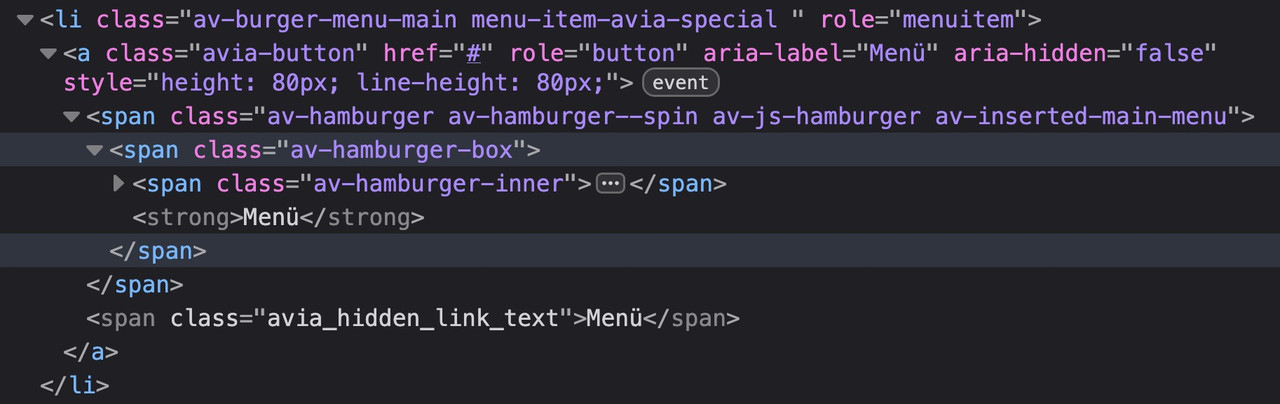
No CSS break: Since it remains an anchor-tag, all Enfold styles for the menu continue to work perfectly.
A11y-compliant: With role=”button,” we tell the screen reader: “Ignore that there is a link here; treat this element like a button.”maybe it is better to not add the class avia-button because it might come into conflict with some stylings.
use a different class there f.e.: avia-burger-button
then you can easily select it via this class.March 5, 2026 at 2:20 am #1495748Sorry, again, for the lag in responding, @Guenni007, and thanks again for your efforts! I think your code wasn’t working right away for me, and I needed some other accessibility fixes for the mobile menu (like a focus trap and making the spacebar open links), so I worked with Claude to implement this code in my child theme functions file — lmk if you see any problems with it:
Stage 1 – Runs immediately on page load:
Finds the hamburger toggle
Adds role=”button”
Adds aria-expanded=”false”
Adds Space key handler
Happens before user ever interacts with itStage 2 – Runs when overlay is created (first click):
Adds aria-controls
Sets up focus trap
Adds aria-expanded management (toggling true/false)
Adds ESC key support
Adds Space key on menu items/* ========================================================================== MOBILE MENU FOCUS TRAP WITH ROLE & ARIA-EXPANDED - TWO-STAGE INIT ========================================================================== */ function abode_enfold_mobile_menu_focus_trap_complete() { ?> <script> (function () { var toggleEnhanced = false; var fullInitialized = false; // STAGE 1: Enhance the toggle button immediately (runs on page load) function enhanceToggle() { if (toggleEnhanced) return; var toggle = document.querySelector('a[href="#"][aria-label="Menu"]'); if (!toggle) return; toggleEnhanced = true; // Add role="button" immediately toggle.setAttribute('role', 'button'); toggle.setAttribute('aria-expanded', 'false'); // Add Space key handler immediately toggle.addEventListener('keydown', function (e) { if (e.key === ' ' || e.key === 'Spacebar') { e.preventDefault(); this.click(); } }); console.log('✓ Stage 1: Toggle button enhanced with role=button and Space key'); } // STAGE 2: Full initialization with focus trap (runs after overlay is created) function fullInit() { if (fullInitialized) return; var toggle = document.querySelector('a[href="#"][aria-label="Menu"]'); var overlay = document.querySelector('.av-burger-overlay'); var menu = document.querySelector('#av-burger-menu-ul'); if (!toggle || !overlay || !menu) return; fullInitialized = true; // Make sure toggle is enhanced (in case Stage 1 hadn't run yet) if (!toggleEnhanced) { enhanceToggle(); } // Add aria-controls toggle.setAttribute('aria-controls', 'av-burger-menu-ul'); console.log('✓ Stage 2: Full initialization with focus trap and aria-expanded management'); function getLinks() { return Array.from(menu.querySelectorAll('a[href]')).filter(function (a) { var li = a.closest('li'); return li && li.offsetParent !== null && getComputedStyle(a).visibility !== 'hidden' && getComputedStyle(a).display !== 'none'; }); } function isOpen() { var s = window.getComputedStyle(overlay); return s.display !== 'none' && parseFloat(s.opacity) > 0; } // Keyboard navigation document.addEventListener('keydown', function (e) { if (!isOpen()) return; // Tab key - focus trap if (e.key === 'Tab') { var links = getLinks(); if (!links.length) return; if (e.shiftKey && document.activeElement === links[0]) { e.preventDefault(); links[links.length - 1].focus(); } else if (!e.shiftKey && document.activeElement === links[links.length - 1]) { e.preventDefault(); links[0].focus(); } } // Space key on menu items - activate link else if (e.key === ' ' || e.key === 'Spacebar') { var a = document.activeElement; if (a && a.tagName === 'A' && menu.contains(a)) { e.preventDefault(); a.click(); } } // Escape key - close menu else if (e.key === 'Escape') { toggle.click(); } }); // Watch for menu open/close and update aria-expanded new MutationObserver(function (mutations) { mutations.forEach(function (m) { if (m.attributeName !== 'style') return; if (isOpen()) { // Menu opened toggle.setAttribute('aria-expanded', 'true'); setTimeout(function () { var l = getLinks(); if (l.length) l[0].focus(); }, 400); } else { // Menu closed toggle.setAttribute('aria-expanded', 'false'); setTimeout(function () { toggle.focus(); }, 100); } }); }).observe(overlay, { attributes: true, attributeFilter: ['style'] }); } // Try to enhance toggle immediately if (document.readyState === 'loading') { document.addEventListener('DOMContentLoaded', enhanceToggle); } else { enhanceToggle(); } // Try full init at various times if (document.readyState === 'loading') { document.addEventListener('DOMContentLoaded', fullInit); } else { fullInit(); } setTimeout(fullInit, 500); setTimeout(fullInit, 1500); // Watch for Enfold dynamically creating the menu overlay new MutationObserver(function (mutations) { mutations.forEach(function (m) { m.addedNodes.forEach(function (node) { if (node.nodeType === 1 && node.classList && node.classList.contains('av-burger-overlay')) { setTimeout(fullInit, 100); } }); }); }).observe(document.body, { childList: true, subtree: true }); })(); </script> <?php } add_action('wp_footer', 'abode_enfold_mobile_menu_focus_trap_complete', 999);March 5, 2026 at 6:05 am #1495752 -
AuthorPosts


- The topic ‘burger menu accessibility’ is closed to new replies.