

-
AuthorPosts
-
February 1, 2026 at 8:54 pm #1494563
The Featured Image does not display when —
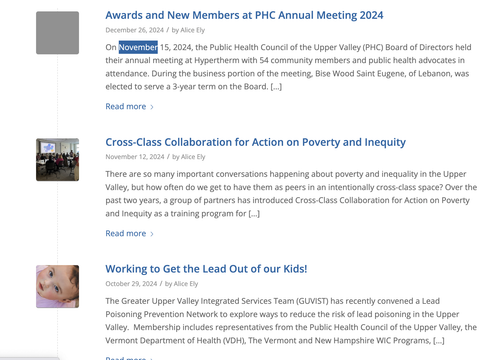
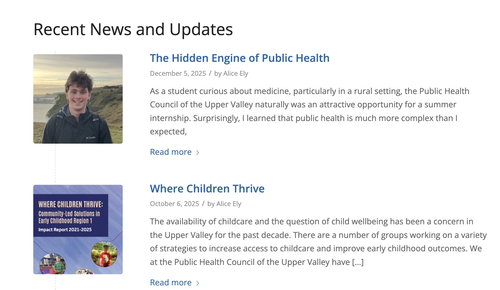
Single Author, small preview Pic (no author picture is displayed, feature image is small)
The featured image does display in other Blog style settings such as Feature image is big or in the Grid Layout…alas these are not styles I want.
I just updated to Enfold 7.1.3 and also WordPress 6.9 — and the small featured imaged displayed before the update.
Do you know how to fix this?
Issue can be seen here: (no small featured images display to left of text 180 x 180 pixel selected
February 2, 2026 at 5:15 am #1494571Hey dcarlsondesign,
Thank you for the inquiry.
The featured images are not displaying due to the following css rule in the style.css file:
.post-entry .blog-meta {
    display: none;
}
Removing this css rule should restore the featured images.
Best regards,
IsmaelFebruary 2, 2026 at 8:50 pm #1494600Hi Ismael,
Thanks for your quick note back..post-entry .blog-meta {
display: none;
}For some reason the code above only affected the Single Post Entries and the Featured Images appeared in the Category Blog Post Multiple listing of small Preview images.
Now on the Single Post Entires a Large Icon appears on the Single post of a Pencil on a large gray square….how do I hide those?
Is there Css to make this icon disappear?
Thanks
February 3, 2026 at 5:31 am #1494613Hi,
Thank you for the update.
The featured images and blog meta inof are not visible on the category page either. Have you tried removing the css code mentioned above? This should restore the blog meta info container along with the featured images.
Best regards,
IsmaelFebruary 3, 2026 at 8:35 pm #1494637Hi Ismael,
Yes I did remove the css code you suggested and the Preview image appears in the “Blog Posts Content Element”
uvpublichealth.oorg/news
but when I hide the featured image on the blog post I get still get a large icon with a pencil — how do I hide that pencil icon?February 4, 2026 at 5:01 am #1494644Hi,
Thank you for the info.
To remove the default pencil icon for posts without featured images, try to add this css code:
.rounded-container .iconfont, .small-preview .iconfont {
    display: none;
}
Then add this code to ensure the featured image covers the entire container.
.small-preview img, .big-preview img {
    width: 100%;
    object-fit: cover;
    height: 80px;
}
Result:
Best regards,
IsmaelFebruary 5, 2026 at 10:07 pm #1494771Still not working as It did before before upgrade
POSTS USED TO WORK HERE — this earlier Enfold install
Nicer small preview image to left of Blog Excerpt
and no featured image
Now Grey Box shows without pencil icon…would rather see pencil or no grey box at all
Preview images are smaller than 180 x 180 selected thumbnail — not the size selected in Post Element
Preview images on blog listing Do not show up at all in Safari
February 6, 2026 at 5:56 am #1494785Hi,
Thank you for the info.
Have you tried adjusting the Blog Layout and Styling in the Enfold > Blog Layout panel? Try adjusting the settings until you restore the previous layout.
Best regards,
IsmaelFebruary 6, 2026 at 6:29 pm #1494800Hi Ismael,
Thanks for your continued replies.
Yes, I have tried changing the size of the small preview image many times in the Enfold > Blog Panel Layout. It does not change the small preview image size as it should.small-preview img, .big-preview img {
width: 100%;
object-fit: cover;
height: 80px;
}I took out the height tag… thinking that might affect the small preview…but it did not
February 7, 2026 at 8:54 am #1494805try in quick css:
#top a.small-preview {
  background-color: transparent !important;
  width: 150px;
  height: auto;
}

#top .iconfont,
#top .post_author_timeline {
  display: none ;
}
February 9, 2026 at 6:15 am #1494872Hi,
Thank you for the upate.
To adjust the width and height of the featured images, you can try this css code:
.small-preview {
    width: 164px;
    height: 164px;
}
Make sure to remove this css code first or override it so the featured images are visible.
.post-entry .blog-meta {
    display: none;
}
Best regards,
Ismael -
AuthorPosts


- You must be logged in to reply to this topic.