

-
AuthorPosts
-
November 28, 2025 at 4:47 pm #1491928
Hallo,
i try to place an arrow above the submenu that points to the main menu.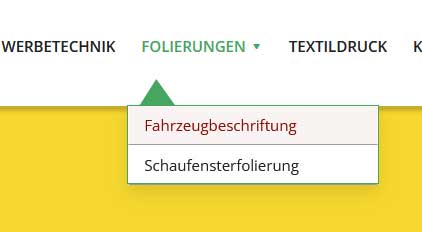
This does not work:
.sub-menu ul:after { content: ‘ ▲▲’; }
.sub-menu ul:only-child:after { content: ”; }-
This topic was modified 4 months ago by
xeovision.
November 28, 2025 at 11:03 pm #1491931and this should be seen always or only if it is the current menu-item or on hover or both … ?
November 28, 2025 at 11:07 pm #1491932Icon should belong the the ul element. so i would be always visible when you hover the main menu.
short: always
November 29, 2025 at 12:09 am #1491933even if it is not the current menu-item?
November 29, 2025 at 12:31 am #1491936Yes always on hover when submenu is added
November 29, 2025 at 1:11 am #1491937there is no extra class on top-level menu-item if a sub-menu is open. So this is probably only usable for modern browsers.
Maybe a solution to bring an extra class to top-level menu-item via script seems to be better.try:
#top .menu-item-has-children > a {
  display: flex;
  justify-content: center;
}

#top .menu-item-has-children > a:hover:after,
#top .current_page_item.menu-item-has-children > a:after,
#top .menu-item-has-children:has(ul.sub-menu[style*="visible"]) > a:after {
  position: absolute;
  top: auto;
  bottom: -4px;
  display:   block;
  content: "\e886";
  font-size: 36px;
  line-height: 24px;
  font-family: 'entypo-fontello';
  color: var(--enfold-main-color-primary);
}
see here on “our clinic” menu-item: https://basis.webers-testseite.de/
November 29, 2025 at 1:20 am #1491938maybe you can bring that arrow to your sub-menu container. But then you can not center it below top-level menu text.
But if you are satisfied by a fixed distance from the left (f.e. 20px ) this is a not so complex solution.or you set the avia-arrow-wrap and avia-arrow to show- and fill with background-color and border-color.
November 29, 2025 at 11:09 am #1491940Hallo,
yes this works but one beauty thing, the black arrow stays a second longer after the sub menu disappear.The reason why i try to use the arrow is to shorten the distance from sub menu to main menu which changes with shrinking the header part.
so, on startpage the header is larger then when i scroll down … this confueses me how to reduce the distance here.. the suv menu jumps directs unter the header height … maybe there is a possibility to place the sub menu on the header like with index-x ?November 29, 2025 at 11:10 am #1491941if you would like to have it always visible just remove the hover pseudo-class:
here is the solution for sub-menu
#top .menu-item-has-children:hover:before {
  position: absolute;
  top: auto;
  bottom: -4px;
  left: 20px;
  display:   block;
  content: "\e886";
  font-size: 36px;
  line-height: 24px;
  font-family: 'entypo-fontello';
  color: inherit;
}
November 29, 2025 at 11:16 am #1491942This works perfect.
Thank youNovember 29, 2025 at 12:06 pm #1491943 -
This topic was modified 4 months ago by
-
AuthorPosts


- You must be logged in to reply to this topic.