

-
AuthorPosts
-
December 4, 2025 at 6:09 am #1492090
I am trying to alter the images dimension and size of the Masonry Gallery and add a small border as in https://wayneandersonart.com/gallery/nggallery/advertising-design/advertising-design. I have created a page at https://peter-test1.co.uk/test/ but don’t seem to be able to alter the image dimensions to copy this can you help please.
Many thanks
Pete
December 4, 2025 at 7:30 am #1492098Hey condonp,
Thank you for the inquiry.
You can use this css code to apply borders to the masonry images:
.av-fixed-size .av-masonry-image-container, .av-fixed-size .av-masonry-outerimage-container {
    border: 1px solid #000000;
}

.av-fixed-size .av-masonry-image-container .av-masonry-image-container, .av-fixed-size .av-masonry-outerimage-container .av-masonry-image-container {
    border: 10px solid #ffffff;
}
Result:

Best regards,
IsmaelDecember 4, 2025 at 7:41 am #1492102Thanks for your response Ismail,
How do I alter the sizes and dimension on of the thumbnails in the gallery to be the same as at https://wayneandersonart.com/gallery/nggallery/advertising-design/advertising-design.
December 4, 2025 at 7:49 am #1492103Hi,
Thank you for the update.
In the Masonry edit panel, go to Styling > Masonry Settings, then locate the Image Size settings. Set this to the first option No Scaling to display the image at its original size. Please let us know the result.
Best regards,
IsmaelDecember 4, 2025 at 10:53 am #1492107Hi Ismail,
I have now altered the edit panel as suggested and set this to no scaling but the thumbmnails does not reflect the same as the original design in https://wayneandersonart.com/gallery/nggallery/advertising-design/advertising-design.
December 4, 2025 at 11:19 am #1492108on your ngg gallery you are showing images !
on your test page : https://peter-test1.co.uk/portfolio-item/test/
you are trying to show portfolios? – why not showing images masonry or gallery instead? https://peter-test1.co.uk/gallery/
And btw. why do you removed the css for the gallery ? You like to show now the full-width?December 4, 2025 at 12:02 pm #1492110Guenni007,
Firstly many thanks for your patience and help this is much appreciated. The CSS in the gallery was a mistake I have now hopefully rectified this. I wanted to isolated the CSS to the page id (1397).
Secondly the page https://peter-test1.co.uk/avertising-design/ this links from the gallery and uses masonry what I am trying to achieve is to have the gallery images as the same size as https://wayneandersonart.com/gallery/nggallery/advertising-design/advertising-design. As we are tring to copy this.
Hope this is clear. Thanks once again and also a merry xmas to you
Pete
December 4, 2025 at 3:07 pm #1492116you have to pay attention – there is a
masonry for posts on : Content Elements Tab
masonry and gallery for images on : Media Elements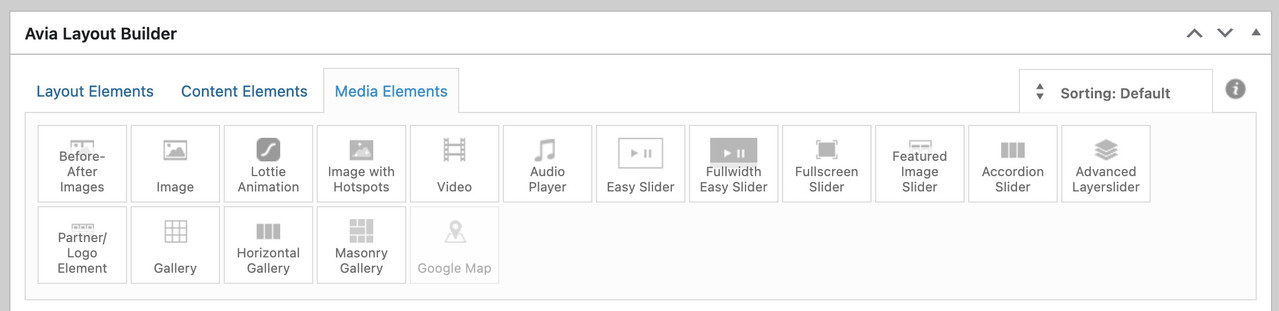
on your example page there is the use of portfolios.
December 5, 2025 at 7:14 am #1492155Hi,
Thank you for the update.
The images in the masonry seem to be displaying in their original sizes now. Have you tried adjusting the width of the container so the images display the same as on the previous site?
.page-id-1562 #section-width .container {
    max-width: 1350px;
}
Adjust the max-width value as necessary.
Screenshot:

Best regards,
IsmaelDecember 5, 2025 at 10:02 am #1492163on your ngg page the content is limited to 1140px – enfold uses on that container a padding: 0 50px
so try:
.page-id-1562 #section-width .container {
  max-width: 1240px;
}
btw. enfold version looks better – because images are not cropped.
December 5, 2025 at 10:28 am #1492166Many Thanks Ismail and Guenni007 for all your help with this.
December 5, 2025 at 11:16 am #1492169Hi,
Glad that Ismail and Guenni007 could help, if you have further questions please open a new thread and we will try to help. Thanks for using Enfold.Best regards,
Mike -
AuthorPosts


- The topic ‘Altering Images on Masonry Gallery’ is closed to new replies.