

-
AuthorPosts
-
January 20, 2026 at 1:47 pm #1494100
When we click on Advanced Layout Editor (to change from default editor), web pages reload blank. Why? How can this be fixed?
January 20, 2026 at 3:26 pm #1494103Hey clbdcnpafe,
Where can we see and reproduce the problem that you are having?
Best regards,
RikardJanuary 20, 2026 at 3:36 pm #1494105Happening to all webpages (270+). This is example: https://www.npafe.org/anna-hop-asod-workshop/
Your admin access code is in Private Content:
January 20, 2026 at 7:24 pm #1494108Hello. Any update?
January 20, 2026 at 8:10 pm #1494110Hi,
The login details are not working, please check and verify.
Best regards,
RikardJanuary 20, 2026 at 8:57 pm #1494113The password is working just fine. See Private Content. More than pleased to share a video of how well the sign-in works with the user name and password we have shared with you if you show us how to share that video with you.
January 21, 2026 at 6:21 am #1494127Hi,
Thank you for the update.
You’ve interchanged “i” with “e” in the username. We’re able to log in, but the account doesn’t have admin rights, so we’re not able to edit the page or access the dashboard. Please set the user role to admin or provide another admin account.
Best regards,
IsmaelJanuary 21, 2026 at 1:39 pm #1494133Hi Ismael.
Thanks for the heads up about user rights. You now have Admin rights. We tested it signing in with your user name and password and it works.
All the best,
Cliff
January 22, 2026 at 5:54 am #1494155Hi,
Thank you for the update.
The Advanced Layout Builder (ALB) is loading correctly based on our check. We also created a test page using the ALB — links are provided in the private field.
Best regards,
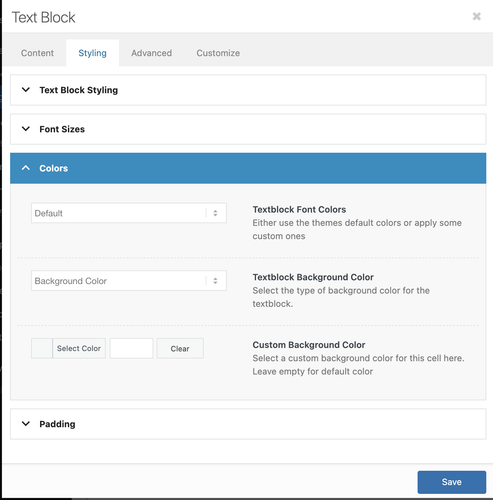
IsmaelJanuary 22, 2026 at 12:08 pm #1494178Thank you for your response. So far as we can see, there are still problems. For example, look at the screen shot (Private content link). There is no longer any way to change text color. Why is this happening?
January 22, 2026 at 12:20 pm #1494179Also, if you watch this video (link in Private Content), now a blank page appears when switching from the Advanced Editor to Default Editor. Can we get these problems solved in a comprehensive way rather than one-by-one? Thanks.
-
This reply was modified 2 months, 1 week ago by
clbdcnpafe.
January 22, 2026 at 6:43 pm #1494189Hi,
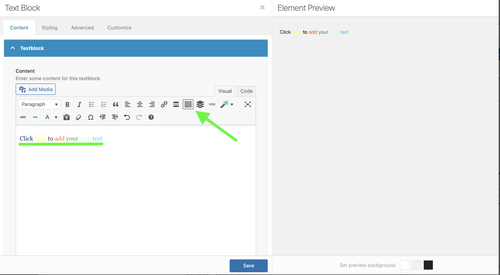
If you click the keyboard icon in the WordPress default editor, then you will see more options.
The Enfold layout builder and the WordPress editor are not compatible with each other, please try to stick to either one of them.
Best regards,
RikardJanuary 22, 2026 at 9:50 pm #1494196Thank you for this information. We will stick with the Advanced Editor. Still not resolved: why can we no longer change text color in a text box? Link to image in Private Content.
January 23, 2026 at 6:32 am #1494206Hi,
There is no color picker in the text editor by default. If you need to change the color of specific text, you’ll either have to switch to the Code editor and use inline styling, or configure the Styling > Colors options.
Best regards,
IsmaelFebruary 1, 2026 at 4:16 pm #1494560There was always a color picker in text editing until now. Why did you remove it? What was the logic in removing such an elemental user friendly element that is found in virtually every other website builder, wordpress theme, and creative apps ranging across all Adobe products to Mailchimp to Canva…really all over the world. We need to have this back as an Enfold standard core feature. When will that happen?
February 1, 2026 at 6:42 pm #1494561Hi,
Please try to read our answers:
If you click the keyboard icon in the WordPress default editor, then you will see more options.
https://snipboard.io/2aIdQN.jpg
Best regards,
RikardFebruary 1, 2026 at 6:55 pm #1494562Not at all. Default editor does not load the page. We’ve reported that over and over. And we never ever had to revert to the WordPress default editor to do anything – ANYTHING – in Enfold in the 10 years we have used this theme. That is, up to now. Unless we are misreading something, you have made a major change to the way Enfold works that is so completely unuser friendly and costs coders significant lost time. Or are we wrong? Are you saying that there was never a color picker in Enfold before now?
February 2, 2026 at 5:20 am #1494572 -
This reply was modified 2 months, 1 week ago by
-
AuthorPosts


- You must be logged in to reply to this topic.