

-
AuthorPosts
-
December 11, 2025 at 5:07 am #1492379
Hi, I’ve read 5+ old threads about adding HTML capabilities to the portfolio excerpt, but none of them work (possibly because the code isn’t relevant anymore).
I would like to add bullets to all of my portfolio excerpts so that my masonry gallery on the homepage shows a bulleted list under each title — alternatively, if I can display the preview text which already allows HTML instead of the excerpt that would be an option as well.
I manually added a bullet symbol (•) in front of each line item since
- xxxx
wasn’t working, but it doesn’t display correctly when the text takes up 2 lines.
December 11, 2025 at 9:26 am #1492392Hey sjahan,
Thank you for the inquiry.
Looks like you’re now using the Masonry element instead of the Portfolio Grid. Where can we find the Portfolio element? Please create a test page and provide screenshots so we can check this further.

Best regards,
IsmaelDecember 11, 2025 at 10:17 am #1492402on masonry – try:
function my_avf_masonry_loop_entry_content($loop_excerpt, $entry) {
  $loop_excerpt = $entry->post_excerpt;
  return $loop_excerpt;
}
add_filter('avf_masonry_loop_entry_content', 'my_avf_masonry_loop_entry_content', 10, 2);
or maybe a bit stricter what is allowed (or better which is not influenced by strip_tags)
function my_avf_masonry_loop_entry_content($loop_excerpt, $entry) {
  $loop_excerpt = strip_tags( ($entry->post_excerpt) , '<br><p><ul><li>'  );
  return $loop_excerpt;
}
add_filter('avf_masonry_loop_entry_content', 'my_avf_masonry_loop_entry_content', 10, 2);
the point is that on the class-avia-masonry.php (or legacy inside: av-helper-masonry.php) the loop-excerpt is set to :
$loop_excerpt = strip_tags( $entry->post_excerpt );December 11, 2025 at 1:14 pm #1492414Unfortunately, WordPress is very stubborn when it comes to automatically setting br tags. You could use the following in the excerpts:
<strong>Validation & Calibration</strong>
<ul>
	<li>Supply and exhaust air volumes</li>
	<li>Room pressure differential</li>
	<li>Pressure gauges and monitors</li>
	<li>Air changes per hour</li>
	<li>Incubators and scales</li>
	<li>Refrigerators and freezers</li>
</ul>
All my attempts to remove these automatic br tags failed. So you could just use it like this:
<strong>Validation & Calibration</strong><ul><li>Supply and exhaust air volumes</li><li>Room pressure differential</li><li>Pressure gauges and monitors</li><li>Air changes per hour</li><li>Incubators and scales</li><li>Refrigerators and freezers</li></ul>see on “listpoints” post : https://webers-testseite.de/masonry-blog/
December 11, 2025 at 6:47 pm #1492429Hi Ismael, sorry I called it the wrong thing. You are correct, I am using the masonry gallery for the portfolio entries. What’s currently on the homepage is accurate. This is a staging site so don’t worry about messing with anything. The bullets that you show in your screenshot are a result of the symbols I entered in the excerpt since the html tags weren’t working
(screenshot: https://imgur.com/a/iUmI9pS)
Hi Guenni007, yes that’s what I had already attempted to do but it wasn’t working so that’s why I created the ticket. Thank you though!-
This reply was modified 3 months, 2 weeks ago by
sjahan.
December 11, 2025 at 10:13 pm #1492434and you have inserted that snippet to your child-theme functions.php:
function my_avf_masonry_loop_entry_content($loop_excerpt, $entry) {
  $loop_excerpt = strip_tags( ($entry->post_excerpt) , '<br><p><ul><li>'  );
  return $loop_excerpt;
}
add_filter('avf_masonry_loop_entry_content', 'my_avf_masonry_loop_entry_content', 10, 2);
But why does it work on my test page? And not on yours?
PS
you do not need the bullits on a ul li elemtent – it is allready there.PPS: where can i see the page you belong to. on https://aabc.com ?
You now like not to use the masonry portfolio ?
-
This reply was modified 3 months, 2 weeks ago by
Guenni007.
December 12, 2025 at 8:24 am #1492452Hi,
Thank you for the upate.
The suggested snippets above should work. Please try adding this filter again in the functions.php file to retrieve the post excerpt without stripping the html tags.
add_filter( 'avf_masonry_loop_entry_content', 'avf_masonry_loop_entry_content_mod', 10, 4 );

function avf_masonry_loop_entry_content_mod( $loop_excerpt, $entry, $entries, $key ) {
    if ( ! empty( $entry->post_excerpt ) ) {
        return $entry->post_excerpt;
    }

    return $entry->post_content;
}
If this is not working, try this:
add_filter( 'avf_masonry_entry_content', 'avf_masonry_entry_content_mod', 10, 3 );

function avf_masonry_entry_content_mod( $content, $entry, $config ) {
    return $entry->post_excerpt;
}
Best regards,
IsmaelDecember 12, 2025 at 7:23 pm #1492469None of those codes work for me unfortunately. One of the codes just added extra spacing between the line items.
The bullets that are displaying are only there because I manually added them in as text thinking that could be my workaround since the code wasn’t working, but it doesn’t look great when the text uses up 2 lines vs 1. (Sample:
- • Room Pressure Differential
)
For testing purposes I removed them from the “Certification” portfolio item. Ismael, would you be able to login and see if I’m doing something wrong? I’ve tried all the codes you and Guenni007 provided (1 at a time of course vs incorporating all of them).
December 13, 2025 at 4:57 pm #1492486Hi,
When I check I see this:
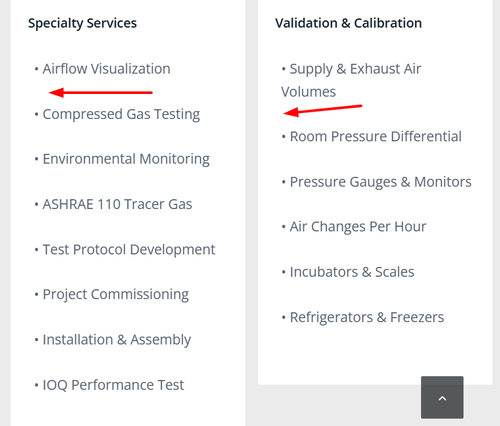
Try this css in your Quick CSS field:.portfolio .av-masonry-entry-content br { display: none; }The result:

Best regards,
MikeDecember 13, 2025 at 6:59 pm #1492488All my attempts to remove these automatic br tags failed. So you could just use it like this:
<strong>Validation & Calibration</strong><ul><li>Supply and exhaust air volumes</li><li>Room pressure differential</li><li>Pressure gauges and monitors</li><li>Air changes per hour</li><li>Incubators and scales</li><li>Refrigerators and freezers</li></ul>we do not want to get rid of intentionally set br tags – but the automatic set br tags are a problem _ thats why i set on my testpage that oneliner !
The bullits are set on my test page because the ul and li elments do have them – no manually placed bullits.
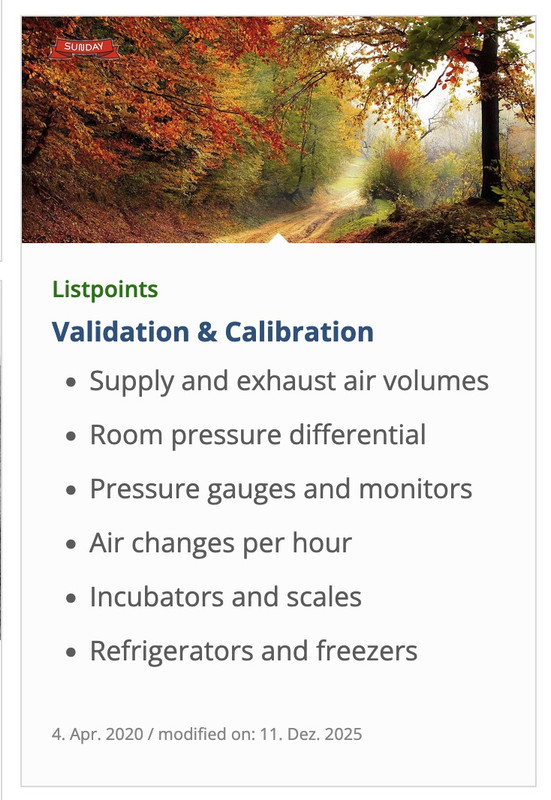
i do not know why it does not work on your installation.December 15, 2025 at 3:47 am #1492508Hi everyone, I think the manual bullet points I’ve added are confusing everyone so I’ve removed them. To circle back, this is the problem:
I need to add bullet points on each line item on the portfolio excerpts that are being displayed via the masonry gallery on my homepage.
The portfolio excerpt:
<ul>
<li>Supply & Exhaust Air Volumes</li>
<li>Room Pressure Differential</li>
<li>Pressure Gauges & Monitors</li>
<li>Air Changes Per Hour</li>
<li>Incubators & Scales</li>
<li>Refrigerators & Freezers</li>
</ul>
I’ve added these suggested codes to the functions.php:
/*enable HTML in portfolio excerpts - option 1*/
function my_avf_masonry_loop_entry_content($loop_excerpt, $entry) {
  $loop_excerpt = strip_tags( ($entry->post_excerpt) , '<br><p><ul><li>'  );
  return $loop_excerpt;
}
add_filter('avf_masonry_loop_entry_content', 'my_avf_masonry_loop_entry_content', 10, 2);

/*enable HTML in portfolio excerpts - option 2 --- this just added extra space between each line item which isn't what I want*/
add_filter( 'avf_masonry_loop_entry_content', 'avf_masonry_loop_entry_content_mod', 10, 4 );

function avf_masonry_loop_entry_content_mod( $loop_excerpt, $entry, $entries, $key ) {
    if ( ! empty( $entry->post_excerpt ) ) {
        return $entry->post_excerpt;
    }

    return $entry->post_content;
}
I don’t believe this affects this issue, but I do have this in my CSS as well so just wanted to share this visibility:
/*Remove masonry gallery links
.av-masonry-entry {
    pointer-events: none !important;
}
*/

/*Equal height for masonry gallery*/
.av-inner-masonry-content-pos {
    min-height: 235px !important;
}
When adding this to the functions.php file, the portfolio excerpt text disappears so I did not include it:
add_filter( 'avf_masonry_entry_content', 'avf_masonry_entry_content_mod', 10, 3 );

function avf_masonry_entry_content_mod( $content, $entry, $config ) {
    return $entry->post_excerpt;
}
This is what it currently looks like: https://imgur.com/mzZlgLJ
December 15, 2025 at 7:24 am #1492509Hi,
Sorry for the delay. Since removing the br tags also removes the list items, we used this css in the style.css file to hide the line breaks and display the list as a standard bullet list.
.av-masonry-entry-content ul br {
    display: none;
}

.av-masonry-entry-content ul li {
    padding-left: 10px;
	position: relative;
}

.av-masonry-entry-content ul li:before {
    content: "•";
    position: absolute;
    left: 0;
    top: 5px;
    font-size: 1em;
    line-height: 1;
}
Please check the private field for the screenshot.

Best regards,
IsmaelDecember 15, 2025 at 10:57 am #1492526try a combination of both filters:
function avf_masonry_entry_content_mod($content, $entry, $config) {
    // Remove all br tags within <ul>...</ul> blocks
    $content = preg_replace_callback('/<ul[^>]*>.*?<\/ul>/is', function($match) {
        return str_replace(['<br>', '<br/>', '<br />'], '', $match[0]);
    }, $content);

    // Reduce duplicate/multiple br tags outside of ul tags to a single one
    $content = preg_replace('/(<br\s*\/?>\s*){2,}/i', '<br>', $content);

    return $content;
}
add_filter('avf_masonry_entry_content', 'avf_masonry_entry_content_mod', 10, 3);

function my_avf_masonry_loop_entry_content($loop_excerpt, $entry) {
  $loop_excerpt = strip_tags( ($entry->post_excerpt) , '<br><ul><li><strong>'  );
  return $loop_excerpt;
}
add_filter('avf_masonry_loop_entry_content', 'my_avf_masonry_loop_entry_content', 10, 2);
with these snippet you can now insert to excerpt input field:<strong>Validation & Calibration</strong><br> <ul> <li>Supply and exhaust air volumes</li> <li>Room pressure differential</li> <li>Pressure gauges and monitors</li> <li>Air changes per hour</li> <li>Incubators and scales</li> <li>Refrigerators and freezers</li> </ul>December 15, 2025 at 8:00 pm #1492540Hi Ismael, that worked!! Thank you so much!!!
December 15, 2025 at 9:52 pm #1492543 -
AuthorPosts


- The topic ‘Add HTML in Portfolio Exceprt’ is closed to new replies.