

-
AuthorPosts
-
September 27, 2019 at 3:00 pm #1142774
Hi there,
I installed and activated the theme “enfold” successfully, everything works except the layer slider. There ist an activation code needed to use it and when I type it in an error occures. Also – the plugin layer slider does not appear in the list “installed plugins” in my WordPress Dashboard (but I don’t know if that’s important or not). Would be awesome if you could check it manually and help me out – I send the credentials for my account as well!
Thanks in advance!
Silvio Di BlasiSeptember 27, 2019 at 6:17 pm #1142863Hey SilvioDiBlasi,
The Layer Slider that works with the theme does not need to be activated, most functions work, only the premium features require a license. You can use it now. The update will be available with one of the next theme updates.
Best regards,
VictoriaSeptember 27, 2019 at 6:21 pm #1142864Hi victoria thanks for the reply!
Ok I See – but I can‘t Even edit My current sliders on the page. So basically there are no sliders available in Layer sliders. Where can I find Them To edit them?
Thanks a lot!September 27, 2019 at 6:29 pm #1142869Hi SilvioDiBlasi,
You need to create them :)
It can be done here

Best regards,
VictoriaSeptember 28, 2019 at 12:54 am #1142939Hi there,
yeah I know that, thanks! :)
What I mean is that there is a slider already on my page and I want to edit this one. Here’s a picture of what I mean and what I want to edit:https://photos.app.goo.gl/VgEXWo69hjbkrHXn8
Thanks a lot!
Silvio-
This reply was modified 6 years, 6 months ago by
SilvioDiBlasi.
September 30, 2019 at 4:57 am #1143213Hi,
Sorry for the late reply, I have logged into your site and found that the slider on your frontpage is not a LayerSlider, it is a “Full width Slider” or “Vollbild-Slider“, please try editing your page with the Advanced Layout Builder and open the slider, you will have these options:
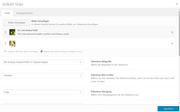
Sorry for the confusion.Best regards,
Mike -
This reply was modified 6 years, 6 months ago by
-
AuthorPosts


- You must be logged in to reply to this topic.