Viewing 4 posts - 1 through 4 (of 4 total)
  • Author
    Posts
  • #1495241

    HI, I have 2 buttons styles on my site which are conflicting. I have some button that are in columns which are full width – here is an example (see private). These buttons are from the advanced style settings.

    I want to create a second button style for rounded edged buttons that will be everywhere else on the website. But dont know the best approach to doing this. the second screenshot is how I want the second button style.


    #1495255

    Hey dreyerjm,

    Thank you for the inquiry.

    You could create a Custom Element Template (CET), which acts as a global element that can be configured from a single source. Please check the documentation for more information.

    https://kriesi.at/documentation/enfold/custom-element-templates/

    Let us know if you have more questions.

    Best regards,
    Ismael

    #1495304

    Thanks for sending this link over. I don’t understand how to make a button row element with the rounded corners that I provided with these settings. I don’t see any radius options for the button to make just that button rounded like the the example I provided. Ideally I would like to have an option for this in button row and single buttons. I have provided a temp login – maybe you can take a look?

    #1495354

    Hi,

    Thank you for the login info.

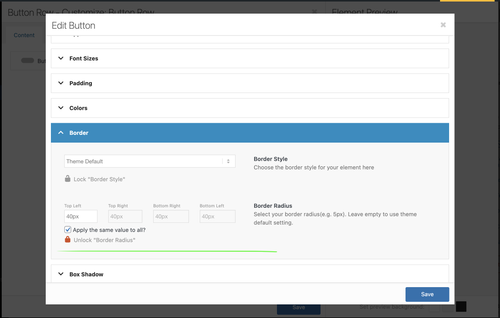
    We edited your custom Button Row element, locked the Styling > Border > Border Radius setting, and set it to 40px. All instances of this Button Row should now have the same border radius.

    qFhWORn.md.png

    Best regards,
    Ismael

Viewing 4 posts - 1 through 4 (of 4 total)
  • You must be logged in to reply to this topic.