Viewing 30 results - 2,701 through 2,730 (of 142,850 total)
  • Author
    Search Results
  • #1474624

    In reply to: Lines in Timeline

    Hi,
    For the horizontal lines between the milestones add this css:

    #top .main_color .av-milestone-icon-wrap:after {
        border-color:#d4af39;
    }

    After applying the css, please clear your browser cache and check.

    Best regards,
    Mike

    This reply has been marked as private.
    #1474609

    Can you please remove the relevant snippets from your functions.php (save them to your desktop) and insert this instead?

    function change_logo_with_screenwidth(){
    ?>
    <script>
    window.addEventListener("DOMContentLoaded", function () { 
    	(function($){
    		
    		// this is for loading the page on smaller screen-width 
    		if ($(window).width() < 1025) {
    			$('.logo img').attr('src', 'https://deserttortoise.org/wp-content/uploads/desert-tortoise-council-50th-ann-logo-hor.png');
    		}
    		else {
    			$('.logo img').attr('src', 'https://deserttortoise.org/wp-content/uploads/desert-tortoise-council-50th-ann-logo.png');
    		}
    
    		function b() {
    			if ($(window).width() < 1025) {
    				$('.logo img').attr('src', 'https://deserttortoise.org/wp-content/uploads/desert-tortoise-council-50th-ann-logo-hor.png');
    			}
    			else {
    				$('.logo img').attr('src', 'https://deserttortoise.org/wp-content/uploads/desert-tortoise-council-50th-ann-logo.png');
    			}
    		}
    
    		$(window).on('debouncedresize', function() {
    			b();
    		});
    
    	})(jQuery);
    });
    </script>
    <?php
    }
    add_action('wp_footer', 'change_logo_with_screenwidth');

    we had to see if the srcset inserted images will follow that script …

    #1474607

    The if(wp_is_mobile()) { is a check if you are watching it on a mobile device ! : Link

    is that what you try to do – or do you always want to change the logo if the header turns to header top posiiton – even for desktop screens lower than a given value (1024px)

    this maybe a quick and dirty way – and please test if it works on other browsers – and mobile browsers too:
    ( in that case – you do not need those functions.php entries – but i will look if there is a solution for that too)

    @media only screen and (max-width: 1024px) {
        .av-logo-container img {
            content: url('https://deserttortoise.org/wp-content/uploads/desert-tortoise-council-50th-ann-logo-hor.png');
        }
    }
    #1474606
    sky19er
    Participant

    Hey, I’m trying to get this logo to switch to a different version below 1024px browser width. I’ve been using the filters from https://kriesi.at/support/topic/different-logo-in-the-header-for-mobile-version/ including the addition from @ismael for the screen width support https://kriesi.at/support/topic/different-logo-in-the-header-for-mobile-version/#post-965244 — The logo is switching for mobile but only for iPad mini and below (< 768px).

    My situation may be further complicated because this is a Left Sidebar layout and I’m using some css to switch to the Top Header layout below 1024px.

    So, here’s the code I’m using and the css below that — can you help me get the logo switching at 1024 so the big vertical logo doesn’t show on iPad Air and Pro? Thanks and lmk if you have any questions.

    /* USE ALTERNATE LOGO FOR MOBILE HEADERS */
    add_filter('avf_logo','av_change_logo'); 
    function av_change_logo($logo) { 
    	if(wp_is_mobile()) { 
    	    $logo = "https://deserttortoise.org/wp-content/uploads/desert-tortoise-council-50th-ann-logo-hor.png"; 
    	} 
    	return $logo; 
    }
    add_action('wp_footer', 'ava_custom_script');
    function ava_custom_script(){
    	?>
    	<script type="text/javascript">
    		(function($)) {
    			$(document).ready( function() {
    				if($(window).innerWidth() <= 1024){
    					$('.logo img').attr('src', 'https://deserttortoise.org/wp-content/uploads/desert-tortoise-council-50th-ann-logo-hor.png');
    				}
    			});
    		})(jQuery);
    	</script>
    	<?php
    }
    /* SWITCH LEFT COLUMN TO TOP HEADER AT 1024 */
    @media only screen and (min-width: 768px) and (max-width: 1024px) {
    	.html_header_sidebar .av-sidebar-social-container {
    		display: none;
    	}
    	.responsive #top .av_header_transparency.av_alternate_logo_active .logo a > img {
    		opacity:1
    	}
    	.responsive #top .av_header_transparency .logo img.alternate {
    		display:none;
    	}
    	.responsive #top #wrap_all #header {
    		position: relative;
    		width:100%;
    		float:none;
    		height:auto;
    		margin:0 !important;
    		opacity: 1;
    		min-height:0;
    	}
    	.responsive #top #main {
    		padding-top:0 !important;
    		margin:0;
    	}
    	#header .avia-custom-sidebar-widget-area {
    		display:none;
    	}
    	.responsive.html_header_sidebar .logo {
    		padding: inherit;
    	}
    	.html_header_sidebar .logo img {
    		padding: 10px 10px 10px 30px;
    	}
    	#top #header .av-main-nav > li {
    		display: none;
    	}
    	#top #header .av-main-nav > li#menu-item-search {
    		display: block;
    	}
    	#top #header .av-main-nav > li.av-burger-menu-main.menu-item-avia-special {
    		display: block;
    	}
    	.html_header_sidebar .main_menu {
    		position: absolute;
    		margin: 6%;
    	}
    	.html_header_sidebar #header .av-main-nav {
    		padding: 0;
    	}
    	.html_header_sidebar .logo {
    		width: 40%;
    	}
    }
    @media only screen and (max-width: 1024px) {
    	#search-3.widget, #custom_post_widget-2.widget {
    		padding: 0 40px 40px 40px;
    		display: none;
    	}
    }
    @media only screen and (max-width: 1140px) {
    	.avia-button.avia-size-small {
    		padding: 10px 10px 8px;
    		font-size: 13px;
    		min-width: 65px;
    	}
    }  
    @media print {
        .html_header_left #top #header { 
    		display: none; 
    	}
        .html_header_left #main {
    		margin-left: 0;
    	}
    }
    @media only screen and (min-device-width: 1024px) and (max-device-width: 1366px) and (-webkit-min-device-pixel-ratio: 2) and (orientation: landscape)  {
    	#search-4, #custom_post_widget-7 {
    		display:none;
    	}
    }
    #1474601

    In reply to: Color Section Glitch?

    i’m participant as you are- so no private content is readable for me.
    But maybe it is enough to see the single frontend page.

    btw. as an interim solution, you can use the Quick CSS rule:

    #top #footer-page .av-section-color-overlay {
      opacity: 0.5;
      background-color: #185cc5;
    }

    PS : what if you just go to enfold footer settings and remove the settings on “Default Footer & Socket Settings” to default behaviour. Then open that page – edit – save – and switch then back to footer page setting.

    i hope – if Günter or Ismael knows a much easier way to obtain that. ;)

    i think that the above mentioned transition to show the text disturbs a bit the whole timing.
    but try with a bit more delay

    #top .avia-icon-circles-icon-text {
      transition: all 1s cubic-bezier(.175,.885,.32,1.275);
    }

    for child-theme functions.php:

    function rotation_of_active_circle_icons(){
    ?>
    <script type="text/javascript">
    document.addEventListener("DOMContentLoaded", () => {
        const parent = document.querySelector('.avia-icon-circles-inner');
        const icons = parent.querySelectorAll('.avia-icon-circles-inner .avia-icon-circles-icon');
        const texts = parent.querySelectorAll('.avia-icon-circles-inner .avia-icon-circles-icon-text');
        let currentIndex = 0;
        let intervalId;
    
        function updateActiveClass() {
            // Remove the 'active' class from all elements
            icons.forEach(icon => icon.classList.remove('active'));
            texts.forEach(text => text.classList.remove('active'));
    
            // Add the 'active' class to the current index
            setTimeout(() => {
    			icons[currentIndex].classList.add('active');
    			texts[currentIndex].classList.add('active');
    		}, 1500);
    
            // Update the index to the next element (loop back to 0 if at the end)
            currentIndex = (currentIndex + 1) % icons.length;
        }
    
        function startIntervalWithDelay() {
            // Add a delay before starting the interval
            setTimeout(() => {
                updateActiveClass(); // Ensure the first activation happens after the delay
                intervalId = setInterval(updateActiveClass, 6000);
            }, 3000); // 3-second delay before starting the interval
        }
    
        function stopInterval() {
            clearInterval(intervalId);
        }
    
        // Start the interval with delay
        startIntervalWithDelay();
    
        // Pause on hover and resume on mouse leave
        parent.addEventListener('mouseenter', stopInterval);
        parent.addEventListener('mouseleave', startIntervalWithDelay);
    });
    </script>
    <?php
    }
    add_action('wp_footer', 'rotation_of_active_circle_icons');
    #1474580

    In reply to: Lines in Timeline

    Hi,
    Then please remove the css in your screenshot and use this instead:

    #top .avia-timeline-container .av-milestone .av-milestone-indicator {
        background-color: #d4af39;
    }

    Best regards,
    Mike

    #1474568

    In reply to: Lines in Timeline

    Hi,

    I bring this up again:
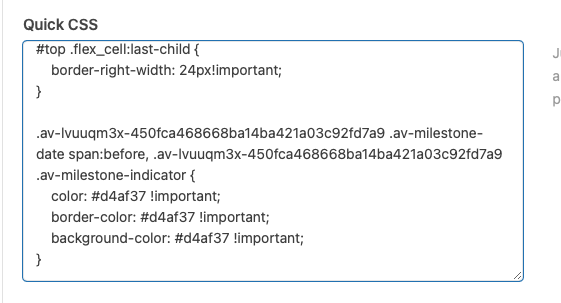
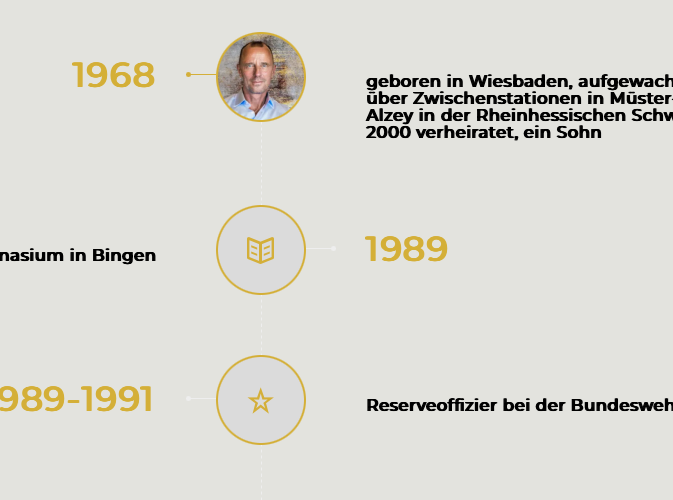
    I added the Code to the Quick-CSS as shown.
    But still doesn’t work, as you can see the first topic has a small golden line, the other ones are still white and too thin. any hint ?

    CSS
    result

    • This reply was modified 1 year, 2 months ago by andred57.

    here is the result for that script and your “home” page:
    https://webers-testseite.de/circle-rotator.mp4

    or with a background-image on your text:

    
    #top .avia-icon-circles-icon-text {
      background-image: url(https://coachcristina.com/wp-content/uploads/2024/12/WhatsApp-Image-2024-12-11-at-11.09.04.jpeg) !important;
      background-repeat: no-repeat !important;
      background-position: center center !important;
      transition: all 1s cubic-bezier(.175,.885,.32,1.275);
    }
    
    #top .avia-icon-circles-icon-text-inner * {
      color: #FFF
    }
    #1474563

    ok on github the filter has on top the comment: link

     * Allows to modify the default shortcode values if an attribute is missing in shortcode.
     * This will not change set attributes in shortcode.

    so it is clear now – but why then the separator could be set on that example?

    #1474562

    i guess the reason for that changing of default values is that you like all default hr’s change to those new values – so the css solution did that job.

    #top .hr.hr-default {
      height: 30px;
    }
    #top .hr.hr-default .hr-inner {
      border: none !important;
    }

    but I also understand your desire to make it possible via that filter.

    #1474561

    I continued to search. I did found a dirty solution.

    As mentioned earlier, I think these should work, but dont work:

    add_filter( 'avf_sync_sc_defaults_array', function( $defaults, $sc_class, $is_modal_item, $content ) {
    	if(get_class($sc_class) == "avia_sc_hr") {
    		$defaults['height'] = '30';
    		$defaults['class'] = 'invisible';
    	}
    	return $defaults;
    }, 30, 4 );
    
    add_filter('avf_in_shortcode_handler_prepare_start', function($args) {
    	if ($args[4] == "av_hr") {
    		$args[2]['class'] = "invisible";
    		$args[2]['height'] = '30';
    	}
    	return $args;
    }, 30, 1);

    This filter is working:

    add_filter('avf_template_builder_shortcode_elements', function($elements) {
    	if ($_POST['action'] == 'avia_ajax_av_hr') {
    		$incoming_shortcode = trim(stripslashes($_POST['params']['shortcode']));
    		$compare_shortcode = trim(stripslashes("[av_hr class='default' icon_select='yes' icon='ue808' position='center' shadow='no-shadow' height='50' custom_border='av-border-thin' custom_width='50px' custom_margin_top='30px' custom_margin_bottom='30px' custom_border_color='' custom_icon_color='' av-desktop-hide='' av-medium-hide='' av-small-hide='' av-mini-hide='' id='' custom_class='' template_class='' av_uid='' sc_version='1.0']"));
    
    		if ($incoming_shortcode === $compare_shortcode) {
    			$_POST['template_changed'] = true;
    			$_POST['params']['shortcode'] = "[av_hr class='invisible' icon_select='yes' icon='ue808' position='center' shadow='no-shadow' height='30' custom_border='av-border-thin' custom_width='50px' custom_margin_top='30px' custom_margin_bottom='30px' custom_border_color='' custom_icon_color='' av-desktop-hide='' av-medium-hide='' av-small-hide='' av-mini-hide='' id='' custom_class='' template_class='' av_uid='' sc_version='1.0']";
    		}
    	}
    
    	return $elements;
    }, 15, 1);

    I modify there the default shortcode and only if the shortcode is absolutly identical. as I change the height which is unused in the “standard” I can use standard when normally set, as then is 30 in the backend and the new values dont get applied. Very dirty and bad code, but didnt find any reasonable other way to do it.

    #1474560

    PS: that delay comes from the default transition timing:

    .avia-icon-circles-icon-text {
      transition:all .8s cubic-bezier(.175,.885,.32,1.275);
    }

    it you set it to none – there will be no delay – see example page. But then not center image is shown.

    #top .avia-icon-circles-icon-text {
      transition: none;
    }
    #1474530

    i do not know why the filter does not work in this case – and even if you use it as in the github example:

    function custom_avf_sync_sc_defaults_array( $defaults, $sc_class, $is_modal_item, $content ){
    	if( $sc_class instanceof avia_sc_hr ){
    		$defaults['height'] = '30';
    		$defaults['class'] = 'invisible';
    	}
    	return $defaults;
    }
    add_filter( 'avf_sync_sc_defaults_array', 'custom_avf_sync_sc_defaults_array', 10, 4 );

    it does not change the allready set default hr’s

    you can change them to that value via css :

    
    #top .hr.hr-default {
      height: 30px;
    }
    #top .hr.hr-default .hr-inner {
      border: none !important;
    }
    

    Hello Mike,
    Thank you for your clarifications. I’m adding this fix to my child theme!
    You can close the topic; my issue is resolved.

    Thanks again for your help!
    Best regards,

    Marc

    #1474517

    I checked other filters:

    add_filter('avf_in_shortcode_handler_prepare_start', function($args) {
    	if ($args[4] == "av_hr") {
    		$args[2]['class'] = "invisible";
    		$args[2]['height'] = '30';
    	}
    	return $args;
    }, 10, 1);

    also this filter edits the default values, without luck.

    in parallel I edited directly the file enfold/config-templatebuilder/avia-shortcode/hr/hr.php :

    		 */
    		protected function register_dynamic_templates()
    		{
    
    			/**
    			 * Styling Tab
    			 * ===========
    			 */
    
    			$c = array(
    						array(
    							'name' 	=> __( 'Horizontal Ruler Styling', 'avia_framework' ),
    							'desc' 	=> __( 'Here you can set the styling and size of the HR element', 'avia_framework' ),
    							'id' 	=> 'class',
    							'type' 	=> 'select',
    							'std' 	=> 'default',
    							'lockable'	=> true,
    							'subtype'	=> array(
    												__( 'Predefined Separators', 'avia_framework' )	=> array(
    																	__( 'Default', 'avia_framework' )						=> 'default',
    																	__( 'Big Top and Bottom Margins', 'avia_framework' )	=> 'big',
    																	__( 'Fullwidth Separator', 'avia_framework' )			=> 'full',
    																	__( 'Whitespace', 'avia_framework' )					=> 'invisible',
    																	__( 'Short Separator', 'avia_framework' )				=> 'short',
    															),
    												__( 'Custom Separator', 'avia_framework' )		=> array(
    																	__( 'Custom', 'avia_framework' )	=> 'custom',
    															),
    											)
    						),

    Changes in protected function register_dynamic_templates() , like a new default value working, but there is no filter which applies there te changes, except hardchaing in the files..

    In this here I can also change directy the $default values:

    		protected function get_element_styles( array $args )
    		{
    			$result = parent::get_element_styles( $args );
    
    			extract( $result );
    
    			$default = array(
    						'class'					=> 'invisible',
    						'height'				=> '50',

    which sould do afterwards $default = $this->sync_sc_defaults_array( $default );

    here the default values can be changed, but as they are already set as $atts, the $this->sync_sc_defaults_array( $default ); is never used. as $atts are set. :/

    so default values can only be changed in hardcoded files. Please check that the filter is woking.

    • This reply was modified 1 year, 2 months ago by BlutVampir.
    #1474516
    BlutVampir
    Participant

    See here https://kriesi.at/support/topic/metadata-element-possible-to-add-default-settings/
    Its a filter to change the defaults.

    function custom_avf_sync_sc_defaults_array( $defaults, $sc_class, $is_modal_item, $content ) {
    	if(get_class($sc_class) == "avia_sc_hr") {
    		$log .= "Filter wurde aufgerufen\n";
    		$defaults['height'] = '30';
    		$defaults['class'] = 'invisible';
    	}
    
    	return $defaults;
    }
    add_filter( 'avf_sync_sc_defaults_array', 'custom_avf_sync_sc_defaults_array', 10, 4 );

    This code changes the detault HR hight to 30 and to invisible. And that does work when you check that the defaults get changed. But that doesnt affect anything at the end, as it seams the defaults get ignored, or with that particular element they are not working.

    How chan I change the default values correctly that they are used?

    Thanks

    #1474515

    you can see here a trial:
    https://guenterweber.com/

    if you hover the circle the animation stops (mouseenter) if you leave the circle – animation starts again.
    Why there is a small delay – between icon and icon-text – i do not know

    put this to your child-theme functions.php

    function rotation_of_active_circle_icons(){
    ?>
    <script type="text/javascript">
    window.addEventListener("DOMContentLoaded", function () { 
    
      // Select the parent element
      const parentElement = document.querySelector('.avia-icon-circles-inner'); // Parent
    
      // The classes to target and toggle
      const targetClasses = ['avia-icon-circles-icon', 'avia-icon-circles-icon-text']; // children
      const activeClass = 'active';
    
      // Function to rotate the active class among children with specific classes
      function rotateActiveClassPair(parent, targetClasses, activeClass, interval) {
          // Get children for each target class
          const childrenGroups = targetClasses.map(cls => Array.from(parent.querySelectorAll(<code>.${cls}</code>)));
          const maxLength = Math.max(...childrenGroups.map(group => group.length));
          let currentIndex = 0;
          let rotationInterval;
    
          // Ensure there are children to rotate
          if (maxLength === 0) return;
    
          // Function to remove all active classes
          function removeAllActiveClasses() {
              childrenGroups.flat().forEach(child => child.classList.remove(activeClass));
          }
    
          // Start the rotation
          function startRotation() {
              rotationInterval = setInterval(() => {
                  // Remove the active class from the current pair
                  childrenGroups.forEach(group => {
                      if (group[currentIndex]) {
                          group[currentIndex].classList.remove(activeClass);
                      }
                  });
    
                  // Move to the next index (loop back to the start if at the end)
                  currentIndex = (currentIndex + 1) % maxLength;
    
                  // Add the active class to the new pair
                  childrenGroups.forEach(group => {
                      if (group[currentIndex]) {
                          group[currentIndex].classList.add(activeClass);
                      }
                  });
              }, interval);
          }
    
          // Start rotating initially
          startRotation();
    
          // Pause the rotation and remove all active classes on hover
          parent.addEventListener('mouseenter', () => {
              clearInterval(rotationInterval); // Stop the rotation
              removeAllActiveClasses(); // Remove all active classes
          });
    
          // Resume the rotation when the mouse leaves the parent
          parent.addEventListener('mouseleave', () => {
              startRotation(); // Restart the rotation
          });
      }
    
      // Start rotating the active class every 3 seconds
      rotateActiveClassPair(parentElement, ['avia-icon-circles-icon', 'avia-icon-circles-icon-text'], 'active', 3000);
    
    });
    </script>
    <?php
    }
    add_action('wp_footer', 'rotation_of_active_circle_icons');
    abortolotti
    Participant

    Hey there,

    We love the Icon Circle element for the site we’re making now, but nearly nobody hover over the icon circle and therefore doesn’t view the content of each circle.

    Is there a way to set an timed autodisplay of the Icon circles content automatically, while scrolling the page?

    Here’s a screenshot of the page I mean:

    Icon Circle

    Ideally, this would be the behaviour:

    1. logo shows in the center, then after 2-3 seconds
    2. First dot on top animates and shows up content in the center, then 2 seconds later,
    3. Second dot on the right animates and shows up content in the center, then 2 seconds later,
    4. Third and last dot on the left animates and show up content in the center.

    Maybe also on loop, so it continues.

    Is it possible?

    Thank you for your help.

    Antonio

    #1474511

    with your logo this might work.

    remove that one rule :

    .logo.avia-svg-logo svg {
      height: 220px;
      max-height: 175% !important;
      overflow: visible;
      top: 10px;
      left: calc((1510px/2) - 50vw);
      right: auto;
    }

    and insert instead:

    .logo, .logo a {
      overflow: visible;
    }
    
    .logo.avia-svg-logo svg {
      height: 150px;
      max-height: 200% !important;
      overflow: visible;
      overflow: visible;
      left: -30px !important;
      top: 5px !important;
    }

    to see my converted svg – look: https://webers-testseite.de/tribal/
    Advantage – you can influence inside the svg by external events

    #1474508

    Hi,

    Thank you for the update.

    Have you tried installing a different local server, such as Local by Flywheel, DevKinsta, or DesktopServer? You can also test it on InstaWP or TasteWP. It’s possible that there are missing configurations in your current local server. Please try testing it with a different server.

    Best regards,
    Ismael

    #1474507

    Hey Jurre Robertus,

    Thank you for the inquiry.

    Those are probably paginated pages with proper canonical tags to avoid duplicate content. Please check this thread: https://kriesi.at/support/topic/google-search-console-avia-element-entries/#post-1474267

    Best regards,
    Ismael

    #1474504

    Hi,

    Thank you for the update.

    It seems to be an issue with the image overlay. Please try to add this css code:

    #top .image-overlay.overlay-type-image {
        position: absolute !important;
    }

    Best regards,
    Ismael

    #1474503

    Hi,

    Thank you for the info.

    Try to add this css code to adjust the position and size of the logo, and also make sure that it can overflow outside the header container.

    div .avia-svg-logo, div .avia-svg-logo a {
        overflow: visible;
    }
    
    div .avia-svg-logo {
        float: left;
        position: absolute;
        left: 200px;
        top: 0;
        z-index: 1;
    }
    
    div .avia-svg-logo svg {
        height: 140px !important;
    }

    Best regards,
    Ismael

    Stegemueller
    Participant

    Categories are displayed twice – tags are not displayed

    Hi Enfold

    I have two problems
    1) Look at my page: categories appear twice at the top of every post
    2) I have enabled the display of tags but they are not showing

    Can you help?
    Greetings.
    Hanne B. Stegemüller

    #1474496

    In reply to: transparent table

    Hi I have this code in my css

    .image-overlay { display: none !important; }

    div.phone-info {
    width: 100%;
    text-align: center;
    }

    .image-overlay { display: none !important; }

    .home #av_section_1.main_color .av_textblock_section .avia_textblock table,
    .home #av_section_1.main_color .av_textblock_section .avia_textblock div,
    .home #av_section_1.main_color .av_textblock_section .avia_textblock td {
    border-color: transparent;
    background-color: transparent;
    }

    .home #av_section_1.main_color .av_textblock_section .avia_textblock tr:nth-child(odd) {
    background-color: transparent;
    }

    #top .av_inherit_color a { text-decoration: none; }

    Sincerely I don’t know where could be the code
    #top .av_inherit_color a { text-decoration: underline; }
    but now there are no more dots but the table and the borders are no longer transparent, what did I do?

    Thanks
    Gianluca

    #1474474

    on your mockup it looks to me if the logo only moves down ( lower than the navigation)
    now i looked better to that image – so you have a header with unchecked setting of : “Let Logo And Menu Position Adapt To Browser Window”

    because i do not see your page – you know better your setting for container width – on my test page it is 1510px

    .logo.avia-svg-logo svg {
      height: 220px;
      max-height: 175% !important;
      overflow: visible;
      top: 10px;
      left: calc((1510px/2) - 50vw);
      right: auto;
    }
    
    @media only screen and (max-width: 1509px) {
      .logo.avia-svg-logo svg {
        left: 0px;
        right: auto;
      }
    }

    btw: – see again test page and code for header_bg – i set in calculated height for it – because this is better to understand how it works. https://webers-testseite.de/tribal/

    maybe there had to be adjustments for responsive case in addition.

    PS : i think you can have a png as masking image too
    https://www.w3schools.com/css/css3_masking.asp

    Unfortunately, I cannot inspect the page in question. I think I could also help with your query: Link . But without the page it’s just a guess what it might look like. Maybe the link to masking images will help you.

    #1474468

    In reply to: transparent table

    Hi,

    Thank you for the update.

    The dots are caused by this css code:

    #top .av_inherit_color a { text-decoration: underline; }
    

    Did you add this somewhere? You can override it with this css:

    #top .av_inherit_color a { text-decoration: none; }
    

    Best regards,
    Ismael

Viewing 30 results - 2,701 through 2,730 (of 142,850 total)