Viewing 30 results - 1,531 through 1,560 (of 142,939 total)
  • Author
    Search Results
  • #1484652

    In reply to: Button Place

    Hi Rikard,

    sorry i’m very late for answering your Question.
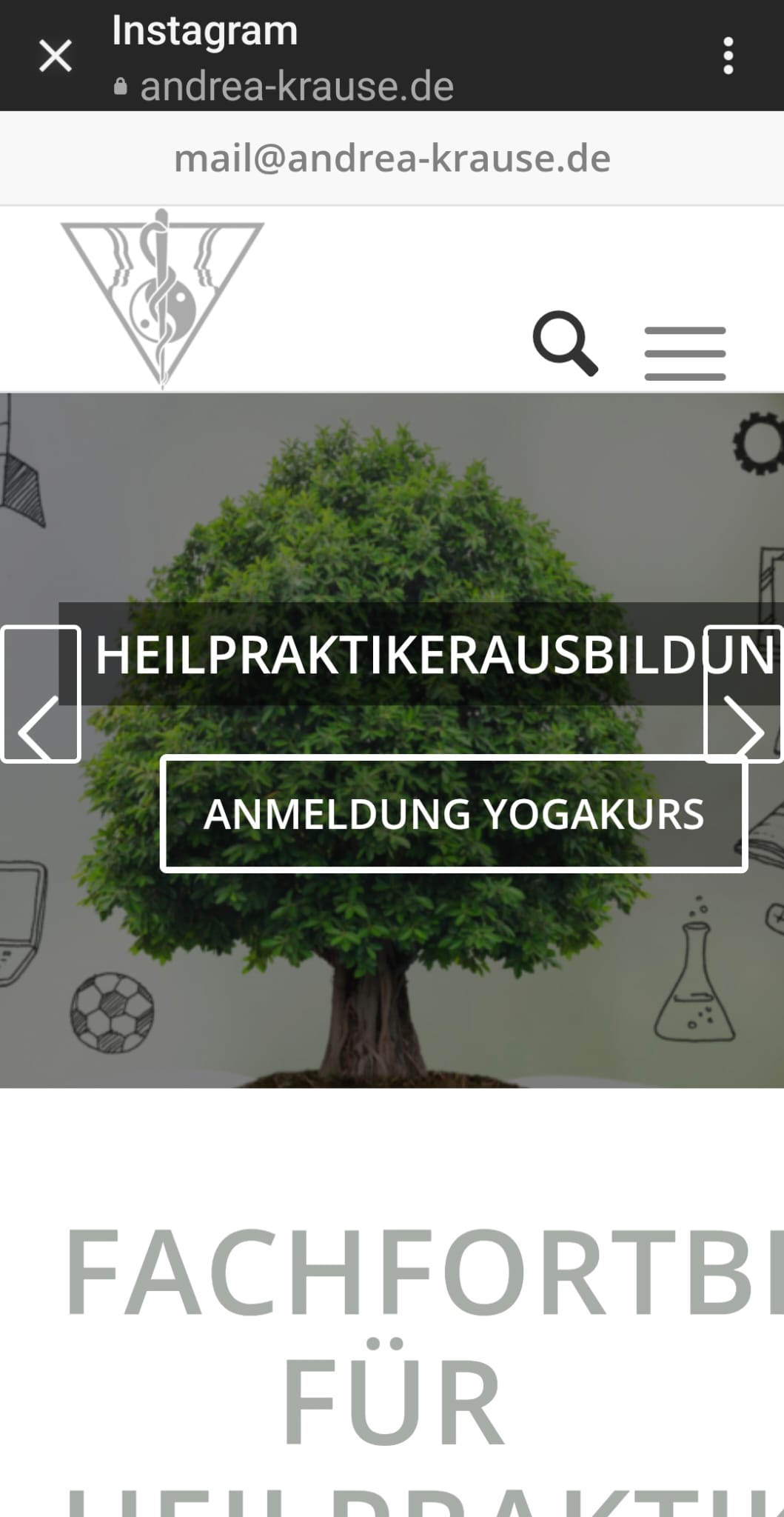
    here is a photo of my page on an Android phone – unfortunately, everything is misaligned. On Apple phones, tablets, and desktops, everything works perfectly.”

    https://www.andrea-krause.de/wp-content/uploads/2025/05/Android.jpeg

    thank you for your help and
    Best regards,

    Andrea

    #1484647

    Hey Sven,
    Your site is reporting a 404 error (file not found) for your icon fonts:
    Screen Shot 2025 05 25 at 6.51.50 AM
    This affects your social icons and the other icons on your page:
    Screen Shot 2025 05 25 at 7.07.21 AM
    It looks like the only fonts loading are from this location: /wp-content/uploads/themepunch/gfonts/ which may be from a plugin, or perhaps your WP Rocket plugin is causing the fonts to not load.
    The first step is to disable all of your plugins and check again. If this doesn’t help leave all of your plugins disabled and include a admin login so we can examine.
    I see that you are using a child theme, if you have a old copy of header.php or footer.php in your child theme, please remove these, as this is the top reason for errors after updating.

    Best regards,
    Mike

    #1484633

    In reply to: difference on 2 pages

    Hi,
    On your second page in the source code the word “Batliner” has ­ twice in the word:
    Screen Shot 2025 05 24 at 6.14.20 PM
    this causes a problem for Guenni007’s script, I pointed this out for you in your other thread. At the time you said you thought it was from the plugin: Data Tables by Supsystic.
    Did you try disabling the plugin?

    Soft hyphen (­) This character is not rendered visibly; instead, it suggests a place where the browser might choose to break the word if necessary. In HTML, you can use ­ to insert a soft hyphen.

    Since your first page doesn’t seem to use the plugin I think that it probably was adding the Soft hyphen.

    Best regards,
    Mike

    #1484632

    Ok -on re-reading my last post I can see that a little bit of extra code has been tacked onto the end of the paypal addresses at the top and bottom when it appears on the forum.
    So -I did as you suggested, made a code box and pasted the code in directly from Paypal, clicked ‘update and then ‘preview changes’ and again I got the wrong button layout:
    Preview with code block
    I went back and checked the code -it had not changed. So I added a text box, pasted the code into the code tab and then saved and previewed. Again I got the odd button layout. I closed WordPress and went straight to the actual Test page at https://follies.org.uk/index.php/test/
    Now I get two buttons, both correct. So it works this way, but why does the preview show incorrectly? Also, how did you get those button views withthe Endolf logo above them as shown in your naswer? I’ve never seena preview like that.

    #1484630

    Hi,
    The snippet that you posted above was not in a code wrap, so it is common in the forum for the quotes to be changed and also in the WordPress text field, since the forum uses WordPress. It is easy to see the diffence when a plain text editor is used such as VS code. So I’m not sure if you posted the incorrect code or if the forum text field changed it, this is why I posted the code in a code block for you above.
    But as I pointed out above, using the text block and then viewing the code in the visual tab will change the code because of the added script running in the backend of your site, there is no way to stop this, so the correct solution is to use the code block element instead. See my post above.
    The other solution would be to use the shortcode for the button above, which you could use in a text element, if you really needed to do that.
    Try following the steps in my post above and you will see that if you do not use the visual tab for your code snippet, the button will work correctly, but if you ever edit the element again in the future you will see the error again, there is no way to stop this.
    So I recommend either using the code block element, or the shortcode function above.

    Best regards,
    Mike

    Hi,
    1:

    @media only screen and (max-width: 767px) { 
    #top #header .phone-info {
    	padding-top: 0;
    }
    #menu-item-1413 a {
    	padding-bottom: 0;
    }
    #avia2-menu {
    	line-height: 10px;
    }
    }

    2:

    @media only screen and (max-width: 767px) { 
    #top #wrap_all .social_bookmarks li a {
      line-height: 30px!important; 
      min-height: 30px!important; 
      font-size: 30px!important; 
      }
      
      #top #wrap_all .social_bookmarks li {
      height: 30px!important; 
      width: 50px!important; 
      }
      
      #top #wrap_all .social_bookmarks {
          height: 35px!important;
      }
    }

    Please ensure to copy the code from the forum and not an email notification so the symbols are not converted.
    After applying the css, please clear your browser cache and check.

    Best regards,
    Mike

    #1484619
    TESLA
    Participant

    When using pictures / sliders on one side and an other element on the other side in one row I’m desperate. I don’t see any reasonable enfold setting option to control the max heights of elements in one row. (1,2)

    For example yo use an image/slider on the left and another element on the right. You have no control to limit the height of the left image / slide. It works only in big resolutions (3) and looks ugly below (4). It’s just displayed much too larger and this up to landscape mode. Have not found a setting, work-around, css code to solve this problem. Even media queries doesn´t work properly.

    Do you have Solution?

    #1484618

    Hey Sven,
    It has always been hidden on screens smaller than 767px to save space, it is not specific to landscape or portrait, it is only that some mobile devices happen to be larger than 767px in landscape mode. To show on all screens try this CSS in your Enfold Theme Options ▸ General Styling ▸ Quick CSS field:

    @media only screen and (max-width: 767px) {
        .responsive #scroll-top-link {
            display: block;
        }
    }

    Please ensure to copy the code from the forum and not an email notification so the symbols are not converted.
    After applying the css, please clear your browser cache and check.

    Best regards,
    Mike

    #1484617
    TESLA
    Participant

    Scroll does top button is set by default and works as it should. But you see this arrow only until mobile landscape mode (1) not portrait. (2)

    Why can’t you see the portrait mode?
    How to fix it?

    #1484616

    Hi,
    To have a smaller font size for the magazine titles, try this CSS in your Enfold Theme Options ▸ General Styling ▸ Quick CSS field:

    #top #wrap_all .all_colors h3.av-magazine-title {
    	font-size: 12px;
    }

    adjust to suit and clear your browser cache
    Screen Shot 2025 05 24 at 1.34.01 PM

    Best regards,
    Mike

    #1484615
    TESLA
    Participant

    Customer request: Fixed header even in mobile resolution.

    This was possible by default – even on mobile. Now the enfold backend says that the mobile resolution ignores it… (1)
    a) Why is this? I know it definitely worked.
    b) How can I configure it anyway?
    c) How can I control the appearance of the header so that it doesn’t take up too much space, especially in landscape mode (where it was always too bold)? Like:

    /***** HEADER *****/ 
    .class {
          max-width: 100%;
    }
    /* Extra small devices (phones, 600px and down) */
    @media only screen and (max-width: 600px) {
    .class {max-height: px;}
    }
    
    /* Small devices (portrait tablets and large phones, 600px and up) */
    @media only screen and (min-width: 600px) {
    .class {max-height: px;}
    }
    
    /* Medium devices (landscape tablets, 768px and up) */
    @media only screen and (min-width: 768px) {
    .class {max-height: px;}
    } 
    
    /* Large devices (laptops/desktops, 992px and up) */
    @media only screen and (min-width: 992px) {
    .class {max-height: px;}
    } 
    
    /* Extra large devices (large laptops and desktops, 1200px and up) */
    @media only screen and (min-width: 1200px) {
    .class {max-height: px;}
    }

    Thanks! Can you help with these please?;

    1. How do I reduce space between address and phone number in the header?: https://img.savvyify.com/image/reduce-space.9wb5f

    2. How to show Social Media icons larger on mobile view at the top

    #1484604
    dpcram
    Participant

    I have been using enfold for quite some time. recently I started building a new site with it for work. I am using a grid row but it will not stack properly on mobile. I have set Column Behaviour When Fullwidth to “individually select position for each column” and then have gone and numbered each column accordingly.

    In this example the image is set to 2 and the text box with button is set to 1 because I want the image to stack below the text box on mobile but instead the image is showing up on top.

    #1484598

    Hey Anne,

    Thank you for the inquiry.

    Please check the links below for possible solutions:

    https://kriesi.at/support/topic/frontend-how-to-hide-image-title-on-hover/#post-1469760
    https://kriesi.at/support/topic/disable-image-title-tooltip-on-hover/#post-1467149

    Let us know if you need more info.

    Best regards,
    Ismael

    #1484586

    For some reason you are not able to see my problem, so I will summarize it again and attach a set of screenshots so you can see exactly what is happening, and can copy the original code and paste it into your own software to see if you get the same result:

    1) I design a payment button in Paypal
    2) This generates a piece of code and shows me what the final design should look like
    3) I click on Copy in the Paypal page to copy the code into temporary memory
    4) I open my website and go to the relevant page in my case ‘Events’
    5) On that page there are two tabs labelled Visual and Code and a large space beneath.
    6) With the Code tab selected I right click and select Paste
    7) The code is pasted into the space. I look at the code and it it appears correctly
    8) I then click on the Visual tab to check the finished button
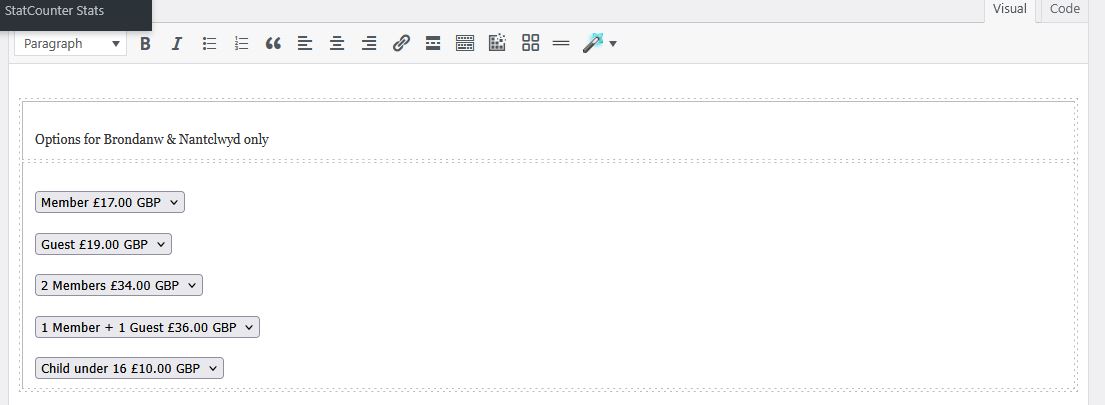
    9) It doesn’t look right. Instead of one button with a drop list of options, I’m getting a lot of separate buttons.
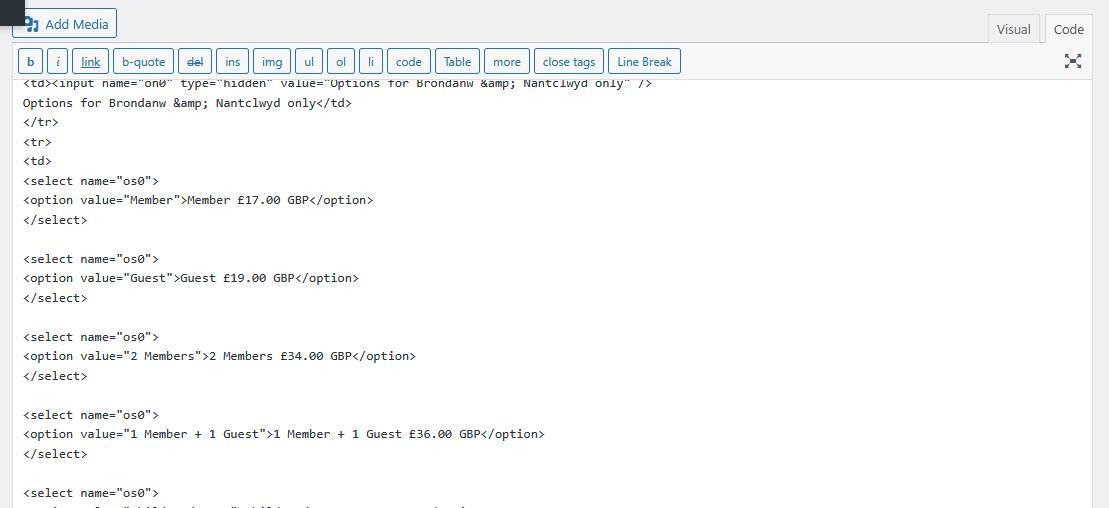
    10) I go back to the code tab and notice that the code has changed – I HAVEN’T DONE ANYTHING AT THIS STAGE, just switched between code and visual tabs. But there are many extra lines that have been added -each item in the drop down list now has an extra <select name=”os0″> and </select> around it . I have messaged WordPress about this, and they tell me that the code tab is part of Enfold and all inputs and outputs to the page are controlled by Enfold, which is why I’m assuming that Enfold is somehow modifying my code.
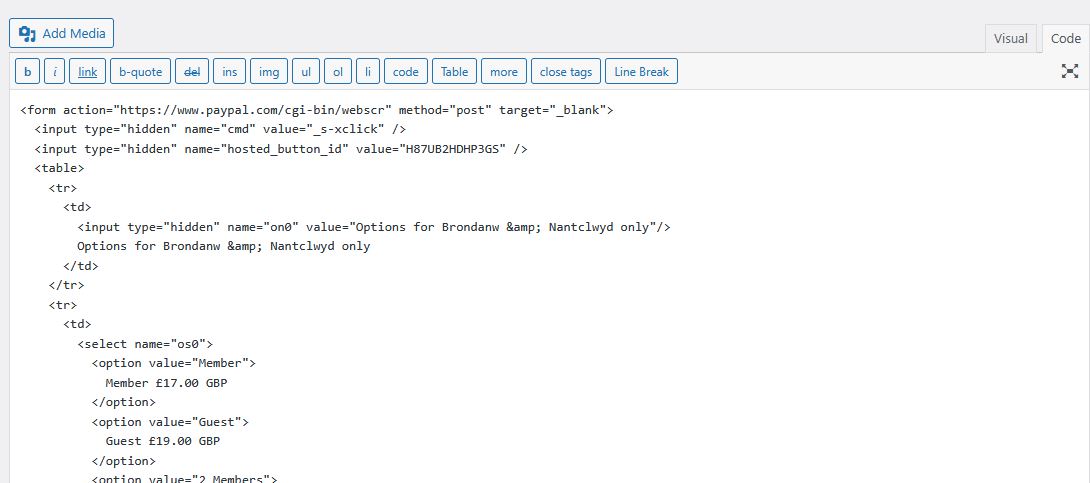
    So, here are the steps visually
    Paypal Code

    Code after pasting into code page

    Visual tab

    Code page showing modified code

    So from this I hope you can see that by simply switching between the Code tab and the Visual tab, my code is being changed.and I would like to know why and what I can do to stop this. If you want to try pasting my original code into a test page of your own, then this is the complete chunk of code:

    <form action=”https://www.paypal.com/cgi-bin/webscr&#8221; method=”post” target=”_blank”>
    <input type=”hidden” name=”cmd” value=”_s-xclick” />
    <input type=”hidden” name=”hosted_button_id” value=”H87UB2HDHP3GS” />
    <table>
    <tr>
    <td>
    <input type=”hidden” name=”on0″ value=”Options for Brondanw & Nantclwyd only”/>
    Options for Brondanw & Nantclwyd only
    </td>
    </tr>
    <tr>
    <td>
    <select name=”os0″>
    <option value=”Member”>
    Member £17.00 GBP
    </option>
    <option value=”Guest”>
    Guest £19.00 GBP
    </option>
    <option value=”2 Members”>
    2 Members £34.00 GBP
    </option>
    <option value=”1 Member + 1 Guest”>
    1 Member + 1 Guest £36.00 GBP
    </option>
    <option value=”Child under 16″>
    Child under 16 £10.00 GBP
    </option>
    </select>
    </td>
    </tr>
    </table>
    <input type=”hidden” name=”currency_code” value=”GBP” />
    <input type=”image” src=”https://www.paypalobjects.com/en_GB/i/btn/btn_cart_LG.gif&#8221; border=”0″ name=”submit” title=”PayPal – The safer, easier way to pay online!” alt=”Add to Cart” />
    </form>

    Thankyou.

    • This reply was modified 11 months, 1 week ago by FFAlan.
    • This reply was modified 11 months, 1 week ago by FFAlan.
    #1484577

    Hi Ismael,

    this works! But: For images only. I use the iframe=true for mixing images and videos. Should have made that clearer:

    <div class="isotope">
      <a alt="CUSTOM ALT HERE" title="CUSTOM TITLE HERE" class="inline_popup" href="xxx.img?iframe=true"> 01 </a>
      <a alt="CUSTOM ALT HERE" title="CUSTOM TITLE HERE" class="inline_popup" href="xxx.mp4?iframe=true"> 02 </a>
    </div>

    So I am back to your script because it works for images and videos but breaks the possibility to click from 01 to 02 – any idea on how to keep the arrows linking to the next frame working?

    Best regards,
    Daniel

    #1484556

    Hi,

    We just noticed that you’re trying to load jpg images. What happens when you remove the iframe=true parameter completely? Make sure that link contains the “lightbox” class name.

    
    <div class="isotope">
      <a alt="CUSTOM ALT HERE" title="CUSTOM TITLE HERE" class="lightbox" href="xxx.jpg"> 01 </a>
      <a alt="CUSTOM ALT HERE" title="CUSTOM TITLE HERE" class="lightbox" href="xxx.jpg"> 02 </a></div>
    

    The title or alt attribute should automatically display without the custom script.

    View post on imgur.com

    Best regards,
    Ismael

    AffiliateAmit100
    Participant

    We have tried to edit the sub menu font size and color on the desktop. It stays super large and spaced out. Website is attached. I have a picture as well but I cant seem to attach it.

    How can I edit the style for the sub menu on the desktop?

    (IE: Hover over Services, and the menu that pops down OR hover or resources and the menu that pops down)

    Hi,
    #3: try unselecting “Unstick Topbar”
    Screen Shot 2025 05 21 at 6.20.27 PM

    Best regards,
    Mike

    Hi,

    if I define top with static px, the logo doesn’t stay vertical centered when the header is shrinking. Same with % instead px. Please have a look on the site if its not clear what I mean
    Thanks

    #1484542

    Hi Ismael,

    the menu-widget lists all sites from all levels. But I only want a list of top-level sites with expandable lists children (so the exakt same desing and function like the main menu). Please have a look on the site I postetd in the private area. You can find the menu-widget in the footer. And what I would like to have in the Burger- or main-menu. Thanks

    #1484538
    NicomIT
    Participant

    I am getting a flood of deprecation warnings in my error_log file and it is slowing down our server’s performance, especially noticeable when editing posts and pages.

    It appears the offending functions are:
    av_icon_char
    av_icon_class
    av_icon_string

    I cannot find information on what the correct replacements are. Is this something you can help me with?

    Here are some samples of how we are currently using these functions.

    av_icon_char
    $icon = av_icon_char( ‘search’ );

    av_icon_string
    $class = av_icon_class( ‘search’ );

    av_icon_string
    ‘ id=’scroll-top-link’ <?php echo av_icon_string(‘scrolltop’); ?>><span class=”avia_hidden_link_text”><?php _e(‘Scroll to top’, ‘avia_framework’);?></span>

    Here are some examples from the error_log file:

    [21-May-2025 18:26:12 UTC] PHP Deprecated: Function av_icon_char is deprecated since version 7.0! Use No longer used by Enfold instead. in /home/maritimetravel/public_html/wp-includes/functions.php on line 6121
    [21-May-2025 18:26:12 UTC] PHP Deprecated: Function av_icon_class is deprecated since version 7.0! Use No longer used by Enfold instead. in /home/maritimetravel/public_html/wp-includes/functions.php on line 6121
    [21-May-2025 18:26:12 UTC] PHP Deprecated: Function av_icon_char is deprecated since version 7.0! Use No longer used by Enfold instead. in /home/maritimetravel/public_html/wp-includes/functions.php on line 6121
    [21-May-2025 18:26:12 UTC] PHP Deprecated: Function av_icon_class is deprecated since version 7.0! Use No longer used by Enfold instead. in /home/maritimetravel/public_html/wp-includes/functions.php on line 6121

    Our error_log file grows about 200 MB per day.

    Can you please direct me on how we can update our child theme to address these deprecation warnings?

    #1484537
    cmactv
    Participant

    This is a continuation of this thread: https://kriesi.at/support/topic/tab-section-height-problem-3/

    Sorry to revisit this after so long. I was initially using this code successfully, but then had a strange problem and forgot to follow up with you on a solution.

    The problem… the text and thumbnails inside the tab section look like they are “pulsating”, slightly moving around. When I remove your code, then the “pulsating” stops. Not sure what is causing it. I’ve included a screening recording below (YouTube link).

    #1484536

    Thank you. I am working on setting up staging so I can convert to the child theme.

    IN THE MEANTIME.. I noticed my other website does not have the font so big, and after all this, I remember years ago I wanted the images bigger, so you gave me this code to put in the QUICK CSS…

    THERE ARE A FEW THINGS YOU GAVE ME IN HERE. CAN WE CHANGE THE PART FOR THE MAGAZINE TO HAVE A SMALLER FONT SIZE USING THIS CODE?

    I am giving you the whole section because I don’t know for sure which part is magazine and which is something else.

    THANK YOU IN ADVANCE FOR HELPING !!!

    THIS IS EVERYTHING IN THE QUICK CSS:
    p strong{
    color:#000!important;
    }

    #top .av-caption-style-overlay .av-masonry-entry .av-masonry-entry-title {
    color: white!important;
    }

    .av-magazine-thumbnail {
    min-height: auto;
    }

    #top .av-caption-style-overlay .av-masonry-entry .av-masonry-entry-title {
    color: white!important;
    }

    .av-magazine-thumbnail {
    min-height: auto;
    }
    div .slideshow_caption h2 {
    text-transform: none;
    }

    .av-magazine-thumbnail {
    width: 135px;
    height: auto;
    }

    @media only screen and (min-width: 768px) and (max-width: 1024px) {
    h2.avia-caption-title {
    font-size: 30px !important;
    }
    .avia-caption-content p {
    font-size: 22px !important;
    line-height: 24px;
    }
    }

    @media only screen and (max-width: 767px) {
    h2.avia-caption-title {
    font-size: 20px !important;
    }
    .avia-caption-content p {
    font-size: 14px !important;
    line-height: 16px;
    }
    .slideshow_caption {
    padding-top: 20px !important;
    }
    }

    #header_meta .menu li a {
    color: #fff !important;
    }
    .av-burger-overlay-scroll #av-burger-menu-ul a {
    color: #fff;
    }

    .html_av-overlay-side #top #wrap_all .av-burger-overlay-scroll #av-burger-menu-ul a {
    color: #fff;
    }

    .html_av-overlay-side.av-burger-overlay-active #top .av-hamburger-inner, .html_av-overlay-side.av-burger-overlay-active #top .av-hamburger-inner::before, .html_av-overlay-side.av-burger-overlay-active #top .av-hamburger-inner::after {
    background-color: #fff;
    }

    #header_meta .sub_menu .menu li a {
    color: #030303 !important;
    }

    .avia_textblock a strong {
    color: blue !important;
    }

    #1484531

    Nice! Thank you Ismael, now I can load the title. But: The connection to the next images is broken! I have more pictures, connected as lightbox gallery like that:

    <div class="isotope">
      <a alt="CUSTOM ALT HERE" title="CUSTOM TITLE HERE" class="inline_popup" href="xxx.img??iframe=true"> 01 </a>
      <a alt="CUSTOM ALT HERE" title="CUSTOM TITLE HERE" class="inline_popup" href="xxx.img??iframe=true"> 02 </a>
    </div>

    With your code only the first image loads in a lightbox. The arrows to navigate from 01 to 02 are missing.

    Can you fix that?

    All the best,
    Daniel

    love2web
    Participant

    Please help! I have been through the topics here but cannot find anything that fixes this display issue.

    I have added the following Simple CSS suggested as some moderators suggested in the topics I found when I searched here.
    But they were quite old replies here so not sure if still valid.

    .comment-container, .text-sep-comment, .text-sep-cat, .blog-author { display: none !important; }

    span.minitext {
    display: none!important;
    }

    h3.miniheading {
    display: none!important;
    }

    The code did remove some lines, but I still see the Blog Replies button styling on the bottom of almost every page (except Home and About) with a note saying “You must be logged in to post a comment” .

    The replies number is displaying as zero – probably because I don’t have any posts on this website as it is a simple services website and not a blog.
    I have also turned off commenting in the Settings, but still no luck.

    Any help much appreciated!

    Thanks
    Nicola

    #1484507

    Hey connect4consulting,

    Thank you for the inquiry.

    You can add this css code to adjust the mobile menu breakpoint.

    @media only screen and (max-width: 1366px) {
      .responsive #top .av_mobile_menu_tablet .av-main-nav .menu-item {
        display: none;
      }
    
      .responsive #top .av_mobile_menu_tablet .av-main-nav .menu-item-avia-special {
        display: block;
      }
    }

    Please make sure to toggle or temporarily disable the Enfold > Performance > File Compression settings after adding the code.

    Best regards,
    Ismael

    #1484501
    es.design.ma
    Participant

    Hi-
    We’re running into an issue with the display of a horizontal gallery when it’s viewed on a phone. It works well on a desktop, but when viewed on a phone the photos are cropped. I tried playing around with the settings but it’s not helping. My client doesn’t want me to hide the gallery when viewed on a small device, so I’m wondering if you have any suggestions. They like the way it looks on the desktop and doesn’t want any changes there. The problem is the website is password protected. Do you need to see what I’m talking about or does this description make sense? I don’t know if there’s even any other option but to hide it so I’m hoping you might have a suggestion.

    Thank you!
    Erin

    #1484488

    In reply to: SVG icons missing

    Hi @Ismael,

    your bit of code mentioned in #1483430 is super useful:

    $logo_url = avia_get_option( 'logo' );

    Is there a similar snippet to load the logo trom the transpareny settings? Anything like:

    $logo_url = avia_get_option( 'TRANSPARENT_LOGO' );

    Can you help me?

    All the best,
    Daniel

    Hi Ismael,

    see your post #1276219. I asked in 2021 because the line remove_filter destroys the code and again everyone is able to use ALB. You suggested to delete the first line and in this way it worked for years. And it still does, but right now the users besides administrators can’t access the ALB templates from the dropdown.

    And they even get the error message when I add the remove_filter line to the code. It is like that:

    With remove_filter: Everyone can use ALB exept templates
    Without remove_filter: Only the user roles from the arry can use ALB exept templates

    Seems as if there are certain rights necessary to use the templates and those rights aren’t granted with the function. What do you think?

    Cheers,
    Daniel

Viewing 30 results - 1,531 through 1,560 (of 142,939 total)