Viewing 30 results - 1,441 through 1,470 (of 142,838 total)
  • Author
    Search Results
  • Thanks! Can you help with these please?;

    1. How do I reduce space between address and phone number in the header?: https://img.savvyify.com/image/reduce-space.9wb5f

    2. How to show Social Media icons larger on mobile view at the top

    #1484604
    dpcram
    Participant

    I have been using enfold for quite some time. recently I started building a new site with it for work. I am using a grid row but it will not stack properly on mobile. I have set Column Behaviour When Fullwidth to “individually select position for each column” and then have gone and numbered each column accordingly.

    In this example the image is set to 2 and the text box with button is set to 1 because I want the image to stack below the text box on mobile but instead the image is showing up on top.

    #1484598

    Hey Anne,

    Thank you for the inquiry.

    Please check the links below for possible solutions:

    https://kriesi.at/support/topic/frontend-how-to-hide-image-title-on-hover/#post-1469760
    https://kriesi.at/support/topic/disable-image-title-tooltip-on-hover/#post-1467149

    Let us know if you need more info.

    Best regards,
    Ismael

    #1484586

    For some reason you are not able to see my problem, so I will summarize it again and attach a set of screenshots so you can see exactly what is happening, and can copy the original code and paste it into your own software to see if you get the same result:

    1) I design a payment button in Paypal
    2) This generates a piece of code and shows me what the final design should look like
    3) I click on Copy in the Paypal page to copy the code into temporary memory
    4) I open my website and go to the relevant page in my case ‘Events’
    5) On that page there are two tabs labelled Visual and Code and a large space beneath.
    6) With the Code tab selected I right click and select Paste
    7) The code is pasted into the space. I look at the code and it it appears correctly
    8) I then click on the Visual tab to check the finished button
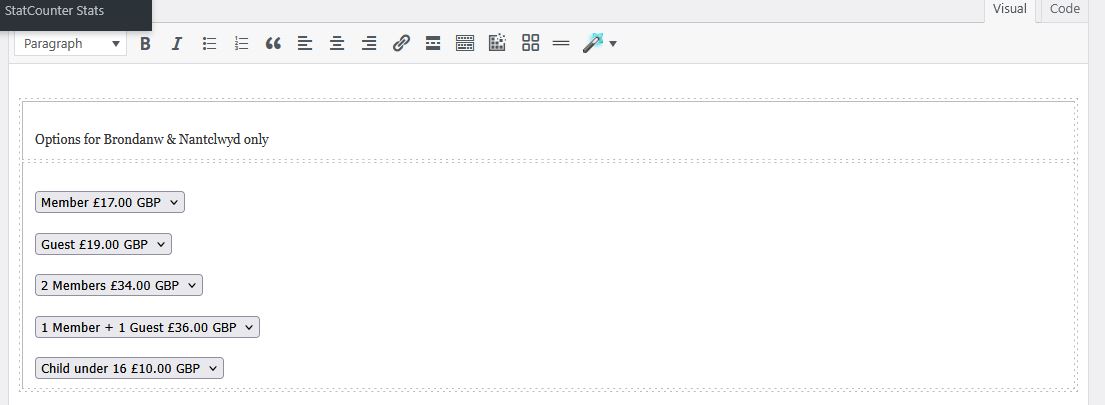
    9) It doesn’t look right. Instead of one button with a drop list of options, I’m getting a lot of separate buttons.
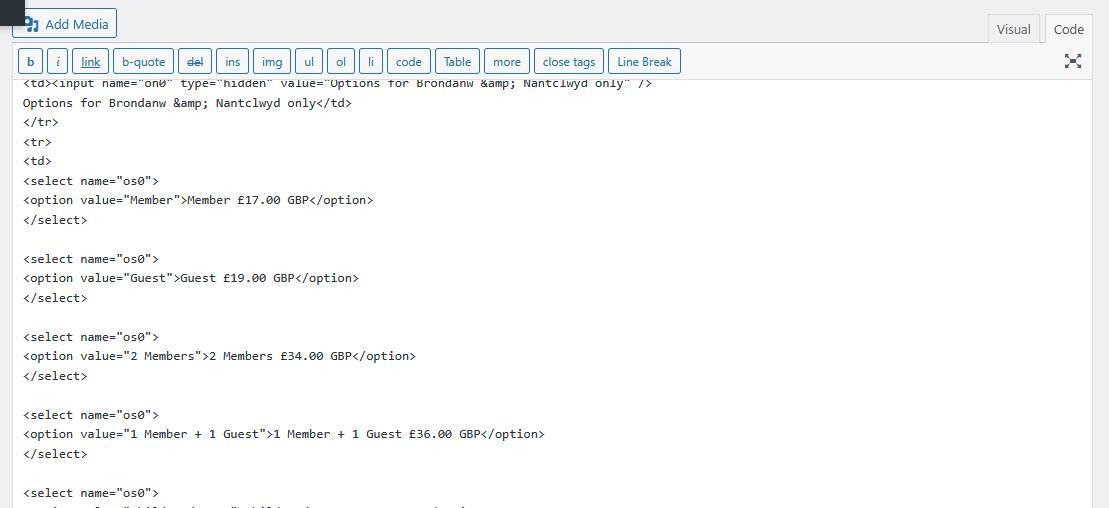
    10) I go back to the code tab and notice that the code has changed – I HAVEN’T DONE ANYTHING AT THIS STAGE, just switched between code and visual tabs. But there are many extra lines that have been added -each item in the drop down list now has an extra <select name=”os0″> and </select> around it . I have messaged WordPress about this, and they tell me that the code tab is part of Enfold and all inputs and outputs to the page are controlled by Enfold, which is why I’m assuming that Enfold is somehow modifying my code.
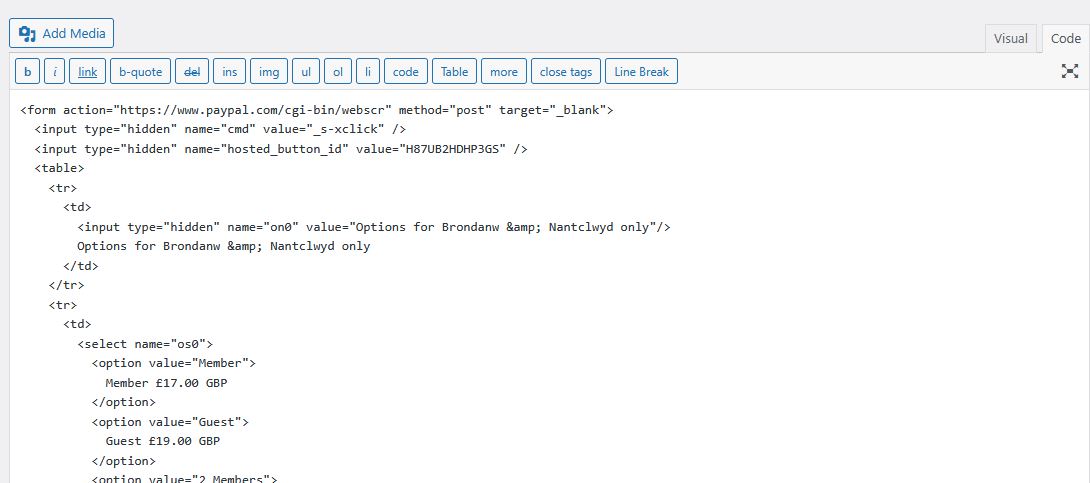
    So, here are the steps visually
    Paypal Code

    Code after pasting into code page

    Visual tab

    Code page showing modified code

    So from this I hope you can see that by simply switching between the Code tab and the Visual tab, my code is being changed.and I would like to know why and what I can do to stop this. If you want to try pasting my original code into a test page of your own, then this is the complete chunk of code:

    <form action=”https://www.paypal.com/cgi-bin/webscr&#8221; method=”post” target=”_blank”>
    <input type=”hidden” name=”cmd” value=”_s-xclick” />
    <input type=”hidden” name=”hosted_button_id” value=”H87UB2HDHP3GS” />
    <table>
    <tr>
    <td>
    <input type=”hidden” name=”on0″ value=”Options for Brondanw & Nantclwyd only”/>
    Options for Brondanw & Nantclwyd only
    </td>
    </tr>
    <tr>
    <td>
    <select name=”os0″>
    <option value=”Member”>
    Member £17.00 GBP
    </option>
    <option value=”Guest”>
    Guest £19.00 GBP
    </option>
    <option value=”2 Members”>
    2 Members £34.00 GBP
    </option>
    <option value=”1 Member + 1 Guest”>
    1 Member + 1 Guest £36.00 GBP
    </option>
    <option value=”Child under 16″>
    Child under 16 £10.00 GBP
    </option>
    </select>
    </td>
    </tr>
    </table>
    <input type=”hidden” name=”currency_code” value=”GBP” />
    <input type=”image” src=”https://www.paypalobjects.com/en_GB/i/btn/btn_cart_LG.gif&#8221; border=”0″ name=”submit” title=”PayPal – The safer, easier way to pay online!” alt=”Add to Cart” />
    </form>

    Thankyou.

    • This reply was modified 10 months ago by FFAlan.
    • This reply was modified 10 months ago by FFAlan.
    #1484577

    Hi Ismael,

    this works! But: For images only. I use the iframe=true for mixing images and videos. Should have made that clearer:

    <div class="isotope">
      <a alt="CUSTOM ALT HERE" title="CUSTOM TITLE HERE" class="inline_popup" href="xxx.img?iframe=true"> 01 </a>
      <a alt="CUSTOM ALT HERE" title="CUSTOM TITLE HERE" class="inline_popup" href="xxx.mp4?iframe=true"> 02 </a>
    </div>

    So I am back to your script because it works for images and videos but breaks the possibility to click from 01 to 02 – any idea on how to keep the arrows linking to the next frame working?

    Best regards,
    Daniel

    #1484556

    Hi,

    We just noticed that you’re trying to load jpg images. What happens when you remove the iframe=true parameter completely? Make sure that link contains the “lightbox” class name.

    
    <div class="isotope">
      <a alt="CUSTOM ALT HERE" title="CUSTOM TITLE HERE" class="lightbox" href="xxx.jpg"> 01 </a>
      <a alt="CUSTOM ALT HERE" title="CUSTOM TITLE HERE" class="lightbox" href="xxx.jpg"> 02 </a></div>
    

    The title or alt attribute should automatically display without the custom script.

    View post on imgur.com

    Best regards,
    Ismael

    AffiliateAmit100
    Participant

    We have tried to edit the sub menu font size and color on the desktop. It stays super large and spaced out. Website is attached. I have a picture as well but I cant seem to attach it.

    How can I edit the style for the sub menu on the desktop?

    (IE: Hover over Services, and the menu that pops down OR hover or resources and the menu that pops down)

    Hi,
    #3: try unselecting “Unstick Topbar”
    Screen Shot 2025 05 21 at 6.20.27 PM

    Best regards,
    Mike

    Hi,

    if I define top with static px, the logo doesn’t stay vertical centered when the header is shrinking. Same with % instead px. Please have a look on the site if its not clear what I mean
    Thanks

    #1484542

    Hi Ismael,

    the menu-widget lists all sites from all levels. But I only want a list of top-level sites with expandable lists children (so the exakt same desing and function like the main menu). Please have a look on the site I postetd in the private area. You can find the menu-widget in the footer. And what I would like to have in the Burger- or main-menu. Thanks

    #1484538
    NicomIT
    Participant

    I am getting a flood of deprecation warnings in my error_log file and it is slowing down our server’s performance, especially noticeable when editing posts and pages.

    It appears the offending functions are:
    av_icon_char
    av_icon_class
    av_icon_string

    I cannot find information on what the correct replacements are. Is this something you can help me with?

    Here are some samples of how we are currently using these functions.

    av_icon_char
    $icon = av_icon_char( ‘search’ );

    av_icon_string
    $class = av_icon_class( ‘search’ );

    av_icon_string
    ‘ id=’scroll-top-link’ <?php echo av_icon_string(‘scrolltop’); ?>><span class=”avia_hidden_link_text”><?php _e(‘Scroll to top’, ‘avia_framework’);?></span>

    Here are some examples from the error_log file:

    [21-May-2025 18:26:12 UTC] PHP Deprecated: Function av_icon_char is deprecated since version 7.0! Use No longer used by Enfold instead. in /home/maritimetravel/public_html/wp-includes/functions.php on line 6121
    [21-May-2025 18:26:12 UTC] PHP Deprecated: Function av_icon_class is deprecated since version 7.0! Use No longer used by Enfold instead. in /home/maritimetravel/public_html/wp-includes/functions.php on line 6121
    [21-May-2025 18:26:12 UTC] PHP Deprecated: Function av_icon_char is deprecated since version 7.0! Use No longer used by Enfold instead. in /home/maritimetravel/public_html/wp-includes/functions.php on line 6121
    [21-May-2025 18:26:12 UTC] PHP Deprecated: Function av_icon_class is deprecated since version 7.0! Use No longer used by Enfold instead. in /home/maritimetravel/public_html/wp-includes/functions.php on line 6121

    Our error_log file grows about 200 MB per day.

    Can you please direct me on how we can update our child theme to address these deprecation warnings?

    #1484537
    cmactv
    Participant

    This is a continuation of this thread: https://kriesi.at/support/topic/tab-section-height-problem-3/

    Sorry to revisit this after so long. I was initially using this code successfully, but then had a strange problem and forgot to follow up with you on a solution.

    The problem… the text and thumbnails inside the tab section look like they are “pulsating”, slightly moving around. When I remove your code, then the “pulsating” stops. Not sure what is causing it. I’ve included a screening recording below (YouTube link).

    #1484536

    Thank you. I am working on setting up staging so I can convert to the child theme.

    IN THE MEANTIME.. I noticed my other website does not have the font so big, and after all this, I remember years ago I wanted the images bigger, so you gave me this code to put in the QUICK CSS…

    THERE ARE A FEW THINGS YOU GAVE ME IN HERE. CAN WE CHANGE THE PART FOR THE MAGAZINE TO HAVE A SMALLER FONT SIZE USING THIS CODE?

    I am giving you the whole section because I don’t know for sure which part is magazine and which is something else.

    THANK YOU IN ADVANCE FOR HELPING !!!

    THIS IS EVERYTHING IN THE QUICK CSS:
    p strong{
    color:#000!important;
    }

    #top .av-caption-style-overlay .av-masonry-entry .av-masonry-entry-title {
    color: white!important;
    }

    .av-magazine-thumbnail {
    min-height: auto;
    }

    #top .av-caption-style-overlay .av-masonry-entry .av-masonry-entry-title {
    color: white!important;
    }

    .av-magazine-thumbnail {
    min-height: auto;
    }
    div .slideshow_caption h2 {
    text-transform: none;
    }

    .av-magazine-thumbnail {
    width: 135px;
    height: auto;
    }

    @media only screen and (min-width: 768px) and (max-width: 1024px) {
    h2.avia-caption-title {
    font-size: 30px !important;
    }
    .avia-caption-content p {
    font-size: 22px !important;
    line-height: 24px;
    }
    }

    @media only screen and (max-width: 767px) {
    h2.avia-caption-title {
    font-size: 20px !important;
    }
    .avia-caption-content p {
    font-size: 14px !important;
    line-height: 16px;
    }
    .slideshow_caption {
    padding-top: 20px !important;
    }
    }

    #header_meta .menu li a {
    color: #fff !important;
    }
    .av-burger-overlay-scroll #av-burger-menu-ul a {
    color: #fff;
    }

    .html_av-overlay-side #top #wrap_all .av-burger-overlay-scroll #av-burger-menu-ul a {
    color: #fff;
    }

    .html_av-overlay-side.av-burger-overlay-active #top .av-hamburger-inner, .html_av-overlay-side.av-burger-overlay-active #top .av-hamburger-inner::before, .html_av-overlay-side.av-burger-overlay-active #top .av-hamburger-inner::after {
    background-color: #fff;
    }

    #header_meta .sub_menu .menu li a {
    color: #030303 !important;
    }

    .avia_textblock a strong {
    color: blue !important;
    }

    #1484531

    Nice! Thank you Ismael, now I can load the title. But: The connection to the next images is broken! I have more pictures, connected as lightbox gallery like that:

    <div class="isotope">
      <a alt="CUSTOM ALT HERE" title="CUSTOM TITLE HERE" class="inline_popup" href="xxx.img??iframe=true"> 01 </a>
      <a alt="CUSTOM ALT HERE" title="CUSTOM TITLE HERE" class="inline_popup" href="xxx.img??iframe=true"> 02 </a>
    </div>

    With your code only the first image loads in a lightbox. The arrows to navigate from 01 to 02 are missing.

    Can you fix that?

    All the best,
    Daniel

    love2web
    Participant

    Please help! I have been through the topics here but cannot find anything that fixes this display issue.

    I have added the following Simple CSS suggested as some moderators suggested in the topics I found when I searched here.
    But they were quite old replies here so not sure if still valid.

    .comment-container, .text-sep-comment, .text-sep-cat, .blog-author { display: none !important; }

    span.minitext {
    display: none!important;
    }

    h3.miniheading {
    display: none!important;
    }

    The code did remove some lines, but I still see the Blog Replies button styling on the bottom of almost every page (except Home and About) with a note saying “You must be logged in to post a comment” .

    The replies number is displaying as zero – probably because I don’t have any posts on this website as it is a simple services website and not a blog.
    I have also turned off commenting in the Settings, but still no luck.

    Any help much appreciated!

    Thanks
    Nicola

    #1484507

    Hey connect4consulting,

    Thank you for the inquiry.

    You can add this css code to adjust the mobile menu breakpoint.

    @media only screen and (max-width: 1366px) {
      .responsive #top .av_mobile_menu_tablet .av-main-nav .menu-item {
        display: none;
      }
    
      .responsive #top .av_mobile_menu_tablet .av-main-nav .menu-item-avia-special {
        display: block;
      }
    }

    Please make sure to toggle or temporarily disable the Enfold > Performance > File Compression settings after adding the code.

    Best regards,
    Ismael

    #1484501
    es.design.ma
    Participant

    Hi-
    We’re running into an issue with the display of a horizontal gallery when it’s viewed on a phone. It works well on a desktop, but when viewed on a phone the photos are cropped. I tried playing around with the settings but it’s not helping. My client doesn’t want me to hide the gallery when viewed on a small device, so I’m wondering if you have any suggestions. They like the way it looks on the desktop and doesn’t want any changes there. The problem is the website is password protected. Do you need to see what I’m talking about or does this description make sense? I don’t know if there’s even any other option but to hide it so I’m hoping you might have a suggestion.

    Thank you!
    Erin

    #1484488

    In reply to: SVG icons missing

    Hi @Ismael,

    your bit of code mentioned in #1483430 is super useful:

    $logo_url = avia_get_option( 'logo' );

    Is there a similar snippet to load the logo trom the transpareny settings? Anything like:

    $logo_url = avia_get_option( 'TRANSPARENT_LOGO' );

    Can you help me?

    All the best,
    Daniel

    Hi Ismael,

    see your post #1276219. I asked in 2021 because the line remove_filter destroys the code and again everyone is able to use ALB. You suggested to delete the first line and in this way it worked for years. And it still does, but right now the users besides administrators can’t access the ALB templates from the dropdown.

    And they even get the error message when I add the remove_filter line to the code. It is like that:

    With remove_filter: Everyone can use ALB exept templates
    Without remove_filter: Only the user roles from the arry can use ALB exept templates

    Seems as if there are certain rights necessary to use the templates and those rights aren’t granted with the function. What do you think?

    Cheers,
    Daniel

    Your the best!
    Last things.

    1. How do I reduce space between address and phone number in the header?: https://img.savvyify.com/image/reduce-space.9wb5f

    2. How to show Social Media icons larger on mobile view at the top

    3. Still doesn’t have sticky top bar (address bar) on desktop view.

    thanks!

    • This reply was modified 10 months, 1 week ago by bemodesign.
    • This reply was modified 10 months, 1 week ago by bemodesign.
    #1484474

    Hey Antonio,

    Thank you for the inquiry.

    You can use this css code to adjust the style of the tab titles:

    #top div .tabcontainer .tab {
        font-size: 20px;
        padding: 12px 24px 14px 24px;
    }

    Best regards,
    Ismael

    #1484467
    BrendaSarg
    Participant

    I cannot seem to figure this out as I can’t recreate it on my end. Am I able to attach a video from my client?

    The issue is the footer page content and the logo overlap (they scroll over) the cart so it’s ineligible on mobile, and they have the same issue on desktop. I’m not sure if I need to lock the background page when the sidecart is open or how I can resolve this issue. I have the side cart shortcodes within header widgets.

    Any advice is greatly appreciated. You can see what I mean by adding items to the cart (add 4-5 so it starts to scroll) and then resize the window with the side cart open.

    Hi,
    Perhaps you didn’t see the css for the logo overlapping the buttons that I posted above:

    @media only screen and (max-width: 767px) { 
    #av_section_1 .container.av-section-cont-open,
    .page-id-910 #av-layout-grid-1 {
    	padding-top: 130px !important;
    }
    }

    Screen Shot 2025 05 18 at 8.55.34 AM
    it would be easier if you disabled the plugin that is blocking me from making changes

    Best regards,
    Mike

    #1484465

    In reply to: Lightbox settings

    Hello,
    Yes because i didn’t remove this in my css:

    .mfp-wrap.mfp-gallery.mfp-close-btn-in.mfp-auto-cursor.avia-popup.mfp-zoom-in.mfp-ready {
    top: 0 !important;
    position:fixed!important;
    }

    with just the code you send to me it seems that it doesn’t work on mobile (if i remove my Css)

    #1484464
    timstonis
    Participant

    Hi,

    I am having issues with the fullwidth easy slider on my landing page.

    I have uploaded videos of 4 seconds each and would like to fade between them for a seamless transition, however, the video stops and goes back to the starting image before starting the transition. I have tried setting the autorotation time to 3 seconds so the transition starts before the video ends, but some videos will play over the automation leaving others to catch up or skip. Is there a way to fix this blocky transition?

    I’ve also made my own full video with embedded transitions but it is difficult to get it under 8MB with decent quality.

    #1484450

    hi Rikard…
    yes in that piece of text… on mobile device work, but not on my desktop view.
    in desktop preview (in back end) work, but not in front end….
    i have already delate the cache…
    I don’t know why!!!!

    #1484444
    spooniverse
    Participant

    Hey @Ismael,

    I found an old thread of yours and @Guenni007 and I am wondering if I could load a title for a lightbox if the lightbox contains an image from the media library?!

    Example: I have a link in a text like https://homepage.de/wp-content/uploads/image.jpg?iframe=true to show the image in a lightbox. Everything works as expected, the lightbox opens the image from the library in an iframe. But no title, description or whatsoever.

    Any idea on how to get the title displayed with an ?iframe=true link? I already tested to put text into the available fields in the media library, but there is no title below the iframe in the lightbox.

    All the best,
    Daniel

    spooniverse
    Participant

    Dear support members, hi @Ismael,

    in 2021 I got a helpful piece of code that is misbehaving in the latest version of the theme right now. See this thread and post #858672.

    It ist still working to load the ALB for defined user roles (in this example editor and administrator), while the option in the theme settings is set to restrict the ALB only for admins:

    function ava_enable_alb_for_editor() {
    	add_filter('avf_allow_drag_drop', 'avia_disable_alb_drag_drop_mod', 40, 1);
    }
    add_action('init', 'ava_enable_alb_for_editor');
    
    function avia_disable_alb_drag_drop_mod( $disable )
    {
        $user = wp_get_current_user();
        $allowed_roles = array('editor', 'administrator', 'author');
    	$check = array_intersect( $allowed_roles, $user->roles );
    
    	if( ! empty( $check ) )
    	{
    		$disable = avia_get_option('lock_alb', 'disabled') != "lock_alb" ? true : false;
    	}
    
    	return $disable;
    }

    I can access the ALB as administrator and as editor, so this part of the code is alright. Perfect! But as editor I can’t load a template from the template dropdown in the upper right corner. Everything else is editable and finde, but as I want to load an ALB template I get an error message:

    An error has occurred
    Error retrieving content – please reload the page and try again

    Seems to be a rights problem. If I delete the code above from functions.php I can’t access the ALB as editor. If I furthermore toggle the option to access the ALB for everybody I can use the ALB as editor and load ALB templates from the dropdown. But: I want only admins and editors to use ALB (and ALB templates).

    Any ideas why the behaviour of the code changed and I can’t access the ALB templates anymore?

    I appreciate your help!

    Kind regards,
    Daniel

    Hi,

    As mentioned above, this will require modifications that are outside the scope of support. Please forward the files mentioned above to the developers. So far, we haven’t encountered another thread with the same issue or request.

    If you have any additional questions at this time we kindly ask that you open them up in a separate thread. The longer threads get in the forum, they become more difficult to support as they tend to drift off topic and they also make it troublesome for users trying to search for solutions. Keeping threads relevant to their original inquiry ensures that we can keep better track of what has been resolved and that users can more effectively find answers to similar issues they might be experiencing.

    Thanks!

    Best regards,
    Ismael

    Hi,

    We couldn’t reproduce the issue using a Safari emulator. Another workaround we recommend is to duplicate the color section, set the background attachment to “scroll”, then control the visibility of each section under Advanced > Responsive > Element Visibility settings. The idea is show one color section on desktop and another on mobile or smaller screens with a different background configuration.

    Best regards,
    Ismael

Viewing 30 results - 1,441 through 1,470 (of 142,838 total)