Viewing 30 results - 99,391 through 99,420 (of 142,852 total)
  • Author
    Search Results
  • #593373
    sanderhudepohl
    Participant

    Hi,

    I have a question regarding the mobile menu. When I open the menu on my iPhone, and click on a page, te mobile menu will stay on the right side of the page. Meaning; if i scroll to the right on my iPhone, the menu will just be “sitting” there while not having pressed the button.

    Picture of what i mean: http://hkcncservice.nl/wp-content/uploads/2016/03/image.png

    My custom CSS as it is know:

    .title_container .breadcrumb {
    position: relative !important;
    right: auto !important;
    margin-top: 0px !important;
    left: -3px;
    margin-bottom: 25px !important;
    }

    @media only screen and (max-width: 1024px) {
    #mobile-advanced, #advanced_menu_toggle, #advanced_menu_hide { display: block; }
    nav.main_menu { display: none; }}

    My website is: http://www.hkcncservice.nl

    – Sander

    #593367

    Hey!

    We checked the page in question and everything seem to work fine however if you still have the issue

    Here is a better version of the code to highlight the full width sub menu items and you don’t need to add different menu id’s either. make sure you remove the previous code and add the below code and link to different section it should work out of the box. (This is designed to work for color sections)

    In situations where you cannot use color sections enable custom class support and add class “avia-section” to the ALB element even if it is a 1/1 section the script will work just fine :)

    kriesi.at/documentation/enfold/turn-on-custom-css-field-for-all-alb-elements/

    
    function activateMenuItem(){
    ?>
    <script>
         jQuery(document).scroll(function() {
         var sections = jQuery('.avia-section'),
             menu   = jQuery('.av-submenu-container'),        
             nav_height = menu.outerHeight();
             jQuery(window).on('scroll', function() {
                var cur_pos = jQuery(this).scrollTop();
                sections.each(function() {
                    var top = jQuery(this).offset().top - 300,
                        bottom = top + jQuery(this).outerHeight();
                    if (cur_pos >= top && cur_pos <= bottom) {
                        menu.find('a').removeClass('active-menu-item');                    
                        menu.find('a[href="#' + jQuery(this).attr('id') + '"]').addClass('active-menu-item');
                    }
                });
            });
        });
     
    </script>
    <?php
    }
    add_action('wp_head', 'activateMenuItem');

    Regards,
    Vinay Kashyap

    #593339

    Well, I spoke too soon.

    Logo Resizing on IPad

    I want to show a unique wide horizontal logo on mobile devices. I have it working now on an IPhone by specifying a unique image in functions.php for the mobile logo as specified in your help. I display the horizontal image with a backgound color identical to the header color, and with a fixed width specified in quick css as:

    @media only screen and (max-width: 767px) {
    #header_main .inner-container {
    height: 100px;
    }
    .responsive .logo img {
    max-height: 100px;
    max-width:250px;
    height:100px !important;
    width:250px !important;

    }}

    This works perfectly on the IPhone, either in regular or landscape mode. On the IPad, however, it replaces the logo as it should, but it resizes the logo according to the width, which is exactly what I don’t want. I either want the IPad to use the standard logo, and let it resize it, or use the mobile logo, and don’t resize it. How can I do either?

    Drop down menus on IPad

    Drop down menus work perfectly on all devices, except the IPad in Vertical Orientation, where the background color changed to the top level menu selection color. In horizontal mode, it works fine. On every other device it works fine. It’s just on the IPad Vertically it does this. Why? Just as FYI, I used the following Quick CSS to highlight the top level menu on hover.

    #avia-menu li:hover a {
    background: #720903;
    font-weight: bold;
    }

    I am literally going out of my mind trying to fix these things..

    #593335

    Dear Kriesi,

    we want to disable ajax search and replace it with WooCommerce Predictive Search (or any other suitable) to give precedence to products over post or pages

    I followed instruction in this post and also in
    https://kriesi.at/support/topic/disabling-ajax-search/
    and
    https://kriesi.at/support/topic/remove-or-fix-ajax-search-functionality/

    but still results appear normally from ajax search.
    (I disabled cache plugin and tested in incognito mode)

    Thank you
    Mauro

    #593331
    emediagroupllc
    Participant

    when we go to mobile, especially on android we get a 404 error page . this is only on mobile and not on desktop ..

    http://s14.postimg.org/cbx8mqb75/IMG_0155.png

    http://www.truckermagazine.com

    #593315

    In reply to: Mobile issues

    Hey!

    We are working on your ticket please wait while we update the results here soon.

    The final code we added in quick css is

    /* Logo position*/
    @media only screen and (max-width: 767px) {
    .responsive .logo img {
        max-height: 80px!important;
    }
    .header_bg {
        min-height: 120px!important; 
    }
    .av-logo-container {
        top: -23px!important;
        width:100%!important;
    }
    .html_header_top.html_logo_center .logo {
        left: 0%!important;
        transform: none!important;
    }
    .responsive #top .logo {
        margin-left: 0px!important;
    }
    }

    please check the site now…

    Cheers!
    Vinay Kashyap

    • This reply was modified 10 years ago by Vinay.
    #593291
    koballo
    Participant

    Hola,
    he creado una nueva página con vuestro template.

    Tengo un problema con los vídeos que inserto como background en un bloque de sección.
    En un ordenador se ve perfectamente, pero al visualizarlo en un smartphone (iPhone) los vídeos no cargan, se quedan en stop y además aparece el icono de “play” de youtube.

    Hay alguna manera de cargar de forma automática los videos, independiente a los dispositivos donde se ve la web?

    Muchas gracias,
    una vez más os felicito por vuestro trabajo.

    Saludos !!!!

    #593279

    Topic: Preview Error

    in forum Enfold
    ChristopherLang
    Participant

    Hello,

    I installed the Enfold theme and it worked perfectly fine for about 5 hours. The suddenly, after I published a webpage, the preview function stopped working. In 90% of cases the message “You do not have permission to preview drafts.” appears when I try to watch the preview of a page. The other 10% of the time it works fine.
    When I go to “Appearance->Customize”, the preview does not work as well. Instead there is a WordPress login page which says “Session expired. Please log in again. You will not move away from this page.”. However, when I try to log in there, the same message appears again.

    Once published, the website itself looks fine and works.However, the scrolling buttons (which appear for example at a masonry gallery on the right and left when you click on a picture) on the published website disappeared (there are just empty boxes instead of arrows). The same goes for the “go up” button at the very end pf the page.

    I already tried deactivating several Plugins and created a completely new installation of wordpress where I transferred the page to. Again, it worked for a few hours and then the bug appeared.

    Thanks for any help!

    Best Regards,
    Christopher

    daoist
    Participant

    This is what my CSS looks now: http://www.dersichtweise.at/blog/

    /* Stack footer */
    @media only screen and (max-width: 767px) {
    footer .copyright, footer .social_bookmarks, footer .sub_menu_socket {
    width: 100%!important;
    clear: both!important;
    display: block!important;
    float:none!important;
    }
    footer .social_bookmarks {
    padding-left:8px;
    }
    }

    /* header */
    .header_color .main_menu ul:first-child > li > a {font-weight: 300; font-size: 18px; font-family:’Helvetica Neue’}
    .header_color .main_menu ul:first-child > li > a:hover { color: #03558f; }
    .header_color .main_menu ul:first-child > li.current_page_item > a { color #d1606d; }

    /* Linie weg im menü*/
    .avia-menu {
    border-right: 0px !important;
    }

    /* title Farbe und größe*/
    .main-title a {
    color: #03558f !important;
    font-size: 24px !important;
    }

    /* title zentrieren */
    .title_container .main-title { text-align: center; }

    .alternate_color { border-color: #e1e1e1 !important; }

    /* footer font size */
    .iconbox_content_title {
    font-size: 15px!important;
    }

    #footer a {
    padding: 0;
    }
    #footer input {
    margin-bottom: 0;
    }

    /* logo große skalieren */
    .logo img {
    max-width: 100%;
    }

    #top .av-mailchimp-widget-style-boxed_form {
    border-style: solid;
    border-width: 1px;
    padding: 10px;
    }
    .widgettitle + .av-mailchimp-widget-style-boxed_form {
    margin-top: 10px;
    }

    @media only screen and (max-width: 767px) {
    .responsive #scroll-top-link {
    display: block !important;
    }}

    @media only screen and (max-width: 767px){
    .responsive #socket .sub_menu_socket {
    display: block !important;
    }}

    /* social icons im header */
    @media only screen and (max-width: 767px) {
    .responsive.html_header_top #header_main .social_bookmarks, .responsive.html_top_nav_header #top .social_bookmarks {
    margin-top: 0;
    display: block !important;
    }
    }

    /* logo abstand nach oben */
    .html_header_top.html_logo_center .logo {
    padding-top: 1px !important;
    }

    /*Farbrand rund um Widget box-Sidebar-blog */
    section#text-2 {
    border: 1px solid #ebeff5;
    padding: 10px;
    }

    /* social media icons größe */
    @media only screen and (max-width: 480px) {
    .responsive #header .social_bookmarks li { margin-right: 10px; }}

    /* Groesse linkliste footer abstand vertical */
    @media only screen and (max-width: 989px) and (min-width: 768px) {
    .responsive .main_menu ul:first-child>li>a {
    padding: 0 20px;
    }
    }

    #593268

    And uor costum css is:

    Enfold costum CSS:

    #footer { font-size: 14px !important; }

    .header_color .main_menu ul:first-child > li> a { font-weight: 700;
    font-family: Century Gothic,CenturyGothic,AppleGothic,sans-serif;
    }

    .header_color .main_menu ul:first-child > li> a { font-weight: 700; text-transform: uppercase;}

    .av-main-nav > li:first-child .avia-menu-text{ border-left: 0; }
    .av-main-nav > li:last-child .avia-menu-text{ border-left: 0; }
    .avia-menu-fx{ display: none; }
    .av-main-nav > li > a > .avia-menu-text{ border-left: 1px solid #e2e2e2; padding-left: 20px; }

    #top .main_menu .menu li ul a {
    font-family: Century Gothic,CenturyGothic,AppleGothic,sans-serif;
    font-weight: open sans;
    font-weight: 700;
    text-transform: uppercase;}
    }

    .main_color .image-overlay .image-overlay-inside::before {
    background-color:#F40 !important;
    }

    h2, h3, h4, h5 {
    font-family: ‘Century Gothic’, CenturyGothic, AppleGothic, sans-serif;
    }

    .widget_nav_menu a {
    font-family: ‘Century Gothic’, CenturyGothic, AppleGothic, sans-serif;
    }

    .widget_nav_menu a { font-size: 16px !important; }

    #593263

    In reply to: Custom Sidebar

    Hi combra!

    versuche dies über ein Plugin zu erreichen:

    https://wordpress.org/plugins/custom-sidebars/

    Ansonsten hilt dir vielleicht dieser Thread hier:
    https://kriesi.at/support/topic/sidebar-functionality-and-assigning-sidebar-to-category-archive-page/#post-175388

    Weitere Infos darüber wie du so etwas erreichen kannst, findest du hier: https://developer.wordpress.org/reference/functions/is_category/

    Wenn du es nicht selbst schaffst, dann müsstest du dafür einen Freelance Developer engagieren.

    Gruß,
    Andy

    #593260

    Hi!

    if you want to call caption title then use this code instead:

    .avia-caption-title {
    position: relative;
    top: 100px;
    }
    

    Cheers!
    Andy

    #593259
    SuperManWithATan
    Participant

    Hi,

    I have a full screen slider and would like to add in a background colour to the slider text captions (large and small text captions).

    I’ve looked in support and tried a couple of things that did not work. I did get it to work on the first caption by changing the shortcode.css to read the below but this does not effect the paragraph text, and does show up on mobile and i suspect there is a better selector to use to do this. Any ideas?

    .avia_transform .av_slideshow_full.avia-fade-slider .active-slide .avia-caption-title,
    .avia_transform .av_fullscreen.avia-fade-slider .active-slide .avia-caption-title
    {
    background: #000;
    filter: alpha(opacity = 80);background: rgba(0, 0, 0, 0.5);
    padding: 20px !important;
    display: inline-block;
    visibility: visible;
    -webkit-animation: caption-top 0.5s 1 ease-out;
    animation: caption-top 0.5s 1 ease-out;
    }

    #593252

    In reply to: color box too deep

    Hey!

    Thank you for the test page. Adjust the top padding with this css:

    .html_header_transparency #top .avia-builder-el-0 .container, .html_header_transparency #top .avia-builder-el-0 .slideshow_inner_caption {
        padding-top: 50px;
    }

    Regards,
    Ismael

    Hi Rikard,

    Thanks for your reply.
    The top wp tool bar continues to be seen despite the code has been placed. :(

    Hey Guys,

    I don’t get any responses anymore on this topic:

    How come?? If you are searching for a solution, let me know, cause I’m used to awesome service from you guys, so this is out of the ordinary (and annoying haha)….

    Can you please help me out here!?

    grt Boris

    #593243

    Hey quadrocreative!

    Thank you for using Enfold.

    1.) Add the logo as an image element above the text. Or try in the Quick CSS field:

    @media only screen and (max-width: 767px) {
    .responsive #top .logo {
        width: 100%;
    }
    
    .responsive .logo a {
        text-align: center;
    }
    
    .responsive .logo img {
        margin: 0;
        display: inline-block;
    }
    }

    2.) This custom css codes reaks the responsive layout of the columns:

    .home .flex_column.avia-builder-el-15, .home .flex_column.avia-builder-el-17, .home .flex_column.avia-builder-el-19, .home .flex_column.avia-builder-el-22, .home .flex_column.avia-builder-el-24, .home .flex_column.avia-builder-el-27, .flex_column.av_one_fifth.avia-builder-el-18.el_after_av_image.el_before_av_one_fifth {
        margin: 0 10px !important;
        width: 17.2% !important;
    }
    
    .home .flex_column.avia-builder-el-15, .home .flex_column.avia-builder-el-17, .home .flex_column.avia-builder-el-19, .home .flex_column.avia-builder-el-22, .home .flex_column.avia-builder-el-24, .home .flex_column.avia-builder-el-27 {
        margin: 0 10px !important;
        width: 17.2%;
    }

    What does it do?

    3.) Could you please provide a screenshot of the mobile layout that you want?

    Regards,
    Ismael

    #593229

    Thank you for the reply.

    I have added you as a user.

    I also posted separately that the slider is not working so maybe you can look at this as well? When viewing the slider as a demo it works perfectly and moves from one slide to the next however on the actual website it only shows the first slide and stops. I have no 3rd part plug ins.

    I spoke with godaddy and they added a .php if you need to access the info.

    Thank you

    #593212

    Hi @elemans ;
    in order to have your dark blue color in your “phone number zone” you should change the code above with following one (add the color that suites you),
    but as your Facebook logo is also a “dark” color you should change it’s color to “light”.

    @media only screen and (max-width: 767px){
    #top #wrap_all .av_header_transparency{  background-color: rgba(13, 46, 208, 1) !important;}
    #top #wrap_all .social_bookmarks {color: #ffffff !important;}
    }

    To how to chose and add color with “rgba” informations are here

    • This reply was modified 10 years ago by begrafiks.
    #593193
    #593192
    Wolf
    Participant

    Hello Team,

    I want to add my google remarketing code to all of my pages.
    I have read a lot of topics here on the forum, but they don’t get solved or solved in private messages.
    Where do I put the code?

    Thanks!

    #593190

    Hello,

    I have done it with this line:
    #top .av-section-color-overlay-wrap{position: relative;margin-top: -1000px;width: 120%;},

    but now another problem occurs. When the page loads, this contact form which is now in the right position, appears for a brief moment and then dissapears and then again appears when i move the the mouse wheel or slider.
    Why is this happening and how to eliminate this?

    Regards,

    Dejan

    #593164

    Hey Vinay,

    I deactivated all plugins and nothing changed. I also activated them one at a time and nothing changed. My wordpress and enfold is up to date. I included the details to login my account in the private content field.

    also fyi, I only added text to the first three images in the top (first) masonry gallery!

    Thank you,
    Chris

    • This reply was modified 10 years ago by ccyran.
    #593143

    Hi peanuttario,

    Find the id of the menu item by inspecting it in your browser, then wrap your code in this media query:

    @media only screen and (min-width: 768px) {
    id of your menu item {
    display:none !important;
    }
    }

    If you can’t do this yourself then link to your site and explain what menu item your would like to hide on desktop.

    Regards,
    Rikard

    #593137

    Hi Rikard, your solution works somewhat. I do now have a link in the column covering all contents between the link, however all text is underlined to indicate the link which is not desireable.

    can you tell me a solution for it?

    also, any idea why below solution doesn’t work for me?

    https://kriesi.at/support/topic/apply-link-to-column-box/

    #593125

    In reply to: scroll to top

    Hey djsmbd,

    Please try the following in Quick CSS under Enfold–>General Styling:

    @media only screen and (max-width: 767px) {
    .responsive #scroll-top-link {
        display: block !important;
    }
    }

    Regards,
    Rikard

    #593124
    Todd
    Participant

    Is there a way to get custom backgrounds on the shop, cart and checkout pages? Woo commerce doesn’t like the Advanced Editor.

    We are experiencing some difficulty with our product pages. We’ve installed a plug-in that allows us to put custom backgrounds on the product pages, which seems to be working although the product pages seem to have a layer of opaque white over the background images, which only become momentarily visible when you force scroll at the top of the page.

    Many thanks!

    Todd

    #593090
    mcraig77
    Participant

    Hi –

    This is my original thread – https://kriesi.at/support/topic/background-section-proportions/#post-592852

    I closed it but my client wasn’t happy so I have to reopen this section.

    I need the “testimonials” section of my one page website to have a fixed height. Because the testimonials are different lengths the page jumps which you will see – the issue is there is a contact form on the bottom so when someone s trying to fill it out the page jumps…

    Can you please help me to make the “testimonials” section to have a fixed height so it does not make the contact form jump?

    Thanks

    #593081

    Hello:

    I recently update wordpress and my enfold theme and it seems that the quick css you gave me is not working. The menu fonts are small and the menu items are shoved tight to the right of the screen. I could use some help. The quick css i have is below. Can you let me know what the correction is please:

    @media only screen and (max-width: 1200px) {
    #top #header .av-main-nav > li > a {
    font-size: 16px !important;
    }
    }
    span.comment-count {
    display: none;
    }

    #top .widget li a {
    color: white;
    }

    #top .widget .children{
    margin-left: 9px;
    }

    #593078

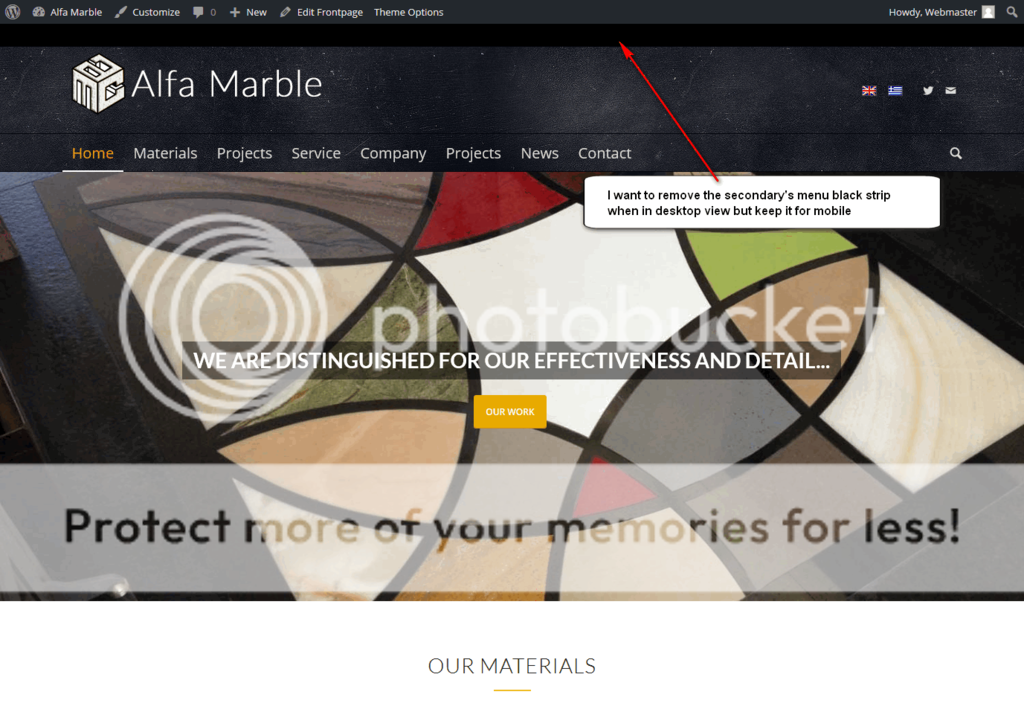
    Since the support team seems a bit swamped with so many requests, I did some research and I achieved (nearly) what I want.
    I activated the header secondary menu and made the “built-in to Enfold” language flags appear. Then I used the following CSS I found in another post with some tweaks to my header:

    @media only screen and (min-width: 768px) {
    .sub_menu {
        position: absolute !important;
        top: 85px !important;
        right: 120px !important;
    }
    }
    
    .header-scrolled .avia_wpml_language_switch.avia_wpml_language_switch_extra {
    top: -32px;
    }
    
    #top ul.avia_wpml_language_switch li {
        margin: 0px 10px 0px 5px;
    }

    I don’t know if I made any mistakes or if I could make the code better but it seems to work.
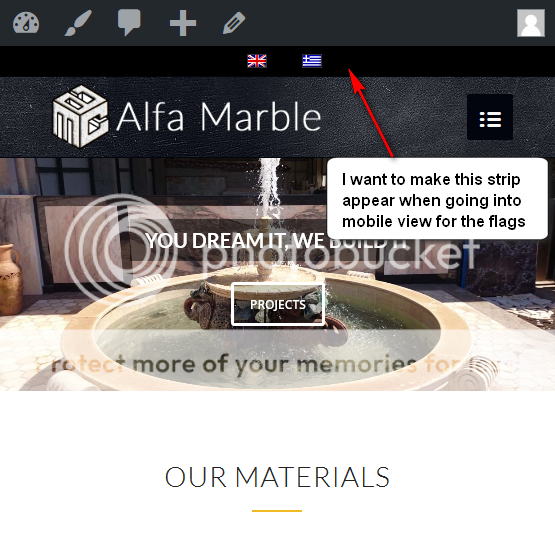
    What I would finally want to achieve is to remove the black strip of the secondary menu but keep it for the language flags when it goes into mobile view.
    Desktop

    Mobile

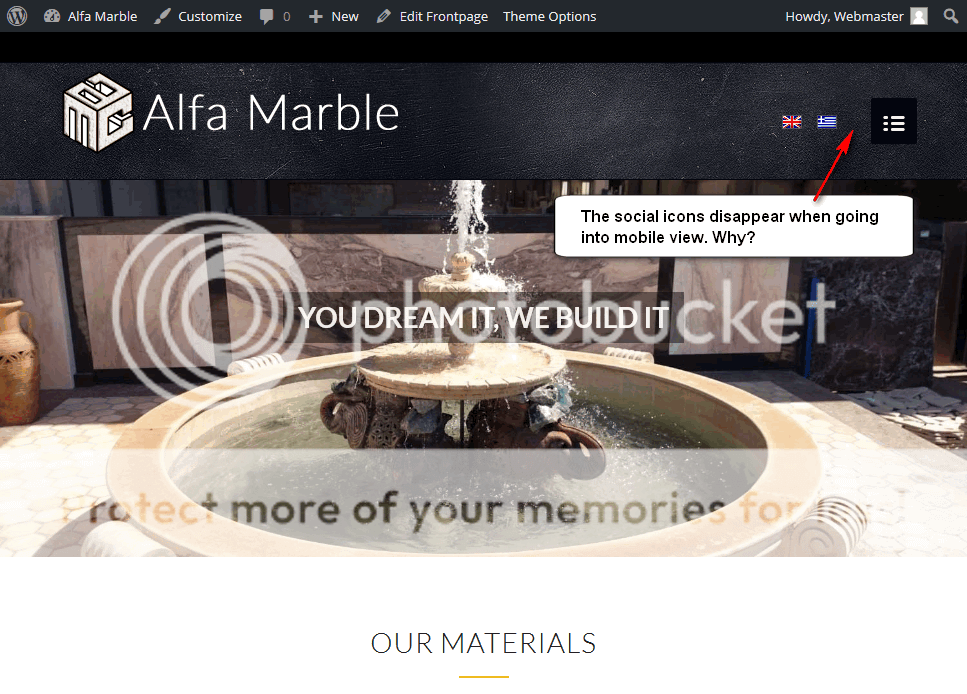
    Also I noticed that the social menu icons disappear when the layout jumps into mobile menu view.
    Social icons disappearance

    I am attaching some screenshots to indicate the above. I hope they help and I hope you will help.

    Thanks

Viewing 30 results - 99,391 through 99,420 (of 142,852 total)