I would like it to appear vertical with the three pictures cause there is a lot of empty space. I believe it would be more nice if it´s possible like that.
Well still if I click on the video on the frontside it´s very difficult to make it play, maybe because of the text?
How can I make the frontsite video play automatically like on normal browser, and why is this deactivated on mobile?
I activated the sidebar for mobiles, but for the page booking it´s not so convenient when the testimonials are at the buttom or at least so far away from the “send” button.
Can you send css code to make it close to the send button? The idea is that the user needs to see the testimonials on mobile before or while writing in the contact form. Can I get three solutions?:
1. the testimonials are on top of contact form
2. the testimonials are in the contactform
3. The testominals are under the contactform but closer to the send button
Thanks a lot! :)
Hi,
Please go to enfold/includes/loop-search.php file, find following and remove it
            <div class='hr_invisible'></div>

            <section class="search_not_found">
                <p><?php _e('You might want to consider some of our suggestions to get better results:', 'avia_framework'); ?></p>
                <ul>
                    <li><?php _e('Check your spelling.', 'avia_framework'); ?></li>
                    <li><?php _e('Try a similar keyword, for example: tablet instead of laptop.', 'avia_framework'); ?></li>
                    <li><?php _e('Try using more than one keyword.', 'avia_framework'); ?></li>
                </ul>

                <div class='hr_invisible'></div>
                <h3 class=''><?php _e('Feel like browsing some posts instead?', 'avia_framework'); ?></h3>

        <?php
        the_widget('avia_combo_widget', 'error404widget', array('widget_id'=>'arbitrary-instance-'.$id,
                'before_widget' => '<div class="widget avia_combo_widget">',
                'after_widget' => '</div>',
                'before_title' => '<h3 class="widgettitle">',
                'after_title' => '</h3>'
            ));
        echo '</section>';
	echo "</article>";

	endif;
	echo avia_pagination('', 'nav');
?>
Yes, they will be overwritten. Please use a child theme – http://kriesi.at/documentation/enfold/using-a-child-theme/ to avoid applying the changes each time you update the theme.
Best regards,
Yigit
-
This reply was modified 9 years, 4 months ago by
 Yigit.
Hi,
Please try adding this code to the Quick CSS section under Enfold > General Styling or to your child themes style.css file:
#header .textwidget .av_font_icon:nth-child(3) .av-icon-char {
    top: 2px;
    position: relative;
}
Best regards,
Yigit
Hi Yigit,
I probably didn’t explain myself well.
I don’t want to hide part of the team on the mobile, or on the desktop, the problem is another.
As you can easily check, the order of the photographs doesn’t correspond with the one of the description.
I think the problem is due to the lack of an unic row section, and that’s probably why on the mobile you find:
-first the description of the first photograph in the second row (description of Giorgia Colletti, which point to Giorgio Traverso)
-then you find the photograph of the first row (Giorgio Traverso)
-then the description of the second photograph in the second row (Elio della Via which point to the first picture of the second row, Giorgia Colletti)
-then you find the photograph of the first row (Giorgia Colletti)
-then the description of the photograph of the first row (Giorgio Traverso)
-then the second picture of the second row. (Elio della Via)
Resuming, the problem is only on the mobile screen with the description that don’t correspond to the right image.
Can you gently suggest me, how can i solve it?
I would like to underline that i don’t want to remove anything on the mobile.
Best regards
Hi!
Glad we could help :) Regarding the documentation, I think it’s a related topic but it’s a bit situational, it’s better to keep it simple. :)
Cheers!
Nikko
Hello, i have a problem with fonts in enfold theme …more precisely with some special characters like š č ť which are correctly displayed in desktopversion but are substituted with different font in mobile version. I have imported a wedding demo theme: and the characters are not rendered correctly not only in the script font but in the body as well… please is there a solution??
Thank you very much
-
This topic was modified 9 years, 4 months ago by
 goldsvk.
Hi,
Could you please be more specific with the details? A few screenshots of the issues will help. The columns are not responsive because of the following css modifications.
div .av_one_third {
    margin-left: 2% !important;
    margin-right: 2% !important;
    margin-bottom: 2% !important;
    margin-top: 2% !important;
    width: 29.333333333333332% !important;
}
What is that for?
Best regards,
Ismael
Hi,
I’m not sure if this is going to work but try to increase the offset value of the avia_waypoints function. More info in this old thead.
// https://kriesi.at/support/topic/issue-with-animated-numbers-2/page/2/#post-573871
Best regards,
Ismael
Hi,
Glad we could help :-)
Please let us know if you should need any further help on the topic.
Best regards,
Rikard
I searched the forums and found some CSS for making breadcrumbs and page title sticky but found that setting a fixed top position only worked on desktop viewports. Do you have any code that will allow the header and breadcrumbs to behave in the same way as the sticky header, where it adjusts elegantly for mobile?
This is important because I’m using buttons with anchor links to move users to the comment section but I’m concerned with the page refresh users will not be certain if they are still on the same page without the page title.
Thank you so much for help!
Hi,
Ok, please try this instead:
#top .alternate_color.title_container .main-title {
  color:#fff !important;
}
There is no setting for only that element no.
Best regards,
Rikard
Hello Nikko,
I have tried it with 2 desktop computers and with newly installed firefox and the effect is the same, text goes into bold every time I activate the sumome plugin.
Hi,
Great, glad you got it working and thanks for sharing :-)
Please let us know if you should need any further help on the topic.
Best regards,
Rikard
Hi,
I tried with some CSS but it’s very difficult since the titles have different content, 1 or 2 lines. You can try adjusting the values in the code you got initially but I think it’s better to leave it as it is:
@media only screen and (max-width: 1024px) {
.news-excerpt {
margin: -30px 0 0 46px !important; /* adjust the values to the left (top/right/bottom/left)*/
}
}
Best regards,
Rikard
Hi,
Ok, thanks for the feedback and glad you found the problem :-)
Please let us know if you should need any further help on the topic.
Best regards,
Rikard
Hi,
Great, glad we could help :-)
Please let us know if you should need any further help on the topic.
Best regards,
Rikard
Hi Riccardo,
Ok, thanks for the feedback. We’ll keep the thread open in case you should need any further help on the topic.
Best regards,
Rikard
I’m building my first site with Enfold, and it has all been going swimmingly, but I’m suddenly unable to view or edit pages within WordPress (back-end) with the Advanced Editor active. The page will load, but as it’s loading the Advanced Editor the browser window will just turn white. There is a brief moment when I’m able to click the button to switch back to the default editor, but unfortunately it will just continue loading the Advanced Editor and turn white anyway. The only thing displayed is just a small square at the top left of the window. It isn’t the normal broken image icon.
Pages are still viewable from the front-end.
I have confirmed that I am still able to view/edit pages that are set to the default editor without issue. I have had no recent browser updates, and have tried with both Chrome and Firefox. I have also confirmed that WordPress is up-to-date and Enfold has just been updated, with no change.
Any help will be appreciated. I need to be able to use the Advanced Editor to finish this site.
::EDIT::
While all pages are still able to be viewed, I am also now experiencing issues with the header displaying incorrectly after updating Enfold, with portions of the header menu being down in the slider banner. Clicking any of these options will cause them to jumble together on top of each other and be unclickable on any subsequent page.
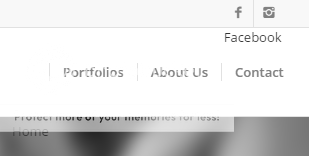
::EDIT 2::
I’ve added a temporary admin account for any needed review.
-
This topic was modified 9 years, 4 months ago by
 powerhobomc.
Hi!
I have an issue with the following page:
I want to remove where it says “Blog – Latest News” at the top, but when I click on “edit calendar”, there doesn’t appear to be any options to amend this. I have checked all the boxes in “screen options” and the options I see on the right hand side are:
– Publish
– Categories
– Looking for more?
– Shortcode
Grateful for any advice you may have.
Jangdom
If you go to our website below, and scroll down about 1 screen. You will see a full page slider that is supposed to display a video and it has the text VACATION BIBLE SCHOOL AT TRIAD BAPTIST CHURCH – KERNERSVILLE NC
Time lapse of a themed stage install for VBS
It has been working for a long time just fine. Today it stopped working and now displays a black screen.
I just manually updated the theme today from 3.61 to 3.71
I did install WP Total Cache in the last week or so. I have disabled it and its still not working
If i create a new slider on a new page it seems to work.
Any insight would be great. Thanks
Portfolio scrolling image keeps going infinitely and showing images that are outside of that portfolio.
I ended up using this solution to disable it https://kriesi.at/support/topic/disable-portfolio-navigation-gallery-lightbox/
But ideally I would want it to work correctly without showing other images outside of that portfolio. Even when I select the number of images it still shows more
Hi RebeccaMontana!
Please add following code to Quick CSS in Enfold theme options under General Styling tab
#top .main_color .input-text, #top .main_color input[type='text'], #top .main_color input[type='input'], #top .main_color input[type='password'], #top .main_color input[type='email'], #top .main_color input[type='number'], #top .main_color input[type='url'], #top .main_color input[type='tel'], #top .main_color input[type='search'], #top .main_color textarea, #top .main_color select {
    color: black !important;
}
Best regards,
Yigit
I can’t find where to adjust the line height for these Heading 1, 2, 3, blah blah.
The sentences are on top of each other and looks awful.
Please advise.
Thanks
Cheers Yigit,
It was just a typo. Thanks so much for the effort you went to despite my incompetence! You can close the topic now, thanks!
Jambo
Hi Support
I just published a website.
It appears that perhaps the CSS, layout or media queries configured might be incorrect.
Two issues I see are:
1. The company title in the header to the right of the logo appears to be on top of the menu at a certain resolution.
I assume this is a media query setting that needs to be altered.
2. On this page http://choice-consult.com/amir-oren a similar problem occurs as in a certain resolution the e-mail address (left side) appears to be over the content text on the right.
I believe this might be resolution of an Ipad but I’m unsure.
Thanks for your assistance!
Best Regards
Ofer
Hey lenvo,
Please go to Enfold theme options > General Layout and adjust “Sticky Sidebar menu” options. Otherwise, it would not be easily possible to achieve what you would like i am afraid. You can also try adding seperator element with whitespace on desktop and remove it on mobile by referring to this post – http://kriesi.at/documentation/enfold/hide-menu-itemselements-on-mobile/
Best regards,
Yigit
Hi,
Please go to enfold/includes/error404.php file and find following code and remove it
<div class='hr_invisible'></div>

<section class="404_recommendation">
    <p><?php _e('For best search results, mind the following suggestions:', 'avia_framework'); ?></p>
    <ul class='borderlist-not'>
        <li><?php _e('Always double check your spelling.', 'avia_framework'); ?></li>
        <li><?php _e('Try similar keywords, for example: tablet instead of laptop.', 'avia_framework'); ?></li>
        <li><?php _e('Try using more than one keyword.', 'avia_framework'); ?></li>
    </ul>

    <div class='hr_invisible'></div>

    <h3 class=''><?php _e('Feel like browsing some posts instead?', 'avia_framework'); ?></h3>

    <?php
    the_widget('avia_combo_widget', 'error404widget', array('widget_id'=>'404',
            'before_widget' => '<div class="widget avia_combo_widget">',
            'after_widget' => '</div>',
            'before_title' => '<h3 class="widgettitle">',
            'after_title' => '</h3>'
        ));

    do_action('ava_after_content', '', 'error404');
    ?>
</section>
Best regards,
Yigit
-
This reply was modified 9 years, 4 months ago by Yigit.
Hello – also, including that code has meant that the social media buttons have now stopped working – any ideas?
Thank you
Andy
Thank you – and how do I add it after the social media buttons on the top right?
Many thanks
Andy
Hey!
Please add following code to Quick CSS in Enfold theme options under General Styling tab
#header #gtranslate {
    padding: 0;
    top: -36px;
}
#header_meta {
    z-index: 1;
}
Best regards,
Yigit



