Viewing 30 results - 5,131 through 5,160 (of 142,866 total)
  • Author
    Search Results
  • Hey xfacta,
    Try this CSS in your Enfold Theme Options ▸ General Styling ▸ Quick CSS field:

    .tribe-common--breakpoint-medium.tribe-events .tribe-events-l-container {
    	padding-top: 0;
    }

    Best regards,
    Mike

    #1441182

    Hi,
    Perhaps try this CSS in your Enfold Theme Options ▸ General Styling ▸ Quick CSS field:

    #top #wrap_all .all_colors h2.tribe-events-widget-events-list__header-title {
    	font-size: 20px;
    	font-weight: 600;
    	font-family: "open sans";
    }

    After applying the css, please clear your browser cache and check.

    Best regards,
    Mike

    Hi,

    Thanks for the update. Please let us know if you should need any further help on the topic, or if we can close it.

    Best regards,
    Rikard

    #1441131

    if you like to synchronize it with the other widget titles:

    #top #wrap_all .all_colors .sidebar .tribe-events h2 {
      font-family: var(--enfold-font-family-heading);
      font-size: var(--enfold-font-size-theme-h3);
      color: var(--enfold-main-color-heading);
      border-color: var(--enfold-main-color-border);
      font-weight: 600 !important;
      letter-spacing: 1px;
      border-style: solid;
      border-width: 1px !important;
      padding: 10px 0;
      border-left: none;
      border-right: none;
      margin-bottom: 15px;
    }

    if you have set in quick css ( or advanced styling) different attributes than the default ones (f.e. font-size) then you have to adjust it to your needs.

    xfacta
    Participant

    Hi there
    i have an events calendar page using the plugin “Events Calendar” and there is a large gap at the top of the page that I dont want – how can I remove that?

    https://dowsingaustralia.com.au/whats-on/
    The gap straight under the main menu and above the header “What’s on at NSW Dowsers Society”

    Cheers
    Natasha

    Hi,
    here is the screen: Screenshot

    Fullscreen-Slider #1 is only visible on desktop. It has a button, which fits perfectly
    Fullscreen Slider #2 is only visible on mobil, because the pictures has to be a different size. It also conains the slider button, but of course the position doesn’t fit to the layout.

    I hope this makes sense ;)

    #1441086

    Got it :) thank you!
    Topic can be closed

    #1441085

    Thank you! That made the trick. Topic can be closed

    #1441084

    In reply to: Additional Icon Packs

    Thank you. Topic can be closed

    Thanks Mike! I appreciate the advice. When I look at my historical data on my domain and url authority (and serp rankings), the drop predates the updates (I could be remembering that wrong, but the drop happened several years ago…I had gotten everything dialed in and stopped checking…not smart). My SEO folks said some thing about regular updates to blog, but that even with that and a poor backlink profile, I should not have dropped as far as I did (if you google Counseling 78746 (my zip code) I’m not listed at all. I used to be in the top 3 in SERPs and map; however, people with horrid websites with terrible Ux, no backlinks, no blog, confusing layout, inconsistent header tags, and spelling/grammar errors ARE ranked…AND several of them aren’t in my zip code…they’re all the way across town). I get dropping off of page one, even beyond page 3, but to not be ranked at all in my zip code or city isn’t explained by backlinks nor blog or the folks with no backlinks nor blog at all wouldn’t be up on pages 3 and 4.

    So that’s the long version backstory of why I’m digging in to everything. I’m wondering if the speed issue on mobile is a symptom of some other technical issue that is the bots don’t like. If there’s garbled code that works, but bloats things, plus any other overly complex stuff, I’m wondering if that plus backlinks and recent blog posts could better explain this … I think I’m going to find some ridiculous technical thing that cascades in to a larger SEO issue, but doesn’t break my site (like a line of code, a freaking semi colon or space somewhere).

    Apologies for not updating y’all before I stopped for the night. It took some experimenting, but I got my mobile scores to 70-85, which is ok for now (used to be 95+). I am using my hosts page cache, which somehow integrates with WP super cache, which integrates with Jet Boost. In boost, if I enable the Critical CSS, mobile speed goes to 30’s, but if I disable that and enable the 3 js/css canonicalization etc features, it gets them back to 70-85.

    I have no idea what changed. I was in mid tp upper 90’s for quite some time, then all of a sudden, mobile speed tanked.

    Re: CORS: I realized that was because I was using private browser. I may have put the wildcard CORS headers in htaccess just in case…I’ll have to check.

    I’ll keep working. I’ve been cleaning up old posts grammar etc. but slowed down. Need to get back to that and post new stuff more.

    Thx!
    J

    if it is real text ( as participant i do not see private content area) –
    you can even animate the color change:

    f.e.: ( adjust the selectors to your needs – you see the class header-scrolled is added after scrolling)

    #top  .logo-title {
      color: red;
      transition: color 2s ease
    }
    
    #top .header-scrolled .logo-title {
      color: green;
      transition: color 2s ease
    }
    #1441055

    Hey ballindigital,
    Try this CSS in your Enfold Theme Options ▸ General Styling ▸ Quick CSS field:

    @media only screen and (max-width: 767px) {
      .responsive table.shop_table td {
          display: table-cell;
      }
      .responsive .shop_table .product-quantity {
        display: table-cell;
        width: 100%;
        text-align: center;
      }
      #top .order_details .product-name li {
         margin: auto;
         padding: 0;
         border-right: none;
      }
      #top .order_details li {
         border-right: none;
      }
      #top table.shop_table td {
          padding: 5px;
      }
      }

    Best regards,
    Mike

    #1441054

    Hi,
    This css seems to easily solve the hover event:

    #top .template-single-blog .big-preview.single-big a {
      pointer-events: none;
    }

    Best regards,
    Mike

    webbx
    Participant

    I searched but couldn’t find it.

    I want a news box at the top of the page that displays a random article from all the posts I’ve ever written.
    Which module should I use, and how do I configure the settings?

    Thanks for any help you can provide.

    #1441040
    dbha
    Participant

    Hello Kriesi-Team,

    I’ve some challenges concerning the strong accessibility requirements for an official school website.
    When “Checking the serialized DOM of current page” I get several errors like:
    Bad value true for attribute disabled on element button.
    Attribute percentage not allowed on element div at this point.
    Element style not allowed as child of element div in this context.
    An element with role=menuitem must be contained in, or owned by, an element with role=menubar or role=menu.

    You can check it on the page: https://pags-kuelsheim.de/pags-new-2024/
    Therefore you need the following 2 Bookmarklets “Check serialized DOM of current page” and “Check for WCAG parsing compliance”.
    You can find them here: https://validator.w3.org/nu/about.html#extras (just save the above mentioned Bookmarklets as Bookmarks)
    After you saved the Bookmarklets open the URL to test: https://pags-kuelsheim.de/pags-new-2024/
    and then first open the Bookmarklet “Check serialized DOM of current page”
    Then you should get the whole list of errors (for a better overview deactivate the warnings).
    How can I eliminate those errors?

    For the errors concerning the role “menuitem” I checked the source code and in fact there is a role “menu” on the UL-tag.
    So I don’t understand why the errors occur.

    The errors I need to eliminate definitely are the ones that remain after the second check.
    So after the first checking of serialized DOM in the same window open the second Bookmarklet “Check for WCAG parsing compliance”.
    After this there are 3 Errors left:

    Error: Attribute percentage not allowed on element div at this point.
    [… <div class=”autoptimize-radial-bar” percentage=”1″> … ]
    Error: Element style not allowed as child of element div in this context. (Suppressing further errors from this subtree.)
    [… <style type=”text/css” data-created_by=”avia_inline_auto” id=”style-css-av-av_heading-35a281d039331e73961c1fb16c90aea2″> …]
    Error: Element style not allowed as child of element div in this context. (Suppressing further errors from this subtree.)
    [… <style type=”text/css” data-created_by=”avia_inline_auto” id=”style-css-av-jhe1dyat-381e073337cc8512c616f9ce78cc22d9″> …]

    These errors need to be eliminated definitely and therefore I need your support.
    Do you have an idea how to get rid of them? It’s quiet urgent, so it would be great if you can provide me a solution for that as soon as possible.

    In case you need some further information or a login credentials, don’t hesitate to contact me by e-mail.
    Thanks in advance and kind regards.

    • This topic was modified 1 year, 11 months ago by dbha.
    #1441039
    Ralph
    Participant

    Hi!

    We try to improve the page speed of our website (especially the speed on mobile). Using Autoptimize and activating the option “JavaScript im <head> erzwingen” the site does not deliver the images anymore (a massive speed improvement, however unusable). Without this option, there is little improvement. Does anyone have experience with Autoptimize or other tools better suited to improve page speed significantly?

    Many thanks,
    Ralph

    #1441028

    In reply to: Blockquote and align

    Hi,

    Thanks for the update. Please let us know if you should need any further help on the topic, or if we can close it.

    Best regards,
    Rikard

    #1441022

    In reply to: no underline in button

    Hi,

    Great, I’m glad that you got it working. Please let us know if you should need any further help on the topic, or if we can close it.

    Best regards,
    Rikard

    #1441021

    Hi,

    Great, I’m glad that Mike could help you out. Please let us know if you should need any further help on the topic, or if we can close it.

    Best regards,
    Rikard

    #1441018

    In reply to: delete topic

    Hey Yaphoon,

    You can post your links in private to avoid that, if you link to the topics in question then we can delete them for you.

    Best regards,
    Rikard

    #1441016

    ***And sorry just to add to this topic – how to chnage the size to be smaller for mobile screens as well.

    Hi there
    I have a blog posts section added to a page and want to change the heading style from the default post-title entry-title for the H2 to just a custom size – but just for the blog posts not changing the H2 tag size for the rest of the site. Is that possible?

    Cheers
    Natasha

    northorie
    Participant

    Hi,
    I’m using to different fullscreen slider on desktop and on mobile, with a different picture.
    With your help I’ve adjusted the position of the slider button for desktion
    Now I would need a different position on mobile. Is that possible?

    Best regards

    Hi,
    I tried to review your previous thread, and the page posted doesn’t seem to show the error: Kalender mit Ereignissem
    Kalender mit Ereignissen is the page H1 title.
    Enfold_Support_5588.jpeg
    It seems that the script solution is working correctly, is there a different page at you see the error on?

    Best regards,
    Mike

    #1440990

    Topic: delete topic

    in forum Enfold
    Yaphoon
    Participant

    Hi there,
    May i know how to delete some topics
    i do not want someone can google our domain name and find my topic here.
    Thanks and best regards,

    #1440986

    In reply to: CSS COMPILATION FAILED

    Hello Rikard, thanks for your reactivity.
    You can close this topic for me cause i just contact my web host to restore a save of my website.
    Everything seems to be ok now.
    Thanks ;)

    #1440978

    Hi,

    Great, I’m glad that Mike could help you out. Please let us know if you should need any further help on the topic, or if we can close it.

    Best regards,
    Rikard

    #1440976

    In reply to: Sidebar not responding

    That moved the description up in top of the sidebar. I then changed 11 to 10 which moved it down, but it went between the products and the pagination. So now I just need the pagination back up underneath the products.

    #1440974

    In reply to: Additional Icon Packs

    And now the profi tip:
    1( Go to Google Font – choose your font – download it. You will get a ttf font.
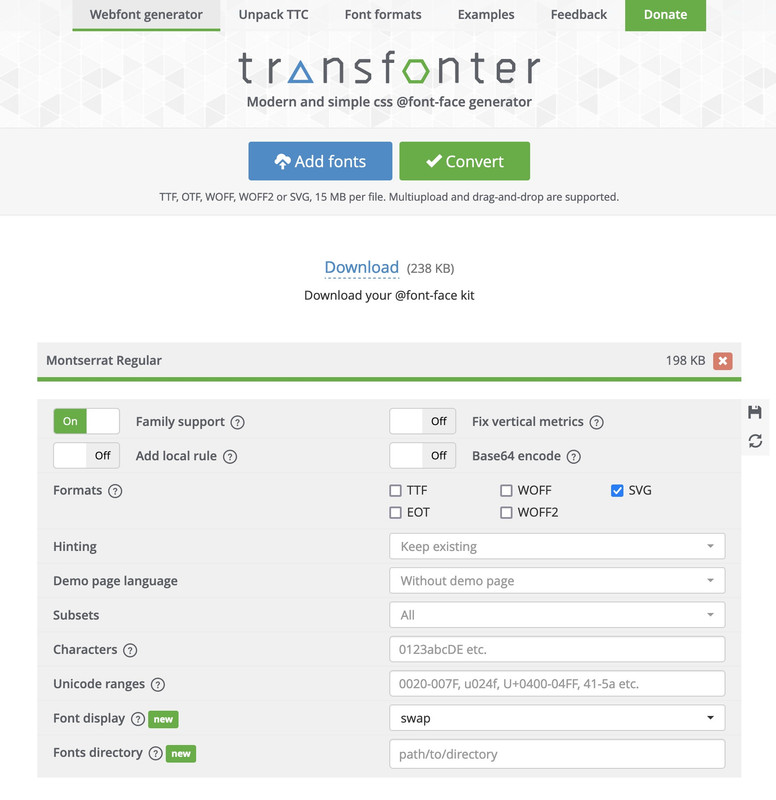
    2) Go to: Transfonter
    choose svg as font:

    download the converted font – unzip and pull out the svg you get.
    3) Go to fontello – drag & drop that svg to the “custom icons” field.
    4) choose your selected icons – name it and download that zip file –
    5) upload that to Enfold – Import/Export/…. Iconfont Manager
    ;)

    see here – done with montserrat-regualar:

    download here: https://webers-testseite.de/montserrat-numbers.zip

    PS: sometimes it might be neccessary to adjust the size of those font-icons.
    eg:

    html body [data-av_iconfont="montserrat-numbers"]::before {
      font-family: 'montserrat-numbers';
      position: absolute;
      left: 50%;
      top: 50%;
      font-size: 2em;
      transform: translate(-50%, -50%);
    }

    see: https://webers-testseite.de/montserrat-numbers-2/

    and – tip: you can combine more than one font-family in that upload.

    Hey Petra,

    1. Please try this in Quick CSS:

    .portfolio_preview_container {
      width: 80%;
      max-width: 80%;
    }

    2.

    #top .portolio-preview-list-image {
      border-bottom-width: 0;
    }

    3.

    .portolio-preview-list-image {
      pointer-events: none; 
    }

    Best regards,
    Rikard

    Hi,

    Great, I’m glad that Ismael could help you out. Please let us know if you should need any further help on the topic, or if we can close it.

    Best regards,
    Rikard

Viewing 30 results - 5,131 through 5,160 (of 142,866 total)