Hey Mike,
I’ve add the WooPayment addon and the plugin “Order Delivery Date” for the customers to select the delivery date/time.
And your code stopped working, I’ve tried with the second one, with both together but still didn’t work anymore.
Do you have any idea?
I really appreciate your help.
Thanks
Best regards!
Hi,
Thanks for sharing that. Please let us know if you should need any further help on the topic, or if we can close it.
Best regards,
Rikard
Hi,
Thanks for the update. Please let us know if you should need any further help on the topic, or if we can close it.
Best regards,
Rikard
Hi Genius Team,
The main content body of our website has just shrunk to 1010px from its setting of 1310px for no apparent reason.
– We have updated to the latest version 6.6.2.
– We have deactivated plugins.
– We have reset theme to stretched layout and back again and it made no difference.
– We tried adding this css to Enfold child styling to force the width back but made no difference:
.boxed#top, .html_boxed.html_header_sticky #header {
width: 1310px!important;
}
– We have changed no styling except a H2 change in Enfold child stylesheet (and the styling has been triple checked)
….running out of ideas, can you help please? Website Link
Kind regards,
Annemarie
Hello,
I added the Enfold cookie policy feature to my website. However, once the user Accepts or Rejects, there is no way to access Manage Cookie Settings. How can I add an additional link to my socket next to Terms that will open the Cookie Settings popup? Also, you need to add a close icon to the top right of the Manage Cookie Settings popup. There is no way to close it.
Site: http://a0w.ee1.mytemp.website/
Thanks,
Steve
-
This topic was modified 1 year, 7 months ago by
 steve3434.
Hello,
I added the Enfold cookie policy feature to my website. However, once the user Accepts or Rejects all, there is no way to access Manage Cookie Settings. How can I add an additional link to my socket next to Terms that will open the Cookie Settings? Also, you need to add a close icon to the top right of the Manage Cookie Settings popup. You have to refresh the window to hide the popup.
Thanks,
Steve
Thanks for the replies guys. The site should be accessible now for you. Please try again and let me know. We are only blocking Russia and Ukraine
The site is at least 5 years old and has had this same exact setup the entire time. It has always worked with no issues until a couple months ago when it stopped working. I assume it was after some updates we did in June. We updated the theme and some plugins and I am sure WordPress too.
The essential grid gallery is just shortcode in the default editor. We are not using a page builder on the gallery pages.
We are using the page builder for the product pages as we are using masonry galleries inside containers inside a color section. Same as its always been.
Hi,
Thanks for the links to your pages, try this CSS in your Enfold Theme Options ▸ General Styling ▸ Quick CSS field:
@media only screen and (max-width: 425px) {
#top #wrap_all #main .avia-slideshow .av-slideshow-caption .avia-caption-title,
#top #wrap_all #main .avia-slideshow .av-slideshow-caption .avia-caption-content p,
#top #main .avia-slideshow .av-slideshow-caption .avia-caption-content {
    font-size: 20px;
    margin: 0;
}
.html_header_transparency #top #main .avia-builder-el-0 .slideshow_caption {
	padding-top: 0;
}
}
After applying the css, please clear your browser cache and check.
Best regards,
Mike
Hi Enforld Team and Developers,
nach dem Enfold Update eine alten Website, werden viele Code-Teile mit Inline CSS beim Öffnen der Blöcke (z.B. Code- oder Text-Element) verändert.
Vorher:
<ul style="list-style-type: none; margin-left: 02px; padding-top: 8px; padding-bottom: 12px; padding-left: 0px;">
 	<li style="display: flex; margin-bottom: 12px;">
           <span style="font-size: 18px; color: green; white-space: nowrap; margin-right: 10px;">✔ </span>
           <span style="font-size: 18px;">xzzz</span></li>
 	<li style="display: flex; margin-bottom: 12px;">
           <span style="font-size: 18px; color: green; white-space: nowrap; margin-right: 10px;">✔ </span>
           <span style="font-size: 18px;">text</span></li>
 	<li style="display: flex; margin-bottom: 12px;">
           <span style="font-size: 18px; color: green; white-space: nowrap; margin-right: 10px;">✔ </span>
           <span style="font-size: 18px;">topic</span></li>
</ul>
Nachher
<ul style="list-style-type: none; margin-left: 02px; padding-top: 8px; padding-bottom: 12px; padding-left: 0px;">
 	<li style="display: flex; margin-bottom: 12px;"><span style="font-size: 18px;">xzzz</span></li>
 	<li style="display: flex; margin-bottom: 12px;"><span style="font-size: 18px;">text</span></li>
 	<li style="display: flex; margin-bottom: 12px;"><span style="font-size: 18px;">topic</span></li>
</ul>
Ich verstehe den Sinn, möchte aber nicht die ganze Website neu machen.
Wo kann ich das abschalten.
BR
Ralf
English: .. after the Enfold update of an old website, many code parts with inline CSS are changed when opening the blocks.
I understand the point, but I don’t want to redo the whole website.
Where can I disable this?
P.S.: Sorry, ich habe vorher im Forum gesucht, finde wohl nicht die richtigen Suchbegriffe um fündig geworden zu sein.
-
This topic was modified 1 year, 7 months ago by
 RSTAC.
-
This topic was modified 1 year, 7 months ago by RSTAC.
Hi,
I still believe that you should delete / remove your child theme header.php & footer.php so you don’t have to do this anymore.
The only files in your child theme should be:
style.css
funchion.php
and maybe redirectroot.php since I don’t know why you add that custom file.
save the other files to your desktop as backup.
Best regards,
Mike
Hi there,
I have the Enfold theme (version 3.8) and recently I have found that I am unable to edit pages. There is a message at the top of the page stating “This Block has encountered an error and cannot be previewed.”
The error details in the email received was as follows:
Error Details
=============
An error of type E_ERROR was caused in line 489 of the file /home/media/sydneydjservices.com.au/wp-content/themes/enfold/config-templatebuilder/avia-template-builder/php/shortcode-template.class.php. Error message: Uncaught Error: Cannot use string offset as an array in /home/media/sydneydjservices.com.au/wp-content/themes/enfold/config-templatebuilder/avia-template-builder/php/shortcode-template.class.php:489
Stack trace:
#0 /home/media/sydneydjservices.com.au/wp-content/themes/enfold/config-templatebuilder/avia-template-builder/php/shortcode-template.class.php(443): aviaShortcodeTemplate->create_sortable_editor_element(Array)
#1 /home/media/sydneydjservices.com.au/wp-content/themes/enfold/config-templatebuilder/avia-template-builder/php/template-builder.class.php(397): aviaShortcodeTemplate->prepare_editor_element()
#2 /home/media/sydneydjservices.com.au/wp-includes/class-wp-hook.php(324): AviaBuilder->js_template_editor_elements(”)
#3 /home/media/sydneydjservices.com.au/wp-includes/class-wp-hook.php(348): WP_Hook->apply_filters(”, Array)
#4 /home/media/sydneydjservices.com.au/wp-includes/plugin.php(517): WP_Hook->do_action(Array)
#5 /home/media/sydneydjservices.com.au/wp-includes/media-template.php(1570): do_action
Can anyone assist?
Hi,
Thanks for the update. Please let us know if you should need any further help on the topic, or if we can close it.
Best regards,
Rikard
Hi,
Try this css:
#top:not(.page-id-34) #header.header_color.av_header_transparency .av-main-nav > li > a .avia-menu-text {
	color: #fff;
}
Best regards,
Mike
Hi,
I believe that this is a duplicate thread, please review your other thread
Best regards,
Mike
Hi,
Try this CSS in your Enfold Theme Options ▸ General Styling ▸ Quick CSS field:
@media only screen and (max-width: 425px) {
	.html_header_transparency #top .avia-builder-el-0 .slideshow_caption {
    padding-top: 0;
}
#top #wrap_all #main .avia-slideshow .avia-caption-title {
    font-size: 40px;
}
}
After applying the css, please clear your browser cache and check.
Best regards,
Mike
Hi,
Thanks for your patience, when I add Guenni007’s css it solves the line in the header when scrolling
#top .avia-menu.av_menu_icon_beside {
  border: none !important;
}
please clear your browser cache and check.
Best regards,
Mike
Hi,
Your MIME error seems to be due to a server error with X-Content-Type-Options “nosniff” and not a theme error, please refer back to this thread.
While we can not reproduce this on any of our servers, thinkjarvis had this issue in this thread and he solved it by changing his server settings. In the page you wrote that your server support will not change this for you, perhaps this info will help your new developer. Unfortunately we don’t have any other ideas, your two threads seem to cover all of the possibilities.
Best regards,
Mike
Hi,
To change the burger menu background to #201d1e and the lines white: Try this CSS in your Enfold Theme Options ▸ General Styling ▸ Quick CSS field:
#top .av-hamburger {
	line-height: 40px;
	background-color: #201d1e;
}
#top .av-burger-overlay li li .avia-bullet, #top .av-hamburger-inner,#top .av-hamburger-inner::before, #top .av-hamburger-inner::after {
  background-color: #fff !important;
 }
this is the expected results:

to change the social icons color to – #304d03, try this css:
#right-toolbar .social_bookmarks a {
	color: #304d03;
}
this is the expected results:

when the menu is open there is no padding on the left, this is the width of the menu. For a smaller menu try this css and adjust to suit:
.html_av-overlay-side .av-burger-overlay-scroll {
    width: 200px;
}
this is the expected results:

Best regards,
Mike
Hi,
Great, I’m glad that you got things working. Please let us know if you should need any further help on the topic, or if we can close it.
Best regards,
Rikard
you have both rulesets of mine in your quick css.
The blur effect only goes to background-color – because there is the gradient instead – it does not take effect.
see the background-image above and on the bottom – when i switch off the gradient
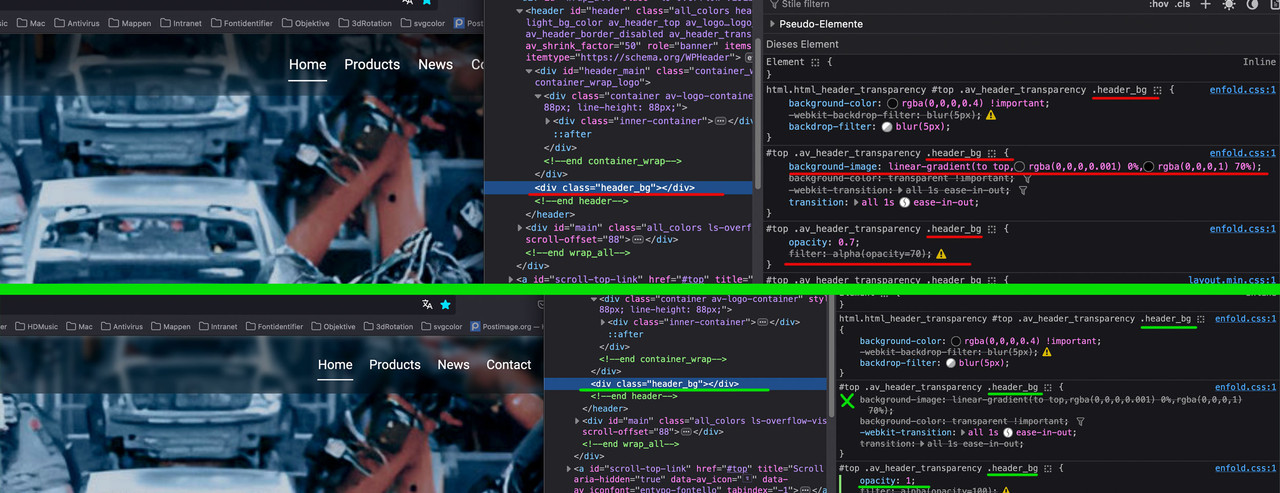
PS i would then work with transparency on that only by rgba value and set the opacity of header_bg to 1
so at the end only this rules the header_bg:
#top .av_header_transparency .header_bg {
  opacity: 1;
  filter: alpha(opacity=100);
}

html.html_header_transparency #top #header:not(.av_header_transparency) .header_bg {
  background-color: rgba(0,0,0,0.7) !important;
  -webkit-backdrop-filter: blur(8px);
  backdrop-filter: blur(8px);
}

html.html_header_transparency #top .av_header_transparency .header_bg {
  background-color: rgba(0,0,0,0.4) !important;
  -webkit-backdrop-filter: blur(5px);
  backdrop-filter: blur(5px);
}
play with blur values and rgba ( the a ) value
Hi,
Great, I’m glad that Mike could help you out. Please let us know if you should need any further help on the topic, or if we can close it.
Best regards,
Rikard
Hi,
Thanks for the update. Please let us know if you should need any further help on the topic, or if we can close it.
Best regards,
Rikard
Hi,
Thanks for the update. Please let us know if you should need any further help on the topic, or if we can close it.
Best regards,
Rikard
Oups, code is mystery to me. I’ll try, hem…
And what about the In the meantime, the 3 cards on top of my homepage, which are overlaping one another. How can I do? I’ve try to add separators but at no success.
Hi,
Thanks for the update. Please let us know if you should need any further help on the topic, or if we can close it.
Best regards,
Rikard
Hi,
I took “lawyers” demo of my website basis. I see that the site display on mobile is not fully as I’d like it to be.
Can I change styles for mobile only, text size and/or padding for example, via “Advanced styling” or do I have to make it one by one via screen size option page by page which is a long job, or else?
In the meantime, I have 3 card on top of my homepage, which are overlaping one another. How can I do? I’ve try to add separators but at no success.
Any idea?
Best regards
This reply has been marked as private.
Hey pelgrimrat,
Thank you for the inquiry.
When you start scrolling, the logo changes into a different, slimmer logo (text only).
This is only visible when you intentionally scroll down a few pixels (10-20px) from the top. The transition you’re describing won’t be noticeable to most users, as they will likely scroll well beyond the fold after viewing the top content. If you’d like to adjust it, you can add this css code to completely hide the initial logo on scroll.
.header-scrolled .logo .subtext > img {
    opacity: 0;
    display: none;
}
Best regards,
Ismael
Hi,
Thanks for the update. Please let us know if you should need any further help on the topic, or if we can close it.
Best regards,
Rikard



