Viewing 30 results - 91 through 120 (of 16,897 total)
  • Author
    Search Results
  • poberndoerfer
    Participant

    Hello,
    We have an up-to-date WordPress-Site (PHP 8.5, WordPress 6.9.0).
    Enfold is installed, albeit with an older version 4.7.4.
    Unfortunately the original license got lost, so we purchased a new license key.
    Following this we created an Envato personal token and installed this successfully!
    Nonetheless, the theme update mechanism still claims:
    “Keine Aktualisierung verfügbar. Du verwendest die letzte Version! (4.7.4)”
    (No update available. You are running the most recent version (4.7.4))
    This is obviously not correct.
    Any ideas what we might be doing wrong?
    Or is this expected behaviour?
    Many thanks!
    BR,
    Pascal

    #1493982

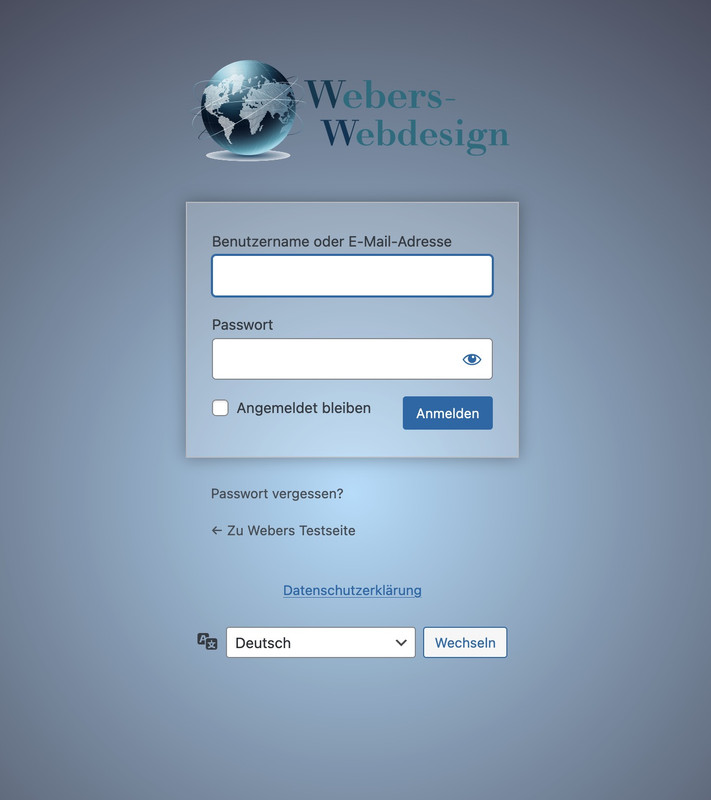
    well this wordpress login screen is not influenced by the themes installed !
    This is a pure wordpress setting – so you have to check where it might be set a different Login Page.

    i often make an own settup for it by this snippet for child-theme functions.php:

    function custom_loginlogo_url($url) {
      $url = get_site_url();
      return $url;
    }
    add_filter( 'login_headerurl', 'custom_loginlogo_url' );
    
    function my_login_logo(){ 
    $logo = avia_get_option('logo'); 
    ?>
    <style type="text/css">
        #login h1 a, .login h1 a {
          background-image: url(<?php echo $logo; ?>);
          height: 120px;
          width: 320px;
          background-size: contain !important;
          background-repeat: no-repeat;
          background-position: center top;
          position: relative;
          left: 50%;
          transform: translateX(-50%);
        }
        body.login {
          background-image: -webkit-radial-gradient(circle farthest-corner at center center, #B8E1FC 0%, #231421 100%) !important;
          background-image: radial-gradient(circle farthest-corner at center center, #B8E1FC 0%, #231421 100%) !important;
          background-repeat: repeat;
        }
        body.login form {
          background: rgba(255,255,255,0.2);
          box-shadow: 0 0 15px rgba(0,0,0,0.3);
        }
    </style>
    <?php 
    }
    add_action( 'login_enqueue_scripts', 'my_login_logo' );

    you see in the snippet that the logo you set in the logo input field of enfold will be dynamically inserted there. If you like to have a differente one – then insert an absolute url on that place: background-image: url(<?php echo $logo; ?>);

    this is then the look for it:

    #1493972

    Topic: Even more CSS Problems

    in forum Enfold
    Sonno
    Participant

    Hi Enfold Support Team,

    I’m experiencing persistent CSS issues with the Enfold theme on my WordPress site that are affecting responsiveness and styling, particularly for mobile and desktop layouts. Custom CSS added via Quick CSS or the child theme’s style.css often fails to apply, gets overridden, or doesn’t update despite clearing all caches (browser, plugins, server-side). Changes to theme options like advanced styling, colors, or typography also don’t reflect on the frontend reliably.

    Specific Problems
    Caching/Loading Issues: Styles revert or show defaults even after disabling CSS/JS merging and compression in Enfold > Performance.

    Responsive Design Breaks: Headings get cut off on iPad/smaller screens (e.g., change font-weight to bold, font-size smaller, text-transform uppercase based on viewport).

    Typography Overrides: Headings and text styles (bold, small caps, uppercase/lowercase transforms) fail to adapt responsively across devices, requiring constant !important hacks that still don’t stick.

    Overrides and Conflicts: Theme options ignore inputs; unclosed Quick CSS blocks break everything; plugin conflicts (e.g., forms, checkouts) exacerbate issues.

    Troubleshooting Steps Tried
    Cleared caches everywhere and tested in incognito mode across browsers (Chrome, Safari, Firefox).

    Disabled caching plugins, performance optimizations, and child theme customizations temporarily—no fix.

    Updated WordPress, Enfold, PHP (tested 7.4 vs. 8), and relevant plugins; issue persists across devices including Mac OS.

    A staging site/credentials can be provided for testing. Any guidance on debugging responsive heading styles, CSS caching, or fixes would be greatly appreciated!

    • This topic was modified 3 months, 1 week ago by Sonno.
    #1493839

    Hi Ismael,
    thanks for your reply.

    YES enfold updated to 7.1.3
    No modification in the child theme
    Already downgraded to older PHP version… same problem.

    Giacomo

    #1493836

    Hey giacomopol,

    Thank you for the inquiry.

    Is the theme updated to version 7.1.3? If there are template modifications in the child theme, please make sure to update those as well. If the issue persists, try to downgrade to an older PHP version, such as PHP 8.1. Let us know the result.

    Best regards,
    Ismael

    #1493828
    giacomopol
    Participant

    After updating PHP from 7.4 to 8.3 and having latest wordpress version (6.9) enfold version and last Woocommerce version, my website crashes.
    Fatal error: Allowed memory size of 134217728 bytes exhausted

    Deactivating Woocommerce (by changing the plugin folder name) all works well.
    As soon as I switch to a “standard wordpress” template, everything works with woocommerce activated.

    Did ALL the woocommerce maintenance tools, nothing worked.

    No way to make it work again even by going back to previous PHP versions.
    Only way to stay with enfold theme is to switch off woocommerce.
    Thank you for your help.

    Hello Enfold Support Team,
    I am continuing to experience the same recurring FATAL ERROR on this live website (https://www.drisabelbalza.com) that triggers WordPress “Your Site is Experiencing a Technical Issue” emails repeatedly again and again.

    Environment:
    WordPress version: 6.8.3
    Parent theme: Enfold 7.1.3
    Active theme: Enfold Child (version 7.1.3)
    Current plugin: (version )
    PHP version: 7.4.33

    Error Details:
    An error of type E_ERROR was caused in line 223 of the file /home/drisabel/public_html/wp-content/themes/enfold/includes/classes/class-social-media-icons.php. Error message: Uncaught Error: Class ‘avia_font_manager’ not found in /home/drisabel/public_html/wp-content/themes/enfold/includes/classes/class-social-media-icons.php:223

    Stack trace:
    #0 /home/drisabel/public_html/wp-content/themes/enfold/includes/classes/class-social-media-icons.php(259): avia_social_media_icons->build_icon(Array)
    #1 /home/drisabel/public_html/wp-content/themes/enfold/includes/classes/class-social-media-icons.php(288): avia_social_media_icons->html()
    #2 /home/drisabel/public_html/wp-content/themes/enfold/includes/helper-main-menu.php(22): avia_social_media_icons(Array, false)
    #3 /home/drisabel/public_html/wp-includes/template.php(812): require(‘/home/drisabel/…’)
    #4 /home/drisabel/public_html/wp-includes/template.php(745): load_template(‘/home/drisabel/…’, false, Array)
    #5 /home/drisabel/public_html/wp-includes/general-template.php(206): locate_template(Array, true, false, Array)
    #6 /home/drisabel/public_html/wp-content/themes/enfold/header.php(275): get_template_part(‘includes/helper’, ‘main-menu’)

    I have been following your recommendations, but this annoying E_ERROR doesn’t disappear. Could you tell me what I can do next?

    Best regards,
    Claudia

    #1493714
    sqzi
    Participant

    I created a layout in WordPress 6.9 with Enfold 7.1.3 and PHP 8.4.16. At the 41st revision, more than half of my layout suddenly disappeared in the preview.

    I have now recreated the layout from scratch twice. Both times I encountered the same problem. I restored the page from a backup. That worked fine, but when I saved it again and previewed it, most of the layout had disappeared once more.

    I currently have about 30 sites running this WordPress Enfold setup and have never had this problem before.

    Do you have any idea how we can solve this?
    I look forward to hearing from you.

    Kind regards,

    Bert

    Translated with DeepL.com (free version)

    #1493676

    Hi Rikard.

    I have gone through the site in question, step by step, updating things one more.

    For this site we have managed to get it running on PHP8.2. A good result for now.

    The issue in this instance, we have found two plugins that appear not to be distributed via WordPress. We are awaiting updates for these and will install shortly and test. We have these two plugins deactivated for now.

    I went through updating another site using Enfold, completing the same process of ensuring all theme, plugins and wordpress are up to date. Then deactivating all plugins and incrementally changing the PHP version until an error appears. We would then rollback to last working PHP version and by process, going through and turning on the plugins one by one and refreshing caches etc. to test for errors.

    For this particular site we could only go as far as PHP 8.1. Not sure where that leaves us for higher PHP versions but for now at least we are away for version 7.

    I think we can close this for now unless you have something else to add?

    All the best
    John

    #1493597

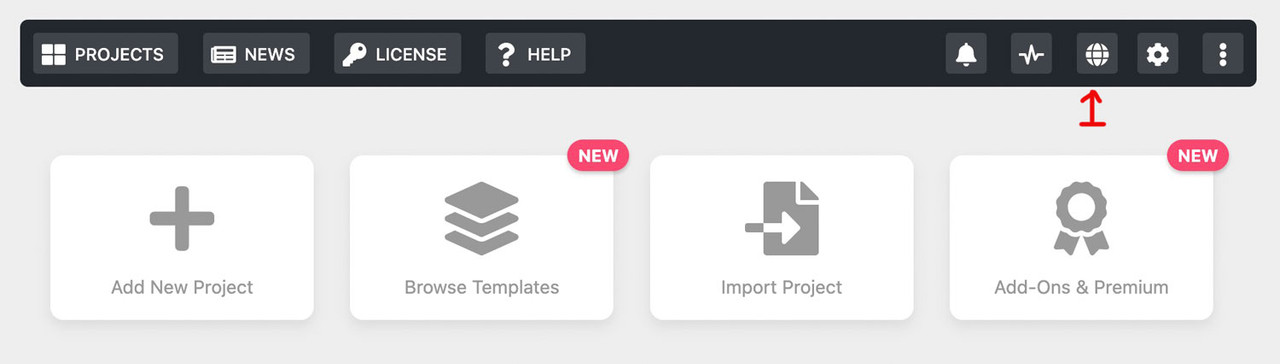
    this is i think the best option to handle the lang files:
    it is a only manual patch vor those lang files of LayerSlider.
    Or automatic after Plugin Update
    Just uploading the lang-files to /wp-content/plugins/LayerSlider/assets/locales folder

    You will have than a button on the LayerSlider Admin bar:

    
    /* ========================================================================
     * LayerSlider: Patch for Select Option of lang files
     * Auto-copies language files from uploads to plugin directory
     * Auto-removes language files that were deleted from uploads
     * Auto-patches after plugin updates
     ======================================================================== */
    
    // 1. Patch-Function
    function child_theme_patch_layerslider_template() {
    
        if (!defined('LS_ROOT_PATH')) {
            return false;
        }
    
        $template_file = LS_ROOT_PATH . '/templates/tmpl-plugin-settings.php';
        
        // Check both locations
        $plugin_locales_dir = LS_ROOT_PATH . '/locales';
        $upload_dir = wp_upload_dir();
        $custom_locales_dir = $upload_dir['basedir'] . '/layerslider/lang';
        
        if (!file_exists($template_file)) {
            return false;
        }
        
        // Create custom locales directory if it doesn't exist
        if (!is_dir($custom_locales_dir)) {
            wp_mkdir_p($custom_locales_dir);
        }
        
        // SYNC language files (copy new/updated, delete removed)
        child_theme_sync_language_files($custom_locales_dir, $plugin_locales_dir);
        
        // Find available languages (now from plugin directory after sync)
        $available_languages = child_theme_get_available_languages($plugin_locales_dir);
        
        if (empty($available_languages)) {
            return false;
        }
        
        $content = file_get_contents($template_file);
        
        // language names
        $language_names = [
            'de_DE' => 'Deutsch',
            'de_DE_formal' => 'Deutsch (Sie)',
            'de_CH' => 'Deutsch (Schweiz)',
            'de_CH_informal' => 'Deutsch (Schweiz, Du)',
            'de_AT' => 'Deutsch (Österreich)',
            // add lang names needed for your uploaded lang files
        ];
        
        // protected default languages 
        $protected_languages = ['auto', 'en_US', 'fr_FR', 'hu_HU', 'uk'];
        
        $modified = false;
        
        // PART 1: Adding missing languages
        $new_options = '';
        foreach ($available_languages as $locale) {
            if (strpos($content, 'value="' . $locale . '"') !== false) {
                continue;
            }
            
            $language_name = isset($language_names[$locale]) ? $language_names[$locale] : $locale;
            $new_options .= "\n\t\t\t\t\t\t<option value=\"" . $locale . "\" <?php echo ( \$custom_locale === '" . $locale . "' ) ? 'selected' : ''?>>" . $language_name . "</option>";
            $modified = true;
        }
        
        if (!empty($new_options)) {
            $search = '<option value="auto" <?php echo ( $custom_locale === \'auto\' ) ? \'selected\' : \'\'?>><?php _e(\'Site default\', \'LayerSlider\') ?></option>';
            $replace = $search . $new_options;
            $content = str_replace($search, $replace, $content);
        }
        
        // PART 2: Removing languages that no longer exist
        foreach ($language_names as $locale => $name) {
            if (in_array($locale, $protected_languages)) {
                continue;
            }
            
            if (strpos($content, 'value="' . $locale . '"') !== false && !in_array($locale, $available_languages)) {
                $pattern = '/\s*<option value="' . preg_quote($locale, '/') . '"[^>]*>.*?<\/option>/';
                $new_content = preg_replace($pattern, '', $content);
                
                if ($new_content !== $content) {
                    $content = $new_content;
                    $modified = true;
                }
            }
        }
        
        if (!$modified) {
            return true;
        }
        
        // Save
        file_put_contents($template_file, $content);
        
        return true;
    }
    
    // 2. IMPROVED: Sync language files (copy new + delete removed)
    function child_theme_sync_language_files($source_dir, $target_dir) {
        
        if (!is_dir($source_dir) || !is_dir($target_dir)) {
            return false;
        }
        
        $copied = 0;
        $deleted = 0;
        
        // PART 1: Copy new/updated files from source to target
        $source_files = glob($source_dir . '/LayerSlider-*.{mo,po}', GLOB_BRACE);
        
        // Get list of locales in source directory
        $source_locales = [];
        if ($source_files) {
            foreach ($source_files as $source_file) {
                $filename = basename($source_file);
                $target_file = $target_dir . '/' . $filename;
                
                // Extract locale from filename
                preg_match('/LayerSlider-([^\.]+)\./', $filename, $matches);
                if (isset($matches[1])) {
                    $source_locales[] = $matches[1];
                }
                
                // Copy if doesn't exist or is newer
                if (!file_exists($target_file) || filemtime($source_file) > filemtime($target_file)) {
                    if (copy($source_file, $target_file)) {
                        $copied++;
                    }
                }
            }
        }
        
        // Remove duplicates
        $source_locales = array_unique($source_locales);
        
        // PART 2: Delete files from target that don't exist in source
        $target_files = glob($target_dir . '/LayerSlider-*.{mo,po}', GLOB_BRACE);
        
        // Protected locales (never delete these - they're from the plugin itself)
        $protected_locales = ['en_US', 'fr_FR', 'hu_HU', 'uk'];
        
        if ($target_files) {
            foreach ($target_files as $target_file) {
                $filename = basename($target_file);
                
                // Extract locale from filename
                preg_match('/LayerSlider-([^\.]+)\./', $filename, $matches);
                if (!isset($matches[1])) {
                    continue;
                }
                
                $locale = $matches[1];
                
                // Skip protected locales
                if (in_array($locale, $protected_locales)) {
                    continue;
                }
                
                // If this locale is NOT in source directory, delete it from target
                if (!in_array($locale, $source_locales)) {
                    if (unlink($target_file)) {
                        $deleted++;
                    }
                }
            }
        }
        
        return ['copied' => $copied, 'deleted' => $deleted];
    }
    
    // 3. Helper function
    function child_theme_get_available_languages($locales_dir) {
        $languages = [];
        
        if (!is_dir($locales_dir)) {
            return $languages;
        }
        
        $files = glob($locales_dir . '/LayerSlider-*.mo');
        
        if (!$files) {
            return $languages;
        }
        
        foreach ($files as $file) {
            $filename = basename($file, '.mo');
            $locale = str_replace('LayerSlider-', '', $filename);
            if (!empty($locale)) {
                $languages[] = $locale;
            }
        }
        
        return $languages;
    }
    
    // 4. Insert button in dashboard
    function child_theme_layerslider_add_sync_button() {
    	$screen = get_current_screen();
    	if (!$screen || strpos($screen->id, 'layerslider') === false) {
    	    return;
    	}
    	?>
    	<script type="text/javascript">
    	    jQuery(document).ready(function($) {
    	        setTimeout(function() {
    	            if ($('.ls-sync-languages-button').length > 0) {
    	                return;
    	            }
    	            
    	            var $settingsButton = $('.ls-open-plugin-settings-button');
    	            
    	            if ($settingsButton.length === 0) {
    	                return;
    	            }
    	            
    	            var syncUrl = <?php echo wp_json_encode(add_query_arg('ls_sync', '1', admin_url('admin.php?page=layerslider'))); ?>;
    	            
    	            var $syncButton = $('<a>', {
    	                href: syncUrl,
    	                class: 'ls-button ls-sync-languages-button',
    	                html: '<?php echo addslashes(lsGetSVGIcon("globe")); ?>'
    	            });
    	               
    	            $settingsButton.before($syncButton);
    	            
    	        }, 500);
    	    });
    	</script>
    	    
    	<style>
    	.ls-sync-languages-button:hover {
    	    color: #fff;
    	    background: #54575f;
    	    border-color: #0000;
    	    transition: opacity 0.2s;
    	}
    	</style>
    	<?php
    }
    add_action('admin_footer', 'child_theme_layerslider_add_sync_button');
    
    // 5. MANUAL TRIGGER
    function child_theme_layerslider_manual_sync() {
        if (!isset($_GET['ls_sync']) || $_GET['ls_sync'] != '1') {
            return;
        }
        
        if (!current_user_can('manage_options')) {
            wp_die('No permission');
        }
        
        $success = child_theme_patch_layerslider_template();
        
        $redirect_url = admin_url('admin.php?page=layerslider');
        
        if ($success !== false) {
            $redirect_url = wp_json_encode(add_query_arg('ls_synced', '1', $redirect_url));
        } else {
            $redirect_url = wp_json_encode(add_query_arg('ls_sync_failed', '1', $redirect_url));
        }
        
        wp_redirect($redirect_url);
        exit;
    }
    add_action('admin_init', 'child_theme_layerslider_manual_sync', 1);
    
    // 6. AUTO-PATCH after plugin update
    function child_theme_layerslider_after_update($upgrader_object, $options) {
        if ($options['action'] !== 'update' || $options['type'] !== 'plugin') {
            return;
        }
        
        if (!isset($options['plugins'])) {
            return;
        }
        
        foreach ($options['plugins'] as $plugin) {
            if (strpos($plugin, 'layerslider') !== false || strpos($plugin, 'LayerSlider') !== false) {
                // Run patch automatically after LayerSlider update
                child_theme_patch_layerslider_template();
                break;
            }
        }
    }
    add_action('upgrader_process_complete', 'child_theme_layerslider_after_update', 10, 2);
    
    #1493579

    Hi,

    We modified config-templatebuilder/avia-template-builder/php/base-classes/class-modal-elements.php and temporarily deactivated the block of code related to the icon fonts, and this seems to have fixed the issue. We’ll keep this modification in place for now so the site remains editable.

    We’ll let you know once we figure out the issue.

    Best regards,
    Ismael

    #1493574

    here we go – Edit: i think this is the better way to do it :
    https://kriesi.at/support/topic/layerslider-translation-into-german-does-not-work/#post-1493597
    ________________________
    (just for standalone plugin – not for the included layerslider)

    /**
     * LayerSlider: Auto-Patch for Select Option of lang files
     */
    
    // 1. Daily auto-patch
    function child_theme_layerslider_auto_patch() {
        if (!defined('LS_ROOT_PATH')) {
            return;
        }
        
        // Check only once a day
        $last_check = get_option('layerslider_patch_last_check', 0);
        if (time() - $last_check < DAY_IN_SECONDS) {
            return;
        }
        
        child_theme_patch_layerslider_template();
        update_option('layerslider_patch_last_check', time());
    }
    add_action('admin_init', 'child_theme_layerslider_auto_patch', 999);
    
    // 2. Patch-Function
    function child_theme_patch_layerslider_template() {
        $template_file = LS_ROOT_PATH . '/templates/tmpl-plugin-settings.php';
        $locales_dir = LS_ROOT_PATH . '/locales';
        
        if (!file_exists($template_file) || !is_dir($locales_dir)) {
            return false;
        }
        
        // Find available languages
        $available_languages = child_theme_get_available_languages($locales_dir);
        
        if (empty($available_languages)) {
            return false;
        }
        
        $content = file_get_contents($template_file);
        
        // language names
        $language_names = [
            'de_DE' => 'Deutsch',
            'de_DE_formal' => 'Deutsch (Sie)',
            'de_CH' => 'Deutsch (Schweiz)',
            'de_CH_informal' => 'Deutsch (Schweiz, Du)',
            'de_AT' => 'Deutsch (Österreich)',
            // add lang names needed for your uploaded lang files
        ];
        
        // protected default languages 
        $protected_languages = ['auto', 'en_US', 'fr_FR', 'hu_HU', 'uk'];
        
        $modified = false;
        
        // PART 1: Adding missing languages
        $new_options = '';
        foreach ($available_languages as $locale) {
            if (strpos($content, 'value="' . $locale . '"') !== false) {
                continue;
            }
            
            $language_name = isset($language_names[$locale]) ? $language_names[$locale] : $locale;
            $new_options .= "\n\t\t\t\t\t\t<option value=\"" . $locale . "\" <?php echo ( \$custom_locale === '" . $locale . "' ) ? 'selected' : ''?>>" . $language_name . "</option>";
            $modified = true;
        }
        
        if (!empty($new_options)) {
            $search = '<option value="auto" <?php echo ( $custom_locale === \'auto\' ) ? \'selected\' : \'\'?>><?php _e(\'Site default\', \'LayerSlider\') ?></option>';
            $replace = $search . $new_options;
            $content = str_replace($search, $replace, $content);
        }
        
        // PART 2: Removing languages that no longer exist
        foreach ($language_names as $locale => $name) {
            if (in_array($locale, $protected_languages)) {
                continue;
            }
            
            if (strpos($content, 'value="' . $locale . '"') !== false && !in_array($locale, $available_languages)) {
                $pattern = '/\s*<option value="' . preg_quote($locale, '/') . '"[^>]*>.*?<\/option>/';
                $new_content = preg_replace($pattern, '', $content);
                
                if ($new_content !== $content) {
                    $content = $new_content;
                    $modified = true;
                }
            }
        }
        
        if (!$modified) {
            return true;
        }
        
        // Back up and save
        file_put_contents($template_file . '.backup-' . date('Y-m-d-His'), file_get_contents($template_file));
        file_put_contents($template_file, $content);
        
        return true;
    }
    
    // 3. helper function
    function child_theme_get_available_languages($locales_dir) {
        $languages = [];
        $files = glob($locales_dir . '/LayerSlider-*.mo');
    
        if (!$files) {
            return $languages;
        }
    
        foreach ($files as $file) {
            $filename = basename($file, '.mo');
            $locale = str_replace('LayerSlider-', '', $filename);
            if (!empty($locale)) {
                $languages[] = $locale;
            }
        }   
        return $languages;
    }
    
    // 4. Automatically patch after plugin update
    function child_theme_layerslider_after_update($upgrader_object, $options) {
        if ($options['action'] !== 'update' || $options['type'] !== 'plugin') {
            return;
        }
        
        if (!isset($options['plugins'])) {
            return;
        }
        
        foreach ($options['plugins'] as $plugin) {
            if (strpos($plugin, 'layerslider') !== false || strpos($plugin, 'LayerSlider') !== false) {
                delete_option('layerslider_patch_last_check');
                child_theme_patch_layerslider_template();
                break;
            }
        }
    }
    add_action('upgrader_process_complete', 'child_theme_layerslider_after_update', 10, 2);
    
    /**
     * END of LayerSlider: Auto-Patch for Select Option of lang files
     */

    Summary of the final solution:
    ✅ Upload language files to /LayerSlider/assets/locales/
    ✅ Automatic patch after 24 hours
    ✅ Automatic patch after plugin updates
    ✅ when needed: delete_option(‘layerslider_patch_last_check’); – for immediate patch

    these snippets will inspect each day – if there are additional lang files for LayerSlider

    PS: You can force the patcher by temporarily inserting the following to your child-theme functions.php: delete_option('layerslider_patch_last_check');
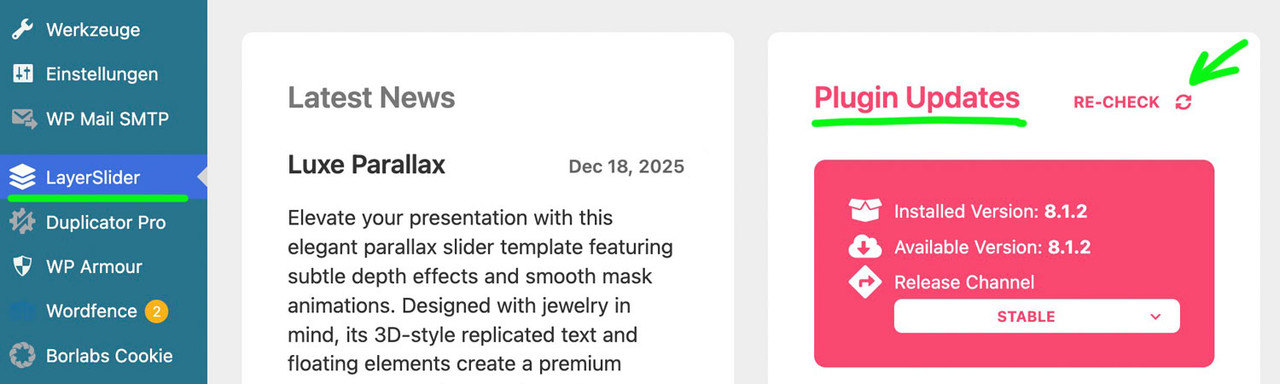
    after that goto Layerslider Dashboard and : Plugin Updates – Re-Check

    #1493572
    Matt
    Guest

    Hello! I am reaching out because I believe we did actually purchase this theme for our website. We worked with a freelance developer to create it – we are not developers ourselves. It is hosted at wordpress.com currently.

    Right now we rely on WP to update all the themes and plugins for us on this site. However, there is one item that has not updated automatically. The error is this:

    “Your theme (Enfold) contains outdated copies of some WooCommerce template files. These files may need updating to ensure they are compatible with the current version of WooCommerce.”

    When I view the affected templates, it says:

    “enfold/woocommerce/emails/admin-new-order.php version 3.7.0 is out of date. The core version is 10.4.0”

    I checked to see if I could easily update the Enfold theme, but it says:

    “Enter a valid Envato private token”

    So do you know where we could retrieve that token from? I assume we paid for the theme at some point, we need to get the auto-updated for it enabled. Please help us by responding, we don’t really know how to go forward and can’t afford to get hacked through an outdated component. I tried to post this in the regular forum but we don’t have a “purchase code” needed to create an account and we are no longer in touch with the original freelancer that set this up. Thank you!!

    Clarification: last live-site fatal error occurred Dec. 23, 2025 — staging now reproduces the same Enfold issue

    Hello Yigit,
    I just wanted to clarify the timeline and current status of the Enfold fatal error that involves avia_font_manager. After reviewing all automated WordPress notifications more carefully, I confirmed that the last fatal error email from the live site (http://www.drisabelbalza.com) was sent on December 23, 2025. Since that date, I have deactivated and completely removed the “Child Theme Configurator plugin” and replaced the Enfold Child theme with the original Enfold Child folder provided by Kriesi (https://kriesi.at/documentation/enfold/install-enfold-theme/#why-child-theme)

    Email received from WordPress:
    Subject: [Dr. Isabel Balza] Your Site is Experiencing a Technical Issue

    Howdy!

    WordPress has a built-in feature that detects when a plugin or theme causes a fatal error on your site, and notifies you with this automated email.

    In this case, WordPress caught an error with your theme, Enfold.

    First, visit your website (https://www.drisabelbalza.com/) and check for any visible issues. Next, visit the page where the error was caught (https://www.drisabelbalza.com/wp-login.php) and check for any visible issues.

    Please contact your host for assistance with investigating this issue further.

    If your site appears broken and you can’t access your dashboard normally, WordPress now has a special “recovery mode”. This lets you safely login to your dashboard and investigate further.

    https://www.drisabelbalza.com/hootlogin/?action=enter_recovery_mode&rm_token=3iCP23yifQpCERmU07tedS&rm_key=AbfuyyFeY7jfVO9htoLbZm

    To keep your site safe, this link will expire in 1 day. Don’t worry about that, though: a new link will be emailed to you if the error occurs again after it expires.

    When seeking help with this issue, you may be asked for some of the following information:
    WordPress version 6.8.3
    Active theme: Enfold Child (version 1.0)
    Current plugin: (version )
    PHP version 7.4.33

    Error Details
    =============
    An error of type E_ERROR was caused in line 223 of the file /home/drisabel/public_html/wp-content/themes/enfold/includes/classes/class-social-media-icons.php. Error message: Uncaught Error: Class ‘avia_font_manager’ not found in /home/drisabel/public_html/wp-content/themes/enfold/includes/classes/class-social-media-icons.php:223
    Stack trace:
    #0 /home/drisabel/public_html/wp-content/themes/enfold/includes/classes/class-social-media-icons.php(259): avia_social_media_icons->build_icon(Array)
    #1 /home/drisabel/public_html/wp-content/themes/enfold/includes/classes/class-social-media-icons.php(288): avia_social_media_icons->html()
    #2 /home/drisabel/public_html/wp-content/themes/enfold/includes/helper-main-menu.php(22): avia_social_media_icons(Array, false)
    #3 /home/drisabel/public_html/wp-includes/template.php(812): require(‘/home/drisabel/…’)
    #4 /home/drisabel/public_html/wp-includes/template.php(745): load_template(‘/home/drisabel/…’, false, Array)
    #5 /home/drisabel/public_html/wp-includes/general-template.php(206): locate_template(Array, true, false, Array)
    #6 /home/drisabel/public_html/wp-content/themes/enfold/header.php(275): get_template_part(‘includes/helper’, ‘main-menu’)

    However, the situation has evolved as follows:
    1) The same fatal error (Class ‘avia_font_manager’ not found)
    2) The same file and line (class-social-media-icons.php, line 223)
    3) The same stack trace path (social media icons → helper-main-menu → header.php)
    is now being reproduced on the staging site: https://gg.drisabelbalza.com
    This confirms the issue is not isolated to the live environment, and it persists even after removing the “Child Theme Configurator” plugin.

    Current environment details:
    – WordPress 6.8.3
    – PHP 7.4.33
    – Active theme: Enfold Child (version 1.0) → clean, original folder
    – No custom code related to fonts or social icons

    At this point, I would appreciate your guidance on:
    1) Where exactly avia_font_manager is initialized in Enfold.
    2) Under which conditions this class may fail to load before class-social-media-icons.php executes.
    3) Whether this behavior is known or expected with WordPress 6.8.3 or PHP 7.4
    4) Any recommended temporary workaround to prevent further fatal error emails while the root cause is addressed

    Thank you for your continued assistance — my goal is to resolve this definitively before applying any further changes to the live site.

    Best regards,
    Claudia

    • This reply was modified 3 months, 4 weeks ago by carrclaudia.
    • This reply was modified 3 months, 4 weeks ago by carrclaudia.
    #1493548

    on tmpl-plugin-settings.php add your edited language manually – and upload it to the assets/templates folder via ftp

    <select name="ls_custom_locale" data-confirm="<?= __('The selected language has been changed. Reload the page to apply the new language?', 'LayerSlider') ?>">
    	<option value="auto" <?php echo ( $custom_locale === 'auto' ) ? 'selected' : ''?>><?php _e('Site default', 'LayerSlider') ?></option>
    	<option value="en_US" <?php echo ( $custom_locale === 'en_US' ) ? 'selected' : ''?>>English (United States)</option>
    	<option value="fr_FR" <?php echo ( $custom_locale === 'fr_FR' ) ? 'selected' : ''?>>Français</option>
    	<option value="de_DE" <?php echo ( $custom_locale === 'de_DE' ) ? 'selected' : ''?>>Deutsch</option>
    	<option value="hu_HU" <?php echo ( $custom_locale === 'hu_HU' ) ? 'selected' : ''?>>Magyar</option>
    	<option value="uk" <?php echo ( $custom_locale === 'uk' ) ? 'selected' : ''?>>Українська</option>
    </select>

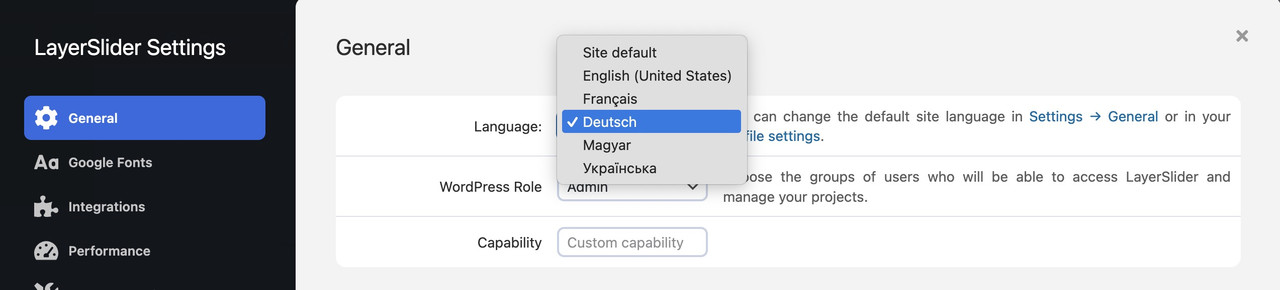
    then you find your language in the drop down.:

    a reload of the page will then switch to your lang files

    i inserted in that drop-down list my german lang option:

    i only tested it with some of the translations – f.e.:

    jodys1976
    Participant

    Hi, I am writing because I am unable to get my favicon to appear in Google search results (SERP), although it is correctly displayed on the browser tabs. Can you help me please?

    I have already thoroughly searched the forum and followed all the suggestions provided in previous threads (such as #1486419, #1486479, and #1486399), but the issue persists.

    Here is a detailed list of what I have already done:

    Format & Conversion: I have converted the favicon from PNG to a proper .ico file using recommended tools (like favicon.io).

    Root Directory: I have manually uploaded the favicon.ico file to the root directory of my server via FTP, as suggested by Mike, to ensure Google Bot can find it outside the /wp-content/uploads/ path.

    Theme Settings: The favicon is correctly set in both Enfold Theme Options and via Appearance > Customize > Site Identity.

    Code Injection: I have tried adding the manual tags to the functions.php of my child theme using the wp_head action to force the icon declaration: <link rel=”icon” href=”https://mysite.com/favicon.ico&#8221; type=”image/x-icon”>

    Caching: I have cleared all server-side caches (Litespeed/Plugin), and I have requested a new crawl via Google Search Console.

    Visibility: The favicon is visible when logged in, in incognito mode, and on various browsers, but Google still shows the default globe icon in search results.

    Despite these steps, which have worked for other users in the past, my site has not updated in the SERP for several weeks.

    Can i ask you if there is any Enfold-specific setting or a conflict in the header output that might be preventing Google Bot from correctly indexing the icon? (i heve the last updated theme and worpress).

    Best regards,

    Stefano

    Subject: Clarification about WordPress error alerts and admin email

    Hi Kriesi Support Team,

    I’d like to clarify one important detail regarding the technical error alerts.

    I personally do not receive any WordPress error notification emails. The WordPress administrator email address is configured to use the site owner’s GreenGeeks account, which was set up by the previous web developer before I became involved. My email was never added to receive system alerts.

    Because of this, I can only know whether the error is still occurring when the site owner receives a WordPress alert email and forwards it to me. If no alert is forwarded, I have no direct confirmation from WordPress itself.

    After my last changes yesterday (removing the previously generated Child Theme and uploading the original Enfold Child from Kriesi), both the staging site and the live site are still working correctly, and I have not been informed of any new alerts by the client so far. However, I cannot independently confirm whether WordPress has completely stopped sending them. I wanted to explain this limitation clearly so you have the full context.

    Question about PHP version upgrade compatibility with Enfold:

    Additionally, I’d like your advice regarding the PHP version. The site is currently running on PHP 7.4.33, and WordPress has been recommending an upgrade for several months now. I understand that PHP 7.4 is no longer receiving security updates, so I agree that an upgrade is necessary.

    My concern is compatibility. Several active plugins list compatibility ranges such as “PHP 5.2.4 or higher” or “PHP 7.4 or higher,” but they do not clearly state support for PHP 8.1, 8.2, or 8.3. Because this site relies heavily on Enfold and its integrations, I want to avoid introducing new issues by upgrading PHP without proper validation.

    Could you please advise:
    1) – Which PHP versions are currently fully supported and tested with the latest Enfold version?
    2) – Whether PHP 8.1 is the safest recommended upgrade path at this time, rather than 8.2 or 8.3?
    3) – If there are any known Enfold-related issues or settings to be aware of before switching PHP versions.

    Hosting limitation regarding PHP version on live and staging sites:

    One additional clarification regarding the hosting environment:
    1) Both the live site and the staging site are hosted under the same GreenGeeks account, and unfortunately, GreenGeeks does not allow PHP versions to be set independently per site in this setup. Any PHP version change applied at the hosting level affects both the live site and the staging site at the same time.

    2) Because of this limitation, I cannot safely test different PHP versions on staging without impacting the live site as well. That’s why it’s especially important for me to confirm in advance which PHP version is recommended and fully compatible with the current Enfold version before making any change.

    If you have a specific PHP version you consider the safest choice for Enfold in this situation, your guidance would be greatly appreciated.
    Thank you for your understanding and support.

    Best regards,
    Claudia

    Subject: Additional context: Child theme creation and plugin warning (possible root cause)

    Hi Kriesi Support Team,
    I want to add an important detail that may help identify the root cause of the fatal error.
    Before creating the current child theme, I first used the original Enfold Child Theme files provided directly on your website. When I activated that official child theme, the site immediately broke and became inaccessible (the website disappeared entirely). Because of that, I had to revert to the parent theme to restore the site.

    After that incident, I created a new Enfold Child theme using the Child Theme Configurator plugin (v2.6.7 by Lilaea Media). Only later did I notice the plugin’s warning stating that some premium themes purchased via ThemeForest may use unsupported options that cannot be fully copied, which can result in errors.

    Because:
    – The official Enfold Child theme also caused a critical failure, and
    – The plugin explicitly warns about compatibility risks with premium themes,
    I now suspect that the issue may be related to how Enfold handles certain internal theme options when a child theme is active, rather than to a specific customization alone.

    NOTE: The technical issue email continues to be received:
    Error Details
    =============
    An error of type E_ERROR was caused in line 223 of the file /home/drisabel/public_html/wp-content/themes/enfold/includes/classes/class-social-media-icons.php. Error message: Uncaught Error: Class ‘avia_font_manager’ not found in /home/drisabel/public_html/wp-content/themes/enfold/includes/classes/class-social-media-icons.php:223
    Stack trace:
    #0 /home/drisabel/public_html/wp-content/themes/enfold/includes/classes/class-social-media-icons.php(259): avia_social_media_icons->build_icon(Array)
    #1 /home/drisabel/public_html/wp-content/themes/enfold/includes/classes/class-social-media-icons.php(288): avia_social_media_icons->html()
    #2 /home/drisabel/public_html/wp-content/themes/enfold/includes/helper-main-menu.php(22): avia_social_media_icons(Array, false)
    #3 /home/drisabel/public_html/wp-includes/template.php(812): require(‘/home/drisabel/…’)
    #4 /home/drisabel/public_html/wp-includes/template.php(745): load_template(‘/home/drisabel/…’, false, Array)
    #5 /home/drisabel/public_html/wp-includes/general-template.php(206): locate_template(Array, true, false, Array)
    #6 /home/drisabel/public_html/wp-content/themes/enfold/header.php(275): get_template_part(‘includes/helper’, ‘main-menu’)
    #

    Please let me know:
    – Whether you recommend recreating the child theme again using the official Enfold child theme files on a clean install, and
    – If there are any known considerations or updated best practices for child themes in recent Enfold versions.

    Thank you for your help.

    Best regards,
    Claudia

    #1492665

    Thanks again, Ismael! Interesting — the temp login isn’t expired, but here’s another one in the PC, also good for a week. I spoke with wp engine support and they troubleshot for about a half hour but couldn’t solve it. They showed me how to look in the inspector > Network > trigger the error > click on the first admin-ajax.php > Response and note how there’s just a “1” (https://snipboard.io/RJ7US6.jpg) as opposed to the html that should show there — they suggested I pass that info on to you in hopes it might provide a clue. I also added another environment in the same account, to test a clean install of Enfold there, and there doesn’t seem to be an issue with that install; no errors on buttons, etc. / functioning normally, if that offers any clue / potential solution. Lmk if you have any other questions.

    #1492644

    Hi,

    Thank you for the details.

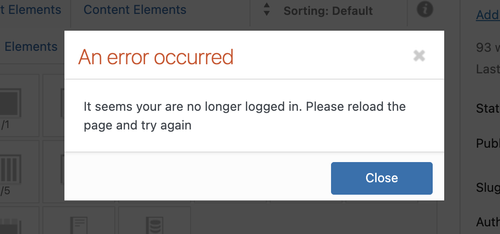
    We reset the WP_MEMORY_LIMIT and WP_MAX_MEMORY_LIMIT to 1024M and it seems to have worked as expected. But when we try to edit an element in the builder, we now receive a “not logged in” error. We are not sure whether the login token has expired or if this is a different issue. Please generate a new login or wtlwp token.

    fl22ht1.md.png

    We are still seeing the same error in the logs.

    PHP Fatal error: Allowed memory size of 536870912 bytes exhausted

    We recommend reaching out to your hosting provider for additional assistance.

    Best regards,
    Ismael

    #1492611

    Thanks Ismael for your precious help, it is ok now!
    For any future use of anyone else, I’ve slightly adapted it. Now it sticks to the right of the logo, and there is a “left arrow” icon instead of the text.

    arrow button
    Here the code to be added to the functions.php of the child theme. The button is visible <780px screens only.

    
    add_action( 'ava_main_header', 'ava_main_header_mod' );
    
    function ava_main_header_mod() {
        ?>
        <div class="ava-go-back-wrapper">
            #
                <svg width="24" height="24" viewBox="0 0 24 24" fill="none" xmlns="http://www.w3.org/2000/svg">
                    <path d="M19 12H5" stroke="currentColor" stroke-width="2" stroke-linecap="round" stroke-linejoin="round"/>
                    <path d="M12 19L5 12L12 5" stroke="currentColor" stroke-width="2" stroke-linecap="round" stroke-linejoin="round"/>
                </svg>
            </a>
        </div>
    
        <style>
            .ava-go-back-wrapper {
                display: none; 
                margin-left: 10px; 
                z-index: 1001;
                align-items: center; 
            }
    
            .ava-go-back-button {
                display: flex;
                align-items: center;
                justify-content: center;
                width: 48px;
                height: 48px;
                padding: 0;
                background-color: transparent; 
                border: none;
                color: #333333;
                text-decoration: none;
                -webkit-tap-highlight-color: transparent;
                transition: opacity 0.2s ease;
            }
    
            .ava-go-back-button:active {
                opacity: 0.5;
            }
            
            .ava-go-back-button svg {
                display: block;
            }
    
            @media only screen and (max-width: 780px) {
                .responsive #top .logo,
                .responsive .logo,
                .logo {
                    display: flex !important; 
                    align-items: center !important;
                    width: auto !important; 
                    float: left !important;
                    overflow: visible !important;
                }
    
                .logo a {
                    display: flex !important;
                    align-items: center;
                }
                
                .ava-go-back-wrapper {
                    display: flex !important;
                }
            }
            
            @media only screen and (max-width: 360px) {
                .ava-go-back-wrapper {
                     margin-left: 5px;
                }
                .ava-go-back-button {
                    width: 40px;
                    height: 40px;
                }
            }
        </style>
    
        <script>
            document.addEventListener('DOMContentLoaded', function() {
                var logo = document.querySelector('.logo');
                var backBtnWrapper = document.querySelector('.ava-go-back-wrapper');
    
                if (logo && backBtnWrapper) {
                    logo.appendChild(backBtnWrapper);
                }
    
                function closeBurgerMenu() {
                    const burgerBtn = document.querySelector('.av-burger-menu-main .av-hamburger.av-js-hamburger');
                    const overlay = document.querySelector('.av-burger-overlay');
                    if (burgerBtn && burgerBtn.classList.contains('is-active')) {
                        burgerBtn.classList.remove('is-active');
                    }
                    if (overlay) {
                        overlay.style.display = 'none';
                        overlay.style.opacity = '0';
                    }
                }
    
                const goBackBtn = document.querySelector('.ava-go-back-button');
                if (goBackBtn) {
                    goBackBtn.addEventListener('click', function(e) {
                        e.preventDefault();
                        e.stopPropagation();
                        
                        closeBurgerMenu();
                        
                        setTimeout(function() {
                            history.back();
                        }, 50);
                    });
                }
            });
        </script>
        <?php
    }
    

    Bye!
    A.-

    #1492586

    Hi,

    Thank you for the update.

    We updated the script in the functions.php file — the page should now be scrollable.

    function remove_slideshow_swipe_script() { ?>
    <script>
    document.addEventListener('DOMContentLoaded', function() {
        if (window.innerWidth <= 768) {
            var slideshow = document.querySelector('.avia-slideshow');
            if (!slideshow) return;
    
            slideshow.style.touchAction = 'pan-y';
    
            let startX = 0;
            let startY = 0;
    
            slideshow.addEventListener('touchstart', function(e) {
                startX = e.touches[0].clientX;
                startY = e.touches[0].clientY;
            }, {passive: true, capture: true});
    
            slideshow.addEventListener('touchmove', function(e) {
                const dx = Math.abs(e.touches[0].clientX - startX);
                const dy = Math.abs(e.touches[0].clientY - startY);
    
                if (dx > dy) {
                    e.preventDefault();
                    e.stopImmediatePropagation();
                }
            }, {passive: false, capture: true});
        }
    });
    </script>
    <?php
    }
    add_action( 'wp_footer', 'remove_slideshow_swipe_script', 99 );


    Best regards,
    Ismael

    carrclaudia
    Participant

    Hello Enfold Support Team,
    I am experiencing a recurring fatal error on a live website (https://www.drisabelbalza.com) that triggers WordPress “Your Site is Experiencing a Technical Issue” emails repeatedly.

    Environment:
    WordPress version: 6.8.3
    Parent theme: Enfold 7.1.3
    Active theme: Enfold Child (version 7.1.3)
    Current plugin: (version )
    PHP version: 7.4.33

    Error Details:
    An error of type E_ERROR was caused in line 223 of the file /home/drisabel/public_html/wp-content/themes/enfold/includes/classes/class-social-media-icons.php. Error message: Uncaught Error: Class ‘avia_font_manager’ not found in /home/drisabel/public_html/wp-content/themes/enfold/includes/classes/class-social-media-icons.php:223

    Stack trace:
    #0 /home/drisabel/public_html/wp-content/themes/enfold/includes/classes/class-social-media-icons.php(259): avia_social_media_icons->build_icon(Array)
    #1 /home/drisabel/public_html/wp-content/themes/enfold/includes/classes/class-social-media-icons.php(288): avia_social_media_icons->html()
    #2 /home/drisabel/public_html/wp-content/themes/enfold/includes/helper-main-menu.php(22): avia_social_media_icons(Array, false)
    #3 /home/drisabel/public_html/wp-includes/template.php(812): require(‘/home/drisabel/…’)
    #4 /home/drisabel/public_html/wp-includes/template.php(745): load_template(‘/home/drisabel/…’, false, Array)
    #5 /home/drisabel/public_html/wp-includes/general-template.php(206): locate_template(Array, true, false, Array)
    #6 /home/drisabel/public_html/wp-content/themes/enfold/header.php(275): get_template_part(‘includes/helper’, ‘main-menu’)
    #

    What I’ve already tried:
    1- Purchased and installed a fresh, original Enfold 7.1.3 download
    2- Verified that only one Enfold parent theme exists in /themes/enfold
    3- Confirmed child theme only contains custom files (no class overrides). It exists in /themes/enfold-child
    4- Switched PHP versions (8.1 → 7.4.33)
    5- Cleared cache and re-uploaded theme via FTP
    Despite this, the error has persisted since August 27, 2025, and continues to send automated WordPress admin emails. The live website https://www.drisabelbalza.com works fine and normally, but my client wants to stop receiving these alert emails from WordPress.

    Questions:
    It appears that avia_font_manager is not being loaded before class-social-media-icons.php is called. Could you please advise:
    – Which file should load avia_font_manager in Enfold 7.1.3? May I need a code snippet somewhere?
    – Whether this indicates a corrupted load order or a missing include
    – If this is a known issue with WordPress 6.8.3
    – I had a long stack trace list when I switched from PHP 7.4.33 to PHP 8.1, and it was worse in PHP 8.3, which is why I downgraded to PHP 7.4.33, where the list is shorter.

    Thank you for your help.
    Best regards,
    Claudia.

    • This topic was modified 4 months, 1 week ago by carrclaudia.
    • This topic was modified 4 months, 1 week ago by carrclaudia.
    • This topic was modified 4 months, 1 week ago by carrclaudia.
    • This topic was modified 4 months, 1 week ago by carrclaudia.
    • This topic was modified 4 months, 1 week ago by carrclaudia.
    • This topic was modified 4 months, 1 week ago by carrclaudia.
    #1492578

    Hi,
    Thanks, I added this script to your child theme functions.php file:

    function remove_slideshow_swipe_script() { ?>
      <script>
    document.addEventListener('DOMContentLoaded', function() {
        if (window.innerWidth <= 768) {
            var slideshow = document.querySelector('.avia-slideshow');
            if (slideshow) {
                slideshow.style.touchAction = 'none';
                
                ['touchstart', 'touchmove', 'touchend'].forEach(function(event) {
                    slideshow.addEventListener(event, function(e) {
                        e.preventDefault();
                        e.stopImmediatePropagation();
                    }, {passive: false, capture: true});
                });
            }
        }
    });
      </script>
      <?php
    }
    add_action( 'wp_footer', 'remove_slideshow_swipe_script', 99 );

    and it is working for my Android device, with the other script still working, as before if you are using a iPhone you may need to clear the history to fully clear the cache.

    Best regards,
    Mike

    #1492575

    Thanks, Rikard, but I increased the memory to wp engine’s max of 512MB, ran another test, and the issue seems to persist. The only things I see in the log since doing that are what look like my two times clearing the wp engine cache (once after increasing the memory to 256 and once after bumping it up to 512 — see below or https://crcamericadev.wpenginepowered.com/wp-content/uploads/crcamericadev-logs-2025-12-16T19_28_03.csv). Any other ideas? I’m including the temp login again in the Private Content field, in case you want to poke around. Thanks again!

    {
    “installName”: “crcamericadev”,
    “environment”: “DEV”,
    “type”: “error”,
    “date”: “2025-12-16T19:24:37.000Z”,
    “severity”: “notice”,
    “client”: “24.24.164.87:0”,
    “message”: “wpe_cache_plugin:info: event=clear-all-cache, referer: https://crcamericadev.wpenginepowered.com/wp-admin/edit.php?post_type=page&#8221;,
    “uuid”: “8b6d00fd-38e3-44d3-903b-9166dbc7f21a”
    }

    {
    “installName”: “crcamericadev”,
    “environment”: “DEV”,
    “type”: “error”,
    “date”: “2025-12-16T19:17:43.000Z”,
    “severity”: “notice”,
    “client”: “24.24.164.87:0”,
    “message”: “wpe_cache_plugin:info: event=clear-all-cache, referer: https://crcamericadev.wpenginepowered.com/wp-admin/media-new.php&#8221;,
    “uuid”: “a746b3bf-7e06-48bd-994c-ce6d04e249d2”
    }

    #1492556

    Thanks, Ismael! It looks like wpengine has an error log in the user portal — I copy/pasted the JSONs for what looked like the most recent three errors below — does that give you the info you need? Here’s the full log, too, if it helps: https://crcamericadev.wpenginepowered.com/wp-content/uploads/crcamericadev-logs-2025-12-16T08_23_26.csv

    {
    “installName”: “crcamericadev”,
    “environment”: “DEV”,
    “type”: “error”,
    “date”: “2025-12-16T07:00:46.000Z”,
    “severity”: “notice”,
    “client”: “49.149.68.94:0”,
    “message”: “auditor:event=profile_update {\”user_id\”:8,\”blog_id\”:1,\”event\”:\”profile_update\”,\”current_user_id\”:8,\”remote_addr\”:\”49.149.68.94\”}, referer: https://crcamericadev.wpenginepowered.com/wp-admin/post.php?post=40933&action=edit&#8221;,
    “uuid”: “363ffd3e-4ddf-4663-99f2-2087ff23cfb1”
    }

    {
    “installName”: “crcamericadev”,
    “environment”: “DEV”,
    “type”: “error”,
    “date”: “2025-12-16T07:00:44.000Z”,
    “severity”: “notice”,
    “client”: “49.149.68.94:0”,
    “message”: “auditor:event=profile_update {\”user_id\”:8,\”blog_id\”:1,\”event\”:\”profile_update\”,\”current_user_id\”:8,\”remote_addr\”:\”49.149.68.94\”}, referer: https://crcamericadev.wpenginepowered.com/wp-admin/post.php?post=40933&action=edit&#8221;,
    “uuid”: “b926ecae-71e8-4fb4-a782-11c298d2ca0d”
    }

    {
    “installName”: “crcamericadev”,
    “environment”: “DEV”,
    “type”: “error”,
    “date”: “2025-12-16T07:00:13.000Z”,
    “severity”: “notice”,
    “client”: “49.149.68.94:0”,
    “message”: “auditor:event=wp_login {\”user_id\”:8,\”blog_id\”:1,\”event\”:\”wp_login\”,\”current_user_id\”:8,\”remote_addr\”:\”49.149.68.94\”}, referer: https://kriesi.at/&#8221;,
    “uuid”: “2748a21e-c9f6-4b3d-a12c-ee78ab39909f”
    }

    #1492555

    Hey Angelo,

    Thank you for the inquiry.

    Try to add this code to the functions.php file to insert a go back button inside the header container.

    
    add_action( 'ava_main_header', 'ava_main_header_mod' );
    function ava_main_header_mod() {
        ?>
        <div class="ava-go-back-wrapper">
            <a href="javascript:history.back();" class="ava-go-back-button">Go Back</a>
        </div>
    
        <style>
            .ava-go-back-wrapper {
                display: none;
                justify-content: center;
                align-items: center;
                padding: 10px 0;
            }
            .ava-go-back-button {
                display: inline-block;
                padding: 8px 16px;
                background-color: #333;
                color: #fff;
                text-decoration: none;
                border-radius: 4px;
                font-size: 14px;
            }
            @media (max-width: 768px) {
                .ava-go-back-wrapper {
                    display: flex;
                }
            }
        </style>
    
        <script>
            function closeBurgerMenu() {
                const burgerBtn = document.querySelector('.av-burger-menu-main .av-hamburger.av-js-hamburger');
                const overlay = document.querySelector('.av-burger-overlay');
                if (burgerBtn && burgerBtn.classList.contains('is-active')) {
                    burgerBtn.classList.remove('is-active');
                }
                if (overlay) {
                    overlay.style.display = 'none';
                    overlay.style.opacity = '0';
                }
            }
    
            document.addEventListener('DOMContentLoaded', function() {
                closeBurgerMenu();
    
                const goBackBtn = document.querySelector('.ava-go-back-button');
                if (goBackBtn) {
                    goBackBtn.addEventListener('click', function(e) {
                        e.stopPropagation();
                        closeBurgerMenu();
                        setTimeout(function() {
                            history.back();
                        }, 50);
                    });
                }
            });
    
            window.addEventListener('pageshow', function(event) {
                if (event.persisted) {
                    closeBurgerMenu();
                }
            });
        </script>
        <?php
    }
    

    Best regards,
    Ismael

    Hey milkrow,
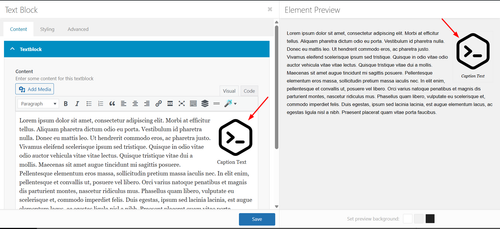
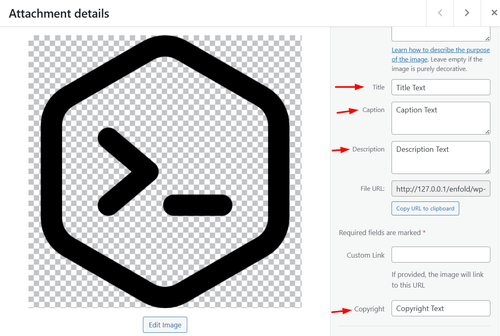
    Thanks for your patience, if I understand correctly you are adding images in the text element in the ALB (advanced layout builder):
    fYB7rrX.md.png
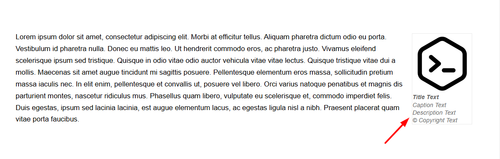
    and instead of just the caption showing below the image, you want caption, description, copyright, and title to show like this:
    fYBExaI.md.png
    In my tests this snippet in your child theme functions.php works:

    add_filter('the_content', 'enfold_add_image_metadata');
    
    function enfold_add_image_metadata($content) {
        // Only process on frontend
        if (is_admin()) {
            return $content;
        }
        
        // Pattern to match images with WordPress attachment IDs
        $pattern = '/<img[^>]+wp-image-(\d+)[^>]*>/i';
        
        preg_match_all($pattern, $content, $matches);
        
        if (!empty($matches[0])) {
            foreach ($matches[0] as $index => $img_tag) {
                $attachment_id = $matches[1][$index];
                
                // Get image metadata
                $title = get_the_title($attachment_id);
                $caption = wp_get_attachment_caption($attachment_id);
                $description = get_post_field('post_content', $attachment_id);
                $copyright = get_post_meta($attachment_id, '_avia_attachment_copyright', true);
                
                // Build metadata HTML
                $metadata_html = '';
                
                if ($title || $caption || $description || $copyright) {
                    $metadata_html .= '<div class="image-metadata" style="line-height: 14px; color: #666;">';
                    
                    if ($title) {
                        $metadata_html .= '<div class="image-title" style="font-weight: bold;">' . esc_html($title) . '</div>';
                    }
                    
                    if ($caption) {
                        $metadata_html .= '<div class="image-caption" style="font-style: italic;">' . esc_html($caption) . '</div>';
                    }
                    
                    if ($description) {
                        $metadata_html .= '<div class="image-description">' . wp_kses_post($description) . '</div>';
                    }
                    
                    if ($copyright) {
                        $metadata_html .= '<div class="image-copyright">© ' . esc_html($copyright) . '</div>';
                    }
                    
                    $metadata_html .= '</div>';
                }
                
                // Replace the image with image + metadata
                if ($metadata_html) {
                    $replacement = $img_tag . $metadata_html;
                    $content = str_replace($img_tag, $replacement, $content);
                }
            }
        }
        
        return $content;
    }
    
    /**
     * Add CSS to hide default WordPress caption text
     * while keeping the caption container styling
     */
    add_action('wp_head', 'enfold_hide_default_caption_text');
    
    function enfold_hide_default_caption_text() {
        ?>
        <style>
            /* Hide the default WordPress caption text inside caption shortcode */
            .wp-caption p {
                display: none !important;
            }
        </style>
        <?php
    }

    In your media library add the text to your image:
    fYBwZjS.md.png

    Best regards,
    Mike

    #1492422
    Grace Donaldson
    Guest

    HI Team,
    I need to update the enfold theme on my website to allow me to update PHP. (I have had the theme on the website now for around 7-8 years
    In order to update the theme on wordpress, I need themeforest username and API key which I don’t have.

    Are you able to assist?
    Thanks!

    #1492371

    In reply to: Enfold Version 3.8

    Hi,
    If you leave the PHP at v7.0 you can update the theme to v7.1.3 and then update PHP. You should not lose access. But please note my previous post that creating a full site backup and using a staging site to test the update would be the best option.
    This way if the staging site fales your live site is still available. We do not expect issues, but as with anything, it is possible.

    Best regards,
    Mike

Viewing 30 results - 91 through 120 (of 16,897 total)