
-
AuthorSearch Results
-
February 1, 2024 at 10:27 am #1432695
Topic: Error after updating to newest version
in forum EnfoldBen_2015
ParticipantHi,
I have updated the the to the newest version but I only saw a white screen. Problem is the following:
WordPress-Version 6.4.3
Aktives Theme: Enfold Child (Version 1.0)
Aktuelles Plugin: (Version )
PHP-Version 8.0.30Fehler-Details
==============
Ein Fehler vom Typ E_ERROR wurde in der Zeile 38 der Datei /www/htdocs/w00afd3e/websiteneu/wp-content/themes/enfold/framework/avia_framework.php verursacht. Fehlermeldung: Uncaught Error: Failed opening required ‘php/inc-autoconfig.php’ (include_path=’.:/usr/share/php:..’) in /www/htdocs/w00afd3e/websiteneu/wp-content/themes/enfold/framework/avia_framework.php:38
Stack trace:
#0 /www/htdocs/w00afd3e/websiteneu/wp-content/themes/enfold/functions.php(247): require_once()
#1 /www/htdocs/w00afd3e/websiteneu/wp-settings.php(611): include(‘/www/htdocs/w00…’)
#2 /www/htdocs/w00afd3e/websiteneu/wp-config.php(118): require_once(‘/www/htdocs/w00…’)
#3 /www/htdocs/w00afd3e/websiteneu/wp-load.php(50): require_once(‘/www/htdocs/w00…’)
#4 /www/htdocs/w00afd3e/websiteneu/wp-admin/admin-ajax.php(22): require_once(‘/www/htdocs/w00…’)
#5 {main}
thrownWhat can I do?
Regards
BenFebruary 1, 2024 at 1:56 am #1432657In reply to: Fatal error with button row
Dettagli dell’errore
Un errore di E_ERROR è stato causato nella linea 876 del file /home/swfpkapi/public_html/wp-content/themes/enfold/config-templatebuilder/avia-shortcodes/buttonrow/buttonrow.php. Messaggio di errore: Uncaught Error: Cannot unset string offsets in /home/swfpkapi/public_html/wp-content/themes/enfold/config-templatebuilder/avia-shortcodes/buttonrow/buttonrow.php:876
Stack trace:
0 /home/swfpkapi/public_html/wp-content/themes/enfold/config-templatebuilder/avia-shortcodes/buttonrow/buttonrow.php(1024): avia_sc_buttonrow->get_element_styles_item(Array)
1 /home/swfpkapi/public_html/wp-includes/shortcodes.php(433): avia_sc_buttonrow->av_buttonrow_item(”, ”, ‘av_buttonrow_it…’)
2 [internal function]: do_shortcode_tag(Array)
3 /home/swfpkapi/public_html/wp-includes/shortcodes.php(273): preg_replace_callback(‘/\[(\[?)(av_but…’, ‘do_shortcode_ta…’, ‘\n[av_butt…’)
4 /home/swfpkapi/public_html/wp-content/themes/enfold/config-templatebuilder/avia-template-builder/php/class-shortcode-helper.php(559): do_shortcode(‘\n[av_butt…’)
5 /home/swfpkapi/public_html/wp-content/themes/enfold/config-templatebuilder/avia-shortcodes/buttonrow/buttonrow.php(998): ShortcodeHelper::avia_remove_autop(‘\n[av_butt…’, true)
6 /home/swfpkapi/public_html/wp-content/themes/enfold/config-templatebuilder/avia-template-builder/php/class-shortcode-template.php(1181): avia_sc_buttonrow->shortcode_handler(Array, ‘\n[av_butt…’, ‘av_buttonrow’, Array)
7 /home/swfpkapi/public_html/wp-includes/shortcodes.php(433): aviaShortcodeTemplate->shortcode_handler_prepare(Array, ‘\n[av_butt…’, ‘av_buttonrow’)
8 [internal function]: do_shortcode_tag(Array)
9 /home/swfpkapi/public_html/wp-includes/shortcodes.php(273): preg_replace_callback(‘/\[(\[?)(av_but…’, ‘do_shortcode_ta…’, ‘[av_textbloc…’)
10 /home/swfpkapi/public_html/wp-content/themes/enfold/config-templatebuilder/avia-template-builder/php/class-shortcode-helper.php(580): do_shortcode(‘[av_textbloc…’)
11 /home/swfpkapi/public_html/wp-content/themes/enfold/config-templatebuilder/avia-shortcodes/columns/columns.php(2072): ShortcodeHelper::avia_apply_autop(‘[av_textbloc…’)
12 /home/swfpkapi/public_html/wp-content/themes/enfold/config-templatebuilder/avia-template-builder/php/class-shortcode-template.php(1181): avia_sc_columns->shortcode_handler(Array, ‘\n[av_textblock …’, ‘av_one_half’, Array)
13 /home/swfpkapi/public_html/wp-includes/shortcodes.php(433): aviaShortcodeTemplate->shortcode_handler_prepare(Array, ‘\n[av_textblock …’, ‘av_one_half’)
14 [internal function]: do_shortcode_tag(Array)
15 /home/swfpkapi/public_html/wp-includes/shortcodes.php(273): preg_replace_callback(‘/\[(\[?)(av_but…’, ‘do_shortcode_ta…’, ‘\n[av_hr class=’…’)
16 /home/swfpkapi/public_html/wp-content/themes/enfold/config-templatebuilder/avia-template-builder/php/class-shortcode-helper.php(559): do_shortcode(‘\n[av_hr class=’…’)
17 /home/swfpkapi/public_html/wp-content/themes/enfold/config-templatebuilder/avia-shortcodes/section/section.php(1466): ShortcodeHelper::avia_remove_autop(‘\n[av_hr class=’…’, true)
18 /home/swfpkapi/public_html/wp-content/themes/enfold/config-templatebuilder/avia-template-builder/php/class-shortcode-template.php(1181): avia_sc_section->shortcode_handler(Array, ‘\n[av_hr class=’…’, ‘av_section’, Array)
19 /home/swfpkapi/public_html/wp-includes/shortcodes.php(433): aviaShortcodeTemplate->shortcode_handler_prepare(Array, ‘\n[av_hr class=’…’, ‘av_section’)
20 [internal function]: do_shortcode_tag(Array)
21 /home/swfpkapi/public_html/wp-includes/shortcodes.php(273): preg_replace_callback(‘/\[(\[?)(av_but…’, ‘do_shortcode_ta…’, ‘[av_layerslider…’)
22 /home/swfpkapi/public_html/wp-includes/class-wp-hook.php(324): do_shortcode(‘[av_layerslider…’)
23 /home/swfpkapi/public_html/wp-includes/plugin.php(205): WP_Hook->apply_filters(‘[av_layerslider…’, Array)
24 /home/swfpkapi/public_html/wp-includes/rest-api/endpoints/class-wp-rest-posts-controller.php(1863): apply_filters(‘the_content’, ‘February 1, 2024 at 1:48 am #1432656In reply to: Fatal error with button row
Hello,
I followed your instructions, changed the PHP version to 8.3 and corrected the homepage URL from http to https, clearly the problem remained unchanged. Below is the error log encountered:[Thu Feb 01 01:43:48.339618 2024] [:error] [pid 1231808:tid 47169805854464] [remote 79.49.222.78:6391] PHP Warning: Trying to access array offset on false in /home/swfpkapi/public_html/wp-includes/class-wp-recovery-mode-email-service.php on line 368, referer: https://www.romacittaperta.com/wp-admin/edit.php?post_type=page
[Thu Feb 01 01:43:48.339450 2024] [:error] [pid 1231808:tid 47169805854464] [remote 79.49.222.78:6391] PHP Warning: Trying to access array offset on false in /home/swfpkapi/public_html/wp-includes/class-wp-recovery-mode-email-service.php on line 367, referer: https://www.romacittaperta.com/wp-admin/edit.php?post_type=page
[Thu Feb 01 01:43:48.308957 2024] [:error] [pid 1231808:tid 47169805854464] [remote 79.49.222.78:6391] thrown in /home/swfpkapi/public_html/wp-content/themes/enfold/config-templatebuilder/avia-shortcodes/buttonrow/buttonrow.php on line 876, referer: https://www.romacittaperta.com/wp-admin/edit.php?post_type=page
[Thu Feb 01 01:43:48.308820 2024] [:error] [pid 1231808:tid 47169805854464] [remote 79.49.222.78:6391] #33 /home/swfpkapi/public_html/wp-admin/post.php(187): require(‘/home/swfpkapi/…’), referer: https://www.romacittaperta.com/wp-admin/edit.php?post_type=page
[Thu Feb 01 01:43:48.308744 2024] [:error] [pid 1231808:tid 47169805854464] [remote 79.49.222.78:6391] #32 /home/swfpkapi/public_html/wp-admin/edit-form-blocks.php(77): block_editor_rest_api_preload(), referer: https://www.romacittaperta.com/wp-admin/edit.php?post_type=page
[Thu Feb 01 01:43:48.308657 2024] [:error] [pid 1231808:tid 47169805854464] [remote 79.49.222.78:6391] #31 /home/swfpkapi/public_html/wp-includes/block-editor.php(750): array_reduce(), referer: https://www.romacittaperta.com/wp-admin/edit.php?post_type=page
[Thu Feb 01 01:43:48.308530 2024] [:error] [pid 1231808:tid 47169805854464] [remote 79.49.222.78:6391] #29 /home/swfpkapi/public_html/wp-includes/rest-api.php(2918): rest_do_request(), referer: https://www.romacittaperta.com/wp-admin/edit.php?post_type=page
[Thu Feb 01 01:43:48.308450 2024] [:error] [pid 1231808:tid 47169805854464] [remote 79.49.222.78:6391] #28 /home/swfpkapi/public_html/wp-includes/rest-api.php(551): WP_REST_Server->dispatch(), referer: https://www.romacittaperta.com/wp-admin/edit.php?post_type=page
[Thu Feb 01 01:43:48.308370 2024] [:error] [pid 1231808:tid 47169805854464] [remote 79.49.222.78:6391] #27 /home/swfpkapi/public_html/wp-includes/rest-api/class-wp-rest-server.php(1041): WP_REST_Server->respond_to_request(), referer: https://www.romacittaperta.com/wp-admin/edit.php?post_type=page
[Thu Feb 01 01:43:48.308260 2024] [:error] [pid 1231808:tid 47169805854464] [remote 79.49.222.78:6391] #26 /home/swfpkapi/public_html/wp-includes/rest-api/class-wp-rest-server.php(1193): WP_REST_Posts_Controller->get_item(), referer: https://www.romacittaperta.com/wp-admin/edit.php?post_type=page
[Thu Feb 01 01:43:48.308153 2024] [:error] [pid 1231808:tid 47169805854464] [remote 79.49.222.78:6391] #25 /home/swfpkapi/public_html/wp-includes/rest-api/endpoints/class-wp-rest-posts-controller.php(569): WP_REST_Posts_Controller->prepare_item_for_response(), referer: https://www.romacittaperta.com/wp-admin/edit.php?post_type=page
[Thu Feb 01 01:43:48.308015 2024] [:error] [pid 1231808:tid 47169805854464] [remote 79.49.222.78:6391] #24 /home/swfpkapi/public_html/wp-includes/rest-api/endpoints/class-wp-rest-posts-controller.php(1863): apply_filters(), referer: https://www.romacittaperta.com/wp-admin/edit.php?post_type=page
[Thu Feb 01 01:43:48.307910 2024] [:error] [pid 1231808:tid 47169805854464] [remote 79.49.222.78:6391] #23 /home/swfpkapi/public_html/wp-includes/plugin.php(205): WP_Hook->apply_filters(), referer: https://www.romacittaperta.com/wp-admin/edit.php?post_type=page
[Thu Feb 01 01:43:48.307834 2024] [:error] [pid 1231808:tid 47169805854464] [remote 79.49.222.78:6391] #22 /home/swfpkapi/public_html/wp-includes/class-wp-hook.php(324): do_shortcode(), referer: https://www.romacittaperta.com/wp-admin/edit.php?post_type=page
[Thu Feb 01 01:43:48.307761 2024] [:error] [pid 1231808:tid 47169805854464] [remote 79.49.222.78:6391] #21 /home/swfpkapi/public_html/wp-includes/shortcodes.php(273): preg_replace_callback(), referer: https://www.romacittaperta.com/wp-admin/edit.php?post_type=page
[Thu Feb 01 01:43:48.307641 2024] [:error] [pid 1231808:tid 47169805854464] [remote 79.49.222.78:6391] #19 /home/swfpkapi/public_html/wp-includes/shortcodes.php(433): aviaShortcodeTemplate->shortcode_handler_prepare(), referer: https://www.romacittaperta.com/wp-admin/edit.php?post_type=page
[Thu Feb 01 01:43:48.307535 2024] [:error] [pid 1231808:tid 47169805854464] [remote 79.49.222.78:6391] #18 /home/swfpkapi/public_html/wp-content/themes/enfold/config-templatebuilder/avia-template-builder/php/class-shortcode-template.php(1181): avia_sc_section->shortcode_handler(), referer: https://www.romacittaperta.com/wp-admin/edit.php?post_type=page
[Thu Feb 01 01:43:48.307358 2024] [:error] [pid 1231808:tid 47169805854464] [remote 79.49.222.78:6391] #17 /home/swfpkapi/public_html/wp-content/themes/enfold/config-templatebuilder/avia-shortcodes/section/section.php(1466): ShortcodeHelper::avia_remove_autop(), referer: https://www.romacittaperta.com/wp-admin/edit.php?post_type=page
[Thu Feb 01 01:43:48.307215 2024] [:error] [pid 1231808:tid 47169805854464] [remote 79.49.222.78:6391] #16 /home/swfpkapi/public_html/wp-content/themes/enfold/config-templatebuilder/avia-template-builder/php/class-shortcode-helper.php(559): do_shortcode(), referer: https://www.romacittaperta.com/wp-admin/edit.php?post_type=page
[Thu Feb 01 01:43:48.307081 2024] [:error] [pid 1231808:tid 47169805854464] [remote 79.49.222.78:6391] #15 /home/swfpkapi/public_html/wp-includes/shortcodes.php(273): preg_replace_callback(), referer: https://www.romacittaperta.com/wp-admin/edit.php?post_type=page
[Thu Feb 01 01:43:48.306962 2024] [:error] [pid 1231808:tid 47169805854464] [remote 79.49.222.78:6391] #13 /home/swfpkapi/public_html/wp-includes/shortcodes.php(433): aviaShortcodeTemplate->shortcode_handler_prepare(), referer: https://www.romacittaperta.com/wp-admin/edit.php?post_type=page
[Thu Feb 01 01:43:48.306854 2024] [:error] [pid 1231808:tid 47169805854464] [remote 79.49.222.78:6391] #12 /home/swfpkapi/public_html/wp-content/themes/enfold/config-templatebuilder/avia-template-builder/php/class-shortcode-template.php(1181): avia_sc_columns->shortcode_handler(), referer: https://www.romacittaperta.com/wp-admin/edit.php?post_type=page
[Thu Feb 01 01:43:48.306694 2024] [:error] [pid 1231808:tid 47169805854464] [remote 79.49.222.78:6391] #11 /home/swfpkapi/public_html/wp-content/themes/enfold/config-templatebuilder/avia-shortcodes/columns/columns.php(2072): ShortcodeHelper::avia_apply_autop(), referer: https://www.romacittaperta.com/wp-admin/edit.php?post_type=page
[Thu Feb 01 01:43:48.306554 2024] [:error] [pid 1231808:tid 47169805854464] [remote 79.49.222.78:6391] #10 /home/swfpkapi/public_html/wp-content/themes/enfold/config-templatebuilder/avia-template-builder/php/class-shortcode-helper.php(580): do_shortcode(), referer: https://www.romacittaperta.com/wp-admin/edit.php?post_type=page
[Thu Feb 01 01:43:48.306414 2024] [:error] [pid 1231808:tid 47169805854464] [remote 79.49.222.78:6391] #9 /home/swfpkapi/public_html/wp-includes/shortcodes.php(273): preg_replace_callback(), referer: https://www.romacittaperta.com/wp-admin/edit.php?post_type=page
[Thu Feb 01 01:43:48.306296 2024] [:error] [pid 1231808:tid 47169805854464] [remote 79.49.222.78:6391] #7 /home/swfpkapi/public_html/wp-includes/shortcodes.php(433): aviaShortcodeTemplate->shortcode_handler_prepare(), referer: https://www.romacittaperta.com/wp-admin/edit.php?post_type=page
[Thu Feb 01 01:43:48.306195 2024] [:error] [pid 1231808:tid 47169805854464] [remote 79.49.222.78:6391] #6 /home/swfpkapi/public_html/wp-content/themes/enfold/config-templatebuilder/avia-template-builder/php/class-shortcode-template.php(1181): avia_sc_buttonrow->shortcode_handler(), referer: https://www.romacittaperta.com/wp-admin/edit.php?post_type=page
[Thu Feb 01 01:43:48.306037 2024] [:error] [pid 1231808:tid 47169805854464] [remote 79.49.222.78:6391] #5 /home/swfpkapi/public_html/wp-content/themes/enfold/config-templatebuilder/avia-shortcodes/buttonrow/buttonrow.php(998): ShortcodeHelper::avia_remove_autop(), referer: https://www.romacittaperta.com/wp-admin/edit.php?post_type=page
[Thu Feb 01 01:43:48.305896 2024] [:error] [pid 1231808:tid 47169805854464] [remote 79.49.222.78:6391] #4 /home/swfpkapi/public_html/wp-content/themes/enfold/config-templatebuilder/avia-template-builder/php/class-shortcode-helper.php(559): do_shortcode(), referer: https://www.romacittaperta.com/wp-admin/edit.php?post_type=page
[Thu Feb 01 01:43:48.305762 2024] [:error] [pid 1231808:tid 47169805854464] [remote 79.49.222.78:6391] #3 /home/swfpkapi/public_html/wp-includes/shortcodes.php(273): preg_replace_callback(), referer: https://www.romacittaperta.com/wp-admin/edit.php?post_type=page
[Thu Feb 01 01:43:48.305629 2024] [:error] [pid 1231808:tid 47169805854464] [remote 79.49.222.78:6391] #1 /home/swfpkapi/public_html/wp-includes/shortcodes.php(433): avia_sc_buttonrow->av_buttonrow_item(), referer: https://www.romacittaperta.com/wp-admin/edit.php?post_type=page
[Thu Feb 01 01:43:48.305535 2024] [:error] [pid 1231808:tid 47169805854464] [remote 79.49.222.78:6391] #0 /home/swfpkapi/public_html/wp-content/themes/enfold/config-templatebuilder/avia-shortcodes/buttonrow/buttonrow.php(1024): avia_sc_buttonrow->get_element_styles_item(), referer: https://www.romacittaperta.com/wp-admin/edit.php?post_type=page
[Thu Feb 01 01:43:48.305323 2024] [:error] [pid 1231808:tid 47169805854464] [remote 79.49.222.78:6391] PHP Fatal error: Uncaught Error: Cannot unset string offsets in /home/swfpkapi/public_html/wp-content/themes/enfold/config-templatebuilder/avia-shortcodes/buttonrow/buttonrow.php:876, referer: https://www.romacittaperta.com/wp-admin/edit.php?post_type=page
[Thu Feb 01 00:10:18.017888 2024] [security2:error] [pid 1075987:tid 47169793246976] [remote 79.49.222.78:4988] [client 79.49.222.78] ModSecurity: Warning. Match of “rx \\\\/wc-api\\\\/KCO_WC_Validation\\\\/” against “REQUEST_URI” required. [file “/etc/apache2/conf.d/modsec_vendor_configs/imunify360-full-apache/005_i360_4_custom.conf”] [line “33”] [id “77140164”] [msg “IM360 WAF: PHP Injection Low value||T:APACHE||SC:/home/swfpkapi/public_html/wp-admin/admin-ajax.php”] [severity “DEBUG”] [tag “service_im360”] [hostname “www.romacittaperta.com”] [uri “/wp-admin/admin-ajax.php”] [unique_id “ZbrTVQtseN1D-0b6HemS_wAC1xA”], referer: https://www.romacittaperta.com/wp-admin/post.php?post=3&action=editThanks for your support
AndreaJanuary 31, 2024 at 5:59 pm #1432632@Guenni007
I put the functions code into the child functions.php and the css into quick css (I removed the code that I had gotten earlier in this thread).I can see the Make and Appointment text, but there’s no button around it, and I still get the overlay with the curved arrow indicating that the image is linked. And to get the caption/button text at all, I still have to hover over each slider.
I’m switching back for now just because of the overlay thing.
January 30, 2024 at 10:24 pm #1432549In reply to: Social Media Icons won’t show on Mobile Menu
@Guenni07, this is weird! I saw them when I posted this but now they are gone. Quick CSS code is there, so is the functions.php file.
January 30, 2024 at 7:00 pm #1432523OOHHH! Ok, I wasn’t sure if you were just showing the possibilities or actually giving the code! And wasn’t sure where to put which code.
Question though: The first window of data looks far more complex than what is ususally in the Quick CSS box . . . am I supposed to drop that into another file via editor (like functions.php or stylesheet.something)?
Thank you again
I’ll give it a go when I’m certain where to put it (I’ve broken my site putting stuff in the wrong place before),
JonJanuary 29, 2024 at 9:04 am #1432350In reply to: Social Media Icons won’t show on Mobile Menu
Hi,
Thank you for the update.
You should not copy the entire functions.php file from the parent theme. Only copy the script that @Guenni007 provided above. Please try again, and make sure that you copy the code directly from this forum. Also, make sure that at the start of the functions.php file, you have this opening tag:
<?phpThe complete functions.php file would be:
<?php

function ava_custom_script_mod_social(){
?>
<script>
(function($){
  $('#header').one('click', '.av-main-nav-wrap', function() {
      var isMobile  = $('.av-burger-menu-main').css('display'),
      isHeading = "Social Bookmarks",
      social    = $('#header_main .social_bookmarks').clone(true).addClass('sub-menu'),
      mobileMenu  = $('.av-burger-overlay');

      mobileMenu.find('#av-burger-menu-ul').append('<li class="only-burger menu-item-social av-active-burger-items"><a itemprop="url" alt="Social Bookmarks" style="" href="#"><span class="avia-bullet"></span><span class="avia-menu-text">'+isHeading+'</span><span class="avia-menu-fx"><span class="avia-arrow-wrap"><span class="avia-arrow"></span></span></span></a></li>');

      if( social.length ){
        mobileMenu.find('.only-burger.menu-item-social').append(social);
      }
    });

    var htmlString   = $('#socket .social_bookmarks').clone().find('li a'),
    socialString = [];

    htmlString.each(function() {
      var socialClass = $(this).parent('li').attr('class'),
      socialItems = $(this).wrap('<li class="'+ socialClass + ' menu-item menu-item-avia-special menu-social"></li>').parent().unwrap();
      socialString.push(socialItems);
    });
    var socials = socialString.reverse();

    $(socials).each(function() {
      $(this).appendTo('#avia-menu');
    });

    $('#avia-menu .menu-social').css('float', 'right');
})(jQuery);
</script>
<?php
}
add_action('wp_footer', 'ava_custom_script_mod_social');
Best regards,
IsmaelJanuary 29, 2024 at 4:46 am #1432328In reply to: Social Media Icons won’t show on Mobile Menu
Thank you for this. When I went to paste the code you provided into my functions.php, I realized I do not have one in my child theme. Here is what I tried:
-Creating a new blank file in my child theme folder called functions.php, pasting in the code you gave me and saving.
-Copying my functions.php file from Enfold into child theme folder, pasting the code you gave me and saving.Both options break the site and return the following error:
Fatal error: Uncaught Error: Failed opening required 'config-wpml/config.php' (include_path='.::/home/dh_aebmdw/tonyreviewsthings.com/wp-content/plugins/wp-appbox/inc/phpQuery/:/home/dh_aebmdw/tonyreviewsthings.com/wp-content/plugins/wp-appbox/inc/phpQuery/plugins/')
in /home/dh_aebmdw/tonyreviewsthings.com/wp-content/themes/enfold-child/functions.php on line 95

Call stack:

include()
wp-settings.php:611
require_once()
wp-config.php:98
require_once()
wp-load.php:50
require_once()
wp-blog-header.php:13
require()
index.php:17
January 29, 2024 at 1:50 am #1432325Topic: Fatal Error when updating theme version
in forum Enfoldagolden85
ParticipantI am running an older version 5.4.1.
When updating to 5.6.10 I get the error below:
Fatal error: Uncaught Error: Class “aviaBuilder\base\aviaElementStylingResponsive” not found in /sitepath/wp-content/themes/enfold/config-templatebuilder/avia-template-builder/php/class-element-styling.php:14 Stack trace: #0 /sitepath/wp-content/themes/enfold/config-templatebuilder/avia-template-builder/php/class-template-builder.php(682): require_once() #1 /sitepath/wp-includes/class-wp-hook.php(324): AviaBuilder->loadLibraries(”) #2 /sitepath/wp-includes/class-wp-hook.php(348): WP_Hook->apply_filters(NULL, Array) #3 /sitepath/wp-includes/plugin.php(517): WP_Hook->do_action(Array) #4 /sitepath/wp-settings.php(643): do_action(‘init’) #5 /sitepath/wp-config.php(103): require_once(‘/www/sitepath…’) #6 /sitepath/wp-load.php(50): require_once(‘/www/sitepath…’) #7 /sitepath/wp-admin/admin.php(34): require_once(‘/www/sitepath…’) #8 /sitepath/wp-admin/plugins.php(10): require_once(‘/www/sitepath…’) #9 {main} thrown in /sitepath/wp-content/themes/enfold/config-templatebuilder/avia-template-builder/php/class-element-styling.php on line 14Any idea what I am doing wrong?
January 28, 2024 at 10:21 pm #1432311In reply to: Problem with enfold web site
Hey Vladimir,
I see the site is using Enfold v4.5, this is not PHP v8.3 compatible.
You will need to update the v5.6.10 to update your version of Enfold you will need to download the latest installable WP version from your Theme Forest account and upload it to your WordPress ▸ Appearance ▸ Themes ▸ Add Themes ▸ Add New

after you choose the zip file and click install, you will see a This theme is already installed message because you are updating, you can continue

then you will see the Theme updated successfully message.

If you can not login to the Theme Forest account with the update files then you will need to purchase again and create a account that you can access.Best regards,
MikeJanuary 28, 2024 at 7:03 pm #1432292I have some questions and observations about why my Footer page is not showing up anymore.
1) Have a Footer page; it used to show up with no problem.
2) I am using a child theme.
3) I replaced the footer.php and header.php files in my child theme with the latest from the Enfold parent theme. (still, no footer showing). I made no edits to the footer.php or header.php files currently in my Child Theme. They are exactly what is used for the parent Enfold theme.
4) On my Footer page, I have the Footer setting on the Enfold sidebar: “Default Layout set in Enfold Child > Footer.”
5) On my Footer page, in the page editor, there is a message in an orange box: “This page is currently selected to be displayed as footer. (Set in Enfold » Footer). (Change)
Therefore it cannot be accessed directly by the general public in your frontend. (Logged in users who are able to edit this page can still see it)”
6) I want the Footer page to be the footer for ALL my pages and posts. That used to work fine.
7) In my Enfold Child Theme Options, accessed via my WP Dashboard, I have the following settings: Default Footer & Socket Settings > “Select a page to replace both the footer and socket”, below that under Select Page > “Footer page” (the actual name of the Footer page I created in the Advanced Layout Builder).
8) Nothing shows up at the bottom of the web page, no socket, no footer. This is for a page where I say to use “Default Layout set in Enfold Child > Footer.”
9) For that same page, to test things, I then set the Footer > “Use selected page to display footer and socket”. I then get my copyright statement and the “Enfold Theme by Kriesi”
( BTW, I want to not show the “Enfold Theme by Kriesi”, it used to not show up with my old Child Theme footer.php)It seems the Enfold ability to use a dedicated Footer page is no longer working. I started with a clean slate as far as my child theme footer.php and header.php.
I am noticing a lot of other Enfold users also recently having this problem.
Can someone please explain, or better yet, post what the footer.php contents are supposed to be for the footer page to show up? It appears like the footer.php from the current parent Enfold theme does not work as it stands now.
Although I have shared my login information, my site is locked down behind a firewall, and not so easy for others to get the footer.php or WP admin page.
Is there a fix for the footer.php that you can share with us having this issue, please?
January 28, 2024 at 6:27 pm #1432287and by the way – Enfold has a no compression level on those recalculated images – that will cause some unnecessary big file-sizes f.e. it might happen that the big sizes 1500×630 and 1500×430 are bigger in file-size than the uploaded original!
screenshot from enfold default setting:
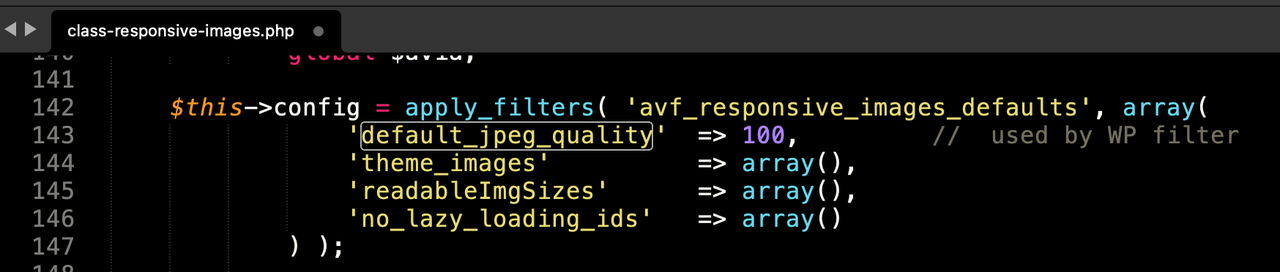
so after erasing some image-sizes – and before recalculating the preserved image-sizes – put this snippet to your child-theme functions.php (change the 55 to what you like to have):
add_filter("avf_jpeg_quality", "avf_set_quality_mod", 9999, 1);
add_filter("avf_wp_editor_set_quality", "avf_set_quality_mod", 9999, 1);
function avf_set_quality_mod($quality) { $quality = 55; return $quality;}
January 28, 2024 at 5:01 pm #1432270In reply to: Social Media Icons won’t show on Mobile Menu
put this to your child-theme functions.php:
function ava_custom_script_mod_social(){
?>
<script>
(function($){
  $('#header').one('click', '.av-main-nav-wrap', function() {
      var isMobile  = $('.av-burger-menu-main').css('display'),
      isHeading = "Social Bookmarks",
      social    = $('#header_main .social_bookmarks').clone(true).addClass('sub-menu'),
      mobileMenu  = $('.av-burger-overlay');

      mobileMenu.find('#av-burger-menu-ul').append('<li class="only-burger menu-item-social av-active-burger-items"><a itemprop="url" alt="Social Bookmarks" style="" href="#"><span class="avia-bullet"></span><span class="avia-menu-text">'+isHeading+'</span><span class="avia-menu-fx"><span class="avia-arrow-wrap"><span class="avia-arrow"></span></span></span></a></li>');

      if( social.length ){
        mobileMenu.find('.only-burger.menu-item-social').append(social);
      }
    });

    var htmlString   = $('#socket .social_bookmarks').clone().find('li a'),
    socialString = [];

    htmlString.each(function() {
      var socialClass = $(this).parent('li').attr('class'),
      socialItems = $(this).wrap('<li class="'+ socialClass + ' menu-item menu-item-avia-special menu-social"></li>').parent().unwrap();
      socialString.push(socialItems);
    });
    var socials = socialString.reverse();

    $(socials).each(function() {
      $(this).appendTo('#avia-menu');
    });

    $('#avia-menu .menu-social').css('float', 'right');
})(jQuery);
</script>
<?php
}
add_action('wp_footer', 'ava_custom_script_mod_social');
if you do not like to have a heading on those bookmarks
replace that one line in the snippet above:isHeading = " ",then this to your quick css:
#av-burger-menu-ul .menu-item-social > a {
  pointer-events: none;
  margin-bottom: 10px;
}

#av-burger-menu-ul .menu-item-social a .avia-menu-text {
  font-style: italic;
}

.html_av-overlay-side-classic #top .av-burger-overlay li.menu-item-social a {
  border: none !important
}

.responsive #top #av-burger-menu-ul .social_bookmarks.sub-menu {
  margin-left: 30px;
  overflow: visible;
  float: left !important;
  display: block !important;
  height: auto
}

#av-burger-menu-ul .social_bookmarks.sub-menu li {
  display: block;
  margin: 3px 15px;
  float: left;
}

#av-burger-menu-ul .social_bookmarks.sub-menu li a {
  padding: 10px !important;
  display: table-cell !important;
  float: none !important;
  border-radius: 0 !important;
}

#av-burger-menu-ul .social_bookmarks.sub-menu li a:before {
  position: relative;
  font-size: 1.8em;
  top: 2px !important;
}

#top #wrap_all #av-burger-menu-ul .av-social-link-facebook a { padding: 10px 13px !important;}
#top #wrap_all #av-burger-menu-ul .av-social-link-facebook:hover  a{color:#fff; background-color:#37589b!important; }
#top #wrap_all #av-burger-menu-ul .av-social-link-instagram:hover a{color:#fff; background-color:#a67658!important; }
#top #wrap_all #av-burger-menu-ul .av-social-link-youtube:hover a{color:#fff; background-color:#a72b1d!important; }
if you do not want to have the burger nav horizontally centered :
#top #av-burger-menu-ul {
  vertical-align: top !important;
  padding-top: 150px !important;
}
result should be:
 January 27, 2024 at 4:52 pm #1432222
Hi,
Please review the functions.php file around line 296 it shows the 12 image sizes that the theme creates and the description for each:$avia_config['imgSize']['widget'] = array( 'width' => 36, 'height' => 36 ); // small preview pics eg sidebar news $avia_config['imgSize']['square'] = array( 'width' => 180, 'height' => 180 ); // small image for blogs $avia_config['imgSize']['featured'] = array( 'width' => 1500, 'height' => 430 ); // images for fullsize pages and fullsize slider $avia_config['imgSize']['featured_large'] = array( 'width' => 1500, 'height' => 630 ); // images for fullsize pages and fullsize slider $avia_config['imgSize']['extra_large'] = array( 'width' => 1500, 'height' => 1500 , 'crop' => false ); // images for fullscrren slider $avia_config['imgSize']['portfolio'] = array( 'width' => 495, 'height' => 400 ); // images for portfolio entries (2,3 column) $avia_config['imgSize']['portfolio_small'] = array( 'width' => 260, 'height' => 185 ); // images for portfolio 4 columns $avia_config['imgSize']['gallery'] = array( 'width' => 845, 'height' => 684 ); // images for portfolio entries (2,3 column) $avia_config['imgSize']['magazine'] = array( 'width' => 710, 'height' => 375 ); // images for magazines $avia_config['imgSize']['masonry'] = array( 'width' => 705, 'height' => 705 , 'crop' => false ); // images for fullscreen masonry $avia_config['imgSize']['entry_with_sidebar'] = array( 'width' => 845, 'height' => 321 ); // big images for blog and page entries $avia_config['imgSize']['entry_without_sidebar']= array( 'width' => 1210, 'height' => 423 ); // images for fullsize pages and fullsize sliderso depending on the elements that you are using you can decide to remove some of these, if you which.
WordPress adds 4 other sizes, small, medium, medium_large, large, and other plugins may add other sizes, such as woocommerce.
Removing these sizes will depend on your site layout and the devices that people use, you will need to test and decide if you need these sizes. Removing some sizes will make your site use larger images than needed which could slow down your loading time, or on very large screens some of your images may seem to be blurry because a smaller image is used. So there is no quick answer, you will just need to test.
You may also note that the thumbnails that WordPress creates may be larger than the original, so 30k of images might be over 9 gigs, here is a easy way to compress 30k of images down to under 900 mb without a plugin and save a lot of space.Best regards,
MikeJanuary 24, 2024 at 7:14 am #1431844In reply to: submenu sticky on mobile
Hi,
@Guenni007: Yes, the script should work regardless of the burger menu settings. You may need to add a few more conditions if you need to prevent the submenu from sticking when the burger menu overlay is active.function ava_custom_sticky_sub_menu() { ?> <script> (function($){ var width = $(window).width(); var $stickyTop = $('#sub_menu1'); if (width <= 767) { $stickyTop.waypoint(function(direction) { if (direction === 'down') { $stickyTop.addClass('sticky-top'); } if (direction === 'up' || $('.av-burger-overlay').is(':visible')) { $stickyTop.removeClass('sticky-top'); } }, { offset: '0%' }); } })(jQuery); </script> <?php } add_action( 'wp_footer', 'ava_custom_sticky_sub_menu', 99 );Best regards,
IsmaelJanuary 23, 2024 at 7:57 am #1431751Topic: Image to flip
in forum EnfoldCreateve_Solutions
ParticipantHey,
I only want one image flipping by mouse hover and then text on the back side. The problem is, that the image here doesn’t fill the whole table…How can I make it, that the image is on the full right side?
https://p654165.mittwaldserver.info/index.php/our-clinic/about/?preview_id=950&preview_nonce=cb8f796753&preview=true
Thanks a lot.
Best regards,
EveJanuary 23, 2024 at 5:26 am #1431737In reply to: submenu sticky on mobile
Hi,
Thank you for the screenshot.
We don’t get any errors when we add the code in the functions.php file. Please revert the changes, re-open the functions.php file or refresh the dashboard, then make sure to copy the code directly from forum before pasting it to the functions.php file.
function custom_sticky_sub_menu()
{ ?>
    <script>
  (function($){
    var width = $(window).width();
    var $stickyTop = $('#sub_menu1');
    if (width <= 767) {
        $stickyTop.waypoint(function(direction) {
            if (direction === 'down') {
                $stickyTop.addClass('sticky-top');
            }
            if (direction === 'up') {
                $stickyTop.removeClass('sticky-top');
            }
        }, {
            offset: '0%'
        });
    }
    })(jQuery);
  </script>
    <?php
}
add_action( 'wp_footer', 'custom_sticky_sub_menu', 99 );
Best regards,
IsmaelJanuary 22, 2024 at 5:42 pm #1431696Topic: Enfold and PHP 8
in forum EnfoldKateStuartDesign
ParticipantHello
I have an issue with one of my sites. The hosting company have updated the PHP and it crashes the site. I manually updated my Enfold to 5.5 and all works fine with PHP 7 but as soon as they assign PHP 8.2 it crashes the site – please see below from the IT team. I have put the URL of the site in the private content.
Please help…..
If we update PHP version to 8.2 (as recommended by the hosting company) the website doesn’t load at all.
If we update PHP to version 7.4 the website still loads but the wp-admin section gives the error again:
We’ve reverted to PHP version 7.0 for the time being.
January 22, 2024 at 5:37 pm #1431694In reply to: Frontpage (Advanced Layout Builder) isn’t working
This reply has been marked as private.January 21, 2024 at 11:31 pm #1431647In reply to: submenu sticky on mobile
Hi,
Try this CSS in your Enfold Theme Options ▸ General Styling ▸ Quick CSS field:@media only screen and (max-width: 767px) { .responsive #top #wrap_all #sub_menu1 .container { width: 100%; max-width: 100%; } #av-custom-submenu-1 span { font-size: 12px; } #top #av-custom-submenu-1.av-subnav-menu > li > a { padding: 0px 5px 0px 5px; } #top #sub_menu1 .av-submenu-pos-right { text-align: center; } .sticky-top { position:fixed!important; top:0!important; z-index:600!important; } }Then add this code to the end of your child theme functions.php file in Appearance ▸ Editor:
function custom_sticky_sub_menu() { ?>
  <script>
(function($){
  var width = $(window).width();
var $stickyTop = $('#sub_menu1');
if (width <= 767) {
$stickyTop.waypoint(function(direction) {
  if (direction === 'down') {
     $stickyTop.addClass('sticky-top');
  }
  if (direction === 'up') {
     $stickyTop.removeClass('sticky-top');
  }
}, {
  offset: '0%'
});
}
})(jQuery);
</script>
  <?php
}
add_action( 'wp_footer', 'custom_sticky_sub_menu', 99 );
Then clear your caching plugin and browser, please note that testing with iPads & iPhones can be hard to clear the cache, often you need to also clear the history to fully purge the cache, following these steps for Safari and note Step 4 where you will Clear the History.
In my test with makes the sub-menu sticky on mobile ans reduces the size of the menu itme so they fit better, feel free to adjust to suit.
Please ensure to copy the code from the forum and not an email notification so the symbols are not converted.Best regards,
MikeJanuary 21, 2024 at 6:06 pm #1431629Topic: submenu sticky on mobile
in forum Enfoldmacika
ParticipantHello.
Please i need to have the submenu sticky on mobile.
I found this code, but it is not so stable. the menu with scrolling disappear on mobile. Is it possible to fix it, make it more stable? And also is it possible to make my submenu on PC on right and centered on moble? And make it little bit more compact on mobile?
<?php
function mobile_sub_menu_sticky() { ?>
<script>
window.addEventListener(‘DOMContentLoaded’, function() {
(function($){
var width = $(window).width();
var $stickyTop = $(‘#sub_menu1’);
if (width <= 767) {
$stickyTop.waypoint(function(direction) {
if (direction === ‘down’) {
$stickyTop.addClass(‘sticky-top’);
}
if (direction === ‘up’) {
$stickyTop.removeClass(‘sticky-top’);
}
}, {
offset: ‘0%’
});
}
})(jQuery);
});
</script>
<?php
}
add_action(‘wp_footer’, ‘mobile_sub_menu_sticky’);Thanks you
January 20, 2024 at 11:07 pm #1431602In reply to: Custom Blog Post Template
Hey William,
To show dual sidebars you can try this customization, first set your sidebar on your post to a “right sidebar” then in your child theme add this custom “sidebar.php”<?php if ( ! defined( 'ABSPATH' ) ) { die(); } // Display both left and right sidebars echo "<aside class='sidebar sidebar_left' " . avia_markup_helper( array( 'context' => 'sidebar', 'echo' => false ) ) . '>'; echo '<div class="inner_sidebar extralight-border">'; // Display the subnavigation for pages $av_sidebar_menu = avia_sidebar_menu( false ); if( $av_sidebar_menu ) { echo $av_sidebar_menu; } $the_id = @get_the_ID(); $custom_sidebar = ''; if( ! empty( $the_id ) && is_singular() ) { $custom_sidebar = get_post_meta( $the_id, 'sidebar', true ); } /** * @param string $custom_sidebar * @return string */ $custom_sidebar = apply_filters( 'avf_custom_sidebar', $custom_sidebar ); if( $custom_sidebar ) { dynamic_sidebar( $custom_sidebar ); } else { if( empty( $avia_config['currently_viewing'] ) ) { $avia_config['currently_viewing'] = 'page'; } // general shop sidebars if( $avia_config['currently_viewing'] == 'shop' && dynamic_sidebar( 'Shop Overview Page' ) ) { // Do nothing here } // single shop sidebars if( $avia_config['currently_viewing'] == 'shop_single' ) { // Do nothing here } if( $avia_config['currently_viewing'] == 'shop_single' && dynamic_sidebar( 'Single Product Pages' ) ) { // Do nothing here } // general blog sidebars if( $avia_config['currently_viewing'] == 'blog' && dynamic_sidebar('Sidebar Blog') ) { // Do nothing here } // custom left sidebar if( $avia_config['currently_viewing'] == 'page' && dynamic_sidebar('left-sidebar') ) { // Do nothing here } // general archive sidebars if( avia_get_option( 'archive_sidebar' ) == 'archive_sidebar_separate' ) { if( $avia_config['currently_viewing'] == 'archive' && dynamic_sidebar( 'Sidebar Archives' ) ) { // Do nothing here } } // general pages sidebars if( $avia_config['currently_viewing'] == 'page' && dynamic_sidebar( 'Sidebar Pages' ) ) { // Do nothing here } // forum pages sidebars if( $avia_config['currently_viewing'] == 'forum' && dynamic_sidebar( 'Forum' ) ) { // Do nothing here } // global sidebar if( dynamic_sidebar( 'Displayed Everywhere' ) ) { // Do nothing here } /** * Filter to show default dummy sidebar * * @param false|string $default_sidebar * @return false|string */ if( apply_filters( 'avf_show_default_sidebars', $default_sidebar ) ) { if( apply_filters( 'avf_show_default_sidebar_pages', true ) ) { avia_dummy_widget(2); } if( apply_filters( 'avf_show_default_sidebar_categories', true ) ) { avia_dummy_widget(3); } if( apply_filters( 'avf_show_default_sidebar_archiv', true ) ) { avia_dummy_widget(4); } // customize default sidebar and add your sidebars do_action ( 'ava_add_custom_default_sidebars' ); } } echo '</div>'; echo '</aside>'; // Right sidebar echo "<aside class='sidebar sidebar_right' " . avia_markup_helper( array( 'context' => 'sidebar', 'echo' => false ) ) . '>'; echo '<div class="inner_sidebar extralight-border">'; // Display the subnavigation for pages $av_sidebar_menu = avia_sidebar_menu( false ); if( $av_sidebar_menu ) { echo $av_sidebar_menu; } $the_id = @get_the_ID(); $custom_sidebar = ''; if( ! empty( $the_id ) && is_singular() ) { $custom_sidebar = get_post_meta( $the_id, 'sidebar', true ); } /** * @param string $custom_sidebar * @return string */ $custom_sidebar = apply_filters( 'avf_custom_sidebar', $custom_sidebar ); if( $custom_sidebar ) { dynamic_sidebar( $custom_sidebar ); } else { if( empty( $avia_config['currently_viewing'] ) ) { $avia_config['currently_viewing'] = 'page'; } // general shop sidebars if( $avia_config['currently_viewing'] == 'shop' && dynamic_sidebar( 'Shop Overview Page' ) ) { // Do nothing here } // single shop sidebars if( $avia_config['currently_viewing'] == 'shop_single' ) { // Do nothing here } if( $avia_config['currently_viewing'] == 'shop_single' && dynamic_sidebar( 'Single Product Pages' ) ) { // Do nothing here } // general blog sidebars if( $avia_config['currently_viewing'] == 'blog' && dynamic_sidebar('Sidebar Blog') ) { // Do nothing here } // custom right sidebar if( $avia_config['currently_viewing'] == 'page' && dynamic_sidebar('right-sidebar') ) { // Do nothing here } // general archive sidebars if( avia_get_option( 'archive_sidebar' ) == 'archive_sidebar_separate' ) { if( $avia_config['currently_viewing'] == 'archive' && dynamic_sidebar( 'Sidebar Archives' ) ) { // Do nothing here } } // general pages sidebars if( $avia_config['currently_viewing'] == 'page' && dynamic_sidebar( 'Sidebar Pages' ) ) { // Do nothing here } // forum pages sidebars if( $avia_config['currently_viewing'] == 'forum' && dynamic_sidebar( 'Forum' ) ) { // Do nothing here } // global sidebar if( dynamic_sidebar( 'Displayed Everywhere' ) ) { // Do nothing here } /** * Filter to show default dummy sidebar * * @param false|string $default_sidebar * @return false|string */ if( apply_filters( 'avf_show_default_sidebars', $default_sidebar ) ) { if( apply_filters( 'avf_show_default_sidebar_pages', true ) ) { avia_dummy_widget(2); } if( apply_filters( 'avf_show_default_sidebar_categories', true ) ) { avia_dummy_widget(3); } if( apply_filters( 'avf_show_default_sidebar_archiv', true ) ) { avia_dummy_widget(4); } // customize default sidebar and add your sidebars do_action ( 'ava_add_custom_default_sidebars' ); } } echo '</div>'; echo '</aside>'; ?>then in your child theme functions.php add this function:
function custom_theme_widgets_init() {
    register_sidebar( array(
        'name'          => esc_html__( 'Left Sidebar', 'text-domain' ),
        'id'            => 'left-sidebar',
        'description'   => esc_html__( 'Add widgets here to appear in the left sidebar.', 'text-domain' ),
        'before_widget' => '<div id="%1$s" class="widget %2$s">',
        'after_widget'  => '</div>',
        'before_title'  => '<h4 class="widget-title">',
        'after_title'   => '</h4>',
    ) );
    register_sidebar( array(
        'name'          => esc_html__( 'Right Sidebar', 'text-domain' ),
        'id'            => 'right-sidebar',
        'description'   => esc_html__( 'Add widgets here to appear in the right sidebar.', 'text-domain' ),
        'before_widget' => '<div id="%1$s" class="widget %2$s">',
        'after_widget'  => '</div>',
        'before_title'  => '<h4 class="widget-title">',
        'after_title'   => '</h4>',
    ) );
}
add_action( 'widgets_init', 'custom_theme_widgets_init' );
function custom_left_sidebar() { ?>
  <script>
(function($) {
     $('.single-post .sidebar_left').detach().insertBefore('.single-post .content.av-main-single');
})(jQuery);
</script>
  <?php
}
add_action( 'wp_footer', 'custom_left_sidebar', 99 );
then add this custom CSS:
.responsive .single-post .container {
    max-width: 98%;
}
#top.single-post #main .sidebar {
    display: inline-block;
    width: 20%;
    border: none;
}
#top.single-post .content.units.alpha.av-main-single {
	width: 58%;
	clear: none;
	border:none;
}
#top.single-post #main .sidebar.sidebar_left {
	float: left;
}
Now you will have two new sidebars:

the other widget areas will also still work for the default sidebar position if you wish.
You will now have dual sidebars:

Please note that for there to be room for the second sidebar we used the css to change the width of the page and the main content and the sidebars, you can tinker with the css above to suit your needs.Best regards,
MikeJanuary 19, 2024 at 5:43 pm #1431506In reply to: Anchor links do not work properly only on mobile
Hi,
Thanks for the login, I added the function in your child theme functions.php and it seems to solve the issue.
Please ensure that you clear your device cache a couple of times, please note that testing with iPads & iPhones can be hard to clear the cache, often you need to also clear the history to fully purge the cache, following these steps for Safari and note Step 4 where you will Clear the History.function slow_scroll_to_anchor() { ?> <script> (function($) { $('a[href*="#"]:not([href="#"])').click(function() { var width = $(window).width() if (location.pathname.replace(/^\//,'') == this.pathname.replace(/^\//,'') && location.hostname == this.hostname) { var target = $(this.hash); target = target.length ? target : $('[name=' + this.hash.slice(1) +']'); if (target.length) { if ($(window).width() < 768) { $('html,body').animate({ scrollTop: target.offset().top - 150 }, 1000); return false; } else { $('html,body').animate({ scrollTop: target.offset().top - 250 }, 1000); return false; } } } }); // Executed on page load with URL containing an anchor tag. var hash = location.href.split("#")[1]; if (hash) { var target = $('#' + hash); if (target.length) { if ($(window).width() < 768) { $('html,body').animate({ scrollTop: target.offset().top - 150 }, 1000); } else { $('html,body').animate({ scrollTop: target.offset().top - 250 }, 1000); } } } }(jQuery)); </script> <?php } add_action( 'wp_footer', 'slow_scroll_to_anchor', 99 );Best regards,
MikeJanuary 17, 2024 at 1:36 pm #1431283In reply to: Critical error can’t load backend
I didn’t add WP_MEMORY_LIMIT constant anywhere but guy from Ionos may have.
I have disabled the W3TC plugin via FTP and get a new error:
W3 Total Cache Error: some files appear to be missing or out of place. Please re-install plugin or remove /homepages/43/d603302806/htdocs/clickandbuilds/AnneCurrySculpture/wp-content/advanced-cache.php.
Fatal error: Allowed memory size of 62914560 bytes exhausted (tried to allocate 20480 bytes) in /homepages/43/d603302806/htdocs/clickandbuilds/AnneCurrySculpture/wp-includes/functions.php on line 650
Fatal error: Allowed memory size of 62914560 bytes exhausted (tried to allocate 20480 bytes) in /homepages/43/d603302806/htdocs/clickandbuilds/AnneCurrySculpture/wp-includes/class-wp-fatal-error-handler.php on line 74
Thanks
RobJanuary 16, 2024 at 2:10 pm #1430253thijsvanhalewijn
ParticipantHi!
I notice the layout of one of my websites looking weird after upgrading from PHP 7.4 > PHP 8.0 (or higher).
After stopping all plugins one by one, the cause seems to be the Mollie plugin.
The support from Mollie advised me to reinstall Woocommerce and WordPress, which I did but without result.I wonder if the Enfold theme itself is the problem. How can I figure out a solution if that’s the case?
Thanks in advance!
Kind regards,
ThijsYuo find a temporary accesslink under Private Content
January 16, 2024 at 11:39 am #1430236In reply to: Critical error can’t load backend
I added it at the end as below but still getting an error:
Fatal error: W3TC\Generic_Plugin::ob_callback(): Cannot use output buffering in output buffering display handlers in /homepages/43/d603302806/htdocs/clickandbuilds/AnneCurrySculpture/wp-content/themes/enfold/config-templatebuilder/avia-shortcodes/progressbar/progressbar.php on line 917Fatal error: Allowed memory size of 62914560 bytes exhausted (tried to allocate 40960 bytes) in /homepages/43/d603302806/htdocs/clickandbuilds/AnneCurrySculpture/wp-includes/plugin.php on line 177
January 16, 2024 at 10:24 am #1430216In reply to: Critical error can’t load backend
PHP Version 8.1.27
Thanks for your help guys.January 16, 2024 at 4:46 am #1430193Hi Mike!
Thank you for your feedback.
So I fixed the two errors you mentioned and I’m not seeing any other errors…
…except when I have a mobile-sized window in the DevTools, open my burger menu, and use my mouse to scroll. This causes multiple errors all saying:
Unable to preventDefault inside passive event listener invocation.
   jquery.min.js?ver=3.7.1:2
I tracked down where Enfold/Avia enqueues this file–in: config-layerslider/LayerSlider/assets/wp/scripts.php. Searching the web for this error message gives possible solutions, like removing the call to preventDefault(). But I sure as heck don’t want to mess with the Ajax libraries.
I’m not sure if this is related to my inablity to scroll in my burger menus or not. Since I’m able to scroll through your demo’s burger menu, I assume there is something else in my code that is preventing me from scrolling.
However, note that this same preventDefault error does appear even in your demo’s burger menu if I scroll past the bottom of it, and multiple instances of the error are displayed as I continue to try to scroll past the bottom of your burger menu. But the preventDefault error appears for my website even if I’m not at the bottom–since I can’t even see the bottom.
Any help would be appreciated.
Thanks,
GaryJanuary 15, 2024 at 10:01 pm #1430187Topic: enfold 4.5.7
in forum Pre Sale QuestionsLynnette Fusilier
GuestHi,
I’m running enfold 4.5.7 as my site theme and the site breaks whenever I try to upgrade to php v8. Is there an update?Thanks,
LynnetteJanuary 15, 2024 at 5:43 am #1430107In reply to: Enfold Pre-Sale Question
Hey Chip Jones,
Thank you for your interest in the theme.
The Enfold theme is under continuous improvement, and updates are planned for the future. The team is committed to ensuring compatibility with the latest versions of WooCommerce, including version 8.2+, as well as the required PHP updates, such as PHP 7.4. You can always reach us here in the forum if you have any questions about the theme.
Best regards,
Ismael -
AuthorSearch Results
-
Search Results
-
Hi,
I have updated the the to the newest version but I only saw a white screen. Problem is the following:
WordPress-Version 6.4.3
Aktives Theme: Enfold Child (Version 1.0)
Aktuelles Plugin: (Version )
PHP-Version 8.0.30Fehler-Details
==============
Ein Fehler vom Typ E_ERROR wurde in der Zeile 38 der Datei /www/htdocs/w00afd3e/websiteneu/wp-content/themes/enfold/framework/avia_framework.php verursacht. Fehlermeldung: Uncaught Error: Failed opening required ‘php/inc-autoconfig.php’ (include_path=’.:/usr/share/php:..’) in /www/htdocs/w00afd3e/websiteneu/wp-content/themes/enfold/framework/avia_framework.php:38
Stack trace:
#0 /www/htdocs/w00afd3e/websiteneu/wp-content/themes/enfold/functions.php(247): require_once()
#1 /www/htdocs/w00afd3e/websiteneu/wp-settings.php(611): include(‘/www/htdocs/w00…’)
#2 /www/htdocs/w00afd3e/websiteneu/wp-config.php(118): require_once(‘/www/htdocs/w00…’)
#3 /www/htdocs/w00afd3e/websiteneu/wp-load.php(50): require_once(‘/www/htdocs/w00…’)
#4 /www/htdocs/w00afd3e/websiteneu/wp-admin/admin-ajax.php(22): require_once(‘/www/htdocs/w00…’)
#5 {main}
thrownWhat can I do?
Regards
BenI am running an older version 5.4.1.
When updating to 5.6.10 I get the error below:
Fatal error: Uncaught Error: Class “aviaBuilder\base\aviaElementStylingResponsive” not found in /sitepath/wp-content/themes/enfold/config-templatebuilder/avia-template-builder/php/class-element-styling.php:14 Stack trace: #0 /sitepath/wp-content/themes/enfold/config-templatebuilder/avia-template-builder/php/class-template-builder.php(682): require_once() #1 /sitepath/wp-includes/class-wp-hook.php(324): AviaBuilder->loadLibraries(”) #2 /sitepath/wp-includes/class-wp-hook.php(348): WP_Hook->apply_filters(NULL, Array) #3 /sitepath/wp-includes/plugin.php(517): WP_Hook->do_action(Array) #4 /sitepath/wp-settings.php(643): do_action(‘init’) #5 /sitepath/wp-config.php(103): require_once(‘/www/sitepath…’) #6 /sitepath/wp-load.php(50): require_once(‘/www/sitepath…’) #7 /sitepath/wp-admin/admin.php(34): require_once(‘/www/sitepath…’) #8 /sitepath/wp-admin/plugins.php(10): require_once(‘/www/sitepath…’) #9 {main} thrown in /sitepath/wp-content/themes/enfold/config-templatebuilder/avia-template-builder/php/class-element-styling.php on line 14Any idea what I am doing wrong?
Topic: Image to flip
Hey,
I only want one image flipping by mouse hover and then text on the back side. The problem is, that the image here doesn’t fill the whole table…How can I make it, that the image is on the full right side?
https://p654165.mittwaldserver.info/index.php/our-clinic/about/?preview_id=950&preview_nonce=cb8f796753&preview=true
Thanks a lot.
Best regards,
EveTopic: Enfold and PHP 8
Hello
I have an issue with one of my sites. The hosting company have updated the PHP and it crashes the site. I manually updated my Enfold to 5.5 and all works fine with PHP 7 but as soon as they assign PHP 8.2 it crashes the site – please see below from the IT team. I have put the URL of the site in the private content.
Please help…..
If we update PHP version to 8.2 (as recommended by the hosting company) the website doesn’t load at all.
If we update PHP to version 7.4 the website still loads but the wp-admin section gives the error again:
We’ve reverted to PHP version 7.0 for the time being.
Topic: submenu sticky on mobile
Hello.
Please i need to have the submenu sticky on mobile.
I found this code, but it is not so stable. the menu with scrolling disappear on mobile. Is it possible to fix it, make it more stable? And also is it possible to make my submenu on PC on right and centered on moble? And make it little bit more compact on mobile?
<?php
function mobile_sub_menu_sticky() { ?>
<script>
window.addEventListener(‘DOMContentLoaded’, function() {
(function($){
var width = $(window).width();
var $stickyTop = $(‘#sub_menu1’);
if (width <= 767) {
$stickyTop.waypoint(function(direction) {
if (direction === ‘down’) {
$stickyTop.addClass(‘sticky-top’);
}
if (direction === ‘up’) {
$stickyTop.removeClass(‘sticky-top’);
}
}, {
offset: ‘0%’
});
}
})(jQuery);
});
</script>
<?php
}
add_action(‘wp_footer’, ‘mobile_sub_menu_sticky’);Thanks you
Hi!
I notice the layout of one of my websites looking weird after upgrading from PHP 7.4 > PHP 8.0 (or higher).
After stopping all plugins one by one, the cause seems to be the Mollie plugin.
The support from Mollie advised me to reinstall Woocommerce and WordPress, which I did but without result.I wonder if the Enfold theme itself is the problem. How can I figure out a solution if that’s the case?
Thanks in advance!
Kind regards,
ThijsYuo find a temporary accesslink under Private Content
Topic: enfold 4.5.7
Hi,
I’m running enfold 4.5.7 as my site theme and the site breaks whenever I try to upgrade to php v8. Is there an update?Thanks,
Lynnette


