
-
AuthorSearch Results
-
August 21, 2024 at 7:55 pm #1465123
In reply to: “font-weight” for “strong” tag
Hi,
Thanks for the update. For the record; what @guenni007 posted above is the default font weight, it’s not bold: https://www.w3schools.com/cssref/pr_font_weight.php
Best regards,
RikardAugust 21, 2024 at 7:18 am #1465041Hi, thank for getting back to me.
I like this theme. Just hitting some minor snags.
For some crazy reason I got on of the portfolio pages to work AFTER I imported some pictures and after turning off Advanced Layout Editor, saving and turning back on.OK, here’s the fix. You gotta switch back to the default editor, delete the text type, save then switch back to the Advanced Layout Editor.
Maybe its php or mysql related? my site hosting ipage,com is not up to speed with the more recent PHP and mySQLs.
Currently running PHP .7.3.5 on the Local App.
And MySQL 5.7.28 and Apache.August 21, 2024 at 7:07 am #1465040In reply to: New Social Media Links
Hey Maggie,
Thank you for the inquiry.
The Basecamp and iTunes logos are not available by default, so you need to upload the following file in Enfold > Import/Export > Iconfont Manager.
// https://1drv.ms/u/s!AjjTfXSRbKTvguNhHdHENtIsAnob_Q?e=111Wsv
Then add this code to the functions.php file:
// Register new icon as a theme icon
function avf_default_icons_mod($icons) {
	$icons['spotify'] = array( 'font' =>'entypo-fontello', 'icon' => 'ue907');
    $icons['basecamp'] = array( 'font' =>'basecamp', 'icon' => 'ue800');
    $icons['itunes'] = array( 'font' =>'basecamp', 'icon' => 'ue801');
	return $icons;
}
add_filter('avf_default_icons','avf_default_icons_mod', 10, 1);

// Add new icon as an option for social icons
function avf_social_icons_options_mod($icons) {
	$icons['Spotify'] = 'spotify';
    $icons['Basecamp'] = 'basecamp';
    $icons['iTunes'] = 'itunes';
	return $icons;
}
add_filter('avf_social_icons_options','avf_social_icons_options_mod', 10, 1);
Best regards,
IsmaelAugust 19, 2024 at 8:20 pm #1464931Update to above. Apparently if we switch to PHP 7.4, BOTH errs seen on category pages like: https://visualrush.in/vosselections/product-category/spirit/ disappear. Obviously this is not ideal, however hoping this might be helpful to troubleshoot WHERE exactly this is coming from and how to get rid of it?
August 16, 2024 at 11:47 am #1464766In reply to: Fetch to JSON field path
This reply has been marked as private.August 12, 2024 at 6:16 am #1464444In reply to: Slow loading product into cart
Hey roberto123montoya,
Thank you for the inquiry.
checking the developer option of chrome I see several admin-ajax.php libraries running…
The AJAX requests originate from the booking calendar form and seem to be triggered when hovering over the date picker. Please contact the plugin developers for more information about these requests.
This is an example of the request and where it is generated:
_mwb_nonce: 7f702da1d4
_wp_http_referer: /producto/entrada-general/
wps_booking_single_calendar_form:
mwb_mbfw_booking_product_id: 663
quantity: 1
action: mbfw_retrieve_booking_total_single_page
nonce: 0cdc88af97
function: wp-content/plugins/mwb-bookings-for-woocommerce/common/js/mwb-common.js?ver=3.1.10 > retrieve_booking_total_ajaxBest regards,
IsmaelAugust 11, 2024 at 1:28 pm #1464396Topic: Unable to edit any Page
in forum Enfoldrichard918
ParticipantHi there,
I have the Enfold theme (version 3.8) and recently I have found that I am unable to edit pages. There is a message at the top of the page stating “This Block has encountered an error and cannot be previewed.”
The error details in the email received was as follows:
Error Details
=============
An error of type E_ERROR was caused in line 489 of the file /home/media/sydneydjservices.com.au/wp-content/themes/enfold/config-templatebuilder/avia-template-builder/php/shortcode-template.class.php. Error message: Uncaught Error: Cannot use string offset as an array in /home/media/sydneydjservices.com.au/wp-content/themes/enfold/config-templatebuilder/avia-template-builder/php/shortcode-template.class.php:489
Stack trace:
#0 /home/media/sydneydjservices.com.au/wp-content/themes/enfold/config-templatebuilder/avia-template-builder/php/shortcode-template.class.php(443): aviaShortcodeTemplate->create_sortable_editor_element(Array)
#1 /home/media/sydneydjservices.com.au/wp-content/themes/enfold/config-templatebuilder/avia-template-builder/php/template-builder.class.php(397): aviaShortcodeTemplate->prepare_editor_element()
#2 /home/media/sydneydjservices.com.au/wp-includes/class-wp-hook.php(324): AviaBuilder->js_template_editor_elements(”)
#3 /home/media/sydneydjservices.com.au/wp-includes/class-wp-hook.php(348): WP_Hook->apply_filters(”, Array)
#4 /home/media/sydneydjservices.com.au/wp-includes/plugin.php(517): WP_Hook->do_action(Array)
#5 /home/media/sydneydjservices.com.au/wp-includes/media-template.php(1570): do_actionCan anyone assist?
August 10, 2024 at 9:32 pm #1464364Hi. I created a copy of the staging
https://staging28.trikego.com/it/
and “deleted” the 2 files
footer.php
header.phpBut as you will see, the site loses images and more. Unfortunately, I think I haven’t figured out how to fix it.
On the occasion I saw copies of functions.php maybe the solution is there?
I am getting more and more confused *__*August 10, 2024 at 6:06 pm #1464332Hi,
Thanks for the login, when I check your staging site child theme footer it is only 172 lines, but the parent theme is 342 lines.
The header is also not the same, this will cause errors in your theme. We do not recommend adding these files to your child theme, it is the most common reason for errors when updating. Please remove these files and any customizations you wish to make should be done in your child theme functions.phpBest regards,
MikeAugust 9, 2024 at 3:04 pm #1464261In reply to: Different logo and footer on different page Id’s
Thank you so much! I’m not sure were to insert that code into php.
Please see a copy of the 1st lines of code in there now. Could you tell me where to insert?
<?php
if( ! defined( ‘ABSPATH’ ) ) { die(); }global $avia_config;
if( ! is_array( $avia_config ) )
{
$avia_config = array();
}/**
* With WP 5.8 block editor was introduced to widget page. This is not supported by Enfold.
* Based on https://wordpress.org/plugins/classic-widgets/ we disable this feature.
*
* For users who need to use it we updated our widgets but preview is not supported properly.
*
* ACTIVATING THIS FEATURE IS NOT SUPPORTED and in trial beta !!
* =============================================================
*
* @since 4.9 started to update widgets to support Block Widget editor – but this is only in trial BETA and preview is not supported properly !!
*/
if( ! current_theme_supports( ‘avia_enable_widgets_block_editor’ ) )
{
// Disables the block editor from managing widgets in the Gutenberg plugin.
add_filter( ‘gutenberg_use_widgets_block_editor’, ‘__return_false’ );// Disables the block editor from managing widgets.
add_filter( ‘use_widgets_block_editor’, ‘__return_false’ );
}/*
* if you run a child theme and don’t want to load the default functions.php file
* set the global var below in you childthemes function.php to true:
*
* example:
*
* global $avia_config;
* $avia_config[‘use_child_theme_functions_only’] = true;
*
*
* The default functions.php file will then no longer be loaded. You need to make sure then
* to include framework and functions that you want to use by yourself.
*
* This is only recommended for advanced users
*/
if( isset( $avia_config[‘use_child_theme_functions_only’] ) )
{
return;
}add_filter( ‘wp_nav_menu_args’, ‘my_custom_wp_nav_menu_args’ );
/**
* Display Different Menu Based on Page Type
*/
add_filter(‘wp_nav_menu_args’, ‘my_custom_wp_nav_menu_args’);function my_custom_wp_nav_menu_args($args) {
if (isset($args[‘theme_location’]) && $args[‘theme_location’] === ‘avia’) {
// List of specific page IDs
$specific_pages = array(3814, 3827, 3825, 3823, 3821, 3818, 3816);if (is_page($specific_pages)) {
$args[‘menu’] = ‘Lil Audreys menu’;
} else {
$args[‘menu’] = ‘Audreys Market Menu’;
}
}
return $args;
}/**
* Disable loading of non active plugin support
*/
$checkfile = trailingslashit( pathinfo( __FILE__, PATHINFO_DIRNAME ) ) . ‘config-include.php’;
if( file_exists( $checkfile ) )
{
require_once $checkfile;
}/*
* create a global var which stores the ids of all posts which are displayed on the current page. It will help us to filter duplicate postsAugust 9, 2024 at 4:53 am #1464202Hey amyncuih,
Thank you for the inquiry.
You may need to edit the enfold/includes/loop-index.php file and add the button below this code, around line 547:
//share links on single post
avia_social_share_links_single_post();
Or use the ava_after_content hook in the functions.php file:
add_action('ava_after_content', function() {
    // add button here
}, 10);
Best regards,
IsmaelAugust 8, 2024 at 8:12 am #1464105Topic: Where to add html for easy slider?
in forum EnfoldJak73
ParticipantHi, i would like to customize the layer slider, with a back button and own navigation-icons.
Where can i add this code
`I was thinking about copying the template-builder.php and adding it in the enfold-child folder, but i’m not sure, if template-builder.php is correct?
kind regards
JakAugust 6, 2024 at 2:43 pm #1463954In reply to: Multisite and broken layout.
Hello,
thank you for your response.In the version as you saw it, the error appears to be on the second site (Dutch language).
I have now discovered that I can also reproduce the error in the main site (English).
When the error occurs on the second site (Dutch) and I only update the theme settings of the second site, the errors are gone but occur on the first site (English).If I then only update the theme settings of the first site (all without changing anything), the errors disappear but they appear again on the second site…..
Now I have modified the functions.php file from the second site (Dutch) with Ismael’s code, and it seems to remain stable.
But, if I update the theme options of the second site (with Ismael’s code) the problem occurs on the first site.
When I update now only the first site, the second site (with Ismael’s code) seems to remain stable.
I hope this is of some use to you.
Thanks.
Additionally:
I can look at comparisons on a test site and I noticed the following, when I compare the source text of the WRONG page with the same GOOD page I see a line difference.
The following code does not appear on the GOOD page:
<link rel='stylesheet' id='avia-single-post-3440-css' href='https://www.testsite.com/nl/wp-content/uploads/dynamic_avia/avia_posts_css/post-3440.css?ver=ver-1722946833' type='text/css' media='all' />-
This reply was modified 1 year, 8 months ago by
Marius100.
August 5, 2024 at 11:45 pm #1463883Hi,
I added your horizontal gallery to your archive pages with this function.php file:add_action('ava_after_main_container', 'ava_after_main_title_mod'); function ava_after_main_title_mod() { if ( is_archive() ) { echo do_shortcode("[av_horizontal_gallery ids='3297,3299,3315,3298,3318,3308,3316,3303,3317' ids_dynamic='' initial='' img_copyright='' height='20' size='large' gap='no' active='' control_layout='av-control-hidden' slider_navigation='av-navigate-arrows av-navigate-dots' nav_visibility_desktop='' nav_arrow_color='' nav_arrow_bg_color='' nav_dots_color='' nav_dot_active_color='' lightbox_arrow_color='' lightbox_arrow_bg_color='' img_copyright_font='' av-desktop-font-img_copyright_font='' av-medium-font-img_copyright_font='' av-small-font-img_copyright_font='' av-mini-font-img_copyright_font='' img_copyright_color='' img_copyright_bg='' transition_speed='' autoplay='true' interval='3' manual_stopper='aviaTBmanual_stopper' links='active' link_dest='' lightbox_text='' img_scrset='' lazy_loading='disabled' alb_description='' id='' custom_class='' template_class='' av_uid='av-a6srr' sc_version='1.0'][/av_horizontal_gallery]"); } }please check.
Best regards,
MikeAugust 5, 2024 at 5:58 pm #1463858In reply to: WooCommerce Category Styling
Hi Tim,
thank you very much for locating the issue. I added a check for empty $bg and then skipping the output.
https://github.com/KriesiMedia/enfold-library/blob/master/temp_fixes/Enfold_6_0_2/config-woocommerce/config.php
Around line 1733:
				if( trim( $bg ) == '' )
				{
					return '';
				}
Hope this fixes it.
Best regards,
GünterAugust 5, 2024 at 5:21 pm #1463855In reply to: Enfold and ACF, customising posts
Hi,
In your Journal CPT you will add the “Custom Layout” element like you did here:

Which uses your “Custom Layout” here:

In your layout the image must have a placeholder image, I added this for you so your image will show:

but your image text is too long unless you use css, to answer your question, you will need to add the “Custom Layout” element to each post unless you add the ACF code to the page another way, perhaps a PHP function. I’m not sure about that we intended to use the “Custom Layout” element.Best regards,
MikeAugust 5, 2024 at 2:57 pm #1463846In reply to: SVG DIVIDERS
on enfold the default place where those svg deviders are saved is:
/wp-content/uploads/dynamic_avia/avia_custom_shapesif you upload those custom dividers to this folder via ftp they are ready to use.
– they only have to be registered for that :
(for child-theme functions.php)
f.e.:function custom_avf_custom_svg_shapes( array $custom_shapes ) { $custom_shapes = array( 'waves-in-motion' => array( 'key' => 'waves-in-motion', 'title' => __( 'Waves in motion', 'avia_framework' ), 'has_flip' => true, 'has_width' => false, // 'attachment' => 16, 'filename' => 'waves-in-motion' ), 'waves-in-motion-2' => array( 'key' => 'waves-in-motion-2', 'title' => __( 'Waves in motion 2', 'avia_framework' ), 'has_flip' => true, 'has_width' => false, // 'attachment' => 17, 'filename' => 'waves-in-motion-2' ), ); return $custom_shapes; } add_filter( 'avf_custom_svg_shapes', 'custom_avf_custom_svg_shapes', 10, 1 );download those files from : https://webers-testseite.de/animated-svgs.zip
Then you can use it like every enfold separator.
On those animated dividers i recommend using it this way :
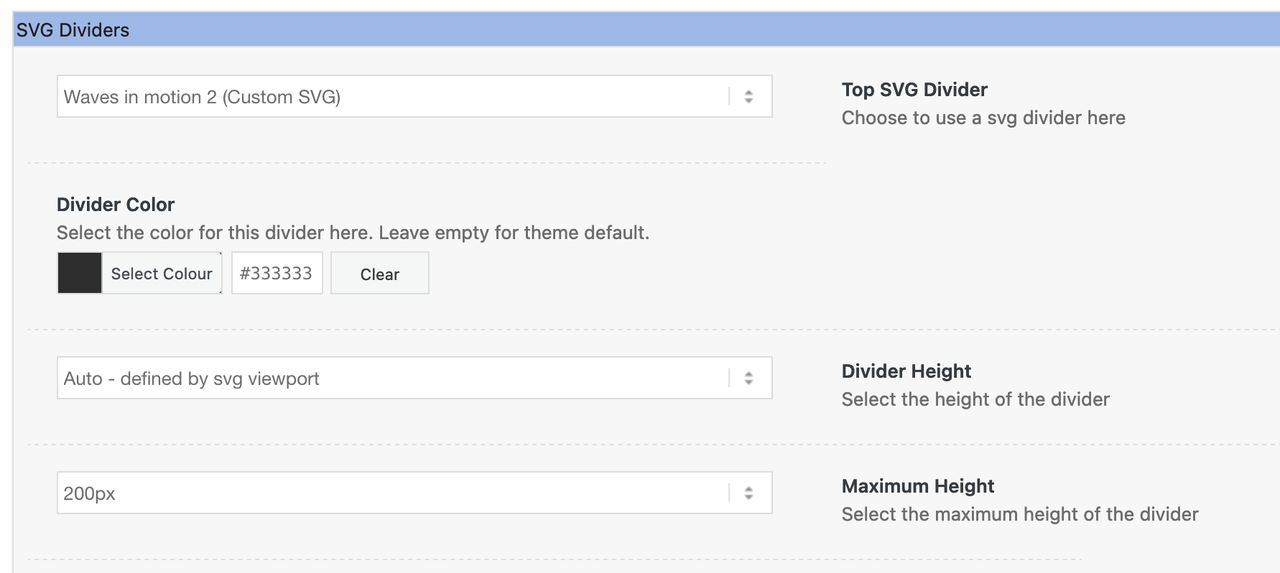
___________________
PS : you can upload those svg files via media library – but then you can determine the svgs via its ID’s for the usage
the ID of each attachment you can find on list view in media library.August 5, 2024 at 11:35 am #1463821mat
GuestHello,
my new client have a very old website with the theme: Enfold | Shared By VestaThemes.com – version 4.3
Now he need to update everythings, also the PHP from 7.4 to the last version.I see update the new version, 6.0. Is it compatible for the update?
Before to buy your new version, what should i check or consider about the last version of the theme?Thanks a lot.
Best Regards.August 4, 2024 at 6:39 pm #1463783In reply to: Enfold and PHP 8.*
Hi,
I have recently update to PHP 8 and there appears to be a bug in your theme.
I get three warnings:
Warning: Undefined array key “footer_option” in /var/www/html/wp-content/themes/enfold/footer.php on line 35Warning: Undefined array key “footer_behavior” in /var/www/html/wp-content/themes/enfold/footer.php on line 37
Warning: Undefined array key “footer_behavior” in /var/www/html/wp-content/themes/enfold/footer.php on line 288.
Can somebody help me with this?
August 2, 2024 at 1:46 pm #1463647In reply to: header transparency inverse behavior
hello Rikard! Thank you for your time
nothing seems to affect the header.
idk why this behavior.wp and plugins are up to date the theme is up to date.
didn’t change any php or css in the base/child theme (besides the css in the slider that i deactivated and nothing changed).
i change some stuff clean browser temporary internet files and still looks all the same. any tip about what are the settings to get this header?
>>> https://kriesi.at/themes/enfold-2017/ <<<
a print of its settings would be awesome than i can mimic in my settings than start to check why is not doing what is intented to do.thanks again!
August 2, 2024 at 11:43 am #1463623In reply to: Line 1152 enfold
Fatal error: Uncaught Error: Attempt to assign property “src” on null
in /homepages/33/d4297991361/htdocs/wordpress/wp-content/themes/enfold/config-templatebuilder/avia-template-builder/php/class-asset-manager.php on line 1152Call stack:
aviaAssetManager::try_deregister_scripts()
wp-content/themes/enfold/config-templatebuilder/avia-template-builder/php/class-asset-manager.php:433
aviaAssetManager::merge()
wp-content/themes/enfold/config-templatebuilder/avia-template-builder/php/class-asset-manager.php:256
aviaAssetManager::minimize_footer_scripts()
wp-includes/class-wp-hook.php:324
WP_Hook::apply_filters()
wp-includes/class-wp-hook.php:348
WP_Hook::do_action()
wp-includes/plugin.php:517
do_action()
wp-includes/script-loader.php:2246
wp_print_footer_scripts()
wp-includes/class-wp-hook.php:324
WP_Hook::apply_filters()
wp-includes/class-wp-hook.php:348
WP_Hook::do_action()
wp-includes/plugin.php:517
do_action()
wp-includes/general-template.php:3081
wp_footer()
wp-content/themes/enfold/footer.php:338
require_once()
wp-includes/template.php:810
load_template()
wp-includes/template.php:745
locate_template()
wp-includes/general-template.php:92
get_footer()
wp-content/themes/optimal-systems/template-builder.php:171
include()
wp-includes/template-loader.php:106
require_once()
wp-blog-header.php:19
require()
index.php:17Best regards,
DJAugust 1, 2024 at 3:19 pm #1463530In reply to: Easy Slider ‘Mouse Hover’
Hi,
Thank you Guenni007 ..I have place this code within function.php but unfortunately it does not work.
Has the support team got any ideas?..
Kind regards
July 31, 2024 at 5:16 pm #1463448In reply to: Replace Logo-image with text
you can do that by subtext option – this inserts f.e. the bloginfo name and description as text.
– but you do not need to insert these dynamic texts – you can insert simple html too
( this inside child-theme functions.php)add_filter('avf_logo_subtext', 'kriesi_logo_addition'); function kriesi_logo_addition($sub) { $sub .= "<h1 class='logo-title'>"; $sub .= get_bloginfo( 'name', 'display' ); $sub .= "</h1>"; $sub .= "<h2 class='logo-title logo-subtitle'>"; $sub .= get_bloginfo( 'description', 'display' ); $sub .= "</h2>"; return $sub; }then you can set logo img to display none – and style the text via quick css too ( positioning; font-size; colors etc. )
btw: : you can see that here on top with logo and text. this “kriesi.at” and “Premium Themes” is placed that way ( but only in strong tags)
PS: you can insert this way dynamically the page title as second text by replacing in the code above
$sub .= get_the_title();f.e.:
#top .logo img {
  display: none
}
#top .logo,
#top .logo a {
  overflow:visible
}
#top .logo-title {
  font-size:12px;
  color:#000;
  position:absolute;
  left:0px;
  top:-7px;
  white-space:nowrap
}
#top .logo-subtitle {
  color:#aaa;
  top:7px
}
July 31, 2024 at 6:56 am #1463397In reply to: Blog Thumbnail Size
Hey lucybb2,
Thank you for the inquiry.
Looks like you’re trying to adjust the size of the thumbnails on the archive or category pages. This cannot be adjusted in the Settings > Media panel. You have to edit the archive.php file directly or use this filter in the functions.php file:
add_filter("avf_post_slider_args", function($atts, $context) {
  if( $context == "archive" ) {
    $atts['type']  = 'grid';
    $atts['columns']  = 4;
    $atts['preview_mode'] = 'custom';
    $atts['image_size'] = 'medium';
  }
  return $atts;
}, 10, 2);
The filter above will set the image size to Medium. Also, when you change the size of the thumbnails, you need to either upload the images again or regenerate the thumbnails.
// https://wordpress.org/plugins/regenerate-thumbnails-advanced/
// https://wordpress.org/plugins/force-regenerate-thumbnails/Best regards,
IsmaelJuly 30, 2024 at 10:22 pm #1463381In reply to: Can’t Update Enfold Theme
This seems like it will remove all my theme options? Will I need to set up all my theme settings and options again?
Also, this site is using a child theme of Enfold so I assume that will be effected as well. Does this change your guidance at all?
Maybe I can export my theme setting and import them into the new theme?
A note that everything else on the site is up to date, including WordPress. I do need to move from PHP 7.4 to 8.x still.
July 30, 2024 at 6:38 pm #1463361In reply to: Can’t Update Enfold Theme
You should create a complete backup in any case, e.g. with the free plugin: duplicator.
If you use a child theme, you will not be able to avoid checking the child theme files for validity. e.g. header.php has changed a lot – also footer.php.
Custom Advanced Layout elements should also be updated. ( if you use child-theme pendents of them ) –
if you only have these three files (style.css, functions.php and screenshot.png) in your child-theme folder – than only a check of your child-theme functions.php is neccessary.Is your WordPress version older too?
Then you need to take precautions here too.
What php Version is in use? with php 7.x or 8 a new jQuery is implemented.With such a huge step, I would update as follows:
I would advise everyone to follow this way. You always have a rollback in the background.The advantage of this procedure is that it can be undone.
Uploading the new theme takes a little time; if all goes well, the site will only be offline for a short time (just for the moment of renaming).Update via ftp
- Download the “installable WordPress file only” file from themeforest and unzip it
- After that – you got a folder : enfold
- Rename this downloaded newest version to enfold-new
- Upload that enfold-new folder to the themes folder
- Rename the existing enfold folder to f.e. enfold-old
- Rename your uploaded enfold-new folder to enfold
- On Enfold – Performance – check mark and “Delete Old CSS And JS Files?”
- Check if your Website works to your full satisfaction.
- Yes – then stop here – Update is finished
- After a while of testing – you can delete that enfold-old folder via ftp
- No – delete or rename back the enfold folder back to enfold-new
- rename the enfold-old folder back to enfold
- check on enfold board if there are known bugs – or similar problems
July 30, 2024 at 3:12 pm #1463336In reply to: Editor issue with WPML translations
Hi,
I have completed the translation of the website: https://ogliastrarimessaggio.com
I thought the bug might depend on this alert: https://drive.google.com/file/d/1wAe2aDGZpoJJIMgQJij5NeHVSmeUOzNo/view?usp=sharing
However, removing the HTML tags from the contact form checkbox (https://drive.google.com/file/d/1VQV3mkLAp1Y13qDLjSntou1lRvjGWdfF/view?usp=sharing) did not solve the initial problem.
Now if I access the Italian version, the original one, all the contents cannot be modified. The same warning always appears: https://drive.google.com/file/d/19mBxsRkUIKwzdiDRWbY0sSC27HdhA658/view?usp=sharing
The problem now occurs not only on the translated page (https://ogliastrarimessaggio.com/wp-admin/post.php?post=1287&action=edit), but also on all the other pages that I had duplicated for backup
I would like to point out that for the translations I only used the WPML editor, as you suggested in previous messages
I await your feedback, thanks
LucaJuly 30, 2024 at 11:49 am #1463317In reply to: cannot select enfold theme for upgrade
thanks, this worked.
we still have problems switching from php 7.4 to 8.3 and suspect the enfold theme:#15 {main}
thrown in /home/sven-hoernich/public_html/wp-includes/class-wp-widget.php on line 163
[30-Jul-2024 09:15:17 UTC] PHP Fatal error: Uncaught ArgumentCountError: Too few arguments to function WP_Widget::__construct(), 0 passed in /home/sven-hoernich/public_html/wp-includes/class-wp-widget-factory.php on line 62 and at least 2 expected in /home/sven-hoernich/public_html/wp-includes/class-wp-widget.php:163this happens in the logs when switching to PHP 8.x – this is strangely a WP core function, so we are not quite sure what to do..
July 29, 2024 at 9:28 am #1463208In reply to: Line 1152 enfold
PHP version: 8.1.29
version of the theme 5.7.1Best regards,
D.J.July 27, 2024 at 1:18 pm #1463104In reply to: events calendar “previous events” text?
Hey Munford,
Thank you for your patience, it looks like you added the BEGIVENHEDER text in the events calendar ▸ settings ▸ display

But I didn’t find any option or custom snippet that adds the SENESTE AFSLUTTEDE BEGIVENHEDER
So to change this try this CSS in your Enfold Theme Options ▸ General Styling ▸ Quick CSS field:.tribe-events-calendar-latest-past__heading.tribe-common-h5.tribe-common-h3--min-medium { opacity: 0; }and add this code to the end of your child theme functions.php file in Appearance ▸ Editor:
function custom_change_text_script() { ?>
  <script>
window.addEventListener('DOMContentLoaded', function() {
    (function($) {
        $(document).ready(function() {
            var targetElement = $(".tribe-events-calendar-latest-past__heading.tribe-common-h5.tribe-common-h3--min-medium");

            if (targetElement.length) {
                targetElement.text("NEW TEXT HERE");
                targetElement.css("opacity", "1");
            }
        });
    })(jQuery);
});
</script>
  <?php
}
add_action( 'wp_footer', 'custom_change_text_script', 99 );
Then in the code above change NEW TEXT HERE to your new text.
Best regards,
Mike -
This reply was modified 1 year, 8 months ago by
-
AuthorSearch Results
-
Search Results
-
Topic: Unable to edit any Page
Hi there,
I have the Enfold theme (version 3.8) and recently I have found that I am unable to edit pages. There is a message at the top of the page stating “This Block has encountered an error and cannot be previewed.”
The error details in the email received was as follows:
Error Details
=============
An error of type E_ERROR was caused in line 489 of the file /home/media/sydneydjservices.com.au/wp-content/themes/enfold/config-templatebuilder/avia-template-builder/php/shortcode-template.class.php. Error message: Uncaught Error: Cannot use string offset as an array in /home/media/sydneydjservices.com.au/wp-content/themes/enfold/config-templatebuilder/avia-template-builder/php/shortcode-template.class.php:489
Stack trace:
#0 /home/media/sydneydjservices.com.au/wp-content/themes/enfold/config-templatebuilder/avia-template-builder/php/shortcode-template.class.php(443): aviaShortcodeTemplate->create_sortable_editor_element(Array)
#1 /home/media/sydneydjservices.com.au/wp-content/themes/enfold/config-templatebuilder/avia-template-builder/php/template-builder.class.php(397): aviaShortcodeTemplate->prepare_editor_element()
#2 /home/media/sydneydjservices.com.au/wp-includes/class-wp-hook.php(324): AviaBuilder->js_template_editor_elements(”)
#3 /home/media/sydneydjservices.com.au/wp-includes/class-wp-hook.php(348): WP_Hook->apply_filters(”, Array)
#4 /home/media/sydneydjservices.com.au/wp-includes/plugin.php(517): WP_Hook->do_action(Array)
#5 /home/media/sydneydjservices.com.au/wp-includes/media-template.php(1570): do_actionCan anyone assist?
Hi, i would like to customize the layer slider, with a back button and own navigation-icons.
Where can i add this code
`I was thinking about copying the template-builder.php and adding it in the enfold-child folder, but i’m not sure, if template-builder.php is correct?
kind regards
JakHello,
my new client have a very old website with the theme: Enfold | Shared By VestaThemes.com – version 4.3
Now he need to update everythings, also the PHP from 7.4 to the last version.I see update the new version, 6.0. Is it compatible for the update?
Before to buy your new version, what should i check or consider about the last version of the theme?Thanks a lot.
Best Regards.


