Viewing 30 results - 481 through 510 (of 16,890 total)
  • Author
    Search Results
  • Good morning Guenni,
    thanks for your reply!
    So i’ll copy postslider.php, replace lines at 876 and load it into my child-theme folder, right?
    kind regards
    Jak

    with a slightly edited postslider.php as child-theme element you can have this DOM Structure:

    lines 876ff

    $permalink = '<div class="read-more-link"><a href="' . get_permalink( $the_id ) . '" class="more-link"><span class="read-more-text">' . __( 'Read more', 'avia_framework' ) . '</span><span class="more-link-arrow"></span></a></div>';
    $prepare_excerpt = ! empty( $entry->post_excerpt ) ? $entry->post_excerpt : avia_backend_truncate( $entry->post_content, apply_filters( 'avf_postgrid_excerpt_length', $excerpt_length ), apply_filters( 'avf_postgrid_excerpt_delimiter', ' ' ), '…', true, '' );

    then it might be possible to have the same effect and a flex will make sense.

    #1473209

    I tried to paste your suggested replacement code into the child theme functions.php file and received this error message:

    Your PHP code changes were not applied due to an error on line 385 of file wp-includes/html-api/class-wp-html-decoder.php. Please fix and try saving again.

    Uncaught Error: Call to undefined function ctype_alnum() in wp-includes/html-api/class-wp-html-decoder.php:385
    Stack trace:
    #0 wp-includes/html-api/class-wp-html-decoder.php(148): WP_HTML_Decoder::read_character_reference(‘attribute’, ‘https://i0.wp.c…&#8217;, 123, NULL)
    #1 wp-includes/html-api/class-wp-html-decoder.php(114): WP_HTML_Decoder::decode(‘attribute’, ‘https://i0.wp.c…&#8217;)
    #2 wp-includes/html-api/class-wp-html-tag-processor.php(2735): WP_HTML_Decoder::decode_attribute(‘https://i0.wp.c…&#8217;)
    #3 wp-content/plugins/jetpack/jetpack_vendor/automattic/jetpack-image-cdn/src/class-image-cdn.php(361): WP_HTML_Tag_Processor->get_attribute(‘src’)
    #4 wp-includes/class-wp-hook.php(324): Automattic\

    Hey henningtillmann,

    Thank you for the inquiry.

    You can try this hook in the functions.php file, but make sure to create a site backup or restore point before doing so:

    function ava_update_custom_fields_for_post_type() {
        $post_type = 'your_post_type';
    
        $posts = get_posts(array(
            'post_type' => $post_type,
            'posts_per_page' => -1,
            'post_status' => 'any',
            'fields' => 'ids',
        ));
    
        if (!empty($posts)) {
            foreach ($posts as $post_id) {
                update_post_meta($post_id, '_aviaLayoutBuilder_active', 'active');
                update_post_meta($post_id, '_aviaLayoutBuilderCleanData', '[av_custom_layout link=\'alb_custom_layout,653\' av_uid=\'av-m3u7m8lu\' sc_version=\'1.0\']');
                update_post_meta($post_id, '_avia_builder_shortcode_tree', 'a:1:{i:0;a:3:{s:3:"tag";s:16:"av_custom_layout";s:7:"content";a:0:{}s:5:"index";i:0;}}');
                update_post_meta($post_id, '_avia_sc_parser_state', 'disabled');
                update_post_meta($post_id, '_av_alb_posts_elements_state', 'a:1:{s:16:"av_custom_layout";b:1;}');
                update_post_meta($post_id, '_av_el_mgr_version', '1.0');
            }
        }
    }
    
    add_action('init', 'ava_update_custom_fields_for_post_type');
    

    Just refresh the dashboard once, then remove the hook immediately. This will create the necessary custom fields for each item in the custom post type and enable the ALB automatically. Make sure to update the value 653 with the actual ID of the custom layout:

    update_post_meta($post_id, '_aviaLayoutBuilderCleanData', '[av_custom_layout link=\'alb_custom_layout,653\' av_uid=\'av-m3u7m8lu\' sc_version=\'1.0\']');
    

    And place the name or slug of the post type here:

    $post_type = 'your_post_type';
    

    Best regards,
    Ismael

    #1473070

    Hey togetherconcept,

    Thank you for the inquiry.

    Try to add this script in the functions.php file:

    function ava_custom_accessibility_script() {
        ?>
        <script>
            (function($) {
                $(document).ready(function() {
                    $(document).keydown(function(e) {
                        if (e.keyCode === 27) {
                            $('.menu-item-has-children').each(function() {
                                var $submenu = $(this).find('.sub-menu');
                                if ($submenu.css('opacity') === '1') {
                                    $submenu.css({
                                        'opacity': '0',
                                        'visibility': 'hidden'
                                    });
                                }
                            });
                        }
                    });
                });
            })(jQuery);
        </script>
        <?php
    }
    add_action('wp_footer', 'ava_custom_accessibility_script');
    

    Best regards,
    Ismael

    #1472993
    This reply has been marked as private.
    #1472785
    This reply has been marked as private.

    Hi Guenni007,

    Thank you for your note. I downloaded Footer.php and added it to the child theme. However, I can’t see any changes afterwards.
    The wav analysis still shows <main> as the landmark and there is no markup as a footer in the source code either.
    We use a normal page as a footer and have selected Replace footer and socket in the Enfold settings.
    I have tried to find a workaround to mark up the footer page, but so far without success.
    However, to comply with the Accessibility Act, the footer landmark is unfortunately absolutely necessary (marking up the socket area would be rather misleading on our website).
    Do you have any other ideas on this topic?

    Regards
    Stephan

    #1472694

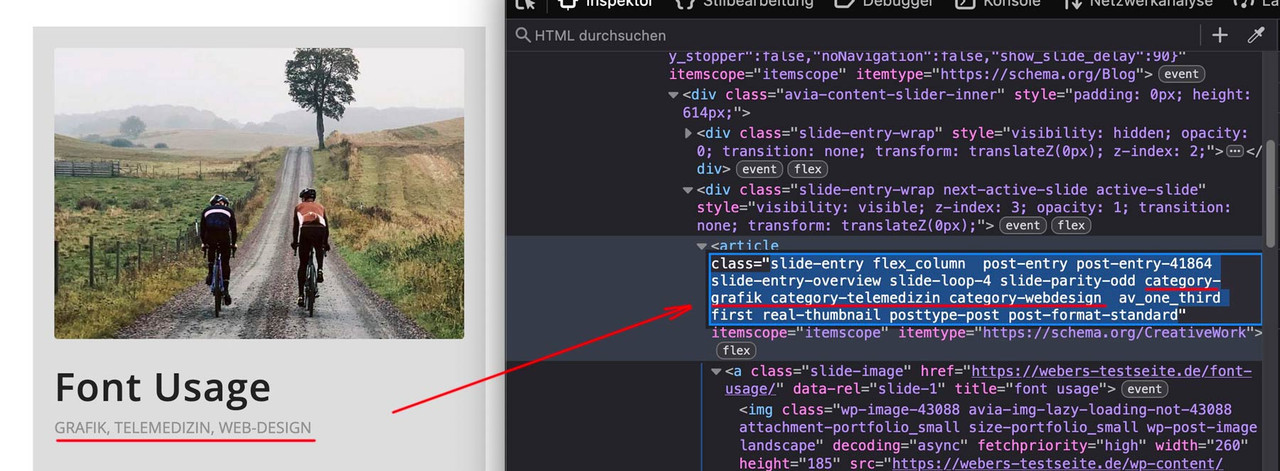
    maybe Günter likes to insert some additonal infos to each article of those posts.

    i edited f.e. postslider.php ( see on pastebin lines 980ff ) : https://pastebin.com/sw25aPdp
    Masonry is working – but for Portfolio Grid see: ( https://pastebin.com/8MgA8nzf ) it had to be done too in a similar way. But because of sort class on grid-entry it is not necessary here.

    see Result:

    each slide-entry will have than those additional classes to represent the categories (taxonomies on portfolio ) the post belongs to.
    It would then be easy to selectively influence this.

    After updating my PHP version from 7.3 to 8.2, I encountered a couple of issues with the theme due to type-related incompatibilities. These errors seem to arise from stricter type handling introduced in PHP 8.2 and primarily involve missing checks for variable types and proper initialization.

    Errors Encountered
    In class-template-builder.php at line 2604, within the apply_editor_wrap() method:

    Fatal Error:
    Fatal error: Uncaught TypeError: Cannot access offset of type string on string

    
    if( $box['id'] == $slug )
    

    Suggested Fix:

    
    if ( is_array( $box ) && isset( $box['id'] ) && $box['id'] == $slug )
    

    In class-meta-box.php:

    Fatal Error: Attempting to access an offset of type string on a string variable.

    Warnings: Trying to access array offsets on a boolean value.
    These issues occur due to uninitialized or improperly set variables. For example, the following line is problematic:

    
    if( in_array( $_POST['post_type'], $default_box['page'] ) )

    Suggested Fixes:

    
    if ( isset( $_POST['post_type'] ) && isset( $default_box['page'] ) && is_array( $default_box['page'] ) ) {
        				if ( in_array( sanitize_text_field( $_POST['post_type'] ), $default_box['page'] ) ) {
    						$must_check = true;
    					}
    				}
    

    These changes involve adding type checks and sanitizing inputs, ensuring compatibility with PHP 8.2 while maintaining the theme’s functionality. They are straightforward adjustments that enhance the theme’s robustness across PHP versions.

    If you’d like, I can share the exact code changes I made to resolve these issues. Could you kindly incorporate these fixes into the next update to ensure compatibility for all users?

    Thank you for your continued support, and please let me know if you need any additional details.

    ttem
    Participant

    I’m getting this fatal error in logs…what would be causing this and how to fix?

    “error”: {
    “type”: 1,
    “file”: “/wp-content/plugins/woocommerce/includes/wc-notice-functions.php”,
    “line”: 240
    },
    “remote-logging”: true,
    “backtrace”: [
    “”,
    “#0 /wp-content/themes/enfold/config-woocommerce/config.php(3072): wc_get_notices(‘success’)”,
    “#1 /wp-includes/class-wp-hook.php(324): avia_woocommerce_cart_dropdown(”)”,
    “#2 /wp-includes/class-wp-hook.php(348): WP_Hook->apply_filters(”, Array)”,
    “#3 /wp-includes/plugin.php(517): WP_Hook->do_action(Array)”,
    “#4 /wp-content/themes/enfold/includes/helper-main-menu.php(153): do_action(‘ava_main_header’)”,
    “#5 /wp-includes/template.php(812): require(‘/nas/content/li…’)”,
    “#6 /wp-includes/template.php(745): load_template(‘/nas/content/li…’, false, Array)”,
    “#7 /wp-includes/general-template.php(206): locate_template(Array, true, false, Array)”,
    “#8 /wp-content/themes/enfold/header.php(275): get_template_part(‘includes/helper’, ‘main-menu’)”,
    “#9 /wp-includes/template.php(810): require_once(‘/nas/content/li…’)”,
    “#10 /wp-includes/template.php(745): load_template(‘/nas/content/li…’, true, Array)”,
    “#11 /wp-includes/general-template.php(48): locate_template(Array, true, true, Array)”,
    “#12 /wp-content/themes/enfold/404.php(9): get_header()”,
    “#13 /wp-includes/template-loader.php(106): include(‘/nas/content/li…’)”,
    “#14 /wp-blog-header.php(19): require_once(‘/nas/content/li…’)”,
    “#15 /index.php(17): require(‘/nas/content/li…’)”,
    “#16 {main}”,
    “thrown”

    #1472628

    In reply to: Deep link and open tab

    Hey westefan,
    This was added a while back and works on my install without any added code. Ensure that you add a custom ID to each tab:
    Screen Shot 2024 11 30 at 12.09.37 PM
    and use a link with the ID “elements/tabs#tabthree” the page will scroll up and open the tab”
    Screen Shot 2024 11 30 at 12.12.41 PM
    If you are using the sticky header and the tab is too close to the header, you can add this code to the end of your child theme functions.php file in Appearance ▸ Editor to adjust the position:

    function custom_script() { ?>
      <script>
    (function($) {
    $(document).ready(function() {
        $('a[href^="#"]').click(function(e) {
            var targetHash = this.hash;
            setTimeout(function() {
                $('html, body').animate({
                    scrollTop: $(targetHash).offset().top - 100
                }, 500);
            }, 100);
        });
        
        if (window.location.hash) {
            $('html, body').animate({
                scrollTop: $(window).scrollTop() - 100
            }, 500);
        }
    });
    }(jQuery));
    </script>
      <?php
    }
    add_action( 'wp_footer', 'custom_script', 99 );

    Screen Shot 2024 11 30 at 12.46.39 PM

    Best regards,
    Mike

    sidsingh78
    Participant

    I am experiencing an issue with my WooCommerce product pages while using the Enfold – Responsive Multi-Purpose Theme (Version 6.0.6). Specifically, the product description is not displayed by default when visiting a product page.

    Details of My Setup:
    WordPress Version: 6.7.1
    WooCommerce Version: 9.4.2
    Theme: Enfold – Responsive Multi-Purpose Theme
    Product Page Example: HairLife Product Page

    Steps I’ve Tried:
    1. Added the PHP code snippet to the functions.php following this suggested solution from this thread Link

    2. Used JavaScript to ensure the description tab opens by default

    add_action('wp_footer', 'open_description_tab_default');
    function open_description_tab_default() {
        if (is_product()) {
            ?>
            <script>
                document.addEventListener('DOMContentLoaded', function () {
                    let tab = document.querySelector('.woocommerce-Tabs-panel--description');
                    if (tab) {
                        tab.style.display = 'block';
                    }
                });
            </script>
            <?php
        }
    }

    3. Verified that product descriptions exist in WooCommerce’s product editor.

    Could you please guide me on how to:
    Ensure the product description is displayed by default without requiring the tab to be clicked.
    I’ve already tested with minimal plugins to rule out conflicts, and this issue seems directly related to the theme. Any advice or customization tips would be greatly appreciated.
    Thank you in advance for your support!
    Best regards,
    Sid

    #1472300
    newmediologo
    Participant

    Hi..

    I’ve noticed that the Enfold Facebook Like Box doesn’t works on mobile with both Chrome a Safari on iOS 18.1 on two sites, both sites runs WP 6.7.1, Enfold 6.0.6 PHP 8.2

    The two sites have the same widget setting. one site have a child theme but the other have a normal Enfold

    If from mobile browsers I choose che “Ask for Desktop site” option the widget works fine on the two sites.
    I’ve try to clear cache with no results..

    Links in private

    Thank You very much for help

    wsclDigitalAssets
    Participant

    Enfold is calling a function (wp_targeted_link_rel) that is now deprecated in WordPress 6.7.
    Offending file: framework/enfold/php/function-set-avia-frontend.php, lines 2569, 2605, and 2696.

    #1472136
    SHR Design
    Participant

    Hi

    I updated a client site to WP 6.7.1 and received this error:

    Notice: Function _load_textdomain_just_in_time was called incorrectly. Translation loading for the duracelltomi-google-tag-manager domain was triggered too early. This is usually an indicator for some code in the plugin or theme running too early. Translations should be loaded at the init action or later. Please see Debugging in WordPress for more information.

    (This message was added in version 6.7.0.) in /customers/0/c/4/cba544erd/webroots/r1191076/wp-includes/functions.php on line 6114 Notice: Function _load_textdomain_just_in_time was called incorrectly. Translation loading for the it-l10n-ithemes-security-pro domain was triggered too early. This is usually an indicator for some code in the plugin or theme running too early. Translations should be loaded at the init action or later. Please see Debugging in WordPress for more information.

    (This message was added in version 6.7.0.) in /customers/0/c/4/cba544erd/webroots/r1191076/wp-includes/functions.php on line 6114 Notice: Funksjonen _load_textdomain_just_in_time ble kalt feil. Innlasting av oversettelser for tekstdomenet avia_framework ble utløst for tidlig. Dette er vanligvis en inikasjon på at noe kode i utvidelsen eller temaet kjører for tidlig. Oversettelser bør lastes inn med knaggen init eller senere. Se Feilsøking i WordPress for mer informasjon.

    (Denne meldingen ble lagt i versjon 6.7.0.) in /customers/0/c/4/cba544erd/webroots/r1191076/wp-includes/functions.php on line 6114
    Warning: Cannot modify header information – headers already sent by (output started at /customers/0/c/4/cba544erd/webroots/r1191076/wp-includes/functions.php:6114) in /customers/0/c/4/cba544erd/webroots/r1191076/wp-admin/includes/misc.php on line 1438
    Warning: Cannot modify header information – headers already sent by (output started at /customers/0/c/4/cba544erd/webroots/r1191076/wp-includes/functions.php:6114) in /customers/0/c/4/cba544erd/webroots/r1191076/wp-includes/functions.php on line 7137
    Warning: Cannot modify header information – headers already sent by (output started at /customers/0/c/4/cba544erd/webroots/r1191076/wp-includes/functions.php:6114) in /customers/0/c/4/cba544erd/webroots/r1191076/wp-admin/admin-header.php on line 9

    I am now restoring to the backup I took just before the update.

    • This topic was modified 1 year, 4 months ago by SHR Design.
    anma
    Participant

    Hallo Zusammen,

    ich bin der Webmaster einer wichtigen Webseite der deutschen Schule in Paris. Ich habe nur auf die letzte WP Version upgedatet und bekomme diese Error Messages:

    Inzwischen ist die letzte Enfold Version aufgespielt, alle Plugins sind deaktiviert und ich habe die PHP Version 8.2 aktiviert, aber nichts hilft, was tun?

    PLEASE HELP !

    Deprecated: Die Funktion wp_targeted_link_rel ist seit Version 6.7.0 veraltet und es ist keine Alternative verfügbar. in /homepages/32/d826609289/htdocs/wp-includes/functions.php on line 6114

    Deprecated: Die Funktion wp_targeted_link_rel_callback ist seit Version 6.7.0 veraltet und es ist keine Alternative verfügbar. in /homepages/32/d826609289/htdocs/wp-includes/functions.php on line 6114

    Deprecated: Die Funktion wp_targeted_link_rel ist seit Version 6.7.0 veraltet und es ist keine Alternative verfügbar. in /homepages/32/d826609289/htdocs/wp-includes/functions.php on line 6114

    Deprecated: Die Funktion wp_targeted_link_rel_callback ist seit Version 6.7.0 veraltet und es ist keine Alternative verfügbar. in /homepages/32/d826609289/htdocs/wp-includes/functions.php on line 6114

    Deprecated: Die Funktion wp_targeted_link_rel ist seit Version 6.7.0 veraltet und es ist keine Alternative verfügbar. in /homepages/32/d826609289/htdocs/wp-includes/functions.php on line 6114

    Deprecated: Die Funktion wp_targeted_link_rel_callback ist seit Version 6.7.0 veraltet und es ist keine Alternative verfügbar. in /homepages/32/d826609289/htdocs/wp-includes/functions.php on line 6114

    Deprecated: Die Funktion wp_targeted_link_rel ist seit Version 6.7.0 veraltet und es ist keine Alternative verfügbar. in /homepages/32/d826609289/htdocs/wp-includes/functions.php on line 6114

    Deprecated: Die Funktion wp_targeted_link_rel_callback ist seit Version 6.7.0 veraltet und es ist keine Alternative verfügbar. in /homepages/32/d826609289/htdocs/wp-includes/functions.php on line 6114

    Ich hoffe ihr könnt schnell helfen?

    VG, AB

    #1472029

    Hi,
    Thank you for your patience, try adding this code to the end of your child theme functions.php file in Appearance ▸ Editor:

    function tax_exempt() { ?>
      <script>
    window.addEventListener('DOMContentLoaded', function() {
    (function($){
      $(function() {
      	setTimeout(function(){
      $('.cart_totals .tax-total th, #order_review .tax-total th').each(function() {
        var text = $(this).text();
        $(this).text(text.replace('Tax', ' Tax Exempt ')); 
    });
    }, 2000);
    });
    })(jQuery);
    });
    </script>
      <?php
    }
    add_action( 'wp_footer', 'tax_exempt', 99 );

    in the cart:
    Screen Shot 2024 11 23 at 12.55.20 PM
    in the checkout:
    Screen Shot 2024 11 23 at 12.56.57 PM

    Best regards,
    Mike

    Hi,
    On mobile, I see that you are using the “easy slider” to change the H tag, click on the element and go to each slide, under the advanced tab change the heading tag:
    Screen Shot 2024 11 23 at 11.56.21 AM
    you had this code in your child theme function.php causing a conflict:
    Screen Shot 2024 11 23 at 12.00.52 PM
    I disabled it for you.
    Change the font size under the styling tab:
    Screen Shot 2024 11 23 at 12.04.45 PM
    to center add this css:

    .avia-slideshow.av-desktop-hide.av-medium-hide .avia-caption {
        bottom: 30%;
        left: 30%;
    }

    Best regards,
    Mike

    #1472019

    Hey Ad-Min747,
    Try adding this code to the end of your child theme functions.php file in Appearance ▸ Editor:

    add_action('admin_bar_menu', function ($wp_admin_bar) {
        if (!current_user_can('administrator')) {
            $wp_admin_bar->remove_node('avia');
        }
    }, 999);
    function hide_enfold_theme_options_menu() {
        if (!current_user_can('administrator')) {
            echo "<style>#toplevel_page_avia { display: none; }</style>";
        }
    }
    add_action('admin_head', 'hide_enfold_theme_options_menu');
    

    Best regards,
    Mike

    #1471973
    oberton
    Participant

    When saving a modified page in side builder, it returns the unchanged page.

    [22-Nov-2024 19:01:58 UTC] PHP Fatal error: Uncaught Error: Attempt to assign property “ID” on null in /homepages/xx/xxxx/htdocs/wp-content/themes/enfold/config-templatebuilder/avia-shortcodes/events_upcoming/events_upcoming.php:398
    Stack trace:
    #0 /homepages/xx/xxxx/htdocs/wp-content/themes/enfold/config-templatebuilder/avia-template-builder/php/class-shortcode-template.php(1329): avia_sc_upcoming_events->shortcode_handler()
    #1 /homepages/xx/xxxx/htdocs/wp-includes/shortcodes.php(434): aviaShortcodeTemplate->shortcode_handler_prepare()
    #2 [internal function]: do_shortcode_tag()
    #3 /homepages/xx/xxxx/htdocs/wp-includes/shortcodes.php(273): preg_replace_callback()
    #4 /homepages/xx/xxxx/htdocs/wp-content/themes/enfold/config-templatebuilder/avia-template-builder/php/class-shortcode-helper.php(559): do_shortcode()
    #5 /homepages/xx/xxxx/htdocs/wp-content/themes/enfold/config-templatebuilder/avia-shortcodes/section/section.php(1547): ShortcodeHelper::avia_remove_autop()
    #6 /homepages/xx/xxxx/htdocs/wp-content/themes/enfold/config-templatebuilder/avia-template-builder/php/class-shortcode-template.php(1329): avia_sc_section->shortcode_handler()
    #7 /homepages/xx/xxxx/htdocs/wp-includes/shortcodes.php(434): aviaShortcodeTemplate->shortcode_handler_prepare()
    #8 [internal function]: do_shortcode_tag()
    #9 /homepages/xx/xxxx/htdocs/wp-includes/shortcodes.php(273): preg_replace_callback()
    #10 /homepages/xx/xxxx/htdocs/wp-content/themes/enfold/config-templatebuilder/avia-template-builder/php/class-template-builder.php(3195): do_shortcode()
    #11 /homepages/xx/xxxx/htdocs/wp-includes/class-wp-hook.php(324): AviaBuilder->text_to_preview()
    #12 /homepages/xx/xxxx/htdocs/wp-includes/class-wp-hook.php(348): WP_Hook->apply_filters()
    #13 /homepages/xx/xxxx/htdocs/wp-includes/plugin.php(517): WP_Hook->do_action()
    #14 /homepages/xx/xxxx/htdocs/wp-admin/admin-ajax.php(192): do_action()
    #15 {main}
    thrown in /homepages/xx/xxxx/htdocs/wp-content/themes/enfold/config-templatebuilder/avia-shortcodes/events_upcoming/events_upcoming.php on line 398

    Marie
    Guest

    Since I’ve updated WP 6.7 then 6.7.1 , and last enfold the avia builder doesn’t work anymore , I’ve got a blank page when editing a page and this error message :
    Notice: La fonction _load_textdomain_just_in_time a été appelée de façon incorrecte. Le chargement de la traduction pour le domaine avia_framework a été déclenché trop tôt. Cela indique généralement que du code dans l’extension ou le thème s’exécute trop tôt. Les traductions doivent être chargées au moment de l’action init ou plus tard. Veuillez lire Débogage dans WordPress (en) pour plus d’informations. (Ce message a été ajouté à la version 6.7.0.) in /home2/sc3latapieth/lib-rdv.fr/wp-includes/functions.php on line 6114

    seemeconsulting
    Participant

    I hope this message finds you well. I am reaching out regarding an issue I am encountering with the Enfold Builder after updating to PHP 8.2 and WordPress 6.7. While I understand that the support period for my license has expired, I wanted to share the details of the problem in case you can provide any guidance or a recommended course of action.

    Upon attempting to use the builder, it crashes with the following errors:

    Issue 1:

    File: class-template-builder.php
    Line: 2604
    Code:

    if (is_array($box) && isset($box['id']) && $box['id'] == $slug) {  
    

    Error Message:

    Fatal error: Uncaught TypeError: Cannot access offset of type string on string in /code/wp-content/themes/enfold/config-templatebuilder/avia-template-builder/php/class-template-builder.php:2604  
    

    Issue 2:

    File: class-meta-box.php
    Line: 172
    Code:

    if (isset($box['page']) && is_array($box['page'])) {  
        foreach ($box['page'] as $area) {  
    

    Given these errors, it seems the code may not be fully compatible with the newer PHP and WordPress versions. If an update is available or a patch could address this, I would greatly appreciate any assistance or direction you could provide.

    Thank you for taking the time to review this matter. I appreciate your help and understanding.

    Thank You

    Adeel Nazar

    Der Dev / Mods : I read about this filter in the link at Typography : avf_el_styling_responsive_font_size_skip

    so i can skip the responsive settings for some ALB Elements : like headings:

    
    function custom_responsive_font_size_skip( $skip, array $atts, \aviaShortcodeTemplate $sc_context, $font_id, $selector_container ){
    	if( $sc_context instanceof avia_sc_heading ){
    		return true;
    	}
    	return $skip;
    }
    add_filter( 'avf_el_styling_responsive_font_size_skip', 'custom_responsive_font_size_skip', 10, 5 );

    looking which elements do have this i read about another filter : avf_responsive_media_sizes
    is it possible to redefine those settings?

    apply_filters( 'avf_responsive_media_sizes', array(
    		'av-desktop'		=> array( 990, 0 ),
    		'av-medium'		=> array( 768, 989 ),
    		'av-small'		=> array( 480, 767 ),
    		'av-mini'		=> array( 0, 479 )
    ) );
    #1471803
    hijazimo
    Participant

    Getting this error on two pages on my website. I am running Enfold 6.0.6 and WordPress

    Deprecated: Function wp_targeted_link_rel is deprecated since version 6.7.0 with no alternative available. in …public_html/wp-includes/functions.php on line 6114

    I added the following to the WP config file with no success:
    define( ‘WP_DEBUG’, true );
    define( ‘WP_DEBUG_LOG’, true );
    define( ‘WP_DEBUG_DISPLAY’, false );
    @ini_set( ‘display_errors’, 0 );
    ‘SCRIPT_DEBUG’, true );

    Not sure what to do now

    #1471766
    This reply has been marked as private.
    #1471720

    Following on from this

    I can 100% confirm this was the cause of our server issues.

    Essentially ALL Enfold websites with WooCommerce installed will gradually use up the ram and see mysql memory usage rise until the server crashes.

    The bots getting stuck crawling all of the ?avia_extended_shop_select=yes queries includes:
    Even with the rel-nofollow:
    Bing bot
    Google bot
    A majority of major search engines
    AI crawlers – New aggressive bots that ignore all instructions

    See screenshot of the before and after. Our Ram use fell from almost 90GB of ram used to 8GB used on average.
    Physical Ram usage screenshot
    https://www.dropbox.com/scl/fi/tw8p399gfdr9cclorc5j9/ramuse-screenshot.PNG?rlkey=d9ty4xvui4w3m2ycb9b9ez94s&st=28aameqn&dl=0
    Mysql memory usage screenshot
    https://www.dropbox.com/scl/fi/iixhdd5vpe7253tbavbxf/mysql-memory-usage.PNG?rlkey=15061shf0haiu3d36cdy0be3t&st=ep9fncx5&dl=0

    SOLUTION
    I propose that Enfold removes the custom sort by options and reinstates the default Woocommerce ones.
    The defaults use form fields and JS so there are no a href links in the default woo sort by dropdown. Bots cannot follow these links because there are no urls in the HTML.

    In your child theme functions.php add the following to remove the enfold filters and reinstate the woo ones.

    // remove the enfold sort by filters
    function avia_woocommerce_frontend_search_params()
    {
       return;
    }
    // reinstate the woo default sort by filters
    add_action( 'woocommerce_before_shop_loop', 'woocommerce_catalog_ordering', 20 );

    Add the following CSS to quick CSS and tweak depending on your sidebar position:

    .sort-param-count {
    display:none;
    }
    .product-sorting {
    padding-top:0px;
    }
    div .product-sorting ul, div .product-sorting li {
    font-size: 16px;
    }
    div .product-sorting ul {
    width: 200px;
    }
    .main_color .sort-param a {
        color: #000000;
    }
    .sort-param-sort a, ul.sort-param-order {
    border: 1px;
    border-color: #969696;
    border-style: solid;
    }
    @media only screen and (max-width: 767px) {
        .responsive #top .woocommerce-ordering {
            position: relative;
            float: left;
            clear: both;
            margin: 0;
            padding-bottom: 25px;
            padding-top: 15px;
            top: 0px;
        }
    }
    @media only screen and (min-width: 768px) {
        .responsive #top .woocommerce-ordering {
            position: relative;
            float: left;
            clear: both;
            margin: 0;
            padding-bottom: 25px;
            padding-top: 15px;
            top: 0px;
        }
    }
    #top.woocommerce-page .woocommerce-ordering select {
    width: 100%;
    font-size:16px;
    }

    Install the Redirection Plugin:

    Add the following RegEX expression to redirect the queries so that the URL redirects BEFORE the query runs on the DB

    Source URL: ^/(.*?)/\?avia_extended_shop_select=.*
    Enable: Ignore Case, Regex and Ignore Slash
    Target URL: /$1/
    Hit Save
    This will redirect any attempt to crawl the enfold filters back to the current category

    #1471646
    Norbert Blume
    Guest

    Hello,
    after updating to WordPress 6.7 and switching to Php 8.2, a critical error has occurred. The website https://klassisch-barock-trainer.de is no longer accessible.
    I am the new webmaster for this domain.
    The debug log points to an error with Enfold Photoprahy.
    My customer is willing to purchase another license. However, under Themeforest it says that support up to WordPress 6.6.x is given.
    Is support for WordPress 6.7 guaranteed?
    Kind regards

    Norbert Blume

    hostworks
    Participant

    Receiving this error on the front-end of the site after upgrading to 6.7 WP. A saw there are a couple of other people with the problem as well. Had debugging turned on by mistake and have since turned it off from displaying as well

    Deprecated: Function wp_targeted_link_rel_callback is deprecated since version 6.7.0 with no alternative available. in /var/www/vhosts/asphaltspecialties.com/httpdocs/wp-includes/functions.php on line 6114

    Probably not related to Enfold, but thought I would point it out.

    Hi,
    You would need to manually edit the footer.php file and add it to your child theme, but I don’t know if changing the div that holds the widgets to a <footer>, and removing the <footer> from the socket will break anything in the theme setting, but you can try. See this thread as a starting point and edit to suit.
    If this doesn’t help try a posting a feature request here for the Dev Team to review.

    Best regards,
    Mike

Viewing 30 results - 481 through 510 (of 16,890 total)