Hi’
I get this error
Warning: fopen(/customers/2/d/9/sif-assentoft.dk/httpd.www/wp-content/uploads/dynamic_avia/avia-head-scripts-aab6b4df32cc048ee43a081a705e43c7—6778eea7bd330.js): Failed to open stream: File too large in /customers/2/d/9/sif-assentoft.dk/httpd.www/wp-content/themes/enfold/framework/php/function-set-avia-backend.php on line 984
The site opens and show, but we have this fail on fisrt line
Hey, I’m trying to get this logo to switch to a different version below 1024px browser width. I’ve been using the filters from https://kriesi.at/support/topic/different-logo-in-the-header-for-mobile-version/ including the addition from @ismael for the screen width support https://kriesi.at/support/topic/different-logo-in-the-header-for-mobile-version/#post-965244 — The logo is switching for mobile but only for iPad mini and below (< 768px).
My situation may be further complicated because this is a Left Sidebar layout and I’m using some css to switch to the Top Header layout below 1024px.
So, here’s the code I’m using and the css below that — can you help me get the logo switching at 1024 so the big vertical logo doesn’t show on iPad Air and Pro? Thanks and lmk if you have any questions.
/* USE ALTERNATE LOGO FOR MOBILE HEADERS */
add_filter('avf_logo','av_change_logo');
function av_change_logo($logo) {
	if(wp_is_mobile()) {
	    $logo = "https://deserttortoise.org/wp-content/uploads/desert-tortoise-council-50th-ann-logo-hor.png";
	}
	return $logo;
}
add_action('wp_footer', 'ava_custom_script');
function ava_custom_script(){
	?>
	<script type="text/javascript">
		(function($)) {
			$(document).ready( function() {
				if($(window).innerWidth() <= 1024){
					$('.logo img').attr('src', 'https://deserttortoise.org/wp-content/uploads/desert-tortoise-council-50th-ann-logo-hor.png');
				}
			});
		})(jQuery);
	</script>
	<?php
}
/* SWITCH LEFT COLUMN TO TOP HEADER AT 1024 */
@media only screen and (min-width: 768px) and (max-width: 1024px) {
	.html_header_sidebar .av-sidebar-social-container {
		display: none;
	}
	.responsive #top .av_header_transparency.av_alternate_logo_active .logo a > img {
		opacity:1
	}
	.responsive #top .av_header_transparency .logo img.alternate {
		display:none;
	}
	.responsive #top #wrap_all #header {
		position: relative;
		width:100%;
		float:none;
		height:auto;
		margin:0 !important;
		opacity: 1;
		min-height:0;
	}
	.responsive #top #main {
		padding-top:0 !important;
		margin:0;
	}
	#header .avia-custom-sidebar-widget-area {
		display:none;
	}
	.responsive.html_header_sidebar .logo {
		padding: inherit;
	}
	.html_header_sidebar .logo img {
		padding: 10px 10px 10px 30px;
	}
	#top #header .av-main-nav > li {
		display: none;
	}
	#top #header .av-main-nav > li#menu-item-search {
		display: block;
	}
	#top #header .av-main-nav > li.av-burger-menu-main.menu-item-avia-special {
		display: block;
	}
	.html_header_sidebar .main_menu {
		position: absolute;
		margin: 6%;
	}
	.html_header_sidebar #header .av-main-nav {
		padding: 0;
	}
	.html_header_sidebar .logo {
		width: 40%;
	}
}
@media only screen and (max-width: 1024px) {
	#search-3.widget, #custom_post_widget-2.widget {
		padding: 0 40px 40px 40px;
		display: none;
	}
}
@media only screen and (max-width: 1140px) {
	.avia-button.avia-size-small {
		padding: 10px 10px 8px;
		font-size: 13px;
		min-width: 65px;
	}
}
@media print {
    .html_header_left #top #header {
		display: none;
	}
    .html_header_left #main {
		margin-left: 0;
	}
}
@media only screen and (min-device-width: 1024px) and (max-device-width: 1366px) and (-webkit-min-device-pixel-ratio: 2) and (orientation: landscape)  {
	#search-4, #custom_post_widget-7 {
		display:none;
	}
}
i hope – if Günter or Ismael knows a much easier way to obtain that. ;)
i think that the above mentioned transition to show the text disturbs a bit the whole timing.
but try with a bit more delay
#top .avia-icon-circles-icon-text {
  transition: all 1s cubic-bezier(.175,.885,.32,1.275);
}
for child-theme functions.php:
function rotation_of_active_circle_icons(){
?>
<script type="text/javascript">
document.addEventListener("DOMContentLoaded", () => {
    const parent = document.querySelector('.avia-icon-circles-inner');
    const icons = parent.querySelectorAll('.avia-icon-circles-inner .avia-icon-circles-icon');
    const texts = parent.querySelectorAll('.avia-icon-circles-inner .avia-icon-circles-icon-text');
    let currentIndex = 0;
    let intervalId;

    function updateActiveClass() {
        // Remove the 'active' class from all elements
        icons.forEach(icon => icon.classList.remove('active'));
        texts.forEach(text => text.classList.remove('active'));

        // Add the 'active' class to the current index
        setTimeout(() => {
			icons[currentIndex].classList.add('active');
			texts[currentIndex].classList.add('active');
		}, 1500);

        // Update the index to the next element (loop back to 0 if at the end)
        currentIndex = (currentIndex + 1) % icons.length;
    }

    function startIntervalWithDelay() {
        // Add a delay before starting the interval
        setTimeout(() => {
            updateActiveClass(); // Ensure the first activation happens after the delay
            intervalId = setInterval(updateActiveClass, 6000);
        }, 3000); // 3-second delay before starting the interval
    }

    function stopInterval() {
        clearInterval(intervalId);
    }

    // Start the interval with delay
    startIntervalWithDelay();

    // Pause on hover and resume on mouse leave
    parent.addEventListener('mouseenter', stopInterval);
    parent.addEventListener('mouseleave', startIntervalWithDelay);
});
</script>
<?php
}
add_action('wp_footer', 'rotation_of_active_circle_icons');
Thank you for the explanation @guenni007, I really appreciate. Thank you for asking @Rikard.
There is however something that either I do not quite understand or is not working as expected on my computer (Mac on Safari):
If I go to your sample website, I never see any auto animation of the Icon Circles; I need to go there with my mouse, hover on one icon and I see the content, then nothing happens for the other icons; if I leave with the mouse the Circle, nothing happens, no animation starts.
I recorded the screen of my computer to show you what I mean:
Webertrial
The video you sent me of my homepage (https://webers-testseite.de/circle-rotator.mp4) works well, but I added the code you wrote in my Quick CSS and nothing happens. The only thing I get is that when I now hover over an icon, the content in the middle has a transparent background (which is actually great) and not the white background it had before. The transparent background is great now, but I can’t get any animation to work automatically, nor if I hover over an icon, then leave nothing happens; there is no effect like in the video you sent me of my homepage trial.
Here you see a screen recording of what I mean:
CristinaHome
So I’m not sure what I’m doing wrong.
Also, I do not have a child-them installed, I only use the main Enfold theme. Therefore, I haven’t put any code in the function.php file.
Read carefully
“For that add to your child-theme functions.php:”
so both php snippets are needed.
____________
on you style.css – remove the code – and then add : Link
@media only screen and (max-width: 989px) {
  .responsive #top #wrap_all #header .container {
    width: 95%;
    max-width: 95%;
  }
  #header {
    position: fixed !important;
    height: 110px !important;
    max-height: 110px !important;
  }
  #top #header.av_header_transparency #header_meta {
    background-color: transparent;
  }
  #header_main {
    border-bottom: none;
  }
  .responsive #top .av-logo-container ,
  .responsive #top .logo a,
  .responsive #top .logo img,
  .responsive #top .logo svg {
    height: 80px;
    max-height: 80px !important;
    line-height: 80px !important;
  }
  .responsive #top .av-main-nav .menu-item-avia-special a {
    height: 80px !important;
    line-height: 80px !important;
  }
  .responsive.html_mobile_menu_tablet #top #wrap_all .av_header_transparency {
    background-color: transparent !important;
  }
  #top .header_bg {
    background-color: transparent !important;
  }
  #top #header:not(.av_header_transparency) .header_bg {
    background-color: #edddc6 !important;
  }
  .responsive.html_mobile_menu_tablet #top .av_header_transparency .logo img.alternate,
  .responsive.html_mobile_menu_tablet #top .av_header_transparency .logo .subtext.avia-svg-logo-sub {
    display: block !important;
  }
  .responsive.html_mobile_menu_tablet #top .av_header_transparency.av_alternate_logo_active .logo a > img,
  .responsive.html_mobile_menu_tablet #top .av_header_transparency.av_alternate_logo_active .logo a > svg {
    opacity: 0;
  }

  /*** depends on your setting  ***/
  #top #header.av_header_transparency #header_meta .phone-info * {
    color: #FFF !important;
  }
  .html_mobile_menu_tablet .header_color  #header.av_header_transparency div .av-hamburger-inner,
  .html_mobile_menu_tablet .header_color  #header.av_header_transparency div .av-hamburger-inner::before,
  .html_mobile_menu_tablet .header_color  #header.av_header_transparency div .av-hamburger-inner::after {
    background-color: #edddc6;
  }
  .html_mobile_menu_tablet .header_color  #header.av_header_transparency .menu-item-search a:before {
    color: #FFF;
  }
  .responsive #top #main {
    padding-top: 110px !important;
  }
  .responsive #top #main .sticky_placeholder {
    height: 0px !important;
  }
  .responsive #top #main .av-submenu-container {
    position : fixed !important;
    top: 110px !important;
  }
}

.responsive #top #wrap_all #header.hide-header,
#header.hide-header + #main #sub_menu1 {
  opacity: 0 !important;
  transition: opacity 1s ease;
}

.responsive #top #wrap_all #header:not(.hide-header),
#header:not(.hide-header) + #main #sub_menu1 {
  transition: opacity 0.5s ease;
}

@media only screen and (max-width: 469px) {
  #header {
    height: 140px !important;
    max-height: 140px !important;
  }
  #header_main {
    height: 80px;
  }
  .header_bg {
    height: 140px;
  }
  .responsive #top #main {
    padding-top: 140px !important;
  }
  .responsive #top .av-logo-container ,
  .responsive #top .logo a,
  .responsive #top .logo img,
  .responsive #top .logo svg {
    height: 60px;
    max-height: 60px !important;
    line-height: 60px !important;
  }
  .responsive #top #main .av-submenu-container {
    position : fixed !important;
    top: 140px !important;
  }

  #top .av-submenu-pos-center .mobile_menu_toggle {
    border: none !important;
  }
}
_______________
i don’t know what is all inside your child-theme functions.php – (this is not readable via the browsers or in dev tools)
both snippets of mine should be there:
function hide_header(){
?>
<script>
(function($){
  'use strict';
  var c,
  currentScrollTop = 0,
  header = $('#header');
   $(window).scroll(function () {
      var a = $(window).scrollTop();
      var b = header.height();

      currentScrollTop = a;

      if (c < currentScrollTop && a > b  ) {
        header.addClass("hide-header");
      } else if (c > currentScrollTop && !(a <= b)) {
        header.removeClass("hide-header");
      }
      c = currentScrollTop;
  });
})(jQuery);
</script>
<?php
}
add_action('wp_footer', 'hide_header');
and:
function close_sub_menu_on_click_items(){
?>
<script type="text/javascript">
(function($) {
  $('.av-subnav-menu .menu-item a').on('click', function() {
    $(this).closest('.av-subnav-menu').removeClass('av-open-submenu');
  });
})(jQuery);
</script>
<?php
}
add_action('wp_footer', 'close_sub_menu_on_click_items');
Hello, I have been using it for a long time and have not had any problems, but despite updating the wordpress version and enfold theme, this editor is not editable. The php version is PHP 7.4. How can I proceed? Is there a way to find out what is causing the error?
https://prnt.sc/yzIYEQZY7wvN
 Bernd
BerndGuest
Hallo,
ich habe eine Webseite (jira.at) zu einem anderen Provider migriert und festgestellt, dass dort nur PHP 8 aufwärts verfügbar ist und die 4.5 Version nur php 7.4 unterstützt. Aus diesem Grund habe ich jetzt ein anderes Template aktiviert.
Meine Frage: wurde damals eine Version für Joachim Jira gekauft (jira.at)? Wenn nein, unterstützt die aktuelle Version php8.x und kann ich diese einfach über die alte Version via FTP kopieren?
besten Dank
Bernd
 Patrick
Guest
I am receiving the same error, and apparently I cannot add to this without purchasing another license, which I should not have to on a regular basis.
Receiving this error on the front-end of the site after upgrading to 6.7 WP. A saw there are a couple of other people with the problem as well. Had debugging turned on by mistake and have since turned it off from displaying as well
Deprecated: Function wp_targeted_link_rel_callback is deprecated since version 6.7.0 with no alternative available. in /var/www/vhosts/asphaltspecialties.com/httpdocs/wp-includes/functions.php on line 6114
Probably not related to Enfold, but thought I would point it out.
It was a problem!
This reply has been marked as private.
Hi,
The day before yesterday I updated my Enfold (followed: https://kriesi.at/support/topic/update-12/), because i can’t make new portfolio elements.
After I successfully uploaded the two portfolio items, I received the following messages in succession:
Fatal error: Allowed memory size of 134217728 bytes exhausted (tried to allocate 20480 bytes) in /web/vincent-design/vincent-design.com/wp-content/themes/enfold/config-templatebuilder/avia-template-builder/php/base-classes/class-popup-templates-callback.php on line 259
What should I do?
Thanks in advance,
István
 Matthias Burchardt
Guest
Hi,
how to update from Version 4.0.7 to make Enfold compatible to PHP 8.x.xx?
Best Regards
Matthias
Hi,
Thank you for the update.
The people working on the website might have put some coding in and also
Yes, it’s possible that they accidentally did something that affected the database and caused the alt text to be removed. Please redo this for a few images and wait for a day or two before proceeding with the rest of the images, just in case. Again, make sure to create a site backup after completing each task.
And as mentioned by @Guenni007 above, you could programmatically copy the title or the description and apply them as alt text. Something like this in the functions.php file.
WARNING: This will override the alt text of all images and replace them with the title.
function av_update_existing_image_alt_texts() {
    $args = [
        'post_type'      => 'attachment',
        'post_mime_type' => 'image',
        'post_status'    => 'inherit',
        'posts_per_page' => -1,
    ];

    $images = get_posts($args);

    foreach ($images as $image) {
        $alt_text = get_post_meta($image->ID, '_wp_attachment_image_alt', true);
        if (empty($alt_text)) {
            $title = $image->post_title;
            if (!empty($title)) {
                update_post_meta($image->ID, '_wp_attachment_image_alt', $title);
            }
        }
    }
}
add_action('admin_init', 'av_update_existing_image_alt_texts');
Best regards,
Ismael
please insert this to your child-theme functions.php:
(maybe a mod knows a shorter way)
function replace_one_specific_color(){
?>
<script>
window.addEventListener("DOMContentLoaded", function () {
(function($) {

	function colorReplace(findHexColor, replaceWith) {
	  // Convert rgb color strings to hex
	  // REF: https://stackoverflow.com/a/3627747/1938889
	  function rgb2hex(rgb) {
	    if (/^#[0-9A-F]{6}$/i.test(rgb)) return rgb;
	    rgb = rgb.match(/^rgb\((\d+),\s*(\d+),\s*(\d+)\)$/);
	    function hex(x) {
	      return ("0" + parseInt(x).toString(16)).slice(-2);
	    }
	    return "#" + hex(rgb[1]) + hex(rgb[2]) + hex(rgb[3]);
	  }

	  // Select and run a map function on every tag
	  $('.flex_column, .avia-button').map(function(i, el) {
	    // Get the computed styles of each tag
	    var styles = window.getComputedStyle(el);

	    // Go through each computed style and search for "color"
	    Object.keys(styles).reduce(function(acc, k) {
	      var name = styles[k];
	      var value = styles.getPropertyValue(name);
	      if (value !== null && name.indexOf("color") >= 0) {
	        // Convert the rgb color to hex and compare with the target color
	        if (value.indexOf("rgb(") >= 0 && rgb2hex(value) === findHexColor) {
	          // Replace the color on this found color attribute
	          $(el).css(name, replaceWith);
	        }
	      }
	    });
	  });
	}
	// Call like this for each color attribute you want to replace
	colorReplace("#ea675b", "#0000DD");

})(jQuery);
});
</script>
<?php
}
add_action('wp_footer', 'replace_one_specific_color');
I am a regular user of enfold but not able to understand why this is crashing and even enfold menu in the sidebar disappeared suddenly.
We are getting the following error this is the second time in 1 week
atal error: Uncaught Error: Call to undefined function avia_get_option() in /home/delmont/public_html/wp-content/themes/enfold/header.php:11 Stack trace: #0 /home/delmont/public_html/wp-includes/template.php(810): require_once() #1 /home/delmont/public_html/wp-includes/template.php(745): load_template(‘/home/delmont/p…’, true, Array) #2 /home/delmont/public_html/wp-includes/general-template.php(48): locate_template(Array, true, true, Array) #3 /home/delmont/public_html/wp-content/themes/enfold/page.php(9): get_header() #4 /home/delmont/public_html/wp-includes/template-loader.php(106): include(‘/home/delmont/p…’) #5 /home/delmont/public_html/wp-blog-header.php(19): require_once(‘/home/delmont/p…’) #6 /home/delmont/public_html/index.php(17): require(‘/home/delmont/p…’) #7 {main} thrown in /home/delmont/public_html/wp-content/themes/enfold/header.php on line 11
There has been a critical error on this website.
Hi guys,
I’m having problems with the PHP conversion from 7.4 to 8.0 and higher. As soon as I increase the PHP, the page disappears. What can I do?
The problem is that the JTL Woocomerce Conector needs 8.0 and higher.
It’s about the page: http://www.moma-shop.de
Thank you!
Best regards
Oli
-
This topic was modified 1 year, 3 months ago by
 OliverRasch.
And you only trust Mods ?
function ava_g_tag_custom_script() {
?>
<!-- Google Tag Manager -->
<script>
  (function(w,d,s,l,i){w[l]=w[l]||[];w[l].push({'gtm.start':
  new Date().getTime(),event:'gtm.js'});var f=d.getElementsByTagName(s)[0],
  j=d.createElement(s),dl=l!='dataLayer'?'&l='+l:'';j.async=true;j.src=
  'https://www.googletagmanager.com/gtm.js?id='+i+dl;f.parentNode.insertBefore(j,f);
  })(window,document,'script','dataLayer','GTM-XXXXX');
</script>
<!-- End Google Tag Manager -->

<!-- Google Tag Manager (noscript) -->
<noscript>
  <iframe src="https://www.googletagmanager.com/ns.html?id=GTM-XXXXX"
  height="0" width="0" style="display:none;visibility:hidden"></iframe>
</noscript>
<!-- End Google Tag Manager (noscript) -->
<?php
}
add_action('wp_head', 'ava_g_tag_custom_script');
the reason why this fails – is that a lot of participants do not use the code tag on posting snippets here : https://kriesi.at/support/topic/adding-google-tag-manager-in-enfold/#post-1473588
HI thank you
After your answer i have understood that if the host run a PHP 7.4 or above ..for Enfold it’s ok
NOw the peace of information i need to know is table of compatibility betwenn ENFOLD and WP version
let s make an exemple:
Enfold 5.6.8 works well with wp 6.7.1?
Enfold 5.6.8 works well with wp 6.5.5?
Enfold 5.6.2 works well with wp 6.2.5?
what ‘s the rolling plan as priority i should use to start eventually update?
Dear Rikard,
Thank you very much for the link. I have now tried various things, but unfortunately all previous attempts to get this ENFOLD contact form to work have failed. (I’m very surprised and a bit helpless, because I’ve never had this problem before (and I’ve been using ENFOLD for all my websites for almost 9 years now)
to the current status and what I have tried:
1. Typos and SPAM > Checked everything, checked with various email addresses
2. I tried the suggested changes in the function.phph-file, after it didn’t change anything, I removed the suggested code:
function change_cf_from() {
return “ (Email address hidden if logged out) ”
}
add_filter(‘avf_form_from’, ‘change_cf_from’, 10);
3. I also tried installing the “Solid Mail” plugin without success and then uninstalled the plugin again.
4.Then: a new contact form from ENFOLD with standard settings integrated into a test page: see link: http://neu2025.lebendigfuehlen.de/home-test/#enfold
– As a test, my own email is entered here as the recipient for the contact form
– I have filled out the contact form and after pressing the “Send” button the message “Your message has been sent” appears >> see screenshot: enfold1.jpg. and enfold2.jpg.
>> !! BUT no message arrives! / There are also no messages blocked or in any SPAM folder, everything checked.
5. Then I created a contact form via Contact form 7. See link: http://neu2025.lebendigfuehlen.de/home-test/#contact7
– Again, I filled out the contact form (see screenshot: contact7-1.jpg) and it WORKS.
>> Both emails (which I sent to different email addresses as a test) arrived – both the confirmation email to the author of the message and the notification to the recipient of the contact form: see screenshot: “contact7-2.jpg
>> WHAT DOES THIS MEAN, that it works with Contact 7, but not with the ENFOLD theme?
The customer wants as few plugins as possible, so it would be important to make the ENFOLD contact form work as well.
Therefore, I would like to ask you: What can I do to make the above contact form from Enfold work: http://neu2025.lebendigfuehlen.de/home-test/#enfold
Please help me further. I have never had this problem in all these years and really don’t know what to do.
Best regards Diana
Hey simog72,
Enfold has the same minimum required PHP as WordPress, but we recommend that you use a higher version: https://wordpress.org/about/requirements/.
If you are running old versions of the theme on your other sites, then we recommend that you update them to the latest version (6.0.8):
https://kriesi.at/documentation/enfold/theme-registration/
https://kriesi.at/documentation/enfold/theme-update/
Best regards,
Rikard
Guenni007,
Yeahhhh!!! Your Code is great. That works great!!!!
function ava_g_tag_custom_script() {
?>
<!-- Google Tag Manager -->
<script>
  (function(w,d,s,l,i){w[l]=w[l]||[];w[l].push({'gtm.start':
  new Date().getTime(),event:'gtm.js'});var f=d.getElementsByTagName(s)[0],
  j=d.createElement(s),dl=l!='dataLayer'?'&l='+l:'';j.async=true;j.src=
  'https://www.googletagmanager.com/gtm.js?id='+i+dl;f.parentNode.insertBefore(j,f);
  })(window,document,'script','dataLayer','GTM-XXXXXXXXX');
</script>
<!-- End Google Tag Manager -->

<!-- Google Tag Manager (noscript) -->
<noscript>
  <iframe src="https://www.googletagmanager.com/ns.html?id=GTM-XXXXXXXXX"
  height="0" width="0" style="display:none;visibility:hidden"></iframe>
</noscript>
<!-- End Google Tag Manager (noscript) -->
<?php
}
add_action('wp_head', 'ava_g_tag_custom_script');
So many thanks for your great help!
I am so happy!
Thanks and regards strumpel
Dear support, @NIKKO @rikard
I’ve been trying to implement the Google Tag Code from Google Ads for hours.
But i get every the error:
Uncaught Error: Undefined constant “‘wp_head’” in wp-content/themes/enfold-child/functions.php:24
Stack trace:
#0 wp-settings.php(672): include()
#1 wp-config.php(104): require_once(‘/var/www/vhosts…’)
#2 wp-load.php(50): require_once(‘/var/www/vhosts…’)
#3 wp-admin/admin.php(34): require_once(‘/var/www/vhosts…’)
#4 wp-admin/theme-editor.php(10): require_once(‘/var/www/vhosts…’)
#5 {main}
thrown
What its wrong???
Here is my script
/**
* Google Tag Manager Head Script
*/
function add_custom_gtm(){
?>
<!– Google Tag Manager –>
<script>(function(w,d,s,l,i){w[l]=w[l]||[];w[l].push({‘gtm.start’:
new Date().getTime(),event:’gtm.js’});var f=d.getElementsByTagName(s)[0],
j=d.createElement(s),dl=l!=’dataLayer’?’&l=’+l:”;j.async=true;j.src=
‘https://www.googletagmanager.com/gtm.js?id=’+i+dl;f.parentNode.insertBefore(j,f);
})(window,document,’script’,’dataLayer’,’GTM-ABCDEFGH’);</script>
<!– End Google Tag Manager –>
<?php
}
add_action(‘wp_head’, ‘add_custom_gtm’);
/**
* Google Tag Manager Body Script
*/
function google_tag_manager_body_code() { ?>
<!– Google Tag Manager (noscript) –>
<noscript><iframe src=”https://www.googletagmanager.com/ns.html?id=GTM-ABCDEFGH”
height=”0″ width=”0″ style=”display:none;visibility:hidden”></iframe></noscript>
<!– End Google Tag Manager (noscript) –>
<?php }
add_action( ‘ava_after_body_opening_tag’, ‘google_tag_manager_body_code’, 1);
Can anybody help?
Sooo great!
Dear support, @NIKKO @rikard
I’ve been trying to implement the Google Tag Code from Google Ads for hours.
But i get every the error:
Uncaught Error: Undefined constant “‘wp_head’” in wp-content/themes/enfold-child/functions.php:24
Stack trace:
#0 wp-settings.php(672): include()
#1 wp-config.php(104): require_once(‘/var/www/vhosts…’)
#2 wp-load.php(50): require_once(‘/var/www/vhosts…’)
#3 wp-admin/admin.php(34): require_once(‘/var/www/vhosts…’)
#4 wp-admin/theme-editor.php(10): require_once(‘/var/www/vhosts…’)
#5 {main}
thrown
What its wrong???
Here is my script
/**
* Google Tag Manager Head Script
*/
function add_custom_gtm(){
?>
<!– Google Tag Manager –>
<script>(function(w,d,s,l,i){w[l]=w[l]||[];w[l].push({‘gtm.start’:
new Date().getTime(),event:’gtm.js’});var f=d.getElementsByTagName(s)[0],
j=d.createElement(s),dl=l!=’dataLayer’?’&l=’+l:”;j.async=true;j.src=
‘https://www.googletagmanager.com/gtm.js?id=’+i+dl;f.parentNode.insertBefore(j,f);
})(window,document,’script’,’dataLayer’,’GTM-ABCDEFGH’);</script>
<!– End Google Tag Manager –>
<?php
}
add_action(‘wp_head’, ‘add_custom_gtm’);
/**
* Google Tag Manager Body Script
*/
function google_tag_manager_body_code() { ?>
<!– Google Tag Manager (noscript) –>
<noscript><iframe src=”https://www.googletagmanager.com/ns.html?id=GTM-ABCDEFGH”
height=”0″ width=”0″ style=”display:none;visibility:hidden”></iframe></noscript>
<!– End Google Tag Manager (noscript) –>
<?php }
add_action( ‘ava_after_body_opening_tag’, ‘google_tag_manager_body_code’, 1);
Can anybody help?
Hi,
I’ll send you the site health info file. It says there:
WP_MEMORY_LIMIT 256M
WP_MAX_MEMORY_LIMIT 768M
Does it have to go up to 1024M?
If I add to wp-config.php: define( ‘WP_MAX_MEMORY_LIMIT’, ‘1024M’ );
It is not changed on the health info site, it is still at 768M.
If I activate enfold it still fails, if I activate Twenty Twenty-Five it works to access the backend.
What can I do more?
Thank you
I’m having a huge SEO issue when using Enfold. On some of my pages Google Search Console is finding a mysterious noindex tag showing up. When I deactivate Enfold, it goes away.
The actual page https://aplusconstructionnow.com/residential-construction/
doesn’t really have a noindex but it does show up in Google Search Console as this:
<!–
Debugging Info for Theme support:
Theme: Enfold
Version: 5.7
Installed: enfold
AviaFramework Version: 5.6
AviaBuilder Version: 5.3
aviaElementManager Version: 1.0.1
ML:512-PU:69-PLA:0
WP:6.6.1
Compress: CSS:load minified only – JS:load minified only
Updates: disabled
PLAu:0
–>
<meta name=”robots” content=”noindex,indexifembedded” /></head>
<body id=”top” class=”page-template-default page page-id-482 stretched rtl_columns av-curtain-numeric barlow avia-responsive-images-support” itemscope=”itemscope” itemtype=”https://schema.org/WebPage”>
<div id=”wrap_all”>
<header id=”header” class=”all_colors header_color light_bg_color av_header_top av_logo_left av_main_nav_header av_menu_right av_custom av_header_sticky av_header_shrinking av_header_stretch_disabled av_mobile_menu_tablet av_header_searchicon_disabled av_header_unstick_top_disabled av_seperator_small_border av_minimal_header av_minimal_header_shadow av_bottom_nav_disabled ” data-av_shrink_factor=”25″ role=”banner” itemscope=”itemscope” itemtype=”https://schema.org/WPHeader”>
<div id=”header_main” class=”container_wrap container_wrap_logo”>
<div class=”
I have already gone into the “Search Engine Optimization Support” area and selected “Let SEO plugin set this tag” for the meta Tag “Robots”. (Because I have Yoast SEO plugin)
I have also tried adding the following to the functions.php based on a previous support string. https://kriesi.at/support/topic/noindex-when-enfold-is-enabled-2/
add_filter(‘avf_set_follow’,’avia_set_follow’);
function avia_set_follow(){
$meta = ‘<meta name=”robots” content=”index, follow” />’ . “\n”;
return $meta;
}
PLEASE HELP!
Well enfold provided the option to only show submenu items on hover or on click.
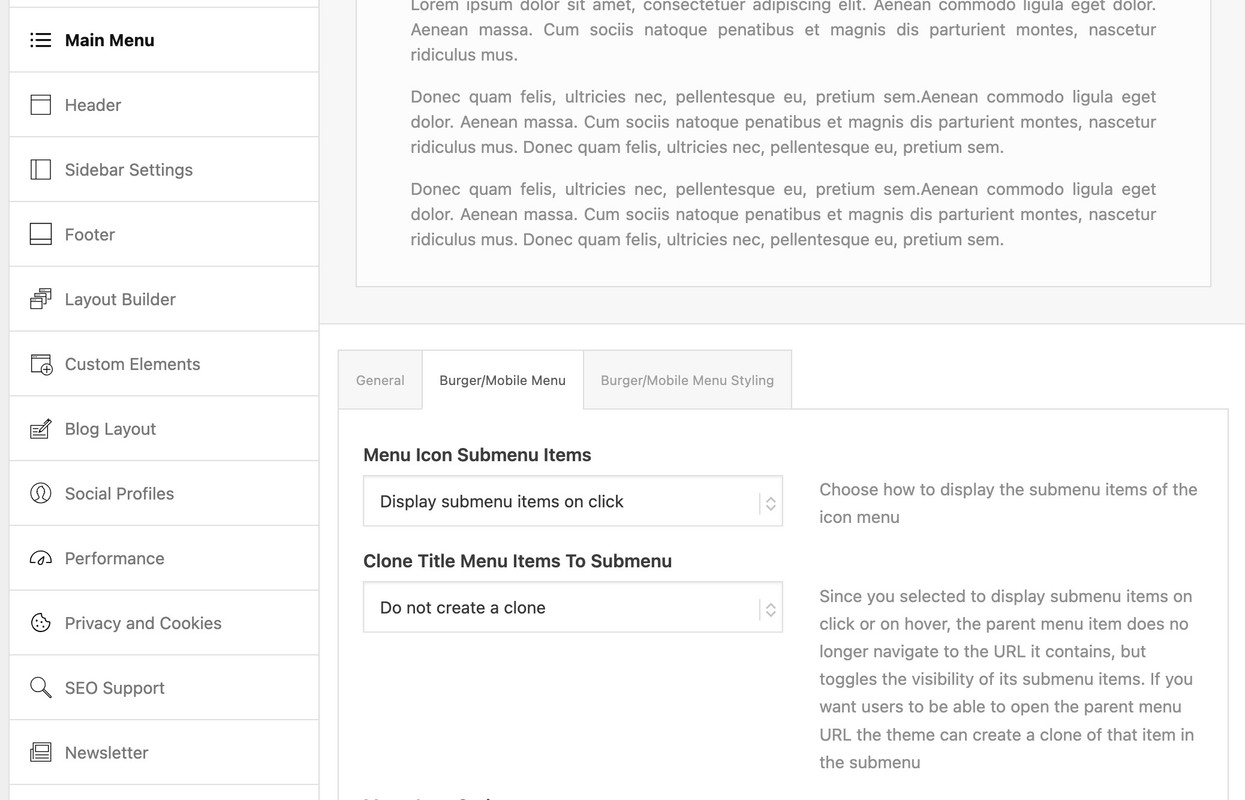
If you choose click we can edit that to only show one toggle open.
then put this to your child-theme functions.php:
function only_one_submenu_open_on_burger(){
?>
<script>
window.addEventListener("DOMContentLoaded", function () {
  (function($) {
    $('body').on( 'click touch', '.av-active-burger-items > a', function () {
      $(this).parent('li').siblings().removeClass('av-show-submenu');
      $(this).parent('li').siblings().find('ul').slideUp( "fast");
    });
    $('body').on( 'click touch', '.av-active-burger-items .av-width-submenu > a', function () {
      $(this).closest('.sub-menu').siblings().find('li').removeClass('av-show-submenu');
      $(this).closest('.sub-menu').siblings().find('ul').slideUp( "fast");
    });
  })(jQuery);
});
</script>
<?php
}
add_action('wp_footer', 'only_one_submenu_open_on_burger');
after doing that i will have a look to your site to optimize if needed.
 DONGHOON,HAN
Guest
To resolve the issue below, would purchasing a new license and updating it fix the problem?
When I click “Add New Page,” the Avia Layout Builder does not appear. How can I activate it? It works on pages that I’ve already created, but it doesn’t activate when I try to add a new page. I’m using WordPress version 6.7.1, Enfold Theme version 4.6.3.1, and PHP version 7.4.5p1. How can I make the Avia Layout Builder visible on new pages?
When I click “Add New Page,” the Avia Layout Builder does not appear. How can I activate it? It works on pages that I’ve already created, but it doesn’t activate when I try to add a new page. I’m using WordPress version 6.7.1, Enfold Theme version 4.6.3.1, and PHP version 7.4.5p1. How can I make the Avia Layout Builder visible on new pages?
Hello,
I’m currently running PHP v.7.7 on my site. From time-to-time, my hosting provider urges me to upgrade to the latest PHP v. 8.2. When I do so, the formatting of my Enfold site gets scrambled and a “critical error” message is displayed. See linked screenshot. When I go back to 7.4, format is restored to normal. Hosting techs wonder if my theme is incompatible with the latest PHP versions.
Advice appreciated.Thanks, Lance
https://postimg.cc/gx8bZdCQ
Hi Guenni,
thank you very much i’ll try it now.
Just for my understanding:
i create a new folder with “shortcodes” in child-theme folder.
Then i change postslider.pho at line 876ff and upload it to child-theme>shortcodes.
Than i add the other code to my function.php child-theme, right?
kind regards
Jak
you have to have a child-theme avia-snippet-sticky-header.js file.
on line 79 there is:

remove that && ! isMobile so there is only :
if( shrinking )
if you like to minify your theme script and css files – put both files ( the script itself and the minified script to a js subfolder to your child-theme. The edited script : you can minfy the code at: https://www.toptal.com/developers/javascript-minifier
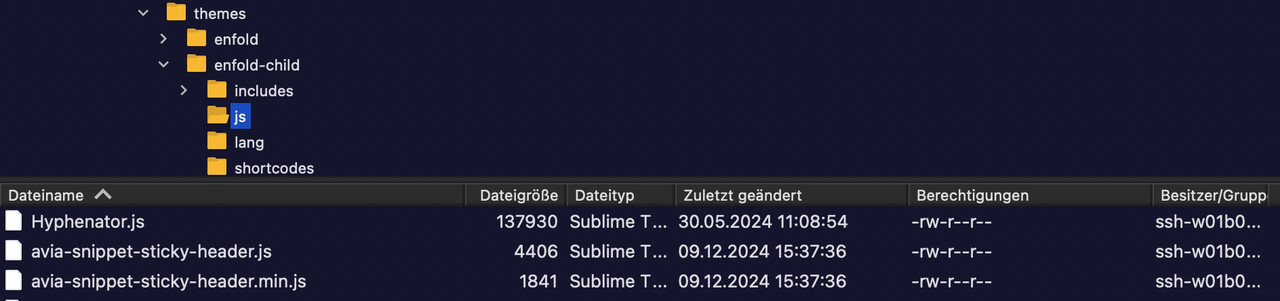
This comes to your child-theme functions.php:
function wp_change_sticky_header_script() {
  wp_deregister_script( 'avia-sticky-header' );

  $vn = avia_get_theme_version();
  $options = avia_get_option();
  $child_theme_url = get_stylesheet_directory_uri();
  $min_js = avia_minify_extension( 'js' );

  $condition  = ( isset( $options['header_position'] ) && $options['header_position'] == 'header_top' );
  $condition2 = ( isset( $options['header_sticky'] ) && $options['header_sticky'] == 'header_sticky' ) && $condition;
  avia_enqueue_script_conditionally( $condition2 , 'avia-sticky-header-child', "{$child_theme_url}/js/avia-snippet-sticky-header{$min_js}.js", array('avia-default'), $vn, true);
}
add_action( 'wp_enqueue_scripts', 'wp_change_sticky_header_script', 100 );



