Hey bb,
Thank you for the inquiry.
Try editing the Icon element and apply a Custom CSS Class (e.g., av-popup-no-nav) in the Advanced > Developer Settings toggle. Then, add this code to the functions.php file:
function ava_popup_init() { ?>
<script type="text/javascript">
jQuery(document).ready(function(){
    jQuery('.av-popup-no-nav, .av-popup-no-nav a').magnificPopup({
        type: 'image',
        midClick: true, // Allow opening popup on middle mouse click
        navigation: {
            next: false, // Disable next arrow
            prev: false  // Disable prev arrow
        }
    });
});
</script>
<?php }

add_action('wp_head', 'ava_popup_init');
Best regards,
Ismael
 bb
bbParticipant
I’m using the lightbox modal window on the site, but I have one specific case where we need to modify the function slightly. We are using an icon to open images in the lightbox and in that case we don’t want the arrows that click through other images on the page. Just want to open the one image and then close it.
We are using the arrows in other cases so we can’t disable it globally.
Is there a code snippet, or a specific class that we could use to disable the arrows selectively?
Thanks!
Hi,
Please reset your localhost and import the demo to your localhost and check that it is imported correctly.
If it doesn’t import there would be a setting that is not correct in your localhost, your loc needs to have access to the internet.
OVH blocks our IP address so the images will not import, your localhost or other webhosts should not block our IP.
Best regards,
Mike
And I forgot a Parallax Effekt for the background Image. Is, this possible?
Problem is: There are NO images in my hosting.
the upload folder is completly empty.
Hi,
Thank you for the inquiry.
You can also assign custom cssclass names to the Image element, allowing you to target them specifically. Please check the documentation below for more info: https://kriesi.at/documentation/enfold/add-custom-css/#enable-custom-css-class-name-support
Best regards,
Ismael
Hey xela,
Thank you for the inquiry.
You can add this filter in the functions.php file:
add_action("ava_after_main_title", function() {
  global $avia_config;

  if( is_singular("post") ) {
    $avia_config['image_size'] = 'full';
    $avia_config['preview_mode']  = 'custom';
  }
}, 10);
Best regards,
Ismael
Hi,
One final question: on the ‘remove 495 image code’ if there were other sizes I wanted to get rid of, is this the code for multiple sizes?
For other sizes, you can duplicate the if block.
function avf_remove_specific_image_size_from_srcset( $sources, $size_array, $image_src, $image_meta, $attachment_id ) {
    if ( isset( $sources[495] ) ) {
        unset( $sources[495] );
    }

    if ( isset( $sources[295] ) ) {
        unset( $sources[295] );
    }

    return $sources;
}
add_filter( 'wp_calculate_image_srcset', 'avf_remove_specific_image_size_from_srcset', 10, 5 );
Best regards,
Ismael
Unfortunately even in the localhost there are no images…
Hey mskmw,
The includes/admin/demo_data folder will not have images, when you import the demo into your localhost the images will be in your /wp-content/uploads/ *date*
after you import into your localhost then use the Duplicator plugin to import from your localhost to OVH, the images will be added.
Do not use the WordPress ▸ Tools ▸ Import with a .xml file to move your localhost to your OVH site.
Best regards,
Mike
I use Smush to compress and Simple Image Sizes to set custom image sizes.
That code has not made a difference, Remote Debug still says it is loading the 700px image.
But if you say it’s loading the correct image, then I’m OK with that and I’m not sure I need the extra code. I just wanted to make sure there wasn’t anything wrong with Enfold. Unless you’ve got other insight into what would cause Remote Debug to show the wrong size on my PC, I’ll just put this down to more dodgy code from Google…
One final question: on the ‘remove 495 image code’ if there were other sizes I wanted to get rid of, is this the code for multiple sizes?
    if ( isset( $sources[495, 295] ) ) {
        unset( $sources[495, 295] );
Hi,
my hoster is OVH, i read about several problems when importing the GYM demo data.
So i imported all data on my localhost and then imported it back to my hosting.
But unfortunately there were no images imported. The includes/admin/demo_data folder is emty.
In the database the links to the pictures seem to be wrong: http://test.kriesi.at/enfold-gym/wp-content/uploads/sites/18/2016/02/hero-2.jpg
is not reachable.
How can I import the pictures otherwise?
Hello, how can I place the “full” image on top of a blog post with the original dimensions instead of a cropped version?
THANKS
Hi Ismael,
I revalidated the token.
Yes, I added custom scripts to the css stylesheet. The above explained problem exists even when I remove all my custom code from the stylesheet.
I deactivated all the plugins temporarily, but the problem still exists.
It all worked well untill I changed the url of the website.
I found another problem in the masonry-gallery. As soon a I set the styling to “perfect grid” all the images from the gallery disappear in the frontend. This hasn’t been before I changed the url.
Beside, the welcome message is gone now.
In the private section I enclose a proof of the valid token.
Hi,
Thank you for the update.
We created a test page using the Fullwidth Easy Slider (see private field). Please make sure to set the Styling > Slides > Slideshow Image and Video Size settings to No Scaling.
Best regards,
Ismael
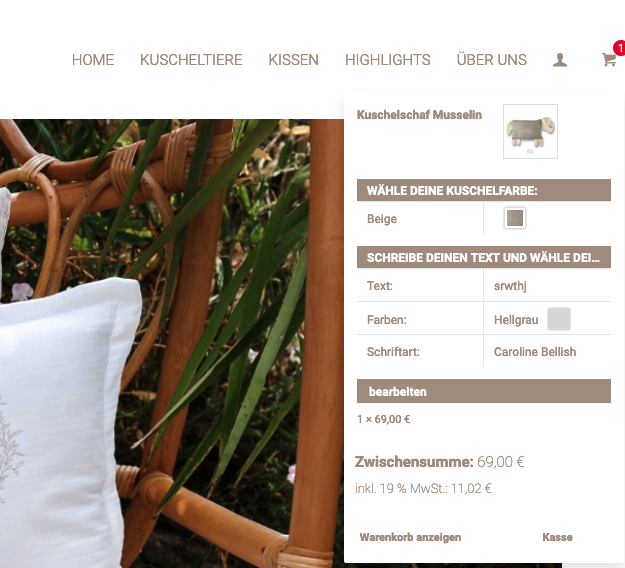
Yes you can see it here:
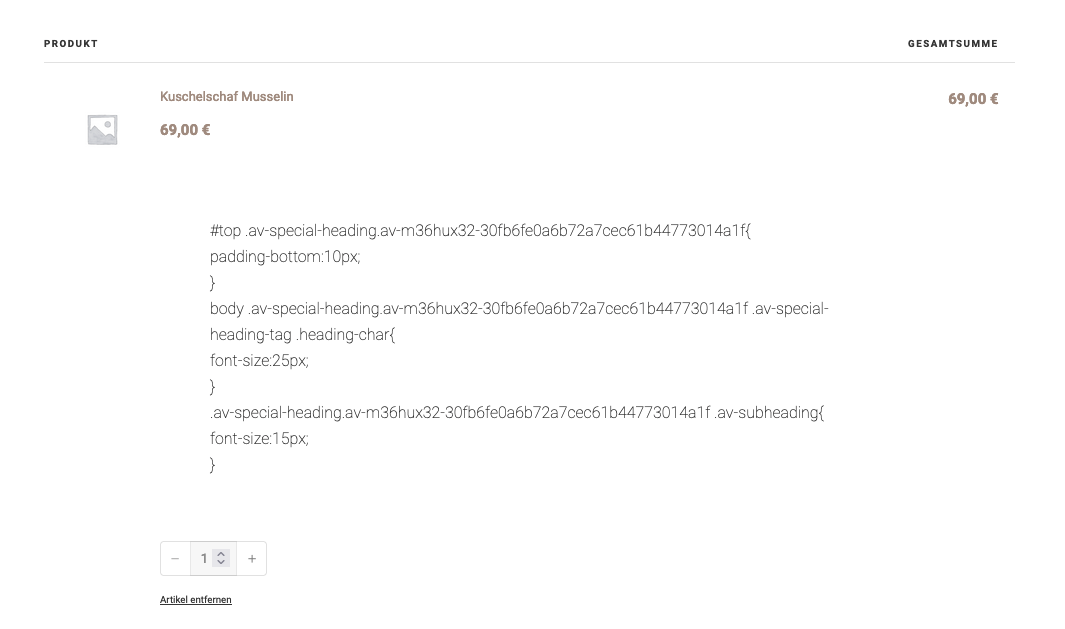
And these are the properties of the product (image, color, fonts, etc.) These are displayed in the small shopping cart. But not on the shopping cart page or only as CSS code
Only the CSS code is output here. No product image and no properties:
Hi Ismael,
No… nothing of the sort… just editing via the Advanced Layout Editor like normal.
The page seems to function fine up and to the point where I’m stuck… if I were to remove any images, it will save fine… if i try to add any further images/content, it refuses to save properly (continues to spin). Almost as if it’s run out of space/memory.
Hi,
It works, but the images are too small in height. Can I still adjust the height in CSS?
You may need to adjust the default size of the entry_without_sidebar thumbnail. Please add this filter in the functions.php file:
function avf_customization_modify_thumb_size( $size ) {
      $size['entry_without_sidebar'] = array( 'width' => 9999, 'height' => 9999 );
      $size['entry_with_sidebar'] = array( 'width' => 9999, 'height' => 9999 );
      return $size;
}

add_filter( 'avf_modify_thumb_size', 'avf_customization_modify_thumb_size', 10, 1 );
Then use the following plugin to regenerate the thumbnails:
// https://wordpress.org/plugins/force-regenerate-thumbnails/
IMPORTANT: Please make sure to create a site backup or restore point before proceeding.
Best regards,
Ismael
Hi,
It seems to be loading the correct image (180x101px) on our end. Are you using any plugins related to images? Try to add this filter to force the browser to load the 180px image when the screen width is less than 768px.
add_filter( 'wp_calculate_image_srcset_sizes', 'avf_wp_calculate_image_srcset_sizes_mod', 10, 2 );
function avf_wp_calculate_image_srcset_sizes_mod( $sizes, $size ) {
    if ( 180 === $size[0] && 101 === $size[1] ) {
        return '(max-width: 768px) 180px, 700px';
    }

    return $sizes;
}
Best regards,
Ismael
Hi, Ismael,
Yes, I tried the fullwidth easy slider, but it cuts off both the top and bottom of the image. Please help!
Thanks,
Justine
Hi there,
I’ve run into an issue with a site I’m working on where a specific page just randomly stopped saving edits beyond a specific point.
The page has a fair amount of content (text/images) utilizing a tab section and while modifying the final tab, the page just gave up on saving edits beyond a specific point (ie: it would save fine, and if I tried adding an additional image and attempted to save, it would not). I assumed that it might be related to the PHP Memory Limit, so we had that increased to 512MB to no avail. Also tried disabling all plugins to no avail.
Any thoughts on what the issue might be?
Thanks in advance!
That new code has removed the 495px image, thanks.
Next problem: Remote Debug for Android says (I think) that the image actually being loaded on Android (the Intrinsic Size) is now the Full size image, 700x394px at 37.1kB, and not any of the smaller thumbnails in srcset.
Why is Android loading the Full size image (and not Square, 180x101px at 5kB, as the page states) – or am I incorrectly interpreting Remote Debug? https://imgur.com/gallery/hotel-nevada-LAGkc3e
Dev Tools says desktop PC correctly loads the 180px size in responsive mode.
Hey jnightingale,
Thank you for the inquiry.
Have you tried using the Fullwidth Easy Slider instead of the Fullscreen Slider? With the Fullwidth Easy Slider, the size of the slider will be calculated based on the dimensions of the images, rather than inheriting the size of the browser viewport.
Best regards,
Ismael
Hi,
Thank you for the update.
Please revert back to the previous avf_blog_style filter:
add_filter('avf_blog_style','avf_blog_style_mod', 10, 2);
function avf_blog_style_mod($layout, $context){
    if($context == 'archive') $layout = 'single-big';
    return $layout;
}
Then, include the hook below:
function avf_blog_featured_image_size_mod() {
    global $avia_config;
    $avia_config['image_size'] = 'full';
}
add_action('after_setup_theme', 'avf_blog_featured_image_size_mod');
Best regards,
Ismael
Hey Jak73,
Thank you for the inquiry.
1.) You can add this css code to adjust the height of the slider images on mobile view:
@media only screen and (max-width: 767px) {
	/* Add your Mobile Styles here */
	#top .avia-slideshow li img {
		min-height: 600px;
		object-fit: cover;
	}
}
2.) To adjust the height of the section, try including this css rule inside the media query above:
.home #av_section_1 .template-page {
    padding: 10px 0;
}
Best regards,
Ismael
Hi,
I am having an issue with the hero image at https://fiestapoolsandspas.com/. It’s the Black Friday Sale at the top of the page. My issue is that it doesn’t show the whole image on a desktop or resize on a cellphone. Can you please advise?
Thank you!
Justine
Hey caro_dsa,
Thank you for the inquiry.
Unfortunately, adding an image banner to product tags is not supported, as there is no default option to apply thumbnails for tags. If having this functionality is essential, you may consider hiring a freelancer to assist with the customization. You can find freelancers who specialize in theme customization on our customization page.
If you have any other questions or need further assistance, please feel free to let us know.
Best regards,
Ismael
Hi,
We adjusted the filter a bit. Please try it again:
function avf_remove_specific_image_size_from_srcset( $sources, $size_array, $image_src, $image_meta, $attachment_id ) {
    if ( isset( $sources[495] ) ) {
        unset( $sources[495] );
    }

    return $sources;
}
add_filter( 'wp_calculate_image_srcset', 'avf_remove_specific_image_size_from_srcset', 10, 5 );
Best regards,
Ismael
I have now installed the PHP code in the latest version from you. That does NOT work!
So I have now changed the wp-config.php so that the theme editor works. So you can make changes but please let me know what you changed.
I removed the widget CATEGORIES because I can’t use it without the correct image view.
I added add_filter( ‘wp_calculate_image_srcset’, ‘__return_false’ ); and it did remove srcset completely.
I’d rather use the specific filter. However after removing the above and putting the specific filter in, srcset comes back into the page but the filter does not remove the 495px image from srcset. Purged caches and did a hard browser reload as well.



