
-
AuthorSearch Results
-
December 8, 2024 at 2:24 pm #1473184
Hey Markus,
It looks like your layerslider says “no video with supported format and MIME type found”

The console has the error :
Media resource could not be decoded.

On Chrome this error is not there,

So it seems that the Firefox browser can not decode this, you could try encoding it again, to correct the codec, it may not be a true mp4

Some browsers are more forgiving than others.Best regards,
MikeDecember 8, 2024 at 1:57 pm #1473183Hey Jak73,
When I check it seems to be working:

I’m not sure that I see a difference:

Best regards,
MikeDecember 8, 2024 at 1:48 pm #1473180In reply to: add custom icon
Hey michael_goering,
Thanks, these icons are colored, for fontello they need to be black and white only. If you want to use the css please convert to PNG.
I do see working icons in the backend:

that show on the frontend:

Best regards,
MikeDecember 7, 2024 at 7:37 pm #1473166In reply to: re: flagship template
Hey alex,
Unfortunately the discount for Enfold expired 4 years ago, which all users were notified of in 2020.
The discount was only for customers that had bought with in a year (2019) your license looks like it is from 2015.
We have an exclusive contract with Envato (Theme Forest) and can not issue licenses or upgrade them.
Then good news is that with the purchase of a new license you will be eligible of 6 month of forum support, or a year with a small upgrade, which I recommend.

Best regards,
MikeDecember 7, 2024 at 7:17 pm #1473163In reply to: add custom icon
Hi,
This post is from the contact form, please log in to the support forum and open a new thread

Best regards,
MikeDecember 7, 2024 at 3:00 pm #1473158Topic: Masonry Gallery with Button in Caption
in forum EnfoldOrenishii
ParticipantHello,
I’m trying to create a Masonry Gallery that I can set up with product images. In the caption, I’d like to include the company, the product name, and the price. I also want to use a button as the clickthrough link in the caption on hover. Is that something I can do with the theme? The links will be directly to the 3rd-party product page rather than our site, so using a portfolio layout won’t help.
I’ve included an example of a similar layout from another website. Thank you for your help.
December 7, 2024 at 2:17 pm #1473153In reply to: add custom icon
Hi,
You can not use.otf or .woff, use must use iconfont which will only be black and white, no colors.
Please see this post, Guenni007 points out that Fontello is a bit picky about the compound paths and offers a solution.
He also offers a solution to use images instead of svg here.
Please note that using the contact form is not appropriate for support questions, please log in to the support forum and open a new thread if you need further assistance.Best regards,
MikeDecember 7, 2024 at 2:02 pm #1473150In reply to: Cannot change the footer height
Hey rixi,
Your footer height is set by the largest widget, Kontakt, that widget has two empty paragraph tags “p”, you may have used the “return” key, thus WordPress adds the paragraph tags.

try removing these.Best regards,
MikeDecember 7, 2024 at 1:51 pm #1473148In reply to: mobil menu is not displayed correctly
Hi,
It looks like you are using v5.5, please update v6.0.8
To update your version of Enfold you will need to download the latest installable WP version from your Theme Forest account and upload it to your WordPress ▸ Appearance ▸ Themes ▸ Add Themes ▸ Add New

after you choose the zip file and click install, you will see a This theme is already installed message because you are updating, you can continue

then you will see the Theme updated successfully message.

Best regards,
MikeDecember 6, 2024 at 4:33 pm #1473117In reply to: General styling is not working
Hi Rikard,
Thank you. I can send you a screen dump if it helps, but I need an email address og way of uploading the images/docs.
What happens is:
I go to
General styling
I click on the appropriate color template
I click “save all changes” (either top button or down button – same result
and the error occurs reading “Saving didn’t work! Please reload and try again”The colour template looks highlighted after the message comes, however, when moving on to other pages/items, the template is lost
This happens every time. I have not been able to choose any template yet..
All the best, MariannDecember 6, 2024 at 4:31 pm #1473116In reply to: iFrames and lightbox for various views
this is based on the snippet above. – but you had to be aware that portfolio links are all url links – so the link goes then to the lightbox – and not to the portfolio page.
You could possibly check whether it is an internal link or not.the snippet looks to the anchor – and to its href – if href is an image link – then all stayes as it is – if not …
function lightbox_with_mixed_content_type() {
?>
<script type="text/javascript">
window.addEventListener("DOMContentLoaded", function () {
	(function($){
		$('.mixed-contenttype a').each(function(){
			var anchorLink = $(this).attr('href');
			if (/\.(jpg|png|gif|webp|jpeg)$/.test(anchorLink)) {
				//console.log(anchorLink + " is an image link");
			} else {
				$(this).attr('rel', 'lightbox').addClass('mfp-iframe');
			}
		});
	})(jQuery);
});
</script>
<?php
}
add_action('wp_footer', 'lightbox_with_mixed_content_type', 999);
but as mentioned above – the ajax portfolio grid will not do that .
December 6, 2024 at 7:10 am #1473062In reply to: touch icon
Ismaels solution is the fastest method. But if you like:
Former tips of Günter show me how to get an input field for an apple touch icon via child-theme functions.php:
put this to your child-theme functions.php:
function my_avf_option_page_apple_touch_icon( array $avia_elements = array()){
  $slug = "avia";
  $id = 'favicon';
  $new_element =  array(
      "slug"  => "avia",
      "name"  => __( "Apple Touch Icon", 'avia_framework' ),
      "desc"  => __("Specify an Apple Touch Icon for your site.", 'avia_framework')." <br/>".__("recommended format: .png", 'avia_framework')."<br/>".__("best format will be 180px in square", 'avia_framework'),
      "id"    => "avia_appleicon",
      "type"  => "upload",
      "label" => __( "Use Image as Apple Touch Icon", 'avia_framework' ) );
  $found = false;
  $index = 0;
	foreach( $avia_elements as $key => $element ){ $index++;
	  if( isset( $element['id'] ) &&  ( $element['id'] == $id ) && isset( $element['slug'] ) && ( $element['slug'] == $slug ) ) {
	    $found = true;
	    break;
	  }
	}
	if( ! $found ) {
		$avia_elements[] = $new_element;
	}
	else {
		$avia_elements = array_merge( array_slice( $avia_elements, 0, $index ), array( $new_element ), array_slice( $avia_elements, $index  ) );
	}
  return $avia_elements;
}
add_filter( 'avf_option_page_data_init', 'my_avf_option_page_apple_touch_icon', 10, 1 );

function add_apple_icon_to_header(){
?>
<link rel="apple-touch-icon" href="<?php echo avia_get_option('avia_appleicon'); ?>" type="<?php echo image_type_to_mime_type(exif_imagetype( avia_get_option('avia_appleicon'))); ?>">
<?php
}
add_action( 'wp_head',  'add_apple_icon_to_header', 10);
upload your image to media-library – best would be to name it: apple-touch-icon.png
or if you do not like those automatic stylings name it: apple-touch-icon-precomposed.png
180px in square is best – because iPhones uses those resolutions.December 6, 2024 at 6:31 am #1473059In reply to: Issue with ajax portfolio within tab element
Hi,
Thank you for the update.
We can’t see the screenshot, 404 error. Please try to add this script in the functions.php file to resize the tab section on page load:
function ava_custom_script_tab_section_resize() { ?>
    <script>
        (function ($) {
            $(document).ready(function () {
                var targetElement = $('a[data-av-tab-section-title="1"]');
                if (targetElement.length) {
                    setTimeout(function () {
                        targetElement.trigger('click');
                    }, 1000); // Optional delay to ensure other elements are ready
                }
            });
        }(jQuery));
    </script>
<?php }
add_action('wp_footer', 'ava_custom_script_tab_section_resize', 99);
You can use platforms like Savvyify, Imgur or Dropbox to upload and share the screenshot. Here are the steps to follow:
1.) Visit the website of your chosen platform, such as Savvyify, Imgur or Dropbox.
2.) Locate the option to upload a file or an image.
3.) Select the screenshot file from your computer or device and upload it to the platform.
4.) After the upload is complete, you will be provided with a shareable link or an embed code.
5.) Copy the link or code and include it in your message or response to provide us with the screenshot.Thank you for taking the time to share the screenshot. It will help us better understand the issue you’re facing and provide appropriate assistance.
Best regards,
IsmaelDecember 6, 2024 at 5:43 am #1473055In reply to: touch icon
Hey ausgesonnen,
Thank you for the inquiry.
You have to create an image for iOS devices that is at least 180x180px in PNG format. Name it apple-touch-icon.png, upload it to the Media Library, and add this filter to the functions.php file:
add_filter( 'avf_favicon_final_output', 'avf_favicon_final_output_mod', 10, 3 );

function avf_favicon_final_output_mod( $icon_link, $url, $type ) {
    $upload_dir = wp_get_upload_dir();
    $touch_icon_url = $upload_dir['baseurl'] . '/apple-touch-icon.png';
    $touch_icon_link = ' 	<link rel="apple-touch-icon" href="' . esc_url( $touch_icon_url ) . '">';
    return $icon_link . "\n" . $touch_icon_link;
}
Best regards,
IsmaelDecember 5, 2024 at 9:27 pm #1473043Topic: Size of images on mobile versus desktop
in forum EnfoldSandy
ParticipantQuestion: Does Enfold automatically serve smaller file versions of images on mobile, while serving the larger file versions of images on desktop?
If no, then what is the best practice for this to support excellence Page Speed?
-
This topic was modified 1 year, 4 months ago by
Sandy.
December 5, 2024 at 11:58 am #1472998In reply to: widgets don’t work
Yes I have 2 plugins as I stated in my original post and they are not the issue. Disable comments and image widget. I tried that first please review original post with additional PHP log snippet.
December 5, 2024 at 11:17 am #1472996Topic: Different images for desktop and smartphone portrait
in forum Enfolddillionline
ParticipantHallo Support,
DE:Wie kann ich verschiedene Bilder für Desktop und Smartphone-Portrait-Format in ENDFOLD angeben?
EN: How can I specify different images for desktop and smartphone portrait format in ENDFOLD?
DE: Ich hatte diesen Ansatz von 2019 gefunden, ist das noch aktuell?
EN: I found this approach from 2019, is it still up to date?@media only screen and (max-width: 479px) {
.avia-image-container .avia_image {
margin-left: -9%;
margin-right: -9%;
width: 120%;
max-width: 120%;
}
}Hier ein Beispiel, wo das Problem sichtbar wird.
Es geht um das große Foto zu Beginn der Seite. In Mobile-Portrait-Format ist die Dame nicht sichtbar.
Meine Lösungsidee wäre für diese mobile Ansicht ein Bild zu erstellen, wo die Dame in der Mitte steht.Here is an example where the problem becomes visible. It’s about the large photo at the top of the page. The lady is not visible in mobile portrait format.
My solution idea would be to create an image for this mobile view where the lady is in the middle.Demo: https://bfi-edel-stahl.de/lohnfertigung/
Many thanks in advance
December 5, 2024 at 9:57 am #1472989In reply to: Facebook Like Box Widget doesn’t work on mobile
Thanks @MIke and @Ismael, I’ve replaced the Image Widget with an HTML Block displayng the image linked to the facebook page to open i a new tab.. More clean and easy because using the image Widget and not the Facebook Like Box Widget there’s no interaction with FB, is better that the Image Widget can have a checkbox to select for opening the link in a new tab..
Thank You Very much for your help..
December 5, 2024 at 9:30 am #1472987In reply to: Issue with ajax portfolio within tab element
I guess I can’t send the image link?
https://chiway.ch/wp-content/uploads/Screenshot-Chiway-Akademie.pngDecember 5, 2024 at 8:16 am #1472982Hi @ismael, many thanks. for 95% we’re there!
see this

1. I noticed that the arrows and text is not exactly in the center yet
2. the text isn’t center aligned (text is left aligned)
3. would be awesome if the arrows left and right could be centered in the coloured block they are in.could you provide CSS for those last bits?
if I wanted to make the overlay a little bit lighter, what would I need to adjust?
-
This reply was modified 1 year, 4 months ago by
the_digital_manager.
December 5, 2024 at 7:40 am #1472981In reply to: Facebook Like Box Widget doesn’t work on mobile
Thanks @Ismael for fixing. But the Enfold Facebook Like Box It’s unuseful, doesn’t works on mobile for a FB issue and do not consent to select the link to open on a new tab.. It’s better and easier to use an HTML block widget to display the image and make then link opens directly in a new tab..
Perhaps is useful that You revise the Facebook Like Box Widget to works properly.. Same thing for the Imege Widget
Thank You Very Much for help
-
This reply was modified 1 year, 4 months ago by
newmediologo.
December 5, 2024 at 6:29 am #1472970In reply to: meta description vs. excerpt
Hi,
Thank you for the update.
Where do you see the meta description? This the only meta description that we can see in the page:
<meta name="description" content="The War Horse is an award-winning nonprofit newsroom educating the public on the military through military news, forums, and writing seminars.">And another for open graph meta, which is different from the meta description:
<meta property="og:description" content="The War Horse is an award-winning nonprofit newsroom educating the public on the military through military news, forums, and writing seminars.">Would you mind providing a screenshot? You can use platforms like Savvyify, Imgur or Dropbox to upload and share the screenshot. Here are the steps to follow:
1.) Visit the website of your chosen platform, such as Savvyify, Imgur or Dropbox.
2.) Locate the option to upload a file or an image.
3.) Select the screenshot file from your computer or device and upload it to the platform.
4.) After the upload is complete, you will be provided with a shareable link or an embed code.
5.) Copy the link or code and include it in your message or response to provide us with the screenshot.Thank you for taking the time to share the screenshot. It will help us better understand the issue you’re facing and provide appropriate assistance.
Best regards,
IsmaelDecember 5, 2024 at 6:25 am #1472969In reply to: Changing Icon to Client logo icon
Hi,
Did you try the css code above?
#top #main #footer-page ul.avia-icon-list.av-iconlist-small li:before {
    background-image: url(/wp-content/uploads/2024/12/ProfoundPlanning_Stacked_White.png);
}
Best regards,
IsmaelDecember 5, 2024 at 6:15 am #1472968Hey bdfuel,
Thank you for the inquiry.
You can manually add the html using a Text or Code block element. Example:
<div class="avia-author-book-container avia-column-gap-no">
<div class="avia-column avia-col-50 avia-top-column avia-element avia-element-1fbc302" data-id="1fbc302" data-element_type="column">
<div class="avia-widget-wrap avia-element-populated">
<div class="avia-element avia-element-41719f0 avia-widget__width-initial avia-widget avia-widget-jet-listing-dynamic-image" data-id="41719f0" data-element_type="widget" data-widget_type="jet-listing-dynamic-image.default">
<div class="avia-widget-container">
<div class="jet-listing jet-listing-dynamic-image">
                        <a href="https://demo.crocoblock.com/v2/only-books/book-authors/adiva-geffen/" class="jet-listing-dynamic-image__link">
                            <img width="100" height="100" src="https://demo.crocoblock.com/v2/only-books/wp-content/uploads/2022/04/Adiva_geffen-100x100.jpg" class="jet-listing-dynamic-image__img attachment-shop_thumbnail size-shop_thumbnail wp-post-image" alt="Adiva_geffen" decoding="async" srcset="https://demo.crocoblock.com/v2/only-books/wp-content/uploads/2022/04/Adiva_geffen-100x100.jpg 100w, https://demo.crocoblock.com/v2/only-books/wp-content/uploads/2022/04/Adiva_geffen-150x150.jpg 150w, https://demo.crocoblock.com/v2/only-books/wp-content/uploads/2022/04/Adiva_geffen-230x230.jpg 230w" sizes="(max-width: 100px) 100vw, 100px" loading="eager">
                        </a></div>
</div>
</div>
</div>
</div>
<div class="avia-column avia-col-50 avia-top-column avia-element avia-element-09dc9ac" data-id="09dc9ac" data-element_type="column">
<div class="avia-widget-wrap avia-element-populated">
<div class="avia-element avia-element-049d92b avia-widget avia-widget-jet-listing-dynamic-link" data-id="049d92b" data-element_type="widget" data-widget_type="jet-listing-dynamic-link.default">
<div class="avia-widget-container">
<h4 class="jet-listing jet-listing-dynamic-link">
                        <a href="https://demo.crocoblock.com/v2/only-books/book-authors/adiva-geffen/" class="jet-listing-dynamic-link__link">
                            <span class="jet-listing-dynamic-link__label">Adiva Geffen</span>
                        </a></h4>
</div>
</div>
<div class="avia-element avia-element-5b03505 avia-widget avia-widget-heading" data-id="5b03505" data-element_type="widget" data-widget_type="heading.default">
<div class="avia-widget-container">
                    <span class="avia-heading-title avia-size-default">1 books</span></div>
</div>
</div>
</div>
</div>
Then add this css code:
.avia-author-book-container {
    display: flex;
    flex-wrap: wrap;
}

.avia-column.av-ia-col-50 {
    width: 50%;
    padding: 10px; /* Adjust the padding as needed */
}

.avia-widget-wrap {
    display: flex;
    flex-direction: column;
}

@media (max-width: 768px) {
    .avia-column.av-ia-col-50 {
        width: 100%; /* Stack columns on smaller screens */
    }
}
You can use the 1/4 Column element for each author.
Best regards,
IsmaelDecember 4, 2024 at 5:52 pm #1472941In reply to: Facebook Like Box Widget doesn’t work on mobile
Hi,
The team points to a FB issue that FB needs to correct: https://developers.facebook.com/community/threads/550478830783215/
As for adding target=”_blank” to your image, please include an admin login in the Private Content area so we can examime.Best regards,
MikeDecember 4, 2024 at 1:55 pm #1472914In reply to: iFrames and lightbox for various views
Hello Guenni007, hello Ismael
Thanks for your help. I proceed exactly as you described, but a normal target page opens, which I enter in the custom link window. However, as on your website, either the content or video in iFrame or image in Lightbox should open optionally. See the link with my screens at the bottom of the Private Content window!Is it perhaps because I have installed the “Responsive Lightbox Lite” plugin?!
Best regards
Translated with DeepL.com (free version)
December 4, 2024 at 11:57 am #1472903In reply to: Need help to install demo
Thanks,
Is there a way to still get the demo?
I wanted a simple theme where I just had to modify the text, images and colors and add a blog page and that’s it.I added the shortcode and it’s not at all like the demo.
There should be a way to just upload locally the demo with images if ovh blocks your ip.-
This reply was modified 1 year, 4 months ago by
evadietetique.
December 4, 2024 at 11:57 am #1472902In reply to: iFrames and lightbox for various views
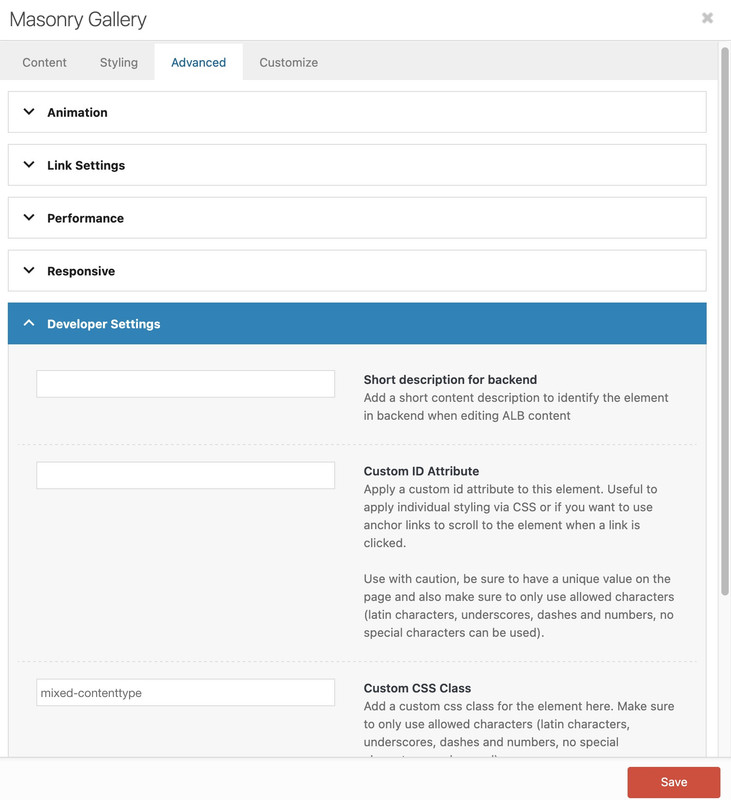
on masonry element itself – on insertion (as ismael mentioned already ) or on edit the gallery – for each gallery-item there is on the right side :
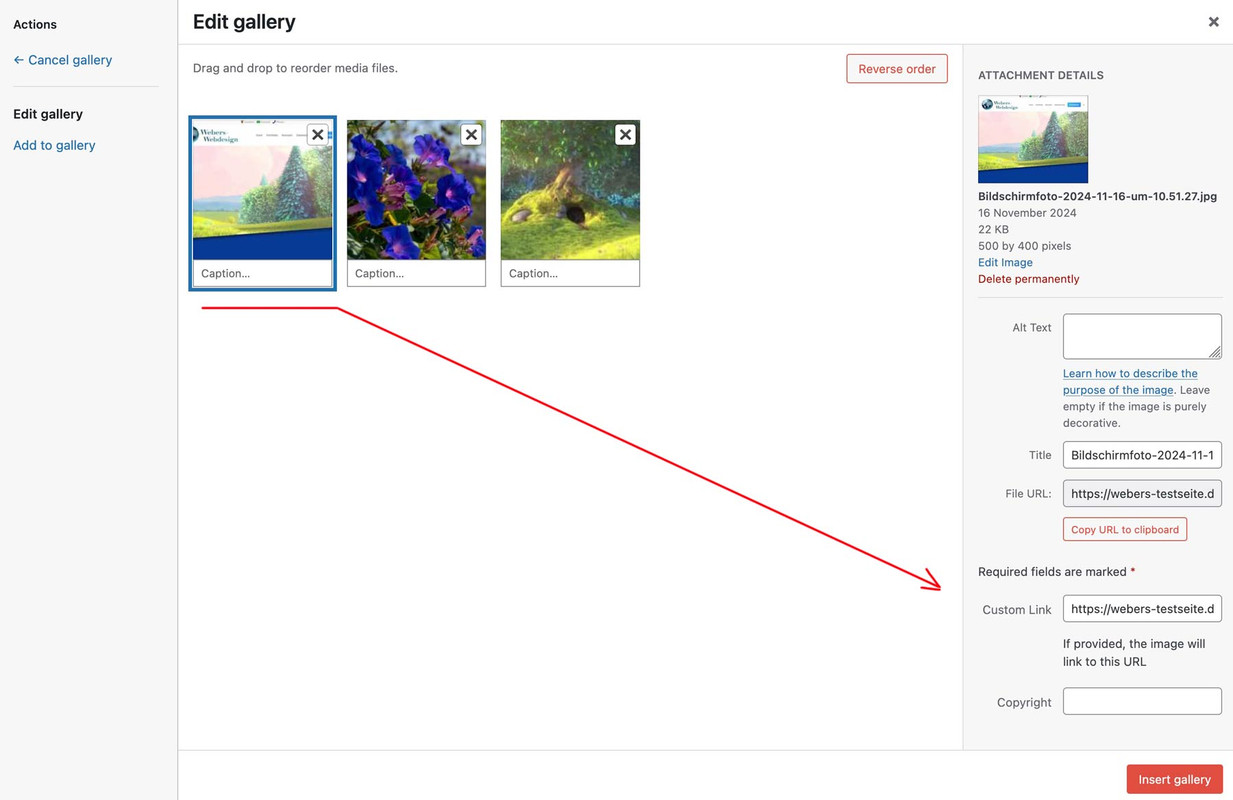
But please note that this is a global change. It will always affect this image from now on!
AND do not forget to :
choose lightbox and on link settings – image link : „use custom link and fallback is image“
December 4, 2024 at 11:40 am #1472897In reply to: iFrames and lightbox for various views
Hi,
But: Where do I enter “a custom class to the masonry : mixed-contenttype”
Try adding the custom class in the Advanced > Developer Settings > Custom CSS Class field.
declare “custom-links to those images ( video or website urls)”?
When selecting images for the Masonry Gallery in the Media > Library, there should be a Custom Link field, right on top of the Copyright field. Please check the screenshot in the private field.
Best regards,
IsmaelDecember 4, 2024 at 11:21 am #1472890Hi,
Thank you for the update.
How can we share screenshots here ?
You can use platforms like Savvyify, Imgur or Dropbox to upload and share the screenshot. Here are the steps to follow:
1.) Visit the website of your chosen platform, such as Savvyify, Imgur or Dropbox.
2.) Locate the option to upload a file or an image.
3.) Select the screenshot file from your computer or device and upload it to the platform.
4.) After the upload is complete, you will be provided with a shareable link or an embed code.
5.) Copy the link or code and include it in your message or response to provide us with the screenshot.Thank you for taking the time to share the screenshot. It will help us better understand the issue you’re facing and provide appropriate assistance.
Best regards,
Ismael -
This topic was modified 1 year, 4 months ago by
-
AuthorSearch Results
-
Search Results
-
Hello,
I’m trying to create a Masonry Gallery that I can set up with product images. In the caption, I’d like to include the company, the product name, and the price. I also want to use a button as the clickthrough link in the caption on hover. Is that something I can do with the theme? The links will be directly to the 3rd-party product page rather than our site, so using a portfolio layout won’t help.
I’ve included an example of a similar layout from another website. Thank you for your help.
Hallo Support,
DE:Wie kann ich verschiedene Bilder für Desktop und Smartphone-Portrait-Format in ENDFOLD angeben?
EN: How can I specify different images for desktop and smartphone portrait format in ENDFOLD?
DE: Ich hatte diesen Ansatz von 2019 gefunden, ist das noch aktuell?
EN: I found this approach from 2019, is it still up to date?@media only screen and (max-width: 479px) {
.avia-image-container .avia_image {
margin-left: -9%;
margin-right: -9%;
width: 120%;
max-width: 120%;
}
}Hier ein Beispiel, wo das Problem sichtbar wird.
Es geht um das große Foto zu Beginn der Seite. In Mobile-Portrait-Format ist die Dame nicht sichtbar.
Meine Lösungsidee wäre für diese mobile Ansicht ein Bild zu erstellen, wo die Dame in der Mitte steht.Here is an example where the problem becomes visible. It’s about the large photo at the top of the page. The lady is not visible in mobile portrait format.
My solution idea would be to create an image for this mobile view where the lady is in the middle.Demo: https://bfi-edel-stahl.de/lohnfertigung/
Many thanks in advance


