nice to see the page now – then it is much easier to give advice.
First – why do you use the image as background? – use it as image element inside that column.
Best would be to give a custom class to that flex-column with your image.
to see an interims result – that could be done:
@media only screen and (min-width: 768px) {
  .flex_column.av-cvo-a82f70a62f8490e3b0b75af0c90996f9 {
    position: absolute;
    bottom: 0
  }
}
But: i guess we can have better results if you do not use the equal height option! because in responsive case the height of those containers are too big.
So can you please give to the flex-column with that image a custom class and remove the equal height option – then i check if there is a better solution for every screen width.
See example with css code : https://webers-testseite.de/greg/
Hi,
Your support license is good until 2025-12-14 your update license is for life, you are using an old version so you may need to manually update.
To update your version of Enfold you may need to download the latest installable WP version from your Theme Forest account and upload it to your WordPress ▸ Appearance ▸ Themes ▸ Add Themes ▸ Add New

after you choose the zip file and click install, you will see a This theme is already installed message because you are updating, you can continue

then you will see the Theme updated successfully message.

Best regards,
Mike
can you try in child-theme functions.php:
add_filter( 'avf_post_ingnore_featured_image_link', '__return_true' );
can you link to one image example ?
and by the way 9400×400 – really? can you link to one of those big images.
WP has for media library a dimension threshold at 2560px – so if bigger dimensions are uploaded a new source will be generated with : filename_scaled.
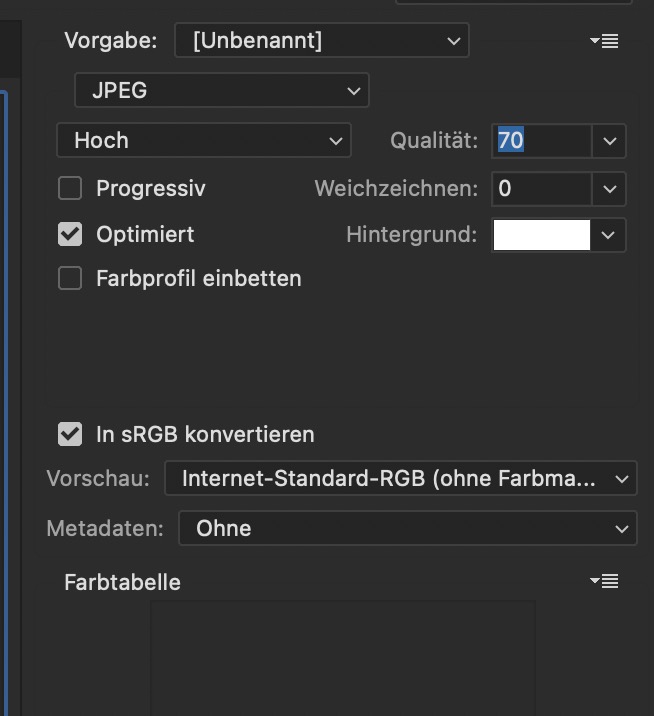
What color profile did you choose on photoshop export: – did you check to have rgb export?
Thanks, and sorry, I did not make it clear:
This action should be removed on EVERY blog-detail-page, and I mean just the header-image, not the lightbox go the galleries itself.
Thanks again!
-
This reply was modified 1 year, 4 months ago by
 xela.
xela.
Currently, images uploding to the WP media library are corrupted either by having a question mark icon in the gallery or being altered with a yellow tint. This happens on most images and only a few get through un affected, usually the smaller inmates 9400×400) all JPG images toady exported from photoshop 2024 using “save for Web Legacy JPG 70 , are corrupted these are 1200 x 800 images.
When viewing the upload “link” in the image preview, the images look fine at full size. When imported into a Portfolio they are either yellow icons and yellowish on the web page or they are question mark in the portfolio page preview and simply not visible on the page. I have reseached this with my web hosting team and they say it is a theme issue and to contact the theme creator, so here I am.
thank you for any help.
Hi,
Thank you for the update.
The width of the tab section title is defined via css. You can override it by adding the following code to the Enfold > General Styling > Quick CSS field:
.av-inner-tab-title, .av-tab-section-icon, .av-tab-arrow-container, .av-tab-section-image {
    width: 250px;
}
Best regards,
Ismael
How do I align the logo and the right image here:

to look like this 
HI Ismael,
Sure, the test page is below. As you can see, I’m attempting to use the ‘title and excerpt’ option to display on my products (the grey squares). The other images are just placeholders from other articles. The option works for those, but the images I’m trying to set up in the masonry aren’t showing properly. I want all that info (designer name, product name, and price) in the bottom of the image on mouseover, with a Shop Now button.
The SupportAcct info remains the same. Thanks for your help.
Hello,
how can I just remove the lightbox link on a single blog-page without changing the layout?
Thanks!
Thanks for your help Ismael.
Here are two screen grabs. User A has full access. User B has some hidden content, but the hidden elements are still holding blank spaces.
https://img.savvyify.com/image/User-B-empty-spaces.9xktO
https://img.savvyify.com/image/User-A-Full-Access.9xIYz
Thanks
Nick
-
This reply was modified 1 year, 4 months ago by
 Nick_Skehan. Reason: Typo
Hey Giovanna,
Thank you for the inquiry.
Where can we check the issue? Please provide the site URL in the private field and provide screenshots using platforms like Savvyify, Imgur or Dropbox to upload and share the screenshot. Here are the steps to follow:
1.) Visit the website of your chosen platform, such as Savvyify, Imgur or Dropbox.
2.) Locate the option to upload a file or an image.
3.) Select the screenshot file from your computer or device and upload it to the platform.
4.) After the upload is complete, you will be provided with a shareable link or an embed code.
5.) Copy the link or code and include it in your message or response to provide us with the screenshot.
Thank you for taking the time to share the screenshot. It will help us better understand the issue you’re facing and provide appropriate assistance.
Best regards,
Ismael
Hi,
Thank you for the update.
We can’t login using any of the account above. Please check the info carefully. Would you mind providing a screenshot of the issue? You can use platforms like Savvyify, Imgur or Dropbox to upload and share the screenshot. Here are the steps to follow:
1.) Visit the website of your chosen platform, such as Savvyify, Imgur or Dropbox.
2.) Locate the option to upload a file or an image.
3.) Select the screenshot file from your computer or device and upload it to the platform.
4.) After the upload is complete, you will be provided with a shareable link or an embed code.
5.) Copy the link or code and include it in your message or response to provide us with the screenshot.
Thank you for taking the time to share the screenshot. It will help us better understand the issue you’re facing and provide appropriate assistance.
Best regards,
Ismael
I’m having a huge SEO issue when using Enfold. On some of my pages Google Search Console is finding a mysterious noindex tag showing up. When I deactivate Enfold, it goes away.
The actual page https://aplusconstructionnow.com/residential-construction/
doesn’t really have a noindex but it does show up in Google Search Console as this:
<!–
Debugging Info for Theme support:
Theme: Enfold
Version: 5.7
Installed: enfold
AviaFramework Version: 5.6
AviaBuilder Version: 5.3
aviaElementManager Version: 1.0.1
ML:512-PU:69-PLA:0
WP:6.6.1
Compress: CSS:load minified only – JS:load minified only
Updates: disabled
PLAu:0
–>
<meta name=”robots” content=”noindex,indexifembedded” /></head>
<body id=”top” class=”page-template-default page page-id-482 stretched rtl_columns av-curtain-numeric barlow avia-responsive-images-support” itemscope=”itemscope” itemtype=”https://schema.org/WebPage”>
<div id=”wrap_all”>
<header id=”header” class=”all_colors header_color light_bg_color av_header_top av_logo_left av_main_nav_header av_menu_right av_custom av_header_sticky av_header_shrinking av_header_stretch_disabled av_mobile_menu_tablet av_header_searchicon_disabled av_header_unstick_top_disabled av_seperator_small_border av_minimal_header av_minimal_header_shadow av_bottom_nav_disabled ” data-av_shrink_factor=”25″ role=”banner” itemscope=”itemscope” itemtype=”https://schema.org/WPHeader”>
<div id=”header_main” class=”container_wrap container_wrap_logo”>
<div class=”
I have already gone into the “Search Engine Optimization Support” area and selected “Let SEO plugin set this tag” for the meta Tag “Robots”. (Because I have Yoast SEO plugin)
I have also tried adding the following to the functions.php based on a previous support string. https://kriesi.at/support/topic/noindex-when-enfold-is-enabled-2/
add_filter(‘avf_set_follow’,’avia_set_follow’);
function avia_set_follow(){
$meta = ‘<meta name=”robots” content=”index, follow” />’ . “\n”;
return $meta;
}
PLEASE HELP!
Hi,
Please include a screenshot and paste the image URL in your post so we can see what you see. I also don’t see a gap.
Best regards,
Mike
Hi Ismael,
Thanks for the clarification—got it. I’ll update the links and image URLs manually as suggested.
Best regards,
Syful
Hi,
How can I place the icon in the middle?
Make sure the background-position is set to center center, and adjust the value of the background-size property if you need to reduce the size of the images.
Example:
div[data-av_icon="\e804"] {
    content: " ";
    background-image: url(/wp-content/uploads/2024/12/Goering_Icon5_eKey_farbig_RGB.png) !important;
    background-size: 50%;
    background-repeat: no-repeat;
    font-size: 0 !important;
    background-position: center center;
}
Best regards,
Ismael
Hi,
Thank you for the screenshot.
The PDF button is now visible below the product image. Please check the screenshot in the private field. Did you figure it out?
Best regards,
Ismael
Hi Ismael,
okay i’ll try: https://img.savvyify.com/image/PDF-drucken.9xhmj
and this is what i put into child theme and funkctions.php:
function ava_product_pdf_print_button() {
echo do_shortcode(‘[bws_pdfprint display=”pdf”]’);
}
add_action( ‘woocommerce_before_single_product_summary’, ‘ava_product_pdf_print_button’, 15 );
As there was no result i used snippets and placed the same code. Still no result.
Any other idea?
Best regards
Michael F.
i guess you have that warning on uploading your icons to fontello about compound path.
you can edit your vector based icon f.e. in illustrator – open your svg and look at Object Menu – Compound Path – create
i hope that this will be the names – because i’m working on german versions : Objekt – zusammengesetzter Pfad – erstellen.
Working with Pathfinder is not enough. You had to go that way.
________
Mikes Way is to substitute an existing entypo-fontello icon by an image. Big advantage – you can use the icon font to insert even colored svg icons.
see here: https://enfold.webers-webdesign.de/colorized-font-icons/
Hi,
Thank you for the update.
Yes, you should update the links and the image URL in every Code Block element with your own URL and author images. Unfortunately, there is no option for this by default, so you will have to edit the html manually.
Best regards,
Ismael
This reply has been marked as private.
Hi,
Thank you for the update.
Did you create a test page? Please provide the page URL so that we can inspect it.
— Unfortunately, there is no option to display a second image on hover. Implementing this feature would require custom modifications, which fall outside the scope of our support.
— To set a custom color for the button, you can add this css code:
.view-product-button a {
   color: red;
   background: blue;
}
Best regards,
Ismael
This reply has been marked as private.
Hi,
For the css, each icon has a different code number, for your shield with the check mark it is \e802
div[data-av_icon="\e802"] {
	content: " ";
	background-image: url(/wp-content/uploads/2024/12/Goering_Icon1_eCheck_farbig_RGB.png) !important;
	background-size: contain;
	background-repeat: no-repeat;
       font-size: 0 !important
}
I adjusted your css and now it works.

Please review the thread on how to find the icon code:

Best regards,
Mike
Hi Rikard
here is my screenshot
https://img.savvyify.com/image/Screenshot-20241209-161530-Chrome.9xca8
the menu on a mobile is big so I would like the sub headings to be bolder or even blue #20316d so that they stand out from the sub-sub headings.
Hope this makes sense.
Regards
This reply has been marked as private.
HI Ismael,
Thank you for replying! I’d add this to the functions.php file, and the option align properly, is that correct? I’ve done so, but the layout isn’t quite right.
Also, could you advise on:
– How to show a second image on mouseover, and
– How to set a custom color for the button?
I appreciate your help.
I tried to paste your suggested replacement code into the child theme functions.php file and received this error message:
Your PHP code changes were not applied due to an error on line 385 of file wp-includes/html-api/class-wp-html-decoder.php. Please fix and try saving again.
Uncaught Error: Call to undefined function ctype_alnum() in wp-includes/html-api/class-wp-html-decoder.php:385
Stack trace:
#0 wp-includes/html-api/class-wp-html-decoder.php(148): WP_HTML_Decoder::read_character_reference(‘attribute’, ‘https://i0.wp.c…’, 123, NULL)
#1 wp-includes/html-api/class-wp-html-decoder.php(114): WP_HTML_Decoder::decode(‘attribute’, ‘https://i0.wp.c…’)
#2 wp-includes/html-api/class-wp-html-tag-processor.php(2735): WP_HTML_Decoder::decode_attribute(‘https://i0.wp.c…’)
#3 wp-content/plugins/jetpack/jetpack_vendor/automattic/jetpack-image-cdn/src/class-image-cdn.php(361): WP_HTML_Tag_Processor->get_attribute(‘src’)
#4 wp-includes/class-wp-hook.php(324): Automattic\
Hey Tanja,
Thank you for the inquiry.
Yes, by default, WordPress applies srcset and sizes attributes to images, allowing the browser to select a more suitable thumbnail for different screen sizes. You can learn more about it here: https://developer.wordpress.org/apis/responsive-images/
Best regards,
Ismael



