-
Search Results
-
Hello,
I have a display problem between a computer and a smartphone.
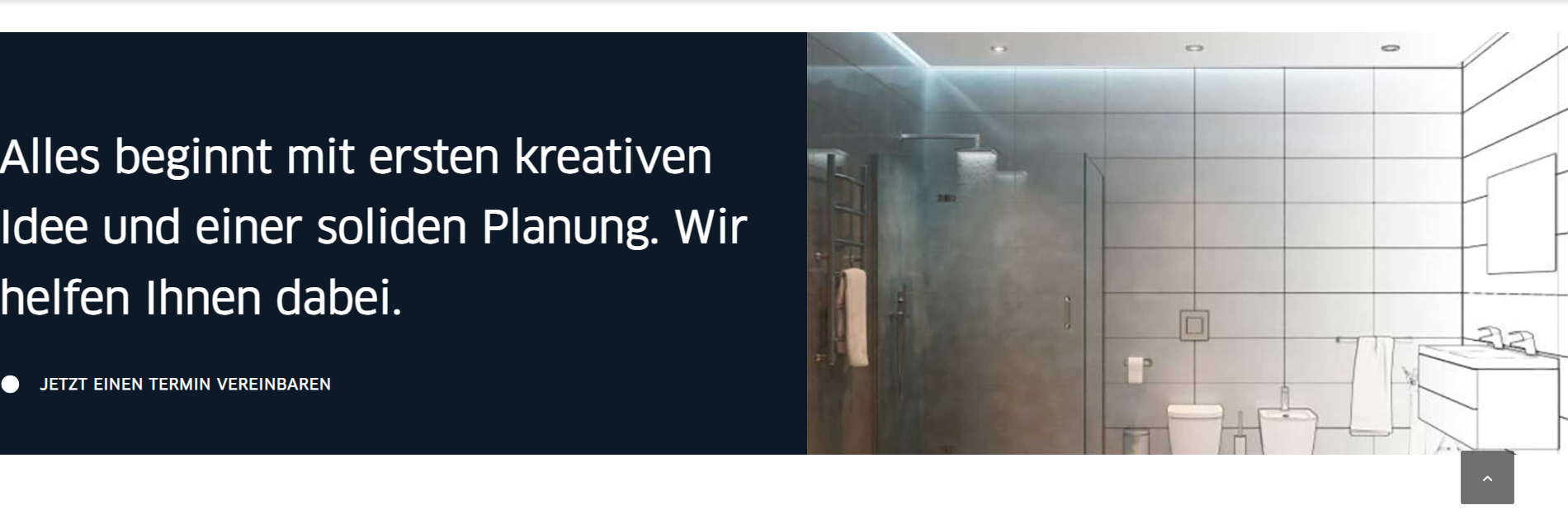
My page is divided in 2 vertically. Title on the left and picture on the right. Next line : Title on the right, image on the left, …On computer (it’s OK) :
A (title) – B (image)
B (image) – A (title)On smartphone:
A (title)
B (image)
B (image)
A (title)Is it possible to have this combination:
A (title)
B (image)
A (title)
B (image)Thank you in advance for your help.
Have a good day.
Hi
I get this error when going into the page for pages, any ideas? I have this setup for a few sites but only this has this issue (so far). Any suggestion?:
Notice: Funktionen WP_Styles::add anropades felaktigt. Stilen med namnet ”avia-module-audioplayer” köades med beroenden som inte är registrerade: avia-layout. Mer information finns i Felsökning i WordPress. (Detta meddelande lades till i version 6.9.1.) in /home/erfrisor/eriksson-robach.se/wp-includes/functions.php on line 6131Notice: Funktionen WP_Styles::add anropades felaktigt. Stilen med namnet ”avia-module-blog” köades med beroenden som inte är registrerade: avia-layout. Mer information finns i Felsökning i WordPress. (Detta meddelande lades till i version 6.9.1.) in /home/erfrisor/eriksson-robach.se/wp-includes/functions.php on line 6131
Notice: Funktionen WP_Styles::add anropades felaktigt. Stilen med namnet ”avia-module-postslider” köades med beroenden som inte är registrerade: avia-layout. Mer information finns i Felsökning i WordPress. (Detta meddelande lades till i version 6.9.1.) in /home/erfrisor/eriksson-robach.se/wp-includes/functions.php on line 6131
Notice: Funktionen WP_Styles::add anropades felaktigt. Stilen med namnet ”avia-module-button” köades med beroenden som inte är registrerade: avia-layout. Mer information finns i Felsökning i WordPress. (Detta meddelande lades till i version 6.9.1.) in /home/erfrisor/eriksson-robach.se/wp-includes/functions.php on line 6131
Notice: Funktionen WP_Styles::add anropades felaktigt. Stilen med namnet ”avia-module-buttonrow” köades med beroenden som inte är registrerade: avia-layout. Mer information finns i Felsökning i WordPress. (Detta meddelande lades till i version 6.9.1.) in /home/erfrisor/eriksson-robach.se/wp-includes/functions.php on line 6131
Notice: Funktionen WP_Styles::add anropades felaktigt. Stilen med namnet ”avia-module-button-fullwidth” köades med beroenden som inte är registrerade: avia-layout. Mer information finns i Felsökning i WordPress. (Detta meddelande lades till i version 6.9.1.) in /home/erfrisor/eriksson-robach.se/wp-includes/functions.php on line 6131
Notice: Funktionen WP_Styles::add anropades felaktigt. Stilen med namnet ”avia-module-catalogue” köades med beroenden som inte är registrerade: avia-layout. Mer information finns i Felsökning i WordPress. (Detta meddelande lades till i version 6.9.1.) in /home/erfrisor/eriksson-robach.se/wp-includes/functions.php on line 6131
Notice: Funktionen WP_Styles::add anropades felaktigt. Stilen med namnet ”avia-module-comments” köades med beroenden som inte är registrerade: avia-layout. Mer information finns i Felsökning i WordPress. (Detta meddelande lades till i version 6.9.1.) in /home/erfrisor/eriksson-robach.se/wp-includes/functions.php on line 6131
Notice: Funktionen WP_Styles::add anropades felaktigt. Stilen med namnet ”avia-module-contact” köades med beroenden som inte är registrerade: avia-layout. Mer information finns i Felsökning i WordPress. (Detta meddelande lades till i version 6.9.1.) in /home/erfrisor/eriksson-robach.se/wp-includes/functions.php on line 6131
Notice: Funktionen WP_Styles::add anropades felaktigt. Stilen med namnet ”avia-module-slideshow” köades med beroenden som inte är registrerade: avia-layout. Mer information finns i Felsökning i WordPress. (Detta meddelande lades till i version 6.9.1.) in /home/erfrisor/eriksson-robach.se/wp-includes/functions.php on line 6131
Notice: Funktionen WP_Styles::add anropades felaktigt. Stilen med namnet ”avia-module-countdown” köades med beroenden som inte är registrerade: avia-layout. Mer information finns i Felsökning i WordPress. (Detta meddelande lades till i version 6.9.1.) in /home/erfrisor/eriksson-robach.se/wp-includes/functions.php on line 6131
Notice: Funktionen WP_Styles::add anropades felaktigt. Stilen med namnet ”avia-module-dynamic-field” köades med beroenden som inte är registrerade: avia-layout. Mer information finns i Felsökning i WordPress. (Detta meddelande lades till i version 6.9.1.) in /home/erfrisor/eriksson-robach.se/wp-includes/functions.php on line 6131
Notice: Funktionen WP_Styles::add anropades felaktigt. Stilen med namnet ”avia-module-gallery” köades med beroenden som inte är registrerade: avia-layout. Mer information finns i Felsökning i WordPress. (Detta meddelande lades till i version 6.9.1.) in /home/erfrisor/eriksson-robach.se/wp-includes/functions.php on line 6131
Notice: Funktionen WP_Styles::add anropades felaktigt. Stilen med namnet ”avia-module-maps” köades med beroenden som inte är registrerade: avia-layout. Mer information finns i Felsökning i WordPress. (Detta meddelande lades till i version 6.9.1.) in /home/erfrisor/eriksson-robach.se/wp-includes/functions.php on line 6131
Notice: Funktionen WP_Styles::add anropades felaktigt. Stilen med namnet ”avia-module-gridrow” köades med beroenden som inte är registrerade: avia-layout. Mer information finns i Felsökning i WordPress. (Detta meddelande lades till i version 6.9.1.) in /home/erfrisor/eriksson-robach.se/wp-includes/functions.php on line 6131
Notice: Funktionen WP_Styles::add anropades felaktigt. Stilen med namnet ”avia-module-heading” köades med beroenden som inte är registrerade: avia-layout. Mer information finns i Felsökning i WordPress. (Detta meddelande lades till i version 6.9.1.) in /home/erfrisor/eriksson-robach.se/wp-includes/functions.php on line 6131
Notice: Funktionen WP_Styles::add anropades felaktigt. Stilen med namnet ”avia-module-rotator” köades med beroenden som inte är registrerade: avia-layout. Mer information finns i Felsökning i WordPress. (Detta meddelande lades till i version 6.9.1.) in /home/erfrisor/eriksson-robach.se/wp-includes/functions.php on line 6131
Notice: Funktionen WP_Styles::add anropades felaktigt. Stilen med namnet ”avia-module-hr” köades med beroenden som inte är registrerade: avia-layout. Mer information finns i Felsökning i WordPress. (Detta meddelande lades till i version 6.9.1.) in /home/erfrisor/eriksson-robach.se/wp-includes/functions.php on line 6131
Notice: Funktionen WP_Styles::add anropades felaktigt. Stilen med namnet ”avia-module-icon” köades med beroenden som inte är registrerade: avia-layout. Mer information finns i Felsökning i WordPress. (Detta meddelande lades till i version 6.9.1.) in /home/erfrisor/eriksson-robach.se/wp-includes/functions.php on line 6131
Notice: Funktionen WP_Styles::add anropades felaktigt. Stilen med namnet ”avia-module-icon-circles” köades med beroenden som inte är registrerade: avia-layout. Mer information finns i Felsökning i WordPress. (Detta meddelande lades till i version 6.9.1.) in /home/erfrisor/eriksson-robach.se/wp-includes/functions.php on line 6131
Notice: Funktionen WP_Styles::add anropades felaktigt. Stilen med namnet ”avia-module-iconbox” köades med beroenden som inte är registrerade: avia-layout. Mer information finns i Felsökning i WordPress. (Detta meddelande lades till i version 6.9.1.) in /home/erfrisor/eriksson-robach.se/wp-includes/functions.php on line 6131
Notice: Funktionen WP_Styles::add anropades felaktigt. Stilen med namnet ”avia-module-icongrid” köades med beroenden som inte är registrerade: avia-layout. Mer information finns i Felsökning i WordPress. (Detta meddelande lades till i version 6.9.1.) in /home/erfrisor/eriksson-robach.se/wp-includes/functions.php on line 6131
Notice: Funktionen WP_Styles::add anropades felaktigt. Stilen med namnet ”avia-module-iconlist” köades med beroenden som inte är registrerade: avia-layout. Mer information finns i Felsökning i WordPress. (Detta meddelande lades till i version 6.9.1.) in /home/erfrisor/eriksson-robach.se/wp-includes/functions.php on line 6131
Notice: Funktionen WP_Styles::add anropades felaktigt. Stilen med namnet ”avia-module-image” köades med beroenden som inte är registrerade: avia-layout. Mer information finns i Felsökning i WordPress. (Detta meddelande lades till i version 6.9.1.) in /home/erfrisor/eriksson-robach.se/wp-includes/functions.php on line 6131
Notice: Funktionen WP_Styles::add anropades felaktigt. Stilen med namnet ”avia-module-image-diff” köades med beroenden som inte är registrerade: avia-layout. Mer information finns i Felsökning i WordPress. (Detta meddelande lades till i version 6.9.1.) in /home/erfrisor/eriksson-robach.se/wp-includes/functions.php on line 6131
Notice: Funktionen WP_Styles::add anropades felaktigt. Stilen med namnet ”avia-module-hotspot” köades med beroenden som inte är registrerade: avia-layout. Mer information finns i Felsökning i WordPress. (Detta meddelande lades till i version 6.9.1.) in /home/erfrisor/eriksson-robach.se/wp-includes/functions.php on line 6131
Notice: Funktionen WP_Styles::add anropades felaktigt. Stilen med namnet ”avia-module-sc-lottie-animation” köades med beroenden som inte är registrerade: avia-layout. Mer information finns i Felsökning i WordPress. (Detta meddelande lades till i version 6.9.1.) in /home/erfrisor/eriksson-robach.se/wp-includes/functions.php on line 6131
Notice: Funktionen WP_Styles::add anropades felaktigt. Stilen med namnet ”avia-module-magazine” köades med beroenden som inte är registrerade: avia-layout. Mer information finns i Felsökning i WordPress. (Detta meddelande lades till i version 6.9.1.) in /home/erfrisor/eriksson-robach.se/wp-includes/functions.php on line 6131
Notice: Funktionen WP_Styles::add anropades felaktigt. Stilen med namnet ”avia-module-masonry” köades med beroenden som inte är registrerade: avia-layout. Mer information finns i Felsökning i WordPress. (Detta meddelande lades till i version 6.9.1.) in /home/erfrisor/eriksson-robach.se/wp-includes/functions.php on line 6131
Notice: Funktionen WP_Styles::add anropades felaktigt. Stilen med namnet ”avia-siteloader” köades med beroenden som inte är registrerade: avia-layout. Mer information finns i Felsökning i WordPress. (Detta meddelande lades till i version 6.9.1.) in /home/erfrisor/eriksson-robach.se/wp-includes/functions.php on line 6131
Notice: Funktionen WP_Styles::add anropades felaktigt. Stilen med namnet ”avia-module-menu” köades med beroenden som inte är registrerade: avia-layout. Mer information finns i Felsökning i WordPress. (Detta meddelande lades till i version 6.9.1.) in /home/erfrisor/eriksson-robach.se/wp-includes/functions.php on line 6131
Notice: Funktionen WP_Styles::add anropades felaktigt. Stilen med namnet ”avia-module-notification” köades med beroenden som inte är registrerade: avia-layout. Mer information finns i Felsökning i WordPress. (Detta meddelande lades till i version 6.9.1.) in /home/erfrisor/eriksson-robach.se/wp-includes/functions.php on line 6131
Notice: Funktionen WP_Styles::add anropades felaktigt. Stilen med namnet ”avia-module-numbers” köades med beroenden som inte är registrerade: avia-layout. Mer information finns i Felsökning i WordPress. (Detta meddelande lades till i version 6.9.1.) in /home/erfrisor/eriksson-robach.se/wp-includes/functions.php on line 6131
Notice: Funktionen WP_Styles::add anropades felaktigt. Stilen med namnet ”avia-module-portfolio” köades med beroenden som inte är registrerade: avia-layout. Mer information finns i Felsökning i WordPress. (Detta meddelande lades till i version 6.9.1.) in /home/erfrisor/eriksson-robach.se/wp-includes/functions.php on line 6131
Notice: Funktionen WP_Styles::add anropades felaktigt. Stilen med namnet ”avia-module-post-metadata” köades med beroenden som inte är registrerade: avia-layout. Mer information finns i Felsökning i WordPress. (Detta meddelande lades till i version 6.9.1.) in /home/erfrisor/eriksson-robach.se/wp-includes/functions.php on line 6131
Notice: Funktionen WP_Styles::add anropades felaktigt. Stilen med namnet ”avia-module-progress-bar” köades med beroenden som inte är registrerade: avia-layout. Mer information finns i Felsökning i WordPress. (Detta meddelande lades till i version 6.9.1.) in /home/erfrisor/eriksson-robach.se/wp-includes/functions.php on line 6131
Notice: Funktionen WP_Styles::add anropades felaktigt. Stilen med namnet ”avia-module-promobox” köades med beroenden som inte är registrerade: avia-layout. Mer information finns i Felsökning i WordPress. (Detta meddelande lades till i version 6.9.1.) in /home/erfrisor/eriksson-robach.se/wp-includes/functions.php on line 6131
Notice: Funktionen WP_Styles::add anropades felaktigt. Stilen med namnet ”avia-sc-search” köades med beroenden som inte är registrerade: avia-layout. Mer information finns i Felsökning i WordPress. (Detta meddelande lades till i version 6.9.1.) in /home/erfrisor/eriksson-robach.se/wp-includes/functions.php on line 6131
Notice: Funktionen WP_Styles::add anropades felaktigt. Stilen med namnet ”avia-module-slideshow-accordion” köades med beroenden som inte är registrerade: avia-layout. Mer information finns i Felsökning i WordPress. (Detta meddelande lades till i version 6.9.1.) in /home/erfrisor/eriksson-robach.se/wp-includes/functions.php on line 6131
Notice: Funktionen WP_Styles::add anropades felaktigt. Stilen med namnet ”avia-module-social” köades med beroenden som inte är registrerade: avia-layout. Mer information finns i Felsökning i WordPress. (Detta meddelande lades till i version 6.9.1.) in /home/erfrisor/eriksson-robach.se/wp-includes/functions.php on line 6131
Notice: Funktionen WP_Styles::add anropades felaktigt. Stilen med namnet ”avia-module-tabsection” köades med beroenden som inte är registrerade: avia-layout. Mer information finns i Felsökning i WordPress. (Detta meddelande lades till i version 6.9.1.) in /home/erfrisor/eriksson-robach.se/wp-includes/functions.php on line 6131
Notice: Funktionen WP_Styles::add anropades felaktigt. Stilen med namnet ”avia-module-table” köades med beroenden som inte är registrerade: avia-layout. Mer information finns i Felsökning i WordPress. (Detta meddelande lades till i version 6.9.1.) in /home/erfrisor/eriksson-robach.se/wp-includes/functions.php on line 6131
Notice: Funktionen WP_Styles::add anropades felaktigt. Stilen med namnet ”avia-module-tabs” köades med beroenden som inte är registrerade: avia-layout. Mer information finns i Felsökning i WordPress. (Detta meddelande lades till i version 6.9.1.) in /home/erfrisor/eriksson-robach.se/wp-includes/functions.php on line 6131
Notice: Funktionen WP_Styles::add anropades felaktigt. Stilen med namnet ”avia-module-team” köades med beroenden som inte är registrerade: avia-layout. Mer information finns i Felsökning i WordPress. (Detta meddelande lades till i version 6.9.1.) in /home/erfrisor/eriksson-robach.se/wp-includes/functions.php on line 6131
Notice: Funktionen WP_Styles::add anropades felaktigt. Stilen med namnet ”avia-module-testimonials” köades med beroenden som inte är registrerade: avia-layout. Mer information finns i Felsökning i WordPress. (Detta meddelande lades till i version 6.9.1.) in /home/erfrisor/eriksson-robach.se/wp-includes/functions.php on line 6131
Notice: Funktionen WP_Styles::add anropades felaktigt. Stilen med namnet ”avia-module-timeline” köades med beroenden som inte är registrerade: avia-layout. Mer information finns i Felsökning i WordPress. (Detta meddelande lades till i version 6.9.1.) in /home/erfrisor/eriksson-robach.se/wp-includes/functions.php on line 6131
Notice: Funktionen WP_Styles::add anropades felaktigt. Stilen med namnet ”avia-module-toggles” köades med beroenden som inte är registrerade: avia-layout. Mer information finns i Felsökning i WordPress. (Detta meddelande lades till i version 6.9.1.) in /home/erfrisor/eriksson-robach.se/wp-includes/functions.php on line 6131
Notice: Funktionen WP_Styles::add anropades felaktigt. Stilen med namnet ”avia-module-video” köades med beroenden som inte är registrerade: avia-layout. Mer information finns i Felsökning i WordPress. (Detta meddelande lades till i version 6.9.1.) in /home/erfrisor/eriksson-robach.se/wp-includes/functions.php on line 6131
Notice: Funktionen WP_Scripts::add anropades felaktigt. Skriptet med namnet ”avia-module-audioplayer” köades med beroenden som inte är registrerade: avia-shortcodes. Mer information finns i Felsökning i WordPress. (Detta meddelande lades till i version 6.9.1.) in /home/erfrisor/eriksson-robach.se/wp-includes/functions.php on line 6131
Notice: Funktionen WP_Scripts::add anropades felaktigt. Skriptet med namnet ”avia-module-chart-js” köades med beroenden som inte är registrerade: avia-shortcodes. Mer information finns i Felsökning i WordPress. (Detta meddelande lades till i version 6.9.1.) in /home/erfrisor/eriksson-robach.se/wp-includes/functions.php on line 6131
Notice: Funktionen WP_Scripts::add anropades felaktigt. Skriptet med namnet ”avia-module-chart” köades med beroenden som inte är registrerade: avia-shortcodes. Mer information finns i Felsökning i WordPress. (Detta meddelande lades till i version 6.9.1.) in /home/erfrisor/eriksson-robach.se/wp-includes/functions.php on line 6131
Notice: Funktionen WP_Scripts::add anropades felaktigt. Skriptet med namnet ”avia-module-contact” köades med beroenden som inte är registrerade: avia-shortcodes. Mer information finns i Felsökning i WordPress. (Detta meddelande lades till i version 6.9.1.) in /home/erfrisor/eriksson-robach.se/wp-includes/functions.php on line 6131
Notice: Funktionen WP_Scripts::add anropades felaktigt. Skriptet med namnet ”avia-module-slideshow” köades med beroenden som inte är registrerade: avia-shortcodes. Mer information finns i Felsökning i WordPress. (Detta meddelande lades till i version 6.9.1.) in /home/erfrisor/eriksson-robach.se/wp-includes/functions.php on line 6131
Notice: Funktionen WP_Scripts::add anropades felaktigt. Skriptet med namnet ”avia-module-countdown” köades med beroenden som inte är registrerade: avia-shortcodes. Mer information finns i Felsökning i WordPress. (Detta meddelande lades till i version 6.9.1.) in /home/erfrisor/eriksson-robach.se/wp-includes/functions.php on line 6131
Notice: Funktionen WP_Scripts::add anropades felaktigt. Skriptet med namnet ”avia-module-gallery” köades med beroenden som inte är registrerade: avia-shortcodes. Mer information finns i Felsökning i WordPress. (Detta meddelande lades till i version 6.9.1.) in /home/erfrisor/eriksson-robach.se/wp-includes/functions.php on line 6131
Notice: Funktionen WP_Scripts::add anropades felaktigt. Skriptet med namnet ”avia-module-gallery-hor” köades med beroenden som inte är registrerade: avia-shortcodes. Mer information finns i Felsökning i WordPress. (Detta meddelande lades till i version 6.9.1.) in /home/erfrisor/eriksson-robach.se/wp-includes/functions.php on line 6131
Notice: Funktionen WP_Scripts::add anropades felaktigt. Skriptet med namnet ”avia-module-rotator” köades med beroenden som inte är registrerade: avia-shortcodes. Mer information finns i Felsökning i WordPress. (Detta meddelande lades till i version 6.9.1.) in /home/erfrisor/eriksson-robach.se/wp-includes/functions.php on line 6131
Notice: Funktionen WP_Scripts::add anropades felaktigt. Skriptet med namnet ”avia-module-icon-circles” köades med beroenden som inte är registrerade: avia-shortcodes. Mer information finns i Felsökning i WordPress. (Detta meddelande lades till i version 6.9.1.) in /home/erfrisor/eriksson-robach.se/wp-includes/functions.php on line 6131
Notice: Funktionen WP_Scripts::add anropades felaktigt. Skriptet med namnet ”avia-module-icongrid” köades med beroenden som inte är registrerade: avia-shortcodes. Mer information finns i Felsökning i WordPress. (Detta meddelande lades till i version 6.9.1.) in /home/erfrisor/eriksson-robach.se/wp-includes/functions.php on line 6131
Notice: Funktionen WP_Scripts::add anropades felaktigt. Skriptet med namnet ”avia-module-iconlist” köades med beroenden som inte är registrerade: avia-shortcodes. Mer information finns i Felsökning i WordPress. (Detta meddelande lades till i version 6.9.1.) in /home/erfrisor/eriksson-robach.se/wp-includes/functions.php on line 6131
Notice: Funktionen WP_Scripts::add anropades felaktigt. Skriptet med namnet ”avia-module-image-diff” köades med beroenden som inte är registrerade: avia-shortcodes. Mer information finns i Felsökning i WordPress. (Detta meddelande lades till i version 6.9.1.) in /home/erfrisor/eriksson-robach.se/wp-includes/functions.php on line 6131
Notice: Funktionen WP_Scripts::add anropades felaktigt. Skriptet med namnet ”avia-module-hotspot” köades med beroenden som inte är registrerade: avia-shortcodes. Mer information finns i Felsökning i WordPress. (Detta meddelande lades till i version 6.9.1.) in /home/erfrisor/eriksson-robach.se/wp-includes/functions.php on line 6131
Notice: Funktionen WP_Scripts::add anropades felaktigt. Skriptet med namnet ”avia-module-magazine” köades med beroenden som inte är registrerade: avia-shortcodes. Mer information finns i Felsökning i WordPress. (Detta meddelande lades till i version 6.9.1.) in /home/erfrisor/eriksson-robach.se/wp-includes/functions.php on line 6131
Notice: Funktionen WP_Scripts::add anropades felaktigt. Skriptet med namnet ”avia-module-isotope” köades med beroenden som inte är registrerade: avia-shortcodes. Mer information finns i Felsökning i WordPress. (Detta meddelande lades till i version 6.9.1.) in /home/erfrisor/eriksson-robach.se/wp-includes/functions.php on line 6131
Notice: Funktionen WP_Scripts::add anropades felaktigt. Skriptet med namnet ”avia-module-menu” köades med beroenden som inte är registrerade: avia-shortcodes. Mer information finns i Felsökning i WordPress. (Detta meddelande lades till i version 6.9.1.) in /home/erfrisor/eriksson-robach.se/wp-includes/functions.php on line 6131
Notice: Funktionen WP_Scripts::add anropades felaktigt. Skriptet med namnet ”avia-module-notification” köades med beroenden som inte är registrerade: avia-shortcodes. Mer information finns i Felsökning i WordPress. (Detta meddelande lades till i version 6.9.1.) in /home/erfrisor/eriksson-robach.se/wp-includes/functions.php on line 6131
Notice: Funktionen WP_Scripts::add anropades felaktigt. Skriptet med namnet ”avia-module-numbers” köades med beroenden som inte är registrerade: avia-shortcodes. Mer information finns i Felsökning i WordPress. (Detta meddelande lades till i version 6.9.1.) in /home/erfrisor/eriksson-robach.se/wp-includes/functions.php on line 6131
Notice: Funktionen WP_Scripts::add anropades felaktigt. Skriptet med namnet ”avia-module-portfolio” köades med beroenden som inte är registrerade: avia-shortcodes. Mer information finns i Felsökning i WordPress. (Detta meddelande lades till i version 6.9.1.) in /home/erfrisor/eriksson-robach.se/wp-includes/functions.php on line 6131
Notice: Funktionen WP_Scripts::add anropades felaktigt. Skriptet med namnet ”avia-module-progress-bar” köades med beroenden som inte är registrerade: avia-shortcodes. Mer information finns i Felsökning i WordPress. (Detta meddelande lades till i version 6.9.1.) in /home/erfrisor/eriksson-robach.se/wp-includes/functions.php on line 6131
Notice: Funktionen WP_Scripts::add anropades felaktigt. Skriptet med namnet ”avia-module-slideshow-video” köades med beroenden som inte är registrerade: avia-shortcodes. Mer information finns i Felsökning i WordPress. (Detta meddelande lades till i version 6.9.1.) in /home/erfrisor/eriksson-robach.se/wp-includes/functions.php on line 6131
Notice: Funktionen WP_Scripts::add anropades felaktigt. Skriptet med namnet ”avia-module-slideshow-accordion” köades med beroenden som inte är registrerade: avia-shortcodes. Mer information finns i Felsökning i WordPress. (Detta meddelande lades till i version 6.9.1.) in /home/erfrisor/eriksson-robach.se/wp-includes/functions.php on line 6131
Notice: Funktionen WP_Scripts::add anropades felaktigt. Skriptet med namnet ”avia-module-tabsection” köades med beroenden som inte är registrerade: avia-shortcodes. Mer information finns i Felsökning i WordPress. (Detta meddelande lades till i version 6.9.1.) in /home/erfrisor/eriksson-robach.se/wp-includes/functions.php on line 6131
Notice: Funktionen WP_Scripts::add anropades felaktigt. Skriptet med namnet ”avia-module-tabs” köades med beroenden som inte är registrerade: avia-shortcodes. Mer information finns i Felsökning i WordPress. (Detta meddelande lades till i version 6.9.1.) in /home/erfrisor/eriksson-robach.se/wp-includes/functions.php on line 6131
Notice: Funktionen WP_Scripts::add anropades felaktigt. Skriptet med namnet ”avia-module-testimonials” köades med beroenden som inte är registrerade: avia-shortcodes. Mer information finns i Felsökning i WordPress. (Detta meddelande lades till i version 6.9.1.) in /home/erfrisor/eriksson-robach.se/wp-includes/functions.php on line 6131
Notice: Funktionen WP_Scripts::add anropades felaktigt. Skriptet med namnet ”avia-module-timeline” köades med beroenden som inte är registrerade: avia-shortcodes. Mer information finns i Felsökning i WordPress. (Detta meddelande lades till i version 6.9.1.) in /home/erfrisor/eriksson-robach.se/wp-includes/functions.php on line 6131
Notice: Funktionen WP_Scripts::add anropades felaktigt. Skriptet med namnet ”avia-module-toggles” köades med beroenden som inte är registrerade: avia-shortcodes. Mer information finns i Felsökning i WordPress. (Detta meddelande lades till i version 6.9.1.) in /home/erfrisor/eriksson-robach.se/wp-includes/functions.php on line 6131
Notice: Funktionen WP_Scripts::add anropades felaktigt. Skriptet med namnet ”avia-module-video” köades med beroenden som inte är registrerade: avia-shortcodes. Mer information finns i Felsökning i WordPress. (Detta meddelande lades till i version 6.9.1.) in /home/erfrisor/eriksson-robach.se/wp-includes/functions.php on line 6131
Notice: Funktionen WP_Scripts::add anropades felaktigt. Skriptet med namnet ”avia_analytics_js” köades med beroenden som inte är registrerade: avia_builder_js. Mer information finns i Felsökning i WordPress. (Detta meddelande lades till i version 6.9.1.) in /home/erfrisor/eriksson-robach.se/wp-includes/functions.php on line 6131
dear team, on my DEV page below at the top i have 1/1 column with text, then 2x ½ columns with 1 pic ea., than again 1/1 column with text.
I want to bring both text elements closer to image (i.e. less space inbetween, but even if I add a space line with “-” value” the space reamains too big.
I tried alternatively to work with pic grids, but this leads to other changes: white frame, hover effect etc.
-> How to fix this?
thx a. lot & best regards Tilman
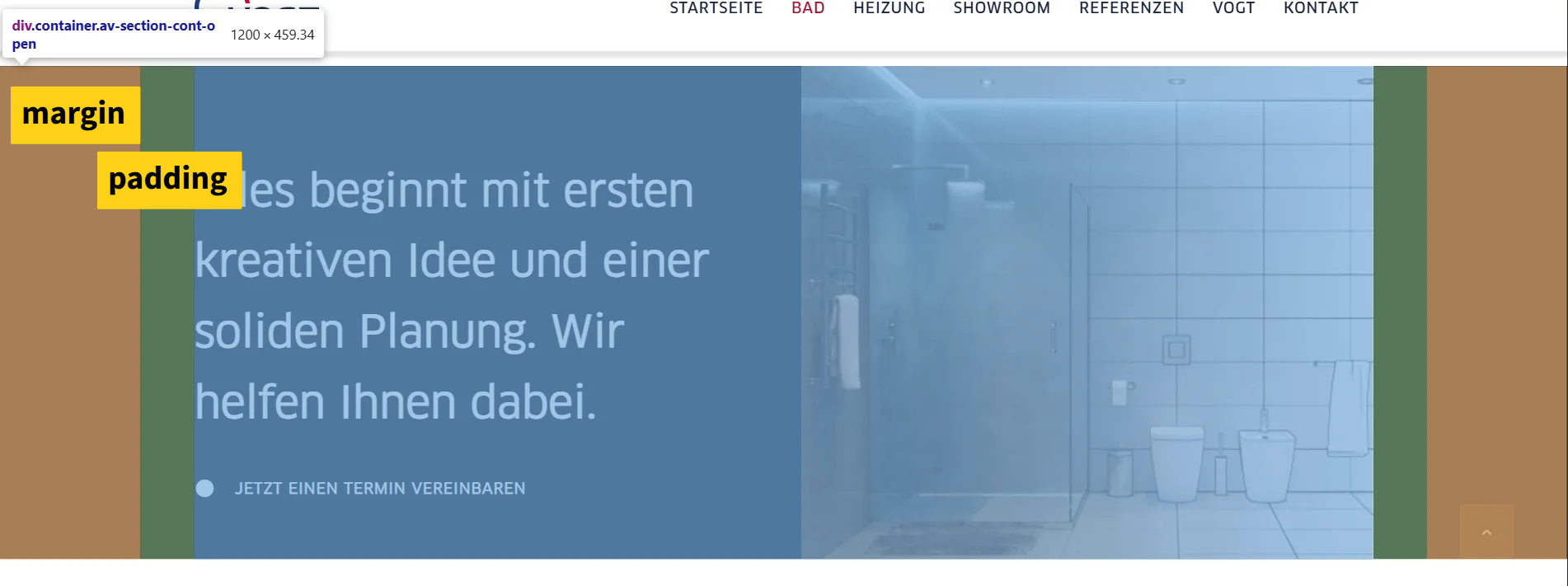
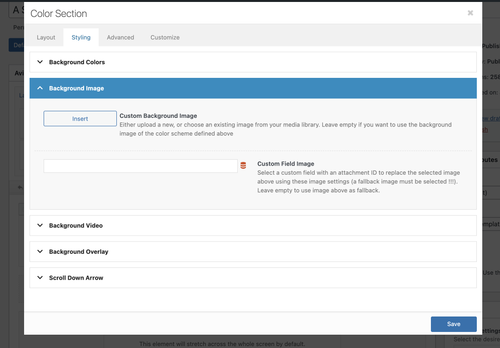
HI .. need to make the right image flexible and full screen

So, i added the css
.home #av_section_4 .container {
    max-width: 100%;
    padding: 0;
}
..and updated the section. But this does not take effect.
Strech to fit is also set in the block settings.What is missing?
Hi Enfold team,
I’m using the Enfold Gallery element in WordPress (Avia Layout Builder). I’m trying to achieve a CSS-only UX like this:
The large preview image stays at the top and is sticky while the user scrolls down through the thumbnails below it.
Once the thumbnails end, the page continues scrolling normally to the next section.
I’m not using any JS. I added a custom class to the Gallery element and tried multiple CSS approaches. I can sometimes get sticky to work, but then the layout breaks (preview shifts left / preview becomes tiny / thumbnails become huge or microscopic / only a few thumbs show per row). When I fix thumbnail sizing, the sticky behavior stops working.
What I’m using
Enfold theme (latest) + WordPress
Gallery element style: big preview + thumbnails (the normal preview-on-top layout)
I added a custom class on the Gallery element: av-gallery-sticky-scroll
What I want (exact behavior)
Keep Enfold’s default layout: big image on top, thumbnails below
Make only the big preview sticky (position: sticky; top: …)
Thumbnails should remain a normal-sized grid below
No inner scrolling container — I want normal page scroll, with preview sticking until the thumbnail list ends
CSS attempts (examples)
I tried sticky on .avia-gallery-big and also .avia-gallery-big-inner (in case the inner wrapper is needed), plus forcing overflow: visible on likely parents. I also tried overriding thumbnail widths using flex/grid.
Example of my latest attempt:
@media (min-width: 990px){
.av-gallery-sticky-scroll{
–stickyTop: 120px;
–thumbSize: 140px;
}.av-gallery-sticky-scroll .avia-gallery-big,
.av-gallery-sticky-scroll .avia-gallery-big .avia-gallery-big-inner{
position: sticky;
top: var(–stickyTop);
z-index: 50;
}.av-gallery-sticky-scroll,
.av-gallery-sticky-scroll .avia-gallery,
.av-gallery-sticky-scroll .avia-gallery-big{
overflow: visible !important;
}.av-gallery-sticky-scroll .avia-gallery-thumb{
display: grid !important;
grid-template-columns: repeat(auto-fill, var(–thumbSize));
gap: 12px;
margin-top: 14px;
justify-content: start;
}.av-gallery-sticky-scroll .avia-gallery-thumb li{
float: none !important;
width: auto !important;
margin: 0 !important;
padding: 0 !important;
}.av-gallery-sticky-scroll .avia-gallery-thumb img{
width: 100% !important;
height: auto !important;
display: block;
}
}Result: thumbnail sizing becomes unpredictable (either microscopic or huge), and sticky often stops working.
My questions
Is it possible CSS-only to make the Gallery element’s big preview sticky (preview on top, thumbs below) without breaking Enfold’s internal thumb sizing/layout rules?
Is there a recommended selector/wrapper inside the Gallery element that is safe to apply position: sticky to?
If sticky fails because of an Enfold container overflow rule, which wrapper should I override (and is there an Enfold setting that influences this)?
If this isn’t feasible with the Gallery element, is there a recommended Enfold-native alternative (e.g., specific element/layout pattern) that support suggests?
Thanks,
RobHey Mike, Ismael,
I do need help. I’ve been uploading images for 3 days, organizing a type-heavy graphic design portfolio. Porting over one site to a new desing based on the Photography theme in a subdirectoryENFOLD Images are not being generated at the size expected, AND Images getting crunched way too much, losing all detail. Even if setting the “Styling” to “No Scaling”. it is still crunching and resizing.
I am running no plug-ins yet.
It is like the images are randomly getting resized to weird sizes down from the original and then being reinterpolated back up. This is all when simply dragging an image into the Portfolio Masonry Gallery.
Is this a simple setting? im hoping I dont have to reimport. the images in the GALLERY look fine.
Dave Chapple