-
AuthorSearch Results
-
December 10, 2013 at 6:26 am #198442
Topic: Enfold > Image Overlay > Transparency > Icon background
in forum Enfoldzerozendesign
ParticipantHey again guys,
1 more thing for the night.
How do I:
remove the image hover transparency effect
remove the image hover icon background color
remove the image hover rotation effectThanks in advance
December 10, 2013 at 6:22 am #198438Hi Devin! – thanks for the reply.
… not quite fixed – if you hit the site homepage (www.pat-bach.com/breitercapital) on a 10″ tablet or iPad in portrait orientation (you will see the mobile menu, as desired), then turn the device to landscape orientation, you will see the overlap issue still exists. If you then refresh the page in landscape orientation, or go to another page, the issue then resolves.
Any thoughts on a fix is very much appreciated!
-LD3
December 10, 2013 at 6:00 am #198430I’ll tag the topic for Kriesi to take a look at and post it on our internal blog. It could just be apple doing something goofy with iOS and the css3 value since w3 seems to think it should be covering the background no matter what.
If you have any other questions or issues just let us know :)
Going to close this topic of for now since we’ll be getting a big spike of support topics coming in with 3.8 in a few days.
December 10, 2013 at 5:56 am #198426In reply to: Can't add images to slider
Also tested on Safari. Same issue.
December 10, 2013 at 5:55 am #198425In reply to: Can't add images to slider
Did not install any plugins.
December 10, 2013 at 5:48 am #198420In reply to: Can't add images to slider
Hey!
Please give us a link to the website. Did you install any plugins? Please deactivate them then test it again on another browser.
Cheers!
IsmaelDecember 10, 2013 at 5:35 am #198411In reply to: Transparent Main Menu with Full Screen Slider
Hi Ismael – when I add that it fixes the bottom of the site, but the image no longer displays under the menu.
I tried it with both removing the current ‘#main {padding-top: 0 !important;}’ and leaving it in with no luck.December 10, 2013 at 4:47 am #198395In reply to: Ajax preview, image size again
Hi!
I can see the issue but I have no idea why the “HOGLADEN” image/slider size is different from other portfolio items. Have you tried recreating the item from scratch? Upload the images again or regenerate the thumbnails using this plugin: http://wordpress.org/plugins/regenerate-thumbnails/
Best regards,
IsmaelDecember 10, 2013 at 4:22 am #198382In reply to: Can't add images to slider
Please respond ASAP!!!
December 10, 2013 at 4:02 am #198373In reply to: Help-Site Layout
Hi!
Please watch these video to learn more about the theme: http://vimeo.com/channels/aviathemes
@BiallaC: Use the Color Section then upload a background image. Insert column layouts inside with the Icon boxes etc.@hershelebram: Do you have the Enfold theme or the Incarnation theme? Please use the Template Builder then insert the Text Area/ Callout / Quotes element, select the Callout for Text Styling.
Cheers!
IsmaelDecember 10, 2013 at 3:54 am #198364In reply to: Advanced layer slider image size?
Hi Angiec13!
Please make sure that you set Slider width to 100% and turn on Full-width slider option in LayerSlider global settings http://i.imgur.com/MBlHwFo.jpg
Best regards,
YigitDecember 10, 2013 at 3:52 am #198362In reply to: I can't upload an image in my portfolio!
Hi!
Please try to download the latest WordPress version then update your installation just like Devin said. http://codex.wordpress.org/Updating_WordPress#Manual_Update
Best regards,
IsmaelDecember 10, 2013 at 3:50 am #198360In reply to: Featured Image Size
Hi derek62!
Is this for blog posts? Images with 700x360px dimension will do.
Cheers!
IsmaelDecember 10, 2013 at 3:03 am #198334In reply to: Single Portfolio: Full Width Display
Hi jaroljmek!
You should add Fullwidth Easy Slider element under Media Elements to your portfolio item http://i.imgur.com/Jr7OLfK.jpg
You can use Fullscreen slider and add only one image so there will not be navigation arrowsBest regards,
Yigit-
This reply was modified 12 years, 4 months ago by
Yigit.
December 10, 2013 at 2:59 am #198333In reply to: Ajax Portfolio – full width individual image
Hey!
Do you mind creating a temporary admin login and posting it here privately?
Regards,
YigitDecember 10, 2013 at 12:54 am #198316In reply to: Changing Image a:hover Effect for Specific Pages
So I believe this is a step in the right direction, as when I hover in certain areas around/over the image, it will start to rotate but then just stops. It still utilizes the default a:hover css.
I guess the better question is: what css file would I look in to disable/comment out the default image a:hover css for the entire theme?
Ive tried to inspect element in my browser, but cannot seem to find the specific class or it’s location.
December 10, 2013 at 12:25 am #198296In reply to: Ajax Portfolio – full width individual image
Hi!
Thanks for you super fast support. Totally understood regarding Point 1. I realise that’s a major customisation.
Regarding disabling the Lightbox link when using Ajax Portfolio, that CSS doesn’t seem to work:
http://www.jaroljmek.com/collection-test/
The first item, Girl by Window, pops up full width now but the lightbox link appears when hovering over the image. That’s the link + opacity overlay that I’d like to remove.
Hope that’s clear and thanks very much again for the help!
December 10, 2013 at 12:11 am #198288Topic: Can't add images to slider
in forum EnfoldStarkos
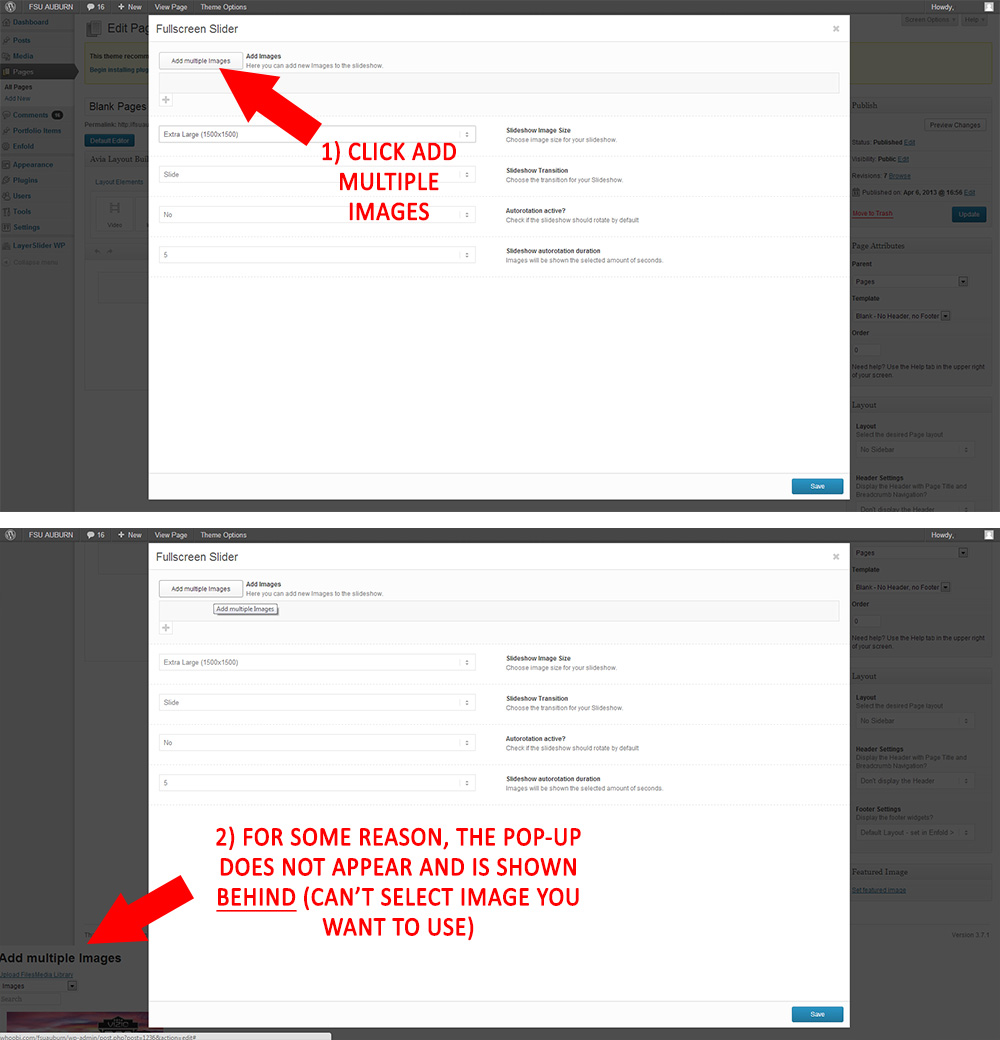
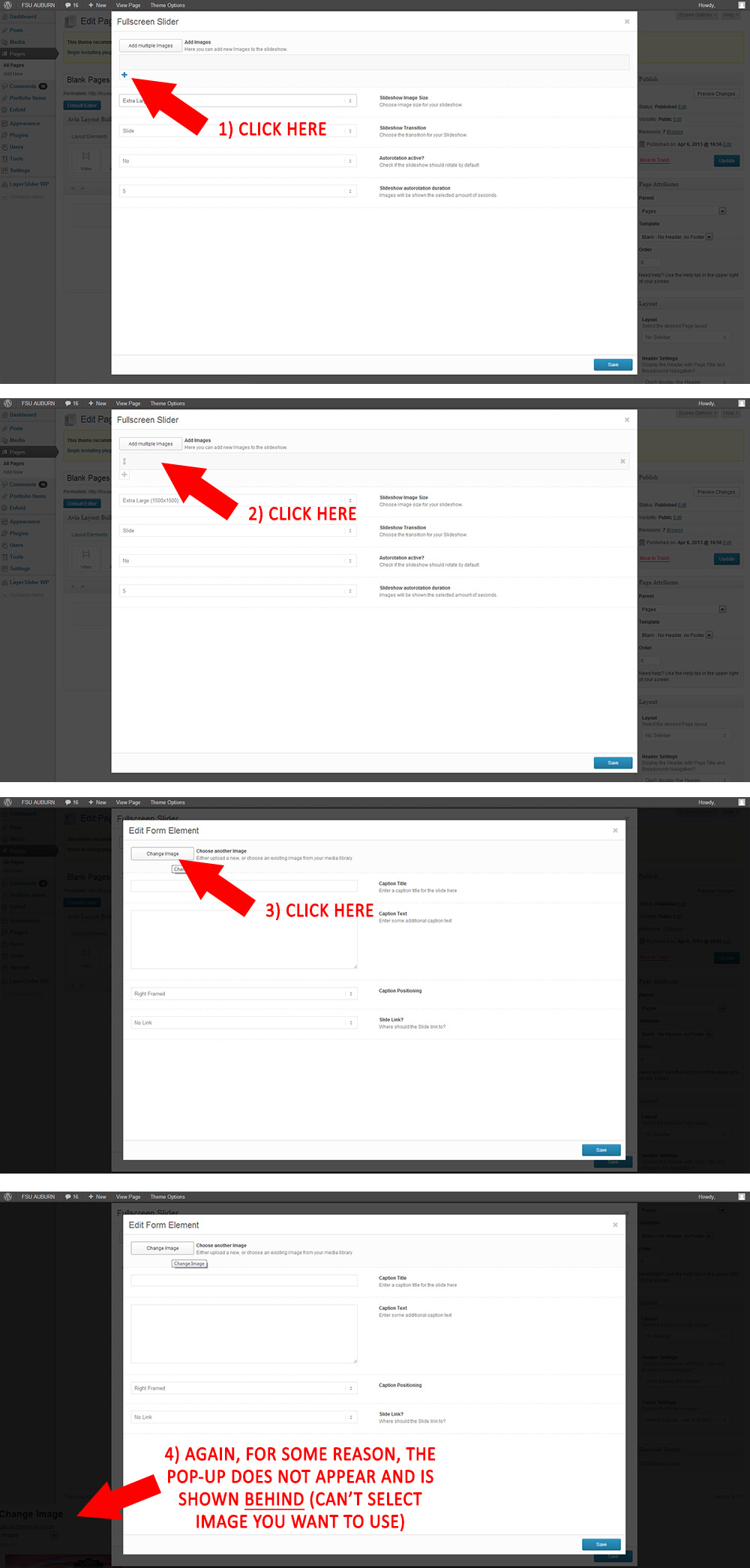
ParticipantCan’t add images to either the full screen slider or easy slider. Please see images below and respond immediately! Thank you!
http://whoobi.com/fsuauburn/FirstMethodFail.jpg
http://whoobi.com/fsuauburn/SecondMethodFail.jpgDecember 9, 2013 at 11:23 pm #198250In reply to: Ajax Portfolio – full width individual image
Hi!
1)You are going to need to hire a freelance developer for that kind of customization as it is beyond the scope of support we can provide. You can also request quote here.
2) Please add following code to Quick CSS as well#top .portfolio-preview-image .avia-gallery .avia-gallery-big { pointer-events: none; cursor: default; }Regards,
YigitDecember 9, 2013 at 11:08 pm #198243In reply to: Thumbnail in single post
Yigit, thank you! It’s great!
But now there was another question. On the main page:http://vkk-journal.ru/, where the blog exerpts, the text was also the wrap around image. I’d like to return it as it was: a vertical line from picture to picture and the text on the right.
How to do it?December 9, 2013 at 10:29 pm #198230In reply to: Ajax Portfolio – full width individual image
Thanks very much!
That looks terrific.
Finally,
1. Is it in any way possible to retain the Title and Preview Text overlaid on the image (in the same way that the navigation < > and x is still there?
2. Is it possible to remove the lightbox link?
Thanks!
December 9, 2013 at 10:13 pm #198224In reply to: Images not resizing propoerly
Hi anudas!
1. Could you please specify what ‘slideshow’ are you referring to?
2. That may be server-related, does it happen even with the default WordPress theme?
Best regards,
JosueDecember 9, 2013 at 10:07 pm #198219In reply to: I can't upload an image in my portfolio!
Hi!
I follow your instruction. I install the theme “TwentyThirteen” and I managed to upload a media from WordPress Uploads.
So, the problem is in your theme Enfold.what we do?
December 9, 2013 at 9:55 pm #198214Topic: Featured Image Size
in forum Enfoldderek62
ParticipantWhat size should I use for featured images?
Thanks.
December 9, 2013 at 9:51 pm #198211In reply to: I need a mobileMenu for iPad (landscape) view
Guys,
I absolutely hate to ask this, but I have tried everything that has been suggested. I’m exhausted and I’m killing my client by making them wait for weeks on this issue. I cannot launch until this issue is resolved.
Can someone please help me out by logging in to my WP account? Or I would assume it’s on my hosting (being that the mobile menu issue is only on the French version).
This is what it looks like when viewed in (portrait) mode for the iPad : http://postimg.org/image/5cin4ne25/
Thank you.
PatDecember 9, 2013 at 9:49 pm #198207In reply to: I can't upload an image in my portfolio!
No, I’m not comfortable editing files on your server directly outside of WordPress.
Adding TwentyThirteen is as simple as searching from within your WordPress Appearance>Themes>add new theme section and then installing from within WordPress. Then switching to the other theme to check things out.
If that doesn’t work the step by step instructions on the Codex for updating WordPress are pretty simple to do even if you are new to WordPress.
December 9, 2013 at 9:25 pm #198201In reply to: Image questions
You are welcome, glad we could help :)
The file was /includes/loop-index.php, line 108. Just so you know in case of updating.
Regards,
JosueDecember 9, 2013 at 9:09 pm #198196In reply to: Image questions
Yes!!! Freaking….awesome. Thank you so much, Josue!!
December 9, 2013 at 9:01 pm #198193In reply to: Ajax Portfolio – full width individual image
Hi!
Please add following code to Quick CSS in Enfold theme options under Styling tab
.portfolio-preview-content { display: none; }
.portfolio-preview-image { width: 100%; }
#top .portfolio-preview-image .avia-gallery .avia-gallery-big { height: auto!important; }
Best regards,
YigitDecember 9, 2013 at 8:39 pm #198188In reply to: Image questions
Hey!
I modified a line in the loop theme file, here’s the result (the thumbnail image is being selected now):
Best regards,
Josue -
This reply was modified 12 years, 4 months ago by
-
AuthorSearch Results
Viewing 30 results - 99,211 through 99,240 (of 106,459 total)
-
Search Results
-
Hey again guys,
1 more thing for the night.
How do I:
remove the image hover transparency effect
remove the image hover icon background color
remove the image hover rotation effectThanks in advance
Topic: Can't add images to slider
Can’t add images to either the full screen slider or easy slider. Please see images below and respond immediately! Thank you!
http://whoobi.com/fsuauburn/FirstMethodFail.jpg
http://whoobi.com/fsuauburn/SecondMethodFail.jpgTopic: Featured Image Size