-
Search Results
-
Topic: Masonry image size
Hello,
I don’t know what I’m doing wrong – no matter what size i have set on masonry element nothing changes, the main problem i have is that when i click on the masonry images and modal opens, the images are not the original ones in full size but 1030 width, masonry element has image size 705, but that is not even showing anywhere. I want the popup to show full quality images.
Thank you
Hello guys, can someone help me to remove all the fade-in animations when the fullscreen slider spawn not the image transitions please.
I am trying to see that the preview image added for my portfolio item is visible in Portfolio Grids, or Portfolio Page in WordPress. It doesn’t work. I tried clearing cache but it didn’t help.
Versions:
Theme Enfold: 7.1.1
Wordpress: 6.8.1Steps:
1) Go to Portofolio Item Edit Page
2) Add image in Gallery Preview
3) Save
4) Check the Portfolio Items Page
I can’t see the image updated.Images:
Please help
I have a custom shortcode:
<?php

if ( ! defined( 'ABSPATH' ) ) {  exit;  }    // Exit if accessed directly

if ( ! class_exists( 'avia_sc_portfolio_kacheln' ) )
{
	class avia_sc_portfolio_kacheln extends aviaShortcodeTemplate
	{
		/**
		 * Create the config array for the shortcode button
		 */
		function shortcode_insert_button()
		{
			$this->config['version']		= '1.0';
			$this->config['self_closing']	= 'no';
			$this->config['base_element']	= 'yes';

			$this->config['name']			= 'Portfolio Kachel';
			$this->config['tab']			= 'wuk Elements';
			$this->config['icon']			= AviaBuilder::$path['imagesURL'] . 'sc-image.png';
			$this->config['order']			= 1;
			$this->config['target']			= 'avia-target-insert';
			$this->config['shortcode'] 		= 'av_portfoliokachel';
//			$this->config['modal_data']     = array( 'modal_class' => 'mediumscreen' );
			$this->config['tooltip'] 	    = __( 'Inserts an image of your choice', 'avia_framework' );
			$this->config['preview'] 		= 1;
			$this->config['disabling_allowed'] = true;
			$this->config['id_name']		= 'id';
			$this->config['id_show']		= 'yes';
		}

		function popup_elements()
		{
			$template_url = get_stylesheet_directory_uri();
			$this->elements = array(

				array(
						'type' 	=> 'tab_container',
						'nodescription' => true
					),

				array(
						'type' 	=> 'tab',
						'name'  => __( 'Kachel', 'avia_framework' ),
						'nodescription' => true
					),

					array(
							'type' 	=> 'toggle_container',
							'nodescription' => true
						),

					array(
									"name" 	=> __("Choose Image",'avia_framework' ),
									"desc" 	=> __("Either upload a new, or choose an existing image from your media library",'avia_framework' ),
									"id" 	=> "bild",
									"type" 	=> "image",
									"title" => __("Insert Image",'avia_framework' ),
									"button" => __("Insert",'avia_framework' ),
									"std" 	=> "",
						),

						array(
							"name" 	=> __("Title", 'avia_framework' ),
							"id" 	=> "title",
							"std" 	=> "",
							"type" 	=> "input"
						),

						array(
							"name" 	=> __("Text", 'avia_framework' ),
							"id" 	=> "text",
							"std" 	=> "",
							"type" 	=> "textarea"
						),

						array(
							"name" 	=> __("Button Text", 'avia_framework' ),
							"id" 	=> "button_text",
							"std" 	=> "",
							"type" 	=> "input"
						),

						array(
							'name'	=> __( 'Image Link?', 'avia_framework' ),
							'desc'	=> __( 'Where should your image link to?', 'avia_framework' ),
							'id'	=> 'link',
							'type'	=> 'linkpicker',
							'fetchTMPL'	=> true,
							'std'		=> '',
							'lockable'	=> true,
							'subtype'	=> array(
											__( 'No Link', 'avia_framework' )	=> '',
											__( 'Lightbox', 'avia_framework' )	=> 'lightbox',
											__( 'Set Manually', 'avia_framework' )	=> 'manually',
											__( 'Single Entry', 'avia_framework' )	=> 'single',
											__( 'Taxonomy Overview Page', 'avia_framework' )	=> 'taxonomy',
										)
						),

						array(
							'name'	=> __( 'Open new tab/window', 'avia_framework' ),
							'desc'	=> __( 'Do you want to open the link url in a new tab/window?', 'avia_framework' ),
							'id'	=> 'target',
							'type'	=> 'select',
							'std'	=> '',
							'lockable'	=> true,
							'required'	=> array( 'link', 'not_empty_and', 'lightbox' ),
							'subtype'	=> AviaHtmlHelper::linking_options()
						),

					array(
							'type' 	=> 'toggle_container_close',
							'nodescription' => true
						),

				array(
						'type' 	=> 'tab_close',
						'nodescription' => true
					),

				array(
						'type' 	=> 'tab',
						'name'  => __( 'Advanced', 'avia_framework' ),
						'nodescription' => true
					),

					array(
							'type' 	=> 'toggle_container',
							'nodescription' => true
						),

						array(
								'type'			=> 'template',
								'template_id'	=> 'screen_options_toggle',
								'lockable'		=> true
							),

						array(
								'type'			=> 'template',
								'template_id'	=> 'developer_options_toggle',
								'args'			=> array( 'sc' => $this )
							),

					array(
							'type' 	=> 'toggle_container_close',
							'nodescription' => true
						),

				array(
						'type' 	=> 'tab_close',
						'nodescription' => true
					),

				array(
						'type'			=> 'template',
						'template_id'	=> 'element_template_selection_tab',
						'args'			=> array(
												'sc'	=> $this
											)
					),

				array(
						'type' 	=> 'tab_container_close',
						'nodescription' => true
					),

				array(
						'id'	=> 'av_element_hidden_in_editor',
						'type'	=> 'hidden',
						'std'	=> '0'
					)
			);

		}

		/**
		 * Editor Element - this function defines the visual appearance of an element on the AviaBuilder Canvas
		 * Most common usage is to define some markup in the $params['innerHtml'] which is then inserted into the drag and drop container
		 * Less often used: $params['data'] to add data attributes, $params['class'] to modify the className
		 *
		 *
		 * @param array $params this array holds the default values for $content and $args.
		 * @return $params the return array usually holds an innerHtml key that holds item specific markup.
		 */
		function editor_element( $params )
		{
			extract( $params['args'] );

			global $KACHELINDEX;
			$KACHELINDEX++;

			if (strstr($link,"manually,")) { $url = str_replace("manually,","",$link); }
			elseif (strstr($link,",")) {
				$tmp = explode(",",$link);
				$url = get_the_permalink($tmp[1]);
			}

			$out = '<div class="portfolio_kacheln sameheight"'.((empty($button_text) && !empty($link)) ? ' onclick="location.href='.$url.'"' : '').'>
				<div class="bg2">'.str_pad($KACHELINDEX, 2, "0", STR_PAD_LEFT).'</div>
				<div class="pic" style="">'.
					'<img src="'.$bild.'" />'.
					'<h3>'.$title.'</h3>'.
				'</div>'.
				(!empty($text) ? '<p>'.$text.'</p>' : '').
				((!empty($link) && !empty($button_text)) ? '<p class="action"><a href="'.$url.'" class="button">'.$button_text.'</a></p>' : '').
			'</div>';

			$params['innerHtml'] = $out;

			return $params;
		}

		/**
		 * Frontend Shortcode Handler
		 *
		 * @param array $atts array of attributes
		 * @param string $content text within enclosing form of shortcode element
		 * @param string $shortcodename the shortcode found, when == callback name
		 * @return string $output returns the modified html string
		 */
		function shortcode_handler( $atts, $content = '', $shortcodename = '', $meta = '' )
		{
			extract( $atts );
			global $KACHELINDEX;
			$KACHELINDEX++;

			if (strstr($link,"manually,")) { $url = str_replace("manually,","",$link); }
			elseif (strstr($link,",")) {
				$tmp = explode(",",$link);
				$url = get_the_permalink($tmp[1]);
			}

			$out = '<div class="portfolio_kacheln sameheight"'.((empty($button_text) && !empty($link)) ? ' onclick="'.($target == '' ? 'location.href='.$url.'"' : 'window.open(\''.$url.'\', \'_blank\');') : '').'>
				<div class="bg2">'.str_pad($KACHELINDEX, 2, "0", STR_PAD_LEFT).'</div>
				<div class="pic" style="">'.
					'<img src="'.$bild.'" />'.
					'<h3>'.$title.'</h3>'.
				'</div>'.
				(!empty($text) ? '<p>'.$text.'</p>' : '').
				((!empty($link) && !empty($button_text)) ? '<p class="action"><a'.($target != '' ? ' target="'.$target.'"' : '').' href="'.$url.'" class="button">'.$button_text.'</a></p>' : '').
			'</div>';

			return $out;
		}

	}
}
taht generates a shortcode like:
[av_portfoliokachel bild='https://xexadeti.cyon.site/wp-content/uploads/2025/08/sta-schweisstechnische-ausbildung-mag-schweissen.jpg' attachment='277' attachment_size='full' title='MAG' text='(135 - Metall-Aktivgas-Schweissen)	Unverändert: [av_portfoliokachel bild='https://xexadeti.cyon.site/wp-content/uploads/2025/08/sta-schweisstechnische-ausbildung-mag-schweissen.jpg' attachment='277' attachment_size='full' title='MAG' text='(135 - Metall-Aktivgas-Schweissen)
Gelöscht: MAG – das Arbeitstier unter den Schweissverfahren! Wir zeigen dir, wie’s richtig geht!' button_text='Infos zu MAG' link='portfolio_entries,5' target='' id='' custom_class='' template_class='' av_element_hidden_in_editor='0' av_uid='av-mebf8h83' sc_version='1.0' admin_preview_bg=''][/av_portfoliokachel]
everything working fine, except oine thing, the ‘ Character.
array(
							"name" 	=> __("Text", 'avia_framework' ),
							"id" 	=> "text",
							"std" 	=> "",
							"type" 	=> "textarea"
						),
If I enter a ‘ char in this “Text” field, it doesnt get escaped as it should
as example: text=’test’s’ will be the endresult and not text=’test\’s’. Is there a hook or filter where I can “correctly apply escaping to a field?Strangly, I did setup the page and that did work. I did update to latest enfold version and now, that is not working anymore. Is that a new bug that the encoding is not correctly working?
It dows work, when changing the field name from “text” to “content”. But what, if I want more than 1 “content” field?
Normal textarea should equallless its name escaped correctly in enfold…Thanks for aour advice or fix.
Hello,
Please let me know how can I match the font size of the captions on a masonry gallery to be exactly the same as the pages below.
This should be applied to all galleries across the whole website.The difference is that some pages are using a Flexible Masonry (this one is fine) while others use the Perfect Automatic Masonry (with the font too big). The idea is to match them like the flexible masonry is.
Pages in private for context.
Thank you
Hi
There is a short delay animation on Fullwidth Easy Slider that I would like to replicate to all Easy Sliders in the website.
I am referring to the captions delay. It loads after the image loads, with a short delay of 1 second or so.Please refer to the pages in private to understand what I mean.
Thank you
My problem is that the full width easy slider is not seen as accessible by our Accessibility vendor, as it presents as a list item.
https://www.integralrecoveries.com/leadership-copy/
Per the team:
Lists: Remove List HTML
Content that does not function as a list should not be coded as such.
The header thumbnail image is coded as being a part of a list when it should not be.Remediation Recommendation
Ensure this content is not coded as a list. Generally, this will mean removing <ol>, <ul>, <dl>, <dt>, <dd>, or <li> elements that are holding this content.Here is a snippet of the code displaying the Full width easy slider:
Here is the code snippet I'm referring to '''<li class="avia-slideshow-slide av-juo9jzkl-8700c68c0f38de355eb6ad66836a0d85__0 av-single-slide slide-1 slide-odd next-active-slide active-slide" style="visibility: visible; opacity: 1; transition: none; transform: translateZ(0px);"><div data-rel="slideshow-1" class="avia-slide-wrap "><img decoding="async" fetchpriority="high" class="wp-image-621 avia-img-lazy-loading-not-621" src="https://www.integralrecoveries.com/wp-content/uploads/2019/06/Header_About2000x300.jpg" width="2000" height="300" title="Header_About2000x300" alt="" itemprop="thumbnailUrl" srcset="https://www.integralrecoveries.com/wp-content/uploads/2019/06/Header_About2000x300.jpg 2000w, https://www.integralrecoveries.com/wp-content/uploads/2019/06/Header_About2000x300-300x45.jpg 300w, https://www.integralrecoveries.com/wp-content/uploads/2019/06/Header_About2000x300-768x115.jpg 768w, https://www.integralrecoveries.com/wp-content/uploads/2019/06/Header_About2000x300-1030x155.jpg 1030w, https://www.integralrecoveries.com/wp-content/uploads/2019/06/Header_About2000x300-1500x225.jpg 1500w, https://www.integralrecoveries.com/wp-content/uploads/2019/06/Header_About2000x300-705x106.jpg 705w, https://www.integralrecoveries.com/wp-content/uploads/2019/06/Header_About2000x300-450x68.jpg 450w" sizes="(max-width: 2000px) 100vw, 2000px" style="left: 0px;"></div></li>'''I’ve tried several options:
The image is set as 2000px x 300px btw.
1) Displaying as an image (no scaling, original width & height) – why doesn’t this work, it would solve many problems.
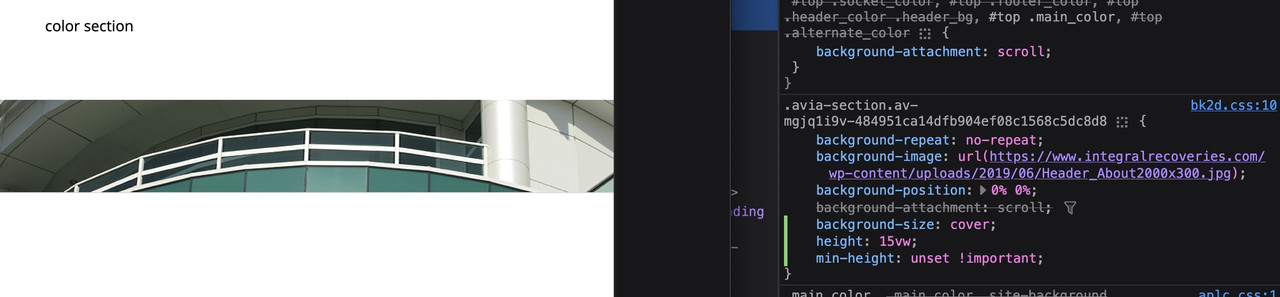
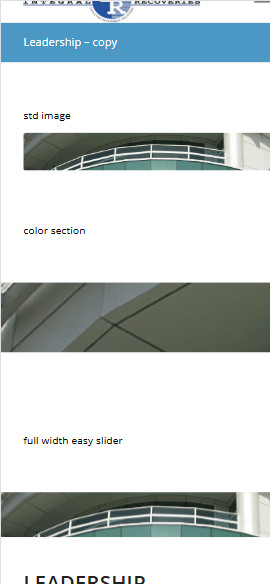
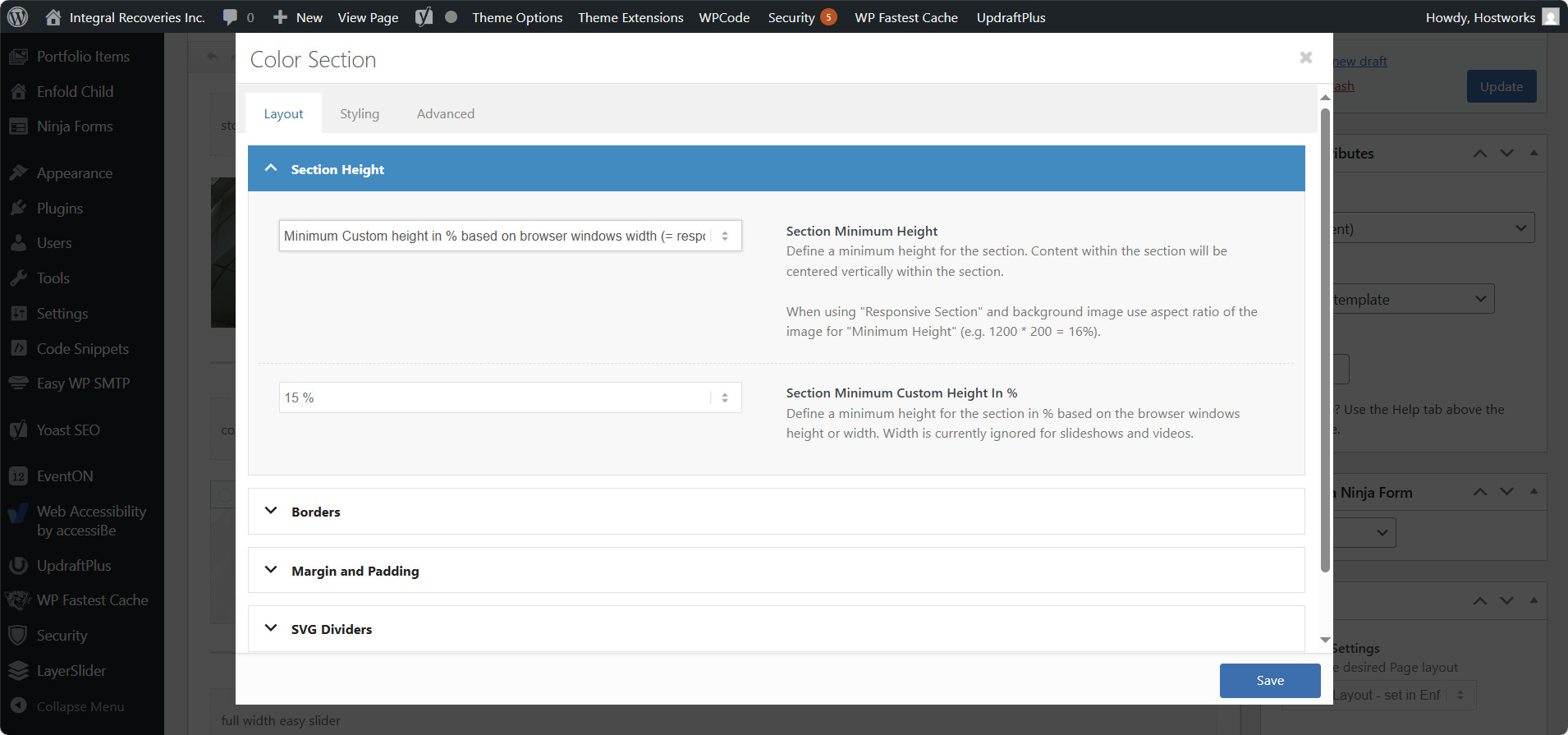
2) Color section – I’ve tried all options under Section Height including – Minimum Custom height in % based on browser windows width (responsive). However, it is not responsive (using 15% custom height for example). When you minimize for phone, it just blows up the left portion of the image height and does not adjust horizontally.
3) full width easy slider – This is what I’ve been using on all pages, which is responsive and is being rejected by the accessibility team as it uses a list element to display.
I’ve setup the following test page to show the differences of the three approaches with text headers
https://www.integralrecoveries.com/leadership-copy/
Inspect the page and display as an iphone 14 Max and you will see what happens. See attachment below
How can I fix this? I’m just trying to display a page header that is not coded as a list.
Thank you very much in advance!
Topic: Button
Can you please look at this page.
Because of the orange symbol I have above the image. – The button lays underneath.
How to make the bottom come to the top?I thought I was smart when I wrote this in the css, but no…
#top a:where(:not(.wp-element-button)) {
z-index: 999;
text-decoration: none;
}