 Val
ValGuest
Hey there! 👋
We are the MeowApps team (https://meowapps.com), and we would like to know if it would be possible to get a Enfold/Avia PRO copy/license to work on improving the compatibility of our plugin, Media Cleaner, with your theme.
Thank you!
You can get back to us at (Email address hidden if logged out) 🙇
Hello
After updating to 7.1.4, a WordPress error occurs:
Ein Fehler vom Typ E_ERROR wurde in der Zeile 820 der Datei /var/www/vhosts/xxxxxxxxxxxx.xx/wordpresstest.xxxxxxxxxxxx.xx/wp-content/plugins/wp-super-cache/wp-cache-phase2.php verursacht. Fehlermeldung: Uncaught Error: Call to undefined function get_blog_option() in /var/www/vhosts/xxxxxxxxxxxx.xx/wordpresstest.xxxxxxxxxxxx.xx/wp-content/plugins/wp-super-cache/wp-cache-phase2.php:820
Stack trace:
#0 /var/www/vhosts/xxxxxxxxxxxx.xx/wordpresstest.xxxxxxxxxxxx.xx/wp-content/plugins/wp-super-cache/wp-cache-phase2.php(3079): get_supercache_dir()
#1 /var/www/vhosts/xxxxxxxxxxxx.xx/wordpresstest.xxxxxxxxxxxx.xx/wp-content/themes/enfold/includes/config-enfold/functions-framework.php(215): wp_cache_clear_cache()
#2 /var/www/vhosts/xxxxxxxxxxxx.xx/wordpresstest.xxxxxxxxxxxx.xx/wp-includes/class-wp-hook.php(341): avia_force_clear_caches()
#3 /var/www/vhosts/xxxxxxxxxxxx.xx/wordpresstest.xxxxxxxxxxxx.xx/wp-includes/class-wp-hook.php(365): WP_Hook->apply_filters()
#4 /var/www/vhosts/xxxxxxxxxxxx.xx/wordpresstest.xxxxxxxxxxxx.xx/wp-includes/plugin.php(522): WP_Hook->do_action()
#5 /var/www/vhosts/xxxxxxxxxxxx.xx/wordpresstest.xxxxxxxxxxxx.xx/wp-content/themes/enfold/framework/php/auto-updates/class-avia-theme-data-updater.php(160): do_action()
#6 /var/www/vhosts/xxxxxxxxxxxx.xx/wordpresstest.xxxxxxxxxxxx.xx/wp-includes/class-wp-hook.php(341): aviaFramework\updates\Avia_Theme_Data_Updater->handler_update_version()
#7 /var/www/vhosts/xxxxxxxxxxxx.xx/wordpresstest.xxxxxxxxxxxx.xx/wp-includes/class-wp-hook.php(365): WP_Hook->apply_filters()
#8 /var/www/vhosts/xxxxxxxxxxxx.xx/wordpresstest.xxxxxxxxxxxx.xx/wp-includes/plugin.php(522): WP_Hook->do_action()
#9 /var/www/vhosts/xxxxxxxxxxxx.xx/wordpresstest.xxxxxxxxxxxx.xx/wp-settings.php(764): do_action()
#10 /var/www/vhosts/xxxxxxxxxxxx.xx/wordpresstest.xxxxxxxxxxxx.xx/wp-config.php(72): require_once('...')
#11 /var/www/vhosts/xxxxxxxxxxxx.xx/wordpresstest.xxxxxxxxxxxx.xx/wp-load.php(50): require_once('...')
#12 /var/www/vhosts/xxxxxxxxxxxx.xx/wordpresstest.xxxxxxxxxxxx.xx/wp-admin/admin.php(35): require_once('...')
#13 {main}
  thrown
If you reload the page, everything will be fine. However, you cannot save any changes in the theme anymore. Error:
Saving didnt work!
Please reload the page and try again
Everything still worked fine with version 7.1.3.
PHP: 8.3.30
Regards
Bernd
I would generally recommend hosting the fonts yourself. And even turning off Enfold support for Google Fonts.
It’s more flexible because you can choose the font styles you specifically need, and this is probably the only correct way to be GDPR compliant.
To hamper Google Fonts Support on Enfold – put this to your child-theme functions.php:
function my_output_google_webfonts_script( $activate ){
  return false;
}
add_filter( 'avf_output_google_webfonts_script', 'my_output_google_webfonts_script', 10, 1 );
For selfhosted Fonts – use the Enfold Font Manager – with its upload.
You upload zip files to that font-manager f.e.:
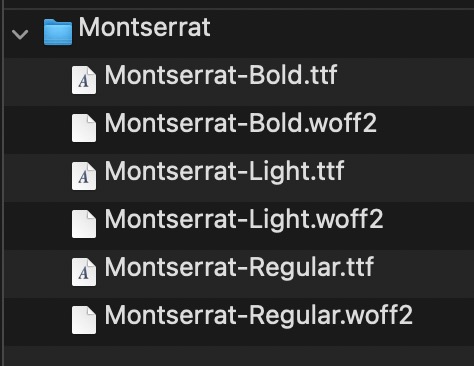
my recommendation is to use definitly woff2 fonts – but maybe as fallback the ttf Variants.
On zipping the Folder (Montserrat) – pay attention if you do that on Mac OSX. Because there are hidden files in there. You had to avoid that.
I am try to install the Enfold One Page Agency demo but it says Download of files of demo agency didn’t work. I have had them increase the file size allowed and alter security. However it still does not load. I need some help.
You are using the Montserrat Font from the drop downlist of Enfold Typos?
Are you familiar with inspecting your page with a browser dev tools? Then you can check if this Montserrat font has all those font-weights you like to use.
Or do you have uploaded your own Montserrat font by self hosting it? What kind of Montserrat did you upload then – the static files or the varialble Font?
Hi Mike
Sorry to hear you have troubles logging in to my WordPress. I have not changed the provided login credentials as of Feb 9th, and I double checked, it works on my end: https://kellerhalsconsulting.com/wp-login.php So please try again.
And great to hear that you could recrate my page on your side with buttons working fine with no bouncing, so I am optimistic on my end.
Please note: I already added
//set builder mode to debug
add_action(‘avia_builder_mode’, “builder_set_debug”);
function builder_set_debug()
{
return “debug”;
}
to my file: /wp-content/themes/enfold/functions.php
Thank you for your help.
Best regards
Philipp
Hi Ismael,
thanks for your reply.
In the meantime we refactored the implementation and moved the SVG + GSAP logic outside of the content area to avoid any interaction with Enfold’s internal rendering and script handling.
With that adjustment the issue is resolved on our side, so no further investigation is required.
Appreciate your support.
Best regards,
T
Hey JennyGr,
Thank you for the inquiry.
You might be referring to the Enfold > Sidebar Settings > Page Sidebar Navigation option. When enabled, this option displays sidebar navigation containing the nested subpages of the active page. Let us know the result.

Best regards,
Ismael
Hi,
Glad that Ismael could help, if you have further questions please open a new thread and we will try to help. Thanks for using Enfold.
Best regards,
Mike
Hi,
Glad that we could help, and thanks to Guenni007 for the solution. If you have further questions please open a new thread and we will try to help. Thanks for using Enfold.
Best regards,
Mike
Hi,
Glad that we could help, if you have further questions please open a new thread and we will try to help. Thanks for using Enfold.
Best regards,
Mike
Hi,
Thanks, glad that we could help, if you have further questions please open a new thread and we will try to help. Thanks for using Enfold.
Best regards,
Mike
Hi Rikard,
Thank you for the guidance — it worked perfectly.
For anyone else dealing with a similar situation (inherited project, large version gap like 4.5.7 → 7.1.x, no access to the original license), here’s what worked for us:
1. Purchased a new Regular License on ThemeForest — no need to transfer the old one.
2. Extracted the enfold.zip from inside the downloaded package (not the outer zip) and uploaded via FTP, replacing the old theme folder entirely.
3. Registered the theme using a newly generated Envato Personal Token.
4. WP Super Cache caused a Fatal Error (get_blog_option() undefined) when saving Enfold Options on PHP 8.3 / single-site installs. Replacing it with another plugin cache solved the issue completely.
5. After the major version jump, any header.php or footer.php overrides in the child theme need to be updated from the new parent theme files — old versions will break footer rendering.
Hope this helps someone going through the same process.
Best regards,
Jorge
-
This reply was modified 1 month ago by
 jorgeacebo.
 Benzy John from P-THEMES
Guest
Hi,
I hope you’re doing well.
I’m the CTO of P-THEMES, and first of all, I want to say that we’re very pleased to be working alongside the Enfold team — a best-selling and highly competitive product in the ThemeForest ecosystem.
As you know, both Porto and Enfold have maintained strong positions in the market and delivered solid commercial success over the years.
However, with the rapid rise of AI, the broader theme marketplace is now entering a period of structural change.
Sales across ThemeForest have been gradually declining year over year — something you’ve likely observed as well.
Even Enfold, which previously maintained sales in the 400–600 range, has seen a noticeable shift. This signals that a new phase of the industry is emerging, and it’s important that we adapt accordingly.
I believe our leadership shares this perspective, and I would welcome the opportunity to collaborate with you on a forward-looking initiative I’ve been developing.
A new era calls for new ideas.
I hope you’ll be open to actively participating so we can work together to shape and implement this next vision in a practical and timely way.
If this resonates with you, I’d be glad to continue the discussion in more depth here:
https://join.slack.com/t/p-themesthe4/shared_invite/zt-3raw7gh4l-4W1FrEI26LP60Il8LKLuZw
Kind regards.
Hi,
I was not able to login to your site, as the typically login url is not working /wp-admin/ I assume that you have set a custom one.
I tried to recreate your page on my site with five color sections, each 100vh and with a button and a contact form at the bottom. All five buttons work with no bouncing.
Please share your login url and Enable the Avia Layout Builder Debugger to your functions.php file. You may need to scroll the documentation page to the Debug mode section or use the sidebar TOC link.
With this I can copy your page exactly and add it to my test site to see if the same error occurs there.
Best regards,
Mike
Hi,
I can not view your page as it is maintenance mode. You can not use the advanced layer builder on category pages.
But we can change the Prints link in the breadcrumb to your prints page instead of the new prints page that you want to use as a custom category page.
So the first step is to add a new product category “Prints” and make it the parent of any other category that you wish for it to show in the breadcrumb trail.
Then add this code to your child theme functions.php if you are not using a child theme you could use the WP Code plugin then add a new snippet, in the top right corner use the PHP snippet as the code type: 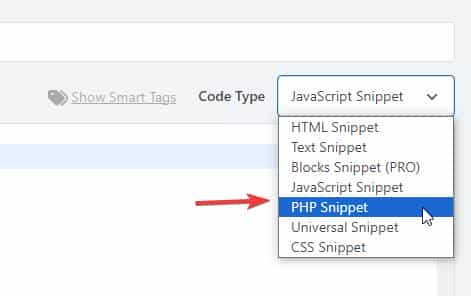 then add the code below and save.
function change_breadcrumb_trail() { ?>
  <script>
document.addEventListener('DOMContentLoaded', function() {
const printsLink = document.querySelector('.breadcrumb-trail a[href="http://enfold.test/product-category/prints/"]');

if (printsLink) {
  printsLink.href = 'http://enfold.test/prints/';
}
});
</script>
  <?php
}
add_action( 'wp_footer', 'change_breadcrumb_trail', 99 );
Ensure that you change the URLs in the code above to your site, and make sure to use the full URL.
Best regards,
Mike
Hi, I bought the theme and installed the restaurant demo data, ie.: https://kriesi.at/themes/enfold-restaurant-one-page/ Does buying the theme with the regular license give me the right to use the demo content? Since I got an email from a german Copyrights agency, COPYTRACK that wants me to show the license to them for a particular image from the demo data, or otherwise risk a fine 350 euro? But it sounds a bit skechy…
The image in question is this one: https://kriesi.at/themes/enfold-restaurant-one-page/wp-content/uploads/sites/42/2014/07/cheese-1030×686.jpg
Just to be safe I removed the image from my wordpress image library already.
Hey Munford,
Glad to hear that you sorted it out, if you have further questions please open a new thread and we will try to help. Thanks for using Enfold.
Best regards,
Mike
Hi,
Glad that we could help, if you have further questions please open a new thread and we will try to help. Thanks for using Enfold.
Best regards,
Mike
Hi,
I do not have experience with elfsight, but from examining your button I can tell that there is no direct link to your side form popout, it works via the data-elfsight-show-form attribute:
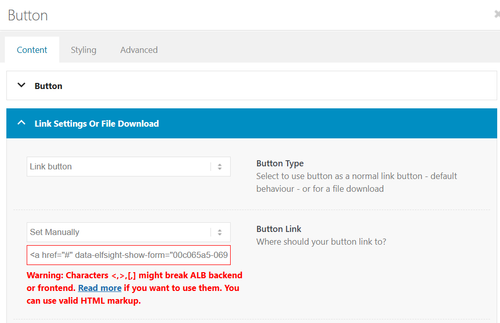
There is not a built-in way to add a data attribute to a button.
So I created a second button for you with your link snippet and the Enfold classes so the style is the same. Please check.
Best regards,
Mike
Hi,
Glad that we could help, if you have further questions please open a new thread and we will try to help. Thanks for using Enfold.
Best regards,
Mike
hi
my client wants to disable the change of size transition in the lightbox slideshow.
I tried a few things but nothing worked. Can it be that the images just fade into each other without moving in and out when you click on them?
thanks
Nancy
tried this:
/* Disable Enfold Lightbox Animation/Transition */
.mfp-zoom-in.mfp-ready.mfp-bg.mfp-zoom-in.mfp-ready .mfp-preloader {
    opacity: 0.8;
}

.mfp-zoom-in.mfp-ready .mfp-content.mfp-zoom-in.mfp-removing .mfp-content {
    transform: scale(1);
    opacity: 1;
}

.mfp-zoom-in.mfp-removing.mfp-bg {
    opacity: 0;
}

/* Force instant transition */
.mfp-zoom-in .mfp-content {
    transition: none !important;
}
-
This topic was modified 1 month ago by
 Munford.
Hi,
Not sure, perhaps you used a different element than the portfolio grid, but it is only ment to show portfolio categories.
So try creating a portfolio category with a portfolio item to show.
Or if you don’t want to try the masonry or blog post element.
Best regards,
Mike
Hey Tilman,
When I check your page the horizontal galleries behave as intended, clicking a image enlarges it until the next one is clicked. It’s true that they stay enlarged. If you want the image size to be restored after 5 seconds, try this function in your child theme function.php file. If you are not using a child theme you could use the WP Code plugin then add a new snippet, in the top right corner use the PHP snippet as the code type:
then add the code below and save.
function restore_horizontal_gallery_size() { ?>
  <script>
document.querySelectorAll('.av-horizontal-gallery-wrap').forEach(item => {
    item.addEventListener('click', function () {
        clearTimeout(this._galTimer);
        this._galTimer = setTimeout(() => {
            this.classList.remove('av-active-gal-item');
        }, 5000);
    });
});
</script>
  <?php
}
add_action( 'wp_footer', 'restore_horizontal_gallery_size', 99 );
Best regards,
Mike
Hey dreyerjm,
Please see our documentation: Add Images to mega menu you may need to scroll to the section, or use the link in the sidebar.
Best regards,
Mike
Hey Luigi,
When I check the changelog it shows February 20th 2026 – Version 7.1.4
Please refer to this one.
Best regards,
Mike
Hey Sabina,
Did you try to activate the Layout Builder at the top of each page?
You need to register at the support forum: https://kriesi.at/support/register/. The start a new thread in the Enfold sub forum.
Best regards,
Rikard
Sorry for the lag replying, @Guenni007 — I always appreciate your time and effort! Frankly, I didn’t really dig into your replies too much — I just scanned them and couldn’t quickly find a reason to not use the Claude code that was already working for me, so I just stuck with that. Here’s a leaner version of that code — again, this is adding aria labels to prev/next arrows for enfolds lightbox galleries and the custom popups @Guenni007 provided me previously, which both use the Magnific Popup code. So this is just fyi, unless anyone sees any serious issue with it:
/* ==========================================================================
   MAGNIFIC POPUP ARIA LABELS
   ========================================================================== */
add_action('wp_footer', 'abode_magnificpopup_aria_labels', 999);
function abode_magnificpopup_aria_labels() { ?>
<script>
jQuery(document).ready(function($) {
  $.extend(true, $.magnificPopup.defaults, {
    closeMarkup: '<button title="Close (Esc)" type="button" class="mfp-close" aria-label="Close popup">×</button>',
    gallery: {
      arrowMarkup: '<button title="%title%" type="button" class="mfp-arrow mfp-arrow-%dir%" aria-label="%title%"></button>',
      tPrev: 'Previous bio',
      tNext: 'Next bio'
    }
  });

  var observer = new MutationObserver(function(mutations) {
    mutations.forEach(function(mutation) {
      mutation.addedNodes.forEach(function(node) {
        if (node.nodeType === 1) {
          var $node = $(node);
          if ($node.hasClass('mfp-arrow') || $node.find('.mfp-arrow').length) {
            var isImage = $('.mfp-figure').length > 0;
            var prevLabel = isImage ? 'Previous image' : 'Previous bio';
            var nextLabel = isImage ? 'Next image' : 'Next bio';
            $('.mfp-arrow-left').attr('aria-label', prevLabel);
            $('.mfp-arrow-right').attr('aria-label', nextLabel);
          }
        }
      });
    });
  });

  observer.observe(document.body, {childList: true, subtree: true});
});
</script>
<?php }
Hi,
I was not able to login as Wordfence blocked me. When you look at the theme settings for the license do you see any errors?
Have you recently updated the token?
Envato limits daily update checks across all tokens on your account. Wait up to 24 hours if you’ve recently updated your token or checked 15 or more times for all tokens on your account.
If not try the Envato Market Plugin, or follow these steps to manually update.
To update Enfold manually you can download the latest installable WP version from your Theme Forest account and upload it to your WordPress ▸ Appearance ▸ Themes ▸ Add Themes ▸ Add New
after you choose the zip file and click install, you will see a This theme is already installed message because you are updating, you can continue,
then you will see the Theme updated successfully message.
Best regards,
Mike



