Hi fkm,
We’re glad to hear that :)
Thanks for using Enfold and have a great day!
Best regards,
Nikko
Hey nasi,
Yes, it’s possible, please add this CSS code in Enfold > General Styling > Quick CSS:
#top .woocommerce-MyAccount-navigation-link a:before {
    display: none;
}
Best regards,
Nikko
Hi danielhastings,
Thanks for providing us access to the staging site.
The reason it’s not working is that the version of Enfold is a bit outdated (4.5.4).
Please update it to the latest version (4.9.2.1) and don’t forget to backup your site first.
Also, you’ll need to generate Envato’s private token first before you can update your theme to the latest version, for further information please check: https://kriesi.at/documentation/enfold/theme-registration/#how-to-generate-a-envato-personal-token
Best regards,
Nikko
Hey navindesigns,
Please try the following in Quick CSS under Enfold->General Styling:
.avia-cookiemessage-bottom {
    position: fixed;
    width: 60%;
    right: 0;
    left: auto;
    bottom: 15%;
}
Best regards,
Rikard
Hi,
Please try the following in Quick CSS under Enfold->General Styling:
span.logo {
  margin-top: 50px;
}
Best regards,
Rikard
Hey navindesigns,
Please try the following in Quick CSS under Enfold->General Styling:
ul.social_bookmarks li:hover a {
  background-color: transparent;
}
Best regards,
Rikard
These entries in your htaccess ( for apache ) ( please google for alternative methods on different servers ) – These settings help to increase the security of your site visitors. You can inspect f.e. your site on : https://securityheaders.com
I’ve been working on the topic of finding a solution for WordPress that also passes critical tests for quite some time.
Unfortunately, it was so far that with some settings of the Content Security Policy WordPress did not work in the frontend. And for example Enfold does not show all the options in a correct manner. Some of the settings had to have an “unsave” setting set – e.g. : script-src ‘unsafe-inline’.
Now there are new ways to set the CSP to pass the test pages with an A+, and still have the frontend work unaffected.
However, I had to set another setting (referrer policy) a little lower in the security level, so that the Youtube videos created in Enfold also work correctly. With this code here I have done well so far:
# -----------------------------------------------------------------------------
#  HTTP SECURITY HEADER | Test on: https://securityheaders.com | UPDATE 2022
# -----------------------------------------------------------------------------

<IfModule mod_headers.c>
	Header set Referrer-Policy "strict-origin-when-cross-origin"
	Header set X-Frame-Options "sameorigin"
	Header set X-XSS-Protection "1; mode=block"
	Header set X-Content-Type-Options "nosniff"
	Header set Strict-Transport-Security "max-age=31536000; includeSubDomains; preload"
	Header always set Content-Security-Policy "upgrade-insecure-requests"
	Header always set Permissions-Policy "camera=(), fullscreen=(self), geolocation=(self), microphone=(), interest-cohort=()"
	Header always set Expect-CT "enforce, max-age=21600"
</IfModule>
by the way – sometimes it needs an apache server restart.
https://securityheaders.com/?q=webers-testseite.de&followRedirects=on
First – what version of Safari do you use?
Then – the entries managing the font used are set by a class that is added to the body tag.
( in my case it is open-sans – click to enlarge the image )
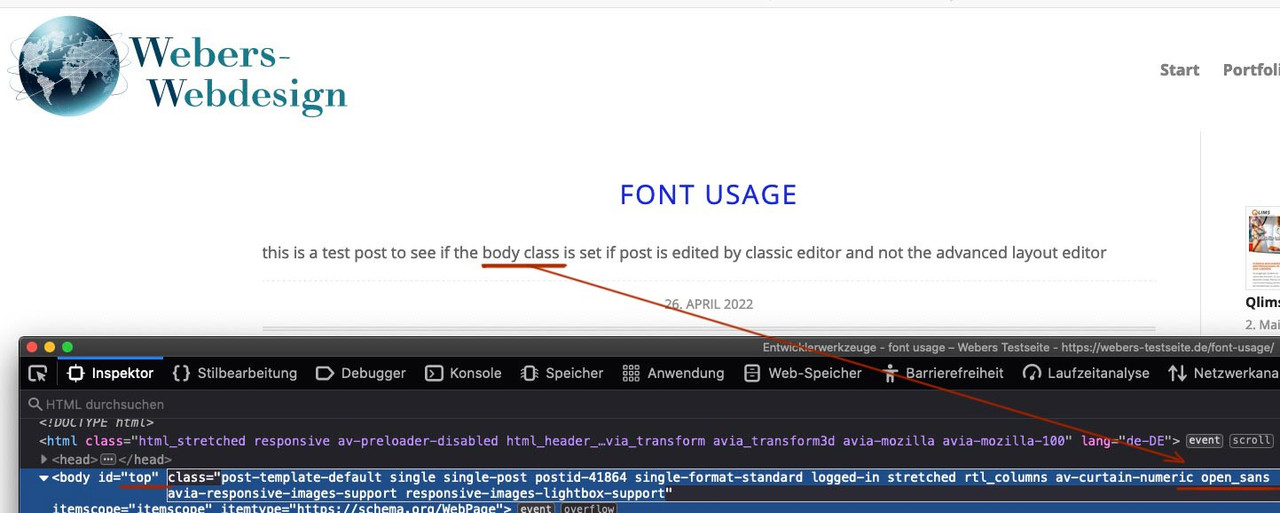
the entries are ( in my case with open-sans ) :
h1, h2, h3, h4, h5, h6,
#top .title_container .main-title,
tr.pricing-row td, #top .portfolio-title,
.callout .content-area,
.avia-big-box .avia-innerbox,
.av-special-font,
.av-current-sort-title,
.html_elegant-blog #top
.minor-meta,
#av-burger-menu-ul li {
	font-family:'open sans', Helvetica, Arial, sans-serif;
}

body.open_sans {
	font-family:'open sans', Helvetica, Arial, sans-serif;
}
you see that the rule on top is not in dependency to that class – but f.e. the p-tag is. – but the default rule of enfold is to “inherit” the font.
Inherit goes to the closest parent element that has a font definition.
one possibility is : this class isn’t set on your installation. And this will be no default behavior.
next: your Safari is an old one – and does not support modern font format (woff, woff2 ) but only : truetype or svg.
But even then, I believe that Enfold has taken that into account in their writings and included them.
Is there a link that we can inspect why this could be
you see that here on open-sans it is as fall-back font Helvetica too. But the first font will be take – if there are no problems with that setting.
Hi, I noticed that there are no updates for RT Theme 17 anymore. I have a webside where i used that theme. Now i would like to use enfold. I changed that theme but lots of pages are gone now and the whole design including the menue is all mixed up.
Can you help me with that? I need to change everything in the next time and i don`t really want to build everything new.
Many greetings rixi
On a page level edit (for my home page) I am using the “Header visibility and transparency” menu in the sidebar. Here you can select from a list of options such as No transparency, Transparent header, Transparent header with border, etc. The one I wish to use is “Header is invisible and appears once the user scrolls down”.
When I select this option my header does get invisible but does not appear when I scroll down. It stays invisible. I have tried various combinations of settings in the Enfold/header menu but get the same result. What am I missing?
ISSUE: After updating the theme to the current version our site is showing the following error.
Call to undefined function avia_wc_clear_catalog_ordering_args_filters()
Seeing that the error had a WC in it I disabled the WooCommerce plugin and the site loaded properly. Only now our online store is not loading. When I activate the WooCommerce plugin the site produces the error again.
I removed the theme and uploaded a fresh install and the same thing happened so I had to reinstall the 4.5 version in order to get my site & store to load.
Every other theme works except ENFOLD.
Your PUBLIC site comments, Yigit told me to –
Please check functions.php file of your child theme for “avia_wc_clear_catalog_ordering_args_filters” function and comment it out and then update the theme. We have not received a single report with this issue so it must be related to your child theme.
That can’t be the issue because I tried the site without the CHILD them too. Anyway, I looked at my functions.php file and that line is not in it. All that’s in it is:
<?php
/*
* Add your own functions here. You can also copy some of the theme functions into this file.
* WordPress will use those functions instead of the original functions then.
*/
add_filter(‘jpeg_quality’, function($arg){return 100;});
add_filter( ‘wp_editor_set_quality’, function($arg){return 100;} );
add_filter(‘avf_blog_style’,’avia_change_category_blog_layout’, 10, 2);
function avia_change_category_blog_layout($layout, $context){
if($context == ‘archive’) $layout = ‘blog-grid’;
return $layout;
}
I’ve provided you Admin access. You will see I have both the 4.5 and 4.9.2.1 themes uploaded so you can flip back and forth to work on it.
Let me know what you find out.
Thanks
-
This topic was modified 3 years, 12 months ago by
 voice903fm. Reason: Added soemthing
Hi Rikard,
We had a reply from the hosts:
I am sorry to hear that you are facing these issues. You can view the error logs as shown here:
https://www.123-reg.co.uk/support/hosting/how-can-i-view-and-download-my-log-files/
I have checked the error logs and noticed that your website requires more than the available resources.
I have now made some adjustments from my end, however, I would strongly advise completely removing any unneeded plugins/themes/ if you still have issues.
So I have only the last 100 lines of server error:
dreamtexltd.com [Mon Apr 25 10:52:00 2022] [error] [client 88.83.119.183:0] mmap() failed: [12] Cannot allocate memory
dreamtexltd.com [Mon Apr 25 10:52:27 2022] [error] [client 88.83.119.183:0] #1 /home/cluster-sites/2/d/dreamtexltd.com/public_html/wp-content/themes/enfold/config-templatebuilder/avia-shortcodes/slideshow_fullsize/slideshow_fullsize.php(1106): avia_sc_slider_full->get_element_styles(Array)
dreamtexltd.com [Mon Apr 25 10:52:27 2022] [error] [client 88.83.119.183:0] Stack trace:
dreamtexltd.com [Mon Apr 25 10:52:27 2022] [error] [client 88.83.119.183:0] PHP Fatal error: Uncaught TypeError: Argument 1 passed to aviaElementTemplates::set_locked_attributes() must be of the type array, string given, called in /home/cluster-sites/2/d/dreamtexltd.com/public_html/wp-content/themes/enfold/config-templatebuilder/avia-shortcodes/slideshow_fullsize/slideshow_fullsize.php on line 1062 and defined in /home/cluster-sites/2/d/dreamtexltd.com/public_html/wp-content/themes/enfold/config-templatebuilder/avia-template-builder/php/class-element-templates.php:3766
dreamtexltd.com [Mon Apr 25 10:52:27 2022] [error] [client 88.83.119.183:0] #2 /home/cluster-sites/2/d/dreamt in /home/cluster-sites/2/d/dreamtexltd.com/public_html/wp-content/themes/enfold/config-templatebuilder/avia-template-builder/php/class-element-templates.php on line 3766
dreamtexltd.com [Mon Apr 25 10:52:27 2022] [error] [client 88.83.119.183:0] #0 /home/cluster-sites/2/d/dreamtexltd.com/public_html/wp-content/themes/enfold/config-templatebuilder/avia-shortcodes/slideshow_fullsize/slideshow_fullsize.php(1062): aviaElementTemplates->set_locked_attributes(”, Object(avia_sc_slider_full), ‘av_slide_full’, Array, Array, ”)
dreamtexltd.com [Mon Apr 25 11:42:56 2022] [error] [client 194.87.218.22:0] AH01630: client denied by server configuration: /home/cluster-sites/2/d/dreamtexltd.com/public_html/wp-content/export.php
dreamtexltd.com [Mon Apr 25 11:43:21 2022] [error] [client 194.87.218.22:0] AH01630: client denied by server configuration: /home/cluster-sites/2/d/dreamtexltd.com/public_html/wp-content/plugins/backup_index.php
dreamtexltd.com [Mon Apr 25 11:43:42 2022] [error] [client 194.87.218.22:0] AH01630: client denied by server configuration: /home/cluster-sites/2/d/dreamtexltd.com/public_html/wp-content/themes/config.bak.php
dreamtexltd.com [Mon Apr 25 11:43:45 2022] [error] [client 194.87.218.22:0] AH01630: client denied by server configuration: /home/cluster-sites/2/d/dreamtexltd.com/public_html/wp-content/plugins/wpconfig.bak.php
dreamtexltd.com [Mon Apr 25 11:43:55 2022] [error] [client 194.87.218.22:0] AH01630: client denied by server configuration: /home/cluster-sites/2/d/dreamtexltd.com/public_html/wp-content/db-cache.php
dreamtexltd.com [Mon Apr 25 11:44:05 2022] [error] [client 194.87.218.22:0] AH01630: client denied by server configuration: /home/cluster-sites/2/d/dreamtexltd.com/public_html/wp-content/outcms.php
dreamtexltd.com [Mon Apr 25 12:09:01 2022] [error] [client 10.16.12.5:0] End of script output before headers: wp-cron.php
dreamtexltd.com [Mon Apr 25 12:19:01 2022] [error] [client 10.16.12.5:0] End of script output before headers: wp-cron.php
dreamtexltd.com [Mon Apr 25 12:31:44 2022] [error] [client 81.102.37.178:0]
dreamtexltd.com [Mon Apr 25 12:31:44 2022] [error] [client 81.102.37.178:0] mmap() failed: [12] Cannot allocate memory
dreamtexltd.com [Mon Apr 25 12:31:44 2022] [error] [client 81.102.37.178:0]
dreamtexltd.com [Mon Apr 25 12:31:44 2022] [error] [client 81.102.37.178:0] mmap() failed: [12] Cannot allocate memory
dreamtexltd.com [Mon Apr 25 12:31:44 2022] [error] [client 81.102.37.178:0] mmap() failed: [12] Cannot allocate memory
dreamtexltd.com [Mon Apr 25 12:31:44 2022] [error] [client 81.102.37.178:0]
dreamtexltd.com [Mon Apr 25 12:32:02 2022] [error] [client 10.16.12.5:0] End of script output before headers: wp-cron.php
dreamtexltd.com [Mon Apr 25 12:35:18 2022] [error] [client 10.16.12.5:0]
dreamtexltd.com [Mon Apr 25 12:35:18 2022] [error] [client 10.16.12.5:0] mmap() failed: [12] Cannot allocate memory
dreamtexltd.com [Mon Apr 25 12:35:18 2022] [error] [client 10.16.12.5:0] PHP Fatal error: Out of memory (allocated 139132928) (tried to allocate 2101248 bytes) in /home/cluster-sites/2/d/dreamtexltd.com/public_html/wp-includes/functions.php on line 617
dreamtexltd.com [Mon Apr 25 12:35:18 2022] [error] [client 10.16.12.5:0] mmap() failed: [12] Cannot allocate memory
dreamtexltd.com [Mon Apr 25 12:35:18 2022] [error] [client 10.16.12.5:0]
dreamtexltd.com [Mon Apr 25 12:47:01 2022] [error] [client 10.16.12.5:0] End of script output before headers: wp-cron.php
dreamtexltd.com [Mon Apr 25 12:54:01 2022] [error] [client 10.16.12.5:0] End of script output before headers: wp-cron.php
dreamtexltd.com [Mon Apr 25 13:01:01 2022] [error] [client 10.16.12.5:0] End of script output before headers: wp-cron.php
dreamtexltd.com [Mon Apr 25 13:01:33 2022] [error] [client 81.102.37.178:0] mmap() failed: [12] Cannot allocate memory
dreamtexltd.com [Mon Apr 25 13:01:33 2022] [error] [client 81.102.37.178:0]
dreamtexltd.com [Mon Apr 25 13:01:33 2022] [error] [client 81.102.37.178:0]
dreamtexltd.com [Mon Apr 25 13:01:33 2022] [error] [client 81.102.37.178:0] mmap() failed: [12] Cannot allocate memory
dreamtexltd.com [Mon Apr 25 13:08:01 2022] [error] [client 10.16.12.5:0] End of script output before headers: wp-cron.php
dreamtexltd.com [Mon Apr 25 13:15:01 2022] [error] [client 10.16.12.5:0] End of script output before headers: wp-cron.php
dreamtexltd.com [Mon Apr 25 13:23:01 2022] [error] [client 10.16.12.5:0] End of script output before headers: wp-cron.php
dreamtexltd.com [Mon Apr 25 14:15:17 2022] [error] [client 90.208.20.76:0] AH01630: client denied by server configuration: /home/cluster-sites/2/d/dreamtexltd.com/public_html/wp-content/uploads/2021/04/index.php
dreamtexltd.com [Mon Apr 25 14:15:17 2022] [error] [client 90.208.20.76:0] AH01630: client denied by server configuration: /home/cluster-sites/2/d/dreamtexltd.com/public_html/wp-content/uploads/2021/04/index.php
dreamtexltd.com [Mon Apr 25 18:32:29 2022] [error] [client 81.102.37.178:0] PHP Fatal error: Uncaught TypeError: Argument 1 passed to aviaElementTemplates::set_locked_attributes() must be of the type array, string given, called in /home/cluster-sites/2/d/dreamtexltd.com/public_html/wp-content/themes/enfold/config-templatebuilder/avia-shortcodes/slideshow_fullsize/slideshow_fullsize.php on line 1062 and defined in /home/cluster-sites/2/d/dreamtexltd.com/public_html/wp-content/themes/enfold/config-templatebuilder/avia-template-builder/php/class-element-templates.php:3766
dreamtexltd.com [Mon Apr 25 18:32:29 2022] [error] [client 81.102.37.178:0] Stack trace:
dreamtexltd.com [Mon Apr 25 18:32:29 2022] [error] [client 81.102.37.178:0] #0 /home/cluster-sites/2/d/dreamtexltd.com/public_html/wp-content/themes/enfold/config-templatebuilder/avia-shortcodes/slideshow_fullsize/slideshow_fullsize.php(1062): aviaElementTemplates->set_locked_attributes(”, Object(avia_sc_slider_full), ‘av_slide_full’, Array, Array, ”)
dreamtexltd.com [Mon Apr 25 18:32:29 2022] [error] [client 81.102.37.178:0] #1 /home/cluster-sites/2/d/dreamtexltd.com/public_html/wp-content/themes/enfold/config-templatebuilder/avia-shortcodes/slideshow_fullsize/slideshow_fullsize.php(1106): avia_sc_slider_full->get_element_styles(Array)
dreamtexltd.com [Mon Apr 25 18:32:29 2022] [error] [client 81.102.37.178:0] #2 /home/cluster-sites/2/d/dreamt in /home/cluster-sites/2/d/dreamtexltd.com/public_html/wp-content/themes/enfold/config-templatebuilder/avia-template-builder/php/class-element-templates.php on line 3766
dreamtexltd.com [Mon Apr 25 18:32:49 2022] [error] [client 5.161.100.123:0] AH01276: Cannot serve directory /home/cluster-sites/2/d/dreamtexltd.com/public_html/wp-admin/css/: No matching DirectoryIndex (index.cgi,index.php) found, and server-generated directory index forbidden by Options directive
I have been back on the website, there is no longer a 500 internal server error on the home page, however Im still getting the critical error on the initial page in question, I have deactivated all plug-ins and still get the critical error.
I can however edit the page if i use the 2022 WP theme. I have removed WP 2021 theme.
As far as I can remember, I do not think there is any custom code on that page.
Hope this gives some insight.
Thanks
Ric
Hi Sabine,
Please add following code to Quick CSS field in Enfold theme options > General Styling tab
.html_av-overlay-side .av-burger-overlay-scroll {
  width: 210px;
}
Best regards,
Yigit
Hey Sabine,
Please add following code to Quick CSS field in Enfold theme options > General Styling tab and adjust the font size (“18px”) as needed
@media only screen and (max-width: 480px) {
#top .all_colors mark {
  font-size: 18px;
}
}
Regards,
Yigit
Hi,
I am very sorry for the late reply.
We believe this is a permission related issue or something is breaking our theme code but unfortunately, we could not locate the problem. As I mentioned earlier, we do not have much experience with LearnDash and we have not received such report before and since there is no error related to this issue in logs, we are unable to provide a solution at the moment.
We have informed our devs regarding the issue. In the meantime, if you are able to find a temporary fix, please do share with us so we can look into implementing it.
Edit: Our developer who has a working installation with LearnDash and Enfold informed me that he does not have such issue on his site and that the behaviour on your website is unusual. He said that this could be related to modifications on theme files, if you have made any, or combination of plugins you are using such as membership plugins. If you have not modified any theme files, could you please try de-activating all active plugins, except for LearnDash, and check if that helps?
Best regards,
Yigit
-
This reply was modified 3 years, 12 months ago by
 Yigit.
Hi,
We did not edit anything in the site actually. Are you sure that it is gone? Please make sure to toggle or temporarily disable the Enfold > Performance > File Compression settings after updating the site.
Best regards,
Ismael
Hi,
Thank you for reporting this – and very sorry for the problems.
Icon Grid problem should be solved – please check your staging site. Was caused by a wrong selector to apply the selected font size (resulted in a wrong padding).
Widget problem also solved for ALB Widget area.
Already added for next update 4.9.2.2 which is planned in the next days.
If you do not want to wait you can copy the 2 modified files (do not forget to make backups of the original files for a fallback):
enfold\config-templatebuilder\avia-shortcodes\icongrid\icongrid.php
enfold\config-templatebuilder\avia-shortcodes\widgetarea\widgetarea.php
And you need to save theme options to invalidate the post css files and clear server and browser cache.
Best regards,
Günter
Hi Jakob,
We are happy that Rikard could help you out! :)
For your information, you can take a look at Enfold documentation here – https://kriesi.at/documentation/enfold/
If you have any other questions or issues, feel free to start a new thread under Enfold sub forum and we will gladly try to help you :)
Enjoy the rest of your day!
Best regards,
Yigit
Hey,
Thanks for contacting us!
Please go to Enfold theme options > Header > Extra Elements > Enfold WPML Language Flags and choose to hide them :)
Regards,
Yigit
Hey limedrop,
Thanks for contacting us!
Please add following code to Quick CSS field in Enfold theme options > General Styling tab
.responsive .av-burger-menu-main {
  display: none !important;
}
Best regards,
Yigit
Hi,
Perhaps the Google font was loaded by the layerslider and disabling this in the layerslider solved this without the function?
Or perhaps you have object-oriented cache such as Memcached, Redis, Varnish, Litespeed, etc. on your server and the function is still loading.
I don’t believe this has anything to do with your cookie banner, and we should not get sidetracked as this is already a long thread, that said as I understand Borlabs Cookie is a good option that many people use successfully, I don’t have any experience with it.
If you have questions about it please open a new thread and keep this thread on-topic with disabling Google Fonts.
Thank you for understanding.
Best regards,
Mike
Hey StuWeTueHo,
It’s not possible to nest columns like that by default unfortunately, but you should be able to get the basic layout using a Color Section and 1/2 elements. For the nested columns, you could try to copy 1/2 shortcodes into the first 1/2 element. You would need to enable debug mode for that: https://kriesi.at/documentation/enfold/intro-to-advanced-layout-builder/#debug-mode. Custom CSS would also be an alternative. If you should need any further help, then please post a link to where we see your current layout.
Best regards,
Rikard
Hey,
Thanks for contacting us!
Your website redirects me to the link I attached in private content field below so I could not check your website but referring to this post should help – https://kriesi.at/documentation/enfold/logo/#overlap-logo-and-page-content :)
Best regards,
Yigit
Hello, I am using a plugin menu, and need therefor to be able to hide the enfold menu on mobile…
How do I do that :)
Hi,
has Enfold an option to have a nice “Under Construction” or “Coming Soon” message for a SUBPAGE – not for the entire website?
kind regards
Elvira
Hello,
I am working on the Enfold Theme and somehow the images are not anymore being displayed on any Mobile devices. I’ve tried to solve this by disabling the Imagify plugin but it has no effect at all.
I also went to the ENFOLD Theme options section “Responsive Images And Lazy Loading” and tried to enable/disable the options there, but again It wasn’t useful.
Any idea?
Hi,
do i understand that right?
Enfold does not offer the option to provide locally hosted video in a “usability” way and if i want to take care of my customers bandwith (or SEO) i have to use videos in a way which is not safe regarding GDPR?
(Can you explain why “lazy load” is not available with locally hosted videos?
Can you explain how i add a fullwidth-video which should play only on useraction in accordance to the GDPR? )
kind regards
Elvira
Hi,
Thanks for the update. If it still doesn’t work when you activate a different theme, that means that it’s not caused by Enfold. The ShortPixel Image Optimizer plugin looks to be most likely candidate for causing this type of problem. Are we allowed to temporarily deactivate plugins for debugging purposes?
Best regards,
Rikard
Hi,
Thanks for that. I’m not sure why the slider is not showing on that particular page, but it seems to be working as it should on the test page I created, please see private. Could you enable debug mode so that we can try to copy all content to a new page, to see if that helps please? https://kriesi.at/documentation/enfold/intro-to-advanced-layout-builder/#debug-mode. We can do it for you, if you give us permission to do so.
Best regards,
Rikard
Hi Ivana,
I’m glad that Rikard could help you :)
Thanks for using Enfold and have a great day!
Best regards,
Nikko



