Hi,
Great, I’m glad that you found a solution, and thanks for the update. I’ll close this thread for now then, please open a new thread if you should have any further questions or problems.
Best regards,
Rikard
 Francisco Pradas Bueno
Guest
I just bought ENFOLD template technical support for 6 months, but I don’t see the license number?
hello Mike,
sending the contact form as just plain text is of course bad without any formatting.
You have to be able to add line spacing (a little formatting) etc. to the mail you send…, it doesn’t have to be anything complicated.
Why should I change to the Contact Form 7 plugin now, when all the fields are already included in the system?
If necessary, are there any instructions on how to switch from the current Enfold contact form to Contact Form 7?
mfg
Alexander
BTW, It’s running Your PHP version: 7.3.31-2+ubuntu18.04.1+deb.sury.org+1
and WordPress 6.0 (which updated today) and 5.0.1 Enfold.
Thanks Rikard. Weirdly, since sending this, the website doesn’t seem to be loading the Enfold Advanced editor (all the pages just show a spinning ball instead of the content), so I can’t check it. Is there any way you could look at it and give me an idea of what to do – or is it something happening away from the site?
Hi,
Thanks for letting us know, I’ll close this thread for now then. Please open a new thread if you should have any further questions or problems.
Best regards,
Rikard
Hi,
Thanks for contacting us!
Please go to Jetpack settings and disable mobile theme. Enfold is responsive and it adapts to all screen sizes so you do not need to use Jetpack’s mobile theme :)
Regards,
Yigit
Hi there,
we try to be gdpr-compliant and this is why we use your option to upload google fonts to our server and include them through your options page.
This generally works fine, it just seems that after a while when returning to our site and checking for gdpr compliance we use the standard google fonts again, hosted by google.
We haven’t figured out yet what causes the problem, but we use Enfold for a few of our projects always with a child-theme installation and it happens on almost all of them from time to time.
Can you help?
Thank you very much.
Best regards
Axel
Hi,
Please try the following in Quick CSS under Enfold->General Styling:
.portfolio-details-inner .open_slide .portfolio-preview-title {
  color: #000;
}
Best regards,
Rikard
Hey sensiblekaren,
Please try the following in Quick CSS under Enfold->General Styling:
.av-single-event-content a {
  color: #0973ba;
}

.av-single-event-content a {
  text-decoration: underline;
}
Best regards,
Rikard
Hey,
Thanks for contacting us!
Enfold is compatible with One Click Accessibility plugin – https://wordpress.org/plugins/pojo-accessibility/ which offers adjustable features to increase readability. You can go to Enfold > Theme Extensions > Accessibility to install the plugin :)
Let us know if you have any other questions and enjoy the rest of your day!
Cheers!
Yigit
Hi Timoi,
In general, updates are pretty smooth but since you are using a child theme, you may need to update files on your child theme to make sure everything is working as expected.
If files such as header.php or footer.php are modified on the child theme, you may need to update them by simply copying a fresh version of the file from parent theme and re-applying the modifications on child theme. In case you do not know what modifications were made on the files, you could let us know which files you have on your child theme and we could share copies from version 4.5.3 so you can compare the difference :)
Best regards,
Yigit
yes
Or just set this in addition to the bg-fixed rules:
.avia-section.bg-fixed.av-minimum-height-100:not(.av-slideshow-section) .container {
       height: 100vh !important
}
so – you can use all the other minimum-height options on enfold – and if you use the 100% value the rule above does force the other setting.
Hi,
We have been in contact now with Yoast. They too told us to install a staging site which we did (link will be provided below, you should be able to access it with the info given last week) and to use the twenty twenty theme instead of enfold and try again.
Since we use the enfold editor, we cannot test the effect when we deactivate enfold. So we created a new test page with the normal editor (link below as well).
Turns out we do not have the issue when using the default theme.
EDIT: Yoast support is going to do a trouble shoot in the staging environment now. I will let you know when they are finished and what they said so you don’t try things parallel
Best regards
viZaar Marketing
-
This reply was modified 3 years, 9 months ago by
 viZaar. Reason: important update
The Fontello site is a bit picky about the compound path. Therefore, my recommendation is: upload the svgs to icomoon app. Remove the colours there.
And download the newly generated svgs there. Unzip the icomoon zip and upload the svgs to fontello.
Icomoon App: https://icomoon.io/app/#/select
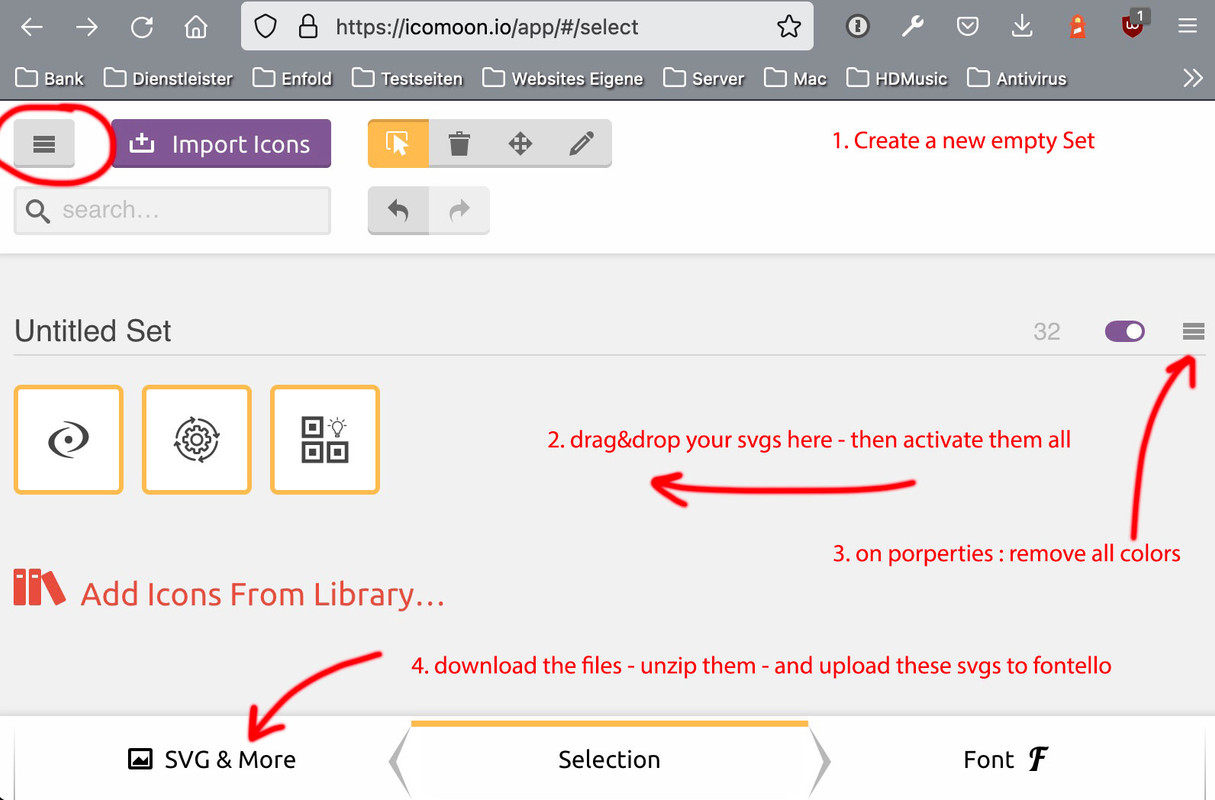
In practice, it would even be possible to upload the fonts generated there to Enfold; however, some settings for the font properties are optimised in Enfold with Fontello Settings (baselines, grid, whitespace, etc.) – so that this small intermediate step is worthwhile.
( f.e. your icon nygtq is a little bit cut off at the right side )
Font Icons here are only used in a non-colored way. Uploads to fontello only work correct if the fill is (standard) : black.
if you like to use multicolored icons anyway. Do the above – and replace later the corresponding source svg files:
https://kriesi.at/support/topic/ajout-dicones-dans-enfold/#post-1356658
https://enfold.webers-webdesign.de/virtualbis/
Hi,
Great, I’m glad that Mike could help you out. I’ll close this thread for now then, please open a new thread if you should have any further questions or problems.
Best regards,
Rikard
Hi,
Thanks for that. The purchase code you posted is already registered to the email you are using to contact us here, please try to login on the support forum. If you need help with resetting your password, then please let us know.
Best regards,
Rikard
Hi there,
We currently have a problem with the portfolio sort function (after newest Enfold update). We noticed via the browser inspector that the specific CSS sort class is placed on only 1 item ( multiple times !! ). So if you filter on a category, you only see 1 item as result. In WP backend all Portfolio Items have the right category.
Can you please take a look at this issue?
Kind regards,
Team VDLP
-
This topic was modified 3 years, 9 months ago by
 vdlpwp.
Hi I am doing a new post as I cannot find my previous post. We have an issue that when we update the website theme, the site layout is destroyed. We updated license with Envato to no avail. Just need to know how we can update without issue. Thanks
Hi guys,
I am using the Enfold Cookie controls to load both Google Analytics and Facebook Pixel (Both codes entered under Google Services in the box).
Under Privacy and Cookies > Model Window Custom Content
I have re-worded the Google tracking section to read Tracking Cookies so it covers both Pixel and Analytics.
The toggle still says “Click to enable/disable Google Analytics Tracking.”
Is there an easy way to change this label to read “Click here to enable/disable tracking cookies”
Thank you in advance.
next – strange behavior: if i use the minimum-height option with 75% from enfold ( removed the custom-class : fullheight with its vh setting in quick css ) – it works too !
i only can reproduce the effect ( from your film on top ) that the last “fixed” pseudo-container is seen and background-colors of other containers – are gone when using that 100% setting.
PS: even a minimum custom-height of 99% will do the job – without css height – only with bg-fixed substitution. ??? – why not the 100%
Hi,
The code for the widget called “Enfold latest Portfolio” is at:
\enfold\framework\php\widgets\widget-classes\class-avia-portfoliobox.php
I’m not sure if there are any dependencies that would also need to be adjusted to change this to your CPT.
Please note that files in the \framework\php\ directory can not be included in a child theme, so any changes you make will need to be done for each theme update.
Best regards,
Mike
Hi,
Naturally 😃, thank you Shari for figuring this out 🙌 Well Done 🎉
If you have any further questions please create a new thread and we will gladly try to help you, before you can figure it out yourself 😃. Thank you for using Enfold.
Best regards,
Mike
This reply has been marked as private.
Hey Ralph,
Thanks for the link to your site, but it doesn’t look like you have enabled the cookie consent message bar or modal window, so the first step to becoming compliant is to do this, once you enable it you can make the adjustments above in the options, please review our documentation.
Also see our blog post: ENFOLD and the GDPR
Best regards,
Mike
Hi,
Glad we were able to help, if you have any further questions please create a new thread and we will gladly try to help you. Thank you for using Enfold.
Best regards,
Mike
Hey qhsedirectory,
Thanks for the link to your page, currently you have an error showing at the top of your page above your menu:
/** Add your own functions here. You can also copy some of the theme functions into this file. * WordPress will use those functions instead of the original functions then.*/
this is the text in your child theme functions.php, please try removing any changes that you have made to correct.
As for hiding and showing the header when a specific place on the page is in view, I tested on an example page containing many columns with text blocks, and for one text block I added a custom class waypoint-trigger:

this “trigger” element is down a ways on the page so it is not in view on the page load:

then I added this css in the Enfold Theme Options ▸ General Styling ▸ Quick CSS field:
.waypoint-hide {
  position: fixed !important;
  top: -100px;
  width: 100%;
  z-index: 999;
  opacity: 0;
  background: #fff;
  transition: 0.3s all;
  box-shadow: 0 2px 3px rgba(0,0,0,0.15);
}

.waypoint-show {
  top: 0;
  opacity: 1;
  transition: 0.3s all;
}
and this code in the child theme functions.php file in WordPress ▸ Appearance ▸ Editor:
function custom_waypoint_trigger_script() { ?>
  <script>
window.addEventListener('DOMContentLoaded', function() {
(function($){
  var $header = $('#header_main');
  var $things = $('.waypoint-trigger');
  $things.waypoint(function(direction) {
    if (direction === 'down') {
       $header.addClass('waypoint-hide');
       $header.removeClass('waypoint-show');
    }
    if (direction === 'up') {
       $header.addClass('waypoint-show');
       $header.removeClass('waypoint-hide');
    }
  }, {
    offset: '95%'
  });
})(jQuery);
});
</script>
  <?php
}
add_action('wp_footer', 'custom_waypoint_trigger_script');
Note in the script the “offset” is 95%, this will trigger when the element is just in view, you can adjust to suit, such as 50% for when the element is in the middle of the page.
Please give this a try, I linked to my example page below.
Best regards,
Mike
Hi,
Thanks for the login, it looks like your web host is deferring your jQuery, note that the options are not available in your theme options at Enfold Theme Options ▸ Performance ▸ Change WordPress Defaults

these are the options that you should see

You will need to ask your web host to restore the WordPress defaults as they have modified the default install.
Also note that your WordPress ▸ Tools ▸ Site Health says that your Debug mode is enabled, displaying errors on your site which is a critical security issue and recommends that you disable this.

Best regards,
Mike
Hi,
Thanks for letting us know, I’ll close this thread for now then. Please open a new thread if you should have any further questions or problems.
Best regards,
Rikard
Hi,
Glad we were able to help, if you have any further questions please create a new thread and we will gladly try to help you. Thank you for using Enfold.
Best regards,
Mike



