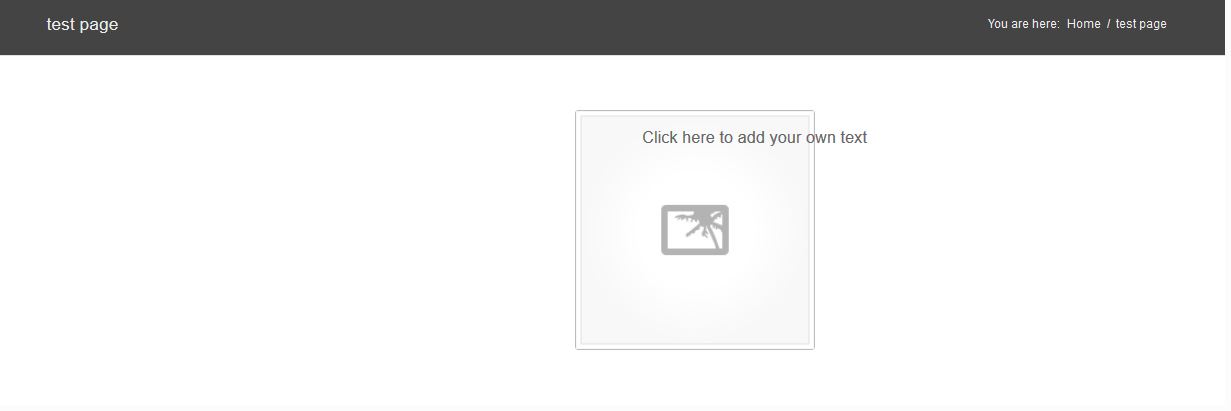
Hi!
Here the code:
[av_section color='main_color' custom_bg='' src='' position='top left' repeat='no-repeat' attach='scroll' padding='default' shadow='no-shadow' id='']
[av_one_half first]
[av_hr class='invisible' height='50' shadow='no-shadow' position='center']
[av_image src='https://xxxxxxxxxxxx.com/themes/xxxxxxxxxxxxxxx/config-templatebuilder/avia-template-builder/images/placeholder.jpg' attachment='' align='center' animation='left-to-right' link='' target='no']
[/av_one_half][av_one_half]
[av_textblock]
Click here to add your own text
[/av_textblock]
[/av_one_half][/av_section]
When i remove the white space above the image it looks ok – with this code it looks like: http://www.pizzeriainnsbruck.at/wp-content/uploads/diverse-daten/problem-enfold.JPG
iT LOOKs like the image centers of the hole page instead of the 1/2 Element.
Whne i use a Image of the reght side it dont appear. It appears outside the website. because it goes tho the center of the website again – but this time the center is outside the website :) I dont understand this…. weird
ONE IMPORTANT POINT:
THE PROBLEM IS ONLY ON FIREFOX 24!!!!!!!!!!!!!!!
WITH IE AND CHROME IT LOOKS FINE…..
Hope you find the bug and i can move on. Thank you so much!
-
This reply was modified 12 years, 5 months ago by
 chooseone.
Hi!
Please add following code to Quick CSS in Enfold theme options under Styling tab and adjust as desired
.main_color .avia-icon-list .iconlist_icon {
background-color: black;
border-color: red;
color: green; }
Regards,
Yigit
Hi!
Please add following code to Quick CSS in Enfold theme options under Styling tab
#top .product div.images img { width: auto; }
Cheers!
Yigit
Hey MuzSolutions!
Please add following code to Quick CSS in Enfold theme options under Styling tab and adjust as desired
#top .social_bookmarks li { font-size: 18px; }
Please update Enfold theme to version 2.3.2. Iconfont uploader was added in version 2.3. Please see Devin’s tutorial on Adding Fontello Icon Fonts http://vimeo.com/75743285
Regards,
Yigit
Hi Movida!
The only items that will be available to be added to the cart directly from the shop are those set as “Simple Products”. WooCommerce handles all of the ecommerce functionality and the theme just styles the plugin and how its presented.
So Variable Products like what you are describing would show up like this product: http://kriesi.at/themes/enfold/product/eva-solo-my-teapot/
If you view that in the regular shop here you’ll see the shop page display vs Simple Products (the Suit Up product): http://kriesi.at/themes/enfold/shop/page/2/
Regards,
Devin
Hi!
Please add following code to Quick CSS in Enfold theme options under Styling tab
div .logo { top: -5px; }
.responsive .logo img { margin: -5px auto; }
Please refer to this post to change the width of switching to mobile menu https://kriesi.at/support/topic/collapsable-menu/#post-165144
Regards,
Yigit
Hi theuptimizers!
Please add following code to Quick CSS in Enfold theme options under Styling tab and adjust as desired
.av_promobox { background-color: red !important; margin: 10px 0; }
Best regards,
Yigit
Hey!
Can you post a screenshot after you apply that css code? When i do it on my end, it looks fine.
Regards,
Yigit
Hi!
Enfold doesn’t support such a layout on product pages. You’d need to rewrite major code parts in /wp-content/themes/enfold/config-woocommerce/config.php to build a right sidebar template. I’d suggest to stick with the default layout or to hire a developer if you really need such a layout. However note that you probably need to create a complete new layout because the sidebar on the right and the image on the left take too much space away and you need to find another place for the product description text, etc.
Best regards,
Peter
Hi Peter, alles perfekt. Hat prima geklappt. Danke!
Grüße, Jan
Hi Jan!
Ich würde ein Update per FTP empfehlen. Devin hat hierzu ein kleines Video gemacht: https://vimeo.com/channels/aviathemes/67209750
Best regards,
Peter
If I edit full page slider on demo page http://kriesi.at/themes/enfold/homepage/home-v7-one-page-portfolio/ the second image has a button section at the bottom of edit content. I don’t seem to have the button option when I try to recreate.
Mike
Hallo, ich habe am 4. September 2013 Enfold 2.0.1 gekauft und sehe gerade, dass es nun schon die Version 2.3.1 gibt. Vor allem die Video-Integration ins Ajax-Portfolio ist wohl damit möglich(?). Leider sehe ich in meinem WP 3.6 keinen Button/Link zum Aktualisieren. Auch finde ich keine Update-Möglichkeiten auf kriesi.at oder bei ThemeForest, oder finde ich das nur nicht? Wie kann ich also das Update vornehmen, so dass alle meine Einstellungen / Seiten dabei erhalten bleiben? Vielen Dank und Grüße aus Hamburg, Jan
I don’t understand this very well.
I went into my functions.php file in the /wp-content/themes/enfold-child/ folder and added:
function disqus_embed($disqus_shortname) {
global $post;
wp_enqueue_script(‘disqus_embed’,’http://’.$disqus_shortname.’.disqus.com/embed.js’);
echo ‘<div id=”disqus_thread”></div>
<script type=”text/javascript”>
var disqus_shortname = “‘.$disqus_shortname.'”;
var disqus_title = “‘.$post->post_title.'”;
var disqus_url = “‘.get_permalink($post->ID).'”;
var disqus_identifier = “‘.$disqus_shortname.’-‘.$post->ID.'”;
</script>’;
}
Then I edited my page (not a blog page, not a post, just a regular page that I want to add comments on) and added a text block with the following code:
<div id=”disqus_thread”></div>
<!–?php disqus_embed(‘myexampleblog’); ?–>
And it still doesn’t load on that page. What am I doing wrong?
Hello!
You need to add the code at the very top of functions.php – otherwise it will not work. Afterwards Enfold will display a text field underneath the visual composer/editor field which allows you to manipulate and view the layout source code.
Cheers!
Peter
Hi!
You would need to build a custom comment form template if you want to re-position the input fields. A basic guide can be found here: http://codex.wordpress.org/Function_Reference/comment_form
Enfold just uses the default comment form and the comment_form() function to call the default input fields and you can’t modify the output directly. You can try to use the comment_form_after_fields action though (see code in /wp-includes/comment-template.php and this thread: http://wordpress.stackexchange.com/questions/24116/using-filter-to-add-additional-fields-to-comment-form ) to add additional input fields to the form.
Cheers!
Peter
Hi Peter,
Thanks for the instructions. I rather not do this either!
You put me however on the right track! I want the breadcrumbs display in de google results (google’s Rich Snippets feature) and the Enfold build in breadcrumbs don’t do this if you don’t select the option to display the Header on the page, post or portfolio (found that out after your remark and some testing). So I have activated this feature (which is the default setting) again and added this to the Quick CSS:
.title_container{display:none;}
this results in not displaying the header and the breadcrumbs on the pages, but does convert the URL in the Google results to a breadcrumb path (which you can test here: http://www.google.com/webmasters/tools/richsnippets). This is exactly what I want.
So thanks and I’ll keep using the Enfold breadcrumbs!
Dave
Hey weball!
Yes, with a small trick you can use any slider as fullwidth slider as long as the slideshow script supports responsive layouts – see: https://kriesi.at/support/topic/revolution-slider-fullscreen-possible-in-enfold/
Cheers!
Peter
All links from monthly archive (e.g. http://www.nopublica.com/2013/10/) just linking to the Homepage.
WP 3.6.1, Enfold 2.3.2. WP Settings Homepage is set, Enfold Frontpage Settings not set. Yoast WordPress SEO installed (as well as some other plugins).
Hi,
Can you post a link to your website please?
Regards,
Josue
On the product page there is a woocommerce tab control with two tabs. The product description and the reviews. Why is it doing a line break between reviews and (0)? How can I style the tab in order to display the title on a single line? You can see on the print screen how it looks like..
Thanks in advance for your help
 woocommerce-tab.png" alt="Woocommerce Tab isn't displaying correctly" />
Hey!
Go to Enfold > General Settings > Blog Style. Choose “Single Author, big preview pic”.
Cheers!
Ismael
Hi!
For WordPress in general, there is this excellent session by wp.tutsplus.com
http://wp.tutsplus.com/sessions/wp101-basix-training/
Regarding Enfold training, these videos will help you getting started:
http://vimeo.com/channels/aviathemes/
Best regards,
Josue
Hey yutakaemura!
Thanks for letting us know. I will pull a request to Kriesi. It will be added on the next update.
Cheers!
Ismael
Hi – i saw this solution:
https://kriesi.at/support/topic/footer-menu-in-socket-not-showing-in-responsive-view-smartphone/
and added the code to the Quick CSS section, but i am not seeing the footer menu on my iPhone. it does show on iPad.
interestingly, when adding the code recommended by Yigit, my Enfold theme stopped displaying customized colors for the header and footer areas. Not sure why that is, but i thought i would mention it.
any ideas? thanks in advance for your help!
Hi,
How can I create an accordion on the left (or right) side of a page, like in your Enfold demo here:
http://kriesi.at/themes/enfold/features/
I can’t find this in the layout-builder… is this custom code?
Thank you!
Hi Devin,
Thanks for the help. But the link only shows how to set up the mega menu, which I already know. My problem is that I can’t get the menu drop down to go full width. It seems to have a limit of 50%. I’ve looked at some discussions regarding this and the only way that it worked was to use
.avia_mega_div {
width: 1024px;
}
The trouble with that is that it doesn’t shrink when the browser is a little below that (say 1020px), so it gets chopped off. I tried using 100% as someone suggested in another discussion but that still keeps the dropdown menu at 50% with all the menus shrunk to a hilarious size.
Wish there was an option to have the dropdown go full width of the container.
Thanks for the help, anyway. Wish I had discovered ENFOLD earlier.
Cheers
BB Looi
Any word on this yet guys? Sorry for the rush, We are waiting on this to launch a site.