Getting the following error after attempting to update the version of enfold. (2014 May 28th – Version 2.8.1)
“Parse error: syntax error, unexpected $end, expecting ‘,’ or ‘;’ in /home/content/18/6958118/html/wp-content/themes/enfold/framework/php/class-framework-widgets.php on line 208”
Entire site is down and can’t even launch WP Admin.
Thanks
Try modifing /wp-content/themes/enfold/css/custom.css with:
ins.adsbygoogle:before, .adsbygoogle ins:before {
content: none !important;
}
Hi!
You can upload it to a service like imgur o dropbox.
Make sure you are using the latest version of Enfold(2.8.1)/WordPress (3.9.1). Right now you are using Enfold 2.7, follow this guide on how to update it.
Best regards,
Josue
I’m seeing this spacer issue now on all the sites that I have created using Enfold. I hope you guys can find a solution as this should be a minor glitch that’s easily fixed.
-
This reply was modified 11 years, 9 months ago by
 Snerp.
This reply has been marked as private.
That’s weird, please try re-installing the theme from a fresh copy of Enfold.
Regards,
Josue
Hey!
Try to add this code to your child theme functions.php file or enfold/functions.php:
add_filter('avia_post_grid_query', 'avf_custom_post_grid_query');

function avf_custom_post_grid_query ( $query ) {
$query['orderby'] = 'date';
$query['order'] = 'ASC';
return $query;
}
This code will make sure that your portfolio entries are ordered by date with an ascending order.
Regards,
Peter
Hi mcalabro!
Please update to Enfold 2.8. I recommend to use ftp to update the theme: https://vimeo.com/channels/aviathemes/67209750
Cheers!
Peter
I am using Enfold 2.6.2 on a WordPress 3.9.1 site, although this happened to me in 3.8 as well.
I can’t fully take advantage of the advanced editor, since the “visual” (wysiwyg) part of it is blank — no toolbars and whatever you type is white or otherwise doesn’t show. The “text” tab of it work, but for users of my site, they really need the formatting tools.

All the normal WP wysiwyg editors work perfectly, as do editors in plugins like Smart WYSIWYG Blocks of Content.
I have disabled all other plugins, yet I get this JS error when opening the editor:

Please advise.
-
This topic was modified 11 years, 9 months ago by
 mcalabro. Reason: clarification
Hey!
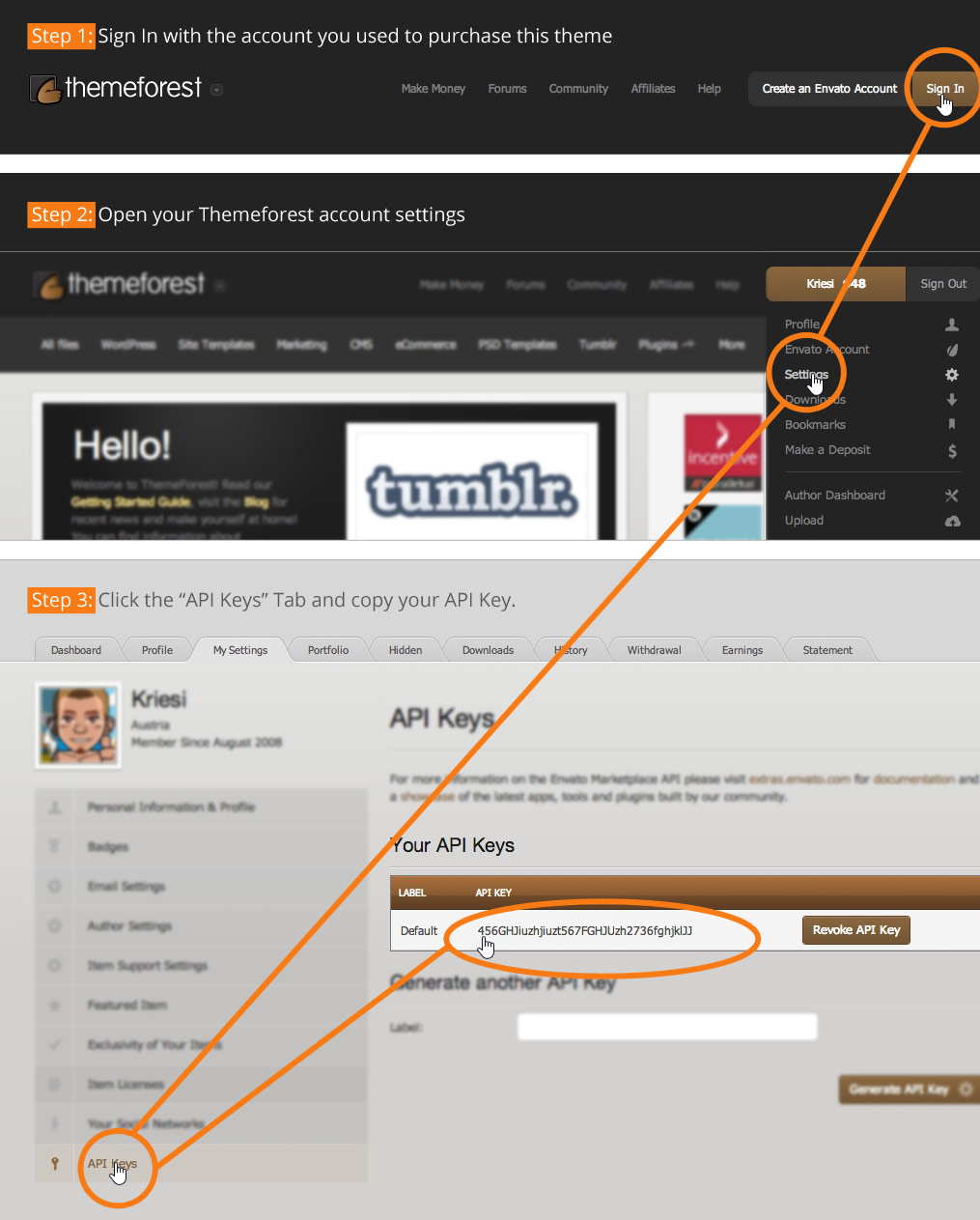
On the “Theme Option” page (Enfold > Theme Options > Theme Update) there’s a link to an image which explains where you can create/find the api key – see http://kriesi.at/wp-content/themes/enfold/framework/images/layout/FIND_API.jpg
Regards,
Peter
 RJ
RJParticipant
Hi,
Is there a way to always show the cart icon in the header when you have woocommerce installed with the enfold theme?
thx!
I cannot update from 2.7.1 to 2.8.1 an automated update.
“The update process is starting. This process may take a while on some hosts, so please be patient.
Enabling Maintenance mode…
Updating Theme Enfold (1/1)” …and do nothing.
-
This reply was modified 11 years, 9 months ago by
 Amondo.
Hi Yigit,
It is in Footer Widgets. It does not change the number of coloums, colours or other settings from the footer options in Enfold theme options.
If I have setup my footer and draged the items into the column 1, column 2 etc. that I want and I update the Enfold theme the footer items/content in the columnns has changed. E.g. I have have placed a ‘advertise area’ in column 2 with my own images this has changes to a ‘tag cloud’ after a theme update. Both in frontend and backend. So I need to do the footer once again.
I update the theme with the build in updater i WordPress.
Thanks Devin,
I’ve tried several of the top rated ones and my server is able to handle the requirements but none have done anything measurable in speeding things up. I did use Google Developer tools and it recommended I reduce image sizes in layer slider or had to eliminate it. Then I’ve been getting a lot of slow down recommendations as to how the java scripst etc. in enfold theme but those are only causing around 200k of the slowdown. I cant seem to get the site to rate any faster that 55/100 on their speed scale no matter how much I minimize the page. Deleted a bunch of plugins but still the site doesn’t pop right up even with a caching plugin. Has about a 2-4 second delay, then it will appear all at once on several devices. Before getting rid of the slider, it would first load background, then tile the rest down. I have a very good apache server with plenty of ram and processor speed.
am trying to build this page
http://kriesi.at/themes/enfold/pages/help/?default=true
please look at mine in private content and help me out
This reply has been marked as private.
This reply has been marked as private.
Hey!
Thank you for the info.
It sounds like you might be having an issue with a third party plugin or script, WordPress HTTPS, which is quite unusual because a lot of Enfold users who are using the plugin are not having this issue. Regretfully, we cannot provide support for third party plugins or scripts as stated on our support policy. Because of this, any questions you have regarding setup, integration, or troubleshooting any piece of functionality that is not included on the theme package will need to be directed to the plugin author.
I would try checking with your hosting provider on this particular issue as it sounds like something related to your setup is causing this. Typically, this is due server configuration problems (i.e. underpowered, traceroute issues, packet loss, permissions errors, et cetera). Additionally, your host will be able to diagnose things much better due to the fact that they have a more complete view of your account and can work behind the scenes with you.
Regards,
Ismael
Hey VictoriousC!
Thank you for using the theme!
You can add something like this on Quick CSS or custom.css:
body, body p {
font-size: 15px;
}
You can also change some of the font style on Enfold > Advanced Styling panel.
Regards,
Ismael
In the ENFOLD DASHBOARD it shows this:
Enter your Google analytics tracking Code here. It will automatically be added so google can track your visitors behavior.
Is this something that should be emailed with my purchase? or Where can I find it?
THANKS
Hi!
I added the function successfully and now the blog title appears there:
http://www.robroek.net/bureau-central/
If you want to change that simply modify the values in the functions.php file, for example:
add_filter('avf_title_args', 'fix_single_post_title', 10, 2);
function fix_single_post_title($args,$id)
{
    if ( $args['title'] == 'Blog - Laatste Nieuws' )
    {
        $args['title'] = 'Custom Title'; // <-- Title
        $args['link'] = 'http://kriesi.at'; //  <-- Link
        $args['heading'] = 'h1';
    }

    return $args;
}
Cheers!
Josue
Hmmm, there must be *something* that is causing it not to work on our work network. Any thoughts at all? I really wanted to use Enfold for our school’s website but without an admin panel that I can access at work it makes it tough.
Thanks for all the help thus far, muchly appreciated!
Hi!
1. To edit the content in the actual footer go to Appearance > Widget > Footer column, fill those widget areas with the your content.
2. To edit the style of the footer elements content go to Enfold > General Styling or Advanced Styling.
Regards,
Josue
Hey!
Please update the theme to its latest version (2.8.1).
Best regards,
Josue
Hey!
You can’t put that “Map” element there because that element will always be full width, but you can try with the Enfold Google Map Widget + Widget Area element.
Cheers!
Josue
Hello everybody,
I can’t really customize the header and footer on my pages. In the footer there seems to be Enfold default content (“Interssante Links, Seiten, Kategorien”) in grey font (I didn’t define grey font for any element…), the same grey font appearing above the header. Is there anything I can do about it?
Thank you!
Hi Josue,
Thanks for your response.
I copy/paste the code into notepad first and compare it to the code you’ve mailed me. Then I paste it in the functions.php (not the enfold-functions.php) but the website remains blank after that and I have to remove the code from the .php file again.
Hiding the title bar is not an option for me.
Is there an alternative?
Thanks.
Regards,
Roman
Hi Josue,
thanks for the quick reply, but unfortunately not ;-)
I tried the first css code – it results in a larger, yet streched image:

The second code doesn’t change the result at all:

Hi
I can’t get the share buttons and related posts to show up below my blogposts.
Using a child theme. Have no social media plugin activated. And I’ve set everything in Theme options/Blog Layout.
Would like it to be like your demo site:
http://kriesi.at/themes/enfold/2014/04/28/new-electric-cars-are-getting-really-fast/
Thanks in advance!
Hans
Hi!
Here you go:
https://www.dropbox.com/s/0thidwxrt42ttu4/enfold.wordpress.2014-05-31.xml
That XML contains only the v10 Magazine, import it in Tools > Import.
Regards,
Josue