Hey!
@wonderfultravel Please try updating the theme via FTP manually this time – http://vimeo.com/67209750
also please make sure that API key you enter in Enfold theme options is correct. It checks for updates every 12 hours
Best regards,
Yigit
Hi Nelson!
Please add following code to Quick CSS in Enfold theme options under General Styling tab
@media only screen and (max-width: 768px) {
.avia-testimonial-row {
min-height: 350px;
}}
Best regards,
Yigit
Hi!
Please re-update Enfold to the latest version 2.9.2 via FTP – http://vimeo.com/67209750
P.S.: You can go to Enfold sub-forum and scroll down to start a new thread – https://kriesi.at/support/forum/enfold/#new-topic-0
@alphateddy Glad it is working fine for you now! :)
Regards,
Yigit
My problem is different
I can’t upload WP V4 or any plugins.
I have already updated Enfold to 2.9.2
Here is one of the errors
Warning: Invalid argument supplied for foreach() in /home/kirksstu/public_html/wp-content/themes/enfold/framework/php/auto-updates/class-pixelentity-theme-update.php on line 49
Also:
I posted here because I can’t seem to find a way to start my own thread or get support for my problem
HELP………..site is virtually down because I can’t move forward
PLEASE HELP
I am using WordPress 4 and Enfold (latest version).
I have a Contact Us page using the “Contact Form” element in the Avia designer.
I want to have my Contact Us page run as a SSL connection so that the email message sent by the form is SSL encrypted. The page uses the “Contact Form” element from Avia.
How can I do this?
The rest of my website does not need SSL, nor do I want it to be SSL (unless this request is only possible using a site entirely SSL encrypted).
Hi,
i want to give the Code-Block a white Background Color.
<h4><a href="http://www.verenalorenz.com/martinklapheck/wp-content/uploads/2014/05/Video2.jpg"><img class="alignleft size-full wp-image-337" src="http://www.verenalorenz.com/martinklapheck/wp-content/uploads/2014/05/Video2.jpg" alt="Video2" width="309" height="235" /></a></h4>
<h4>Video zum »Piano-Referat«</h4>
<p>Schauen Sie sich hier das Kurzvideo zum Vortrag an.</p>
<p><a style="font-weight: inherit; font-style: inherit; color: #b81111;">» direkt online ansehen</a></p>


Thanks
David
Yes I cannot use the enfold theme options menu
Hi
Now I cannot drag widgets into the sidebars and footers since upgraded to WP 4.0
Thanks
Peter
I guess the problem was the new update of WordPress. I had Enfold version 2.9.1 and when I updated to 2.9.2 it worked again. Thanks!
Hi!
Enfold version 2.9.2 is already compatible with WordPress 4.0. Enfold version 3 will come soon though.
Cheers!
Yigit
Hey Biggy!
Latest version of Enfold comes with version 5.2.0, if you are using LayerSlider as a standalone plugin, please contact plugin author
Regards,
Yigit
Hi!
Thank you all for the update! As stated on Enfold’s ThemeForest page, version 2.9.2 works fine with WordPress 4 :)
Best regards,
Yigit
Hi David!
Please update Enfold to version 2.9.2.
Cheers!
Peter
Hi corefocusgroup!
Please go to Enfold theme options > Header Layout > Header Size and choose to display custom pixel value and set the height to 266px and remove custom CSS code you have added. If that does not help, let us know so we can check your website to see the issue
Cheers!
Yigit
Hi!
Yes Advanced layout page use a special template ( enfold/template-builder.php ) and you probably need to modify this file to use it with UAM. I don’t know the plugin though and I can’t tell you if or how you can use UAM with Advanced Layout templates. You can use the “avia_builder_precompile” or “avf_template_builder_content” or “the_content” filter if you want to manipulate the output with UAM (i.e. replace the default template content with a “please login” message if UAM restricts the access). Personally I recommend to contact the plugin author or to try another plugin like: https://wordpress.org/plugins/groups/
Regards,
Peter
Hi codecreative!
No, this is currently not possible. You can try to install this plugin: https://wordpress.org/plugins/woocommerce-dynamic-gallery/ but I didn’t test it with Enfold.
Best regards,
Peter
Hi!
Normally the German language files should translate this word. If it does not work on you website add this code to the child theme functions.php file (or enfold/functions.php). I recommend to insert the code at the very bottom.
add_filter('avf_toggle_sort_first_label','avia_change_toggle_label', 10, 2);

	function avia_change_toggle_label($all, $params)
	{
		$all =  "Alle";
		return $all;
	}
Cheers!
Peter
My fault ! I was with Enfold 291 (sure it was 292, but …) Avia Layout Builder works fine for me with 2.9.2 and WP 4
Edit: i’m a fool – for my customer i updated to 2.92 (WP4.0 compatible) but my test environment on my server is 2.91 so forget everything.
Enfold works on 4.0 WP
Hi,
i updated wordpress to 4.0 enfold theme is damaged.
Cant use the enfold layout editor and no menu ist displayed

Can u help me please?
Thanks!
David
-
This topic was modified 11 years, 7 months ago by
 d1h.
d1h.
dear alengio – thanks this solves for me the problem that the enfold options can not be seen in total:
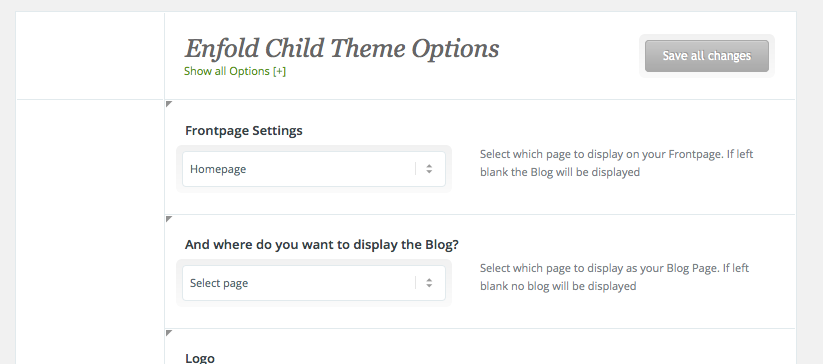
but with your code the toggle button on top (show all) works now!
and Sitecreation and Frontsite Changings work for me.
But the bold (strong does not work in code mode) so it is a bit confusing:
so change on line 948 of wp-content/themes/enfold/framework/js/avia_colorpicker.js the inner quotes to double quotes:
from:
.filter('a[rel=' + hash + ']');
to:
.filter('a[rel="' + hash + '"]');
-
This reply was modified 11 years, 6 months ago by
 Guenni007.
I use WordPress 4.0 and the newest version of Enfold.
This reply has been marked as private.
Hello,
I’ve installed the Enfold template and when I create a new Page, I want to use the Layout Builder. There’s a button “Erweiterter Layout-Builder”, but when I hit the button, nothing happens.
I hope you can help me!
Thanks a lot.
Hello :)
I love Enfold, but since this morning, i have a terrible experience…
I don’t know if it’s a coincidence, but everything is destroyed on my site since i’ve updated to wordpress 4.0 :
Looks like the avia code doesn’t work ?
The header menu doesn’t work anymore either, and the layout is weird.
What should i do ?
Thanks by advance…
Hi Josue
Today … No it’s still on my localhost :-) – Maybe this weekend I will move the site online.
I have uploaded a picture of the full page. We are working on the frontpage and the image shows where the colour section is showing the video and a mockup of the button and where I want to move it to. NEW PIC HERE
-
This reply was modified 11 years, 7 months ago by
 Netzie.
Same here, but I found the cause:
There is an earlier jQuery syntax error for the expression a[rel=] which causes the e undefined error later on.
Apparently the jQuery version in 3.9.2 didn’t throw a fatal error for this.
wp-content/themes/enfold/framework/js/avia_colorpicker.js line 948:
/**
 *
 * layout.js
 *
 */
(function($){
    var initLayout = function() {
        var hash = window.location.hash.replace('#', '');
        var currentTab = $('ul.navigationTabs a')
                            .bind('click', showTab)
                           .filter('a[rel=' + hash + ']');           // line 948, source of the bug
        if (currentTab.size() == 0) {
            currentTab = $('ul.navigationTabs a:first');
        }
Change the bold line to:
.filter('a[rel="' + hash + '"]');
That is, add the double quotes around the hash value.
-
This reply was modified 11 years, 7 months ago by
 alengio.
This reply has been marked as private.
Same thing here. Avia is not loading (Enfold 3.9.2).



