
-
Search Results
-
Topic: Bluehost Enfold fail
My Bluehost website using Enfold has critical errors and is down for days. WordPress tech cant fix and points to the theme as the issue. I don’t have the receipt as it was purchased maybe 15 years.
What to do? Should I re-purchase or change to a different theme
my phone is 703-217-7760I use the WP SMTP Mail plugin.
Enfold is generating regular errors from the plugin. Here’s the error report:
Debug Event Details
Type
Error
Date
July 7, 2025 at 2:06 pm
Content
Mailer: Other SMTP
SMTP Error: data not accepted.SMTP server error: DATA END command failed Detail: Spam message rejected
SMTP code: 554 Additional SMTP info: 5.7.1
Source
Enfold
/home/storage/322/4077322/user/htdocs/wp-content/themes/enfold/framework/php/class-form-generator.php (line: 1485)I just found out the errors actually started in April 2024 but as I use the free version of the plugin I don’t get notified via email when an error occurs so I’d only notice it if I logged in to the WP admin panel and there had been a recent error (as I did today). Unfortunately when there is a successful send of an email the plugin clears the error flag from the admin bar which is why I only discovered this today.
The errors are generated at random intervals. There have been one a day for the past 3 days, prior to that it was June 30, two on June 28, two on June 26, June 25, June 24, June 22, June 3, May 31 etc.
Any ideas?
WordPress 6.8.1, Enfold 7.1.1
Hi Rikard and Kriesi Team,
How’s it going?
The reason for this email was to see if you had reactivated interest in doing a sponsored video on your Enfold theme.
We can offer you up to 20% discount on all the options you choose, would you like me to pass on the prices?
I look forward to hearing from you,
Best regards,
Héctor Romeroon one installation i got for a page “aktuelles” – ID: 2061
i want to show the whole content for the blog entries with taxonomy “aktuelles”on newer enfold versions this does not work anymore.
function custom_avf_blog_content_in_loop( $blog_content, $current_post, $blog_style, $blog_global_style ){
  global $avia_config;
    $pages = [ 2061 ];
    if( ! in_array( $avia_config['real_ID'], $pages ) ){
      return $blog_content;
    }
  return 'content';
}
add_filter( 'avf_blog_content_in_loop', 'custom_avf_blog_content_in_loop', 10, 4 );
How can the entire content be displayed?
Hi Enfold Team,
we’d like to get your feedback regarding the page structure and semantic markup used in our Enfold setup. An accessibility tool pointed out that our website lacks a <main> landmark, which is suboptimal in terms of both accessibility (screen reader navigation) and SEO.
Observation:
Currently, our page structure looks something like this:
——————-
<div class=”main”>
<!– content –>
</div>
————–
The accessibility tool reports that a semantic <main> element is missing, which is important for screen readers and search engines.Question:
From your perspective, is there any reason not to change the markup to the following?
——————-
<main class=”main”>
<!– content –>
</main>
———————
Can you confirm whether this change is reasonable and compatible with Enfold, or is there anything we should be aware of before implementing it?Thanks in advance,
Hello
I try to add a checkbox tho the checkout form of the woo commerce shop. The checkbox should indicate the consent to forward the email adress to the delivery service.
The site https://shop-en.sonnenmulde.at/kasse/ shows a nice checkout form and I only want to add a field there:What I already tried:
Since it is apparently a block based component the classic checkout and adding a checkbox via functions.php did not work
I tried to use the custom blocks plugin which gets installed if I switch in enfold to the block based editor but this ruins the layout
I tried to create some javascript to inject the checkbox, which worked but I was not able to receive the value of it into my backend.Any suggestions on how I can add a non mandatory checkbox to the checkout field and receive its value into the order backend ?
Topic: Favicon Not Appearing
HI Guys,
I have tried to get this Favicon indexed for weeks, it is currently uploaded to appearance > customise area but also tried the Favicon in the Enfold settings and getting no joy whatsoever.
Can anyone advise please?
It displays when I am logged in but when and logged out in incognito but its not being picked up with Google
Topic: Share this entry
Hello I need your assistance with changing the shape of the social media logos from rectangles to circles.
I went to the settings from Enfold, blog entries and I changed it there I noticed it changes for any new items I published but not on the current pages. I need the current pages to change the social media from rectangle to circles please.
Please help me change the profile from rectangles to circles please
if you have set this filter:
add_filter( 'avf_default_lightbox_no_scroll', '__return_true' );The body does not scroll away on opened lightbox
To prevent the background from scrolling when the lightbox is open, enfold sets to the html elment an overflow: hidden.
Enfold also considers the scroll bar, which disappears, and added a margin-right of 15px (15px–17px is a common scroll bar width).
However, since the fixed header is virtually taken out of the DOM flow, it appears to widen. This causes the navigation to jump slightly when opening and closing the lightbox.
Unfortunately, no additional class is added to HTML when the lightbox is open (e.g., “lightbox-active”), so I use the now-widespread pseudo-class selector “has” to compensate for this.html.av-default-lightbox-no-scroll body:has(.mfp-wrap) #header.av_header_sticky { width: calc(100% - 15px); }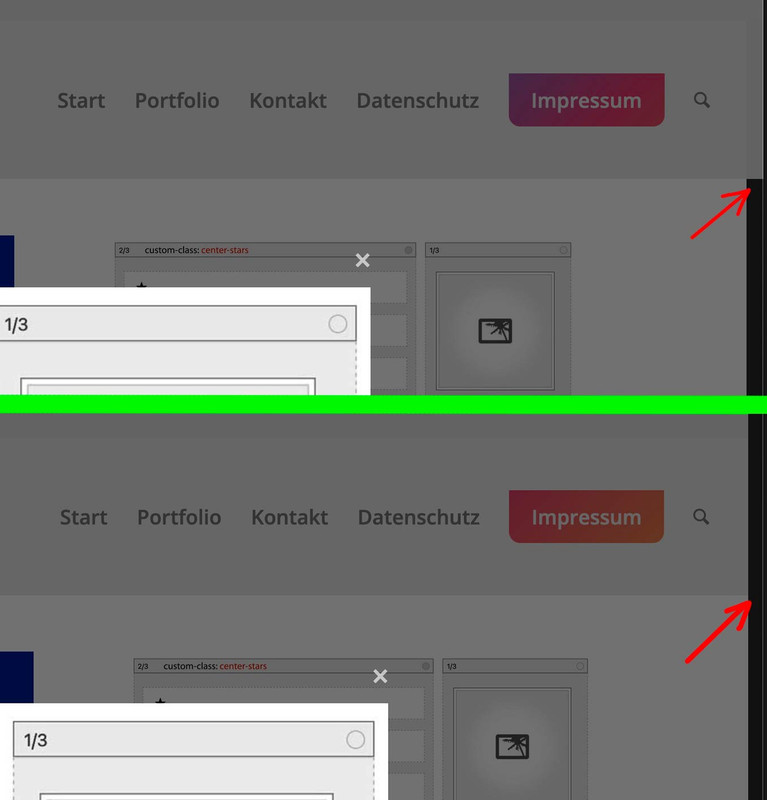
Hi @enfold!
if you look at this portfolio raster https://boetz-kresse.de/rezepte/ you see that the length of the text destroys the layout. where can i do setting to make the size of each portfolio equal?
Thanks for your support!
Michael F.
Nach dem Update von Enfold erscheint folgender PHP-Fehler im Frontend und/oder Backend und nach Aktivierung von WP Rocket kam es zu einem Error 500.
Nach einer Analyse mit Hilfe v. ChatGPT (sorry, hab nur eingeschränkte php-Kenntnisse) kam die KI zu diesem Schluss:Warning: Trying to access array offset on value of type null in /wp-content/themes/enfold/config-templatebuilder/avia-shortcodes/helper-templates/function-set-avia-frontend.php on line [XY]Ursache:
In der Funktion avia_get_option() wird folgender Code ausgeführt:$pages[] = 'avia'; $pages = array_unique( array_merge( $pages, array_keys( $avia->options ) ) );Wenn $avia->options nicht gesetzt oder null ist, erzeugt array_keys( $avia->options ) eine PHP-Warning.
Lösungsvorschlag:
Absicherung der Zeile, z.B. so:$pages[] = 'avia'; if ( isset( $avia->options ) && is_array( $avia->options ) ) { $pages = array_unique( array_merge( $pages, array_keys( $avia->options ) ) ); }So wird der Fehler zuverlässig vermieden, auch wenn $avia->options noch nicht initialisiert wurde.
System:
Enfold Version: 7.1.1
WP Rocket:
PHP Version: 8.2.28
Hosting: HetznerUm den Error 500 und die auftretenden PHP-Warnungen in Verbindung mit Enfold zu identifizieren, haben wir folgende Schritte unternommen:
1. WP_DEBUG aktiviert: Fehlerausgabe und Logging wurden aktiviert, um detaillierte Fehlermeldungen zu erhalten.
2. PHP-Log geprüft: Im Error-Log wurde die Warnung „Trying to access array offset on value of type null“ in der Datei function-set-avia-frontend.php gefunden.
3. Object Cache geprüft: Im Hetzner-Webhosting wurde überprüft, ob Redis oder Memcached aktiv sind. Redis war aktiviert, wurde aber testweise deaktiviert. Das Problem bestand weiterhin.
4. Theme-Tests: Das Enfold-Theme und das Enfold-Child-Theme wurden einzeln getestet. Der Error 500 blieb bestehen, unabhängig vom Theme.
5. Kritische Theme-Datei überprüft: Die Datei function-set-avia-frontend.php wurde gezielt untersucht und der problematische Quellcode identifiziert.
6. Optionen im Backend geprüft: Es wurde geprüft, ob veraltete oder ungültige Optionen (z. B. durch Caching) eine Rolle spielen könnten.Diese gezielten Analysen führten letztlich zur Identifikation des fehlerhaften Codes in der Theme-Funktion.
Topic: Lightbox with Contact Form
Hello! I have a button that opens a lightbox with a contact form within. It looks okay in desktop but in mobile the lightbox cuts off the form. I used the instructions on the button open lightbox documentation (below). No other css or theme file updates made. Is there a way to show the form at full height?
Viewing 30 results - 2,101 through 2,130 (of 244,498 total)


