Hi silviouk!
Please add following code to Quick CSS in Enfold theme options under General Styling tab
div#header_meta {
margin-bottom: 0;
}
Best regards,
Yigit
Hey!
Can you please try updating Enfold to the latest version 3.0.1 via FTP – http://vimeo.com/67209750
and try de-activating all active plugins and check if that helps?
Best regards,
Yigit
Hi Dominik!
Please add following code to Quick CSS in Enfold theme options under General Styling tab to remove logo
.logo { display: none !important; }
Best regards,
Yigit
For the life of me I cannot figure out how to get LayerSlider to open embedded video (using an iframe) to show up in a popover.
This use to work perfectly with the old version of LayerSlider but since it’s been updated it just keeps opening the videos in the main window.
What I’m doing is choosing ‘Image’ as the layer type then specifying the image of a PLAY button.
I then switch over to the ‘Link’ tab and enter in the embed popover URL into the field and set it to ‘Open on same page’.
http://fast.wistia.net/embed/iframe/k15tf84uzl?videoWidth=640&videoHeight=388&controlsVisibleOnLoad=false&autoPlay=true
Additionally if I used a fancybox plugin, I would add the class ‘fancybox-iframe’ into the ‘Attributes’ tab.
In the old version of the Enfold theme with LayerSlider, it could detect the source of the video (Youtube etc) and allow it to load as a popover video.
I’m currently using a video from Wistia. I’ve tried a Youtube hosted video but it too doesn’t open in a popover now either.
The only way that I could get it to work is choosing the ‘HTML / Video / Audio’ layer type and entering in the following html code:
<a href="//fast.wistia.net/embed/iframe/k15tf84uzl?popover=true"><img src="https://embed-ssl.wistia.com/deliveries/07b5e1d983243191d31e6f4f47ca8dfa7fcdb75d.jpg?image_play_button=true&image_play_button_color=0212e3e0&image_crop_resized=150x84" alt="" /></a>
<script charset="ISO-8859-1" src="//fast.wistia.com/assets/external/popover-v1.js"</ script>
But I don’t like having to do this because the thumbnail/preview image does not actually resize itself when you alter the window size of the browser, so everything around it is reduced except for the video play button.
Can you please help figure out how to get this working like it was before?
-
This topic was modified 11 years, 6 months ago by
 Perenso. Reason: Added code tags in
This reply has been marked as private.
Hi Martin!
Please add following code to Quick CSS in Enfold theme options under General Styling tab
.template-blog .post_delimiter { margin: 0; padding: 0; }
Best regards,
Yigit
This reply has been marked as private.
This reply has been marked as private.
Hey Dominik!
It would require some custom work but you can achieve similar look using Enfold. I tried Google Translating your query but it looks like you are not asking a question. Please elaborate if you are :)
Regards,
Yigit
I toggled every possible setting in the Enfold > General Layout > Dimensions panel. No difference. Again, the problem is only on the Home page.
Please, please help.
Hi!
Can you post the link to your website please?
You can add following code to Quick CSS in Enfold theme options under General Styling tab to remove logo on homepage
.home .logo { display: none !important; }
Regards,
Yigit
Hi wigldesign!
Please add following code to Quick CSS in Enfold theme options under General Styling tab
#top .widget_nav_menu li {
list-style: square;
}
Cheers!
Yigit
Hey!
Well, there was no color tab before the update, but there was the option to select your own custom color. That’s not new. See the screenshot, the option ‘heading color’ could be set to custom: 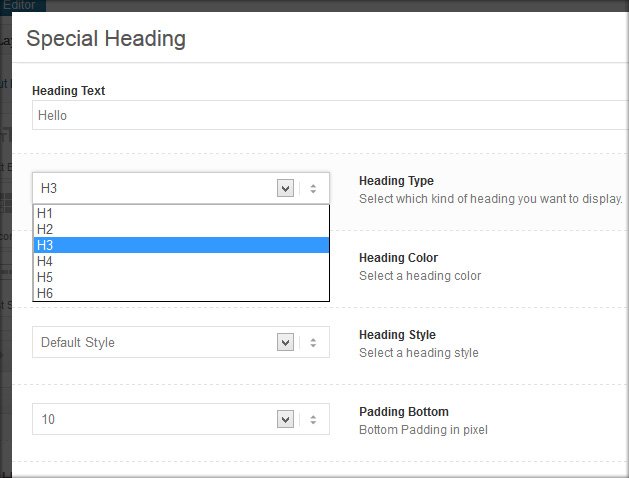
However, I fixed the issue by applying the “socket” color scheme instead of the “main content” to a page section. Still, I think it’s strange that the custom color code doesn’t override the global settings. Especially because it worked before.
Cheers!
Ronald-Jan
-
This reply was modified 11 years, 6 months ago by
 ronaldjan.
Hey!
Try the following: open /enfold/functions-enfold.php and look for line 796:
$post_id = function_exists('avia_get_the_id') ? avia_get_the_id() : get_the_ID();
Add this below:
if($post_id == 2) $settings['header_position'] = 'header_left header_sidebar';
Change “2” by the ID of your about page.
Cheers!
Josue
Hey MediaMix1!
Please go to Enfold theme options > Demo Import tab and import any demo content you would like :)
Cheers!
Yigit
Hi erussell!
This kind of smooth scroll is available – http://kriesi.at/themes/enfold-restaurant-one-page/
you can find more information here – http://kriesi.at/documentation/enfold/add-anchors-to-your-page-for-single-page-navigation/
But with side navigation, currently not possible. Please feel free to request it here – https://kriesi.at/support/enfold-feature-requests/
Regards,
Yigit
Hey,
I just bought a fresh copy of Enfold for a new website I’m starting. I’ve used Enfold before for another site and I really liked starting with the demo content, but I didn’t receive the .xml file with my download this time. I even went back to my downloads history and re-download the previous Enfold files I had bought in the past just to see if it was in there, and it’s not. Can you send me some that I can use for my new Enfold installation?
Thanks!
Kristy
-
This topic was modified 11 years, 6 months ago by
 MediaMix1.
Hi!
Please go to Enfold theme options > Blog Layout and choose to display Related Entries. Make sure that your posts that you would like to relate have the same tags.
Can you please elaborate on sidebar issue?
Regards,
Yigit
Hey erussell!
you can give you Color Section element a unique ID and then add a Easy Slider element inside it and then add following code to Quick CSS in Enfold theme options under General Styling tab
#whatwedo .container { padding: 0; margin: 0; width: 100%; max-width: 100%; }
Best regards,
Yigit
-
This reply was modified 11 years, 6 months ago by
 Yigit.
Hi codecreative!
Please add social icons and phone number to header and choose to display logo on left and menu on the right on Enfold theme options and post the link to your website
Cheers!
Yigit
Hi ste_thumbs!
Currently it is not possible. But please feel free to request such feature here – https://kriesi.at/support/enfold-feature-requests/
Regards,
Yigit
Hey!
Currently it is not possible but you can request it here or vote if already requested – https://kriesi.at/support/enfold-feature-requests/
Best regards,
Yigit
Hi envapk2!
Please try editing functions.php file. Find following
require_once( 'config-bbpress/config.php' );					//compatibility with  bbpress forum plugin
require_once( 'config-templatebuilder/config.php' );			//templatebuilder plugin
require_once( 'config-gravityforms/config.php' );				//compatibility with gravityforms plugin
require_once( 'config-woocommerce/config.php' );				//compatibility with woocommerce plugin
require_once( 'config-wordpress-seo/config.php' );				//compatibility with Yoast WordPress SEO plugin
require_once( 'config-events-calendar/config.php' );			//compatibility with the Events Calendar plugin
and change it to
//require_once( 'config-bbpress/config.php' );					//compatibility with  bbpress forum plugin
require_once( 'config-templatebuilder/config.php' );			//templatebuilder plugin
//require_once( 'config-gravityforms/config.php' );				//compatibility with gravityforms plugin
//require_once( 'config-woocommerce/config.php' );				//compatibility with woocommerce plugin
//require_once( 'config-wordpress-seo/config.php' );				//compatibility with Yoast WordPress SEO plugin
//require_once( 'config-events-calendar/config.php' );			//compatibility with the Events Calendar plugin
Then you can remove folder from Enfold folder and try uploading.
Cheers!
Yigit
Hello,
I just updated to the new version of Enfold and need some help making the product image larger on the single product page. In previous updates, I was able to change the Woocommerce config.php making the single-product-main-image 8 units and the single-product-summary 4 units instead of six and six.
That code no longer exists in the config.php. What’s your recommendation to achieve this in the new version?
Thanks!
Keith
Hey musklick!
I cannot see a background image are you trying to hide second logo? If so, please add following code to Quick CSS in Enfold theme options under General Styling tab
@media only screen and (max-width: 768px) {
.second-logo { display: none; }}
Cheers!
Yigit
Hi wpstarter!
You can enable debugging mode to see shortcodes you have created in pages using Advanced Layout Builder – http://kriesi.at/documentation/enfold/enable-advanced-layout-builder-debug/
You can switch to Default Editor and click on Magic Wand to see full list of shortcodes http://i.imgur.com/n4KXkdm.jpg
then you can create any of them and copy/paste shortcode into any other content element or into text widget.
Best regards,
Yigit
This reply has been marked as private.
This reply has been marked as private.
Hey!
Version 2.9 is likely to cause issues with WordPress 4.0. If possible, please create a testing environment and try installing WordPress 4.0 and Enfold 3.0.1 via FTP – http://vimeo.com/67209750
As far as i know, there is not any other user having the same issue
Cheers!
Yigit



