Hey Steve,
Did you try to check the options to delete old CSS and JS files under Enfold->Performance? If you should need further help, then please post admin WordPress login details in private.
Best regards,
Rikard
Hi @getfletch,
Could you please start a new thread in https://kriesi.at/support/forum/enfold#new-post and attach temporary admin logins in private content field so we can look into it?
Cheers!
Yigit
Hello,
the Enfold Parallax Demo got “Rasterzeile” Layout Elements with different/asymmetrical divisions, like 3/5 – 2/5 for example. If I create a “Rasterzeile” it starts with 1/2 – 1/2 and if I add one it goes up like 1/3 – 1/3 – 1/3. How can I create asymmetrical devisions in “Rasterzeile”?
Sorry, I didn’t find the correct translation for the Rasterzeile. I hope you can help me out.
Thanks in advance
Feok
Hallo :)
Ich bekomme bei der Installation von Enfold immer folgende Fehlermeldung im Backend: Es gab einen kritischen Fehler auf deiner Website. Bitte überprüfe den Posteingang deiner Website-Administrator-E-Mail-Adresse für weitere Anweisungen. E-Mail kommt allerdings keine an.
Im Fontend bekomm ich HTTP Error 500.
Neueste WordPress-Installation, PHP 8.1.
Bitte um Hilfestellung!
-
This topic was modified 3 years, 3 months ago by
 findt.
Hi,
Great! Glad Nikko could help :)
For your information, you can take a look at Enfold documentation here – https://kriesi.at/documentation/enfold/
If you have any other questions or issues, feel free to start a new thread under Enfold sub forum and we will gladly try to help you :)
Enjoy the rest of your day!
Best regards,
Yigit
Hey John,
Please refer to this post – https://kriesi.at/documentation/enfold/theme-update/ to update Enfold.
Best regards,
Yigit
Hi Enfold team,
for sorting my media library, pages or Portfolio items I use „Folders“ plugin. One of the feature of this plugin is that I can use the Portfolio items Folders in Masonry.
So I have some of the Portfolio items in the „classic“ Portfolio Category but also in the Portfolio folders.
In my Portfolio pages I use metadata (category). And there is something where I should your help.
In the metadata in front-end I see not only the „classic“ Portfolio Category but also the Portfolio folder. And I don´t want to display the Folders in the metadata.
Screenshot here: https://mtsakademie.cz/report/Enfold_Portfolio_Items_and_Folders.pdf
Live page here: https://mtsakademie.cz/nase-sluzby/mts-hubnuti-chuzi/
I have discussed that first with „Folders team“, but they told me, that it is not possible to change it, because „The folders work with the entire Portfolio custom post type”.
I understand and my question is: Is possible to hide it by using css? I would do it myself but there is no special class and I can´t find the right css code.
Thanks a lot,
Zdenek
Hi Enfold team,
for sorting my media library, pages or Portfolio items I use „Folders“ plugin. One of the feature of this plugin is that I can use the Portfolio items Folders in Masonry.
So I have some of the Portfolio items in the Portfolio Category but also in the Portfolio Folders.
In my Portfolio pages I use metadata (category). And there is something where I should your help.
In the metadata in front-end I see not only the Portfolio Category but also the Portfolio Folder => but I don´t want to display the Folders in the metadata.
Screenshot here: https://mtsakademie.cz/report/Enfold_Portfolio_Items_and_Folders.pdf
Live site here: https://mtsakademie.cz/nase-sluzby/mts-hubnuti-chuzi/
I have discussed that first with „Folders team“, but they told me, that it is not possible to change it, because „The Folders work with the entire Portfolio custom post type”.
I understand and my question is: Is possible to hide it by using css? I would do it myself but there is no special class and I can´t find the right css code.
Thanks a lot,
Zdenek
yes – they changed the server and something on board soft. So my post is located in the endless expanses of the Internet clouds.
Here is my second trial:
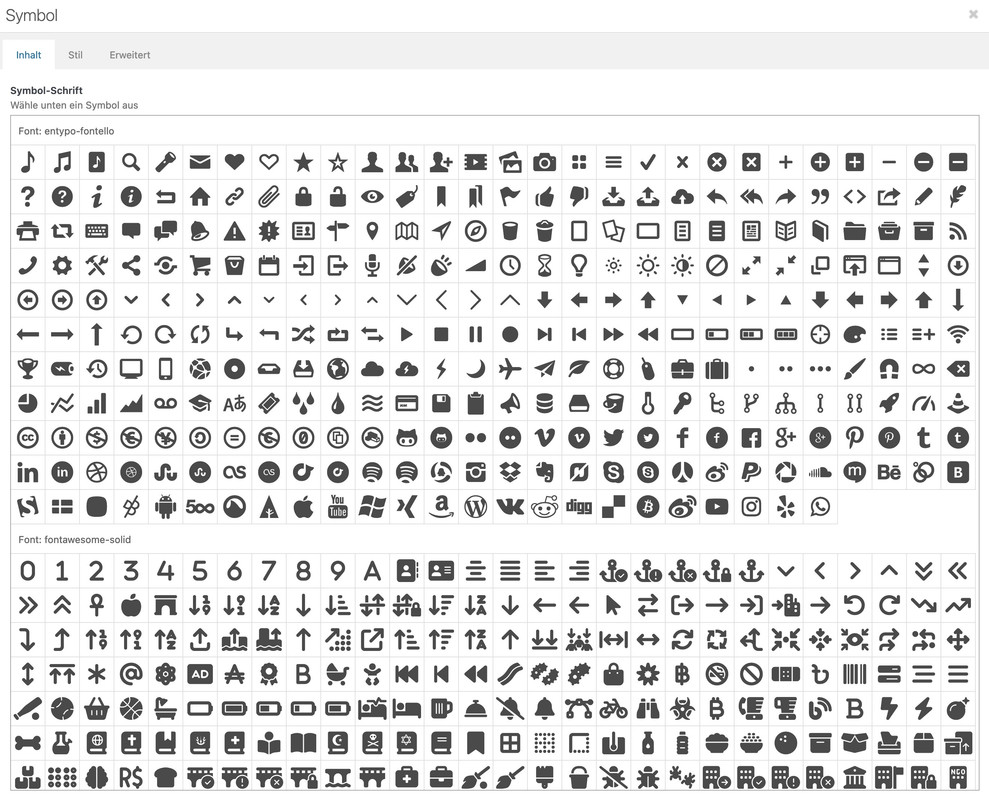
i would do the following to keep the similar usage as the entypo fontello icons:
Download the free Fontawesome – unzip it and extract the svg folders. There are probably three. Open one of these folders – e.g. the solid folder. Now go to the fontello page. There is a custom icon field at the top. Drag all – or only the svg icons you want into it. Activate all of them (you can do this by dragging the left mouse button). Give them a name in the upper right corner ( e.g. fontawesome-solid ) and download this set.
Upload this zip to Enfold – Import/Export – Iconfont Manager.
-
This reply was modified 3 years, 3 months ago by
 Kriesi.
Hm? i do not see my post on submitting. – i try again:
To maintain the usability of the icon usage of Enfold I would not do the recommended installation ( as plugin ), but proceed as follows?
Download of the free package. Open the zip file – then extract the svg folders.
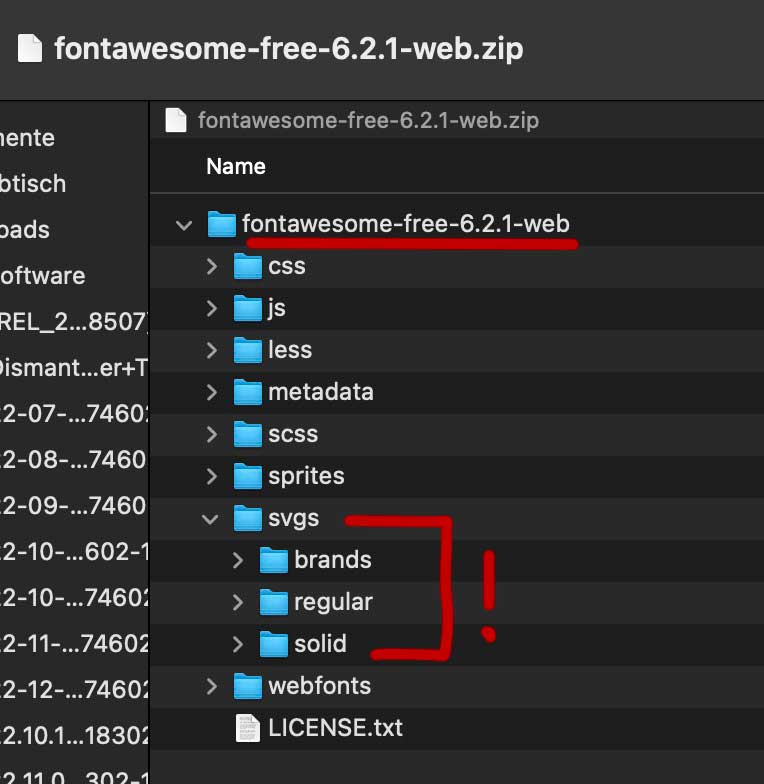
Open the Fontello page and drag the complete contents of one of the folders into the Custom Icons field. Now all the svgs will be uploaded. Then activate all of them there in the Custom-Icon field ( or only selected icons ). Assign a name – here in my case fontawesome-solid and download that package.
Rename the zip file if you like and upload it via import to Enfold.
Now you can choose these files like the entypo-fontello files in your alb elements.
Worked like a charm, thanks!!
Before we close this thread, I have another issue that I need help with…
My dropdown menu under the menu point “Services” needs to be transparent (NOTE: but when you scroll down and the sticky header kicks in and the main menu changes to white, then of course the submenu needs to change to white as well. Basically, it needs to have the same behaviour as the main menu).
I’ve read these two posts and implemented the suggestions there, but nothing has changed:
Post 1 – https://kriesi.at/support/topic/enfold-theme-dropdown-menu-transparency/
Post 2 – https://kriesi.at/support/topic/main-menu-drop-down-opacity/
I put this code into my custom CSS and it didn’t work:
#top .sub-menu {
background: rgba(255,255,255,0.1) !important;
box-shadow: none !important;
}
I also put this code into my custom CSS and it didn’t work:
#top .sub-menu {
background: transparent !important;
box-shadow: none !important;
}
I also added this code to my style.css and it didn’t work:
#top .sub-menu { background: transparent !important; box-shadow: none !important; }
I have removed all of the above lines of code from the site.
One idea: Could the code from higher up in this thread be conflicting with any of this other code?
(That code is this:)
#top .av_header_with_border.av_header_transparency #header_main {
border: none;
}
Thanks for your help!!
Hey Andrea,
To update your version of Enfold you will need to download the latest installable WP version from your Theme Forest account and upload it to your WordPress ▸ Appearance ▸ Themes ▸ Add Themes ▸ Add New

after you choose the zip file and click install, you will see a This theme is already installed message because you are updating, you can continue

then you will see the Theme updated successfully message.

After you update you will need to go to your Theme Forest account and create a new Token for future updates.
Best regards,
Mike
 wissam
Guest
Hello,
I want to buy this theme with 1 year support “https://themeforest.net/item/enfold-responsive-multipurpose-theme/4519990” but im not able to pay more than 40USD due to our situation. can you help me and give us some discount.
Thx
Hi,
Thanks for contacting us!
Have you referred to this post to generate your Personal Token: https://kriesi.at/documentation/enfold/theme-registration/#how-to-generate-a-envato-personal-token? If you have not, please do so.
If you have, please try using Envato Market plugin: https://www.envato.com/lp/market-plugin/ and insert your Token in plugin options and check Themes for the update.
Best regards,
Yigit
Hi Ismail
thank for the respons
I removed the list style in the spans and pasted it in the quick css, but it does not do anything
/* kleur tekst in lijst*/
.avia_textblock ul li {
color: #b5aaa8!important;
}`
do you see any reason?
cant be overwritten by the settings in Enfold General Styling, can it?
best regards, jelle vanhijfte
-
This reply was modified 3 years, 3 months ago by
 jeel147.
Hi Edwin,
Please login to your support account and go to https://kriesi.at/support/forum/enfold#new-post and re-validate your purchase code. After that you should be able to start new threads.
If it does not help, please let us know :)
Cheers!
Yigit
Hi,
I bought the ENFOLD theme and installed without problem.
Now I can not activate the API key to be able to make the theme updates from WordPress.
The error message is displayed:
The last time we checked your Envato token we couldn’t connect to it:
Access to purchases could not take place
Username could not be found (required for your information only)
Unable to access E-Mail (required only for your information)
The following errors have occurred:
cURL error 7: Failed to connect to api.envato.com port 443: Connection refused
cURL error 7: Failed to connect to api.envato.com port 443: Connection refused
cURL error 7: Failed to connect to api.envato.com port 443: Connection refused
Purchases: a pb. took place to access your purchases. Updates impossible.
Thanks for helping me!
Stephanie
Hi,
Glad Ismael could help, if you have any further questions please create a new thread and we will gladly try to help you. Thank you for using Enfold.
Best regards,
Mike
Hi,
Glad we were able to help, if you have any further questions please create a new thread and we will gladly try to help you. Thank you for using Enfold.
Best regards,
Mike
Hi,
Thanks for the login, the product page you linked to has HTML in the page title:
<strong><span style="color: #0066b3;">Premium</span></strong> Pre-Formed Cuff<br>$89.99</br>
I would recommend against this practice, you can use css to change this on the frontend, but I’m not sure where you expect this to show since you have page titles disabled in the theme settings. I see that all of your products are like this:

For the Tab Test Page that you created, is definitely broken as the tabs are not selectable and at the bottom in the backend and the red box should not be there. I tried coping it to my demo site but couldn’t fix it.
There are 81 <div but only 77 </div so that means there are 4 unclosed div’s there are also Unicode Characters in the page code which was probably added when you copied and pasted from wherever you copied the code from.
The page also contains empty divs with classes such as page, section, layoutArea, column

these serve no purpose and I recommend removing them.
For this page you should start over and add the tabs one at a time and check the html carefully, there is no easy fix for this.
Best regards,
Mike
Hi,
When I test your page the menu highlighting seems to work but some of the lower sections are not very high so sometimes two sections will show at once and the menu will highlight the lower second on desktop.
Try making each second 100 percent high so when you click on a menu item the section will fill the screen.

Best regards,
Mike
 Andrea
Guest
Hi, I would like to update the theme to version 5.0 but I can’t find the update, currently my version of Enfold is 4.7.6.4.
Thank you.
Hi
My website running with ENFOLD needs a Webspace with about 23 GB, although the WordPress Site shows only 400 MB.
Now I found out, that there is a folder called «Dynamic Avia» with more than 90’000 files in it and 23 GB of Webspace!
All JS and CSS files.
What are these files for exactly? And can I delete them, or are they needed for running the website? Is there a function in ENFOLD options to delete all these files. Or do you know a «File Cleaner» plugin for ENFOLD theme files? Opening the folder with the 90’000 files per FTP is not working (too many files, timeout breakdown)
Thank you
Steve
Hi,
We now need an enfold specialist to log into our website, look at the code and clean it up again.
Unfortunately, this is beyond the scope support because we cannot trace back code that was added by other developers and clean up after them. If you need a third-party developer to trace and remove the unwanted code, we recommend Codeable. Please check the link below.
// https://kriesi.at/contact/customization
Thank you for your understanding.
Best regards,
Ismael
Hello Yigit,
Thank you for replying to our inquiry. It’s better if we write back to you in English, because you seem to have misunderstood the request. Our issue is no beginner information and no missing tokens, but that a programmer introduced some code to the team without our knowledge to prevent updates. We now need an enfold specialist to log into our website, look at the code and clean it up again.
In addition, our question was whether we actually have to buy a support ticket in envato market in order to get a specialist? Or can we commission a specialist directly from Krisi? The support ticket in the envato market gives the impression that you are buying a whole new license there for €59. We don’t need them, we already have three of them.
So who can help us? We look forward to a new answer!
Hi Enfold team,
for sorting my media library, pages or Portfolio items I use „Folders“ plugin. One of the feature of this plugin is that I can use the Portfolio items Folders in Masonry.
So I have some of the Portfolio items in the Portfolio Category but also in the Portfolio Folders.
In my Portfolio pages I use metadata (category). And there is something where I should your help.
In the metadata in front-end I see not only the Portfolio Category but also the Portfolio Folder => but I don´t want to display the Folders in the metadata.
Screenshot here: https://mtsakademie.cz/report/Enfold_Portfolio_Items_and_Folders.pdf
Live site here: https://mtsakademie.cz/nase-sluzby/mts-hubnuti-chuzi/
I have discussed that first with „Folders team“, but they told me, that it is not possible to change it, because „The Folders work with the entire Portfolio custom post type”.
I understand and my question is: Is possible to hide it by using css? I would do it myself but there is no special class and I can´t find the right css code.
Thanks a lot,
Zdenek
Hi,
Thank you for the update.
Where can we check one of the galleries? We disabled the Lightbox Modal Window option in the Enfold > Theme Options. Let us know if this helps.
Best regards,
Ismael
Hi Enfold team,
I would need to do some adjustments in the Portfolio Category page:
1. To insert a space between and above the portfolio items
2. To add an excerpt under the title
3. To fix wrong displayed items in Tablet portrait
See the screenshot here: https://mtsakademie.cz/report/Enfold_Portfolio_Category.pdf
Thanks a lot,
Zdenek
Hi
I am having issues with getting site to show once woocommerce is activated: http://pagani.temp.domains/~medsales
when woocommerce is activated the site shows a blank.
1. I have installed latest version of wordpress
2. Installed Woocommerce plugin
3. Imported demo content for Enfold 2017 with woocoommerce
I have tried a few demo imports that have woocommerce and get same issue. Can you let me know how to fix.
Hi Reinhard,
To update the theme, a child theme isn’t required. It is only suggested when you want to extend the functionality of the Enfold theme or make some tweaks in the theme files and don’t want to lose it when the theme updates (any changes done on the Enfold theme files will be lost during a theme update).
As for font problems, can you try to disable CSS File Merging And Compression in Enfold > Performance as it may just be some caching issue.
Best regards,
Nikko



