Hi,
Thanks for letting us know, I’ll close this thread for now then. Please open a new thread if you should have any further questions or problems.
Best regards,
Rikard
Well I delayed responding thinking this was a temporary problem but the same situation now exists on another newsite! (the other customer has now decided that would not use enfold because of this problem) As said this never used to be a problem and when checking with my hosting company they have advised me that access to your servers is being blocked!! Their message to me once again quoted below.. WHY NOT CONTACT THEM AS THEY ASK TO RESOLVE THIS ISSUE???
I WILL GIVE YOU A LOGON BUT THIS WILL STILL MEAN THE SAME PROBLEM EXISTS AND THE TIMEOUT MESSAGE COMES UP AS WE ARE UNABLE TO ACCESS YOUR SERVERS!
“””””Hi Terry,
Thanks for waiting.
Having seen this error before, I believe the actual issue here may be that our servers are being blocked by the theme’s servers. I can also see that one of my colleagues has attempted to install and import a different theme, which they say worked without issue, and would further lead me to believe that a server block is the issue here.
Normally the cURL error message also indicates the exact URL it’s trying to connect to, which unfortunately isn’t the case where, but assuming the demo file is on the same domain as the demo site itself, that being https://kriesi.at, I can see that this is blocking connection requests from our web servers.
What you would need to do in this case is reach out to the theme’s support team and request for our external IP addresses to be unblocked. You can find a list of our external IP addresses here:
https://www.20i.com/support/web-hosting/ip-address-external-connections
If it would help at all, we’d be happy to make contact with their support team for you, providing that they have a publicly available support email we can use.
I hope that makes sense?
Best wishes,
Joshua R
20i Support””””
-
This reply was modified 3 years, 2 months ago by
 madmanbean. Reason: logon in wrong place
Hi Nikko,
thanks for your advice. This doesn’t change anything. I’ve lost the Fonts and some widgets (e.g. Footer) have lost the configuration.
I’ve loaded Jura, but Enfold doesn’t recognize it anymore.
Furthermore, I’ve noticed that a Typo static has also been loaded. But I didn’t do it. I don’t understand, where this comes from.
I have removed Rank Math and some of my problems have disappeared. How can I now recover my fonts???
Thanks a lot for your help
Arantza
Hi all,
is there a way to create a masonry gallery with just 1 column?
I just need the text effects of the gallery on mouse over and this would helps a lot if we can do it this way.
Grtnx Dave
Hi,
The Dev Team has modified the Special Character Translation plugin to support the mail form elements with this filter:
add_filter( 'avf_form_subject', array( $this, 'handler_the_content' ), 9999999, 1 );
			add_filter( 'avf_form_mail_form_field', array( $this, 'handler_the_content' ), 9999999, 1 );
In my test it is working, please check the new version.

Best regards,
Mike
Sorry, I found it. Enfold classic demo. Tks a lot
I fixed a sub page to my main enfold page. But the main buttons on the new page do not lead to the main page, but to the same sub-page. Where can i change so that the buttons lead back to the main page?
Frontpage: https://webbx.nu/
sub page: https://webbx.nu/frontpage/shortcuts/?preview_id=3263&preview_nonce=7c64a15c60#top
Worderful, I like the first link very much, which demo do I have to install, I can’t find it into the Enfold Settings
Hey Mark,
You can refer to this post https://kriesi.at/documentation/enfold/theme-registration/#how-to-generate-a-envato-personal-token, generate a Personal Token, and insert it in Enfold theme options > Theme Update to receive theme updates.
You can also install the Envato Market plugin (https://www.envato.com/lp/market-plugin/), insert your Persona Token in plugin settings, and check the Theme tab for the update.
If the suggestions above doesn’t work, please update the theme manually: https://kriesi.at/documentation/enfold/theme-update/
Best regards,
Yigit
Hello, this slider is not the problem. I want to use a new “Easy slider” which is shown at
with headline “Multiple Options”
I thought that I can choose this easy slide if I install a new version.
Can you help me?
Thanks
Hi,
Glad to hear that you have this sorted out, and thanks for sharing your solution, if you have any further questions please create a new thread and we will gladly try to help you. Thank you for using Enfold.
Best regards,
Mike
 Mark Asplin
Guest
Hi,
I bought your theme (Enfold) in 2019 and my purchase code through ThemeForest is: 9dccb32c-7694-4869-a052-3a292a7eaffa
I need to update my PHP through my server but when I do it, it locks the whole site and makes it unusable… Im on Enfold version 4.5.2
How do I update my Enfold version and also what PHP version do I need for the theme to work properly?
Best Wishes
Mark
Hi,
Glad we were able to help, if you have any further questions please create a new thread and we will gladly try to help you. Thank you for using Enfold.
Best regards,
Mike
line 78 : 4
line 91 : 1.333 ( use a dot ! )
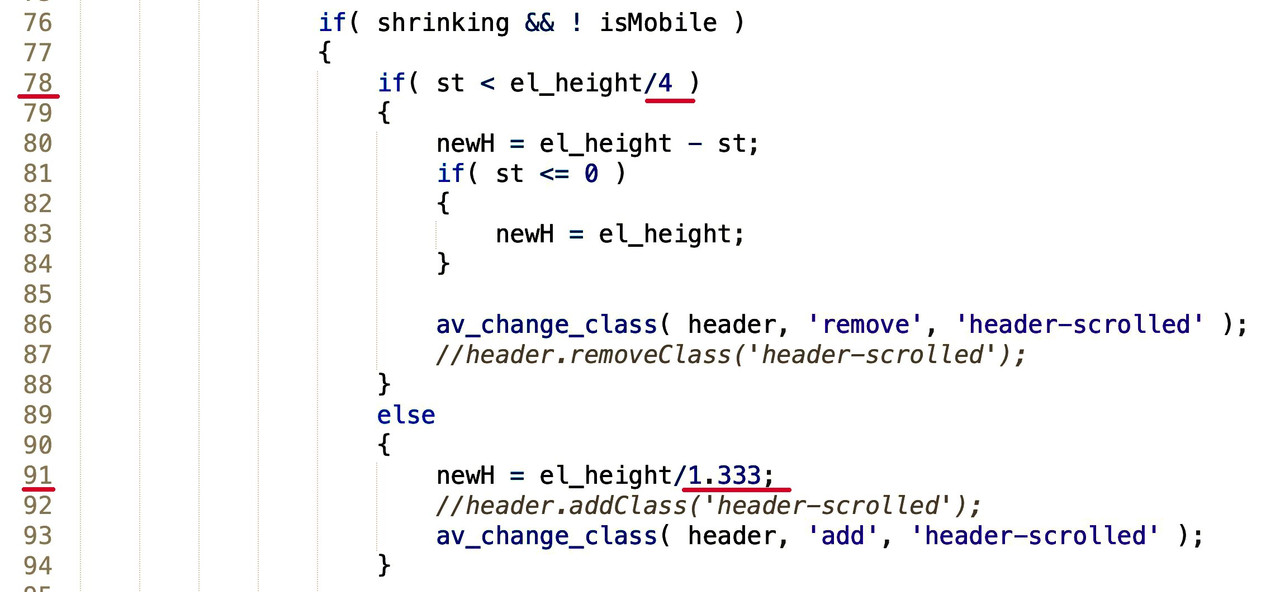
PS: if you like to have the 100px start height – go and choose on the enfold options – header size : custom pixel value !
_________
1.333 : (1.333 – 1 ) ≅ 4
100:75 ≅ 1.333
You have also entered the values the wrong way round.
You have entered what should be in line 78 at 91 and vice versa. In addition as said no commas for the decimal places!
-
This reply was modified 3 years, 2 months ago by
 Guenni007.
Hi Martina,
I deactivated all plugins and then it worked. Then activated again and still correct, strange!
This sounds like a caching issue. If the issue reoccurs, please clear cache and check if that helps.
According to the GDPR, all buttons in the cookie banner must look the same, i.e. the same color & size. Where do I have to make changes here so that all are green and like a little smaller?
Please go to Enfold theme options > Advanced Styling and edit cookie consent elements: https://i.imgur.com/BIfv5rt.png
Best regards,
Yigit
Hi,
wordpress, woocommerce, enfold and variant-products.
If you open a variant product page without choosing a variant, the gallery images are shown on the page one among echt other.
If you choose a variant the gallery output is as it should be.
if you go back to non-variant selection the images still disappear but there is a space left (min-height).
The css-class above got this value:
<div class="woo-variation-gallery-wrapper ..." style="min-height: 2596.5px; min-width: 399.3px;"></div>
There is no option, only you have to workaround and change the templat-code.
How to disable that initial behavior or this might be a bug?
Thx!
-
This topic was modified 3 years, 2 months ago by
 kisys.
-
This topic was modified 3 years, 2 months ago by kisys.
Hey Tom,
The Events Calendar should inherit the colors you set in Enfold theme options > General Styling tab. It is not fully compatible with customizer.
If you’d like to override Enfold theme options styling, please add following code to bottom of Quick CSS field in Enfold theme options > General Styling
.tribe-events .tribe-events-c-search__button {
  background-color: var(--tec-color-background-events-bar-submit-button) !important;
  color: var(--tec-color-text-events-bar-submit-button) !important;
}
Best regards,
Yigit
Hey Tom,
I reported the issue to our developers. Issue should be fixed in upcoming version.
As a temporary solution, I added the following code to the bottom of the Quick CSS field in Enfold theme options > General Styling
/* Temporary CSS fix for TEC styling */
:root{
    --tec-color-text-events-title-day:var(--tec-color-text-events-title);
    --tec-color-text-events-title-latest-past:var(--tec-color-text-events-title);
    --tec-color-text-event-title-list:var(--tec-color-text-events-title);
    --tec-color-text-events-title-month-multiday:var(--tec-color-text-events-title);
    --tec-color-text-events-title-widget-list:var(--tec-color-text-events-title);
    --tec-color-text-secondary-event-date-month:var(--tec-color-text-secondary-event-date);
    --tec-color-text-secondary-event-date-month-mobile:var(--tec-color-text-secondary-event-date-month);
    --tec-color-text-day-of-week-month:var(--tec-color-text-secondary);
    --tec-color-day-marker-month:var(--tec-color-text-primary);
    --tec-color-day-marker-month-hover:var(--tec-color-text-primary-hover);
    --tec-color-day-marker-month-active:var(--tec-color-text-primary-active);
    --tec-color-day-marker-current-month:var(--tec-color-day-marker-month);
    --tec-color-day-marker-current-month-hover:var(--tec-color-day-marker-month-hover);
    --tec-color-day-marker-current-month-active:var(--tec-color-day-marker-month-active);
    --tec-color-day-marker-past-month:var(--tec-color-text-primary);
    --tec-color-day-marker-past-month-hover:var(--tec-color-day-marker-past-month);
    --tec-color-day-marker-past-month-active:var(--tec-color-day-marker-past-month);
    --tec-color-text-day-of-week-week:var(--tec-color-text-secondary);
    --tec-border-radius-month-multiday:9.5px;
    --tec-color-border-secondary-month-grid:var(--tec-color-border-secondary);
    --tec-color-border-active-month-grid-hover:var(--tec-color-border-active);
    --tec-color-background-month-grid:transparent;
    --tec-color-background-tooltip:var(--tec-color-background);
    --tec-color-text-events-bar-input:var(--tec-color-text-primary);
    --tec-color-text-events-bar-input-placeholder:var(--tec-color-text-secondary);
    --tec-opacity-events-bar-input-placeholder:var(--tec-opacity-default);
    --tec-color-border-events-bar:var(--tec-color-border-secondary);
    --tec-color-background-events-bar:var(--tec-color-background);
    --tec-color-background-view-selector:var(--tec-color-background-events-bar);
    --tec-color-background-view-selector-tabs:var(--tec-color-background-view-selector);
    --tec-color-background-view-selector-list-item-hover:var(--tec-color-background-secondary);
    --tec-color-background-subscribe-list-item-hover:var(--tec-color-background-secondary);
    --tec-color-text-view-selector-list-item:var(--tec-color-text-primary);
    --tec-color-text-view-selector-list-item-hover:var(--tec-color-accent-secondary-hover);
    --tec-color-background-search-container:var(--tec-color-background-events-bar);
    --tec-color-text-events-bar-submit-button:var(--tec-color-background);
    --tec-color-text-events-bar-submit-button-active:var(--tec-color-text-events-bar-submit-button);
    --tec-color-text-events-bar-submit-button-hover:var(--tec-color-text-events-bar-submit-button);
    --tec-color-background-events-bar-submit-button:var(--tec-color-button-primary);
    --tec-color-background-events-bar-submit-button-hover:var(--tec-color-button-primary-hover);
    --tec-color-background-events-bar-submit-button-active:var(--tec-color-button-primary-active);
    --tec-color-icon-events-bar:var(--tec-color-icon-primary);
    --tec-color-icon-events-bar-active:var(--tec-color-icon-active);
    --tec-color-icon-events-bar-hover:var(--tec-color-icon-hover)
}
You can remove in the version after 5.4.1
Edit: After checking your other thread, I realized we must hear back from our devs. As I mentioned in the other thread, TEC styling should inherit Enfold theme options.
Best regards,
Yigit
-
This reply was modified 3 years, 2 months ago by
 Yigit.
Hi enfold team,
the images in the accordeon sliders lightbox are shown too small. I’ve 4 Sliders, the image count in the lightbox is 8. The first Image seems to be shown in the right size, but the other looking only like tumbnails.
looking forward to your soon reply ;)
Hello Rikard,
Thank for your response. I did and as soon as I do the issue I’m reporting comes up. I have a staging site which is equal to prod. You can see how the site now looks like after trying to delete the files under Enfold->Performance.
Hi Support,
I am trying to achieve the following layout for the masonry gallery component: https://snipboard.io/lSG8x5.jpg
I saw this layout was achieved with the other masonry component shown on your demo here: https://kriesi.at/themes/enfold-minimal-photography/
Is there a way I can achieve the same layout with the masonry gallery component, perhaps by using something similar to this function displayed in this thread: https://kriesi.at/support/topic/change-image-size-on-masonry-gallery/ or by including some https://isotope.metafizzy.co/ overrides somehow?
Your help would be greatly appreciated.
Thanks
Sean
do you call this support? Is that why I have paid extra to even get this? I need help. How many days do I have to wait for someone to answer my questions? I have never used Enfold. Much is unknown to me. Most often it is the beginning that is difficult and that is when the support has to help, right?
I found out what caused the issue:
I use the Imagify plugin to display webp images on this website. There are 2 options in Imagify to display webp images:
1 – Use <picture> Tags Option
2- Use Rewrite Rules Option
The first option is the default and recommended option, but it will cause the issue with the minimum pixel heigt in the slider!
When switching to the second option, the issue is gone, the minimum pixel height is working fine.
More info about this:
https://imagify.io/documentation/my-images-are-broken/
I’ve had a similar problem before at another Enfold website due to these Imagify plugin settings. Unfortunately I forgot about that, otherwise I could have solved this issue myself faster… :)
I fixed a sub page to my main enfold page in WP. But the main buttons on the new page do not lead to the main page, but to the same sub-page. how can i change so that the buttons lead back to the main page?
Hello Ismael,
What do you mean by uodating the theme again? I am already on version 5.4.1. So do you want me to upload the Enfold theme files again with FTP and overwrite the existing files?
If you want to login to the siute you need an 2FA code. You can find the code in the private content box :)
Alwin
Hi,
I have some fonts which I have download from google fonts. I did it as you describe in documentation – so I used the webfont generator and then I imported the fonts as a zip into enfold. When I tired to insert the zip file (button) only one strange named font were imported, called specimen files ().
I also think, that the font isn’t shown although I set it. I also tried to deacitvate the google font blocker plugin, but that is not the reason for this problem.
Can you please help me here again?
Thanks a lot.
Best regards,
Eve
Hi,
Adding this css code should help.
.search .slide-entry-wrap {
	display: flex;
}
You may need to toggle or temporarily disable the Enfold > Performance > File Compression settings after adding the css code. If it is not working, please provide the login details in the private field so that we can check it further.
Best regards,
Ismael
Hi,
Yes, this should be possible but it will require some modifications (template and css). To replicate the home page for example, you can use the Blog Posts and Magazine elements with different configurations to display posts in different layouts. There is also the Masonry or Masonry Gallery element if you need to displays posts or images in tiles. You can check the links below for demos.
// https://kriesi.at/themes/enfold/homepage/home-v10-magazine/
// https://kriesi.at/themes/enfold-2017/blog/
Best regards,
Ismael
Hi there, I would like to update WP to the latest version but am worried it will not be compatible with my version of Enfold. I am on the following versions:
WordPress Version: 4.7.25
Enfold Version: 3.2.1
If it matters I am on an older PHP (5.6.40).
Please can you advise if I update to New WordPress Version: 6.1.1, that my current Enfold website on Enfold version 3.2.1 will still work?
Many thanks
James
Hey isdixon,
Thank you for the inquiry.
You can upload the custom icon using the Icon Font Manager in the Enfold > Import/Export panel. Please note that only monocolored icon fonts from fontello and flaticons are supported. If you have an svg format of the image, you can also add it directly using the Image element.
Best regards,
Ismael



