
-
AuthorSearch Results
-
September 10, 2023 at 1:20 am #1418623
In reply to: slider revolution compatability
Hi,
Glad we were able to help, if you have any further questions please create a new thread and we will gladly try to help you. Thank you for using Enfold.Best regards,
MikeSeptember 10, 2023 at 1:00 am #1418620In reply to: slider revolution compatability
Hi,
Try using the search function in the Dev Tools and search for rev_slider_ so no matter what the number is you will find it.
When you open the Dev Tools (F12 on Windows) click in the middle of the code to ensure you are searching that panel and use the keyboard Ctrl+F (Windows) and paste (Ctrl+V Windows) into the find field and hit Enter:

the text will be found and highlighted for you. Please note that you will hit the Enter key twice because you want the second one the first one is the wrapper rev_slider_9_1_wrapper and not correct for Yigit’s css.
See if this helps you find it.Best regards,
MikeSeptember 10, 2023 at 12:36 am #1418614In reply to: Overlay images
Hey Stilecatalini,
If you mean this on your homepage with the boats:

I added this css for your to remove it:.main_color .image-overlay .image-overlay-inside:before { opacity: 0; } .avia_transform #top a:hover .image-overlay { background: transparent; opacity: 0!important; }now it is like this:

clear your browser cache and check.
Please note that testing with iPads & iPhones can be hard to clear the cache, often you need to also clear the history to fully purge the cache, following these steps for Safari and note Step 4 where you will Clear the History.Best regards,
MikeSeptember 10, 2023 at 12:12 am #1418613In reply to: slider revolution compatability
Hi,
Glad to hear this helped, I used the Chrome Dev Tools and the inspector to see the ID of the slider:

Unless there is anything else we can assist with on this issue, shall we close this then?Best regards,
MikeSeptember 10, 2023 at 12:06 am #1418612In reply to: Fixed Header + Fixed footer
Hey Carl,
Please use the option Enfold Theme Options ▸ Header ▸ Header behavior ▸ Sticky Header to make the header sticky.
To show the footer always visible at the bottom of the screen Try this CSS in your Enfold Theme Options ▸ General Styling ▸ Quick CSS field:#footer { position: fixed; bottom: 0; width: 100%; }After applying the css, please clear your browser cache and check.
Please note that using the contact form is not appropriate for support questions, please log in to the support forum and open a new thread if you need further assistance.
If you are unable to login to the support forum because you don’t have a activate support contract, please try going to your Theme Forest account and renew your support and then log in to the support forum and open a new thread.Best regards,
MikeSeptember 9, 2023 at 11:56 pm #1418611In reply to: Enfold & WooCmmerce
Hey Henrik Primdal,
Thank you for your patience and the link to your site, I see that you are using an older version 4.8.6.4, we are now up to v5.6.6
I see that your product pages are manually created with the Advanced Layout Builder, so you can use the ALB template option in the builder to reuse the layout for each product that you create:

adjusting the content for each new product.
If you are going to import more products and want them to automatically be added as ALB product using the same elements, we don’t have an option for that, you could try our partner CodeableBest regards,
MikeSeptember 9, 2023 at 11:41 pm #1418609In reply to: How do I change this current style of product images
Hi,
Thank you for your patience, on my demo site the text is below the products like this:
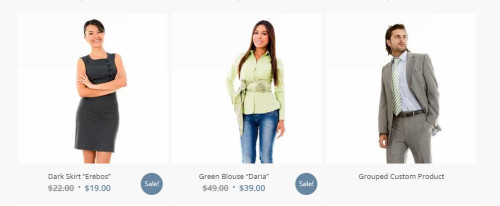
please link to your page so we can examine.Best regards,
MikeSeptember 9, 2023 at 11:35 pm #1418608In reply to: Masonry Gallery – Remove title
Hi,
Glad Guenni007 could help, thank you Guenni007, if you have any further questions please create a new thread and we will gladly try to help you. Thank you for using Enfold.Best regards,
MikeSeptember 9, 2023 at 11:19 pm #1418606In reply to: Post CSS missing again
Hey Jeannette,
Thank you for your patience, but unfortunately if you use the filter ‘avf_post_css_create_file’ the css will be inline.
Have you tried the option Enfold Theme Options ▸ Performance ▸ CSS file merging and compression ▸ Use minified theme CSS files without merging this doesn’t merge or add the css inline.Best regards,
MikeSeptember 9, 2023 at 11:11 pm #1418604In reply to: Cookies settings
Hi,
Glad we were able to help, if you have any further questions please create a new thread and we will gladly try to help you. Thank you for using Enfold.Best regards,
MikeSeptember 9, 2023 at 11:10 pm #1418603In reply to: Disable post-slider link
Hey rmatus,
Try this CSS in your Enfold Theme Options ▸ General Styling ▸ Quick CSS field:.avia-content-slider-inner .slide-entry { pointer-events: none; }After applying the css, please clear your browser cache and check.
Best regards,
MikeSeptember 9, 2023 at 10:04 pm #1418592In reply to: filter option on a listing
Hi,
Thank you for your patience, but unfortunately I don’t see a way to display the content like this with the filter, I recommend using a plugin with a shortcode that you can add to your current page to display it.
Perhaps try the plugin Display Posts it offers a lot of parmeters for creating a list of posts without any extra style so you can easily style it yourself, I tested the shortcode in a code block to show a specific category with the title and full content:
[display-posts category="order" include_content="true" category_label="Category: " category_display="true"]
and it display in full width:

You can add more features like images and the date and then style it with css to make it look as you want, it doesn’t have the filter though.Best regards,
MikeSeptember 9, 2023 at 8:42 pm #1418585Topic: Theme Not Displaying Correctly
in forum Enfolddennisgreid
ParticipantMy website is running WordPress 6.3 using Enfold 5.6.6. I previously had a problem where the website was not displaying properly and I assumed it to be a plugin update as a root cause although I couldn’t determine which one specifically. I performed a restore of the website, which solved the problem. The problem just occurred again but this time, a restore is not working to correct the display of the site.
Can you tell what has been corrupted by looking at the site? Is there something I can look at to help diagnose?
Any assistance would be greatly appreciated.
Kind Regards,
DennisSeptember 9, 2023 at 8:05 pm #1418581In reply to: Arrow scroll up above the cookie banner
Hi,
We have giving you a solution to this in another thread, plase don’t open multiple threads for the same topic. Thank you for your patience and understanding and using Enfold.Best regards,
MikeSeptember 9, 2023 at 7:52 pm #1418574In reply to: Color section
Hi,
I did, we don’t have a way to make it exactly like the link you provided, but you can use the page preloading in Enfold theme options > Page Preloading as Yigit said and it will be sort of like it.Best regards,
MikeSeptember 9, 2023 at 7:50 pm #1418573In reply to: Cookies settings
Hi,
Thanks for the feedback, this css will put it under:#top .avia-cookie-consent { z-index: 9999; }add it to your Enfold Theme Options ▸ General Styling ▸ Quick CSS field and then clear your browser cache.
Best regards,
MikeSeptember 9, 2023 at 7:38 pm #1418568In reply to: button image problem
Hi,
Unfortunately as Yigit pointed out this is not possible.
If you’d like such feature in Enfold, please feel free to request it at https://github.com/KriesiMedia/Enfold-Feature-Requests.Best regards,
MikeSeptember 9, 2023 at 7:31 pm #1418565In reply to: Cookies settings
Hi,
Thank you for your patience, when I check your page the arrow to scroll up the page is not under the cookie banner, so you don’t need to close the cookie banner.

Best regards,
MikeSeptember 9, 2023 at 6:06 pm #1418562In reply to: Screen Options Not Working
Hi,
I see that this is a different site and it doesn’t seem to be a clone because the section IDs are not the same, the ID you were having trouble with isn’t there. Nonetheless the section with the title “Your Global IT Supply Chain Solutions” didn’t have the Advanced ▸ Responsive ▸ Element Visibility options set to hide it on mobile:

I did this for you and now it works correctly and the expected classes are in the element av-small-hide av-mini-hide
Please clear your browser cache and check.Best regards,
MikeSeptember 9, 2023 at 3:27 pm #1418557In reply to: NO SUPPORT
Hey Stilecatalini,
Thanks you for your patience, I see that you have some threads that Yigit has tired to help with and said it was not possible, and you have a couple of threads that are out of our support scope, but we have not closed them should someone have an idea on how to achieve what you ask, sometimes other users had good ideas for helping also.
Please reframe from opeing threads that don’t have a question, and please note that each time you “bump” a thread it moves it back to the bottom of the list, that is each time you add a comment like “please check” or “hello” you move out of the queue, Thank you for your patience and understanding and for using Enfold.Best regards,
MikeSeptember 9, 2023 at 2:21 pm #1418555In reply to: Placement Menu Custom Line Up Logo and below logo
Hi,
Based on your mockup you want is smaller around 35px, try this CSS in your Enfold Theme Options ▸ General Styling ▸ Quick CSS field:.logo, .logo a, .logo img, .av-logo-container { max-height: 35px; height: 35px; line-height: 35px; }please adjust to suit and after applying the css, please clear your browser cache and check.
The expected results

Best regards,
MikeSeptember 9, 2023 at 1:59 pm #1418552Hi,
Thank you for the code snipptes, I see that you have added the Form Embed Code which is the iframe in the second code block and in the first code block you have the old button as the trigger.
I believe that your new popup code uses a different trigger to call the popup.
As I review your video I only see you use the “copy embed code” button, please also include the code from the “copy form link” button:

Please add this to the trigger code block, that is the first one with the button so we can see the popup working correctly, then I can examine how the trigger works and work out a why for it to be like the button you want it to be.Best regards,
MikeSeptember 9, 2023 at 11:48 am #1418549Topic: Produktbild in WooCommerce auf Seite größer darstellen
in forum Enfoldwerbeagenturlauf
ParticipantHallo@Kriesi!
Ich möchte in meinem WooCommerce-Shop https://www.copy-shop-lauf.de/product/tischset-pasta/ das Produktbild wesentlich größer darstellen und will nicht unbedingt mit einem weiteren Plugin arbeiten. Ich nutze Enfold.
Habt ihr dazu evtl. schon eine Anleitung???Liebe Grüße aus Lauf
Michael F KrausSeptember 9, 2023 at 11:07 am #1418545In reply to: Full Width Easy Slider Mobile
Hey jasonlthornton,
Please try the following in Quick CSS under Enfold->General Styling:
@media only screen and (max-width: 767px) {
.html_header_transparency #top .avia-builder-el-0 .container, .html_header_transparency #top .avia-builder-el-0 .slideshow_caption {
    padding-top: 10px;
}
}
Best regards,
RikardSeptember 9, 2023 at 11:05 am #1418544In reply to: Install Enfold Child Theme License
Hi Gee,
Please refer to this: https://kriesi.at/documentation/enfold/theme-registration/
Best regards,
RikardSeptember 9, 2023 at 11:04 am #1418543In reply to: Install Enfold Child Theme License
Hi Gee,
Please refer to this: https://kriesi.at/documentation/enfold/theme-registration/
Best regards,
RikardSeptember 9, 2023 at 10:16 am #1418539In reply to: Health Theme Logo Home Page
The site is not online right now. Can I send you a picture?
I worked with the Health Theme once. It is just that on the MAIN Home Page the Logo from Enfold appears and I would like to just eliminate a Logo on the main page. It works with CSS i can remember.
September 9, 2023 at 10:08 am #1418536In reply to: Cant tell question in support forum
Hey Mathias,
Please use this link to open a new thread, or click this button: https://imgur.com/a/AnoSPNb.
Best regards,
RikardSeptember 9, 2023 at 4:24 am #1418528In reply to: Upgrading from 4.5.2 –> 5.6.6
Hey skurtz1,
Thanks for the two site to compare, I found the difference is the css while examining the frontend and add it to your Enfold Theme Options ▸ General Styling ▸ Quick CSS field and now the issue is solved#top.process-page .process .flex_column_table { max-width: 1060px; padding: 0 50px; margin: 0 auto !important; float: unset; }
but I couldn’t update your child theme stylesheet where your other css is because you have a editor plugin and your stylesheet shows the same stylesheet file twice on top of each other and even editing both didn’t enable the correct results:

Perhaps you will have better luck or perhaps this is part of the problem, but I would recommend disabling the editor plugin.Best regards,
MikeSeptember 9, 2023 at 3:41 am #1418527Hey bonsaimedia,
The quantity buttons are intentionally disabled or hidden on mobile devices due to the space limitation.
Please try the css in these threads:Best regards,
Mike -
AuthorSearch Results
-
Search Results
-
My website is running WordPress 6.3 using Enfold 5.6.6. I previously had a problem where the website was not displaying properly and I assumed it to be a plugin update as a root cause although I couldn’t determine which one specifically. I performed a restore of the website, which solved the problem. The problem just occurred again but this time, a restore is not working to correct the display of the site.
Can you tell what has been corrupted by looking at the site? Is there something I can look at to help diagnose?
Any assistance would be greatly appreciated.
Kind Regards,
DennisHallo@Kriesi!
Ich möchte in meinem WooCommerce-Shop https://www.copy-shop-lauf.de/product/tischset-pasta/ das Produktbild wesentlich größer darstellen und will nicht unbedingt mit einem weiteren Plugin arbeiten. Ich nutze Enfold.
Habt ihr dazu evtl. schon eine Anleitung???Liebe Grüße aus Lauf
Michael F Kraus


