Viewing 30 results - 1,231 through 1,260 (of 244,620 total)
  • Author
    Search Results
  • #1491017

    In reply to: Google maps height

    Hi,

    Great, I’m glad that Ismael could help you out. We’ll close this thread for now then, please open a new thread if you should have any further questions or problems.

    Best regards,
    Rikard

    #1491014

    Hello together,
    i use the Enfold Theme and the Heroic KB Plugin for our company intern knowledge page.

    my problem is, that Enfold and the Plugin Heroic makes a lot of bugs in my System if i want to create a articel with enfold builder
    in the plugin. can you help me what i can do?

    I have the bugs also if i want to create an blog entry and i don’t use the Plugin Heroic to create entries.
    I also use the classic editor to build my content and i have disabled gutenberg.

    i hope you can help me
    thanks
    Stefan

    #1491011

    In reply to: change cookie style

    Hey diefleischerei,

    Please have a look under Enfold->Privacy and Cookies first of all. Also please check the available options for styling under Enfold->Advanced Styling.

    Best regards,
    Rikard

    #1491010

    Hey diefleischerei,

    All the header settings can be found under Enfold->Header, and in the Layout menu while editing each page. Customisations outside the available settings would unfortunately be out of scope of theme support.

    Best regards,
    Rikard

    #1491008

    In reply to: Enfold Theme

    Hey Justin,

    Thanks for reaching out to us. Enfold is not compatible with any frontend layout builders, but some do work with the theme. I would recommend that you use the Enfold layout builder if you want to continue using the theme though.

    Adding pages, editing pages and adding a shop can all be done in the WordPress menu. It’s not theme specific functionality.

    Best regards,
    Rikard

    #1491007

    Topic: popup on landingpage

    in forum Enfold
    diefleischerei
    Participant

    Can you recommend a popup plugin or something similar that would allow me to display information to first-time visitors to the website – information they have to click away to continue browsing? Do you have a plugin you could recommend, or can I easily implement this directly with Enfold? Thanks, Alex

    #1491004
    Justin Mann
    Guest

    Hi there,
    Recently purchased this theme from you. I completely understand that you can’t support customisation issues but if you could just bear with me…..
    I was struggling with editing another site via Elementor, bought your theme not realising it wasn’t supposed to be edited with this app.
    I understand there is a built in editor but cannot for the life of me work out how to edit, add pages, shop and so on. I have a good understanding of computers, websites etc. but just cannot get my head around this.
    Are you able to recommend a front page editor that could make my life easier please?
    I appreciate any advice you can offer with thanks.
    Justin N. Mann

    #1491003

    In reply to: Toggel + sign

    Hey limedrop,

    Please try the following in Quick CSS under Enfold->General Styling:

    
    .toggle_icon {
      left: 24px;
    }
    
    .togglecontainer {
      border-radius: 5px;
    }

    Best regards,
    Rikard

    #1491000

    Hi,

    Thanks for letting us know. Please open a new thread if you should have any further questions or problems.

    Best regards,
    Rikard

    #1490996
    orianos
    Participant

    Hi,
    Just to let you know that on your demo site
    https://kriesi.at/themes/enfold-shop/shop/
    if a user clicks on one of the WooCommerce filters, they receive the following error:
    >There has been a critical error on this website.

    Example:
    https://kriesi.at/themes/enfold-shop/shop/?filter_color=green

    I didn’t know who to report it to, so I’m telling you here 😬

    Best regards, and thaks for Enfold theme.
    Oriano

    #1490984

    Hi,
    Glad that Ismael could help, if you have further questions please open a new thread and we will try to help. Thanks for using Enfold.

    Best regards,
    Mike

    #1490982

    css depends on the place where you show it – f.e. in the top header:

    #top #wrap_all .av-social-link-bluesky:hover a {
        color: #fff;
        background-color: #1185fe;
    }
    #top #wrap_all .av-social-link-bluesky a svg * {
        fill: var(--enfold-header_replacement_menu_color);
    }
    #top #wrap_all .av-social-link-bluesky a:hover svg * {
        fill: #FFF
    }
    #1490976

    now – thanks for the admin permissions.

    i did what i mentioned above: for the thumbs in grid i take the portfolio size (495×400)
    using that snippet to have original images in the ajax preview image ( on imagify you have choosen to have no compression – so original image might be of less file-size than the recalculated large image-size )
    and disabeling the enfold option to use lazyloading ( maybe the option of wp-rocket is better )

    but with these changings – you can see a much better loading performance.

    in additon – i decided to show on lightbox the full image ( because your large recalculated images are much bigger in file-size than the full one )
    and to have no scroll on background – on opend lightbox.

    #1490970

    you know that and how you can add your own social media icons to the enfold system.

    #1490966

    Topic: Fixed Header?

    in forum Enfold
    Bikul
    Participant

    Hello.
    in your demo

    there is a header which appears only if you scroll down. How to deactivate this so that the header is always visible?
    Thanks for Feedback
    Bernd

    #1490964

    can we influence the image shown in the ajax preview ( that img insided avia-gallery-big ) – it seems to use the recalculated “large” image.
    But as you know this might be bigger in file size than the original uploaded image!
    I can not find a filter to adjust it.

    or could we influence it by
    $params['preview_size'] = apply_filters( 'avf_ajax_preview_image_size', 'gallery' );

    i can find this in portfolio.php

    //	create array with responsive info for lightbox
    	$img = Av_Responsive_Images()->responsive_image_src( $attachment->ID, 'large' );

    bring it to full will often reduce file-size – as you know that Enfold standard compression leads to bigger file-sizes on large image.

    ok – i found the place to change in gallery.php (line 757)
    $prev = wp_get_attachment_image_src( $attachment->ID, $preview_size );

    if we would use :
    $prev = wp_get_attachment_image_src( $attachment->ID, 'full' );

    looking to his page f.e.:
    the krebs-treppen-systeme-gelaender-system30-3.jpg is 121kb
    but krebs-treppen-systeme-gelaender-system30-3-1030×839.jpg is 268kb

    the whole page got over 112MB images – and could be reduced to a half size.

    #1490963

    In reply to: Footer Issues

    Hi,

    Thanks for the update, we’ll close this thread for now then. Please open a new thread if you should have any further questions or problems.

    Best regards,
    Rikard

    you can find the defintions of standard icons on enfold/includes/config-enfold/init-base-data.php

    Easy Slider is on default using:

    'svg__next_big'  	=> array( 'font' => 'svg_entypo-fontello', 'icon' => 'right-open-big' ),
    'svg__prev_big'  	=> array( 'font' => 'svg_entypo-fontello', 'icon' => 'left-open-big' ),

    The Filter you can use to change these icons is: avf_default_icons

    you can use it like this in your child-theme functions.php:

    function avia_replace_default_icons($icons){
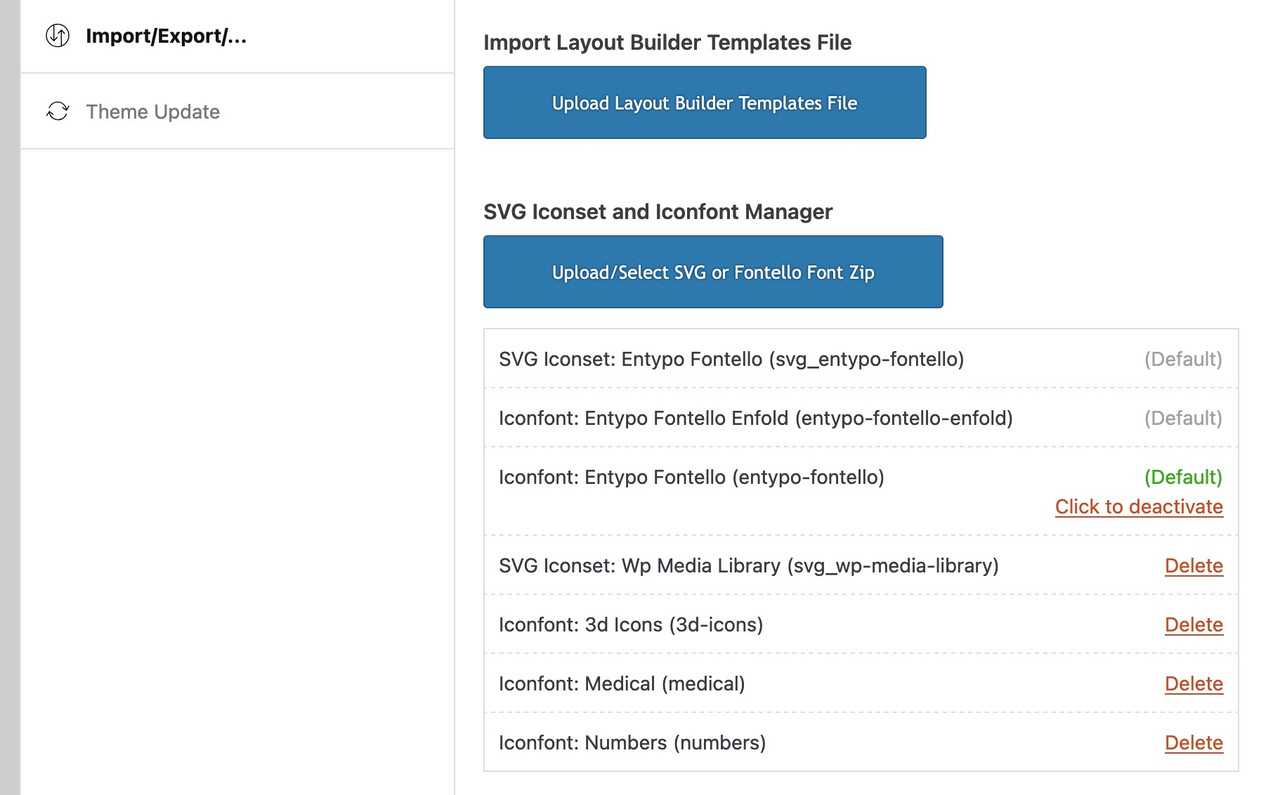
    // e.g.: changed by uploaded svg files - using the ID's and the font-name is svg_wp-media-library
    	$icons['svg__prev_big'] =  array( 'font' =>'svg_wp-media-library', 'icon' => '50913');
    	$icons['svg__next_big'] =  array( 'font' =>'svg_wp-media-library', 'icon' => '50591');     
    	return $icons;
    }
    add_filter('avf_default_icons','avia_replace_default_icons', 10, 1);


    but
    : What is the font-name of your uploaded icon-set

    you find that information on :

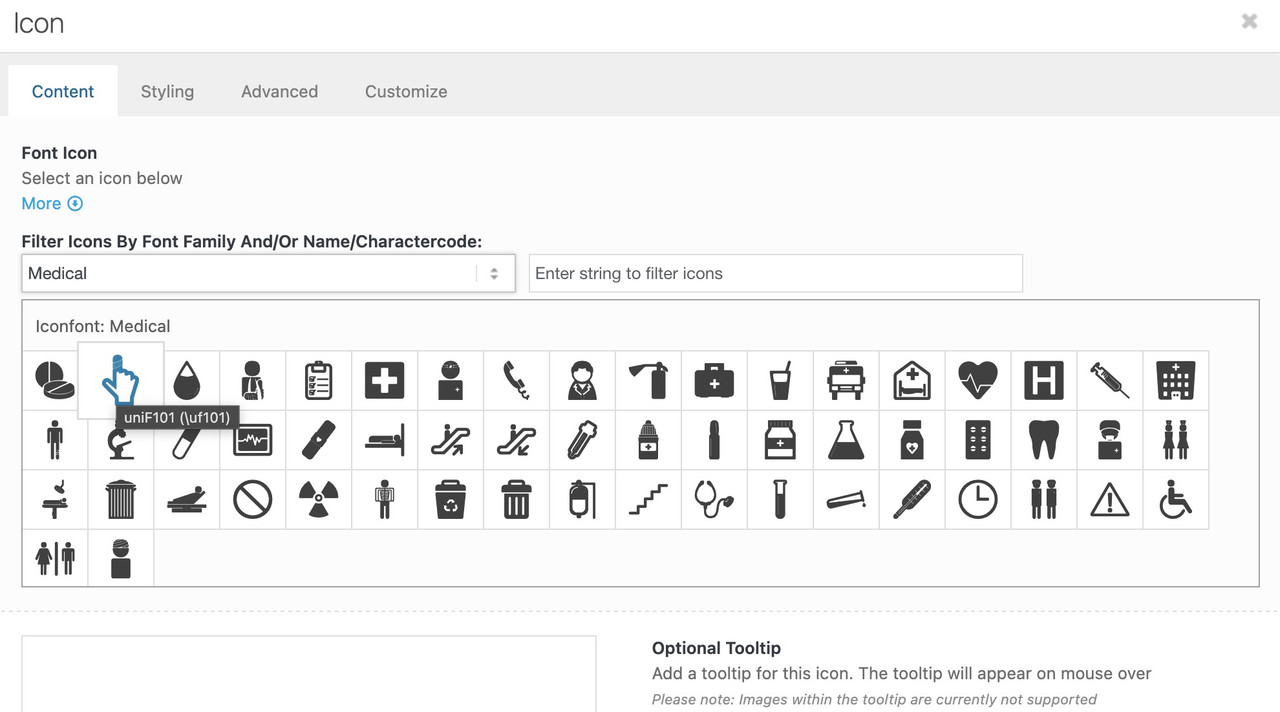
    now f.e. if you like to replace these standard icons by icons of the iconset : medical

    function avia_replace_default_icons($icons){
    	$icons['svg__prev_big'] =  array( 'font' =>'medical', 'icon' => 'uf101');
    	$icons['svg__next_big'] =  array( 'font' =>'medical', 'icon' => 'uf135');     
    	return $icons;
    }
    add_filter('avf_default_icons','avia_replace_default_icons', 10, 1);

    you can find those font icon codes f.e. on trying to place that icon you like to have and hover it :
    ( it is the value inside the brackets – without that backslash)

    #1490948

    Hi,

    Thanks for the update, we’ll close this thread for now then. Please open a new thread if you should have any further questions or problems.

    Best regards,
    Rikard

    #1490947

    Hey Uta,

    You can purchase a theme license here: https://themeforest.net/item/enfold-responsive-multipurpose-theme/4519990

    Best regards,
    Rikard

    #1490945

    Hi,

    Great, I’m glad to hear that you got things working. Please open a new thread if you should have any further questions or problems.

    Best regards,
    Rikard

    #1490938
    Uta Gleiser
    Guest

    Dear Kriesi Team, I am using the Enfold Child Theme 1.0
    When my homepage was built in 2018, I paid the Enfold Theme costs to the person who built it, but I never received the license.
    The site is still running on Version 1.0, but there are now difficulties with PHP updates.
    I guess it’s because I never updated the Enfold theme. Is it possible to buy a new license and update my site? Please let me know. Then I will buy a new one.

    Hey Uta,
    Quintuple post, closing.
    Best regards,
    Rikard

    What does: Quintuple post, closing. mean?
    How can I get the new update? How can I pay for it? And how much does it cost? I cannot find any help on this topic on your site. Please let me know how i can purchase an update for my homepage and if a new update will fix the PHP problem?
    Thanks Uta

    #1490935

    Hi Rikard,

    I have installed the new Enfold version and updated the PHP. Everything went well! The thread can be closed.

    Best,
    Marieke

    #1490926

    In reply to: Enfold Update?

    Hey Uta,

    Thanks for reaching out to us. A child theme is used to override the parent theme, it will never be updated automatically. If you look under Apperance->Themes in the WordPress menu and click on Enfold, then you will see the version of the parent theme.

    If you don’t own your own license, then it’s a good idea to purchase one. Otherwise you will never receive updates, or have access to the theme files.

    Best regards,
    Rikard

    #1490923
    Uta Gleiser
    Guest

    Dear Kriesi Team, I am using the Enfold Child Theme 1.0
    When my homepage was built in 2018, I paid the costs for the Enfold Theme to the person who built it, but I never received the license.
    The site is still running on Version 1.0, but there are now difficulties with PHP updates.
    I guess it’s because I never updated the Enfold theme. Is it possible to buy a new license and update my site? Please let me know. Then I will buy a new one.
    thank you for your help, Uta

    #1490924
    Uta Gleiser
    Guest

    Dear Kriesi Team, I am using the Enfold Child Theme 1.0
    When my homepage was built in 2018, I paid the costs for the Enfold Theme to the person who built it, but I never received the license.
    The site is still running on Version 1.0, but there are now difficulties with PHP updates.
    I guess it’s because I never updated the Enfold theme. Is it possible to buy a new license and update my site? Please let me know. Then I will buy a new one.
    thank you for your help, Uta

    #1490922
    Uta Gleiser
    Guest

    Dear Kriesi Team, I am using the Enfold Child Theme 1.0
    When my homepage was built in 2018, I paid the costs for the Enfold Theme to the person who built it, but I never received the license.
    The site is still running on Version 1.0, but there are now difficulties with PHP updates.
    I guess it’s because I never updated the Enfold theme. Is it possible to buy a new license and update my site? Please let me know. Then I will buy a new one.
    thank you for your help, Uta

    #1490921
    Uta Gleiser
    Guest

    Dear Kriesi Team, I am using the Enfold Child Theme 1.0
    When my homepage was built in 2018, I paid the costs for the Enfold Theme to the person who built it, but I never received the license.
    The site is still running on Version 1.0, but there are now difficulties with PHP updates.
    I guess it’s because I never updated the Enfold theme. Is it possible to buy a new license and update my site? Please let me know. Then I will buy a new one.
    thank you for your help, Uta

    #1490920
    Uta Gleiser
    Guest

    Dear Kriesi Team, I am using the Enfold Child Theme 1.0
    When my homepage was built in 2018, I paid the costs for the Enfold Theme to the person who built it, but I never received the license.
    The site is still running on Version 1.0, but there are now difficulties with PHP updates.
    I guess it’s because I never updated the Enfold theme. Is it possible to buy a new license and update my site? Please let me know. Then I will buy a new one.
    thank you for your help, Uta

    #1490918
    BR-Fotodesign
    Participant

    Hallo Zusammen,

    ich kann in meinem aktuellen Enfold Projekt die Startseite nicht mehr zum bearbeiten öffnen.

    Es kommt immer die Fehlermeldung:
    Es gab einen kritischen Fehler auf dieser Website. Prüfe bitte den Posteingang deines Website-Administrators auf Anweisungen. Wenn du weiterhin Probleme hast, wende dich bitte an die Support-Foren.

    Ich hatte das bereits öfters und konnte es immer regeln, in dem ich Plug-Ins deaktiviert habe.
    Leider funktioniert das dieses Mal nicht und ich weiß nicht mehr weiter.

    Kann mich jemand helfen?

    Danke. Viele Grüße
    Bettina

Viewing 30 results - 1,231 through 1,260 (of 244,620 total)