
-
AuthorSearch Results
-
January 22, 2024 at 12:05 pm #1431666
Das Menu, welches dir oben bei Enfold angezeigt werden soll muss in den Menü Optionen angewählt werden: Punkt 4 im Bild.
(click to enlarge the image)
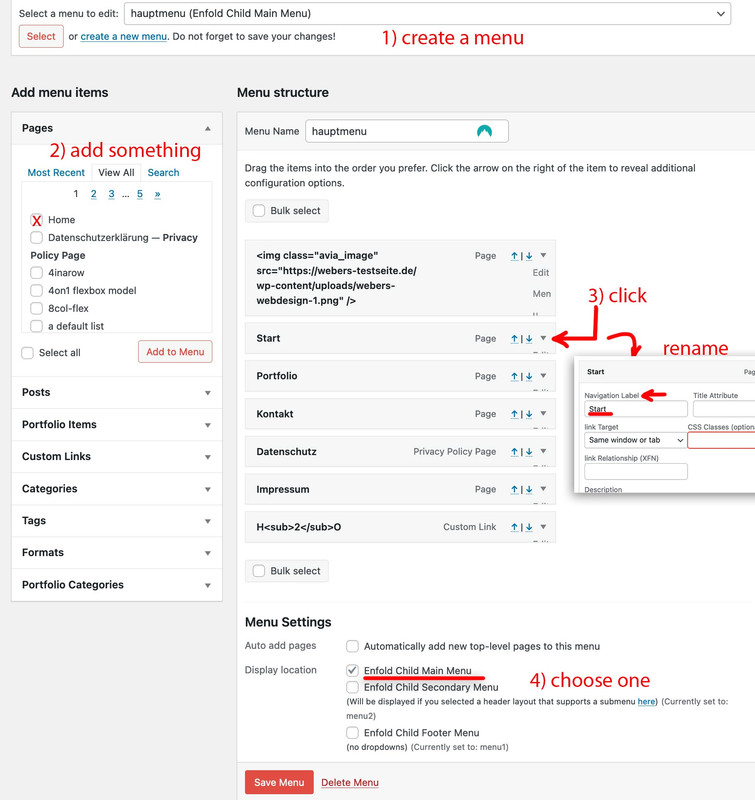
Wenn du also dann via (1) ein neues Menü erstellt hast (Benennung bleibt dir überlassen) kannst du Menüpunkte (2) dem Menü hinzufügen. Solltest Du also “Startseite” ( im Bild home da ich die Seite auf englisch führe) hinzugefügt haben, dann kannst du bei (3) den Pfeil klicken. es erscheinen die Optionen zu dem Menüpunkt als Dropdown. Hier kannst du bei “Naviagtion Label” etwas anderes eintragen.
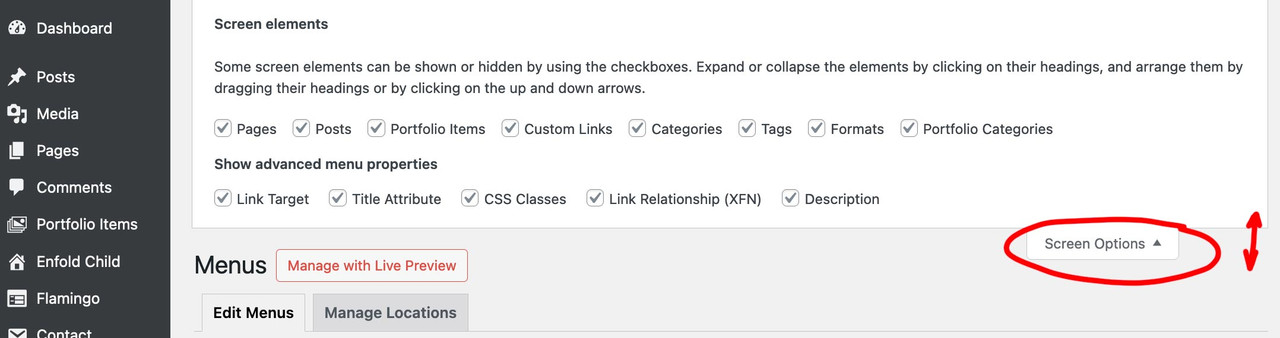
PS : solltest du nicht so viel angezeigt bekommen wie auf meinem Bild dann sind oben rechts in dem Dropdown nicht alle Optionen ausgewählt.
 January 22, 2024 at 9:36 am #1431658
Topic: Please give me the shortcodes
in forum EnfoldCreateve_Solutions
ParticipantJanuary 22, 2024 at 4:54 am #1431650In reply to: Lightbox now not working.
Hi purmar,
Please try to check if the Portfolio Grid’s Link Handling is set to Display the big image in a lightbox (Advanced > Link Setting)
If it’s still not helping, please disable Javascript File Merging And Compression in Enfold > Performance.Best regards,
NikkoJanuary 22, 2024 at 4:48 am #1431649Hi Gilles,
For the header, please add this CSS code in Enfold > General Styling Quick CSS
@media only screen and (min-width:479px) {
    #header #header_main .inner-container {
        display: flex;
        justify-content: center;
        gap: 40px;
    }

    #header #header_main .inner-container > * {
        position: static;
    }
}
For the content slider, I think it would be better if you change the background color of the content slider instead to match the slide item’s background color.
Best regards,
NikkoJanuary 21, 2024 at 11:31 pm #1431647In reply to: submenu sticky on mobile
Hi,
Try this CSS in your Enfold Theme Options ▸ General Styling ▸ Quick CSS field:@media only screen and (max-width: 767px) { .responsive #top #wrap_all #sub_menu1 .container { width: 100%; max-width: 100%; } #av-custom-submenu-1 span { font-size: 12px; } #top #av-custom-submenu-1.av-subnav-menu > li > a { padding: 0px 5px 0px 5px; } #top #sub_menu1 .av-submenu-pos-right { text-align: center; } .sticky-top { position:fixed!important; top:0!important; z-index:600!important; } }Then add this code to the end of your child theme functions.php file in Appearance ▸ Editor:
function custom_sticky_sub_menu() { ?>
  <script>
(function($){
  var width = $(window).width();
var $stickyTop = $('#sub_menu1');
if (width <= 767) {
$stickyTop.waypoint(function(direction) {
  if (direction === 'down') {
     $stickyTop.addClass('sticky-top');
  }
  if (direction === 'up') {
     $stickyTop.removeClass('sticky-top');
  }
}, {
  offset: '0%'
});
}
})(jQuery);
</script>
  <?php
}
add_action( 'wp_footer', 'custom_sticky_sub_menu', 99 );
Then clear your caching plugin and browser, please note that testing with iPads & iPhones can be hard to clear the cache, often you need to also clear the history to fully purge the cache, following these steps for Safari and note Step 4 where you will Clear the History.
In my test with makes the sub-menu sticky on mobile ans reduces the size of the menu itme so they fit better, feel free to adjust to suit.
Please ensure to copy the code from the forum and not an email notification so the symbols are not converted.Best regards,
MikeJanuary 21, 2024 at 11:10 pm #1431646In reply to: Questions on Freelancer-theme
Hi,
To adjust the main font size for different screen sizes please go to Enfold Theme Options ▸ General Styling ▸ Typography ▸ Advanced Options: Customize Typography Settings you will see a option for four screen sizes:

After selecting these ensure that you clear your cache and caching plugins, and if your server is using a object-oriented cache such as Memcached, Redis, Varnish, Litespeed, etc. you may need to also clear it.
Please note that we ask that each thread stays on a specific topic, this helps other users find solutions based on the opening subject line quicker. For further questions please open a new threadBest regards,
MikeJanuary 21, 2024 at 10:57 pm #1431645In reply to: No Images appear on Work page of Dark Enfold Theme
Hi,
Glad that this helped, I expect that this is the only step needed, while you are creating your site I recommend leaving the any caching plugins and the file merging disable, as it is not needed. Once you are done creating the site you can enable again and I would not expect any further issues, but if you do just let us know and we could take a look.
You can include your site login or private info in the Private Content area below the main input box:

but only for threads that you start, if you want to reply to someone elses thread adding your info will be seen by the thread starter.Best regards,
MikeJanuary 21, 2024 at 10:38 pm #1431642In reply to: Submenu Custom Icon
Hey karacafer,
You can add your icon with css, first you would determine the menu ID for the menu item, in this example it is #menu-item-3059
then use that ID in this css and the URL to your icon:#menu-item-3059 span.avia-menu-text:before { content: url(https://img.icons8.com/color/17/wordpress.png); display: inline; padding-right: 10px; vertical-align: sub; }This is how this example worked:

Then repeat this for each menu item.Best regards,
MikeJanuary 21, 2024 at 10:35 pm #1431641In reply to: Full Size featured image in blog posts
Well what you had to know is that you can redifine an existing enfold image size with an additional setting of crop or no-crop:
so you can use ismaels code with an additional setting :
function avf_customization_modify_thumb_size( $size ) {
      $size['entry_without_sidebar'] = array( 'width' => 9999, 'height' => 9999, 'crop' => false );
      $size['entry_with_sidebar'] = array( 'width' => 9999, 'height' => 9999, 'crop' => false );
      return $size;
}
add_filter( 'avf_modify_thumb_size', 'avf_customization_modify_thumb_size', 10, 1 );
After that recalculate thumbs – maybe that is the solution.
January 21, 2024 at 8:47 pm #1431637In reply to: Menu problems – underline and dividers are not there
Hi,
Glad we were able to help, if you have any further questions please create a new thread and we will gladly try to help you. Thank you for using Enfold.Best regards,
MikeJanuary 21, 2024 at 8:16 pm #1431635Hi,
Glad we were able to help, if you have any further questions please create a new thread and we will gladly try to help you. Thank you for using Enfold.Best regards,
MikeJanuary 21, 2024 at 5:37 pm #1431628In reply to: Full Size featured image in blog posts
Excellent — thank you for all your help! I will try that other plugin.
BTW LOVE the enfold theme and the ALB! Your team does great work!January 21, 2024 at 5:09 pm #1431626In reply to: Need updates enfold
Hey saad,
Thanks for your question, typically you can update a very old version on Enfold without any issues, assuming that only the theme options were used to customize the site.
If any file customizations were made in a child theme then these customizations will also not be lost, but if core theme files were modified then those modifications will be lost.
I recommend first creating a staging site to test on, most cPanel webhosts have a staging site option, some in the dashboard:

Others add the option in the Softaculous WordPress Management

There may be other staging site options in different cPanel servers, these are the two that I have seen.
Then update your staging site and check if there are any issues.
To update your version of Enfold you will need to download the latest installable WP version from your Theme Forest account and upload it to your WordPress ▸ Appearance ▸ Themes ▸ Add Themes ▸ Add New

after you choose the zip file and click install, you will see a This theme is already installed message because you are updating, you can continue

then you will see the Theme updated successfully message.

When you purchase a new license you will get 6 months of support from our support fourm included, but for only a little more you can get a full year of support, which is a really good deal.

I hope this information is helpful.Best regards,
MikeJanuary 21, 2024 at 4:01 pm #1431624Topic: Need updates enfold
in forum Pre Sale Questionssaad
GuestI have website work on enfold old version from 4 yeasrs and unfortunately, I haven’t access for themeforest
So, if I buy new license, can make theme update without break current pages and don’t lost enfold settings.
Note: I have pages on pages, portfolio and posts.
My current enfold version may be 3 or 4January 21, 2024 at 3:52 pm #1431623In reply to: Aligning rows top and bottom within a grid
Hi,
Try this CSS in your Enfold Theme Options ▸ General Styling ▸ Quick CSS field:#top.home #av-layout-grid-1 .flex_cell .flex_column_table:nth-child(2) { position: absolute; bottom: -900px; }After applying the css, please clear your browser cache and check.
Best regards,
MikeJanuary 21, 2024 at 3:01 pm #1431621In reply to: No Images appear on Work page of Dark Enfold Theme
Hi,
Thank you for the link to your site, the browser console is showing some javascript errors, please try disabling the theme option Enfold Theme Options ▸ Performance ▸ JS & CSS file merging and compression and enable Enfold Theme Options ▸ Performance ▸ Delete old CSS and JS files
and then check your pages again, if this doesn’t help try ensuring that Enfold Theme Options ▸ Performance ▸ Disable jQuery Migrate is not enable and try disabling all of your plugins. If that resolves the issue, reactivate each one individually until you find the conflict.
If you still have trouble please include an admin login in the Private Content area so we can be of more assistance.Best regards,
MikeJanuary 21, 2024 at 2:14 pm #1431618In reply to: Questions on Freelancer-theme
Hi,
On the Freelancer Demo the behavior for the fixed background image is the same as on your site, were the center of the background image is in the center of the page and not in the center of the cell. This is the image:

and this is how it shows in the grid row:

There is no date for the next release right now, but you can use the “scroll” option for now as it will give the same result for you.Best regards,
MikeJanuary 21, 2024 at 1:53 pm #1431613In reply to: Horizontal gallery – doesn’t continue on first click
Hi,
Glad we were able to help, if you have any further questions please create a new thread and we will gladly try to help you. Thank you for using Enfold.Best regards,
MikeJanuary 21, 2024 at 1:40 pm #1431611Hi,
Thank you for your patience, the Dev Team found that displaying ALB content in a blog element may lead to nested shortcodes which is not allowed and circular reference breaking the layout and/or displaying the page. So in your staging site the blog element shows this message:
Pages/Posts/.. built with ALB will only display “Excerpt With Read More Link” to avoid a possible breaking of layout

and the portfolio items (testimonials) that you are showing the blog element are created with the ALB.
To solve this the Dev Team has provided this filter I added it to your child theme functions.php and added the page ID of the pages under priorities and now they all show correctly:

If you have any other pages that I missed add their ID to this array.Best regards,
MikeJanuary 21, 2024 at 1:23 pm #1431610In reply to: Questions on Freelancer-theme
January 21, 2024 at 1:03 pm #1431608In reply to: Horizontal gallery – doesn’t continue on first click
Hey andre_h_,
Thank you for your patience and the link to your site, it looks like you have no slide chosen in the setting Initial Active Image

so if you click the navigation before the Gallery Image Rotation begins the first slide becomes active, and then due to the size of your images the second click activates the second slide but there in no movement so then it takes the third click to activate the third slide a cause some movement.
To solve this please enable the second slide as the Initial Active Image as in the screenshot above.Best regards,
MikeJanuary 21, 2024 at 12:38 pm #1431607In reply to: logo h2 tags are above my h1 tag
Hi,
To make your text black and adjust the line height try this CSS in your Enfold Theme Options ▸ General Styling ▸ Quick CSS field:.header_color .avia-standard-logo-sub b { color: #000; } .header_color .avia-standard-logo-sub p { margin: 0; line-height: 22px; }Please see the screenshots in the Private Content area of the expected results.
Best regards,
MikeJanuary 20, 2024 at 11:13 pm #1431603In reply to: Populate via databse and add “items”?
January 20, 2024 at 11:07 pm #1431602In reply to: Custom Blog Post Template
Hey William,
To show dual sidebars you can try this customization, first set your sidebar on your post to a “right sidebar” then in your child theme add this custom “sidebar.php”<?php if ( ! defined( 'ABSPATH' ) ) { die(); } // Display both left and right sidebars echo "<aside class='sidebar sidebar_left' " . avia_markup_helper( array( 'context' => 'sidebar', 'echo' => false ) ) . '>'; echo '<div class="inner_sidebar extralight-border">'; // Display the subnavigation for pages $av_sidebar_menu = avia_sidebar_menu( false ); if( $av_sidebar_menu ) { echo $av_sidebar_menu; } $the_id = @get_the_ID(); $custom_sidebar = ''; if( ! empty( $the_id ) && is_singular() ) { $custom_sidebar = get_post_meta( $the_id, 'sidebar', true ); } /** * @param string $custom_sidebar * @return string */ $custom_sidebar = apply_filters( 'avf_custom_sidebar', $custom_sidebar ); if( $custom_sidebar ) { dynamic_sidebar( $custom_sidebar ); } else { if( empty( $avia_config['currently_viewing'] ) ) { $avia_config['currently_viewing'] = 'page'; } // general shop sidebars if( $avia_config['currently_viewing'] == 'shop' && dynamic_sidebar( 'Shop Overview Page' ) ) { // Do nothing here } // single shop sidebars if( $avia_config['currently_viewing'] == 'shop_single' ) { // Do nothing here } if( $avia_config['currently_viewing'] == 'shop_single' && dynamic_sidebar( 'Single Product Pages' ) ) { // Do nothing here } // general blog sidebars if( $avia_config['currently_viewing'] == 'blog' && dynamic_sidebar('Sidebar Blog') ) { // Do nothing here } // custom left sidebar if( $avia_config['currently_viewing'] == 'page' && dynamic_sidebar('left-sidebar') ) { // Do nothing here } // general archive sidebars if( avia_get_option( 'archive_sidebar' ) == 'archive_sidebar_separate' ) { if( $avia_config['currently_viewing'] == 'archive' && dynamic_sidebar( 'Sidebar Archives' ) ) { // Do nothing here } } // general pages sidebars if( $avia_config['currently_viewing'] == 'page' && dynamic_sidebar( 'Sidebar Pages' ) ) { // Do nothing here } // forum pages sidebars if( $avia_config['currently_viewing'] == 'forum' && dynamic_sidebar( 'Forum' ) ) { // Do nothing here } // global sidebar if( dynamic_sidebar( 'Displayed Everywhere' ) ) { // Do nothing here } /** * Filter to show default dummy sidebar * * @param false|string $default_sidebar * @return false|string */ if( apply_filters( 'avf_show_default_sidebars', $default_sidebar ) ) { if( apply_filters( 'avf_show_default_sidebar_pages', true ) ) { avia_dummy_widget(2); } if( apply_filters( 'avf_show_default_sidebar_categories', true ) ) { avia_dummy_widget(3); } if( apply_filters( 'avf_show_default_sidebar_archiv', true ) ) { avia_dummy_widget(4); } // customize default sidebar and add your sidebars do_action ( 'ava_add_custom_default_sidebars' ); } } echo '</div>'; echo '</aside>'; // Right sidebar echo "<aside class='sidebar sidebar_right' " . avia_markup_helper( array( 'context' => 'sidebar', 'echo' => false ) ) . '>'; echo '<div class="inner_sidebar extralight-border">'; // Display the subnavigation for pages $av_sidebar_menu = avia_sidebar_menu( false ); if( $av_sidebar_menu ) { echo $av_sidebar_menu; } $the_id = @get_the_ID(); $custom_sidebar = ''; if( ! empty( $the_id ) && is_singular() ) { $custom_sidebar = get_post_meta( $the_id, 'sidebar', true ); } /** * @param string $custom_sidebar * @return string */ $custom_sidebar = apply_filters( 'avf_custom_sidebar', $custom_sidebar ); if( $custom_sidebar ) { dynamic_sidebar( $custom_sidebar ); } else { if( empty( $avia_config['currently_viewing'] ) ) { $avia_config['currently_viewing'] = 'page'; } // general shop sidebars if( $avia_config['currently_viewing'] == 'shop' && dynamic_sidebar( 'Shop Overview Page' ) ) { // Do nothing here } // single shop sidebars if( $avia_config['currently_viewing'] == 'shop_single' ) { // Do nothing here } if( $avia_config['currently_viewing'] == 'shop_single' && dynamic_sidebar( 'Single Product Pages' ) ) { // Do nothing here } // general blog sidebars if( $avia_config['currently_viewing'] == 'blog' && dynamic_sidebar('Sidebar Blog') ) { // Do nothing here } // custom right sidebar if( $avia_config['currently_viewing'] == 'page' && dynamic_sidebar('right-sidebar') ) { // Do nothing here } // general archive sidebars if( avia_get_option( 'archive_sidebar' ) == 'archive_sidebar_separate' ) { if( $avia_config['currently_viewing'] == 'archive' && dynamic_sidebar( 'Sidebar Archives' ) ) { // Do nothing here } } // general pages sidebars if( $avia_config['currently_viewing'] == 'page' && dynamic_sidebar( 'Sidebar Pages' ) ) { // Do nothing here } // forum pages sidebars if( $avia_config['currently_viewing'] == 'forum' && dynamic_sidebar( 'Forum' ) ) { // Do nothing here } // global sidebar if( dynamic_sidebar( 'Displayed Everywhere' ) ) { // Do nothing here } /** * Filter to show default dummy sidebar * * @param false|string $default_sidebar * @return false|string */ if( apply_filters( 'avf_show_default_sidebars', $default_sidebar ) ) { if( apply_filters( 'avf_show_default_sidebar_pages', true ) ) { avia_dummy_widget(2); } if( apply_filters( 'avf_show_default_sidebar_categories', true ) ) { avia_dummy_widget(3); } if( apply_filters( 'avf_show_default_sidebar_archiv', true ) ) { avia_dummy_widget(4); } // customize default sidebar and add your sidebars do_action ( 'ava_add_custom_default_sidebars' ); } } echo '</div>'; echo '</aside>'; ?>then in your child theme functions.php add this function:
function custom_theme_widgets_init() {
    register_sidebar( array(
        'name'          => esc_html__( 'Left Sidebar', 'text-domain' ),
        'id'            => 'left-sidebar',
        'description'   => esc_html__( 'Add widgets here to appear in the left sidebar.', 'text-domain' ),
        'before_widget' => '<div id="%1$s" class="widget %2$s">',
        'after_widget'  => '</div>',
        'before_title'  => '<h4 class="widget-title">',
        'after_title'   => '</h4>',
    ) );
    register_sidebar( array(
        'name'          => esc_html__( 'Right Sidebar', 'text-domain' ),
        'id'            => 'right-sidebar',
        'description'   => esc_html__( 'Add widgets here to appear in the right sidebar.', 'text-domain' ),
        'before_widget' => '<div id="%1$s" class="widget %2$s">',
        'after_widget'  => '</div>',
        'before_title'  => '<h4 class="widget-title">',
        'after_title'   => '</h4>',
    ) );
}
add_action( 'widgets_init', 'custom_theme_widgets_init' );
function custom_left_sidebar() { ?>
  <script>
(function($) {
     $('.single-post .sidebar_left').detach().insertBefore('.single-post .content.av-main-single');
})(jQuery);
</script>
  <?php
}
add_action( 'wp_footer', 'custom_left_sidebar', 99 );
then add this custom CSS:
.responsive .single-post .container {
    max-width: 98%;
}
#top.single-post #main .sidebar {
    display: inline-block;
    width: 20%;
    border: none;
}
#top.single-post .content.units.alpha.av-main-single {
	width: 58%;
	clear: none;
	border:none;
}
#top.single-post #main .sidebar.sidebar_left {
	float: left;
}
Now you will have two new sidebars:

the other widget areas will also still work for the default sidebar position if you wish.
You will now have dual sidebars:

Please note that for there to be room for the second sidebar we used the css to change the width of the page and the main content and the sidebars, you can tinker with the css above to suit your needs.Best regards,
MikeJanuary 20, 2024 at 8:48 pm #1431600Topic: Coming Soon Page Appears as White Page
in forum Enfoldkhaledalbarghothi
ParticipantThe Enfold theme coming soon page appears as a white page in Chrome, Firefox, and Edge browsers. However, the page appears correctly in Safari. The site is hosted on Bluehost.
Please help resolve this issue so that the coming soon page appears correctly in all browsers.BR
January 20, 2024 at 8:40 pm #1431599In reply to: Right settings column hidden behind
Hey Qgrafica_7,
Thanks for the link to your site, I see that you are using v5.6.6, please update to v5.6.9 or disable the full screen editor:

Best regards,
MikeJanuary 20, 2024 at 6:42 pm #1431591In reply to: Latin text in search results
Hi,
Thank you for your patience, I believe you are referring to this text:

this is in the manually excerpt for the portfolio post, if you are using the Block Editor look in the sidebar:

if you don’t see the option you may need to enable it in the three dots and then preferences:

the panels and excerpt:

if you are using the Classic Editor look below the post:

if you don’t see the option you may need to enable it in the screen options at the top of the page:

Best regards,
MikeJanuary 20, 2024 at 6:26 pm #1431589I have resolved this for now by installing contact form 7 however I would be interested to know if this functionaltiy is available with Enfold, and this may help other people looking for the solution.
January 20, 2024 at 6:23 pm #1431588Hi,
Thanks for your patience but we don’t have any documentation for this as it is not a feature.
Perhaps you could create a template page and use the duplicate option each time you want to create a new page based on the template:

Or you could just load the template via the template option:

Best regards,
MikeJanuary 20, 2024 at 6:15 pm #1431587It appears something like http://localhost/wordpress/contact/?fruit=apple works on contact form 7.. is something like this possible with the Enfold default form?
-
AuthorSearch Results
Viewing 30 results - 10,501 through 10,530 (of 244,483 total)
-
Search Results
-
Topic: Need updates enfold
I have website work on enfold old version from 4 yeasrs and unfortunately, I haven’t access for themeforest
So, if I buy new license, can make theme update without break current pages and don’t lost enfold settings.
Note: I have pages on pages, portfolio and posts.
My current enfold version may be 3 or 4


