
-
AuthorSearch Results
-
January 28, 2024 at 8:59 pm #1432301
In reply to: Slider Caption Help
Hi,
This is the Caption Positioning option in the slide:

this is the font size option in the slide:

I did this for your first slide, please check and adjust to suit:

Best regards,
MikeJanuary 28, 2024 at 8:16 pm #1432299In reply to: Add exerpt and read more to Magazine
Hi,
Glad to hear that you have this sorted out, if you have any further questions please create a new thread and we will gladly try to help you. Thank you for using Enfold.Best regards,
MikeJanuary 28, 2024 at 8:15 pm #1432298In reply to: woocommerce color product
Hi,
To change the color of your button, Try this CSS in your Enfold Theme Options ▸ General Styling ▸ Quick CSS field:.cart .single_add_to_cart_button.button { background-color: #fc6c12; }After applying the css, please clear your browser cache and check.
Best regards,
MikeJanuary 28, 2024 at 7:27 pm #1432295Hey web4698,
Try adding this CSS in your Enfold Theme Options ▸ General Styling ▸ Quick CSS field:.responsive #top #wrap_all .av_mobile_menu_tablet .main_menu .av-main-nav-wrap { background-color: #fff; }After applying the css, please clear your browser cache and check.
Best regards,
MikeJanuary 28, 2024 at 7:16 pm #1432294In reply to: bullet point are not shown in list
Hi,
Glad Rikard could help, if you have any further questions please create a new thread and we will gladly try to help you. Thank you for using Enfold.Best regards,
MikeJanuary 28, 2024 at 7:03 pm #1432292I have some questions and observations about why my Footer page is not showing up anymore.
1) Have a Footer page; it used to show up with no problem.
2) I am using a child theme.
3) I replaced the footer.php and header.php files in my child theme with the latest from the Enfold parent theme. (still, no footer showing). I made no edits to the footer.php or header.php files currently in my Child Theme. They are exactly what is used for the parent Enfold theme.
4) On my Footer page, I have the Footer setting on the Enfold sidebar: “Default Layout set in Enfold Child > Footer.”
5) On my Footer page, in the page editor, there is a message in an orange box: “This page is currently selected to be displayed as footer. (Set in Enfold » Footer). (Change)
Therefore it cannot be accessed directly by the general public in your frontend. (Logged in users who are able to edit this page can still see it)”
6) I want the Footer page to be the footer for ALL my pages and posts. That used to work fine.
7) In my Enfold Child Theme Options, accessed via my WP Dashboard, I have the following settings: Default Footer & Socket Settings > “Select a page to replace both the footer and socket”, below that under Select Page > “Footer page” (the actual name of the Footer page I created in the Advanced Layout Builder).
8) Nothing shows up at the bottom of the web page, no socket, no footer. This is for a page where I say to use “Default Layout set in Enfold Child > Footer.”
9) For that same page, to test things, I then set the Footer > “Use selected page to display footer and socket”. I then get my copyright statement and the “Enfold Theme by Kriesi”
( BTW, I want to not show the “Enfold Theme by Kriesi”, it used to not show up with my old Child Theme footer.php)It seems the Enfold ability to use a dedicated Footer page is no longer working. I started with a clean slate as far as my child theme footer.php and header.php.
I am noticing a lot of other Enfold users also recently having this problem.
Can someone please explain, or better yet, post what the footer.php contents are supposed to be for the footer page to show up? It appears like the footer.php from the current parent Enfold theme does not work as it stands now.
Although I have shared my login information, my site is locked down behind a firewall, and not so easy for others to get the footer.php or WP admin page.
Is there a fix for the footer.php that you can share with us having this issue, please?
January 28, 2024 at 6:27 pm #1432287and by the way – Enfold has a no compression level on those recalculated images – that will cause some unnecessary big file-sizes f.e. it might happen that the big sizes 1500×630 and 1500×430 are bigger in file-size than the uploaded original!
screenshot from enfold default setting:
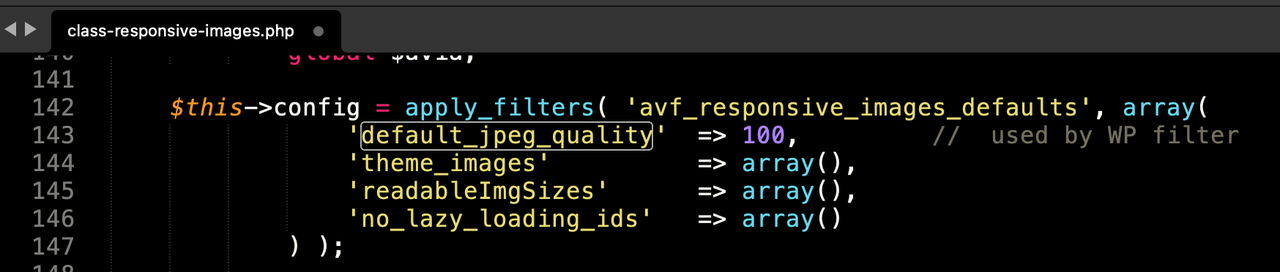
so after erasing some image-sizes – and before recalculating the preserved image-sizes – put this snippet to your child-theme functions.php (change the 55 to what you like to have):
add_filter("avf_jpeg_quality", "avf_set_quality_mod", 9999, 1);
add_filter("avf_wp_editor_set_quality", "avf_set_quality_mod", 9999, 1);
function avf_set_quality_mod($quality) { $quality = 55; return $quality;}
January 28, 2024 at 6:07 pm #1432284In reply to: bullet point are not shown in list
Hey bernhardleube,
Please try the following in Quick CSS under Enfold->General Styling:
ul li::marker {
  color: black;
  font-size: 1em;
}
Best regards,
RikardJanuary 28, 2024 at 5:54 pm #1432280In reply to: button higher and further to the left
Hi Franz,
Please try the following in Quick CSS under Enfold->General Styling:
#scroll-top-link {
  right: 60px;
  bottom: 60px;
}
Best regards,
RikardJanuary 28, 2024 at 5:51 pm #1432279In reply to: Custom Subheading Color not displaying on mobile
Hi,
Did you try clearing the cache from your cache plugin? You could also try to temporarily deactivate file compression and activate the option to delete old JS and CSS files under Enfold->Performance. If that doesn’t work, then please post admin WordPress login details in private so that we can have a closer look.
Best regards,
RikardJanuary 28, 2024 at 5:17 pm #1432274In reply to: Metadata element – possible to add default settings?
Hi,
Please read chapter https://kriesi.at/documentation/enfold/custom-element-templates/#custom-elements-advanced-options and use
add_theme_support( 'show_advanced_custom_element_options' );This will enable more options.
And also further down https://kriesi.at/documentation/enfold/custom-element-templates/#custom-elements-advanced-option-custom-elements-for-subitems
Best regards,
GünterJanuary 28, 2024 at 5:12 pm #1432273Hi,
Glad we were able to help, if you have any further questions please create a new thread and we will gladly try to help you. Thank you for using Enfold.Best regards,
MikeJanuary 28, 2024 at 5:07 pm #1432272In reply to: no burger menu on mobile
Hi,
Glad we were able to help, if you have any further questions please create a new thread and we will gladly try to help you. Thank you for using Enfold.Best regards,
MikeJanuary 28, 2024 at 4:41 pm #1432268In reply to: Metadata element – possible to add default settings?
Günter,
Great to see your post and thank you! After 7 years using Enfold I had never used the custom element and have been using templates instead… wow, this is great! I will start using them for buttons, etc. Wonderful!However in the case of the custom element for post metadata, it appears when customizing on the content tab then gonig to the “edit metadata element” and the first box “Metadata” which says “Select the metadata you want to display, if empty or not available your selection will be skipped. On the regular (non customized element) this opens a dropdown with “add/edit metadata” and a “+” so you can stack the metadata elements like “author” and “publishing date”.
However with the custom element for post metadata, this same field is just a dropdown without the “+” so it lets you select only one element such as “Last Modified Date” but there is no way to string them together (that I can see) like there is on the original non-custom element.
Am I doing something wrong?
Thanks,
RobJanuary 28, 2024 at 3:06 pm #1432266Topic: Can’t install demo import
in forum EnfoldSkytaya2727
ParticipantHi,
I want to install one of demo import, but it keeps saying this error.
“Download of files for demo Enfold 2017 didn’t work!
You might want to try reloading the page and then try again”and, I was deleted wordpress, and keep re-installed this theme.
why I can’t download this?
Please help me.January 28, 2024 at 8:20 am #1432256In reply to: Metadata element – possible to add default settings?
Hi,
Better way would be to use custom elements which are editable – https://kriesi.at/documentation/enfold/custom-element-templates/.
But I will think about a filter that will allow to change the default settings.
Best regards,
GünterJanuary 28, 2024 at 12:39 am #1432249In reply to: Suggestion for content element: “Cards”
Hi,
Thank you for your idea, if you would like to request this feature the Dev Team has opened a new Github Feature Request for users to place requests and follow them as the Dev Team reviews them.
We can’t add this from the support threads, unless there is anything else we can help with on this issue, shall we close this thread then?Best regards,
MikeJanuary 28, 2024 at 12:29 am #1432247In reply to: Sticky menu on mobile
Hey northorie,
Typically a sticky header would be achieved with this CSS in your Enfold Theme Options ▸ General Styling ▸ Quick CSS field:@media only screen and (max-width: 767px) { .responsive #top #wrap_all #header { position: fixed; } }but if you only want a sticky burger icon you could try this:
@media only screen and (max-width: 767px) {
  .responsive #top #wrap_all #header .av-burger-menu-main {
    position: fixed;
  }
}
If this doesn’t help please include the url to the page in question so we can take a closer look.
Best regards,
MikeJanuary 27, 2024 at 11:49 pm #1432245Hi,
Try this CSS in your Enfold Theme Options ▸ General Styling ▸ Quick CSS field:@media only screen and (max-width: 989px){ .html_mobile_menu_tablet #top #wrap_all .av_header_transparency { background-color: transparent; } .responsive #top #main { margin-top: 0; } }After applying the css, please clear your browser cache and check.
Best regards,
MikeJanuary 27, 2024 at 11:34 pm #1432244In reply to: tables column widths
Hi,
Try this CSS in your Enfold Theme Options ▸ General Styling ▸ Quick CSS field:#top.page-id-472 #main .main_color .avia-data-table * { border: none; background-color: #fff; font-size: 18px; text-align: left; } #top.page-id-472 .main_color .avia-data-table.avia_pricing_minimal th { color: #009bdd; width: 10%; }Best regards,
MikeJanuary 27, 2024 at 11:07 pm #1432242Hi,
The page that you have linked to: /reisebilder-berichte/ is the WordPress “blog” page for your site:

So the frontend shows your latest posts and not the layout of this specific page, please try changing the WordPress ▸ Settings ▸ Reading setting to
“-select-” so this page can show the page content, then the builder will load and you can build the page as you wish.
It looks like the last time the page was save was 8 years ago and it was saved as an empty page, probably the same time that the WordPress setting was used to enable the page as the “blog” page:

Best regards,
MikeJanuary 27, 2024 at 5:56 pm #1432231In reply to: Problem on show social icons in mobile header
Hi,
Glad Ismael could help, if you have any further questions please create a new thread and we will gladly try to help you. Thank you for using Enfold.Best regards,
MikeJanuary 27, 2024 at 5:47 pm #1432228Topic: Measure Enfold Contactform Submissions with GTM
in forum Enfoldenvis
ParticipantHi, I have created a trigger in GTM. If a form submission is done on the path /wordpress/ the trigger is fired. This trigger is not fired though.
My setup is pretty straight forward:
- Connected Tag Manager with the Google Site Kit
- Linked GA4 to GTM
- Created a Form Submission trigger based on Page Path from the page /wordpress/
- Enable Catcha V3 with fallback to V2, enabled both API credentials
- Do receive the email from contact form and the sent receipts
What am I missing?
 January 27, 2024 at 4:05 pm #1432221
Hi,
Glad to hear that you have this sorted out, and thanks for sharing your solution. If you have any further questions please create a new thread and we will gladly try to help you. Thank you for using Enfold.Best regards,
MikeJanuary 27, 2024 at 3:24 pm #1432218In reply to: Full width easy slider text not vertically centered
Hey Qgrafica_7,
Please try the following in Quick CSS under Enfold->General Styling:
.home .slideshow_align_caption {
    vertical-align: bottom;
    padding-bottom: 100px;
}
Best regards,
RikardGuenni007
Participantmaybe it would be a good idea to place a link to the good docu page, at least as a sticky message similar to the umcomming fixes post, or in the sidebar. A lot of questions could be solved by reading the docu –
and perhaps a link to the github too.
https://kriesi.at/documentation/enfold/
https://github.com/KriesiMedia/enfold-library___________
there was a presale question on getting the avia shortcodes of a page. – in this case i go to the demo page on github:
https://github.com/KriesiMedia/enfold-library/tree/master/demos – download the xml of that demo and look inside for that page ( the easiest way is to search for page_id=123) – only the homepage is sometimes harder to find. You find the avia shortcodes in between CDATA as content:encoded<content:encoded><![CDATA[ … here is the avia shortcode inside ]]></content:encoded>January 27, 2024 at 1:32 pm #1432213In reply to: Video Media Element not showing video
Hi,
Thanks for that. Please try copying this shortcode:
[av_section min_height='' min_height_px='500px' padding='huge' shadow='no-border-styling' bottom_border='border-extra-arrow-down' bottom_border_diagonal_color='#ffffff' bottom_border_diagonal_direction='' bottom_border_style='' id='Demos' color='main_color' custom_bg='' src='https://test.kriesi.at/enfold-2017/wp-content/uploads/sites/24/2015/07/isometric-1.jpg' attachment='447' attachment_size='full' attach='scroll' position='center left' repeat='contain' video='' video_ratio='16:9' overlay_opacity='0.5' overlay_color='' overlay_pattern='' overlay_custom_pattern='' av_element_hidden_in_editor='0' av_uid='av-laduq6']
[av_one_half first min_height='' vertical_alignment='av-align-top' space='no_margin' custom_margin='aviaTBcustom_margin' margin='50px' margin_sync='true' padding='0px' padding_sync='true' border='' border_color='' radius='0px' radius_sync='true' background_color='' src='' attachment='' attachment_size='' background_position='top left' background_repeat='no-repeat' animation='left-to-right' mobile_display='' av_uid='av-l5utwe']

[/av_one_half][av_one_half min_height='' vertical_alignment='av-align-top' space='no_margin' custom_margin='aviaTBcustom_margin' margin='0px' margin_sync='true' padding='50px' padding_sync='true' border='' border_color='' radius='0px' radius_sync='true' background_color='rgba(255,255,255,0.85)' src='' attachment='' attachment_size='' background_position='top left' background_repeat='no-repeat' animation='left-to-right' mobile_display='' av_uid='av-kzc3a6']

[av_heading tag='h1' padding='20' heading='A growing library of more than 2 dozen demos' color='custom-color-heading' style='blockquote modern-quote' custom_font='#000000' size='40' subheading_active='' subheading_size='15' custom_class='' av_uid='av-kpdzb2'][/av_heading]

[av_hr class='custom' height='50' shadow='no-shadow' position='left' custom_border='av-border-fat' custom_width='50px' custom_border_color='#000000' custom_margin_top='30px' custom_margin_bottom='30px' icon_select='no' custom_icon_color='' icon='ue808' font='entypo-fontello' av_uid='av-klz60e']

[av_textblock size='' font_color='' color='' admin_preview_bg='rgb(255, 255, 255)' av_uid='av-keqweu']
Our demos are one of a kind: we only offer<strong> full concept demos</strong> with multiple pages that show whole projects, unlike others who only include a single page and call that a demo ;)

You can import them with <strong>a single click</strong>, they are easily adaptable to your needs and you can chose from a variety of layouts and niche designs. In addition to that you can also use the <strong>demo images used in our demo for your own project</strong>!
[/av_textblock]

[/av_one_half]
[/av_section]
Best regards,
RikardJanuary 27, 2024 at 12:30 pm #1432204Meantime in the galaxy of the vast universe of the eternal bitmaps… Jeremy from RankMath send me this answer:
When it comes to editors, Enfold and Rank Math, the only possible conflict we can think of will be related to the Content Analysis where Rank Math may not be able to read the content.
Even for the content analysis tests, we have added API access to the content analysis in Rank Math to make content from the custom page builder readable.
You may share this guide to the developers of that page builder: https://rankmath.com/kb/content-analysis-api/
Please note that this should not affect your overall SEO performance as this issue is only happening on the backend.
But still – there are questions: (From me at Earth):
Part of: … My Reply to Jeremy!
If my content can’t be analysed by RM due to the fact that Enfold theme is not compatible – How can I then benefit from the SEO tool? – It can’t provide insight or suggestions/corrections if it cant read my content (In Danish)?? Nor show me when the contents score is good enuf to rank/outrank.
So I conclude that using Enfold on the content I already have on my site / pages can’t be analyzed by RM.
How about the AI content?
Can I copy paste my content into the AI and have it do it’s magic? – Then copy it back?I am using the Classic Editor and the AVIA pagebuilder – So could I copy/paste my content into the AI and have it analysed and work and expand the topics on a given page/topic? – Or can I only create new content with the AI and save that direct into my pages / or is that also a copy/ paste job?
Would you say that I am better off buying a new theme? That is 100% compatible? – Like X or Avada and maybe even start using the Gutenberg?
January 27, 2024 at 11:07 am #1432201Hey careyassoc,
There’s no way of automatically checking which site is using which license unfortunately, I would suggest that you check them manually. If you haven’t registered your licenses then please refer to this: https://kriesi.at/documentation/enfold/theme-registration/
If you have previously used a license on a site which is now inactive, then it’s ok to use that on a new site.
Best regards,
RikardHey Margriet,
Do you have access to the Themeforest account which was used to purchase your theme license? If not, then you might have to purchase a new license in order to receive updates: https://themeforest.net/item/enfold-responsive-multipurpose-theme/4519990
Once you have access to the theme files, then please follow this: https://kriesi.at/documentation/enfold/theme-registration/
Best regards,
Rikard -
AuthorSearch Results
-
Search Results
-
Topic: Can’t install demo import
Hi,
I want to install one of demo import, but it keeps saying this error.
“Download of files for demo Enfold 2017 didn’t work!
You might want to try reloading the page and then try again”and, I was deleted wordpress, and keep re-installed this theme.
why I can’t download this?
Please help me.Hi, I have created a trigger in GTM. If a form submission is done on the path /wordpress/ the trigger is fired. This trigger is not fired though.
My setup is pretty straight forward:
- Connected Tag Manager with the Google Site Kit
- Linked GA4 to GTM
- Created a Form Submission trigger based on Page Path from the page /wordpress/
- Enable Catcha V3 with fallback to V2, enabled both API credentials
- Do receive the email from contact form and the sent receipts
What am I missing?
Topic: Docu Link
maybe it would be a good idea to place a link to the good docu page, at least as a sticky message similar to the umcomming fixes post, or in the sidebar. A lot of questions could be solved by reading the docu –
and perhaps a link to the github too.
https://kriesi.at/documentation/enfold/
https://github.com/KriesiMedia/enfold-library___________
there was a presale question on getting the avia shortcodes of a page. – in this case i go to the demo page on github:
https://github.com/KriesiMedia/enfold-library/tree/master/demos – download the xml of that demo and look inside for that page ( the easiest way is to search for page_id=123) – only the homepage is sometimes harder to find. You find the avia shortcodes in between CDATA as content:encoded<content:encoded><![CDATA[ … here is the avia shortcode inside ]]></content:encoded>


