Hi,
Sidebars on category pages is at Enfold Theme Options ▸ Sidebar Settings ▸ Sidebar On Archive Pages
On default editor product pages, the sidebar shows under the product image if you have a widget in the Single Product Pages widget area, for ALB products the sidebar is enabled on the edit page under Sidebar Settings

Best regards,
Mike
Hey peterolle,
Perhaps I don’t understand, because if you use the product grid you can choose the category:

so wouldn’t that be a category grid?
Best regards,
Mike
Hi,
Glad we were able to help, if you have any further questions please create a new thread and we will gladly try to help you. Thank you for using Enfold.
Best regards,
Mike
Hi,
Glad we were able to help, if you have any further questions please create a new thread and we will gladly try to help you. Thank you for using Enfold.
Best regards,
Mike
Hi,
Thank you for your patience, I set the function above back to the original code from the documentation and then added a custom searchform.php file to your child theme with this:
<?php
if( ! defined( 'ABSPATH' ) )   { exit; }

global $avia_config;


// Modify the search parameters for custom search URL
$search_params = apply_filters('avf_frontend_search_form_param', array(
    'placeholder'   => __('Search', 'avia_framework'),
    'search_id'     => 'swps',  // Changed from 's' to 'swps'
    'form_action'   => home_url('/') . '?swp_form%5Bform_id%5D=1', // Appended custom query string
    'ajax_disable'  => false
));

$disable_ajax = $search_params['ajax_disable'] == false ? '' : 'av_disable_ajax_search';

$icon = av_icon_char('search');
$class = av_icon_class('search');
?>

<form action="<?php echo $search_params['form_action']; ?>" id="searchform" method="get" class="<?php echo $disable_ajax; ?>">
    <div>
        <input type="submit" value="<?php echo $icon; ?>" id="searchsubmit" class="button <?php echo $class; ?>" />
        <input type="text" id="s" name="<?php echo $search_params['search_id']; ?>" value="<?php echo esc_attr(get_search_query()); ?>" placeholder="<?php echo esc_attr($search_params['placeholder']); ?>" />
    </div>
</form>
now your ajax form “Show all results” link points to ?swp_form%5Bform_id%5D=1&swps=
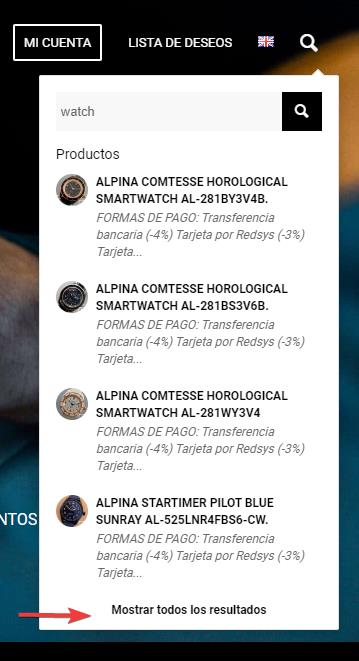
and lands on your custom SearchWP results page:

Best regards,
Mike
Hey peterolle,
To remove the “Add to Cart” button that changes to “Read More” for products without a price and add the class single_button to the div avia_cart_buttons so the button is centered add this code to the end of your child theme functions.php file in Appearance ▸ Editor:
add_action('woocommerce_before_shop_loop_item', 'start_custom_output_buffer', 9);
function start_custom_output_buffer() {
    ob_start();
}
add_action('woocommerce_after_shop_loop_item', 'modify_and_end_custom_output_buffer', 25);
function modify_and_end_custom_output_buffer() {
    $output = ob_get_clean();
    global $product;
    if ('' === $product->get_price()) {
        $output = str_replace("avia_cart_buttons", "avia_cart_buttons single_button", $output);
    }
    echo $output;
}
add_filter('woocommerce_loop_add_to_cart_link', 'custom_woocommerce_loop_add_to_cart_link', 10, 2);
function custom_woocommerce_loop_add_to_cart_link($button, $product) {
    if ('' === $product->get_price()) {
        return '';
    }
    return $button;
}
Please ensure to copy the code from the forum and not an email notification so the symbols are not converted.
This is the expected results:

Best regards,
Mike
Hi,
In your opening post you write that your site lost some of it’s ranking, perhaps this is related to the Google helpful content updates, there was another on March 5.
I’m not a SEO expert, but I have heard a lot of people talking about this on podcasts, perhaps adding a “latest post” from your blog on your homepage and adding weekly “helpful” posts will help your ranking. See Google’s documentation on Creating helpful, reliable, people-first content and then try working with a content writer to create content like this each week for you to post on your site. Also try to use the name of your city and state often, as I understand Google is looking for “local” content. You might also want to post the content on YouTube as it may help a lot.
I checked your site on PageSpeed Insights and it scores well:

I don’t see any CORS errors.
minified without merging is a good setting with cloudflare, as it also merges and double merging sometimes causes errors. But you can try merge and compress and see if it works better, but if you see errors then switch back.
So you site looks good, I believe if you start adding “helpful” content weekly it will help you a lot.
Best regards,
Mike
Hey,
Thanks for sharing, as you point out using the admin_head hook will make this work, but I believe that you wish to make a feature request, please use the Github Feature Request as it will be sent to the Dev Team directly for their review.
Best regards,
Mike
Hi,
Glad we were able to help, if you have any further questions please create a new thread and we will gladly try to help you. Thank you for using Enfold.
Best regards,
Mike
Hey ballindigital,
Try this CSS in your Enfold Theme Options ▸ General Styling ▸ Quick CSS field:
@media only screen and (max-width: 767px) {
  .responsive table.shop_table td {
      display: table-cell;
  }
  .responsive .shop_table .product-quantity {
    display: table-cell;
    width: 100%;
    text-align: center;
  }
  #top .order_details .product-name li {
     margin: auto;
     padding: 0;
     border-right: none;
  }
  #top .order_details li {
     border-right: none;
  }
  #top table.shop_table td {
      padding: 5px;
  }
  }
Best regards,
Mike
Hi,
You can go to fontello: https://fontello.com/
and choose the ones you like to make your own pack.
You can also download some of the icons from our demos from our documentation
Best regards,
Mike
Hi,
Glad Rikard could help, if you have any further questions please create a new thread and we will gladly try to help you. Thank you for using Enfold.
Best regards,
Mike
Hi!
We try to improve the page speed of our website (especially the speed on mobile). Using Autoptimize and activating the option “JavaScript im <head> erzwingen” the site does not deliver the images anymore (a massive speed improvement, however unusable). Without this option, there is little improvement. Does anyone have experience with Autoptimize or other tools better suited to improve page speed significantly?
Many thanks,
Ralph
using svg instead of jpg/png – it would be very easy to obtain this.
because Enfold places an inline svg on that case. And inline svg ( if it is pure vector svg ) could be influenced from outside ( quick css ) css rules.
Hi,
Great, I’m glad that we could help you out. Please open a new thread if you should have any further questions or problems.
Best regards,
Rikard
Hey rixi,
Please try the following in Quick CSS under Enfold->General Styling:
#main .av-sort-by-term a {
  text-decoration: none;
}
Best regards,
Rikard
Hi,
I rechecked on my install and it works.
There are 4 german language files – please follow the steps to download the repo https://github.com/KriesiMedia/enfold-language-files and update all 4 german files. And make sure to select 1 of these german language in WP settings.
Do not forget to clear server and browser cache.
Best regards,
Günter
Hi Robin,
You can drag a Button element to a new layout and then activate debug mode under Enfold->Layout Builder->Show advanced option in order to see the shortcodes for that button, then you can copy that shortcode to the location in question.
Best regards,
Rikard
Hello,
It is possible in Enfold to make a content slider that change image when clicked on the dots or arrows?
I would like to make something like the header with the 4 slidesahow of text and images that changes when you slide: https://aarsleffpipe.dk/
Hi! I’m either missing the Enfold Child Custom Widget Area, or maybe I’ve already used it, but is there a way to add a new custom widget area to my widgets? I have a couple of pages not using the footer, where I’d like to add a widget area content element to the page – to be able to add a single line of text (copyright) that I could then plug into other pages and only have to update it once in the widget area for it to update across all.
Can you help me with this?
Hi,
Try this CSS in your Enfold Theme Options ▸ General Styling ▸ Quick CSS field:
#main a.avia-button {
  text-decoration: none;
}
After applying the css, please clear your browser cache and check.
Best regards,
Mike
Hi,
Glad Ismael could help, if you have any further questions please create a new thread and we will gladly try to help you. Thank you for using Enfold.
Best regards,
Mike
Hey rixi,
Try this CSS in your Enfold Theme Options ▸ General Styling ▸ Quick CSS field:
#main .av-magazine .av-magazine-cats a {
	pointer-events: none;
	text-decoration: none;
}
After applying the css, please clear your browser cache and check.
Best regards,
Mike
Hi,
I tried to review your previous thread, and the page posted doesn’t seem to show the error: Kalender mit Ereignissem
Kalender mit Ereignissen is the page H1 title.

It seems that the script solution is working correctly, is there a different page at you see the error on?
Best regards,
Mike
Good morning. Last night I updated my Enfold theme on my url everything was fine. This morning I get a email from my hosting about this error. I would greatly appreciate any help in pointing me in the right direction to fix it. Thank you
Warning: count(): Parameter must be an array or an object that implements Countable in /var/www/wp-content/themes/enfold/framework/php/function-set-avia-frontend.php on line 1478
Notice: Function register_sidebar was called incorrectly. No id was set in the arguments array for the “” sidebar. Defaulting to “”. Manually set the id to “” to silence this notice and keep existing sidebar content. Please see Debugging in WordPress for more information. (This message was added in version 4.2.0.) in /var/www/wp-includes/functions.php on line 6078
Fatal error: Access level to avia_sc_chart::shortcode_insert_button() must be public (as in class aviaShortcodeTemplate) in /var/www/wp-content/themes/enfold/config-templatebuilder/avia-shortcodes/chart/chart.php on line 49
There has been a critical error on this website.
Thank you Ismael.
I ended up using some functions and a form plugin that allows hidden fields using “page title” and “page url” among others.
Normal fields, then 2 hidden fields and works like a charm, that way you can place the form in all products or pages and you will receive from where it was send.
Something like that in Enfold would be awesome.
Solved, you can close it.
🙂
Hi,
Great, I’m glad to hear that you found a solution. We’ll close this thread for now then, please open a new thread if you should have any further questions or problems.
Best regards,
Rikard
Hey rixi,
Please try the following in Quick CSS under Enfold->General Styling:
a.avia-button {
  text-decoration: none;
}
Best regards,
Rikard
Hi,
Please try the following in Quick CSS under Enfold->General Styling:
.page-id-691 .av-masonry .av-masonry-date {
  display: none;
}
Best regards,
Rikard
Hi,
Thanks for the update. Please try the following in Quick CSS under Enfold->General Styling:
.page-id-691 #after_section_2 {
  display: none;
}
Best regards,
Rikard



