I buy the least version of Enfold Theme, in this link:
you will see that contact page has a error.
In the mobile phone is worst
Hello,
after installing ENFOLD theme into my WordPress it keeps displaying infobox that “Enfold Child template uses outdated copies of Woocommerce templates”. The list is quite huge (see below). Woocommerce suggest to contact the author of a theme for actual versions, which I am doing here.
Can you help, please? Thanks.
===========================================
enfold-child/woocommerce/checkout/form-checkout.php,
enfold-child/woocommerce/emails/admin-cancelled-order.php verze 2.5.0 je neaktuální. Verze jádra je 4.1.0,
enfold-child/woocommerce/emails/admin-failed-order.php verze 2.5.0 je neaktuální. Verze jádra je 3.7.0,
enfold-child/woocommerce/emails/admin-new-order.php verze 2.5.0 je neaktuální. Verze jádra je 3.7.0,
enfold-child/woocommerce/emails/customer-completed-order.php verze 2.5.0 je neaktuální. Verze jádra je 3.7.0,
enfold-child/woocommerce/emails/customer-invoice.php verze 2.5.0 je neaktuální. Verze jádra je 3.7.0,
enfold-child/woocommerce/emails/customer-new-account.php verze 1.6.4 je neaktuální. Verze jádra je 6.0.0,
enfold-child/woocommerce/emails/customer-note.php verze 2.5.0 je neaktuální. Verze jádra je 3.7.0,
enfold-child/woocommerce/emails/customer-on-hold-order.php verze 2.5.0 je neaktuální. Verze jádra je 7.3.0,
enfold-child/woocommerce/emails/customer-processing-order.php verze 2.5.0 je neaktuální. Verze jádra je 3.7.0,
enfold-child/woocommerce/emails/customer-refunded-order.php verze 2.5.0 je neaktuální. Verze jádra je 3.7.0,
enfold-child/woocommerce/emails/customer-reset-password.php verze 2.0.0 je neaktuální. Verze jádra je 9.3.0,
enfold-child/woocommerce/emails/email-addresses.php verze 3.2.1 je neaktuální. Verze jádra je 8.6.0,
enfold-child/woocommerce/emails/email-customer-details.php,
enfold-child/woocommerce/emails/email-downloads.php verze 3.2.0 je neaktuální. Verze jádra je 3.4.0,
enfold-child/woocommerce/emails/email-footer.php verze 2.3.0 je neaktuální. Verze jádra je 7.4.0,
enfold-child/woocommerce/emails/email-header.php verze 2.4.0 je neaktuální. Verze jádra je 7.4.0,
enfold-child/woocommerce/emails/email-order-details.php verze 3.2.0 je neaktuální. Verze jádra je 3.7.0,
enfold-child/woocommerce/emails/email-order-items.php verze 3.2.0 je neaktuální. Verze jádra je 3.7.0,
enfold-child/woocommerce/emails/email-styles.php verze 2.3.0 je neaktuální. Verze jádra je 9.3.0,
enfold-child/woocommerce/emails/plain/admin-cancelled-order.php verze 2.5.0 je neaktuální. Verze jádra je 4.1.0,
enfold-child/woocommerce/emails/plain/admin-failed-order.php verze 2.5.0 je neaktuální. Verze jádra je 3.7.0,
enfold-child/woocommerce/emails/plain/admin-new-order.php verze 2.5.0 je neaktuální. Verze jádra je 3.7.0,
enfold-child/woocommerce/emails/plain/customer-completed-order.php verze 2.5.0 je neaktuální. Verze jádra je 3.7.0,
enfold-child/woocommerce/emails/plain/customer-invoice.php verze 2.5.0 je neaktuální. Verze jádra je 3.7.0,
enfold-child/woocommerce/emails/plain/customer-new-account.php verze 2.0.0 je neaktuální. Verze jádra je 6.0.0,
enfold-child/woocommerce/emails/plain/customer-note.php verze 2.5.0 je neaktuální. Verze jádra je 3.7.0,
enfold-child/woocommerce/emails/plain/customer-on-hold-order.php verze 2.5.0 je neaktuální. Verze jádra je 7.3.0,
enfold-child/woocommerce/emails/plain/customer-processing-order.php verze 2.5.0 je neaktuální. Verze jádra je 3.7.0,
enfold-child/woocommerce/emails/plain/customer-refunded-order.php verze 2.5.0 je neaktuální. Verze jádra je 3.7.0,
enfold-child/woocommerce/emails/plain/customer-reset-password.php verze 2.3.0 je neaktuální. Verze jádra je 9.3.0,
enfold-child/woocommerce/emails/plain/email-addresses.php verze 3.2.1 je neaktuální. Verze jádra je 8.6.0,
enfold-child/woocommerce/emails/plain/email-customer-details.php verze 2.5.0 je neaktuální. Verze jádra je 3.4.0,
enfold-child/woocommerce/emails/plain/email-downloads.php verze 3.2.0 je neaktuální. Verze jádra je 3.4.0,
enfold-child/woocommerce/emails/plain/email-order-details.php verze 3.2.0 je neaktuální. Verze jádra je 3.7.0,
enfold-child/woocommerce/emails/plain/email-order-items.php verze 3.2.0 je neaktuální. Verze jádra je 5.2.0
try both inside your child-theme functions.php:
function avf_template_builder_content_postimage_mod($content = ""){
  if(  is_singular('post') || is_singular('portfolio') && ( '1' != get_post_meta( get_the_ID(), '_avia_hide_featured_image', true ) ) )  {
        $featuredImage = get_the_post_thumbnail( $the_id, 'original' );
        $content = '<header class="entry-content-header"><div class="page-thumb">' .$featuredImage. '</div></header>' . $content ;
      }
  return $content;
}
add_filter('avf_template_builder_content', 'avf_template_builder_content_postimage_mod', 10, 1);

//image-sizes:  widget, square, featured, featured_large, extra_large, portfolio, portfolio_small, gallery, magazine, masonry, entry_with_sidebar, entry_without_sidebar, medium, large

function custom_post_featured_image_link( $image_link, array $current_post, $size ){
  if(  is_singular('post') || is_singular('portfolio') && ( '1' != get_post_meta( get_the_ID(), '_avia_hide_featured_image', true ) ) )  {
    $image_link = get_the_post_thumbnail( $current_post['the_id'], 'original' ); /**** or medium, square etc. ***/
  }
  return $image_link;  // echo $image_link;  if you want to get rid of link function
}
add_filter( 'avf_post_featured_image_link', 'custom_post_featured_image_link', 10, 3 );
these snippets have that check if on the editor mode – on the right side in the layout box “show/hide featured image on single post”
so they will respect that setting.
PS that comment : echo $image_link; if you want to get rid of link function. –
Most people don’t like the fact that the featured image in single posts has a link to their own post. I think so too – that’s superfluous
But – removing that link function will move the feature image out of the article container. That means the image is above all – title is beneath.
So it might be better to have that link – and preserve enfold structure – but hamper only the pointer-event on that image
Hi,
I have created a one page website using the enfold theme https://www.technology-reply.ro and the space it occupies on the server 16 GB, out of which 14 GB are in the dynamic_avia folder (a lot of avia-merged-styles, each a couple of MB).
Is there a way to reduce its size?
Thank you!
Hi,
Thank you for the update.
Where did you add the css code? Please try to toggle or temporarily disable the Enfold > Performance > File Compression settings to make sure that the changes take effect.
Best regards,
Ismael
Hey Tilman,
Thank you for the inquiry.
You can adjust the style of the titles in the second magazine element using this csscode:
#top .main_color .av-m3hnr7qq-27f7d867790b3f7b7d88721dc4cc0bcf .av-magazine-title a, #top .main_color .av-m3hnr7qq-27f7d867790b3f7b7d88721dc4cc0bcf .av-magazine-title {
    color: blue;
}
The class name “av-m3hnr7qq-27f7d867790b3f7b7d88721dc4cc0bcf” is a unique identifier automatically generated by the theme for this specific magazine element. You can also apply your own custom css class name in the Advanced > Developer Settings panel.
// https://kriesi.at/documentation/enfold/add-custom-css/#enable-custom-css-class-name-support
Best regards,
Ismael
Hey langanger,
Thank you for the inquiry.
You can change the background color of the top header by adjusting the value of the Enfold > General Styling > Logo Area > Alternate Background Color field. You may need to toggle or temporarily disable the Enfold > Performance > File Compression settings to make sure that the changes take effect.
Best regards,
Ismael
Hello,
Since updating to WC 9.4.1 on Nov. 12 along with 2 other plugins – Mailpoet and Bulk Table Editor, my website’s backend is not accessible to most pages.
I have checked for theme and plugin conflict and found if I keep Enfold as a theme, Google plugins, Mailpoet, and Advanced Coupons create major problems. If I switched to WP 2024 theme, everything works perfectly with all plugins activated. I think the issue is with Enfold compatibility.
Right now, I am keeping all the necessary plugins active so I can continue receiving orders, but it’s very impractical since I must deactivate some temporarily to have access to my backend. Really not practical during the heavy sales season!
Thank you for looking into this.
Philip
Hey Amanda,
Thank you for the inquiry.
I am having a problem with the button option not styling.
Have you tried temporarily disabling the Enfold > Performance > File Compression settings? Also, please make sure to clear the cache before checking for any changes.
To register on the forum, you’ll need the purchase code. Please ask the previous developer for this information so that you can register on the forum.
Best regards,
Ismael
Hey Mike
I need to circle back to not using any code here. To figure out the bottom line issue happening. Fibo Search should be seen but it is not.
In a not logged in browser window. Upon loading the screen the Fibo Search box is seen for a moment before I noticed a kind of white area cover the everything to the left of the menu. (Seen in the Brave and Firefox browser not logged inn.)
From this it looks like the Fibo Search is not a part of the menu. Even though it is added through the menu.
Why is Enfold covering up Fibo Search and how can we handle this in a simple way?
Hi Ismael,
I tried the css code (put it in the enfold child css file) to remove bottom margin for mobile. However, it did not seem to work. Any idea why it didn’t work?
Lisa
Hi guys,
I am totally new at creating websites and just want to create one for a small, private healthcare-provider. Now using the Enfold-Theme I feel like this could be feasible.
Now I have a small problem: I created the header and above the header there is a blue line (secondary menu). I just want to change the color of this line but I have no clue where to change it. So can anybody tell me how to do that?
I would really appreciate it.
Thanks
Decoy
PS: Sorry for my englisch – I am not a native speaker
by the way dear mods / dev
how to use the filter : avf_allow_wp_hooks_dependency
can i load f.e. avia-snippet-sidebarmenu.js on a single page only?
Why? https://enfold.webers-webdesign.de/
Default header is on that installation is header : top; logo: left; menu: right
This page : https://enfold.webers-webdesign.de/enfold-consulting/ is changed to sidebar menu – by:
function av_change_header_style($header){
    if( is_page(45368) ){
		$header['header_position'] = "header_left header_sidebar";
		$header['header_class'] = " all_colors header_color light_bg_color av_header_left av_header_sidebar av_conditional_sticky av_always_sticky";
    }
    return $header;
}
add_filter('avf_header_setting_filter','av_change_header_style');
i do not add header classes here – but replace by those of the demo page.
because of conditionally loading of the sidebar-menu script:
$condition = ( isset( $options['header_position'] ) && $options['header_position'] != 'header_top' );
i can not load that script for that page – because the default header_position is top.
what can i do to load it anyway?
-
This reply was modified 1 year, 4 months ago by
 Guenni007.
Hello. I have tried several Woocommerce hooks to add text with a link to a contact page to apply for tax exemption, but it seems the Enfold theme overrides quite a few of them. Is there any way to add the text “TAX EXEMPT?” either after the word TAX in Woo cart/checkout pages, or after the dollars calculated to the right of it? Thanks.
if you are in the edit mode of the page/post you can decide it on the right side inside the layout-box a drop-down:
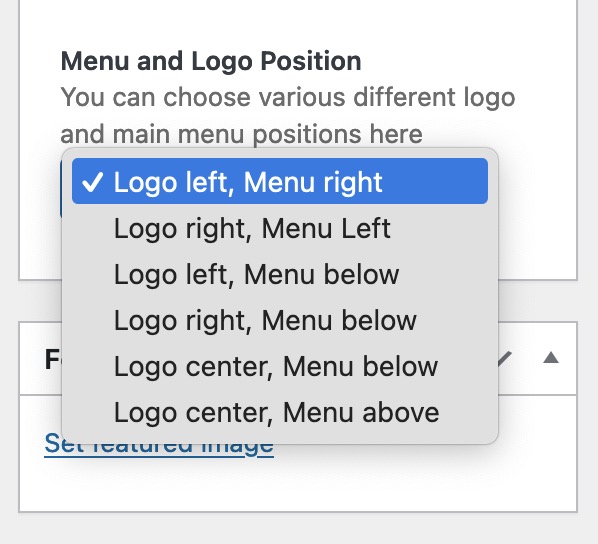
place that code snippet to your child-theme functions.php:
function register_meta_elements($avf_builder_elements){
$avf_builder_elements[] = array(
  "slug"  => "layout",
  "name"  => __("Menu and Logo Position", 'avia_framework'),
  "desc"  => __("You can choose various different logo and main menu positions here", 'avia_framework'),
  "id"  => "header_layout",
  "type"  => "select",
  "std"   => "",
  "no_first"=>true,
  "subtype" => array( __('Logo left, Menu right', 'avia_framework')   =>'logo_left main_nav_header menu_right',
            __('Logo right, Menu Left', 'avia_framework') =>'logo_right main_nav_header menu_left',
            __('Logo left, Menu below', 'avia_framework')   =>'logo_left bottom_nav_header menu_left',
            __('Logo right, Menu below', 'avia_framework')  =>'logo_right bottom_nav_header menu_center',
            __('Logo center, Menu below', 'avia_framework') =>'logo_center bottom_nav_header menu_right',
            __('Logo center, Menu above', 'avia_framework') =>'logo_center bottom_nav_header top_nav_header menu_center',
            ));
return $avf_builder_elements;
}
add_filter('avf_builder_elements', 'register_meta_elements', 10, 1);
but for some options – there had to be additional header classes added. So there had to follow some Postprocessing.
see for example this based on Enfold Parallax: https://enfold.webers-webdesign.de/
under Main Menu “Front Page” click “Enfold Consulting” ;)
All set – doing what I did above got me back to the Enfold editor. Thank you, everyone, for your input – I do hope this helps someone else!
 Amanda
Guest
Hi there, Below is my previous message. Edit to share my web developer is no longer in business and has refused to give me the token for me to register with you directly. On the back I end I see the below info that he registered my site on WordPress with before building it with enfold.
my web developer is no longer in business, he has told me I need to contact you directly for support now. EEK.
When I log into WordPress, I can see the information regarding the purchase of Enfold and have shared in in the private content area below.
Can you please help me register so I have you for support please?
I am having a problem with the button option not styling. I can change the wordage on it, but styling and advanced is no longer active and I cannot set it’s location or link to another page. Please advise.
Dear Sirs,
Yes, I want to continue with the Enfold Theme. I have 11 sites running and only this 1 website is causing an issue. I cannot upgrade the website to the latest version of WP 6.7 until this is resolved. I created a clone of the site as a sandbox and tried everything you requested as follows – still cannot pull up the Enfold theme platform.
Here is what I did:
– Re-uploaded the theme
– Switched back to Classic Editor
– Layout Builder was changed to Activate bundled plugin
Any other thoughts? Are you working on a bug fix for this?
I appreciate your feedback!
Hi,
Glad Ismael could help, if you have any further questions please create a new thread and we will gladly try to help you. Thank you for using Enfold.
Best regards,
Mike
Hi,
Glad to hear that you have this sorted out, if you have any further questions please create a new thread and we will gladly try to help you. Thank you for using Enfold.
Best regards,
Mike
maybe it is just the fact that the new WP 6.7 switches back to block editor as standard.
Goto Enfold – Theme Options – Select your Editor : and switch back to classic Editor.
or is the problem that you want to use the block editor – but had no enfold elements anymore?
By the way. I can see the button at the top to activate the advanced layout editor – but the active click area is only on the half right. (as if only this part of the standard editor button area is active)
It is that field on the left that overlaps the Enfold button.

______________
not necessary:
it starts with ALB editor even in Block Editor Mode if you got this in your child-theme functions.php:
function trigger_alb_on_load(){
?>
<script>
(function($){
    $(window).on('load', function(){
      setTimeout(function() {
        $("#avia-builder-button").trigger('click');
      }, 300);
    });
})(jQuery);
</script>
<?php
}
add_action('admin_head-post-new.php', 'trigger_alb_on_load');
Hi, I upgrade to WP 6.7 and me website https://www.bokalind.is and I get error both on head of webside and in for each product
they have send to me email,with this:
#0 /var/www/virtual/bokalind.is/htdocs/wp-content/themes/enfold/config-templatebuilder/avia-shortcodes/product_snippets/product_snippet_tabs.php(141): wc_clear_notices()
#1 /var/www/virtual/bokalind.is/htdocs/wp-content/themes/enfold/config-templatebuilder/avia-template-builder/php/class-shortcode-template.php(1178): avia_sc_product_tabs->shortcode_handler()
#2 /var/www/virtual/bokalind.is/htdocs/wp-includes/shortcodes.php(434): aviaShortcodeTemplate->shortcode_handler_prepare()
If you go to https://bokalind.is/vara/ensk-islensk-ordabok-soren-sorensson/ that are selling enlish-icelandic dictionary I have 25 notice like that:
Deprecated: Function wp_targeted_link_rel is deprecated since version 6.7.0 with no alternative available. in /var/www/virtual/bokalind.is/htdocs/wp-includes/functions.php on line 6114
Deprecated: Function wp_targeted_link_rel_callback is deprecated since version 6.7.0 with no alternative available. in /var/www/virtual/bokalind.is/htdocs/wp-includes/functions.php on line 6114
Deprecated: Function wp_targeted_link_rel_callback is deprecated since version 6.7.0 with no alternative available. in /var/www/virtual/bokalind.is/htdocs/wp-includes/functions.php on line 6114
This is in all sales products
I have try to go back to WP 6.2.2 but it was not possible – What should I do?
Regards
Omar SG
Hi,
Thank you for the update.
In the database the links to the pictures seem to be wrong: http://test.kriesi.at/enfold-gym/wp-content/uploads/sites/18/2016/02/hero-2.jpg
Have you tried using a search and replace method to update the URL (http://test.kriesi.at) with the actual URL of your OVH site? There are plugins available that can help you do this easily.
// https://wordpress.org/plugins/better-search-replace/
// https://wordpress.org/plugins/search-and-replace/
Best regards,
Ismael
Hi,
Thank you for the update.
To ease your concerns about updating the theme, we recommend requesting your hosting provider to create a full site backup, or alternatively, you can create one yourself using plugins like UpdraftPlus or Jetpack Backup. These plugins allow you to back up your entire site so that you can quickly revert to a previous version if any issues occur during the update.
For more details on how to update the theme, check the links below.
// https://kriesi.at/documentation/enfold/theme-update/
// https://kriesi.at/archives/the-complete-guide-to-updating-enfold
Best regards,
Ismael
Hi,
Thank you for the inquiry.
You can also assign custom cssclass names to the Image element, allowing you to target them specifically. Please check the documentation below for more info: https://kriesi.at/documentation/enfold/add-custom-css/#enable-custom-css-class-name-support
Best regards,
Ismael
I tried to make some changes to my layersliders today, and was unable to save anything. There is a server error pop up, but the error code is not displayed. I went through and updated my plugins/WP core, and finally I did the latest Enfold update. Unfortunately the server error still pops up everytime I try to save a layerslider.
I disabled every plugin, and the issue still persisted. I updated the database inside the layerslider plugin and the issue still exists. I contacted my host (Hostgator) who worked for a long time, and they could not figure it out. They recommended installing the plugin separately instead of using your bundled version, but I don’t really want to do that.
Can you see what is going on please?
I had issue today after upgrading to wp 6.7. The issue was when disabling or removing LayerSlider the visual editor wasn’t showing. If you have removed LayerSlider just change setting under Layout builder to “Activate bundled plugin” for LayerSlider and upload Enfold again.
I also noticed that activating classic editor fixed issue but you might wanna use Block editor on posts or other post types.
I had issue today after upgrading to wp 6.7. The issue was when disabling or removing LayerSlider the visual editor wasn’t showing. If you have removed LayerSlider just change setting under Layout builder to “Activate bundled plugin” for LayerSlider and upload Enfold again.
I also noticed that activating classic editor fixed issue but you might wanna use Block editor on posts or other post types.
Hi – I have been working on website issues for over 8 hours today – no fixes. I have 11 websites running your theme. I did have a problem with WordFence which they are aware of – however, just one of 11 websites is giving me an issue not only with WordFence but when I update to WP 6.7 Enfold no longer has the visual editor. Only block editing is available – again, odd as all other 10 websites are now fine. Can you look to update to 6.7 and see what happens to the theme?
I would give you access to the website – but I am concerned WordFence will block you.
Please let me know if WP 6.7 has effected anyone else with the theme.
Hi,
Glad Ismael could help, if you have any further questions please create a new thread and we will gladly try to help you. Thank you for using Enfold.
Best regards,
Mike



