Viewing 30 results - 421 through 450 (of 243,704 total)
  • Author
    Search Results
  • #1490322

    Hi,

    Thank you for the inquiry.

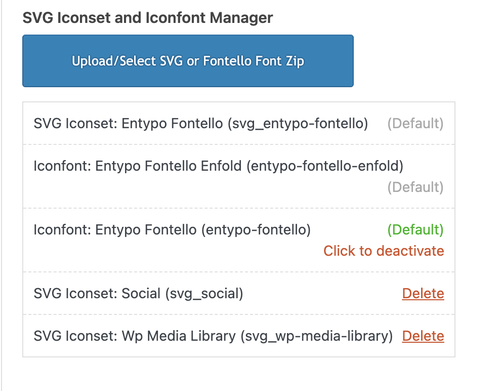
    Are you trying to upload this in Enfold > Import/Export? The name of the top folder in the zip file should be “SVG”. Currently, it’s named “Medical_Icons_SVG”, so the theme can’t recognize it. Please rename the top folder, then archive or zip it again before uploading it to the icon manager.

    Please check this documentation for more info: https://kriesi.at/documentation/enfold/svg-icon-sets/

    Best regards,
    Ismael

    Hey milkrow,

    Thank you for the inquiry.

    The sidebar on archive or category pages for custom post types, such as Portfolio, can be controlled in Enfold > Sidebar Settings > Sidebar On Archive Pages settings. Aside from this option, there are no other settings to adjust the appearance of the sidebar, so you will need to use custom css modifications. To control the widgets in the sidebar, go to the Appearance > Widgets and look for the Displayed Everywhere widget area.

    Best regards,
    Ismael

    #1490309
    sjahan
    Participant

    Hi, I’m trying to upload an SVG zip file for a set of icons but I keep getting an error message. My hosting is via GoDaddy’s Managed WordPress hosting so I do not have CPanel access and the provider is not able to increase any limits or anything. I’ve used this hosting plan with other enfold sites and haven’t had an issue.

    Is there a way to manually upload these in the child theme via FTP?

    Error message: Couldn’t add the font because the server didn’t respond. Please reload the page, then try again

    #1490300

    Hi,

    Thanks for the update, we’ll close this thread for now then. Please open a new thread if you should have any further questions or problems.

    Best regards,
    Rikard

    The password protection shouldn’t matter, you can still see the links aren’t working. But I removed the password.

    I did some tinkering, and I have discovered something.

    Compare one portfolio item vs. another. They have the same template but their Title Bar settings are different.
    The Title Bar is set to “hide both” and the links don’t work here:

    The Title Bar is set to “default”, and the links do work here:

    So there is something that is causing the links to stop working if “hiding both” is selected. I think it is the existence of drop-down menu items in the header where those regions overlap the sidebar. See this screenshot:

    https://drive.google.com/file/d/1gac80t1KhrN_RVFbez1uoBZXRLn9RSR_/view?usp=sharing

    You can see that the region for the drop-down menus overlaps the sidebar menu items at the top. I added two additional categories in the menu, and those work because they fall below the drop-down menu region.

    As a work around, I can show the title bar (though, for various reasons particular to this site’s content, I wanted to hide the title and use an h1 in the custom layout), but I think this should be addressed so that one can have a drop-down menu, and sidebar navigation that do not conflict (out-of-the-box). I could also add padding to the menu…but I shouldn’t have to force the sidebar menu down on the page to avoid overlap with the drop-down menu region–if the region were larger, it would still conflict with moderate padding.

    Can you fix this?

    Just in case there was an issue between the Boxed vs Stretched layout, I switched to the stretched layout (but it turns out the same issues existed in Boxed and Stretched).

    Also: Before I found this through inspecting the menu, I’d considered these options below. I’m including them in case it’s helpful:

    I also tried setting the page’s sidebar settings to use “Sidebar Pages” and moved the navigation widget to the default Sidebar Pages widget area. Same result, so it doesn’t appear to be an issue with the custom widget area.

    I added Enfold Child Latest Portfolio links to the Sidebar Pages widget area and those links work (even when “hide both” is selected). ((But this is because they appear lower on the page and don’t conflict with the Z-index of the drop-down menus, even when those drop-down menus aren’t active.))

    I have since removed these test options and put the navigation menu widget back in the custom widget area and changed the settings back to display these in my custom posts.

    • This reply was modified 1 month, 3 weeks ago by milkrow. Reason: Note regarding changes made once tests were completed
    • This reply was modified 1 month, 3 weeks ago by milkrow. Reason: added screenshot link
    #1490290

    Hi,
    Glad that Ismael could help, if you have further questions please open a new thread and we will try to help. Thanks for using Enfold.

    Best regards,
    Mike

    #1490260
    pfk-kbh
    Participant

    I am using the knowledge base plugin from Echo plugins with my Enfold theme. On my article pages I have the issue that the Table of Contents in the right sidebar is not sticky, although it’s supposed to be.

    In the knowledge base documentation the following is mentioned about this: “This issue is caused by your active WordPress theme. The theme has applied an overflow property somewhere on the page, which stops the TOC from scrolling.”

    According to the same documentation the solution is to add the following css:
    /*
    The .container class needs to be change to the container class of your active themes classes. It could be even the HTML Tag or BODY Tag.
    */
    .container {
    overflow: initial !important;
    }

    Can someone tell me if this will work and if it does where to paste this code?

    #1490256

    Hi Ismael,

    I’ve reinserted the script you provided, placing it directly beneath the original script in the Enfold child theme functions file (copied/pasted to https://snipboard.io/240r8s.jpg). Please let me know if you see anything helpful there. Thanks.

    Last week I deactivated the Molongui Authorship and it made no difference with the sort order. If there is a conflict, I don’t see it there.

    Hi,

    Great, I’m glad that you found a solution and thanks for sharing it. We’ll close this thread for now then, please open a new thread if you should have any further questions or problems.

    Best regards,
    Rikard

    #1490238

    Hey carmen,

    Thank you for the inquiry.

    The site is not using the Enfold theme when we checked. Did you disable it? If you need to update the theme and it’s not available in the dashboard or theme options, try to download the latest version from your ThemeForest account and upload it to your server via FTP. Please check this documentation for more info.

    https://kriesi.at/documentation/enfold/theme-update/#update-via-ftp

    Best regards,
    Ismael

    #1490231

    In reply to: Caching hook

    Hi,

    Thank you for the update.

    What do you mean by “notification”? Would you mind providing an example or reference? If you’re looking for a list of hooks, you can try the following.

    // reset post meta and delete all css files
    add_action( 'ava_after_theme_update', array( $this, 'handler_ava_reset_css_files' ), 100, 1 );
    add_action( 'ava_after_import_demo_settings', array( $this, 'handler_ava_reset_css_files'), 100, 1 );
    add_action( 'avia_ajax_after_save_options_page', array( $this, 'handler_ava_reset_css_files'), 100, 1 );

    These are from enfold/config-templatebuilder/avia-template-builder/php/class-post-css-management.php file. Feel free to update us if you need more info.

    Best regards,
    Ismael

    #1490222
    carmen
    Guest

    please help me with compuscan.us, it didn’t update the theme

    #1490219

    Hey Sarah,

    Could you try updating the theme to the latest version (7.1.3) to see if that helps please? https://kriesi.at/documentation/enfold/theme-update/. If not, then please post admin WordPress login details in private, along with a detailed description of how to reproduce the problems that you are seeing on your end.

    Best regards,
    Rikard

    #1490209
    rtwcs_web
    Participant

    Over the last few days when attempting to edit pages using Advanced Layout Builder page edit, it just throws up a blank page with a button for the Default Editor that just provides a small non-resizable box showing the HTML source.

    After consulting the hosting provider DreamHost they revealed a console message:

    “wp.editPost.PluginBlockSettingsMenuItem is deprecated since version 6.6.
    Please use wp.editor.PluginBlockSettingsMenuItem instead.”

    The suggestion was that there is some incompatibility between our version of Enfold 7.1.3 and WordPress 6.8.3

    #1490202
    sarahheisinger
    Participant

    Hallo Enfold-Team,

    seit zwei Tagen reagiert Enfold nicht mehr korrekt. Ich verliere so langsam meine Geduld und bin wirklich ratlos…

    Beispiel 1: Ich gebe einer Zelle einer Rasterzeile einen neuen Innenabstand. Resultat: Der Innenabstand verschwindet komplett und auch die Hintergrundfarbe wird nicht mehr ausgegeben.

    Beispiel 2: Ich gebe einer Farbsektion einen neuen Innenabstand. Resultat: Der Innenabstand verschwindet komplett und auch die Hintergrundfarbe wird nicht mehr ausgegeben.

    Die Webseite war, bis auf kleine Korrekturen im mobile Design, komplett fertig. Nun traue ich mich nicht mehr Änderungen vorzunehmen, da ich die Webseite dadurch zerschieße.

    Woher kommen diese plötzlichen Fehler?

    Die Seite ist ein ehrenamtliches Projekt für die Grundschule meiner Kids und müsste bald fertig werden. Bitte helft mir.

    Danke und Grüße
    Sarah

    Übersetzung:
    Hello Enfold Team,

    Enfold hasn’t been responding correctly for two days. I’m slowly losing patience and am truly at a loss…

    Example 1: I’m giving a new padding to a cell in a grid row. Result: The padding disappears completely, and the background color is no longer displayed.

    Example 2: I’m giving a new padding to a color section. Result: The padding disappears completely, and the background color is no longer displayed.

    The website was completely finished, except for minor tweaks to the mobile design. Now I don’t dare make any more changes because I’ll ruin the website.

    Where are these sudden errors coming from?

    The site is a volunteer project for my kids’ elementary school and should be finished soon. Please help me.

    Thanks and best regards,
    Sarah

    #1490191

    Hey Lion,

    Thanks for sharing!

    I’ve turned your customization into a plugin and uploaded it to the Enfold Library at https://github.com/KriesiMedia/enfold-library/tree/master/codesnippets%2C%20tricks%2C%20plugins/Enfold/integration%20plugins/3rd%20party%20plugins/Enfold%20Complete%20Image%20Protection.

    Best regards,
    Yigit

    P.S.: Please feel free to delete the file from your server.

    9zeroagentur
    Participant

    Hallo Enfold-Team,

    seit dem Update auf Enfold 7.1.2 funktioniert der visuelle Editor im Textblock (avia_textblock) nicht mehr korrekt.
    Der Reiter „Visuell“ bleibt komplett leer, nur im „Code“-Tab ist Inhalt sichtbar.

    Bereits geprüft:

    – Enfold und WordPress sind auf dem neuesten Stand
    – Alle Caches (Theme, Browser, Server) wurden geleert
    – CSS/JS-Merging in den Enfold Performance-Einstellungen wurde deaktiviert
    – Alle Plugins wurden testweise deaktiviert
    – Keine individuellen Code-Anpassungen im Child Theme, die TinyMCE betreffen

    Beobachtung:
    Der Editor-Bereich im Backend wird angezeigt, bleibt aber leer

    Frage:
    Gibt es derzeit bekannte Probleme mit Enfold 7.1.2 und dem visuellen Textblock-Editor?
    Falls ja, gibt es bereits einen Fix oder empfohlenen Workaround?

    Ich kann bei Bedarf temporäre Zugangsdaten per privater Nachricht zur Verfügung stellen.

    #1490180
    Lion
    Guest

    Hi Yeet, read private content please

    #1490169

    Hey rixi,

    Thank you for the inquiry.

    Are you referring to the tablet view of the contact form fields? Please add the following code in Enfold > General Styling > Quick CSS field.

    @media only screen and (max-width: 1024px) {
      /* Add your Mobile Styles here */
      .responsive .avia_ajax_form .form_element {
        width: 100%;
        clear: both;
        margin-right: 0;
        margin-left: 0;
        float: none;
      }
    }

    Another option is to make the columns stack to full width on tablet view.

    Screenshot-2025-10-14-at-1-10-35-PM

    Best regards,
    Ismael

    #1490166

    Hey birdfr0g,

    Thank you for the inquiry.

    You have to extract the enfold.zip file from the original Themeforest package first, before uploading it to your WordPress installation. Please check this documentation for reference: https://kriesi.at/documentation/enfold/install-enfold-theme/

    Let us know if you need more info.

    Best regards,
    Ismael

    #1490159

    Hi,

    Thank you for the update.

    Did you install a classic editor plugin? Please disable it, then adjust the Enfold > Theme Options > Select Your Editor settings to use the classic editor. If you need to remove the shortcode field, you’ll have to remove the snippet from the functions.php file. There is no toggle for it by default.

    Let us know if you need more info.

    Best regards,
    Ismael

    #1490154
    birdfr0g
    Participant

    I have tried to add the themeforest-eTIYN1qt-enfold-responsive-multipurpose-theme-zip through WordPress, but I get an error message that says that there is no style.css file. I have unzipped the file to be sure that there is indeed a style.css file. Your instructions say I am supposed to upload the themeforest zip file, is this incorrect? Am I supposed to upload the enfold.zip file. I realize that I am new to this. I went through all of the support files (I used search to limit the files), and couldn’t find anything on this topic

    My client has not given me access to FTP, so I cannot upload the files that way.

    Please advise. Thank you in advance.

    #1490146

    Thanks. I guess that’s the only route for this one. I wish we knew the answer though. There should be no reason the navigation out of the box would conflict with Enfold..

    Hi,

    Thanks for the update. Please open a new thread if you should have any further questions or problems.

    Best regards,
    Rikard

    #1490139

    Topic: Caching hook

    in forum Enfold
    xela
    Participant

    We use the Enfold theme and WP Fastest Cache. When Enfold creates a new dynamic CSS file under “wp-content/uploads/dynamic_avia/avia-merged-styles-*.css,” the cache still wants to serve the old CSS file, which has already been deleted. This results in an unformatted page.
    WP Fastest Cache has options for clearing the cache when pages are created or modified. However, this doesn’t seem to be sufficient.

    Do you have a hook that executes when a new CSS file is generated that we can use to clear the cache?

    AndreasWinkler
    Participant

    Hallo liebes Support Team,

    ich habe Probleme mit meiner Kontaktseite, die sich ohne Bilder öffnet.
    Im Entwicklermodus sehe ich einige Fehlermeldungen: “insecure stylsheet”. Es handelt sich um mehrere Enfold CSS Dateien (z.B. http://www.aw-impulse.de/wp-content/themes/enfold/CSS/layout.min.css?ver=7.1 sowie weitere http Dateien grid.min.css, base.min.css usw.).

    Meine Website ist bereits auf HTTPS umgestellt, daran kann es nicht liegen.

    Ich bitte um Hilfe.

    Vielen Dank!

    #1490132

    Hi,

    Great, I’m glad that Mike could help you out. We’ll close this thread for now then, please open a new thread if you should have any further questions or problems.

    Best regards,
    Rikard

    #1490129

    Hey Alexandre,

    Please try the following in Quick CSS under Enfold->General Styling:

    .avia_transform .av_fullscreen .active-slide .avia-caption-title, .avia_transform .av_fullscreen .active-slide .avia-caption-content {
      animation: none;
    }

    Best regards,
    Rikard

    #1490123

    Hello everyone,
    For those who are interested, you can download the latest version of the Italian language

    Download here
    Translation: Italian language
    Version: Enfold 7.1.3
    Released on: 13th october 2025
    Strings: 6662
    All translations are synchronised with the source files

    Regards
    Luigi

    Protohill
    Participant

    Hi

    After a recent theme update, my website stopped loading due to a critical error. I restored the theme from a previous backup, and the site is now partially working, but I’m facing the following issue:

    Main pages (e.g. /contact, /team, etc.) display the message:

    “No results found. We’re sorry, but no results could be found for your request.”

    Subpages inside these main pages open correctly.

    I’ve already tried the following troubleshooting steps:

    Regenerated permalinks.
    Checked and rebuilt the .htaccess file.
    Verified that the correct pages are assigned under Settings → Reading and Enfold → Theme Options.
    Cleared all caches and tested with minimal active plugins.
    Created new test pages (they also show the same “No results” message).

    It seems that Enfold is interpreting static pages as empty search or blog results, even though they’re correctly configured.

    Could you help me?

    Thank you very much for your help and support.
    I can provide temporary access or additional information if needed.

    Best regards,

    • This topic was modified 1 month, 3 weeks ago by Protohill.
Viewing 30 results - 421 through 450 (of 243,704 total)