Hey Yves,
Please make sure that you have backups of your site before you update anything. https://kriesi.at/documentation/enfold/theme-update/.
Best regards,
Rikard
Hello,
I couldn’t find any solution so far. I removed every plugin nothing changed this behavior.
When I edit my page, for example adding another element and adding some text and clicking on “Save” the half of the page will be deleted automatically.
i don’t know why.
I have installed the following:
Enfold: 6.0.9
PHP: 8.2.27
Wordpress: 6.7.1
Can somebody help me please?
Thank you very much in advance.
Hey,
I’ve upgraded Enfold on that site (https://planfait.fr/) from version 5.6.8 to 6.0.9
It works but I have that error remained and i don’t know what to do with it.
Anyone to give me a hand on that one please ?
Thx
 Yves
YvesGuest
Hi we got on espaciogrecia.com enfold 4.9 and we want last version its possible without broke anything we got done on the website
Hi,
Thanks for the update, we’ll close this thread for now then. Please open a new thread if you should have any further questions or problems.
Best regards,
Rikard
Hi,
Thanks for the update. Please open a new thread if you should have any further questions or problems.
Best regards,
Rikard
Hi,
Thanks for the update, we’ll close this thread for now then. Please open a new thread if you should have any further questions or problems.
Best regards,
Rikard
Hi,
Thanks for the update, we’ll close this thread for now then. Please open a new thread if you should have any further questions or problems.
Best regards,
Rikard
Hello Ismael,
I tried login in with the enfold support account and had no problem accessing the wp-admin page, I double checked and the role of the account is admin.
I published the Test product again.
Best regards,
Michael
I have a separate individual licence for some of my customers. How to manage that best in Enfold?
Remove the embedded one by: Layout-Builder – Integrated (Bundled) LayerSlider Plugin – “Remove theme plugin files only and keep slides”
or is there something else I need to consider?
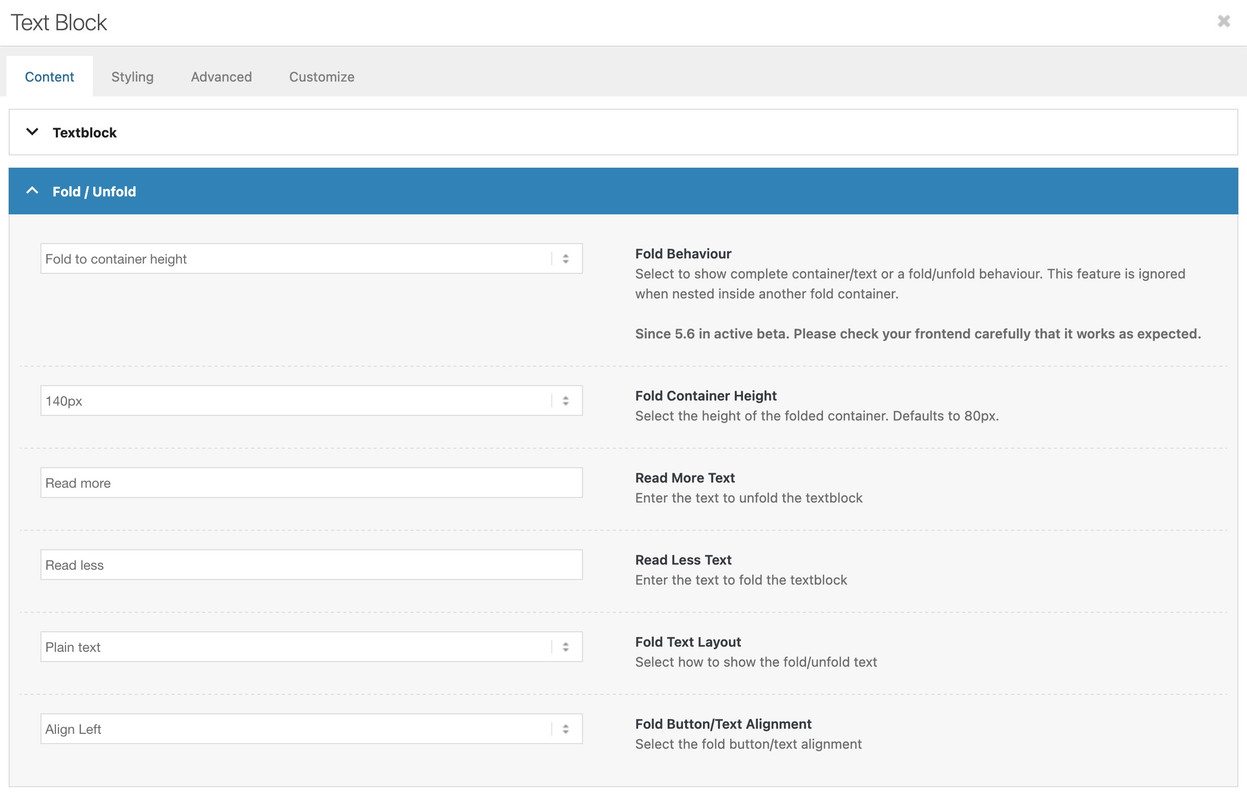
yes – i think you are right . Allthough there are translatables in the code of enfold
__( 'Read More Text', 'avia_framework' ),
__( 'Read more', 'avia_framework' ),
__( 'Read Less Text', 'avia_framework' ),
__( 'Read less', 'avia_framework' ),
on many languages these ( f.e. on german) tranlations are missing.
but for dutch there is: Lees minder and Lees meer inside the lang files – so i guess you only want to change that translation? One solution could be to have your own translation files – or to use a plugin to change these translations.
I don’t know how you have implemented multilanguage support for your installation. With WPML you have separate pages. There you could rename it manually in the element.
For mobile view: I need code for only the Caption Text, and maybe the Caption Title. thanks!
Hi,
Try this CSS in your Enfold Theme Options ▸ General Styling ▸ Quick CSS field:
#top.page-id-16 .av-horizontal-gallery-slider {
    display: flex;
    justify-content: center;
}

Best regards,
Mike
Hi,
Please try disabling your WP Rocket plugin and disable Enfold Theme Options ▸ Performance ▸ JS & CSS file merging and compression and enable Enfold Theme Options ▸ Performance ▸ Delete old CSS and JS files and clear any CDN and server cache that you may have enabled. This may that 24 hours to clear.
Then clear your browser cache and check.
Best regards,
Mike
Hi both site health and woocommerce system info show the 4gb max limit. I set 2gb because 4gb is too large and overkill.
We run our own dedicated servers so it’s no issue with the provider. We set our own settings.
I can confirm that there is nothing wrong with the PHP, MySQL, mariadb or Plesk config.
The issue is for some reason some actions in the enfold builder are unable to allocate the required memory.
My suggested solution forces WordPress to recognise the correct memory limit.
As above the problem does not occur in php8 but started in php8.1 and above. I also checked the individual php fpm memory settings for each version.
Adding the memory limit to the wp-config forces WordPress to accept the new value and appears to stop the process hitting a false memory limit.
If this has fixed the problem then you guys need to investigate a possible memory leak or bug in the Avia builder in php8.1 and above.
Hi,
Thanks for the update, we’ll close this thread for now then. Please open a new thread if you should have any further questions or problems.
Best regards,
Rikard
Hi,
Thanks for the update, we’ll close this thread for now then. Please open a new thread if you should have any further questions or problems.
Best regards,
Rikard
Hi Rikard,
We used query monitor – It doesnt tell us anything useful.
It appears there is a memory leak somewhere or something in Enfold is picking up the wrong memory limit when it isnt specified.
For our site we just had to tell wordpress what the memory limits are by adding the following to wp-config.php
For us the 2gb limit per action looks like this:
define('WP_MEMORY_LIMIT', '2048M');
define('WP_MAX_MEMORY_LIMIT', '2048M');
For some reason the error code in the console was suggesting that the memory limit was around 512mb (written in bytes).
For context we actually have a 4gb memory limit – So there shouldnt have been a problem anyway but specifying a figure in wp-config seems to have solved the issue. I’ll report back if I can recreate it again.
The problem does not occur in PHP 8.0 but does occur in all versions above this.
With this in place the problem seems to have stopped and we are running PHP 8.2 again now. So it looks like there is an issue with the memory allocated to some actions in Enfolds interface not able to use the available ram fully.
Someone else reported a simillar issue here:
I was writing a reply on the post above explaining this when you closed it too early!!!!
Can you reopen it and add my suggestion above!
Hi,
Thanks for the update, we’ll close this thread for now then. Please open a new thread if you should have any further questions or problems.
Best regards,
Rikard
Hi,
Thanks for letting us know. Please open a new thread if you should have any further questions or problems.
Best regards,
Rikard
Hi,
Thanks for the update, we’ll close this thread for now then. Please open a new thread if you should have any further questions or problems.
Best regards,
Rikard
Hi,
Thanks for the update, we’ll close this thread for now then. Please open a new thread if you should have any further questions or problems.
Best regards,
Rikard
I was looking at the enfold support to try to figure this out myself? will this solution work for the above issue?
a:focus {
border:1px solid red !important;
}
 Sandor
Guest
Hi,
I have been a satisfied user of enfold since 2014.
My Purchase codes: e77e1dbe-9f18-4fb7-8735-35f5479ec567 – if necessary.
I would like to report this problem because it is a script error.
I need to use the MEC plugin (Modern Events Calendar by Wednus – https://webnus.net/modern-events-calendar) on my website – I searched for a suitable calendar plugin for a long time and decided on this one.
Unfortunately, MEC conflicts with Enfold + Woocommerce, monthly view in MEC plugin displaying incorrectly. I am attaching a printscreen. Only the monthly view is faulty, everything else works fine.
For testing purposes, I installed the Enfold and the MEC plugin on a brand new WP site (on a subdomain) – it works fine.
When I also installed Woocommerce, the monthly calendar view on the new website broke.
If I turn off Woocommerce, the monthly view works fine, if I turn back, falls apart again.
This was a “virgin” WP website.
But the MEC works with the WP base template even if I enable Woocommerce.
So there is a conflict with Enfold, between the MEC plugin and Woocommerce both.
– Base WP template + MEC + Woocommerce = works fine,
– Enfold + MEC = works fine,
– Enfold + MEC + Woocommerce = doesn’t work.
So, the error is in the Enfold.
I consulted MEC support, they said the problem is between Enfold and Woocommerce: “The Enfold theme likely includes scripts that conflict when both WooCommerce and MEC are enabled simultaneously.” – they wrote me.
Is it possible to fix this error?
Thank you.
Best regards,
Sandor
Hi,
I have been a satisfied user of enfold since 2014.
My Purchase codes: e77e1dbe-9f18-4fb7-8735-35f5479ec567 – if necessary.
I would like to report this problem because it is probably a script error.
I need to use the MEC plugin (Modern Events Calendar by Wednus – https://webnus.net/modern-events-calendar) on my website – I searched for a suitable calendar plugin for a long time and decided on this one.
Unfortunately, MEC conflicts with Enfold + Woocommerce, monthly view in MEC plugin displaying incorrectly. I am attaching a printscreen. Only the monthly view is faulty, everything else works fine.
For testing purposes, I installed the Enfold and the MEC plugin on a brand new WP site (on a subdomain) – it works fine.
When I also installed Woocommerce, the monthly calendar view on the new website broke.
If I turn off Woocommerce, the monthly view works fine, if I turn back, falls apart again.
This was a “virgin” WP website.
But the MEC works with the WP base template even if I enable Woocommerce.
So there is a conflict with Enfold, between the MEC plugin and Woocommerce.
– Base WP template + MEC + Woocommerce works fine,
– Enfold + MEC works fine,
– Enfold + MEC + Woocommerce doesn’t work.
So, the error is in the Enfold.
I consulted MEC support, they said the problem is between Enfold and Woocommerce: “The Enfold theme likely includes scripts that conflict when both WooCommerce and MEC are enabled simultaneously.” – they wrote me.
Is it possible to fix this error?
Thank you.
Best regards,
Sandor
Hi Enfold,
I am trying to translate the Fold/Unfold text which I have set-up in Dutch. However, I can’t seem to find the translation in WPML anywhere, not in the page translation menu but also not in the theme settings. I can only find the label for it, but not the input I gave it.
Please see the link attached and toggle between the languages to see that the ‘Lees meer’ button is not able to be translated (or I am missing something)
Looking forward to your reply.
hi team,
i read in a previous post that a user manages to import a demo locally into his server. I m not a pro so i dont get the point. The scary point is that there is a problem to import automatically from the dashboard
is the idea of removing all the theme (enfold) and re instal it a valide one ? anybody tried yet ?
Hi,
Thank you for the update.
The automatic update in the dashboard will no longer work in the current version (4.7.3). You will have to download the latest version (6.0.9) from your Themeforest account and update the theme manually via FTP. Please check this documentation for more info: https://kriesi.at/documentation/enfold/theme-update/#update-via-ftp
Best regards,
Ismael
yes – and your mentioned code above : a.cart_dropdown_link leads me to the wrong direction.
But better is to post the link to that page – so i can inspect it there. – is it the priver page?
(f.e. the demo page Enfold Shop does not have that account login icon inside main nav. it is on header_top.)
#top #header .av-main-nav  #menu-item-wc-account-icon > a {
  color: #f19809;
  font-size: 28px;
}
or if you like to have a hover effect on this:
#top #header .av-main-nav  #menu-item-wc-account-icon > a {
  color: #f19809;
  font-size: 28px;
  transition: color 0.7s ease;
}

#top #header .av-main-nav  #menu-item-wc-account-icon > a:hover {
  color: #1c60c7;
}
the data-av_icon is on the following span tag:
#top a.cart_dropdown_link {
  right: 15px;
}

#top a.cart_dropdown_link span[data-av_icon] {
  font-size: 28px;
  color: var(--enfold-header-color-color);
}

/* === to influence the counter === */
#top a.cart_dropdown_link span.av-cart-counter {
  height: 20px;
  left: 64%;
  font-size: 18px;
  line-height: 20px;
  border-radius: 50%;
  background: var(--enfold-header-color-primary);
  color: var(--enfold-header-color-constant-font);
  margin: -22px 0 0 2px;
  padding: 2px 6px;
}
i inserted above the default colors – change them to your needs



