-
Search Results
-
Hello,
I was wondering if there is a way to add another search box on a different page but have it search differently than the global search? I’m looking for a way to keep the global search box on the home page but add search boxes elsewhere that will only search specific posts or post types. I’m researching how to create additional post forms now but I fear that Enfold uses different code. It would be helpful if you could point me to the code and/or files that would allow me to accomplish this.
Thanks for your help,
ChrisFirst of all, thanks a lot for providing the Enfold theme, I like it very much – congratulations for your work!
A simple question: Where are the Enfold theme options stored?
The background of my question is a short story: I’m maintaining several domains with different systems. Some are simple file based, one is based on “Joomla! ”, one is a “MediaWiki” installation and one is WordPress based, with “Enfold” as theme.
To secure backups of these different systems I maintain a Unix shell script, which safes daily backups to a cloud service, triggered by “cron”. In general this works fine; the script safes the entire file system and a database dump, using “tar” and “mysqldump” (database dumps only if the system is based on a database).
A backup is only useful if a restore is tested. Therefore I frequently test backups by restoring them.
It seems, a restore of a WordPress installation with Enfold theme might be a special theme. I installed a restore on a different domain (twice to be sure not to report wrong things to you) . Therefore I had to search and replace all occurences of the prior domain name to the new domain name in the SQL dump. (By the way: The need of this step seems to be a conceptional bug of WordPress; e. g. Joomla doesn’t need such a step – but this shouldn’t be part of a discussion here).
However, I could restore the WordPress and Enfold based installation at a different domain. Everything worked fine, with one exception: The Enfold theme options were missed.
That’s curious. Up to now, I expected everything of the prior installation had been stored in the backup and should be restored, both, in/from the backup of the file system and in/from the database dump.
Fortunately Enfold theme provides an option to export the theme options in a file and to import this options file in a new istallation. Thanks a lot for this feature!
And, fortunately too, I still had access to the prior system (which was not lost).
But, I can’t understand why these steps of export and import of the theme options are needed. Up to now I thought, an entire backup of the file system and the database should include everything, including the theme options, wherever they are stored.
Maybe my backup script is uncomplete. But, what the hell, did I miss?
Up to now it seems, the theme options are stored outside the file system and the database.
Again, please let me know, where are the Enfold theme options stored?Kind regards,
EckhardTopic: Some slight nags in theme.
I’m just about to relaunch my site using enfold and there’s some things that may be quite small, but still big enough to nag me :)
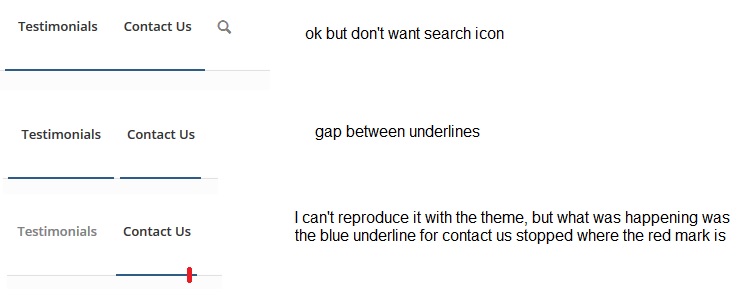
1) If the search tab from the main menu is removed, it seems the menu tab underline doesn’t extend properly beyond the last menu item. I just tried to reproduce it and I couldn’t, but now instead I get a gap between testimonials and contact us. I noticed this before but my developer fixed it, but then the “line not being extended” problem was there, and adding the search icon fixed this. I’d prefer not to have the search button in the main menu. I’m not sure if it’s because of some customisations in the child theme that the menu is reacting this way, but he said there’s no actual customisation to the menu.
Please see screenshot here: http://omg.wthax.org/6QGJ7t.jpg
2) I’m displaying rotating testimonials on my homepage and I want these above the contact form. At the start if you would be filling out the contact form, every time the testimonial rotated to a short to long text testimonial, the contact form would move position on the page to accommodate the longer/shorter testimonial. My developer did some customisation to fix this, but it’s still an issue on mobile and there’s still some movement within the assigned section for the testimonials, I’d prefer if the left/right scroll arrows didn’t move at all, or the “what our clients say” heading didn’t move either and it was just the actual text of the testimonial that extended or shrunk within the assigned section.
Customisations were also required in the following areas:
o – /homepage and /services – to reduce gap between service icons and service title (the large default gap meant the rendering on mobile made it difficult to see which service title was with which icon)
o – several customisations required on testimonials on homepage and /testimonials
o – I embedded a new map using the following: https://developers.google.com/maps/documentation/embed/ This provides full business information, link to reviews and shows rating etc. I also found some code to add to the Quick CSS from another website that allows the map to be responsive. The enfold editor map element doesn’t show business informatin/review count etc so wanted something that showed these.I think there must have been a few more customisations to achieve the requests I was making with certain changes but I’m not sure.
Any feedback would be greatly appreciated :)
Hi Everyone,
I just purchased enfold. Seems like a really promising theme.
I have some questions / comments / concerns:
1. I can’t see the admin text very well. The contrast is extremely low and I’m having to strain my eyes to read everything. Is anyone else experiencing this or am I just colorblind?2. I’m finding that these forums are also a little too whited out. Is there a feature to be able to change the colors I read them in? I know some forums provide that type of feature.
3. I noticed that the search bar for the forum is only available from the main forum page. Its not available within the enfold section. What’s the best way to search the enfold section? Should include the word enfold in every search or I am missing something?
Thanks,
T.Topic: Google Indexing Issues
Inside of my Google Webmaster Tools, it tells me that I have 183 missing pages on my site. Examples include:
• wp-content/themes/enfold/framework/
• this-is-a-nice-post/
• aenean-vulputate-eleifend-tellus-aenean-leo-ligula/
• another-title-for-our-pretty-cool-blog/
• lorem-ipsum-dolor-sit-amet-consectetuer-adipiscing-elit-aenean-commodo-ligula-eget-dolor-aenean-massa/
• kriesi-at/
• this-is-a-test/
My question is, am I supposed to delete all of the unused pages that are included with the theme? Essentially, I just modified the demo to suit my clients needs, but there are a lot of pages that will never be used. The site in and of itself is very basic, with fewer than 10 total pages.
Additionally, the site is not showing well in Google search results. The site shows up well in Google Local results, but does not show up in Organic results. In fact, the company’s Facebook and Google+ pages rank well in the Organic results, but the actual website does not. Thank you for any assistance you can provide!I am try to do the search box task, but the admin page showing me the Javascript conflicts between WordPress and Enfold theme, so could you remove this conflict because I am not able to edit or save the page.
Hi, everybody!
I want to put a logout button or link in the top menu.
I’ve searched the wordpress.org site but I didn’t see clearly the way to do it.
When I tried to get a logout & redirect to homepage link putting
<a href="<?php echo wp_logout_url( home_url() ); ?>" title="Logout">Logout</a>in the WP menu url field, and click Save Menu, the Menu rewrite ahref and become useless.Then, I found this as example and I think that I have to put it in enfold-child theme functions
add_filter('allowed_redirect_hosts','allow_ms_parent_redirect');
function allow_ms_parent_redirect($allowed)
{
    $allowed[] = 'multisiteparent.com';
    return $allowed;
}

<a href="<?php echo wp_logout_url( 'http://multisiteparent.com' ); ?>" title="Logout">Logout</a>
How can I get it?
Thanks!
Best regards!
Hi
I want to add my own icons to use in icon lists, boxes, menu items and more.
Searching the documentation and forum, I understand this is only possible by creating and uploading a new icon-font.When searching how to do this, I found either
1) This video (http://vimeo.com/channels/aviathemes/75743285) in which an iconfont manager is used – but I can’t find the manager in my theme settings (using ENFOLD 3.0.4)
OR
2) This code snippet to place in functions.php (I’m working with a child theme): https://kriesi.at/support/topic/change-standard-icon-doesnt-work-child-theme/ but it seems to replace specific icons while what I want is to add more icons, not replace existing ones.Please advise. If I’m working with a child theme under ENFLOD 3.0.4 how can I import additional icons to be used in theme elements.
Thanks,
SharonHello,
I can’t get the Full-Width Easy Slider or Layerslider Images to load in IE9. I’ve had our client test with Compatibility Mode On and Off, and they reported no difference. There’s just a blank, white space where the image is supposed to go.
I’m using WP 3.9.3 & Enfold 2.7. I know, I know, they should be updated, but we have a custom forum added into our site, and our back-end developer says it’d be tricky to update right now, and he doesn’t think updating WP / Enfold will fixthis issue (or will it?).
Is there anything I could try to make this work? I’ve done a lot of research, I’m not sure if it’s a memory issue, too many CSS files loading, or what. I know Enfold is supposed to be compatible with IE9, so there has to be some work-around. Any help / suggestions is appreciated. Thank you!!
URL:
JulieHi All,
I need to have all posts (in archives, categories, tags, search, etc) to be sorted by slug. I can achieve that with the following code placed in the archive.php file in the enfold-child:
<?php
// we add this, to show all posts sorted alphabetically by post name (slug) and not title
$posts = query_posts($query_string . '&orderby=name&order=asc&posts_per_page=-1');
?>
When I then display category archive it is sorted by slug (http://coelo.eu/paciorkiewicztest/wp/category/miscellany/).
However when I set up a page with avia builder and use Blog Posts content element this does not work (http://coelo.eu/paciorkiewicztest/wp/compositions/a-orchestral-works/).
Can you please advise in which file I should place my code so that changes are applied to the page with Bog Posts?many thanks,
PeterHello Team,
I have a problem with my logo. I want to start my site with https cert and I have a problem with my logo. I have defined in Database – table:avia_options_(my child name): “http://pl.homesquare.pl/files/uploads/2014/03/homesquare-logo.png” and similar with favicona:1:{s:4:”avia”;a:135:{s:9:”frontpage”;s:2:”10″;s:9:”undefined”;s:17:”Use Image as logo”;s:8:”blogpage”;s:0:””;s:4:”logo”;s:65:”http://pl.homesquare.pl/files/uploads/2014/03/homesquare-logo.png”;s:7:”favicon”;s:57:”http://pl.homesquare.pl/files/uploads/2014/03/favicon.png”;s:15:”websave_windows”;s:6:”active”;s:6:”markup”;s:0:””;s:15:”lightbox_active”;s:15:”lightbox_active”;s:9:”analytics”;s:0:””;s:16:”color-body_style”;s:9:”stretched”;s:15:”header_position”;s:10:”header_top”;s:20:”layout_align_content”;s:20:”content_align_center”;s:18:”sidebarmenu_sticky”;s:18:”conditional_sticky”;s:19:”sidebarmenu_widgets”;s:0:””;s:18:”sidebarmenu_social”;s:8:”disabled”;s:17:”responsive_active”;s:17:”responsive_active”;s:15:”responsive_size”;s:6:”1310px”;s:13:”content_width”;s:2:”80″;s:14:”combined_width”;s:3:”100″;s:12:”color_scheme”;s:4:”Blue”;s:24:”colorset-header_color-bg”;s:7:”#ffffff”;s:25:”colorset-header_color-bg2″;s:7:”#f8f8f8″;s:29:”colorset-header_color-primary”;s:7:”#719430″;s:31:”colorset-header_color-secondary”;s:7:”#8bba34″;s:27:”colorset-header_color-color”;s:7:”#666666″;s:28:”colorset-header_color-border”;s:7:”#e1e1e1″;s:25:”colorset-header_color-img”;s:0:””;s:33:”colorset-header_color-customimage”;s:0:””;s:25:”colorset-header_color-pos”;s:8:”top left”;s:28:”colorset-header_color-repeat”;s:9:”no-repeat”;s:28:”colorset-header_color-attach”;s:6:”scroll”;s:22:”colorset-main_color-bg”;s:7:”#ffffff”;s:23:”colorset-main_color-bg2″;s:7:”#f8f8f8″;s:27:”colorset-main_color-primary”;s:7:”#719430″;s:29:”colorset-main_color-secondary”;s:7:”#8bba34″;s:25:”colorset-main_color-color”;s:7:”#666666″;s:26:”colorset-main_color-border”;s:7:”#e1e1e1″;s:23:”colorset-main_color-img”;s:0:””;s:31:”colorset-main_color-customimage”;s:0:””;s:23:”colorset-main_color-pos”;s:8:”top left”;s:26:”colorset-main_color-repeat”;s:9:”no-repeat”;s:26:”colorset-main_color-attach”;s:6:”scroll”;s:27:”colorset-alternate_color-bg”;s:7:”#ffffff”;s:28:”colorset-alternate_color-bg2″;s:7:”#f8f8f8″;s:32:”colorset-alternate_color-primary”;s:7:”#719430″;s:34:”colorset-alternate_color-secondary”;s:7:”#8bba34″;s:30:”colorset-alternate_color-color”;s:7:”#666666″;s:31:”colorset-alternate_color-border”;s:7:”#e1e1e1″;s:28:”colorset-alternate_color-img”;s:0:””;s:36:”colorset-alternate_color-customimage”;s:0:””;s:28:”colorset-alternate_color-pos”;s:8:”top left”;s:31:”colorset-alternate_color-repeat”;s:9:”no-repeat”;s:31:”colorset-alternate_color-attach”;s:6:”scroll”;s:24:”colorset-footer_color-bg”;s:7:”#ffffff”;s:25:”colorset-footer_color-bg2″;s:7:”#f8f8f8″;s:29:”colorset-footer_color-primary”;s:7:”#719430″;s:31:”colorset-footer_color-secondary”;s:7:”#8bba34″;s:27:”colorset-footer_color-color”;s:7:”#666666″;s:28:”colorset-footer_color-border”;s:7:”#e1e1e1″;s:25:”colorset-footer_color-img”;s:0:””;s:33:”colorset-footer_color-customimage”;s:0:””;s:25:”colorset-footer_color-pos”;s:8:”top left”;s:28:”colorset-footer_color-repeat”;s:9:”no-repeat”;s:28:”colorset-footer_color-attach”;s:6:”scroll”;s:24:”colorset-socket_color-bg”;s:7:”#ffffff”;s:25:”colorset-socket_color-bg2″;s:7:”#f8f8f8″;s:29:”colorset-socket_color-primary”;s:7:”#719430″;s:31:”colorset-socket_color-secondary”;s:7:”#8bba34″;s:27:”colorset-socket_color-color”;s:7:”#666666″;s:28:”colorset-socket_color-border”;s:7:”#e1e1e1″;s:25:”colorset-socket_color-img”;s:0:””;s:33:”colorset-socket_color-customimage”;s:0:””;s:25:”colorset-socket_color-pos”;s:8:”top left”;s:28:”colorset-socket_color-repeat”;s:9:”no-repeat”;s:28:”colorset-socket_color-attach”;s:6:”scroll”;s:16:”color-body_color”;s:7:”#eeeeee”;s:14:”color-body_img”;s:0:””;s:22:”color-body_customimage”;s:0:””;s:14:”color-body_pos”;s:8:”top left”;s:17:”color-body_repeat”;s:9:”no-repeat”;s:17:”color-body_attach”;s:6:”scroll”;s:14:”google_webfont”;s:0:””;s:12:”default_font”;s:32:”Helvetica-Neue,Helvetica-websave”;s:9:”quick_css”;s:0:””;s:13:”header_layout”;s:36:”logo_left main_nav_header menu_right”;s:11:”header_size”;s:4:”slim”;s:18:”header_custom_size”;s:3:”150″;s:16:”header_title_bar”;s:20:”title_bar_breadcrumb”;s:13:”header_sticky”;s:13:”header_sticky”;s:16:”header_shrinking”;s:16:”header_shrinking”;s:14:”header_stretch”;s:8:”disabled”;s:17:”header_searchicon”;s:17:”header_searchicon”;s:13:”header_social”;s:0:””;s:21:”header_secondary_menu”;s:34:”secondary_left extra_header_active”;s:19:”header_phone_active”;s:0:””;s:5:”phone”;s:0:””;s:23:”header_replacement_logo”;s:0:””;s:23:”header_replacement_menu”;s:0:””;s:24:”header_mobile_activation”;s:18:”mobile_menu_tablet”;s:22:”header_mobile_behavior”;s:8:”disabled”;s:14:”archive_layout”;s:13:”sidebar_right”;s:11:”blog_layout”;s:13:”sidebar_right”;s:13:”single_layout”;s:13:”sidebar_right”;s:11:”page_layout”;s:13:”sidebar_right”;s:19:”smartphones_sidebar”;s:8:”disabled”;s:16:”page_nesting_nav”;s:16:”page_nesting_nav”;s:22:”display_widgets_socket”;s:3:”all”;s:14:”footer_columns”;s:1:”1″;s:9:”copyright”;s:29:”© Copyright – HomeSquare”;s:13:”footer_social”;s:8:”disabled”;s:10:”blog_style”;s:12:”single-small”;s:17:”single_post_style”;s:12:”single-small”;s:27:”single_post_related_entries”;s:24:”av-related-style-tooltip”;s:16:”blog-meta-author”;s:16:”blog-meta-author”;s:18:”blog-meta-comments”;s:18:”blog-meta-comments”;s:18:”blog-meta-category”;s:18:”blog-meta-category”;s:14:”blog-meta-date”;s:14:”blog-meta-date”;s:19:”blog-meta-html-info”;s:19:”blog-meta-html-info”;s:13:”blog-meta-tag”;s:13:”blog-meta-tag”;s:14:”share_facebook”;s:14:”share_facebook”;s:13:”share_twitter”;s:13:”share_twitter”;s:15:”share_pinterest”;s:15:”share_pinterest”;s:11:”share_gplus”;s:11:”share_gplus”;s:12:”share_reddit”;s:12:”share_reddit”;s:14:”share_linkedin”;s:14:”share_linkedin”;s:12:”share_tumblr”;s:12:”share_tumblr”;s:8:”share_vk”;s:8:”share_vk”;s:10:”share_mail”;s:10:”share_mail”;s:12:”social_icons”;a:2:{i:0;a:2:{s:11:”social_icon”;s:7:”twitter”;s:16:”social_icon_link”;s:25:”http://twitter.com/kriesi”;}i:1;a:2:{s:11:”social_icon”;s:8:”dribbble”;s:16:”social_icon_link”;s:26:”http://dribbble.com/kriesi”;}}s:17:”avia-nonce-import”;s:10:”e9e04f51db”;s:24:”avia-nonce-import-parent”;s:10:”c0e1bb7a4c”;s:18:”config_file_upload”;s:0:””;s:15:”iconfont_upload”;s:0:””;s:16:”updates_username”;s:0:””;s:15:”updates_api_key”;s:0:””;}}
When I change it to “https://www.homesquare.pl/files/uploads/2014/03/homesquare-logo.png” logo doesn’t work and I have some other issues. The same is with favicon. Why I can’t change it simply in database?
I can’t do it via enfold theme settings in wp-admin, because I have cut customization module by agency which made my site.
Please help!Topic: Tighter columns in Avia
I have been looking for a theme as good as Enfold and keep coming back to yours! My only problem is that I would like to have a lot less white space for some websites, so I would need to change all of the Avia column width settings.
Is there a simpler way to tighten all the layouts up, without having to go into each CSS and re-write the scripts?
Perhaps you might have a variation on Enfold or another template that looks tighter that you could suggest I try.
———
Also a very daft question. When I am on your support page I can’t see anyway to search WITHIN Enfold. As soon as I do a search I think it covers all of the Kriesi templates, not just Enfold. Am I missing something?Thanks for any help or advice!