Hello,
We’re redesigning a website with Enfold, and our client asked us to do this (attached page).
The idea is that when you click on the basement or floors button, the image changes, as does the bottom content. How can we do this?
Thanks in advance.
BR,
Antonio
Hey jenscasper,
I’m not sure how to want the button changed:

but the font, color, and background color are from the plugin:
color: var(--gf-local-color);
font-family: var(--gf-local-font-family);
background-color: var(--gf-local-bg-color);
at: /wp-content/plugins/gravityforms/assets/css/dist/gravity-forms-theme-framework.min.css
note the “gf” in the css var, this is from Gravity Forms and not Enfold.
Perhaps Gravity Forms is only using the theme standerd colors and not appling their own colors, so to match whatever theme is active?
If you explain how you want it changed we can help override this with css.
Best regards,
Mike
Dear Sir or Madam,
Could you please help me solve the following problem? When using the Gravity Forms plugin and the Enfold theme, the font and color of the buttons are not displayed correctly. You can find the corresponding form at the link below.
Best regards,
Jens Casper
Hey Caitlin,
Thank you for the inquiry.
Before proceeding, we kindly ask you to register on the forum using the purchase code associated with your theme license. Please use the following link: https://kriesi.at/support/register/
Once registered, you can open a new thread using the form here: https://kriesi.at/support/forum/enfold/#new-post
To add a button to the header widget area, you can use the Text widget, then add this shortcode:
[av_button label=' (Email address hidden if logged out) ' icon_select='yes' icon='mail' font='svg_entypo-fontello' title_attr='' button_type='' link='manually,mailto: (Email address hidden if logged out) ' link_dynamic='' link_target='' download_file='https://' attachment='' attachment_size='' downloaded_file_name='' size='small' position='center' label_display='' size-text='' av-desktop-font-size-text='' av-medium-font-size-text='' av-small-font-size-text='' av-mini-font-size-text='' margin='' margin_sync='true' padding='' padding_sync='true' av-desktop-margin='' av-desktop-margin_sync='true' av-desktop-padding='' av-desktop-padding_sync='true' av-medium-margin='' av-medium-margin_sync='true' av-medium-padding='' av-medium-padding_sync='true' av-small-margin='' av-small-margin_sync='true' av-small-padding='' av-small-padding_sync='true' av-mini-margin='' av-mini-margin_sync='true' av-mini-padding='' av-mini-padding_sync='true' color_options='' color='theme-color' custom_bg='#444444' custom_font='#ffffff' btn_color_bg='theme-color' btn_custom_grad_direction='vertical' btn_custom_grad_1='#000000' btn_custom_grad_2='#ffffff' btn_custom_grad_3='' btn_custom_grad_opacity='0.7' btn_custom_bg='#444444' btn_color_bg_hover='theme-color-highlight' btn_custom_bg_hover='#444444' btn_color_font='theme-color' btn_custom_font='#ffffff' btn_color_font_hover='white' btn_custom_font_hover='#ffffff' border='' border_width='' border_width_sync='true' border_color='' border_radius='' border_radius_sync='true' box_shadow='' box_shadow_style='0px,0px,0px,0px' box_shadow_color='' animation='' animation_duration='' animation_custom_bg_color='' animation_z_index_curtain='100' hover_opacity='' sonar_effect_effect='' sonar_effect_color='' sonar_effect_duration='1' sonar_effect_scale='' sonar_effect_opac='0.5' css_position='' css_position_location=',,,' css_position_z_index='' av-desktop-css_position='' av-desktop-css_position_location=',,,' av-desktop-css_position_z_index='' av-medium-css_position='' av-medium-css_position_location=',,,' av-medium-css_position_z_index='' av-small-css_position='' av-small-css_position_location=',,,' av-small-css_position_z_index='' av-mini-css_position='' av-mini-css_position_location=',,,' av-mini-css_position_z_index='' id='' custom_class='' template_class='' av_uid='av-me0reo0x' sc_version='1.0' admin_preview_bg='']
You can also use this html:
<div class="avia-button-wrap av-me0reo0x-af6ff2d8373030c9c60f62b386b56008-wrap avia-button-center  avia-builder-el-0  el_before_av_slideshow_accordion  avia-builder-el-no-sibling "><a href="mailto: (Email address hidden if logged out) " class="avia-button av-me0reo0x-af6ff2d8373030c9c60f62b386b56008 av-link-btn avia-icon_select-yes-left-icon avia-size-small avia-position-center avia-color-theme-color" aria-label=" (Email address hidden if logged out) "><span class="avia_button_icon avia_button_icon_left avia-svg-icon avia-font-svg_entypo-fontello" data-av_svg_icon="mail" data-av_iconset="svg_entypo-fontello"><svg version="1.1" xmlns="http://www.w3.org/2000/svg" width="29" height="32" viewBox="0 0 29 32" preserveAspectRatio="xMidYMid meet" aria-labelledby="av-svg-title-4" aria-describedby="av-svg-desc-4" role="graphics-symbol">
<title id="av-svg-title-4">Mail</title>
<desc id="av-svg-desc-4">Mail</desc>
<path d="M0.96 8.448q-1.024-0.576-0.896-1.28 0.064-0.448 0.832-0.448h27.072q1.216 0 0.64 1.024-0.256 0.448-0.768 0.704-0.448 0.192-6.144 3.264t-5.824 3.136q-0.512 0.32-1.472 0.32-0.896 0-1.472-0.32-0.128-0.064-5.824-3.136t-6.144-3.264zM28.16 11.648q0.64-0.32 0.64 0.32v11.776q0 0.512-0.544 1.024t-1.056 0.512h-25.6q-0.512 0-1.056-0.512t-0.544-1.024v-11.776q0-0.64 0.64-0.32l12.288 6.4q0.576 0.32 1.472 0.32t1.472-0.32z"></path>
</svg></span><span class="avia_iconbox_title"> (Email address hidden if logged out) </span></a></div>
Best regards,
Ismael
Hi everyone,
I need your help and I’m a bit lost. I’m trying to track form submissions from the Enfold contact form using Google Tag Manager.
I’ve already added the following code to the functions.php file, as recommended in this thread: https://kriesi.at/support/topic/contact-form-tracking-with-gtm/
add_filter(‘avf_contact_form_submit_button_attr’,’avia_add_submit_attributes_to_cf’, 10, 3);
function avia_add_submit_attributes_to_cf($att, $formID, $form_params){
$att = “onsubmit =\” dataLayer.push({‘event’: ‘form-submission’}); \””;
return $att;
}
Everything in GTM seems to be set up correctly, but for some reason, the event isn’t firing. Does anyone have an idea what I might be missing?
Best regards,
Chris
Hey fanlokbun,
Try this CSS in your Enfold Theme Options ▸ General Styling ▸ Quick CSS field:
.page-id-13 .mejs-overlay-button {
	display: none;
}
After applying the css, please clear your browser cache and check.
Best regards,
Mike
Hi,
the button that opens / closes a section with fold / enfold does not follow mobile settings.
You can see it here:
Watch it on small or very small screens and the button is still there although the whole section is set to “Hide on small & very small screens”
Hi Mike,
sorry for the delay – the past few weeks I’ve been fully occupied making five Enfold-based websites WCAG-compliant.
Thanks again for your suggestion regarding the Scroll-to-Top button.
After reviewing the situation, my clients decided not to implement additional plugins or custom code to fix this specific theme-generated issue. Given the already significant effort and cost invested in accessibility improvements, this workaround is currently not seen as proportionate.
The issue has been transparently documented in the accessibility statements, and we hope it will be addressed in a future Enfold update.
Also, thanks for your tip regarding the alternative to the Header Footer Code Manager. I’ll definitely keep the WPCode plugin in mind for future projects …
Thanks again for your support !
Best regards
Diana
Hello,
I’m working on a new design for an existing site currently running Enfold 7.1.1 but when I try to edit style options within certain elements, like uploading a custom background image for a row or a cell container, or editing the padding or font size for a button, none of the styles appear in the frontend.
Hello! I have a button that opens a lightbox with a contact form within. It looks okay in desktop but in mobile the lightbox cuts off the form. I used the instructions on the button open lightbox documentation (below). No other css or theme file updates made. Is there a way to show the form at full height?
https://kriesi.at/documentation/enfold/button/
Thanks, Guenni,
The issue is that the buttons in Enfold don’t meet the WCAG standard for keyboard accessibility. We do meet the 4:1 contrast ratio requirement, and we also tested black and white. It’s 21:1, which is extreme. But when reading the page with the keyboard, the button doesn’t change, even though the focus-visible is set to !important in the CSS.
Regards
take a look at the rules for the hover state and apply them to the focus-visible state.
f.e.: on that page here – the first button on top: https://kriesi.at/themes/enfold-overview/
Add inside dev tools the css to see what i mean.
.avia-button.avia-color-light:focus-visible {
  opacity: 0.7;
  transition: all 0.4s ease-in-out;
}

.av-icon-on-hover:focus-visible .avia_button_icon {
  width: 1.5em;
  opacity: 1;
}
the focus-visible state ( or focus-within too ) do not influence a clicked or hover state.
This means that normal navigation is not affected, contrary to the focus state.
Hi,
Thank you for the update.
1.) Try adjusting the top margin of the button layer.
2.) Apply a minimum height to one of the main layers, or go to Project Settings > Layout > Layout Settings > Canvas Height and adjust the value.
3.) Apply a Custom CSS Class name to the element and replace the generic selector with it. You can follow this guide: https://kriesi.at/documentation/enfold/add-custom-css/#enable-custom-css-class-name-support
If you have any additional questions at this time we kindly ask that you open them up in a separate thread. The longer threads get in the forum, they become more difficult to support as they tend to drift off topic and they also make it troublesome for users trying to search for solutions. Keeping threads relevant to their original inquiry ensures that we can keep better track of what has been resolved and that users can more effectively find answers to similar issues they might be experiencing.
Thanks!
Best regards,
Ismael
Hey Jackie,
I only see three buttons:

Try this CSS in your Enfold Theme Options ▸ General Styling ▸ Quick CSS field:
.avia-buttonrow-wrap {
  display: flex;
  gap: 10px;
  flex-wrap: wrap;
  justify-content: center;
}
for this result:

Best regards,
Mike
trying to update the home page of https://www.fbclancaster.com/ and when I change the text in the first color section and press save everything below the full width button disappears. See attached video.
what is wrong? WordPress is up to date, Enfold is up to date.
Hey slawek,
You can use this link to open a new thread, or click this button on the forum: https://imgur.com/a/AnoSPNb
Best regards,
Rikard
Hi,
the topic of accessibility is currently on our minds. We actually have it well under control, and the Enfold theme is exemplary in this regard. Currently, we’re working on focusable elements, such as buttons that indicate the action behind them when hovered over. If you only use the keyboard, this change in the button color isn’t visible. This leads to complaints. Do you have any ideas how to solve this? This also applies to links or searches…basically, every interaction!
Regards
Dear Mike,
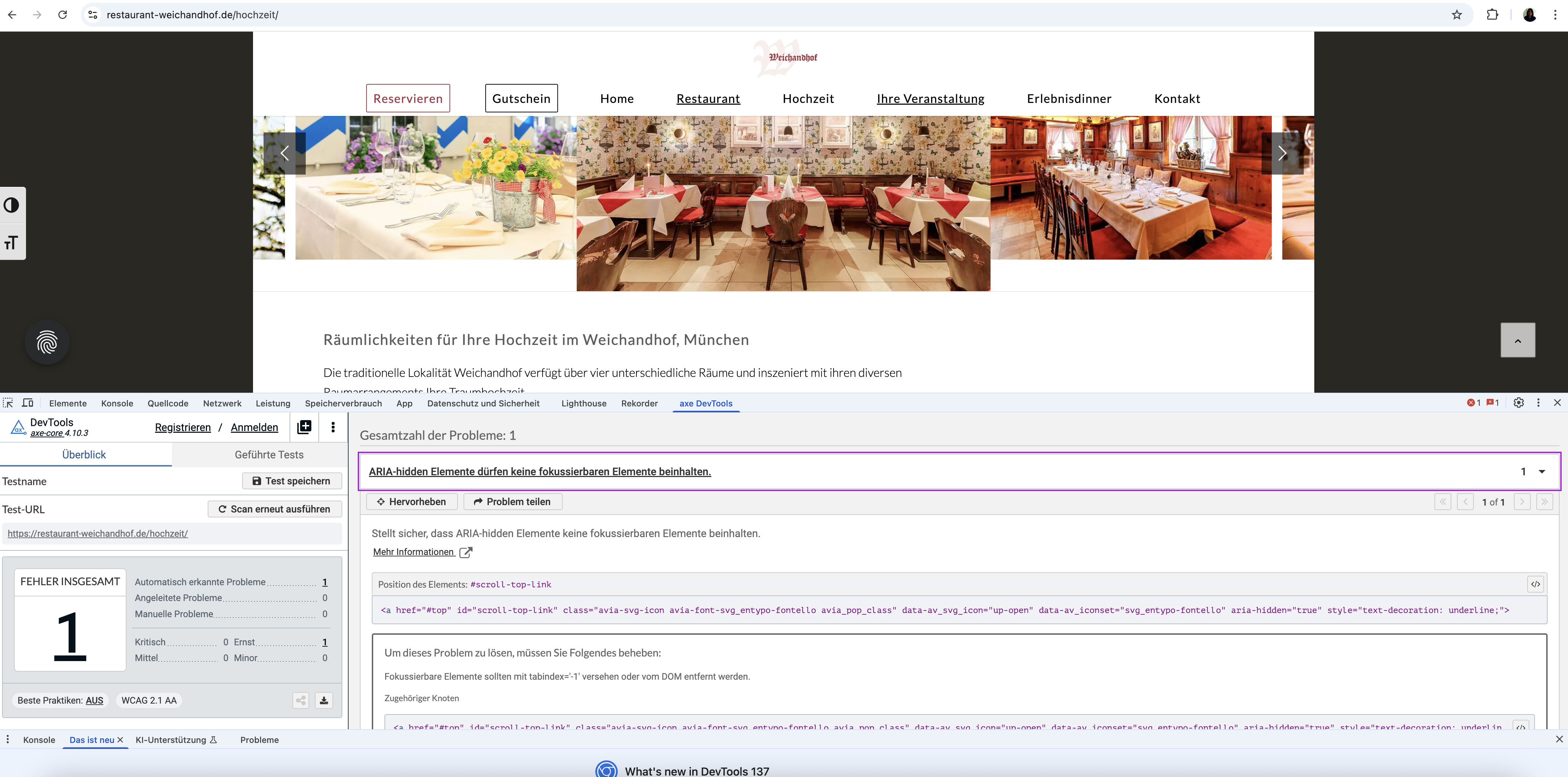
Thank you so much for your quick help and solution suggestion. I wanted to let you know that AXE is actually a free browser extension (available for Chrome) and very easy to install and use. I tested your code after clearing the cache and restarting everything, but unfortunately, AXE still reports the same error (see screenshot at https://restaurant-weichandhof.de/support/axe.png).
Also, this seems to be a global issue. I am currently working on making seven websites accessible, all built with Enfold, and this Scroll-to-Top-Button problem appears across all of them. It would be great to have a solution that I could apply universally or ideally have this fixed directly in the theme itself.
I would also prefer not to use an additional plugin (like WPCode) or keep this code in the functions.php file, as I would lose the changes with the next theme update. Could you perhaps suggest a solution that works via the existing Header Footer Code Manager plugin, or maybe there is another way to solve this via theme settings or CSS/JS?
Thank you so much again for your support!
Best regards,
Diana
Dear Enfold Team,
During accessibility testing of our website (https://restaurant-weichandhof.de) built with the Enfold theme, the AXE tool reported an issue concerning the built-in Scroll-to-Top button.
Specifically, the tool flags an error indicating that an element with aria-hidden=”true” is focusable. This error appears when the page is scrolled before starting the test (so the Scroll-to-Top button is visible). If the page is not scrolled prior to testing, the button is not visible and the error does not appear. This suggests the issue exists on every page but is only flagged depending on test conditions. This error really appears in EVERY SITE. Is there a way to fix it by not changing the ENDOLD-php-Code (> not consistent solutions for updates) ?
So I kindly ask you to review this ARIA issue and advise on how to ensure the Scroll-to-Top button meets WCAG 2.1 AA requirements.
Thank you in advance for your support.
Best regards, Diana
 Darren Dittrich
Guest
Hi, thanks for your help many years ago (see my email support from (Email address hidden if logged out) )!
We’ve updated this old client to v4.0 of Enfold, which has helped with PHP errors. But we’re still getting this error on every Save or Save Settings button:
[Back Popup] : Saving didnt work!
Please reload the page and try again
It would also be good if we could register a support account, and possibly have this purchase tranferred to (Email address hidden if logged out) since the person who bought this plugin is no longer associated with this site.
And one more: is this v4.0 Enfold compatible with the latest WP 6.8.1 and PHP7.4? We’d like to move this to a more modern hosting platform. Thanks!
to get a “footer-page” with dynamically feed menues – you can use the menu shortcode :
function custom_named_menu_shortcode( $atts ) {
    extract( shortcode_atts( array(
        'name'  => '', // Default to an empty menu name
        'class' => 'custom-menu', // Default CSS class
        'depth' => 0, // Default depth (0 for unlimited)
        'title' => '', // New: Default to an empty title
        'title_tag' => 'h2', // New: Default title HTML tag
        'title_class' => 'menu-title', // New: Default title CSS class
    ), $atts ) );

    $output = ''; // Initialize output variable

    // If a title is provided, add it to the output
    if ( ! empty( $title ) ) {
        $output .= '<' . esc_attr( $title_tag ) . ' class="' . esc_attr( $title_class ) . '">' . esc_html( $title ) . '</' . esc_attr( $title_tag ) . '>';
    }

    if ( ! empty( $name ) ) {
        $output .= wp_nav_menu( array(
            'menu'            => $name,
            'menu_class'      => $class,
            'container'       => 'nav', // You can change this to 'div', false, etc.
            'container_class' => $class . '-container',
            'echo'            => false, // Important: returns the menu HTML instead of printing it
            'depth'           => $depth,
        ) );
    }
    return $output; // Return the accumulated output
}
add_shortcode( 'named_menu', 'custom_named_menu_shortcode' );
it is used like this:
[named_menu name="your-menu-name" class="my-custom-menu" depth="2" title="Our Main Menu"]
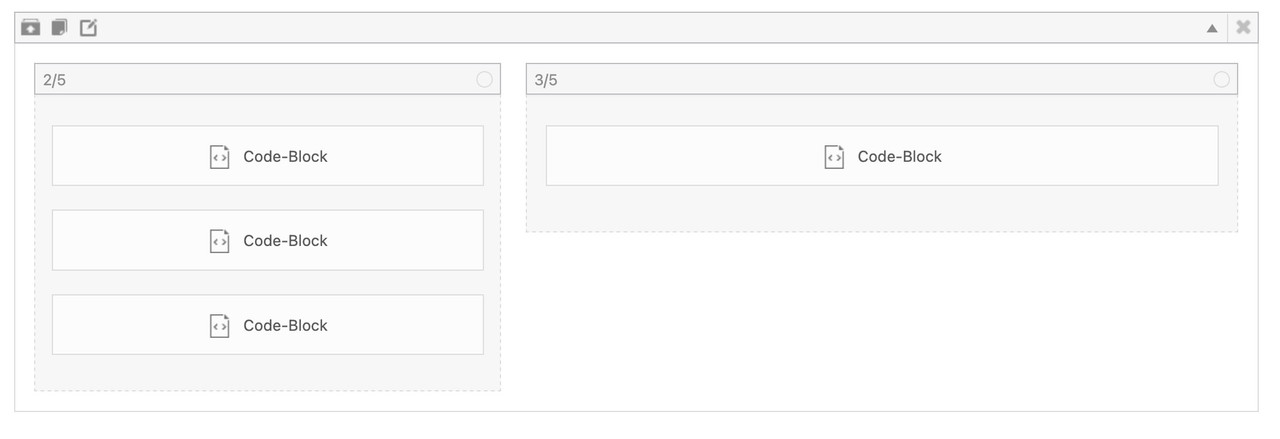
then you can setup your layout with codeblock elements – each of them represents a menu ( or different shortcode – f.e. social-media )
but for that i wouldn’t use the enfold burger icon – instead i would place a custom Button – perhaps a fixed button to toggle a class to hide/show this page.
Hey Enfold
I like one of buttons to link to a specifik paragraph in the text, how is that done?
Thanks ;)
Hi,
However, I believe there may have been a misunderstanding regarding the issue. The problem is not with the icon itself or its aria-hidden attribute, but with the structure and function of the link that wraps the icon.
If we’re not mistaken, the issue occurs because the SVG icon includes the aria-hidden attribute, which makes it unreadable to accessibility tools. As a result, the parent link is marked as “suspicious” since the icon is hidden and the link lacks any accessible text or description. The span avia_hidden_link_text, which contains the word “Search” also has its display property set to none, making it inaccessible to screen readers as well.
Removing the aria-hidden attribute from the SVG icon or adjusting the visibility of the avia_hidden_link_text should help.
#top .avia_hidden_link_text {
    position: absolute;
    width: 1px;
    height: 1px;
    padding: 0;
    margin: -1px;
    overflow: hidden;
    clip: rect(0 0 0 0);
    white-space: nowrap;
    border: 0;
}
You can also try editing the enfold/includes/config-enfold/functions-enfold.php, around line 125, change the text “Search” to “Click here to search”.
$items .= '<span class="avia_hidden_link_text">' . __( 'Click Here to Search', 'avia_framework' ) . '</span>';
According to https://wave.webaim.org/, screen readers tend to better interpret buttons or links when it contains more descriptive text.
View post on imgur.com
If this doesn’t help, you can always try the suggestions above.
Let us know the result.
Best regards,
Ismael
by the way – it is nice to have an embedded tab navigation now on Enfold – but to prevent that mouse events do show the focus setting – it might be better to go to the focus-visible or focus-within setting. These rulesets do not influence the click or hover states of links / buttons etc.
f.e. :
#menu-item-search a.avia-svg-icon:focus {
  outline: none !important;
}
#menu-item-search a.avia-svg-icon:focus-visible > svg {
  outline: 3px solid red !important;
  outline-offset: 5px;
}
now we got the ugly outline by navigation with mouse !
you can see here a manually set tab navigation with only focus-visible settings. Click a link to see that the states are not influenced.
https://guenterweber.com/
Hey rixi,
Try this CSS in your Enfold Theme Options ▸ General Styling ▸ Quick CSS field:
@media only screen and (min-width: 768px) {
#av_section_2 .flex_column_table .avia-button-wrap {
    position: absolute;
    bottom: 0;
    left: 20%;
    transform: translateX(-13%);
    padding-bottom: 20px;
}
#av_section_2 .flex_column_table .av_textblock_section {
	padding-bottom: 50px;
}
}
for this:

Best regards,
Mike
Hi,
Try this CSS in your Enfold Theme Options ▸ General Styling ▸ Quick CSS field:
.gm-style-iw-chr button {
	height: 0 !important;
  top: -10px !important;
}
.gm-style-iw-ch {
	padding: 0 !important;
}
for this result:

Best regards,
Mike
Hello,
I am using Enfold with WPML to create a bilingual website and am wondering how I can translate the before-after button text. I would be very grateful for some quick feedback.
Best
Goetz
Hi Enfold team,
I am using the blog grid to display my blog posts, but I don’t like the big gap between each picture and post title. Is there a way to make it smaller? Also I would prefer it, if the columns were aligned, especially the titles and the “read more” button. Is that possible and if so, how do I do that?
Thanks in advance!
Hey lucasgeuna,
Thank you for the inquiry.
In the Enfold > Privacy & Cookies > Cookie Handling panel, there’s a Display Modal Popup Actions setting where you can configure the modal to display only when triggered by a button click. Have you tried that selecting this option?
View post on imgur.com
Best regards,
Ismael
you can see here an example on using that shortcode including the existing classes from enfold to handle a hamburger menu – if you look to the DOM – it is very nearby the setup from : https://jonsuh.com/hamburgers/
because all scripts are allready implemented to enfold – you have to find a way how to insert that DOM Structure
<button class="hamburger hamburger--collapse" type="button">
  <span class="hamburger-box">
    <span class="hamburger-inner"></span>
  </span>
</button>
but try to find a plugin ( yes the good ones are not free) that handles the hamburger insertion with a given WordPress menu.