Hi,
Thanks for contacting us!
You can refer to this post – https://kriesi.at/documentation/enfold/social-share-buttons/#how-to-add-custom-social-icons-to-enfold-options and it to theme options as image.
Enfold uses icons from Fontello and currently there is no TikTok icon on Fontello, so we are unable to add it to theme options.
If you need assistance with that, please let us know :)
Regards,
Yigit
Hello,
I’m using a iconbox and have set the the link to be “Yes, apply link to icon and title”, but i need it to be on the whole button.
I tried to use the guide “How to make icon box clickable?” on https://kriesi.at/documentation/enfold/icon-box/ but that open it on in a new tab, and i need it to open in the iframe.
I do it when i click on the play button and the title.
What should i change from the guide or do i need another solution?
Ciao Rikard. I was out for 3 days, I couldn’t check it earlier.
I’ve just connected to production, and I still cannot save it. I thought “maybe Rikard was able to save it because he connected using the user I’ve created for Kriesi”, and I tried again connecting with your user. See below the result:
https://imgur.com/GAZtX8X
Let me repeat the steps:
1) I connect here https://www.sentierigressoney.it/wp-admin/
2) I go to “Enfold Child” / “Theme Options”
3) the button “Save all changes” is enabled already (and this is strange: it is normally disabled, if there are no changes left. In staging it is disabled, indeed).
4) I click on it, I have the issue you see in the screenshot.
It is not browser related: I’ve just tried with Edge, same result. I’ve just tried with Chrome, incognito mode: same result.
In STAGING environment it is working as expected (https://staging.sentierigressoney.it/wp-admin)
Thanks for your help!
Bye,
A.-
Hi,
Thanks for enabling the site again, when I add something to the form upload button the console shows a javascript error:
Uncaught ReferenceError: fieldId is not defined in a child theme file /wp-content/themes/enfold-child/script.js
try disabling or removing this custom script as the error may be causing a conflict for the plugin.
You are also getting CORS errors on the site, try also correcting those.
Best regards,
Mike
Hi Ryan,
Thanks for giving us admin access.
It seems that the problem is more of a caching issue, I have disabled CSS File Merging And Compression in Enfold > Performance to fix this.
Also, you can change those colors in Advanced Styling, just change the colors in Menu Item Button.
Please review your site.
Best regards,
Nikko
Hey Ryan,
Please try the following in Quick CSS under Enfold->General Styling:
#top #wrap_all .header_color .av-menu-button-colored > a .avia-menu-text {
    background-color: #edae44;
    color: #ffffff;
    border-color: #edae44;
}
Best regards,
Rikard
here is – i think the best solution – with iframe :
(by using custom-class: iframe-popup-link )
function iframe_popup_posts() {
?>
<script type="text/javascript">
(function($){
$(window).on('load', function () {
	if (top === self) {
	} else {
		$('#header, #footer, #socket, .sidebar').hide();
		$('#main').css('padding-top', '0');
		$('.container .av-content-small').css('width', '100%');
		$('.content').css('border-right', 'none');
	};

	$('.iframe-popup-link').find('a').addClass('no-scroll');

	$('.iframe-popup-link a').magnificPopup({
		type:'iframe',
		closeOnContentClick: false,
	});
 });
})(jQuery);
</script>
<?php
}
add_action('wp_footer', 'iframe_popup_posts', 999);
see again right side button: https://enfold.webers-webdesign.de/popup-posts/
as you said that ?iframe=true works – why don’t you use that to establish a f.e. button to open that page in an iframe.
Buttons do have a drop down to choose the post/page they will open.
If you gave to the button a custom-class f.e. iframe-open
function button_opens_iframe() {
?>
<script type="text/javascript">
(function($){
	window.addEventListener("DOMContentLoaded", function () {
	  $('.iframe-open a').each(function() {
	    var Link = $(this).attr('href').replace(/\/$/, '');
	    $(this).attr('href', Link + '?iframe=true');
	  });
	});
})(jQuery);
</script>
<?php
}
add_action('wp_footer', 'button_opens_iframe');
I can’t say that this takes very long, – but what remains is that the complete page – and not only the content is shown – but you should be able to do that with css.
https://enfold.webers-webdesign.de/popup-posts/
Hi,
I’m trying to rebuild one of my pages and it seems on latest version of Enfold new created buttons stopped properly working.
I’ve created button my page but after publishing it there is no hover effect or click effect on my buttons.I’ve configured button to go to specific page but it does act like without effect.
Can you please check why this is happening?
See private content:
Hello,
I’m just a regular participant like you, but your help request caught my eye. I visited your site on a phone, tablet, and desktop and couldn’t help but notice your mobile menu only activates on the smallest of screen sizes, which means when you view it on a tablet or turn your phone in landscape mode, your menus and logos do overlap.
To help fix this, you might consider changing the following.
From the enfold menu, Enfold>Main Menu
Under the option “Menu For For Mobile”, change the drop down menu to “SmartPhones & Tablets below 990px”
The option below that asks about Screen Mode in Landscape Mode, set that to “use current screen width”
To move the logo to the furthest point left,
Also, Enfold> Header
Under the tab that says Header Behavior, at the bottom is a button option that says “Let Logo & Menu Change to Fit Browser window” turn that ON
Making those changes should fix your issue.
I am trying to use the yith request for quote plug in, but with avia it is not visible. How can I make visible this add to quote button with Avia? it is very important to be able to use it there, because of the type of images I want to use.
I have several installations with your theme Enfold.
The feature https://kriesi.at/documentation/enfold/button/#toggle-id-7 doesn´t work.
We have one page already online – it worked, but then just didn´t work anymore.
Actually a new customer would like to use this feature the same way. I tried to add it in my homepage
and it doesn´t work, too.
Just nothing happens.
Could you pls help?
Anymore informations needed?
Hi Bernd,
CSS added in WP 6.1 targets all links that does not have “wp-element-button” class. So please add following code to bottom of Quick CSS field in Enfold theme options > General Styling
a:where(:not(.wp-element-button)) {
    text-decoration: none;
}
Best regards,
Yigit
Hi,
Some CSS issues were introduced with WordPress 6.1 such as underlined links and increased margin in Masonry element.
Please add following code to Quick CSS field in Enfold theme options > General Styling tab to fix those issues
/* To fix underlined links */
a:where(:not(.wp-element-button)) {
  text-decoration: none;
}

/* To fix increased margin in Masonry */
figure {
  margin: 0;
}
We will include CSS fixes in upcoming Enfold update and update this post if we find more CSS issues.
Regards,
Yigit
Hey,
Thanks for contacting us!
Please add following code to Quick CSS field in Enfold theme options > General Styling tab
a:where(:not(.wp-element-button)) {
  text-decoration: none;
}
Regards,
Yigit
Hi Rikard,
Unfortunately the css-snippet isn’t a useful solution for us. Because we have much more than 100 client-websites with Enfold. And we’re facing this issue on many of this websites since the last WordPress update.
It seems, that the css-snippet
a:where(:not(.wp-element-button)) {
 text-decoration:underline;
}
is placed inline by one of the javascripts. But I don’t know exactly from which JS and why.
Regards,
Bernd
-
This reply was modified 3 years, 5 months ago by
 Bernd.
-
This reply was modified 3 years, 5 months ago by Bernd.
Hi Guys,
In Enfold 5.2.1 – When on the Cart page with WooCommerce installed – There are two icons missing.
remove.png
bg-button.png
The URLS are no longer pointing towards the right location.
Please can you confirm and add to the next bug fix?
You can see it in the private link below.
I can confirm that I am seeing this bug on all of the Enfold sites I manage.
Hi Rikard,
thanks for your reply! Meanwhile we contacted the WooCommerce support and updated to the latest Enfold 5.2.1.
You can reproduce the error on both sites I linked if you choose a product, start and end date and the button “Verfügbarkeit prüfen”. Depending on the speed you choose dates and the button it creates both error notes I posted before. On the page of each product you see that the calendar is loading a couple of seconds and the loading time varies a bit between the staging and live site, which is related to missing files of the Enfold theme (PNG, CSS, JS).
We found out what is happening here, because some files of the theme are missing, the calendar ajax request “wc_bookings_find_booked_day_blocks” will be set to pending until the site either retrieves or marks as failed with a 404 error for the missing files. So, until the site doesn’t mark the missing files as missing and loads all the files from the theme, the calendar will not load. In the following example, you can see how the calendar took 6.25 seconds to load:
calendar load 1
The calendar took that time to load because of the following files that were missing from the theme:
calendar load 2
The calendar’s loading time is causing the issues in the frontend and because of this customers already cancel their bookings both on desktop and smartphone usage, because they failed to complete the booking requests!
Can you please check what’s going wrong and why theme files are missing?
Best regards,
Dirk
Hi guys,
in the site in private data.
I have been asked to tweak the category and tag layouts.
No matter what settings I put in the Enfold > Blog Settings area the archive pages always display complete articles rather than exerpts.
I have WordPress > Settings > Reading set to display excerpts only. This is being ignored.
Is there a way I can make it so all category and tag archives only display the feautred image and excerpt rather than the full article? OR the Featured image and the READ MORE BUTTON?
I cannot work out the logic being applied by Enfold.
-
This topic was modified 3 years, 6 months ago by
 thinkjarvis. Reason: More info provided in private data
Hey Peter Vidrine,
Thank you for the inquiry.
You can find information about the license in the overview page, including prices.
// https://themeforest.net/item/enfold-responsive-multipurpose-theme/4519990#
Open the Buy License tab and click the Regular License button to open a dropdown containing the Extended License info.
Best regards,
Ismael
After the update to Enfold 5.2.1 it’s not possible to buy tickets for events. We use The Events Calendar + Events Tickets + Events Tickets Plus. If you click on the “get ticket” button nothing happens. This is the error:
2022/10/24 09:38:06 [error] 77564#77564: *888570 FastCGI sent in stderr: “PHP message: id was called incorrectly. Producteigenschappen mogen niet rechtstreeks aangeroepen worden. Backtrace: require_once(‘wp-load.php’), require_once(‘wp-config.php’), require_once(‘wp-settings.php’), do_action(‘wp_loaded’), WP_Hook->do_action, WP_Hook->apply_filters, WC_Cart_Session->get_cart_from_session, WC_Product->is_purchasable, apply_filters(‘woocommerce_is_purchasable’), WP_Hook->apply_filters, wpas_woocommerce_is_purchasable, WC_Abstract_Legacy_Product->__get, wc_doing_it_wrong. This message was added in version 3.0” while reading response header from upstream, client: 81.172.182.21, server: XXX request: “POST /wp-admin/admin-ajax.php HTTP/1.1”, upstream: “fastcgi://unix:/var/run/php7.4-fpm-XXX.sock:”, host: “XXX:17447”, referrer: “https://XXX/checkout/”]
We will rollback tot 5.1.2 for the time being. I hope this can be fixed in a next version of Enfold.
Hello Enfold Team,
I have an issue and I hope you can help me. On the mobile version of my website mentioned below at the beginning of in the media section, there is a plug in for my Instagram, the videos are displayed in small boxes with a big play sign, unfortunately. The play sign button actually differentiates between video and image but the play sign is so big that it is covering almost the full box (I am using an iPhone, but with a Samsung the problem is other as well). My Webdesigner advised me to contact you for this issue as it does not look nice. He said that you can help me reducing the size of the sign because It is generated automatically (by default) from the plugin by Enfold.
Would you please take a look and let me know ?
I appreciate a quick turnaround.
Best regards, Elie
Hey Guenter,
Sorry for the delay. If I am not mistaken, the reload will only happen or occur when you accept the privacy option or when you click the accept button. The page will not reload when you toggle any of the privacy options. Is that what you are expecting to happen?
Please check enfold/js/avia-snippet-cookieconsent.js around line 130. This triggers a reload (line 176) when the accept button (.avia-cookie-consent-button.avia-cookie-close-bar) is clicked.
Best regards,
Ismael
Hi,
If this occurs try clicking on the Advanced Layout Builder button at the top of the page, when I checked the pages open in the Advanced Layout Builder correctly, but sometimes it took an extra minute for the builder to show and the debugger window showed first, perhaps this is what you mean:

but in the end the builder loaded correctly.
I don’t recall if you had Enabled the Avia Layout Builder Debugger of if I did, I can disable it if you wish.
If you mean the first text block with the button shortcode, this was always like this and it is fine to use shortcode like this:

instead of using the shortcode in the text element you could use the notification and button elements, I created a test page for you linked below:

Best regards,
Mike
the setting on “Auto Reload Page” do work on the main Cookie Consent Message:
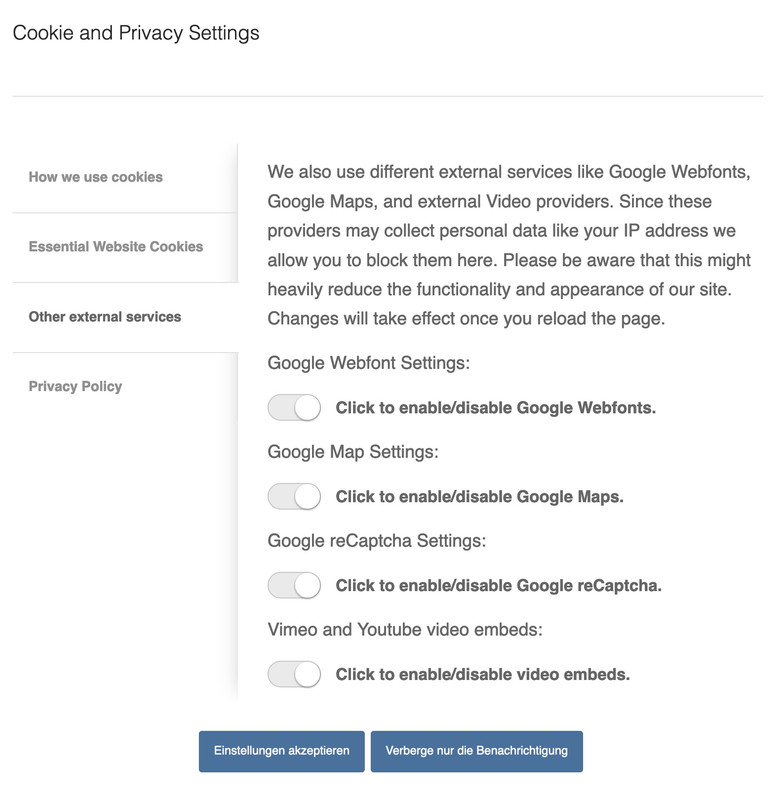
but if i place that shortcode [av_privacy_video_embeds] on a page – these settings are not respected ( i do not test the other shortcodes yet) . The switch itself works – but no reload.
I’m actually a fan of the Borlabs cookie plugin, but I’m currently looking into optimizing Enfold’s own tool – e.g. regarding video blocking. and for performance reasons it would certainly not be bad to have one less plugin at the launch.
Hi,
If you don’t want a sidebar on your shop page go to Enfold Theme Options ▸ Sidebar Settings ▸ Sidebar On Archive Pages and choose No Sidebar
If you do want the sidebar, but not the filter go to WordPress ▸ Appearance ▸ Widgets ▸ Shop Overview Page and remove the filter widget.
As for your cart button, the only time that button shows is when the cart is empty, and when I click it goes to /shop/ not /mein-shop/
The main menu link goes to /mein-shop/
Best regards,
Mike
Dear Ismael,
This is a great day ! Thank you very very much.
There are still some small details:
1. when opening the footer page, as well as when previewing it, an information is visible: Notice: Undefined index: id in /home/hulaslim/public_html/wp-content/themes/enfold/config-templatebuilder/avia-shortcodes/logoslider/logoslider.php on line 1523
2. The lower part of the footer is white, moreover the 3 buttons Mentions légales, CGA and confidentiality should come into the blue zone beneath.
3. I can’t achieve making the two missing buttons smaller like the surrounding ones (the green one and the dark blue one), last time I tried one month ago the error came and it blocked everything (but it could be due to the presence of Wordfense, now deleted). Is there a code fto make them smaller like the other ones ?
Thanks again for your precious help.
Best regards,
Natacha
 Klaus
Klaus
Hi Rikard,
So your account was brand new, and they cancelled your account before you had a chance to purchase anything?
Yes, exactly like that. First I put the Enfold theme in the shopping cart. Then I created the account according to the requirement. In the payment process, I then selected credit card as the payment method and entered the credit card details. I clicked on the payment button and the next thing I knew, a message appeared saying that my account was locked.
Best regards,
Klaus
Hi Samuel,
To remove the underline, please add this CSS code in Enfold > General Styling > Quick CSS:
#top #main .avia-button-fullwidth {
    text-decoration: none;
}
As for the color of the font, edit the full-width button and go to Styling > Colors > Button Font Color set it to Custom Color then select a color that you want to use.
Best regards,
Nikko



