I am having the same problem as others after wordpress 4 upgrade, ie spinning wheel of death. I have used ftp filezilla to upload enfold 2.9.2 and in the remote site side of filezilla it looks like this has been successful. however on my wordpress dashboard>themes>enfold it still says version 2.9.1. i have tried flushing cache, reinstalling wordpress 4, two different browsers, and tried going through dashboard>enfold>theme options>theme update, but it says “no updates available. you are running the latest version! Great!” i try “check manually” but this just takes me to the dashboard>wordpress updates page.
I have been reading the forums and spent most of yesterday tying to get this to work but am at a loss as to what to try next. I am fairly new to wordpress so there may be a “reset” button somewhere that i am not aware of, or some simple trick to get enfold to update but just dont know what it is.
could do with some help
cheers
Hi jalmz!
You can change the related entries in your backend at Enfold->Blog->Related Entries
There is no option to hide the prev/next button but here is a simple css snippet to remove them:
add this to your custom.css stylesheet in folder /css/ or to the quick-css panel located in your wordpress backend at Enfold->General Styling:
#top .avia-post-nav {
display: none;
}
Cheers!
Kriesi
-
This reply was modified 11 years, 7 months ago by
 Kriesi.
I followed instructions to upload theme via FTP. I wanted to import the dummy content so I could play around with the theme. I did not find tha option button in “Theme options”, as the video shows, but in the Enfold “import/export” It seemed to import fine but when I viewed the site, the dropdown menu items are scattered all over the page
Dear Team Kriesi:
After uploading Enfold, then activating, I don’t get any response from the Theme Options page, meaning, drop-down menus, upload buttons and “save all changes” are unresponsive.
Please advise. Very excited about using this theme, so I hope you can help soon.
Login credentials attached below.
Many thanks,
Tim
-
This topic was modified 11 years, 7 months ago by
 hypergolica.
i have a blog wit about 900 blogposts. Now i want a button at the end of each blogpost with a link to a external website (opens blank). I do’nt want to change every blogpost by hand so i want to change in enfold. I have a child theme of enfold but i dont have access to the server itselve.
Can you please help me? If a button with the text Download Brochure is not possible then a link “download brochure” to another website.
Hope you can help.
Hey elibeachy!
Please add following code to Quick CSS in Enfold theme options under General Styling tab
.join_button {
z-index: 99;
}
Best regards,
Yigit
This reply has been marked as private.
Hi schuttjon!
Thank you for using Enfold.
You want the button title and icon change to black? Use this on Quick CSS or custom.css:
span.avia_button_icon {
color: #666666;
}

span.avia_iconbox_title {
color: #666666;
}
Best regards,
Ismael
Hi ryanmortier!
Thank you for using Enfold.
First, please create a backup of your database and theme files. Go to Enfold > Import / Export panel then Export Theme Settings File, just in case. Activate the child then go back to the Import / Export panel. Click the Import Settings from your Parent Theme button.
Cheers!
Ismael
Hey mcraig77!
Thank you for using Enfold.
You can add this at the very bottom of functions.php:
function add_custom_script(){
?>
<div id="header-right"><div class="container"><a href="http://ucirotc.com/?page_id=71">Apply</a></div></div>
<?php
}
add_action('ava_main_header', 'add_custom_script');
Use this on Quick CSS or custom.css to stylize the button:
div#header-right div a {
background: yellow;
padding: 10px 16px;
font-size: 20px;
text-transform: uppercase;
border-radius: 10px;
color: white;
}

div#header-right {
position: absolute;
right: 30%;
}
Cheers!
Ismael
Tried searching for similar issue but have not found an answer.
Running WordPress 4.0 with Enfold V 2.9.2, all plugins up-to-date.
When I create a new page and click on either Advanced Layout Editor or Add Media nothing happens, no loading or anything, the buttons are dead. The link that is present is “…/wp-admin/post.php?post=46&action=edit#” so it doesn’t appear to “go” anywhere.
Tried switching themes and then back but no change. I’m developing the site on a temporary domain which is flagged at the top of the page…could this be the issue?
Thank you to anyone willing to help.
Hi Devin,
http://kriesi.at/themes/enfold.
As mentioned, the bug comes into play when you resize the browser window by the button in the top bar of the browser (‘Verkleinern’, ‘Maximieren’).
Also, since WordPress 4.0, the tooltip of the Google Maps markers appear to have vertical scrollbars (was not the case before WordPress 4.0, does not look nice ;-). See http://kriesi.at/themes/enfold/pages/contact/.
Thanks,
Simon
Hello,
Not this biggest issue, but upon update to 2.9.2, all of my Theme Subtle buttons have changed style. Prior to the update, they appeared like this, in accordance to http://kriesi.at/themes/enfold/shortcodes/buttons.

After the update they appear like this:

Any fix? I’m sure quick CSS can solve this.
Cheers,
Jon
Hi kriru!
Thank you for using Enfold.
Please add a unique selector for every buy now avia button. Refer to this link how: http://kriesi.at/documentation/enfold/turn-on-custom-css-field-for-all-alb-elements/
Let’s use “ga-buy” for example. Add this at the very bottom of functions.php to add the onclick attribute on the buy button with the “ga-buy” custom css class:
function add_custom_script(){
?>
<script>
jQuery(window).load(function(){
	jQuery('.ga-buy a').attr('onclick', 'ga(\'send\', \'event\', \'Buy Button\', \'Resume\', \'Resume Template Download\')\;');
});
</script>
<?php
}
add_action('wp_footer', 'add_custom_script');
Cheers!
Ismael
Hello guys! Thank you for this perfect theme. Could you help me with a little problem please. I’m trying to add like buttons on a blog for post pages instead of share buttons. I’ve downloaded 4 snippets for each button but have a problem with inserting it in a single.php. I’ve tried to add it with a widget on a post page but with no success. Could you tell me what is the best way to it qithout using plugins? Should i use a child theme?
Upgraded to 4.0. Installed Enfold 2.92. Promo Box buttons are not showing up now.
Hey Holger!
Please firstly turn on Custom CSS field for ALB elements ( please see – http://kriesi.at/documentation/enfold/turn-on-custom-css-field-for-all-alb-elements/ ) and then give your buttons a custom CSS class ( i.e.: custom-button-width ) and then add following code to Quick CSS in Enfold theme options under General Styling tab and adjust as needed
.custom-button-width {
min-width: 120px!important;
}
Cheers!
Yigit
Hi!
The website is on maintenance mode. Please give us a temporary login details so that we can see the button issue. Please try to delete the enfold_child.css file on wp-content/uploads/dynamic_avia folder. Change anything on the theme options then save changes to regenerate the file. See if the button gets fixed.
Best regards,
Ismael
There are two options. Download Enfold (green button) or Install theme (blue button)
I used Finder to search the unzipped contents. I couldn’t find a version.txt file
but did find an update.txt file.
I’m also having the same problem with the add media button. I have been updating this site for days now and no problems and then all of a sudden the “add media” doesn’t work. Changed the theme to Twenty twelve and the button works?? I am running the latest ver Wp (4) and latest Enfold ver 2.8.1
Yesterday, I upgraded my site to WordPress 4.0 (http://BittenByAZebra.com).
I can no longer get into Avia Layout builder pages to edit them. I can create blog posts but cannot get the “Add Media” button to work or links in the editor.
I can add html code in the text box to post items but that’s the only way to do it.
I have disabled all my plugins (there aren’t many) and disabling the plugins does not change things.
Any help would be most appreciated.
Thanks!
Bob
I am experiencing the same issue as described by other users. Please note the following feedback regarding this error.
1. As soon as I updated to WordPress 4.0 the pages advanced editor stopped working. The page would load and I would get a spinner in the content block. The page would not load the advanced editor (which I imagine is the aviya framework) and therefore all the fancy modules to edit content / media were unusable because the page just isn’t editable.
2. If one tries to updated using the Enfold > Theme Update interface, the side menus don’t show. So that troubleshooting option presented in the threads simply does not work. It is very frustrating to see that the mechanism to update from the theme itself has been broken.
3. To update via FTP, I had to go to envato and re-download the source files, but I was kind of annoyed that I did not see a more direct link or button to the right version of the template 2.9.2.
After updating the theme via FTP, the advanced editor functionality came back. However, the new media gallery features in WordPress 4.0 don’t seem to be getting along with the media galleries in the themes. For example, I can no longer upload images into a gallery in a group. The first image works and uploads, and all subsequent image experience “500” errors.
This transition looks like it will be very bumpy. Please just keep us posted. We understand as users that there are always issues when there is an update, but it would be appreciated if you guys could post more clear or direct upgrade instructions when a major update such as this one happens.
Hi,
I’m using BBPress for a forum on my website and noticed that the buttons in the sidebar and the search button at the top of the forums does not seem to match the button style that enfold uses for the rest of the website. The buttons seem a little larger than their related input elements and do not have rounded edges. Is it possible to make these buttons match the rest of the theme?
Screenshot below:
screenshot
Thanks.
Hi Steamed!
Go to Enfold > Import/Export > click the “Import Dummy Content” button.
Cheers!
Josue
I am grateful for your speedy response and I understand you get many messages per day so it is not easy I had already found your current answer in a previous post and it did not answer my question. When we bought the theme we already had hundreds of posts so although your suggestion will work it will only work by doing this for each post individually. The default WordPress settings make this possible via selecting a radio button option and clicking the save button. If this is the only solution for Enfold, we will create a solution within our child theme, otherwise please let me know if there is any other solution.
Thanks in advance.
Hello Yigit,
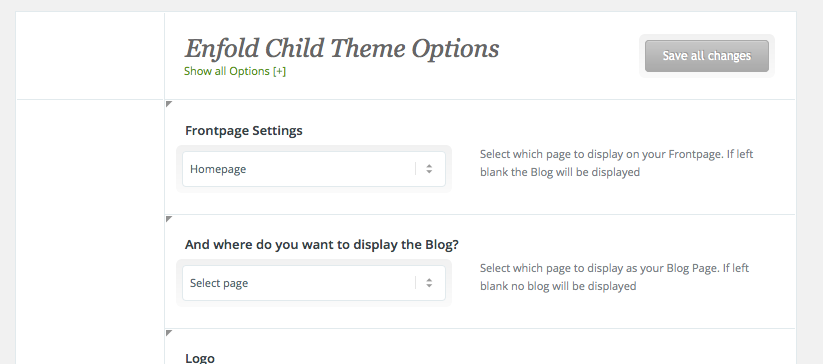
I just upgraded to WP4.0 with using 2.9.1 accidentally. Now I can not see the Upgrading Button because the Enfold-Menu (showing all options) disappeared. I mean I can see the Enfold-Menu, but not the “sidebar” with “styling, header, sidebar, etc”.
How can I upgrade the theme by maintaining all options?
Regards
Manu
dear alengio – thanks this solves for me the problem that the enfold options can not be seen in total:
but with your code the toggle button on top (show all) works now!
and Sitecreation and Frontsite Changings work for me.
But the bold (strong does not work in code mode) so it is a bit confusing:
so change on line 948 of wp-content/themes/enfold/framework/js/avia_colorpicker.js the inner quotes to double quotes:
from:
.filter('a[rel=' + hash + ']');
to:
.filter('a[rel="' + hash + '"]');
-
This reply was modified 11 years, 7 months ago by
 Guenni007.
Hello,
I’ve installed the Enfold template and when I create a new Page, I want to use the Layout Builder. There’s a button “Erweiterter Layout-Builder”, but when I hit the button, nothing happens.
I hope you can help me!
Thanks a lot.
Hi Josue
Today … No it’s still on my localhost :-) – Maybe this weekend I will move the site online.
I have uploaded a picture of the full page. We are working on the frontpage and the image shows where the colour section is showing the video and a mockup of the button and where I want to move it to. NEW PIC HERE
-
This reply was modified 11 years, 7 months ago by
 Netzie.
Hi pbennion!
Thank you for using Enfold.
1.) If you want to have a next section button on the color section, please refer to this link: https://kriesi.at/support/topic/color-section-background-image-as-url/
2.) It is not actually full screen, it is a standard height chosen to cater most screen sizes.
3.) You can use the Fullscreen Slider if you want a “fullscreen” slider. There’s a difference between Fullwidth Easy Slider and Fullscreen Slider.
Best regards,
Ismael



