
-
Search Results
-
Hi,
I’m trying to fix a problem with the Avia builder: The screenshot shows it. When I place a button the option to define the link is gone. I have re-installed enfold already. No change. Any help?
Thanks, paul.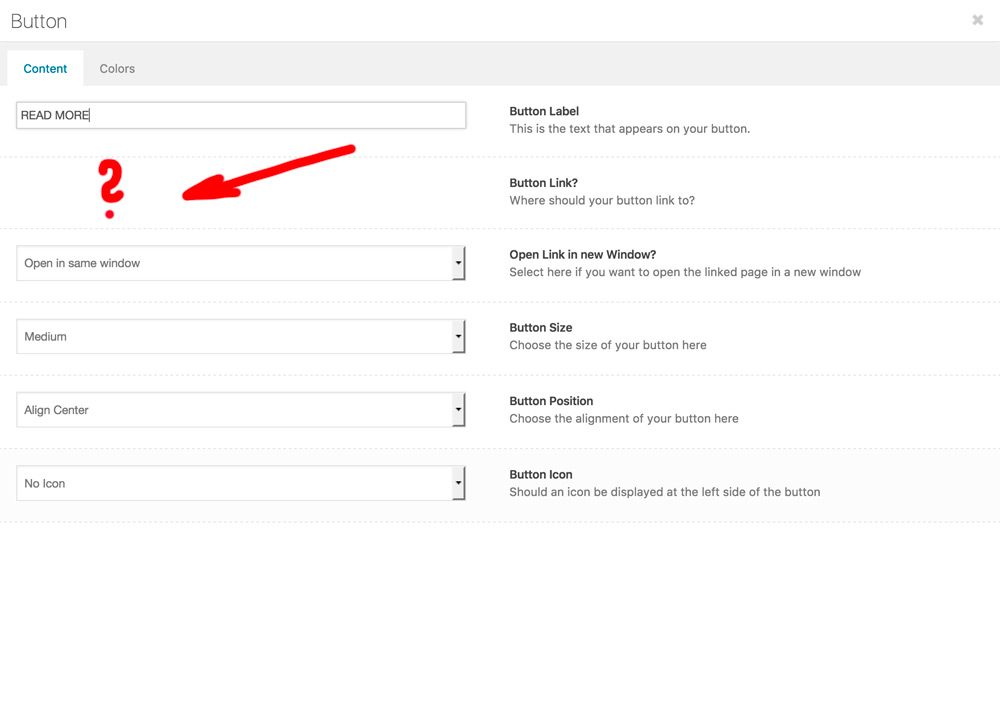
Topic: Enfold Menu issues
hi i am using one page menu here on http://mcitycondospro.com/
but when navigated to another section, all the menu links get highlighted.
http://www.awesomescreenshot.com/image/2201732/f3ef76c5c9182b47facbd1e9364edd29i know there is solution for this to add links like #about instead of http://mcitycondospro.com/#about. But i want to use mixed use of links, for ex. an VIP ACCESS REGISTRATION button on the top opens on different page
Thanks..
Hi, I have a big problem with on a running client installation:
the following message suddenly appears in fiel ”Breadcrump Hierarchy” on every portfolio site:
Warning: A non-numeric value encountered in /homepages/11/d20570219/htdocs/WP-IGEL-PS/wp-content/themes/enfold/config-templatebuilder/ avia-template-builder/php/html-helper.class.php on line 1049 __
Warning: A non-numeric value encountered in /homepages/11/d20570219/htdocs/WP-IGEL-PS/wp-content/themes/enfold/config-templatebuilder/avia-template-builder/php/html-helper.class.php on line 1058 __
At the same time the selector für taxonomies/categories in Avia Layout Architekt Modul ”Magazine” misses.
At the same time some more selectors for example for setting a link to a button are missing…!The maybe concerning ”html-helper.class.php” php data file i already refreshed from a new theme, but no success.
Any ideas how to repair the running system? Help for even money will be no problem…!Thanks username_envato
Hello
I have generated the API key on Google Developer Console and have enabled the Google Maps Javascript API but even after entering the key in the enfold panel, when I go inside the Google Maps block and click on ‘Enter address, and fetch coordinates’ button, I get an error message saying “Google changed the way google maps work. You now need to enter a valid Google Maps API Key. You can read a description on how to create and enter that key here: Enfold Google Settings”, BUT I HAVE ALREADY DONE THAT. In fact, I tried using multiple Google Accounts. Then I saw that there were two coordinate boxes that had appeared but were empty, so I opened Google Maps, extracted the coordinates of the place I want to mark and entered two coordinates in those two boxes. Now, something does show up in the Maps area, but the location (despite having the correct coordinates) seems to have shifted to somewhere in the arctic circle.
Please help me fix this. I don’t want my customers to go to the Arctic circle because of a small error.
PS – This has been massively frustrating. Hoping for a quick solution. :)
Update: I just checked my Google Developer Console and saw that the Maps API is being hit properly without errors. I just don’t understand why it’s not showing the correct coordinates. Screenshot: https://c1.staticflickr.com/3/2650/33031336875_e105025255_o.png
Hi I have a question. My website online has the enfold version 3.8
in order to work on some custom pages and do some tests I downloaded my website on my local pc. In the meanwhile I updated the theme (locally only) to enfold 3.8.5I realized that if I keep my custom shortcode in the child theme it gives problems in adding new pages: whenever I update a new page or I try to delete it, a completely blank screen appears, although it actually saves or bin the pages (i.e. the action is completed successfully). Trying to understand what was messing up, I realized that everything worked fine if I deleted the shortcode folder in my child theme.
At this point, before updating the online enfold theme I would like to understand if you are aware of such bugs. The shoertcode I created was very simple, as it only applied the <abbr> tag to the text. herebelow I copy my code:
if ( !class_exists( 'av_abbr' ) )
{
	class av_abbr extends aviaShortcodeTemplate
	{
			/**
			 * Create the config array for the shortcode button
			 */
			function shortcode_insert_button()
			{
				$this->config['name']			= __('Acronym Extension');
				$this->config['order']			= 100;
				$this->config['shortcode'] 		= 'av_abbr';
				$this->config['tooltip'] 	    = __('Creates a full text which appears on mouse over acronyms terms');
				$this->config['inline'] 	= true;
				$this->config['tinyMCE']    = array('tiny_always'=>true);
			}

			/**
			 * Popup Elements
			 *
			 * If this function is defined in a child class the element automatically gets an edit button, that, when pressed
			 * opens a modal window that allows to edit the element properties
			 *
			 * @return void
			 */
			function popup_elements()
			{
				$this->elements = array(

					array(
							"type" 	=> "tab_container", 'nodescription' => true
						),

					array(
							"type" 	=> "tab",
							"name"  => __("Content" , 'avia_framework'),
							'nodescription' => true
						),
					array(	"name" 	=> __("Acronym", 'avia_framework' ),
							"desc" 	=> __("This is the acronym.", 'avia_framework' ),
				            "id" 	=> "acronym",
				            "type" 	=> "input",
				            "std" => __("ACR", 'avia_framework' )),

					array(	"name" 	=> __("Full title", 'avia_framework' ),
							"desc" 	=> __("This is the text that appears on your acronym.", 'avia_framework' ),
				            "id" 	=> "title",
				            "type" 	=> "input",
				            "std" => __("Full text", 'avia_framework' )),
					array(
							"type" 	=> "close_div",
							'nodescription' => true
						),

				);

		}

			/**
			 * Frontend Shortcode Handler
			 *
			 * @param array $atts array of attributes
			 * @param string $content text within enclosing form of shortcode element
			 * @param string $shortcodename the shortcode found, when == callback name
			 * @return string $output returns the modified html string
			 */
			function shortcode_handler($atts, $content = "", $shortcodename = "", $meta = "")
			{
				$output = "";

				$atts = shortcode_atts(
						array(	'title'=>'',
								'acronym' =>'',
							), $atts, $this->config['shortcode']);


				$output = '';

				$output= "<abbr title='".$atts['title']. "'> " . $atts['acronym'] . "</abbr>";

				//<abbr title = 'xx'>ACR</abbr>

				return $output;
			}

	}
}
Thanks very much
Hello, sorry, I hope you understand, I ‘m not speeck english well
so, I have a problem about Blog solvable in 2 ways. ( I’m not need to use a blog page but I use a tag and portfolio category into a navigation menu)
1 way) If I setting the Elegant blog with a Grid, the preview image of the posts are displayed in the right way grid in the tag , but not in the portfolio category . I wish display the same layout grid in both. Furthermore although i had put into -Enfold-Element meta Blog to show only the comments count, categoryes and tag, it show other things I do not.
2 way) if I setting the Elegant blog with a single autor and large ( or small) preview, is dispayed a default size of images in the grid of 400 x 450 px but i need to show a different size, for exemple 300×400 or 450 x 675 , but no more large and using this proportion (not horizontal but vertical).
I noticed that resizing 2 times the highlights image into a portfolio posts( making a potfolio posts) , will be show a very big preview image in the tag grid and portfolio categoy grid but with the rigth proportions, so until today i have make this. For this reason when you will visit my post or porfolio category page, you will not find a default size of images 400×450 but the big preview…I hope you will understand my bad English..
ps; sometimes My site have a problem with cache, so I suggest you to clean the cronologie after have making changes, and press the purge button of Purge SG Cache.
best reguards
SachaThe 3 boxes slide up and cover the banner and button when using mobile view:
http://quirktools.com/screenfly/#u=http%3A//kriesi.at/themes/enfold-medical/&w=360&h=640&a=39
Because i am building website on local i recorded the problem
How to disable page reloading on button click. as you can see i used enfold button and linked to product item, but on click i want only item to go to cart and not reloading page again and sending me to top of the page.
Hi team,
i tried several ways to activate a mobile search form for my customer.Like this: https://kriesi.at/support/topic/search-button-on-mobile/
or this: https://kriesi.at/support/topic/mobile-search-bar/ (i didn´t found >>do_action(‘ava_after_main_menu’);<<)But it doesn´t works…one time i had to recover the page.
Hope u can help.
WordPress: 4.7.2
Enfold: 3.8.4Best regards,
Alexander
installed the newest enfold and wordpress i got some errors on some Text-Block and Button elements in the advanced layout builder
i click on the for example button element and the modal opens in admin, i can see everything but i can’t see the dropdown for the “button link”same on some text-blocks there i can’t see the textarea and editor where to input the text, if i mark the area with the mouse the text is there but no editor
Hello again, enfold travel demo: the 2 buttons in the homepage slider when vertical on mobile do not show because the height is not enough?
thanks!!Topic: PROBLEM LINK OPTION
Hey guys!
I’m about to finish a new website and I haven’t had any problem until now.
Suddenly all the links a button or a partner logo. etc. have desapeared. The old links still working but I can’t modifie them neither.
I add a photo so you can undestand me better: https://dl.dropboxusercontent.com/u/57223972/ENFOLD%20PROBLEM%20PHOTO.png
Do you know why this happen and what can I do? I’m running the last version of enfold.
Thank you so much


