Hi,
Since upgrading Enfold I am having issues saving edits to anything. As an example a text box. I can see the big blue Save button at the bottom and when I click on it nothing happens. I can not get out of the editing block without hitting refresh and losing the changes. I attempt to “X” out but it doesn’t do anything and I have no choice except to refresh. I have attempted to add other things such as a testimonial from the advanced layout and have the same issues. I have tried including a box from the advanced layout element and dropping a text block in. I have tried just dropping a text box in directly and to no avail. Any guidance?
Masonry Gallery working fine for at least the last year, now it simply will not display.
An example being at the very bottom of the page below the “Download our free report” button: https://www.fjpinvestment.co.uk/pegasus-agriculture-investment/
Wordpress version 4.73 and Enfold version 4.05
Hey HsDsBb12,
du kannst zunächst das hier tun: http://kriesi.at/documentation/enfold/enable-advanced-layout-builder-debug/ und dann die Shortcodes verwenden, um deinen Button zu kreieren. Erstelle dazu eine neue Seite im Backend und kreiere deinen Button. Anschließend nutze die neuen Shortcodes, um sie in deinen Widget einzusetzen.
Gruß,
Andy
Hi,
You cannot find php file in your browser. Since “categories_sort_button” is a variable that changes depending on your category, you cannot find the file by searching it on theme files as well. However, there is “inner_sort_button” and you can search it on enfold theme folder to find files – http://i.imgur.com/bASIzkw.png
Best regards,
Yigit
Hi,
I’m using a child theme of the enfold theme. I modified the file ‘avia.js’ and put it into the child-themes js-folder. And of course, I modified the functions.php as it is described many times here in the forum.
But if I do these changes, I can’t switch between the visual and the text editor (for posts or pages). And in the text editor there are no tools-buttons displayed anymore. If I undo these changes, everything works fine again.
Because I need to switch between the two editors sometimes, the use of the modified avia.js in the child theme is not possible at the moment. But that’s not the solution …
Does anyone know how to handle this problem?
Regards, Jens
Hey adferger1,
Just add this custom CSS code at Enfold Theme Options > General Styling > Quick CSS
#top .avia-button-fullwidth:hover
.avia_button_background {
  background-color: #000 !important;
}
Best regards,
John Torvik
Hello,
I’m using Shopify Lite as my ecommeerce, where they generate the code for the buy button. I need to embed that code on my website (via Enfold),. When I add the code to a Text Box (under the text tab) the text box is empty when i preview the page. Nothing shows up. What am I doing wrong ? Thanks.
We copied the Mailchimp embed code and pasted it as TEXT BLOCK and CODE BLOCK but both still missing the Subscribe button from mailchimp. See home page for how it looks NOW even with all plugins disabled.
Hi,
Please go to Enfold/config-templatebuilder/avia-shortcodes/portfolio.php file and find following line
$output .= '<a href="#" data-filter="'.$category->category_nicename.'_sort" class="'.$category->category_nicename.'_sort_button" ><span class="inner_sort_button">';
Please consider using a child theme – http://kriesi.at/documentation/enfold/using-a-child-theme/ and refer to this post – http://kriesi.at/documentation/enfold/add-new-or-replace-advanced-layout-builder-elements-from-child-theme/
Best regards,
Yigit
There is something wrong with a full width button I have placed on my site.
The color setting is “Theme Color” and the hover color is set to “Theme Color Subtle”
However. It seems like the hover color it use is from the “Alternate background color” in the settings panel. Not the color that was set as “highlight color” in Enfold settings.
It doesn’t really make sence that I have to set this color manually, now that the highlight color works correctly on menu buttons. (Hint: Look at the blue button in my menu area, it works perfectly)
Is this an error in the theme?
-
This topic was modified 9 years ago by
 adferger1.
Hey zetharia,
To change the button position, just apply top, bottom, left and right values using this custom CSS code at Enfold Theme Options > General Styling > Quick CSS
.slideshow_align_caption .avia-button {
  top: 40px;
}
Just change or add the top,bottom, left or right property.
Best regards,
John Torvik
Hey Dalen,
There’s no justify button on wordpress editor as well as in Enfold. Try enabling Custom CSS Classes first: http://kriesi.at/documentation/enfold/turn-on-custom-css-field-for-all-alb-elements/ then on your text block in Custom Css Classes add this text-justify. Then go to Enfold > General Styling, and on Quick CSS add this css code:
#top .text-justify {
  text-align: justify !important;
}
Let us know if this helps :)
Best regards,
Nikko
Hi there,
I’m really lost:
I have a button and would like it to link to an external url. But there’s nowhere to insert a link?
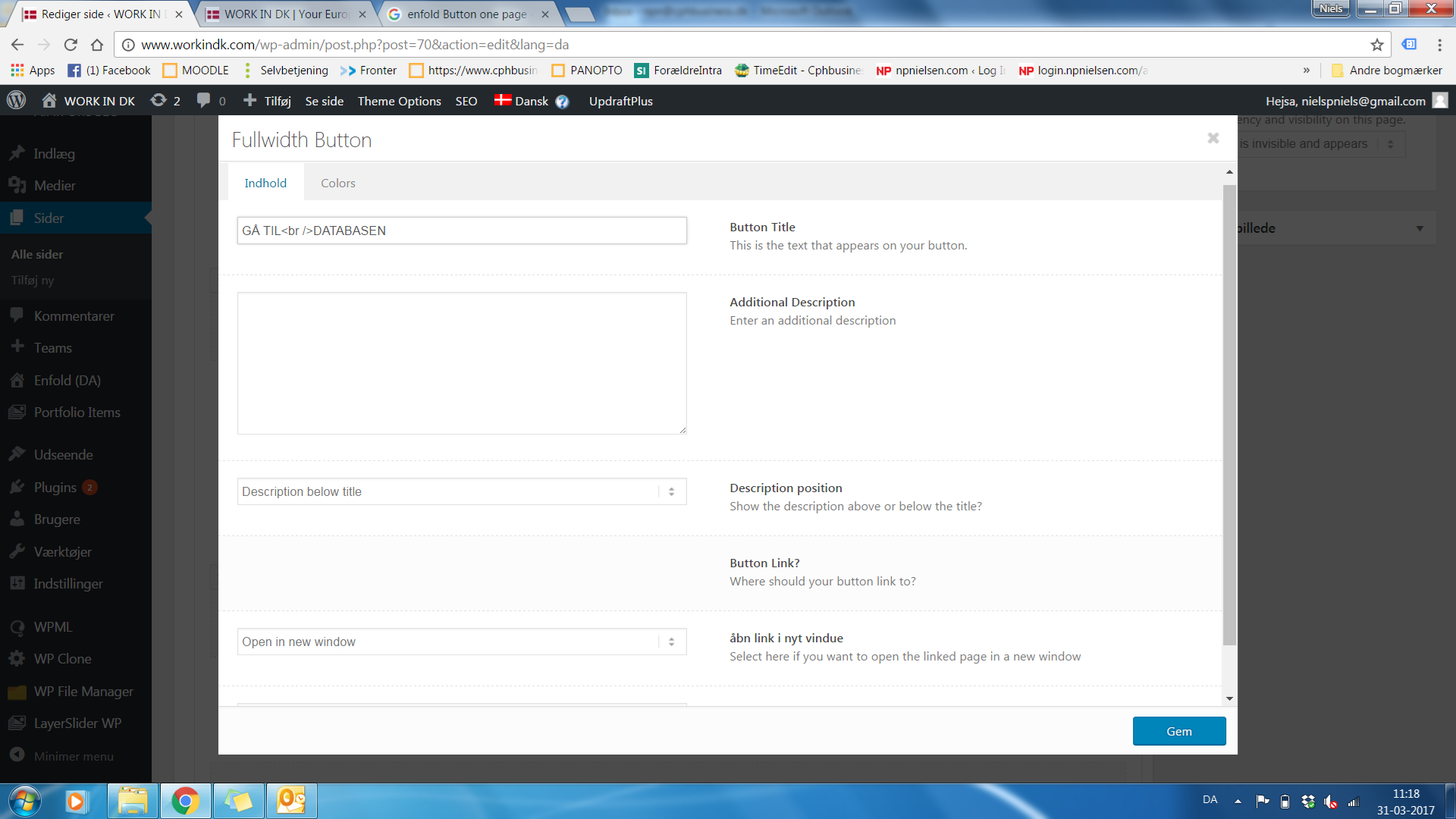
Best regards
Niels
For some reason In stock text is not visible on product or category page. Woocommerce settings are correct and the product is in stock as well.
I checked the enfold demos as well and it’s not appearing there as well.
Can you please give me code so that I can add it on the page, if possible beside Add to cart button on product page and for each product on category pages.
Thanks
Hey Adam,
Thanks for using Enfold.
1. To change the title color, add this custom CSS code at Enfold Theme Options > General Styling > Quick CSS
.portfolio-grid-title entry-title a {
color: #000;
}
2. Please, may you explain your question better? Because I didn`t understand the “headline and button on left side”
Best regards,
John Torvik
Hi there
When I try switching a language using WPML I get an error
http://franklydifferent.com/events/?lang=es
Fatal error: Allowed memory size of 67108864 bytes exhausted (tried to allocate 77824 bytes) in /home/frankly/public_html/events/wp-content/themes/enfold/config-templatebuilder/avia-shortcodes/buttons.php on line 161
I switched themes and it works ok. Any ideas?
Hello,
I’m having issues with functionality in WordPress 4.7.3 after Enfold 2.5.4 is activated.
The controls on the Enfold Theme Options page do not respond.
The “Advanced Layout Editor” button does not work when editing pages.
The Visual/Text tabs do not work on the WordPress page editor (they work fine in the default 2017 theme, but not in Enfold).
The Enfold link on the WordPress menu only shows “Enfold Theme Options”. There are no other sub-items available.
In other words – Styling / General Settings / Header / Sidebar / Footer and Theme Update are not accessible under the Enfold menu option in the left column.
It seems like the Javascript is broken in WordPress. I see the following errors in the JavaScript Console (firefox)…
When clicking on the Enfold entry in left column…
Syntax error, unrecognized expression a[rel=]
When clicking on Advanced Layout Editor…
typeError: e is undefined
Again, I am attempting to use Enfold 2.5.4 with WordPress 4.7.3
Is there a conflict with these versions?
Thanks.
-
This topic was modified 9 years ago by
 markofwits.
How do I change the demo menu for the Creative studio to be a traditional nav menu at the top? I want the menu to be normal like the other themes not the 3 line button.
Hi,
Is it possible to call for the enfold add to cart button (and quantity field) within a function and add it into a hook (on the single product page)?
Thanks
Hi John,
Same issues even after manually installing by FTP.
The controls on the Enfold Theme Options page do not respond.
The “Advanced Layout Editor” button does not work when editing pages.
The Visual/Text tabs do not work on the WordPress page editor.
The Enfold link on the WordPress menu only shows “Enfold Theme Options”. There are no other sub-items available.
In other words – Styling / General Settings / Header / Sidebar / Footer and Theme Update are not accessible under the Enfold menu option in the left column. To reach these options, you must manually navigate to the link here:
http://www.scostar.com/wp-admin/?page=avia#goto_header
It seems like the Javascript is broken in WordPress. I see the following errors in the JavaScript Console (firefox)…
When clicking on the Enfold entry in left column…
Syntax error, unrecognized expression a[rel=]
When clicking on Advanced Layout Editor…
typeError: e is undefined
Again, I am attempting to use Enfold 2.5.4 with WordPress 4.7.3
Is there a conflict with these versions?
Please login to see what I am talking about.
Thanks,
Scott
-
This reply was modified 9 years ago by markofwits.
Hello,
I’m trying to activate Enfold in WordPress 4.7.3 and the Activate screen is not working.
The upload buttons do not respond.
Also, the LayerSlider screen is a mess.
I purchased Enfold 2.5.4 in 2014, but it does not look right in this new version of WordPress.
Is there a new version of Enfold I should be using?
If so, how can I download it?
If this theme cannot survive future versions of WordPress, how often must it be upgraded before it breaks again?
And with each upgrade of Enfold, will all of my content survive intact?
Any help is greatly appreciated!
Regards,
Scott
-
This topic was modified 9 years ago by markofwits.
Hi, I want to change the font color of ” your message have been sent”
I use below code, but it is not working
.avia-form-success {
color: #ff6600 !important;
}
besides, I am using the dark transparent format, so when clicking the ” submit” button, the processing color on the form became very weird( light blue?? can I make amendment on this color too?
I am using the enfold default contact form
Hey Annelies,
Here is the code you can put this in Enfold > General Styling > Quick Css, if it does not work, put into themes/enfold/css/custom.css
.avia_show_sort.active_sort span.inner_sort_button { color: #19b5c0 !important; }
If you need further assistance please let us know.
Best regards,
Victoria
Hi,
Please enable the custom css class field: http://kriesi.at/documentation/enfold/turn-on-custom-css-field-for-all-alb-elements/ as Jordan suggested and then give your slider a custom class (“custom-slider-button” in example below) and then add following code to Functions.php file in Appearance > Editor
function av_custom_slider_attr(){
?>
 <script>
jQuery(window).load(function(){
jQuery('.custom-slider-button a').attr('href','');
jQuery('.custom-slider-button a').attr('onClick','HERE GOES YOUR ON CLICK VALUE');
});
 </script>
<?php
}
add_action('wp_footer', 'av_custom_slider_attr');
Best regards,
Yigit
Hey!
Please try adding this code to the Quick CSS section under Enfold > General Styling or to your child themes style.css file:
@media only screen and (max-width: 767px) {#top .avia-slideshow-button {
    margin-top: 0!important;
}}
Best regards,
Yigit
Hey EnlightenedMedia,
You need to enable the debug mode to see all the shortcodes following this tutorial: http://kriesi.at/documentation/enfold/enable-advanced-layout-builder-debug/ and create and paste the button shortcode at Layer Slider.
Best regards,
John Torvik
Hi,
You can change this by going to Enfold > Advanced Styling > check for the dropdown field and select Main Menu Links and click on the Edit Element button and change the colors there :)
Best regards,
Nikko
Andy, Sorry fixed access for you. :)
It is not clear to me if you are looking at the staging or production for the theme version. So, I recreated the staging site to make sure you see the actual version of the theme.
I have done it several times but I will do it again for you. :)
The links that you sent me to have the options for child theme – basic starter and theme options neither of which have the enfold dir in them.
I obtained my enfold dir from https://themeforest.net/downloads (version 4.0.2) This is the one and only update email I have. (this is the one I have done these steps with 4 times) ;)
FTP to staging – navigated to the enfold dir and deleted the enfold folder and enfold-child
I have placed the exact steps that we are doing in our editing (See link in private content). The issue has changed to not being able to use the Save button. This was the initial issue that was brought to me in Dec 2016. See my notes at the bottom of the link I sent you.
Have a wonderful day,
Kimberly
Hi,
gehe hier hin: https://kriesi.at/support/forum/enfold/
und dann klicke auf den großen blauen Button, um ein neues Ticket im Forum zu erstellen.
Gruß,
Andy
Andy,
Thanks for quick response.
Yes, it had the WPengine techs stumped too. Please login to our site and you can see what is happening.
I have worked with several WPengine techs since January. I have also been working with the Developer. They have all determined it has to be the theme.
They ran a scan on the sight and found no virus.
We have changed the theme in staging to WP theme and tried a free theme. We Only see the issue when we use Enfold theme.
We have turned off all plugins on the staging to no avail.
We update the core WP files and everything works until we use the Enfold theme things start breaking again. As soon as the “Save” button it all starts happening.
Have a great day,
Kimberly
-
This reply was modified 9 years ago by
 LBiLearn. Reason: added ticket with WPengine



